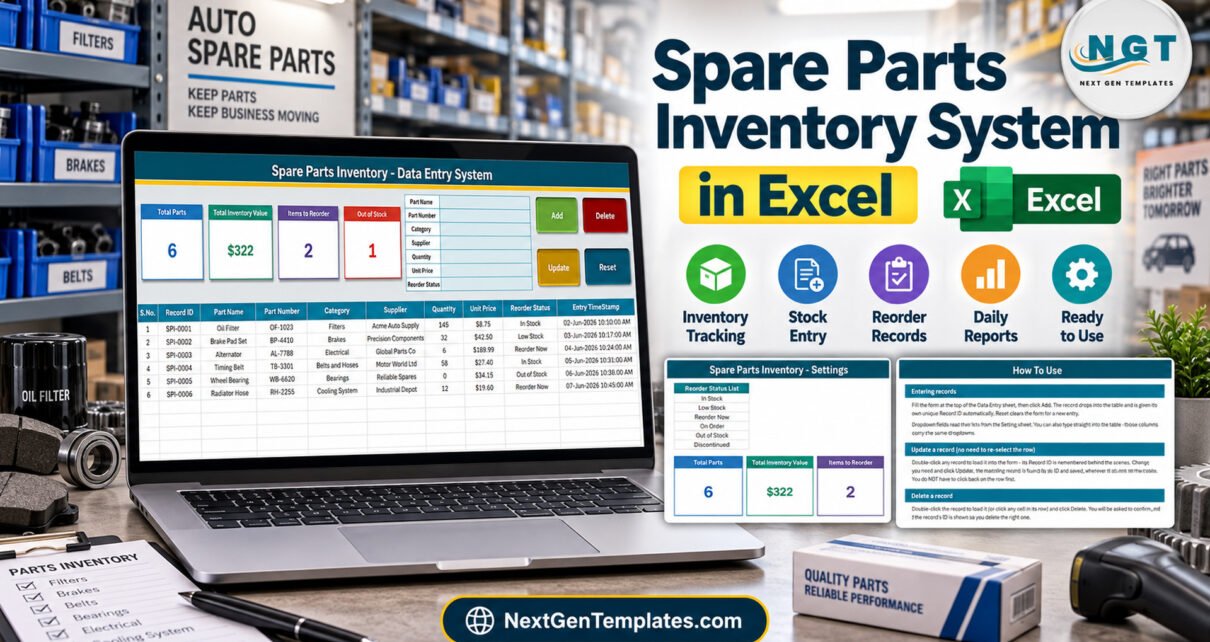
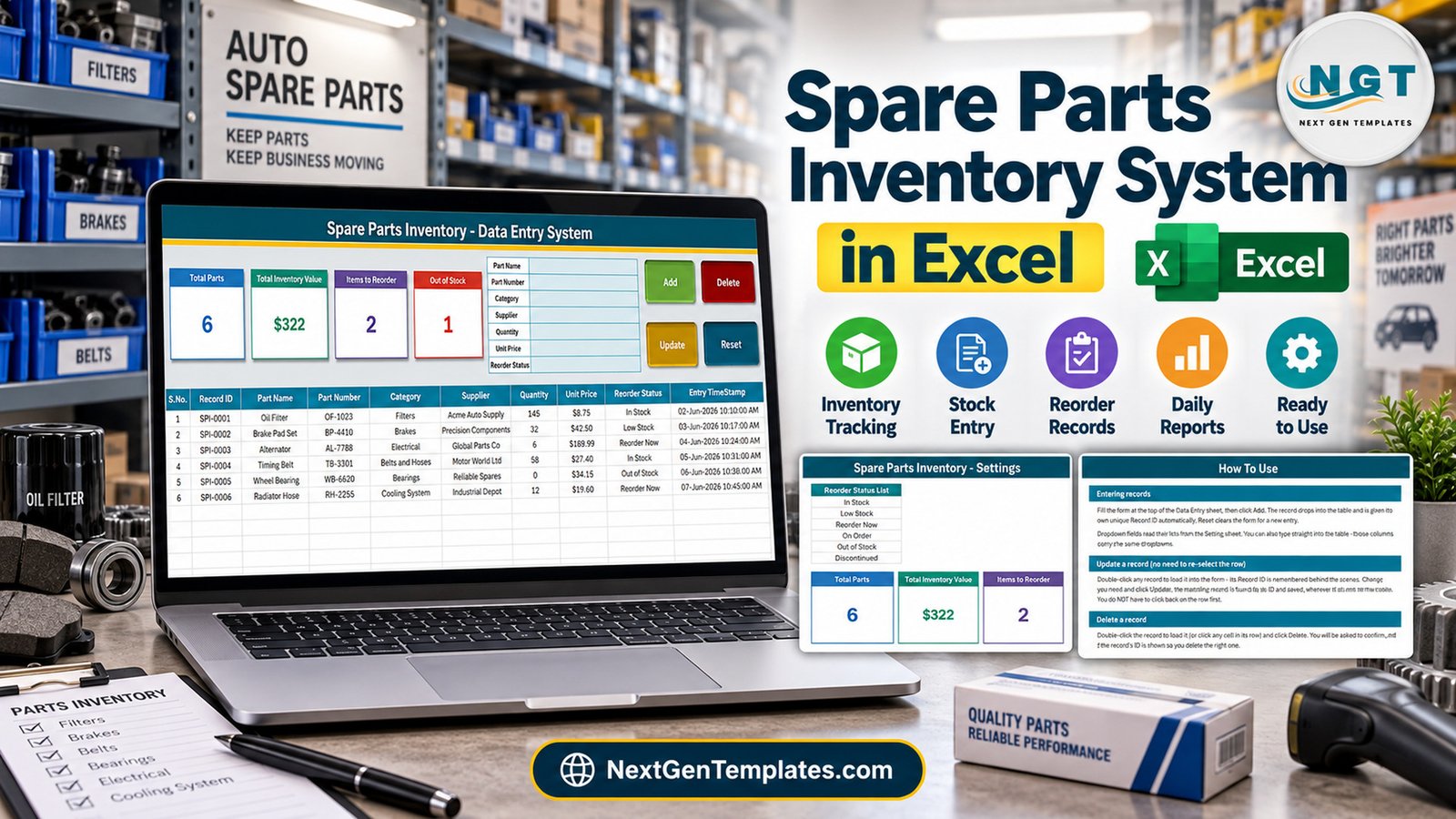
The Spare Parts Inventory Data Entry System in Excel is a macro-enabled workbook with a 7-field entry form, 4 VBA buttons, 4 live stat cards and 3 dropdown lists holding 31 values – 13 part categories, 12 suppliers and 6 reorder statuses. Every saved part gets an automatic Record ID in the SPI-0001 series and an Entry TimeStamp, and the records table has formatted, dropdown-ready rows for 200 parts.Spare Parts Inventory Data Entry System in Excel
Plenty of garages and workshops still track spares in a stock book or on a whiteboard. It works until a customer’s car is on the lift and nobody knows whether the timing belt is on the shelf, or which supplier sold you the last set of brake pads. This walkthrough covers every sheet, exactly what each stat card counts, and the limits worth knowing before you set it up for your own parts shelf.Spare Parts Inventory Data Entry System in Excel
What the Spare Parts Inventory Data Entry System in Excel Does
It is an .xlsm workbook with four sheets. You type a part into a form, click Add, and the part drops into a records table with its Record ID and timestamp. There is nothing to install, nothing to sign into and no subscription. Four cards beside the form recount themselves as records are added, updated or deleted.Spare Parts Inventory Data Entry System in Excel
It is deliberately small. It is not a purchasing system, not a point-of-sale till, not connected to a barcode scanner, not a multi-location warehouse tool and not accounting software. The six sample parts, suppliers and prices are fictional and are not linked to any real manufacturer or catalogue.Spare Parts Inventory Data Entry System in Excel
Key Features
- Seven-field form: Part Name, Part Number, Category, Supplier, Quantity, Unit Price and Reorder Status.
- Four VBA buttons: Add, Update, Delete (with a confirmation that shows the Record ID) and Reset.Spare Parts Inventory Data Entry System in Excel
- Stable Record IDs: the next ID is one more than the highest already used, so a deleted number is never reissued.Spare Parts Inventory Data Entry System in Excel
- Double-click to edit: the row loads into the form and the macro remembers its ID, so Update finds it wherever it sits.Spare Parts Inventory Data Entry System in Excel
- Dropdowns in two places: on the form and on table rows 15-214, all reading the Setting sheet.
- Linked-picture stat cards: the cards on Data Entry are pictures of formula cards on Setting, so restyling one restyles both.Spare Parts Inventory Data Entry System in Excel
- Unlocked: no sheet protection and no VBA project password.
Sheets Explanation
Data Entry sheet
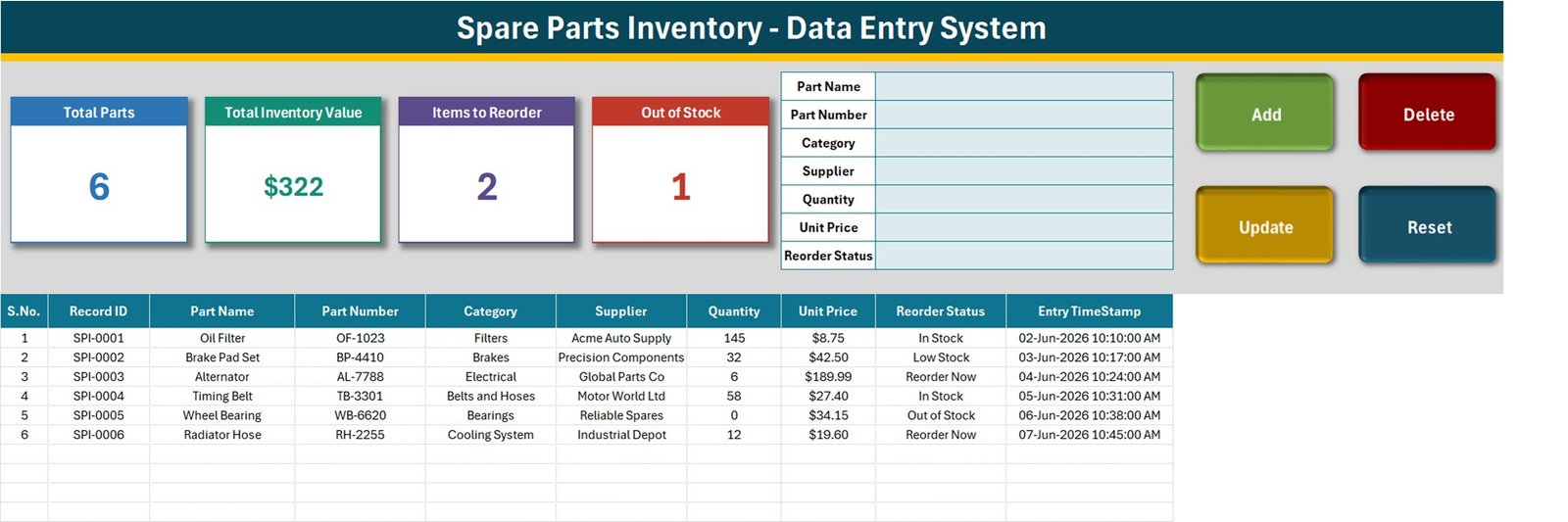
The form, the four buttons and the four stat cards sit across the top. Below them the table holds S.No., Record ID, Part Name, Part Number, Category, Supplier, Quantity, Unit Price, Reorder Status and Entry TimeStamp. With the samples loaded the cards read 6 parts, $322 inventory value, 2 items to reorder and 1 out of stock.Spare Parts Inventory Data Entry System in Excel
Setting sheet
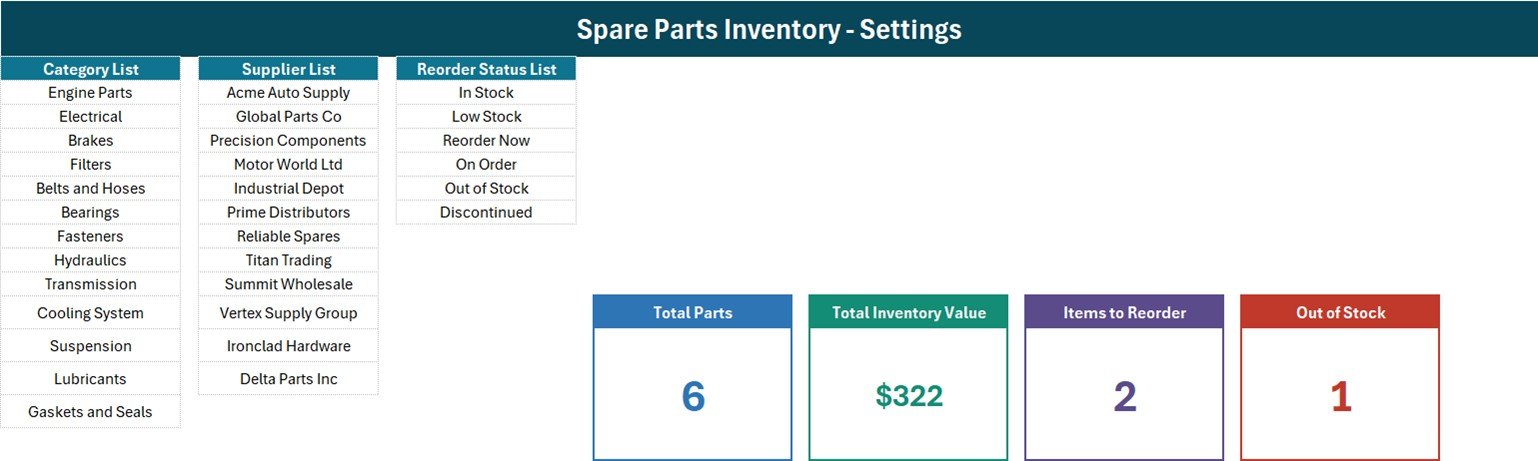
Three lists drive every dropdown: Category List (Engine Parts, Electrical, Brakes, Filters, Belts and Hoses, Bearings, Fasteners, Hydraulics, Transmission, Cooling System, Suspension, Lubricants, Gaskets and Seals), Supplier List (12 sample supplier names such as Acme Auto Supply and Global Parts Co) and Reorder Status List (In Stock, Low Stock, Reorder Now, On Order, Out of Stock, Discontinued). The four formula cards live here too.Spare Parts Inventory Data Entry System in Excel
How To Use sheet
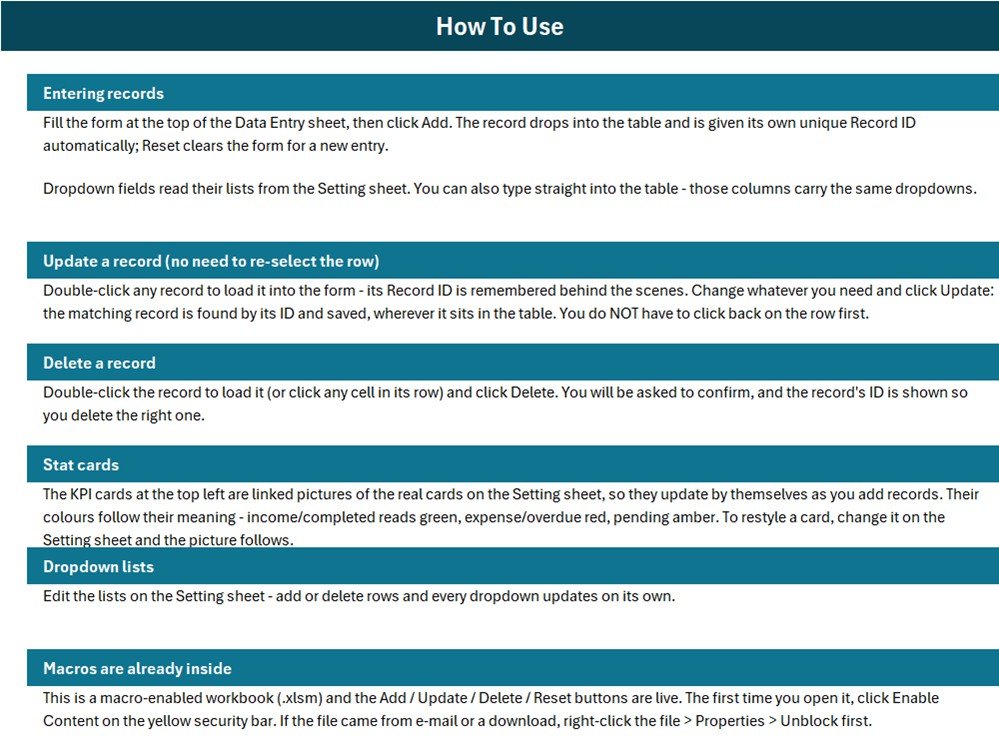
Short instructions for entering, updating and deleting records, how the stat cards update, how to edit the lists and how to enable the macros on first open.Spare Parts Inventory Data Entry System in Excel
What the Four Stat Cards Count
These are the real formulas on the Setting sheet, read from the workbook itself:
| Card | Formula | What it means |
|---|---|---|
| Total Parts | COUNTA('Data Entry'!$C$15:$C$1048576) |
Counts the Part Name column. Add refuses a blank first field, so this matches the parts added through the form. |
| Total Inventory Value | SUM('Data Entry'!$H$15:$H$1048576) |
Adds every Unit Price once, with no Quantity multiplier and no status filter. |
| Items to Reorder | COUNTIF('Data Entry'!$I$15:$I$1048576,"Reorder Now") |
Rows whose status is exactly Reorder Now. Low Stock is not included. |
| Out of Stock | COUNTIF('Data Entry'!$I$15:$I$1048576,"Out of Stock") |
Rows whose status is exactly Out of Stock, whatever the Quantity says. |
Total Inventory Value is not stock value. The samples show $322 (exactly $322.39), which is just the six unit prices added together. Multiply each Quantity by its Unit Price and the shelf is really worth $5,593.09 – the 58 timing belts alone are $1,589.20. For true stock value, replace Setting!I13 with a SUMPRODUCT formula:
=SUMPRODUCT('Data Entry'!$G$15:$G$5000,'Data Entry'!$H$15:$H$5000)Items to Reorder misses Low Stock. Only two of the six statuses have a card, so the sample brake pad set marked Low Stock is not counted, and In Stock, On Order and Discontinued are never shown. To count Low Stock as well, use =SUM(COUNTIF('Data Entry'!$I$15:$I$1048576,{"Reorder Now","Low Stock"})).Spare Parts Inventory Data Entry System in Excel
Status and quantity are not linked. There is no reorder level, so the workbook never changes a status on its own. A part with Quantity 0 counts as out of stock only if you set it that way. To count by quantity instead, use =COUNTIFS('Data Entry'!$G$15:$G$5000,0,'Data Entry'!$C$15:$C$5000,"<>").
The lists do not grow on their own. How To Use says every dropdown updates when you add rows, but the named ranges behind the data validation are fixed – CategoryList is Setting!$A$3:$A$15, SupplierList $C$3:$C$14, Reorder_StatusList $E$3:$E$8 – and all three are full. Insert a row inside a list to add a value, or redefine the name as =OFFSET(Setting!$A$3,0,0,COUNTA(Setting!$A$3:$A$100),1).
Excel Workbook vs. Google Sheets Log vs. Inventory Software – Feature Comparison
| Feature | Spare Parts Inventory workbook (Excel) | Home-made Google Sheets log | Zoho Inventory / parts management software |
|---|---|---|---|
| Cost | $6.99 one-time (regular $11.99) | Free, but you build it | Recurring monthly subscription |
| Platform | Excel for Windows desktop | Any browser | Vendor web or mobile app |
| Setup time | About 10 minutes | Hours of design work | Days of onboarding |
| Entry form with Add / Update / Delete | Yes, VBA | No | Yes |
| Real-time team collaboration | No | Yes | Yes |
| Mobile access | No | Yes | Usually |
| Customizable lists and fields | Fully unlocked | Yes | Vendor settings only |
| Stock movements, purchase orders, barcodes | No | No | Usually |
| Year-1 cost at 5 users | One purchase per user, no renewal | Free | Subscription x 12 months |
For a small garage or workshop that wants a searchable parts register without paying for inventory software it will not fully use, this workbook sits in the sweet spot.
Who Should Use This Template
Perfect for:
- Auto garages, service workshops and small parts counters keeping one row per part with its supplier, quantity and price
- Factory or building maintenance teams who flag parts for reordering by hand
- Owners comfortable in Excel who want a file they fully control
Not a fit if:
- You need stock-in and stock-out transactions, purchase orders, barcodes or several stock locations
- You need FIFO or average-cost valuation, or an audit trail of every quantity change
- Your team works on Mac, in a browser or in Google Sheets, or needs several people editing at once
Real-World Use Cases
Ravi runs a two-bay car service garage. He lists every filter, belt and brake part he keeps on the shelf, sets Reorder Now when a box runs low, and checks the Items to Reorder card each Friday before phoning his suppliers.
Maria manages spares for a small factory maintenance team. She uses the Category list for Bearings, Hydraulics and Fasteners, filters the table by supplier when a quote comes in, and adds the SUMPRODUCT formula so the value card shows real stock value.
A motorcycle parts counter renames the sample suppliers, marks slow sellers Discontinued, and adds a Low Stock card so nothing slips past the weekly order.
Advantages
- One purchase, no subscription and no per-user fee.
- Ten minutes from download to the first real part on the list.
- Update and Delete work by Record ID, so sorting or filtering the table does not break them.
- Everything is visible and editable – formulas, lists and macro.
Opportunities for Improvement
- A true stock value card (Quantity x Unit Price) in place of the unit-price total.
- A reorder level column, so Low Stock and Reorder Now could be set by formula.
- Cards for Low Stock and On Order, not just Reorder Now and Out of Stock.
- Self-extending dropdown lists to match what How To Use promises, and a simple stock movement log.
Best Practices
- Always add parts through the form so every row gets a Record ID; rows typed straight into the table cannot be updated or deleted by the buttons.
- Rewrite the Category and Supplier lists before you enter real parts, inserting rows inside each block.
- Use the Part Number exactly as it appears on the supplier invoice, so filtering by number finds the right row.
- Keep a dated backup copy – Update overwrites Quantity, and the in-table dropdowns cover rows 15-214.
Macros and Compatibility
Macros must be enabled and Windows desktop Excel is required. On first open click Enable Content; Microsoft’s guide to enabling macros in Microsoft 365 files covers the security bar, and its note on macros from the internet being blocked explains the Unblock checkbox.
Explore Relevant Templates
If you like this format, the Hardware Store Inventory Data Entry System in Excel and the Tile Showroom Stock Data Entry System in Excel apply the same form-and-cards build to other stock shelves, and the Footwear Shop Stock walkthrough covers a retail stock room. For the service work your parts go into, see the Machine Maintenance Data Entry System in Excel.
In the store, the Auto Parts Inventory Management System Web App suits parts businesses that need several users and a browser-based system.
Frequently Asked Questions
What does the Spare Parts Inventory Data Entry System in Excel record?
One row per part: Part Name, Part Number, Category, Supplier, Quantity, Unit Price and Reorder Status, plus an automatic Record ID and Entry TimeStamp. Four cards show total parts, the unit-price total, items marked Reorder Now and items marked Out of Stock.
How long does setup take?
About ten minutes. Enable macros, replace the sample categories and suppliers on the Setting sheet, delete the six sample rows and start adding parts. Nothing needs installing.
Do I need to know VBA?
No. The Add, Update, Delete and Reset buttons are already wired. VBA only matters if you want to change what a button writes, such as adding a reorder level field to the form.
Why is Total Inventory Value so low?
The card adds each Unit Price once instead of multiplying by Quantity. On the samples it shows $322 against a true stock value of $5,593.09. Swap in the SUMPRODUCT formula above to fix it.Spare Parts Inventory Data Entry System in Excel
Does it track stock in and stock out?
No. Quantity is a single typed number per part that you change with Update. There is no movement log, purchase order or barcode feature, so use inventory software if you need those.Spare Parts Inventory Data Entry System in Excel
How does it compare to Zoho Inventory?
Zoho Inventory and similar tools run stock movements, purchase orders and barcodes for a monthly fee. This is a one-time $6.99 Excel file that records what parts you hold, from which supplier, at what price and whether they need reordering.Spare Parts Inventory Data Entry System in Excel
About the Author
Built by PK – Microsoft Certified Professional with 15+ years of Excel, Google Sheets and Power BI experience. Founder of NextGenTemplates, reaching 300K+ subscribers across YouTube channels. Every template is hand-built and tested before release.Spare Parts Inventory Data Entry System in Excel
Conclusion
This workbook turns a garage stock book into a table you can sort and filter, with four numbers on top that keep themselves current. Know what those numbers count – a unit-price total rather than stock value, Reorder Now without Low Stock, and statuses you set by hand – and it will not surprise you.Spare Parts Inventory Data Entry System in Excel
Click here to Purchase the Spare Parts Inventory Data Entry System in Excel – $11.99, currently $6.99.
✅ Instant download · One-time payment · No subscription
Last updated: September 2026Spare Parts Inventory Data Entry System in Excel
Watch more Excel tutorials at Youtube.com/@PKAnExcelExpert