Managing health contracts efficiently plays a critical role in ensuring smooth healthcare operations, regulatory compliance, and financial control. However, many healthcare organizations still rely on scattered spreadsheets, manual tracking, and disconnected reports. As a result, decision-makers often struggle to track contract performance, monitor compliance, and analyze trends effectively.
That is exactly why the Health Contract Management KPI Dashboard in Excel becomes an essential tool.
In this detailed article, you will learn everything about the Health Contract Management KPI Dashboard in Excel, including its structure, features, benefits, best practices, and how it helps healthcare organizations make data-driven decisions. Moreover, this guide uses simple language, clear explanations, and practical examples so you can easily understand and implement the dashboard.
Click to buy Health Contract Management KPI Dashboard in Excel
What Is a Health Contract Management KPI Dashboard in Excel?
A Health Contract Management KPI Dashboard in Excel is a centralized performance tracking tool designed to monitor, analyze, and visualize contract-related KPIs in healthcare organizations.
Instead of managing multiple files, emails, and reports, this dashboard brings all contract performance metrics into one interactive view. As a result, healthcare administrators, procurement teams, and finance professionals can track:
- Contract compliance
- Financial performance
- Vendor performance
- Contract renewal timelines
- Target vs actual performance
- Monthly and yearly trends
Moreover, since the dashboard is built in Excel, it remains flexible, cost-effective, and easy to use without requiring advanced BI tools.
Why Do Healthcare Organizations Need a Contract Management KPI Dashboard?
Healthcare contracts involve vendors, service providers, equipment suppliers, pharmaceutical companies, and insurance partners. Therefore, even a small mistake can lead to financial losses, compliance risks, or service disruptions.
Here is why a Health Contract Management KPI Dashboard becomes essential:
- It provides centralized visibility of all contract KPIs
- It improves decision-making speed and accuracy
- It reduces manual reporting errors
- It improves compliance tracking
- It helps monitor financial performance and contract utilization
- It supports data-driven negotiations and renewals
As a result, healthcare organizations gain full control over contract performance.
Overview of Health Contract Management KPI Dashboard Structure
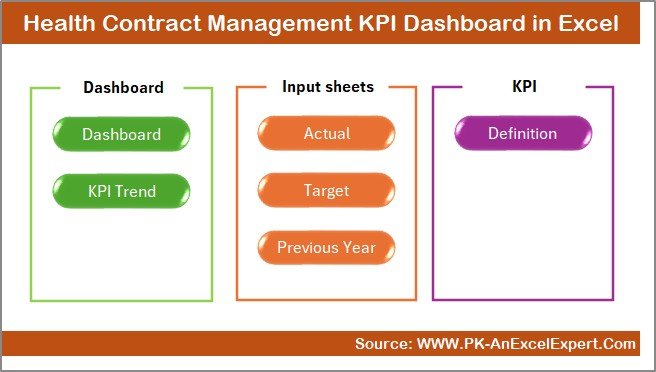
This Excel dashboard includes 7 professionally designed worksheets, each serving a specific purpose. Together, they create a complete performance monitoring system.
Let’s explore each sheet in detail.
Summary Page – Central Navigation Hub
The Summary Page acts as the main index of the dashboard.
Key Features of Summary Page
- Serves as the dashboard homepage
- Contains 6 navigation buttons
- Allows quick access to all sheets
- Improves user experience and navigation
- Saves time during analysis
Because of this design, users can move between sheets without searching manually.
Click to buy Health Contract Management KPI Dashboard in Excel
Dashboard Sheet – Main Performance View
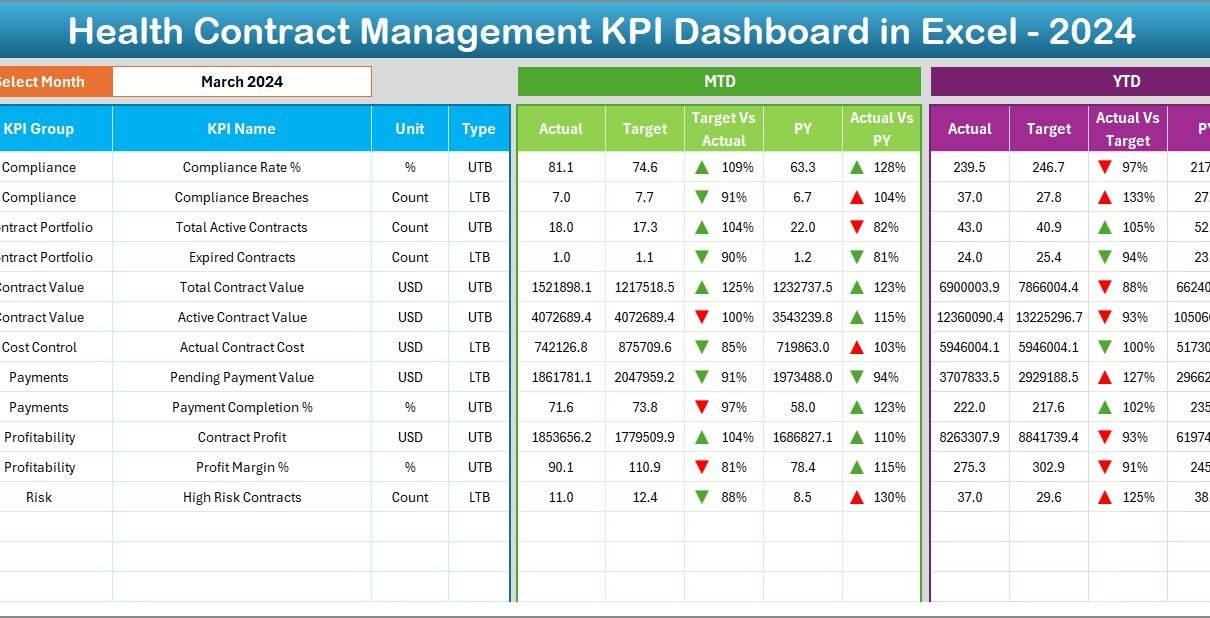
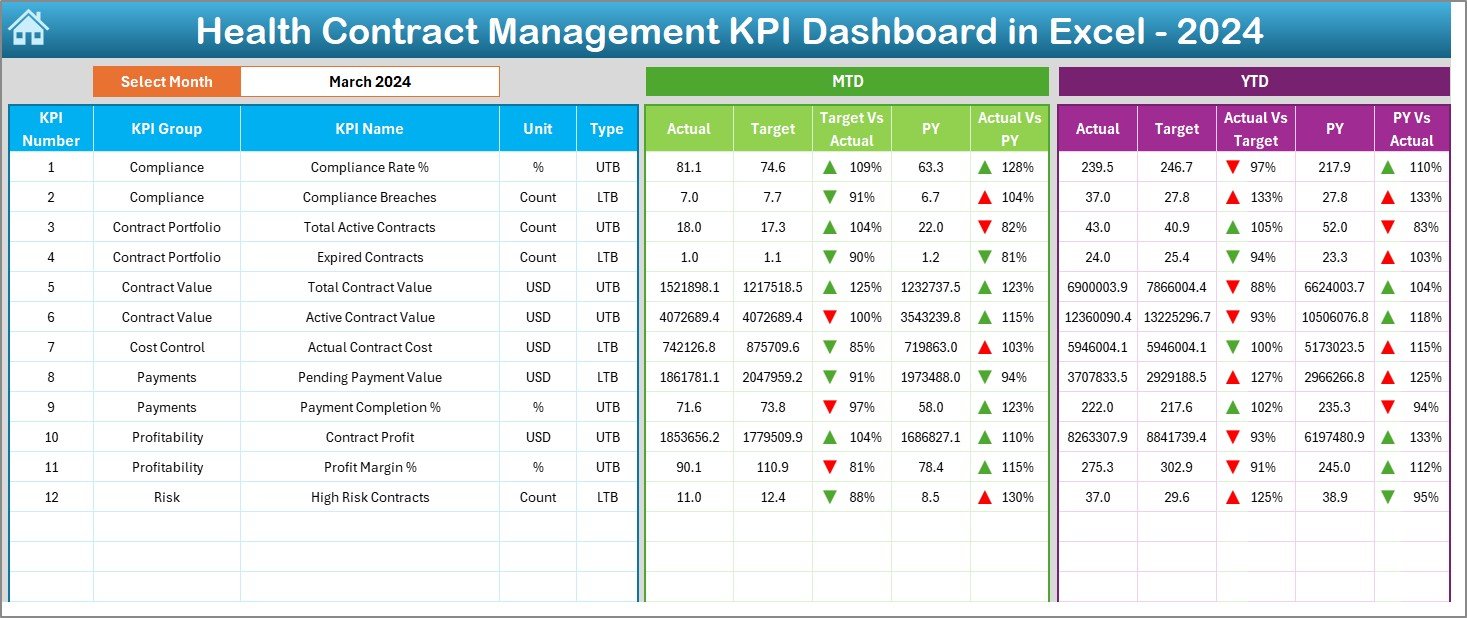
The Dashboard Sheet acts as the core of the entire system. It displays all KPI performance in a visual and interactive format.
Key Features of Dashboard Sheet
Dynamic Month Selection
- Located at Cell D3
- Select any month from the dropdown
- Automatically updates all KPI values
KPI Performance Tracking
- MTD (Month-to-Date)
- YTD (Year-to-Date)
- Target values
- Previous Year values
Visual Performance Indicators
- Target vs Actual comparison
- Previous Year vs Actual comparison
- Conditional formatting arrows
- Instant performance visibility
Smart Analysis
- Identifies underperforming KPIs
- Highlights improvement areas
- Supports fast management decisions
Because of this setup, users can instantly understand performance trends without manual calculations.
Click to buy Health Contract Management KPI Dashboard in Excel
Trend Sheet – KPI Performance Analysis
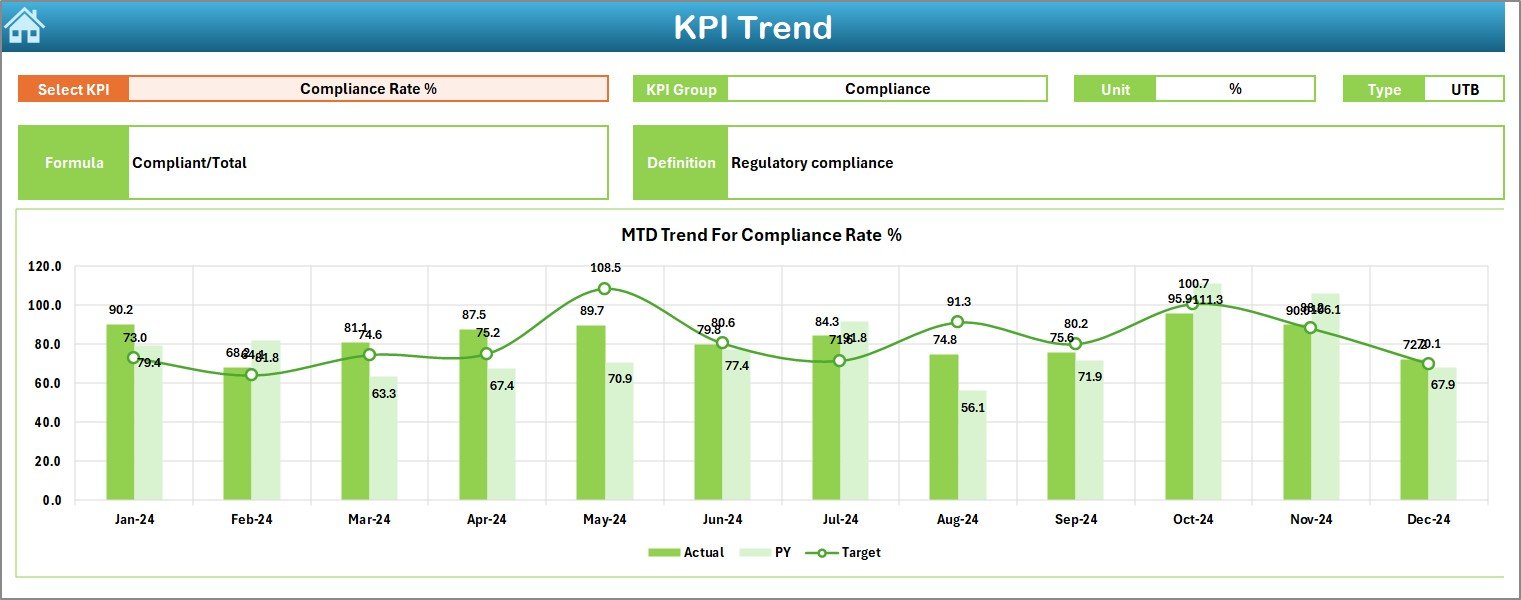
The Trend Sheet helps users analyze KPI movement over time.
Features of Trend Sheet
- KPI selection from dropdown (Cell C3)
Displays:
KPI Group
KPI Unit
KPI Type (LTB / UTB)
KPI Formula
KPI Definition
Shows:
MTD Trend Chart
YTD Trend Chart
Actual vs Target vs Previous Year
Benefits of Trend Analysis
- Identifies performance patterns
- Tracks long-term improvements
- Highlights risk areas early
- Supports strategic planning
As a result, management can act proactively rather than reactively.
Click to buy Health Contract Management KPI Dashboard in Excel
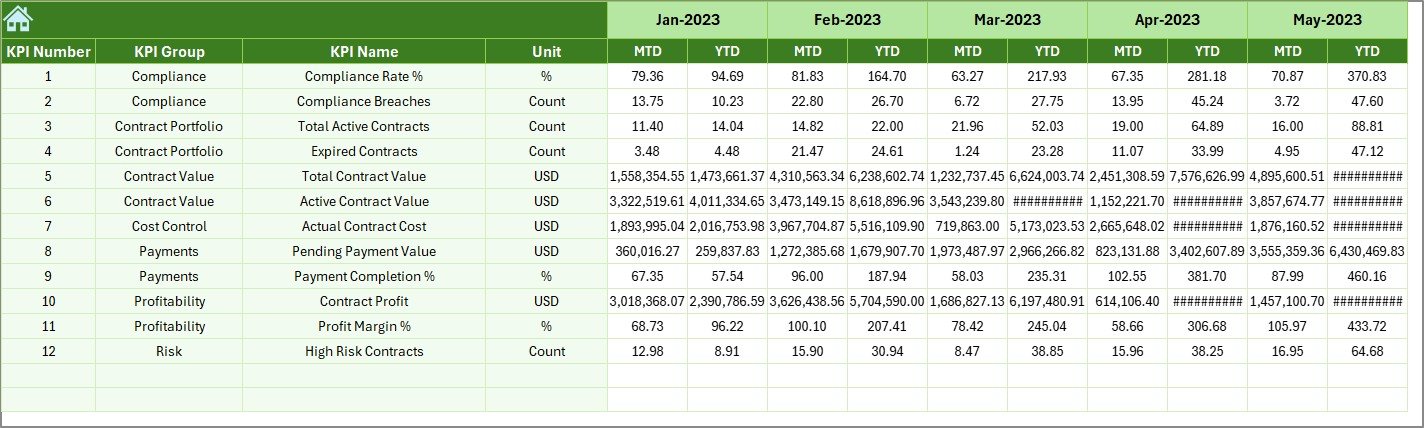
Actual Numbers Input Sheet
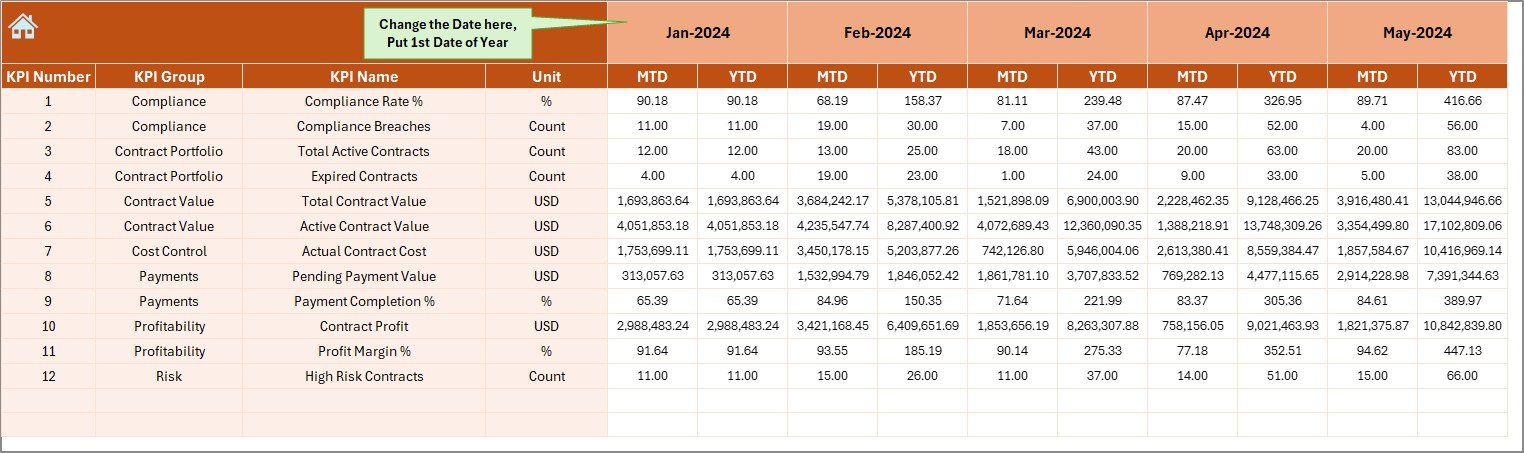
This sheet allows users to input real performance data.
Key Highlights
- Enter MTD and YTD actual values
- Select reporting month using Cell E1
- Enter only once and dashboard updates automatically
- Supports accurate monthly reporting
Because the dashboard links directly to this sheet, all calculations remain dynamic and error-free.
Click to buy Health Contract Management KPI Dashboard in Excel
Target Sheet – Performance Benchmarking
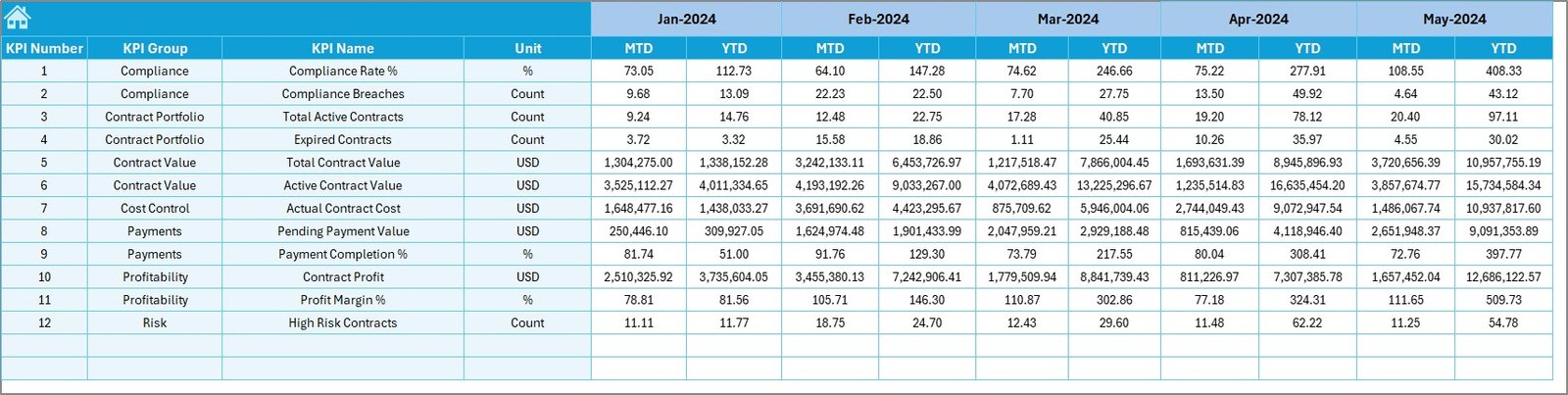
The Target Sheet helps define expected performance levels.
What You Enter Here
- Monthly target values
- YTD target values
- KPI-wise target data
Why This Sheet Is Important
- Enables Target vs Actual comparison
- Helps measure operational efficiency
- Supports performance accountability
Without targets, performance measurement remains incomplete. This sheet solves that problem effectively.
Click to buy Health Contract Management KPI Dashboard in Excel
Previous Year Data Sheet
This sheet stores historical data for comparison.
Purpose of This Sheet
- Enter previous year KPI values
- Enables year-on-year comparison
- Helps identify growth or decline trends
Benefits
- Measures performance improvement
- Supports long-term planning
- Helps management evaluate contract efficiency
Historical comparison plays a critical role in strategic decision-making.
Click to buy Health Contract Management KPI Dashboard in Excel
KPI Definition Sheet – Standardization Hub
The KPI Definition Sheet ensures consistency and clarity.
Fields Included
- KPI Name
- KPI Group
- Unit
- Formula
- KPI Definition
Why This Sheet Matters
- Avoids KPI confusion
- Ensures standardized reporting
- Helps new users understand metrics quickly
- Improves audit readiness
This sheet acts as a reference guide for the entire dashboard.

Click to buy Health Contract Management KPI Dashboard in Excel
Advantages of Health Contract Management KPI Dashboard in Excel
1. Centralized Contract Performance Tracking
You can track all KPIs from one place, which saves time and reduces errors.
2. Improved Decision-Making
Visual dashboards make trends clear and actionable.
3. Easy to Use and Customize
Since it uses Excel, anyone can modify it without technical skills.
4. Cost-Effective Solution
No need for expensive BI tools or software licenses.
5. Enhanced Compliance Monitoring
Track contract adherence and performance regularly.
6. Real-Time Performance Visibility
Instant updates allow faster corrective actions.
7. Better Vendor and Contract Evaluation
Helps evaluate suppliers based on real data.
Best Practices for Health Contract Management KPI Dashboard
- 1. Define KPIs Clearly
- Always use standardized definitions for consistency.
- 2. Update Data Regularly
- Ensure monthly data updates to maintain accuracy.
- 3. Validate Input Data
- Check values before entering to avoid reporting errors.
- 4. Use Targets Wisely
- Set realistic and measurable targets.
- 5. Monitor Trends, Not Just Numbers
- Focus on performance direction, not just values.
- 6. Review Dashboard Monthly
- Regular reviews improve contract governance.
- 7. Train Users Properly
Ensure users understand how to interpret KPIs.
Who Can Use This Dashboard?
This dashboard works perfectly for:
- Hospitals
- Healthcare providers
- Medical procurement teams
- Contract managers
- Finance departments
- Healthcare administrators
- Government health agencies
- Private healthcare organizations
How This Dashboard Improves Healthcare Contract Management
This KPI dashboard helps healthcare organizations:
- Improve contract compliance
- Reduce financial risks
- Monitor vendor performance
- Improve cost control
- Support audit readiness
- Enhance transparency
- Strengthen decision-making
As a result, organizations gain better control over their contract ecosystem.
Conclusion
The Health Contract Management KPI Dashboard in Excel provides a powerful, user-friendly, and cost-effective solution for managing healthcare contracts efficiently. It transforms raw data into meaningful insights, improves accountability, and enhances decision-making.
With structured sheets, automated calculations, visual indicators, and KPI tracking, this dashboard becomes an essential tool for modern healthcare management. Moreover, its flexibility allows organizations to customize it according to their specific contract requirements.
If you want better visibility, stronger compliance, and improved performance tracking, this dashboard is the right solution.
Frequently Asked Questions (FAQs)
What is a Health Contract Management KPI Dashboard?
A Health Contract Management KPI Dashboard is a tool used to track, analyze, and monitor contract-related performance metrics in healthcare organizations.
Why should I use Excel for contract KPI tracking?
Excel offers flexibility, ease of use, cost efficiency, and wide compatibility without requiring advanced software.
Can I customize the KPIs in this dashboard?
Yes, you can easily modify KPIs, targets, and formulas based on your organizational needs.
How often should I update the dashboard?
You should update it monthly to ensure accurate MTD and YTD tracking.
Does this dashboard support trend analysis?
Yes, it includes trend charts for MTD and YTD performance analysis.
Who can use this dashboard?
Healthcare administrators, procurement teams, finance managers, and contract managers can use it effectively.
Can this dashboard help with audits?
Yes, it provides structured data, historical comparison, and standardized KPIs, which support audit readiness.
Visit our YouTube channel to learn step-by-step video tutorials
Watch the step-by-step video tutorial:
Click to buy Health Contract Management KPI Dashboard in Excel