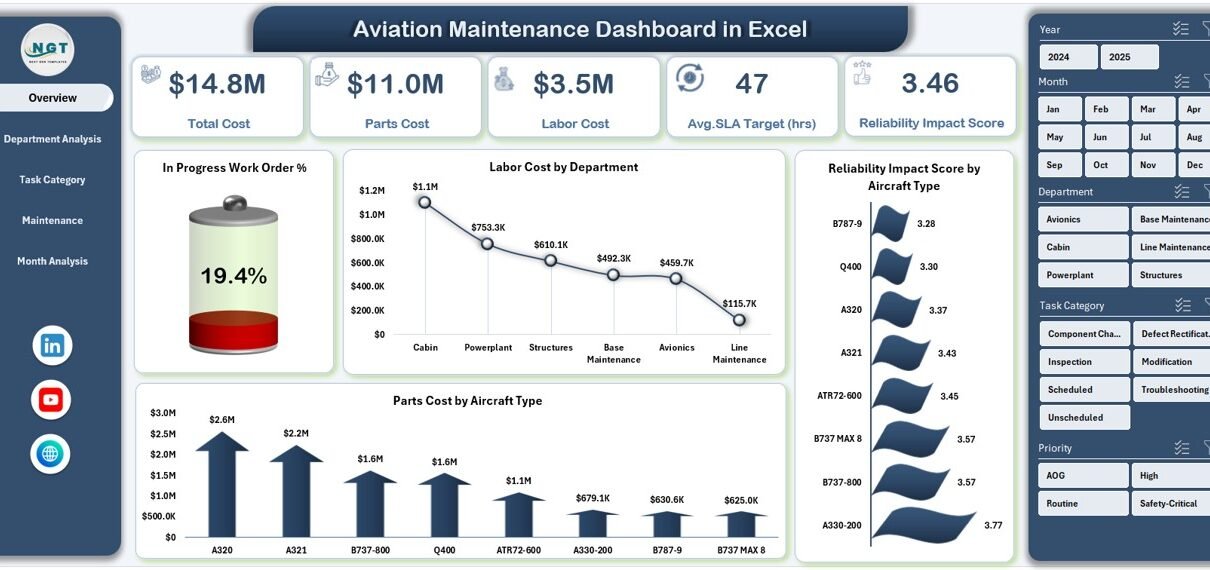
Managing aircraft maintenance is one of the most critical responsibilities in the aviation industry. Every maintenance delay, cost overrun, or unresolved work order directly affects aircraft safety, operational efficiency, and profitability. Therefore, aviation professionals need clear, accurate, and timely insights to manage maintenance activities effectively. That is exactly where an Aviation Maintenance Dashboard in Excel becomes a powerful and practical solution.
In this detailed and SEO-friendly guide, you will learn what an Aviation Maintenance Dashboard in Excel is, why it is essential, how it works, and how each dashboard page supports better decision-making. Moreover, you will explore the advantages of an Aviation Maintenance Dashboard in Excel, best practices for using it, and frequently asked questions with clear answers. By the end of this article, you will clearly understand how this dashboard transforms raw maintenance data into actionable insights—without complexity.
Click to Purchases Aviation Maintenance Dashboard in Excel
What Is an Aviation Maintenance Dashboard in Excel?
An Aviation Maintenance Dashboard in Excel is a ready-to-use, interactive reporting tool designed to track, analyze, and visualize aircraft maintenance data in one centralized Excel file. Instead of managing scattered worksheets, emails, and static reports, this dashboard consolidates all key maintenance metrics into visually rich charts, cards, and summaries.
As a result, maintenance managers, engineers, and operations teams can monitor performance in real time, identify problem areas quickly, and make informed decisions with confidence.
Moreover, Excel-based dashboards offer flexibility, familiarity, and cost-effectiveness. Since most aviation organizations already use Excel, this dashboard fits seamlessly into existing workflows without requiring advanced technical skills or expensive software.
Why Do Aviation Teams Need a Maintenance Dashboard in Excel?
Aircraft maintenance involves multiple departments, task categories, maintenance types, and timelines. Therefore, tracking everything manually becomes time-consuming and error-prone. An Aviation Maintenance Dashboard in Excel solves these challenges by providing clarity and structure.
Here is why aviation teams rely on it:
-
It centralizes all maintenance data in one place.
-
It highlights in-progress and open work orders instantly.
-
It tracks labor, parts, and total maintenance costs accurately.
-
It measures reliability impact across aircraft, departments, and tasks.
-
It supports faster and smarter maintenance decisions.
Because of these benefits, aviation organizations improve efficiency, reduce downtime, and maintain higher safety standards.
How Does an Aviation Maintenance Dashboard in Excel Work?
The Aviation Maintenance Dashboard in Excel works by connecting structured maintenance data to dynamic charts and summary cards. Users enter or update data in the Data Sheet, while the dashboard pages automatically refresh insights using formulas, pivot tables, and visuals.
Additionally, the dashboard includes a Page Navigator located on the left side. This navigator allows users to move between analytical pages instantly, which saves time and improves usability.
Each page focuses on a specific maintenance perspective. Therefore, users can analyze data at both high-level and detailed views without switching files.
What Are the Key Features of the Aviation Maintenance Dashboard in Excel?
This Aviation Maintenance Dashboard in Excel includes multiple powerful features designed for real-world aviation maintenance operations.
Page Navigator for Easy Navigation
The Page Navigator sits on the left side of the dashboard. Because of this feature, users can jump between pages with a single click. As a result, navigation becomes smooth, fast, and intuitive.
How Does the Overview Page Help Aviation Maintenance Managers?
Overview Page Explained
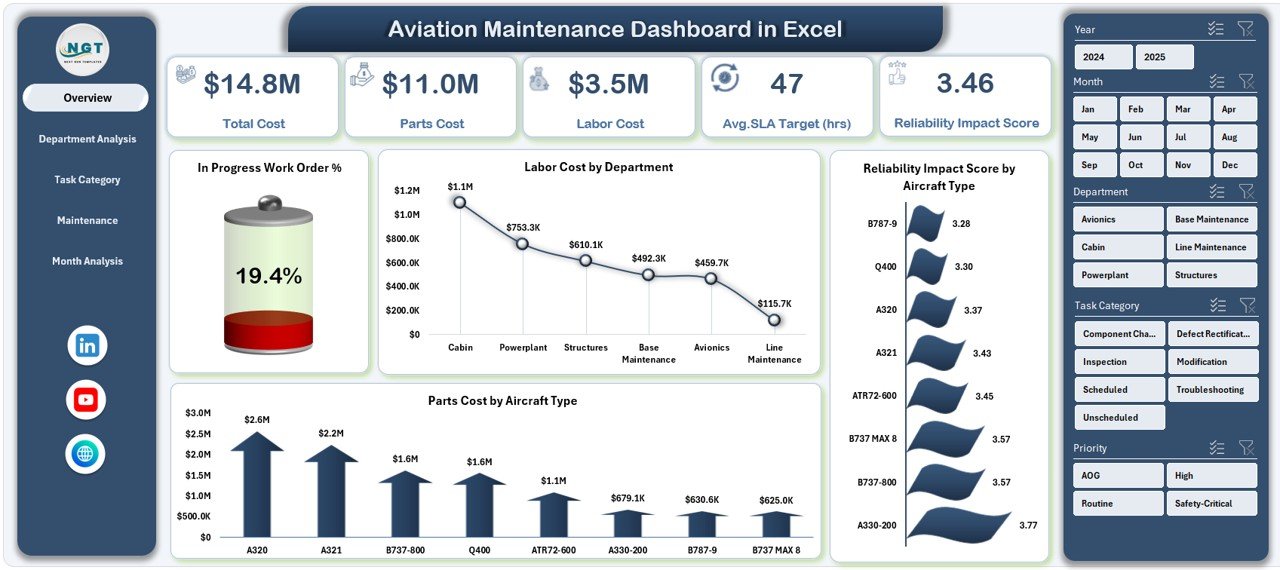
The Overview Page acts as the main landing page of the Aviation Maintenance Dashboard in Excel. It provides a high-level snapshot of overall maintenance performance.
On this page, you will find:
Key KPI Cards
-
In-Progress Work Order %
-
Total Labor Cost
-
Overall Reliability Impact Score
-
Total Parts Cost
These KPI cards instantly show the health of maintenance operations.
Click to Purchases Aviation Maintenance Dashboard in Excel
Key Charts on the Overview Page
-
In-Progress Work Order %
This chart shows how many work orders are currently in progress. As a result, managers can quickly identify workload pressure. -
Labor Cost by Department
This chart highlights labor expenses across departments. Therefore, cost control becomes easier. -
Reliability Impact Score by Aircraft Type
This chart reveals which aircraft types face higher reliability risks. -
Parts Cost by Aircraft Type
This chart shows where spare parts spending concentrates.
Because of this structure, the Overview Page enables quick decision-making at a glance.
How Does Department Analysis Improve Maintenance Control?
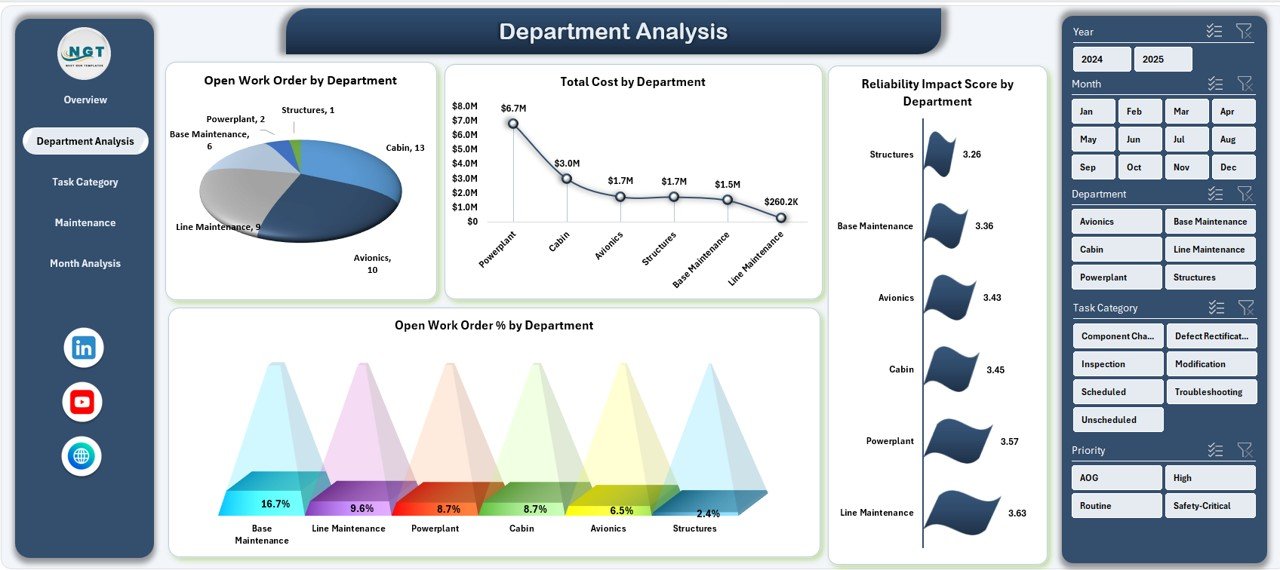
Department Analysis Page Explained
The Department Analysis Page focuses on department-level maintenance performance. Since different departments handle different tasks, this page brings clarity and accountability.
Charts Available on Department Analysis Page
-
Open Work Order by Department
This chart shows pending workload per department. -
Total Cost by Department
This chart highlights overall maintenance spending by department. -
Reliability Impact Score by Department
This chart identifies departments contributing to higher reliability risks. -
Open Work Order % by Department
This chart compares open work orders across departments.
Because of these insights, managers can allocate resources efficiently and address bottlenecks proactively.
Why Is Task Category Analysis Important in Aviation Maintenance?
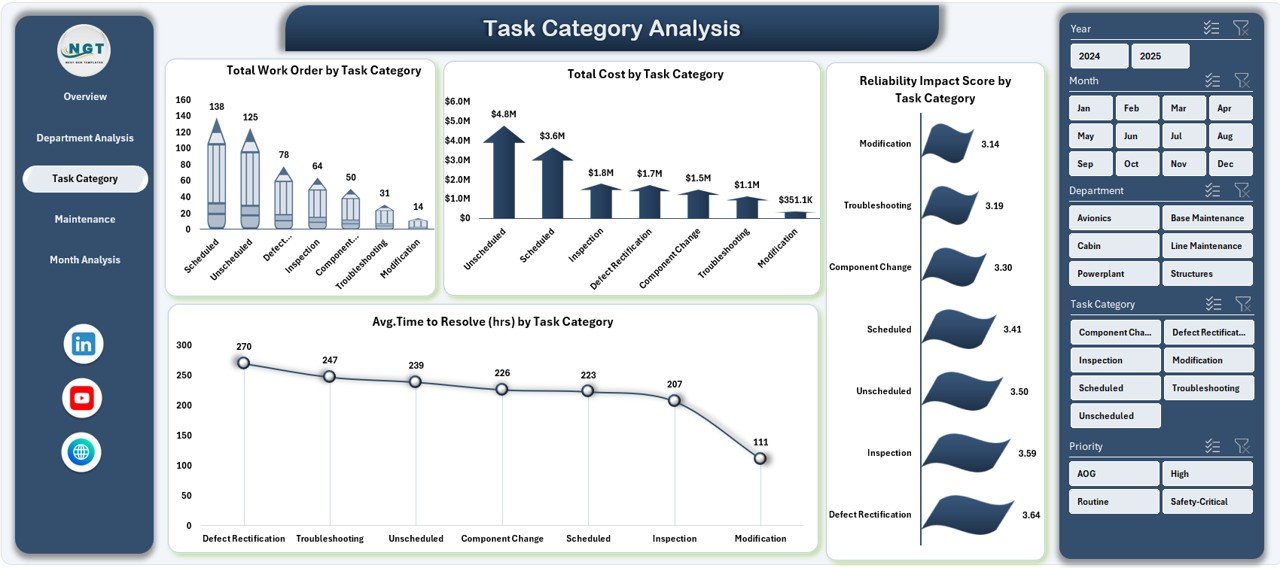
Task Category Analysis Page Explained
Maintenance tasks vary in complexity and urgency. Therefore, analyzing performance by task category becomes essential.
Charts Available on Task Category Analysis Page
-
Total Work Order by Task Category
This chart shows workload distribution across task types. -
Total Cost by Task Category
This chart reveals which task categories consume the most budget. -
Reliability Impact Score by Task Category
This chart highlights tasks that affect aircraft reliability the most. -
Average Time to Resolve by Task Category
This chart measures resolution efficiency.
As a result, maintenance planners can optimize task prioritization and reduce delays.
How Does Maintenance Type Analysis Support Better Decisions?
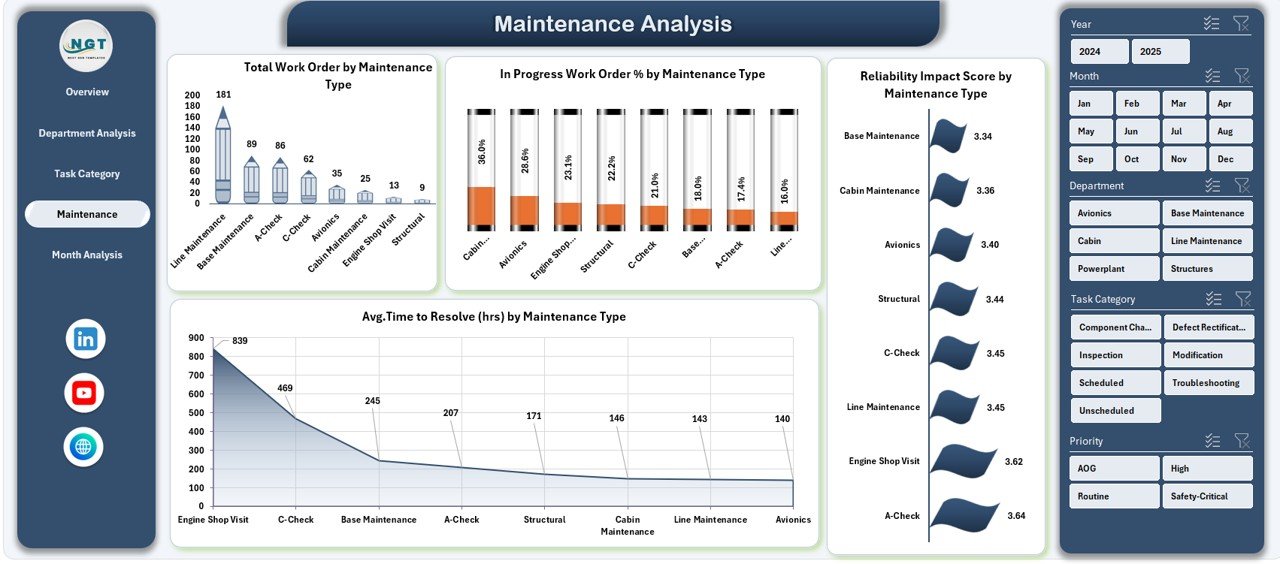
Maintenance Analysis Page Explained
The Maintenance Analysis Page focuses on maintenance types such as preventive, corrective, and scheduled maintenance.
Charts Available on Maintenance Analysis Page
-
Total Work Order by Maintenance Type
This chart shows maintenance volume by type. -
In-Progress Work Order % by Maintenance Type
This chart highlights ongoing maintenance workload. -
Reliability Impact Score by Maintenance Type
This chart identifies high-risk maintenance activities. -
Average Time to Resolve by Maintenance Type
This chart tracks efficiency across maintenance types.
Because of this analysis, organizations can balance preventive and corrective maintenance effectively.
Click to Purchases Aviation Maintenance Dashboard in Excel
How Does Month Analysis Help Track Maintenance Trends?
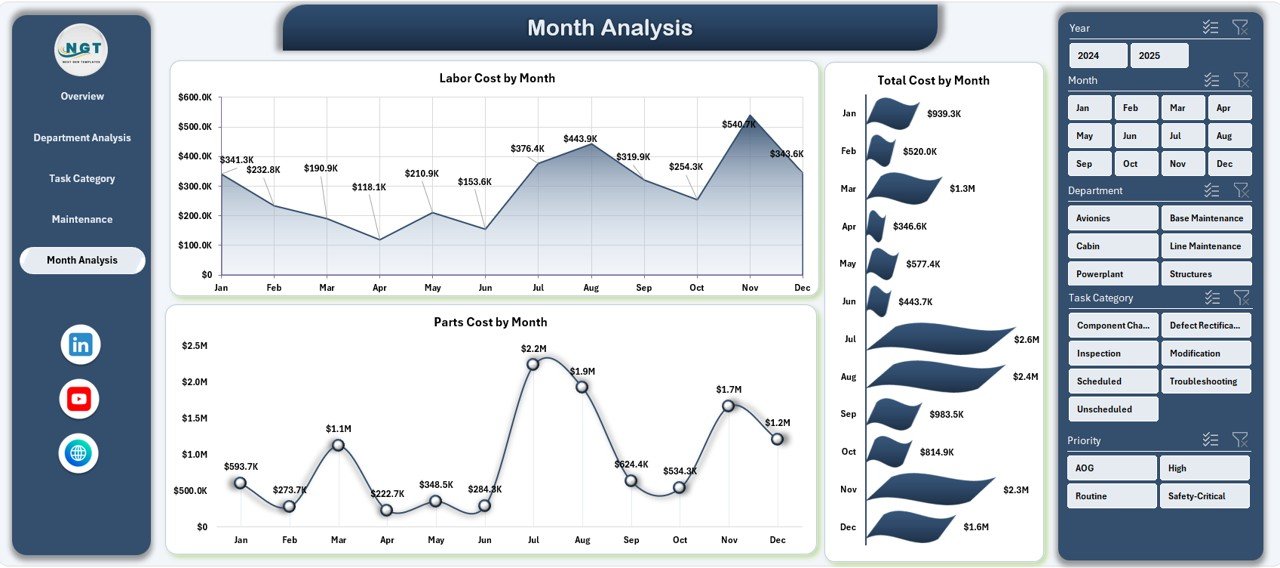
Month Analysis Page Explained
The Month Analysis Page tracks maintenance costs over time. This page helps identify trends, seasonal patterns, and cost spikes.
Charts Available on Month Analysis Page
-
Labor Cost by Month
-
Total Cost by Month
-
Parts Cost by Month
Since these charts display trends clearly, finance and maintenance teams can plan budgets more accurately.
What Is the Role of the Data Sheet in the Dashboard?
Data Sheet Explained
The Data Sheet serves as the backbone of the Aviation Maintenance Dashboard in Excel. Users enter structured maintenance data such as:
-
Work Order ID
-
Department
-
Task Category
-
Maintenance Type
-
Aircraft Type
-
Labor Cost
-
Parts Cost
-
Total Cost
-
Resolution Time
-
Reliability Impact Score
-
Month
Once data updates, all dashboard visuals refresh automatically. Therefore, data accuracy remains critical.
Advantages of Aviation Maintenance Dashboard in Excel
Using an Aviation Maintenance Dashboard in Excel offers several advantages for aviation organizations.
Key Advantages
-
📊 Centralized maintenance reporting
-
⏱ Faster decision-making
-
💰 Improved cost control
-
✈ Better aircraft reliability tracking
-
🔍 Clear visibility into maintenance performance
-
📈 Trend analysis for proactive planning
-
🧩 Easy customization and scalability
-
💻 No complex software required
Because of these advantages, organizations achieve operational excellence with minimal effort.
Best Practices for the Aviation Maintenance Dashboard in Excel
To get maximum value, follow these best practices for the Aviation Maintenance Dashboard in Excel.
Data Management Best Practices
-
Always maintain clean and consistent data.
-
Use standardized naming for departments and task categories.
-
Update the data sheet regularly.
Dashboard Usage Best Practices
-
Review the Overview Page daily.
-
Analyze department and task pages weekly.
-
Use month analysis for budget planning.
Performance Improvement Best Practices
-
Focus on high reliability impact scores.
-
Reduce average resolution time proactively.
-
Balance preventive and corrective maintenance.
Following these best practices ensures long-term dashboard success.
How Does This Dashboard Improve Aviation Safety and Compliance?
Safety and compliance remain top priorities in aviation. This dashboard supports both by:
-
Highlighting overdue and in-progress work orders.
-
Tracking reliability impact across aircraft.
-
Supporting preventive maintenance planning.
-
Improving accountability across departments.
Therefore, organizations maintain higher safety standards consistently.
Who Can Use an Aviation Maintenance Dashboard in Excel?
This dashboard suits various aviation roles, including:
-
Maintenance Managers
-
Engineering Teams
-
Operations Managers
-
Reliability Engineers
-
Finance and Cost Control Teams
-
Aviation Consultants
Because Excel remains widely used, everyone can adopt it easily.
How Does This Dashboard Compare to Manual Reporting?
Manual reporting consumes time and increases errors. In contrast, an Aviation Maintenance Dashboard in Excel offers:
-
Automation
-
Visual clarity
-
Faster insights
-
Better accuracy
-
Improved collaboration
As a result, organizations move from reactive to proactive maintenance management.
Conclusion
An Aviation Maintenance Dashboard in Excel is not just a reporting tool—it is a strategic asset for modern aviation operations. It transforms raw maintenance data into meaningful insights, improves visibility across departments, and supports faster, smarter decisions.
Moreover, with structured pages like Overview, Department Analysis, Task Category Analysis, Maintenance Analysis, and Month Analysis, this dashboard delivers complete maintenance intelligence in one place. When used with best practices, it improves efficiency, reduces downtime, controls costs, and enhances aircraft reliability.
If you want a simple yet powerful way to manage aviation maintenance, this dashboard delivers exactly what you need.
Frequently Asked Questions (FAQs)
Click to Purchases Aviation Maintenance Dashboard in Excel
What is an Aviation Maintenance Dashboard in Excel?
An Aviation Maintenance Dashboard in Excel is an interactive Excel-based tool that tracks and analyzes aircraft maintenance performance using charts, KPIs, and structured data.
Who should use this dashboard?
Maintenance managers, engineers, operations teams, and aviation analysts benefit the most from this dashboard.
Does this dashboard require advanced Excel skills?
No. The dashboard uses standard Excel features, so basic Excel knowledge is enough.
Can I customize the dashboard?
Yes. You can add new KPIs, charts, and pages based on your requirements.
How often should I update the data?
You should update the data daily or weekly to ensure accurate insights.
Does this dashboard help reduce maintenance costs?
Yes. By tracking labor, parts, and total costs, the dashboard helps identify cost-saving opportunities.
Can this dashboard improve aircraft reliability?
Yes. Reliability Impact Score analysis helps prioritize critical maintenance tasks.
Is this dashboard suitable for small aviation teams?
Yes. It works for both small teams and large aviation organizations.
Visit our YouTube channel to learn step-by-step video tutorials