Environmental, Social, and Governance (ESG) compliance has become a critical focus area for organizations worldwide. Regulators demand transparency, investors expect accountability, and customers prefer responsible businesses. However, many organizations still struggle to track ESG metrics efficiently due to fragmented data, manual reporting, and delayed insights.
That is exactly where an ESG Compliance KPI Dashboard in Power BI delivers powerful value.
In this comprehensive and SEO-friendly guide, you will learn what an ESG Compliance KPI Dashboard in Power BI is, why it is essential, how it works, its page-wise structure, key ESG KPIs, advantages, best practices, and frequently asked questions. By the end of this article, you will clearly understand how this ready-to-use Power BI dashboard helps organizations strengthen ESG compliance and make confident, data-driven decisions.
Click to Purchases ESG Compliance KPI Dashboard in Power BI
What Is an ESG Compliance KPI Dashboard in Power BI?
An ESG Compliance KPI Dashboard in Power BI is an interactive analytics solution designed to track, analyze, and visualize ESG performance using dynamic visuals, slicers, and comparisons.
Instead of reviewing static ESG reports or Excel files, this dashboard converts ESG data into real-time insights. Moreover, it displays key ESG indicators such as MTD, YTD, target achievement, and year-over-year performance in a single, unified view.
As a result, sustainability teams, compliance officers, and leadership teams gain instant clarity on ESG performance.
Why Do Organizations Need an ESG Compliance KPI Dashboard?
ESG compliance involves multiple KPIs, departments, and reporting timelines. However, manual tracking leads to errors, inconsistency, and delayed actions. Therefore, organizations need a centralized and automated ESG monitoring system.
An ESG Compliance KPI Dashboard in Power BI helps organizations because it:
-
Centralizes ESG data across functions
-
Improves reporting accuracy and speed
-
Enhances transparency for stakeholders
-
Supports regulatory and audit requirements
-
Enables proactive ESG decision-making
Moreover, Power BI offers advanced visualization and interactivity without complex development.
Click to Purchases ESG Compliance KPI Dashboard in Power BI
How Does an ESG Compliance KPI Dashboard in Power BI Work?
The dashboard follows a simple yet effective workflow.
First, ESG data is maintained in a structured Excel file. Next, Power BI connects to this Excel file as a data source. Then, Power BI models, measures, and visuals transform raw ESG data into meaningful insights.
Finally, users interact with slicers, tables, cards, and charts to analyze ESG performance dynamically.
Because of this structure, ESG reporting becomes faster, consistent, and actionable.
What Are the Key Features of the ESG Compliance KPI Dashboard in Power BI?
This ready-to-use ESG Compliance KPI Dashboard in Power BI includes a clean design, structured data model, and powerful analytics. Below is a detailed page-wise explanation.
What Information Does the Summary Page Show?
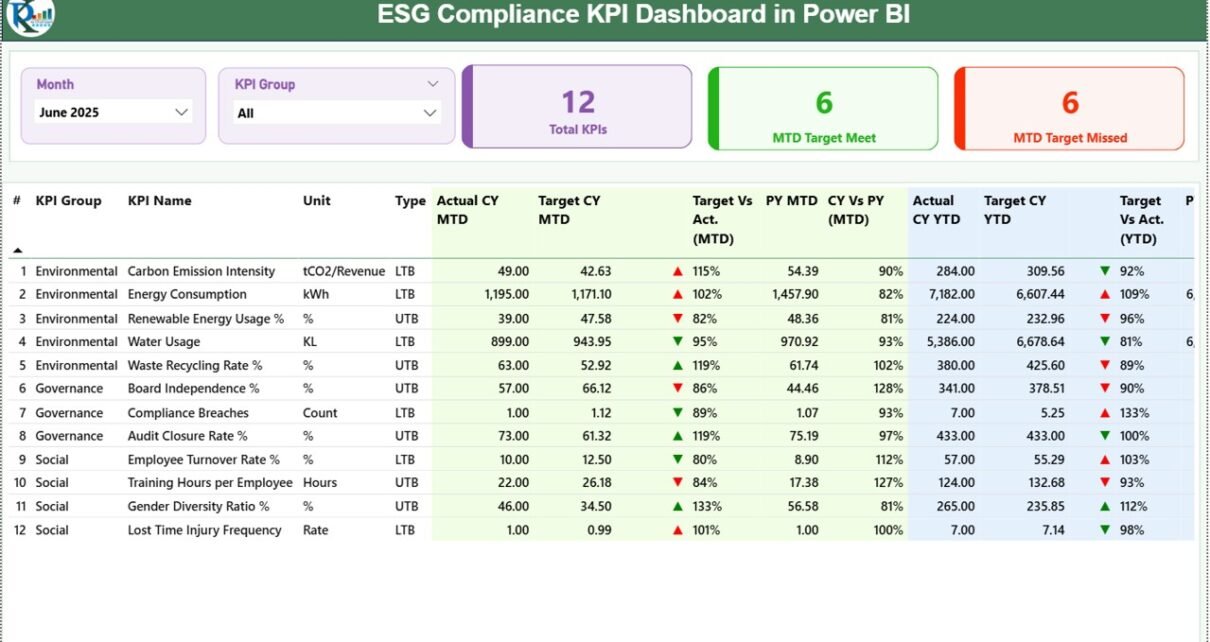
1) Summary Page
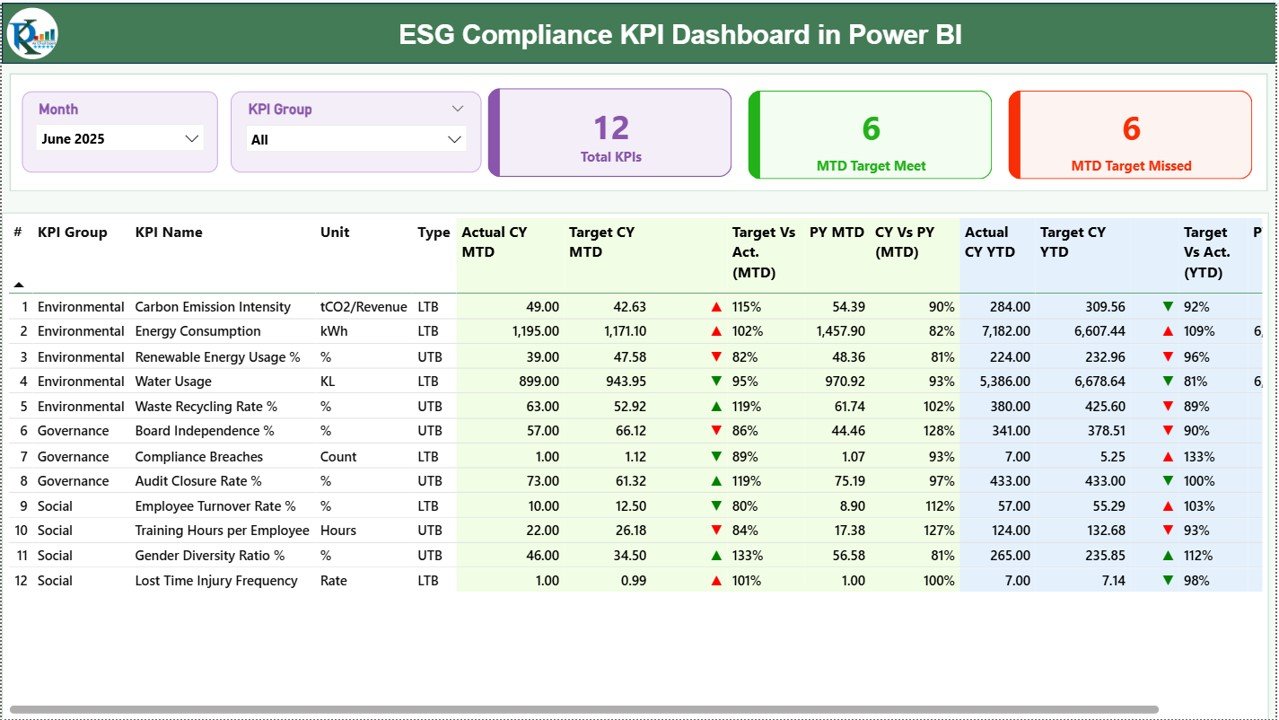
The Summary Page serves as the main landing page of the dashboard.
Key Features of the Summary Page
-
Month slicer at the top
-
KPI Group slicer for filtering ESG categories
-
Three KPI cards:
-
Total KPIs Count
-
MTD Target Meet Count
-
MTD Target Missed Count
-
Below the cards, a detailed KPI performance table displays the following columns:
-
KPI Number – Sequence number of each KPI
-
KPI Group – Environmental, Social, or Governance
-
KPI Name – Name of the ESG KPI
-
Unit – Unit of measurement
-
Type – LTB (Lower the Better) or UTB (Upper the Better)
-
Actual CY MTD – Current Year actual MTD value
-
Target CY MTD – Current Year target MTD value
-
MTD Icon – ▲ or ▼ icon indicating target status
-
Target vs Actual (MTD) – Actual ÷ Target (percentage)
-
PY MTD – Previous Year MTD value
-
CY vs PY (MTD) – CY MTD ÷ PY MTD (percentage)
-
Actual CY YTD – Current Year actual YTD value
-
Target CY YTD – Current Year target YTD value
-
YTD Icon – ▲ or ▼ indicator for YTD performance
-
Target vs Actual (YTD) – Actual ÷ Target (YTD)
-
PY YTD – Previous Year YTD value
-
CY vs PY (YTD) – CY YTD ÷ PY YTD
Because of this layout, users can instantly identify ESG compliance gaps and achievements.
How Does the KPI Trend Page Support ESG Analysis?
2) KPI Trend Page
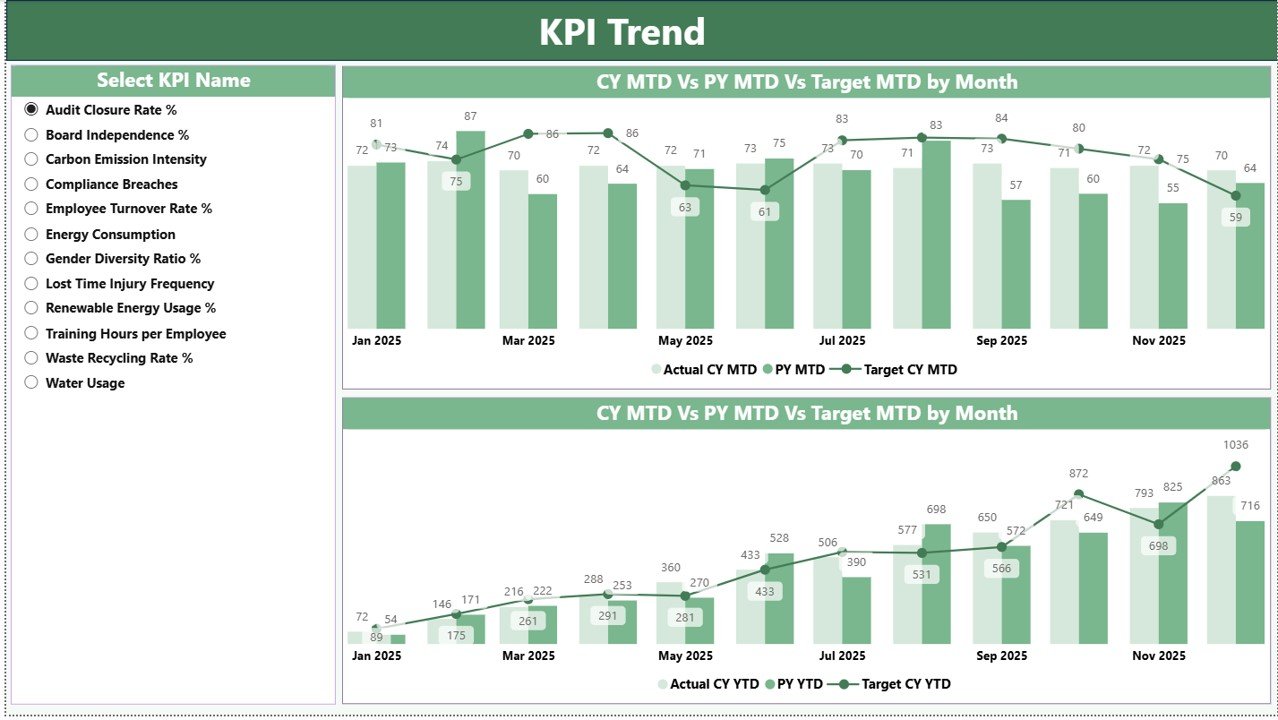
The KPI Trend Page focuses on KPI-level performance analysis.
Key Highlights
-
KPI Name slicer on the left
-
Two interactive combo charts:
-
MTD trend: Actual, Target, Previous Year
-
YTD trend: Actual, Target, Previous Year
-
These charts help users:
-
Track ESG KPI performance over time
-
Compare current performance with targets
-
Analyze year-over-year ESG trends
As a result, teams can detect performance patterns and act early.
Click to Purchases ESG Compliance KPI Dashboard in Power BI
What Is the Purpose of the KPI Definition Page?
3) KPI Definition Page (Drill-Through Page)
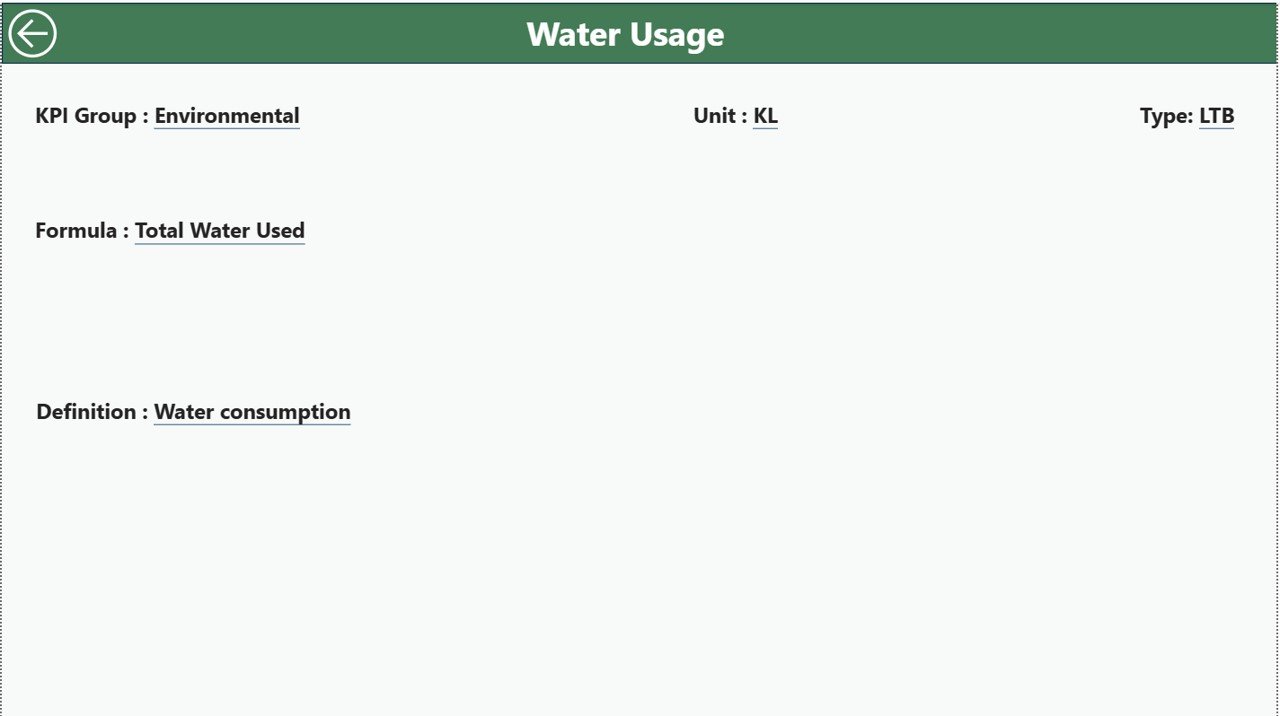
The KPI Definition Page acts as a reference and drill-through page.
Key Features
-
Hidden page for clean navigation
-
Drill-through access from the Summary Page
-
Displays:
-
KPI Formula
-
KPI Definition
-
KPI Group
-
Unit and Type
-
To return to the main dashboard, users simply click the back button available at the top-left corner.
Because of this setup, users maintain clarity and consistency across ESG metrics.
What Is the Data Source for This ESG Dashboard?
The ESG Compliance KPI Dashboard in Power BI uses Excel as the data source.
This approach ensures flexibility, simplicity, and easy data maintenance.
What Excel Sheets Are Used in This Dashboard?
1) Input_Actual Sheet
In this sheet, users enter actual ESG performance data.
Columns include:
-
KPI Name
-
Month (use first date of the month)
-
MTD Actual Value
-
YTD Actual Value
2) Input_Target Sheet
This sheet stores ESG target values.
Columns include:
-
KPI Name
-
Month
-
MTD Target Value
-
YTD Target Value
3) KPI Definition Sheet
This sheet defines ESG KPIs clearly.
Columns include:
-
KPI Number
-
KPI Group
-
KPI Name
-
Unit
-
Formula
-
Definition
-
Type (LTB or UTB)
Because of this structure, Power BI automatically reflects any data updates.
Click to Purchases ESG Compliance KPI Dashboard in Power BI
What ESG KPIs Can Be Tracked in This Dashboard?
This dashboard supports a wide range of ESG KPIs.
Environmental KPIs
-
Carbon emission intensity
-
Energy consumption per unit
-
Water usage efficiency
-
Waste recycling percentage
-
Renewable energy usage
Social KPIs
-
Employee diversity ratio
-
Training hours per employee
-
Workplace incident rate
-
Employee attrition rate
-
Community investment spend
Governance KPIs
-
Board diversity percentage
-
Compliance audit score
-
Policy adherence rate
-
Risk incidents count
-
Ethics training completion rate
Because the dashboard is flexible, organizations can customize KPIs easily.
Click to Purchases ESG Compliance KPI Dashboard in Power BI
Advantages of ESG Compliance KPI Dashboard in Power BI
1. Centralized ESG Reporting
All ESG data and insights remain in one interactive dashboard.
2. Real-Time Performance Insights
Power BI updates visuals automatically after data refresh.
3. Clear Visual Storytelling
Cards, icons, tables, and charts simplify ESG communication.
4. Strong Comparison Analysis
MTD, YTD, Target vs Actual, and CY vs PY comparisons improve decision-making.
5. Scalability and Flexibility
Organizations can add new KPIs and data easily.
6. Audit-Ready Structure
Structured data and drill-through pages support audits and reviews.
Best Practices for the ESG Compliance KPI Dashboard in Power BI
1. Define ESG KPIs Clearly
Always maintain accurate definitions in the KPI Definition sheet.
2. Maintain Data Quality
Use validated and approved ESG data sources.
3. Refresh Data Regularly
Schedule monthly or automated refresh cycles.
4. Monitor Trends, Not Just Numbers
Focus on KPI trends to identify long-term performance issues.
5. Align Targets with Strategy
Ensure ESG targets align with corporate sustainability goals.
6. Review Dashboard Periodically
Conduct ESG review meetings using dashboard insights.
Click to Purchases ESG Compliance KPI Dashboard in Power BI
How Does This Dashboard Improve ESG Decision-Making?
This dashboard helps decision-makers by:
-
Identifying compliance gaps early
-
Tracking progress against ESG commitments
-
Supporting regulatory disclosures
-
Improving stakeholder confidence
Because of this, ESG management becomes proactive and strategic.
Who Should Use an ESG Compliance KPI Dashboard in Power BI?
This dashboard is ideal for:
-
ESG and sustainability teams
-
Compliance and risk officers
-
Corporate governance teams
-
CFOs and CXOs
-
Organizations preparing ESG disclosures
Both SMEs and large enterprises benefit from this solution.
Can This Dashboard Be Customized?
Yes, completely.
You can customize:
-
ESG KPIs
-
KPI groups
-
Visuals and branding
-
Thresholds and targets
Power BI makes customization simple and scalable.
Conclusion: Why ESG Compliance KPI Dashboard in Power BI Is a Must-Have
An ESG Compliance KPI Dashboard in Power BI transforms ESG tracking into a structured, transparent, and insight-driven process. It centralizes ESG data, improves reporting accuracy, and enables timely decision-making.
Moreover, its interactive design, drill-through capabilities, and Excel-based data source make it practical and powerful. By implementing this dashboard, organizations can strengthen ESG compliance, improve stakeholder trust, and move confidently toward sustainable growth.
Click to Purchases ESG Compliance KPI Dashboard in Power BI
Frequently Asked Questions (FAQs)
What is an ESG Compliance KPI Dashboard in Power BI?
It is an interactive dashboard that tracks ESG KPIs using Power BI visuals, comparisons, and trends.
Can non-technical users use this dashboard?
Yes, the dashboard is intuitive and easy to navigate.
Does it support MTD and YTD tracking?
Yes, it supports MTD, YTD, target comparison, and previous year analysis.
Can we add more ESG KPIs?
Yes, you can easily add KPIs by updating the Excel data source.
Is this dashboard suitable for audits?
Yes, the structured design and drill-through features support audits.
Do we need advanced Power BI skills?
No, basic Power BI knowledge is sufficient to use and maintain this dashboard.
Click to Purchases ESG Compliance KPI Dashboard in Power BI
isit our YouTube channel to learn step-by-step video tutorials