Managing office documents has become more complex than ever. Every organization deals with thousands of files such as policies, contracts, reports, manuals, and compliance documents. However, many teams still rely on folders, emails, and manual tracking methods. As a result, documents get misplaced, versions get confused, and deadlines get missed.
That is exactly where an Office Document Management Dashboard in Power BI plays a critical role.
This dashboard converts raw document data into clear, interactive, and actionable insights. Instead of searching through folders, teams can instantly see document status, ownership, expiry risks, and monthly trends. Consequently, organizations improve control, visibility, and compliance.
Click to buy Office Document Management Dashboard in Power BI
In this detailed article, you will learn what an Office Document Management Dashboard in Power BI is, how it works, why it matters, its dashboard pages, key features, advantages, best practices, and frequently asked questions.
What Is an Office Document Management Dashboard in Power BI?
An Office Document Management Dashboard in Power BI is an interactive analytics solution designed to monitor, analyze, and manage office documents efficiently.
Instead of tracking documents manually, this dashboard allows users to:
- Monitor document lifecycle in real time
- Track active, expired, archived, and under-review documents
- Analyze documents by department, category, owner, and time
- Identify compliance risks before deadlines
Moreover, the dashboard connects Excel or database files with Power BI visuals. As a result, teams receive instant insights without complex tools.
Why Do Organizations Need an Office Document Management Dashboard?
Organizations create and store documents every day. However, without visibility, documents quickly become a risk rather than an asset.
Here is why this dashboard becomes essential:
- Documents expire without alerts
- Owners lose track of responsibilities
- Compliance audits become stressful
- File sizes increase storage costs
- Manual reporting wastes valuable time
Therefore, a centralized Power BI dashboard helps teams stay proactive instead of reactive.
How Does an Office Document Management Dashboard in Power BI Work?
The dashboard works by connecting structured document data to Power BI. Typically, the data includes:
- Document ID
- Document Name
- Department
- Category
- Owner
- Status (Active, Expired, Under Review, Archived)
- File Size (MB)
- Created Date
- Expiry Date
Once connected, Power BI transforms this data into interactive visuals. Additionally, slicers allow users to filter by department, category, owner, or date.
As a result, decision-makers gain clarity within seconds.
What Are the Key Pages in the Office Document Management Dashboard in Power BI?
This dashboard contains five powerful pages, each focused on a specific type of analysis.
What Insights Does the Overview Page Provide?
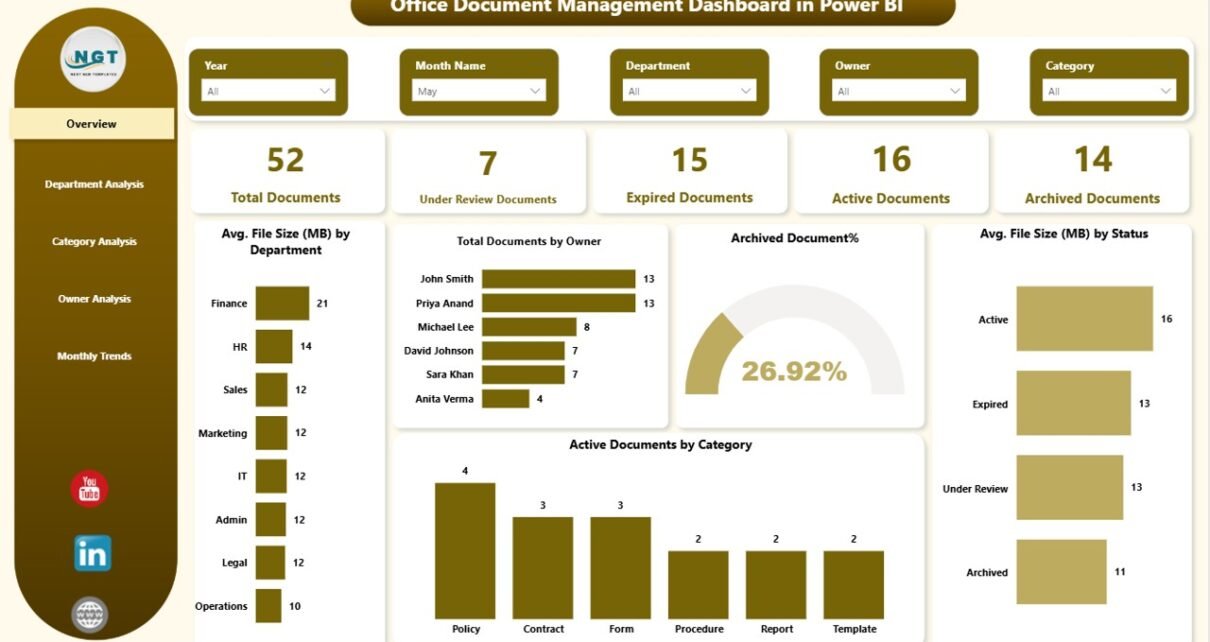
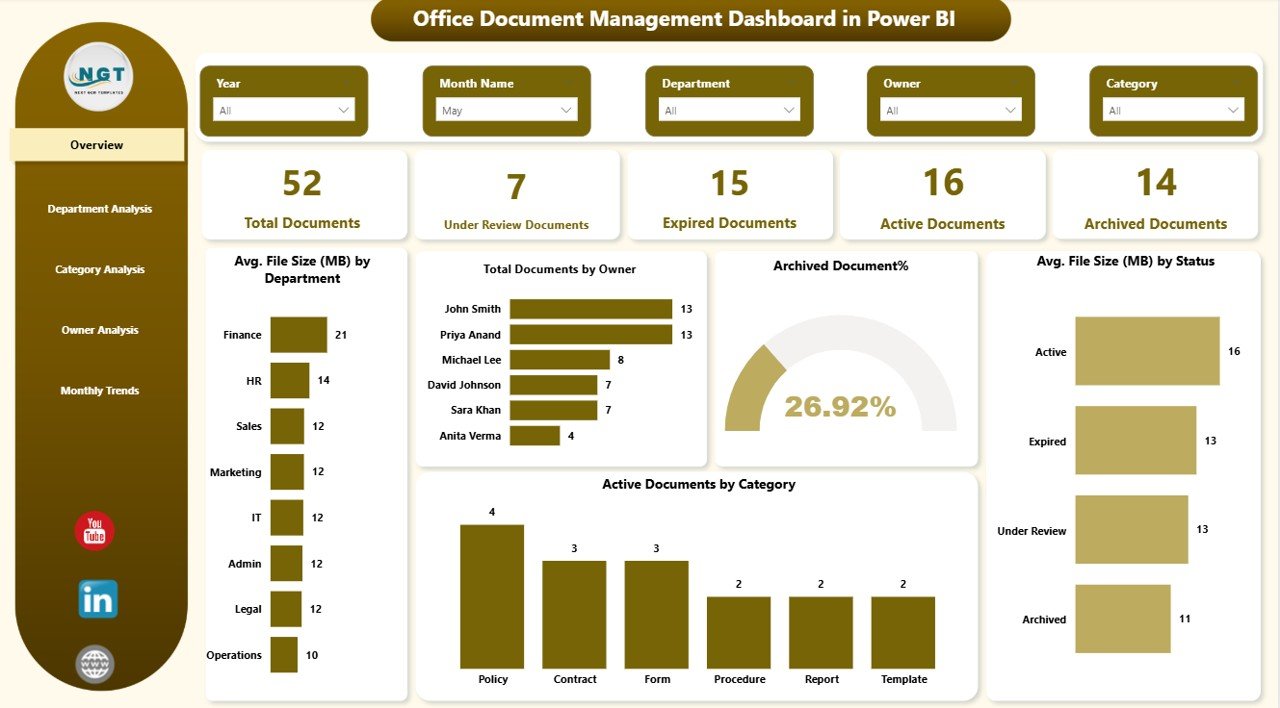
The Overview Page acts as the control center of the dashboard. It delivers a quick snapshot of the entire document ecosystem.
Key Metrics on the Overview Page
- Total Documents
- Active Documents
- Under Review Documents
- Expired Documents
- Archived Documents
- Average File Size (MB)
Key Visuals on the Overview Page
- Total Documents by Owner
- Archived Documents %
- Average File Size (MB) by Status
- Active Documents by Category
Because of these visuals, users instantly understand document health. Moreover, leadership teams can identify risks without opening individual files.
Click to buy Office Document Management Dashboard in Power BI
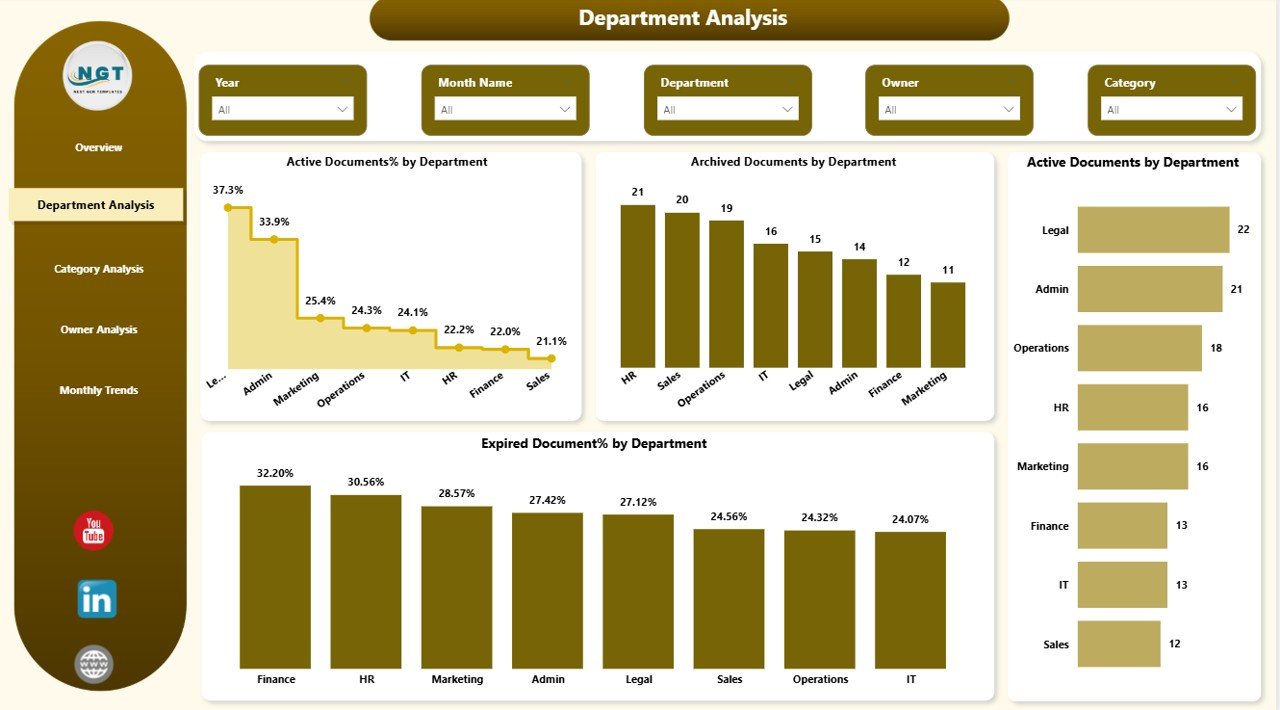
How Does the Department Analysis Page Improve Control?
The Department Analysis Page focuses on departmental performance and compliance.
Key Insights from Department Analysis
- Active Documents % by Department
- Archived Documents by Department
- Active Documents by Department
- Expired Documents % by Department
This page helps management identify departments with high expiry risks. Additionally, it highlights departments that need better document discipline.
Click to buy Office Document Management Dashboard in Power BI
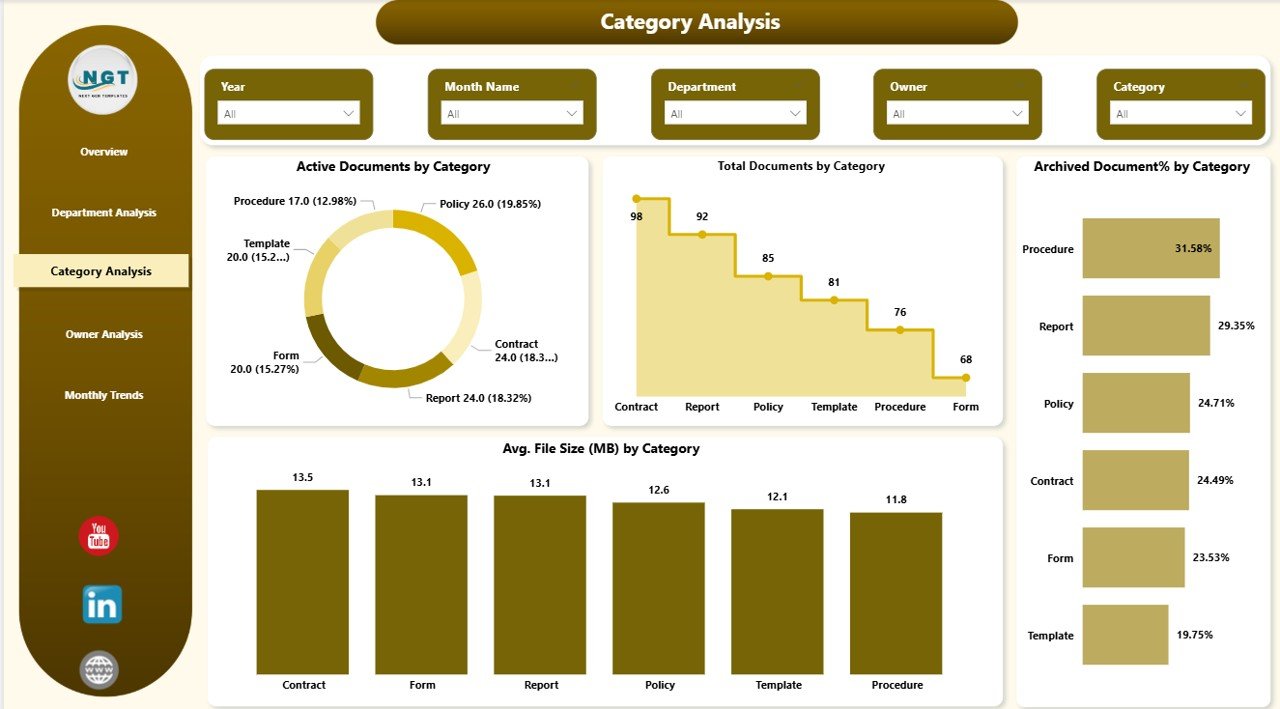
What Does the Category Analysis Page Show?
Documents often belong to categories such as policies, SOPs, contracts, manuals, or legal files. Therefore, category-level visibility becomes essential.
Key Visuals on the Category Analysis Page
- Active Documents by Category
- Total Documents by Category
- Archived Documents by Category
- Average File Size (MB) by Category
Because of this page, teams understand which document types dominate storage and compliance workloads.
Click to buy Office Document Management Dashboard in Power BI
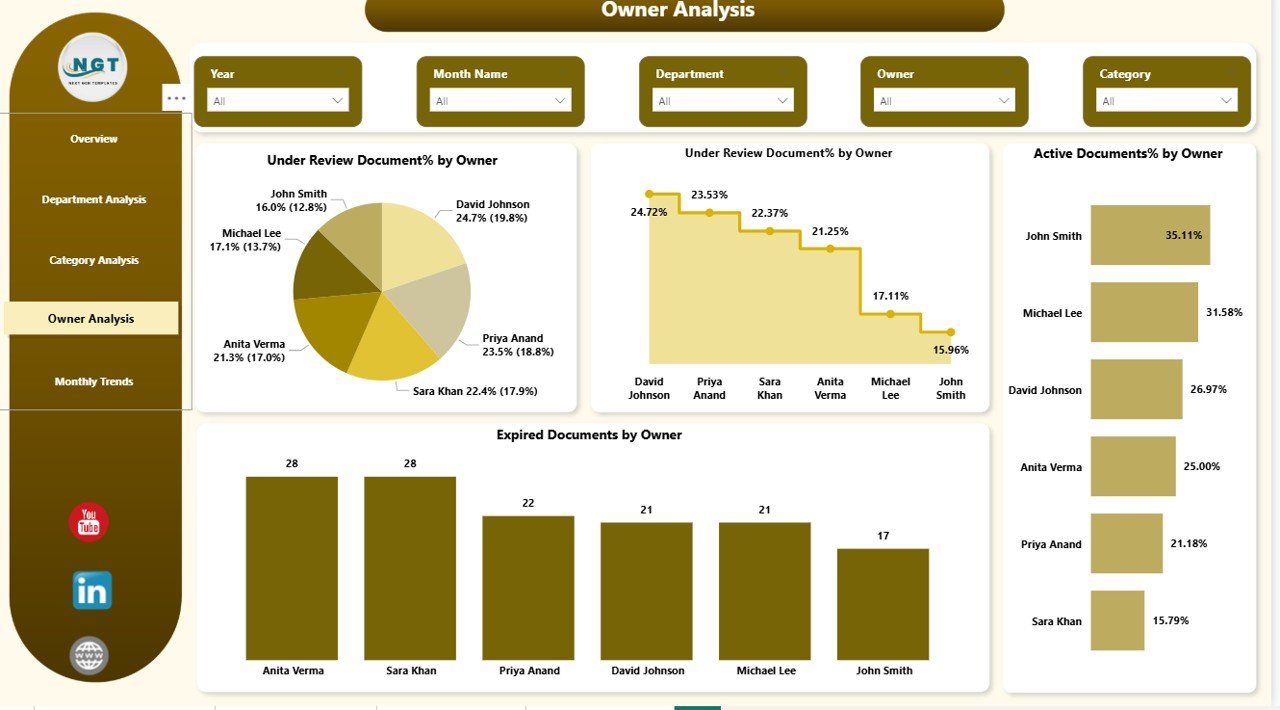
Why Is the Owner Analysis Page Important?
Every document must have a responsible owner. Without ownership, accountability disappears.
Key Insights from the Owner Analysis Page
- Under Review Documents % by Owner
- Active Documents % by Owner
- Owner-wise Document Responsibility
This page ensures accountability. Moreover, it helps managers balance workloads among document owners.
Click to buy Office Document Management Dashboard in Power BI
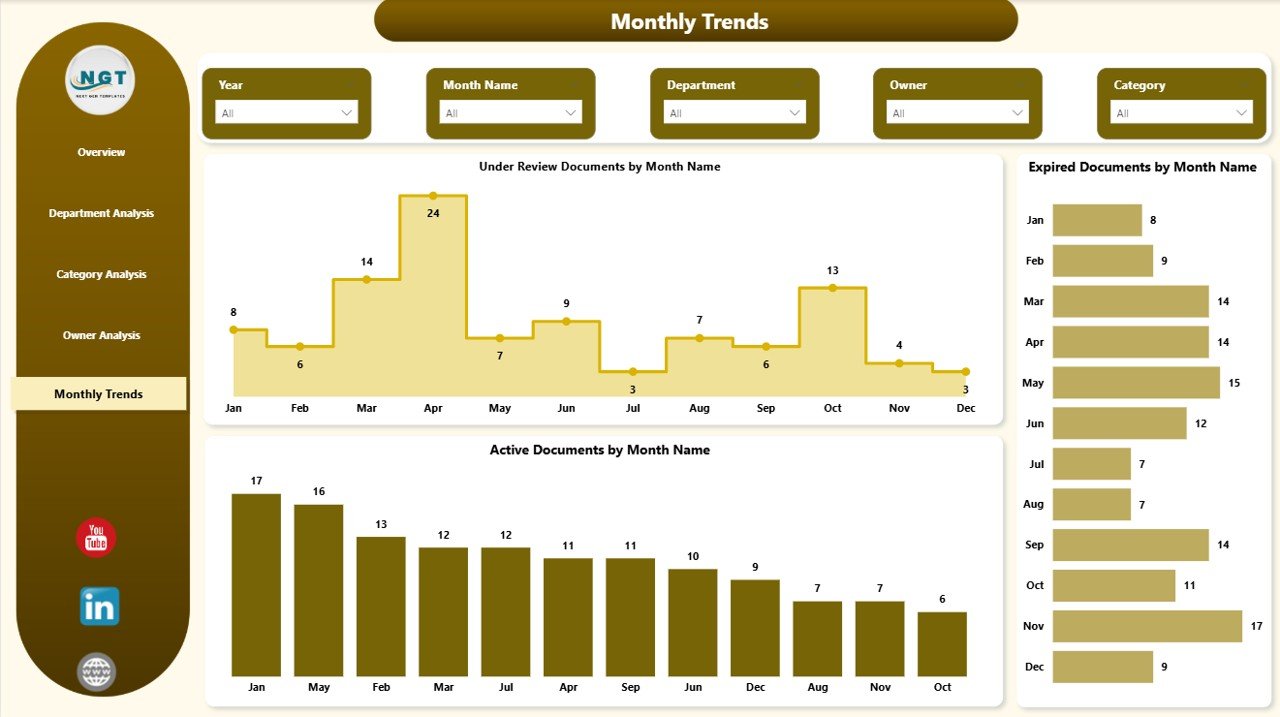
What Trends Does the Monthly Trends Page Reveal?
The Monthly Trends Page highlights how document activity changes over time.
Key Monthly Trend Visuals
- Under Review Documents by Month
- Expired Documents by Month
- Active Documents by Month
Because of trend analysis, organizations can identify seasonal document spikes. As a result, teams plan reviews and audits more effectively.
Click to buy Office Document Management Dashboard in Power BI
What Are the Key Features of an Office Document Management Dashboard in Power BI?
This dashboard offers several powerful features that make document management efficient and reliable.
Key Features at a Glance
- Interactive slicers for dynamic filtering
- Real-time document status tracking
- Owner-wise accountability analysis
- Department-wise compliance monitoring
- File size optimization insights
- Monthly trend analysis
- Easy Excel-to-Power BI integration
Together, these features transform document management into a strategic process.
Advantages of Office Document Management Dashboard in Power BI
Using this dashboard delivers both operational and strategic benefits.
Improved Visibility
Teams instantly see document status without searching folders.
Better Compliance
Expired and under-review documents receive attention before deadlines.
Faster Decision-Making
Leaders make decisions based on real-time data, not assumptions.
Reduced Manual Work
Automated dashboards replace manual tracking and reporting.
Strong Accountability
Owner-wise analysis ensures responsibility and ownership.
Optimized Storage
File size analysis helps reduce unnecessary storage usage.
How Does This Dashboard Support Compliance and Audits?
Compliance teams often struggle during audits. However, this dashboard simplifies the entire process.
- Auditors see document status instantly
- Expired files get flagged early
- Ownership remains clearly defined
- Departmental risks become visible
As a result, audits become smoother and stress-free.
Who Can Use an Office Document Management Dashboard in Power BI?
This dashboard suits multiple teams and roles.
Ideal Users
- Compliance Teams
- Admin Departments
- HR Teams
- Legal Teams
- Quality Assurance Teams
- IT and Records Management Teams
Because the dashboard remains user-friendly, both technical and non-technical users can use it easily.
Best Practices for the Office Document Management Dashboard in Power BI
To get maximum value, organizations should follow these best practices.
Maintain Clean Data
Ensure consistent document names, categories, and statuses.
Assign Clear Owners
Every document must have one accountable owner.
Update Data Regularly
Refresh data weekly or monthly to keep insights accurate.
Standardize Categories
Avoid too many document categories to maintain clarity.
Monitor Expiry Proactively
Always review expiry trends instead of reacting late.
Train Users
Provide basic Power BI training for better adoption.
How to Prepare Data for the Office Document Management Dashboard?
Good dashboards depend on good data.
Recommended Data Structure
- Document ID
- Document Name
- Department
- Category
- Owner
- Status
- File Size (MB)
- Created Date
- Expiry Date
Once structured, Power BI easily transforms this data into insights.
Can Small Businesses Benefit from This Dashboard?
Yes, absolutely.
Small businesses often lack enterprise document systems. Therefore, this Power BI dashboard becomes a cost-effective solution.
- No expensive software required
- Works with Excel files
- Scales as business grows
- Improves document discipline
How Is Power BI Better Than Manual Document Tracking?
Manual tracking creates delays and errors. In contrast, Power BI offers:
- Automation instead of spreadsheets
- Visual insights instead of raw data
- Filters instead of endless searching
- Trends instead of guesswork
As a result, productivity increases significantly.
What Is the Future of Document Management with Power BI?
As organizations move toward data-driven operations, document analytics will become standard.
Future enhancements may include:
- Automated alerts for expiring documents
- Integration with SharePoint and OneDrive
- AI-based document classification
- Predictive compliance analytics
Therefore, adopting this dashboard prepares organizations for the future.
Conclusion
An Office Document Management Dashboard in Power BI transforms document chaos into structured clarity. It provides visibility, accountability, compliance control, and strategic insights from a single platform.
Instead of managing documents reactively, teams take proactive actions. Moreover, leadership gains confidence in document governance.
If your organization still relies on manual tracking, now is the perfect time to upgrade.
Frequently Asked Questions About Office Document Management Dashboard in Power BI
What is an Office Document Management Dashboard in Power BI?
It is an interactive dashboard that tracks document status, ownership, categories, and trends using Power BI visuals.
Can this dashboard work with Excel data?
Yes, the dashboard works perfectly with Excel-based document data.
Is Power BI required to use this dashboard?
Yes, users need Power BI Desktop to view and analyze the dashboard.
Can this dashboard handle large document volumes?
Yes, Power BI can handle large datasets efficiently with proper modeling.
Is this dashboard suitable for compliance teams?
Absolutely. It helps monitor expiry, ownership, and audit readiness.
Can this dashboard be customized?
Yes, organizations can customize visuals, KPIs, and filters based on requirements.
Visit our YouTube channel to learn step-by-step video tutorials
Watch the step-by-step video tutorial:
Click to buy Office Document Management Dashboard in Power BI