Space exploration represents one of humanity’s most advanced and complex scientific efforts. Governments, private space companies, and research organizations continuously work on satellite launches, planetary missions, space station operations, and deep-space research programs.Space Exploration KPI Scorecard in Excel Because these projects involve massive investments, strict timelines, and high-risk operations, organizations must monitor performance carefully.
However, managing performance across multiple missions, engineering teams, and research objectives often becomes challenging. Many organizations still depend on fragmented reports and manual performance tracking. As a result, decision-makers struggle to evaluate mission progress, compare targets, and identify performance gaps quickly.
So, how can space exploration organizations track mission KPIs effectively without building complicated software systems?
The answer is the Space Exploration KPI Scorecard in Excel.
Space Exploration KPI Scorecard in Excel This comprehensive article explains everything about the Space Exploration KPI Scorecard in Excel, including features, benefits, implementation steps, best practices, and frequently asked questions.
Click to Purchases Space Exploration KPI Scorecard in Excel
What Is a Space Exploration KPI Scorecard in Excel?
A Space Exploration KPI Scorecard in Excel is a structured performance monitoring tool designed to track key performance indicators related to space missions, research activities, engineering efficiency, and operational outcomes.
Instead of reviewing multiple reports, users analyze mission performance through one centralized scorecard.
The scorecard helps organizations:
-
Monitor mission progress
-
Compare actual vs target performance
-
Track monthly and yearly achievements
-
Analyze KPI trends
-
Improve strategic decision-making
Because Excel provides flexibility and accessibility, teams implement this scorecard quickly without advanced technical infrastructure.
Why Is KPI Tracking Important in Space Exploration?
Space exploration projects involve complex coordination among scientists, engineers, operations teams, and management leaders. Therefore, performance measurement becomes essential.
Common Challenges Without KPI Monitoring
-
Limited visibility into mission performance
-
Delayed reporting cycles
-
Difficulty measuring research outcomes
-
Inefficient resource utilization
-
Lack of standardized metrics
Consequently, organizations need a structured scorecard to ensure mission success and accountability.
Click to Purchases Space Exploration KPI Scorecard in Excel
Key Features of the Space Exploration KPI Scorecard in Excel
This ready-to-use template contains four structured worksheets, each designed for specific analytical purposes.
1. Scorecard Sheet – Main Performance Dashboard
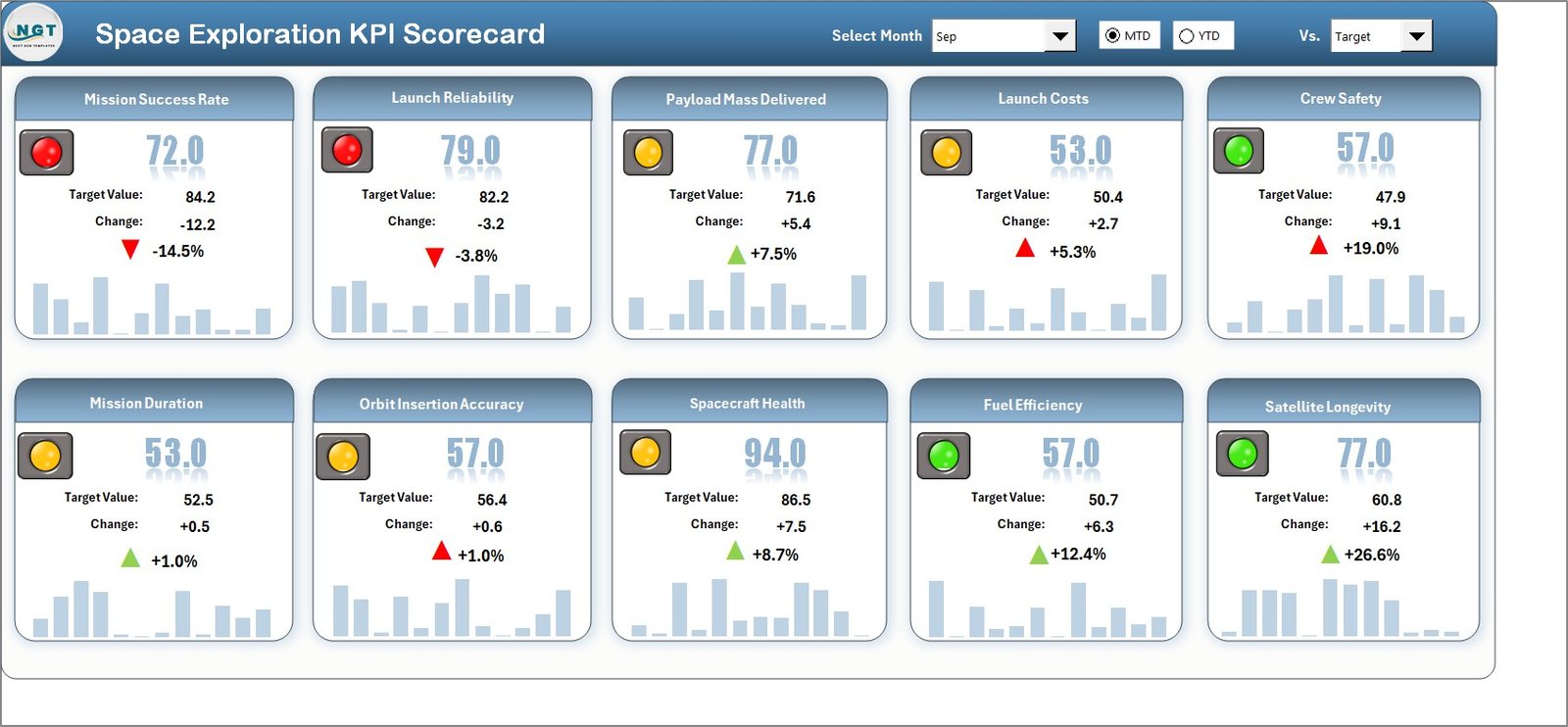
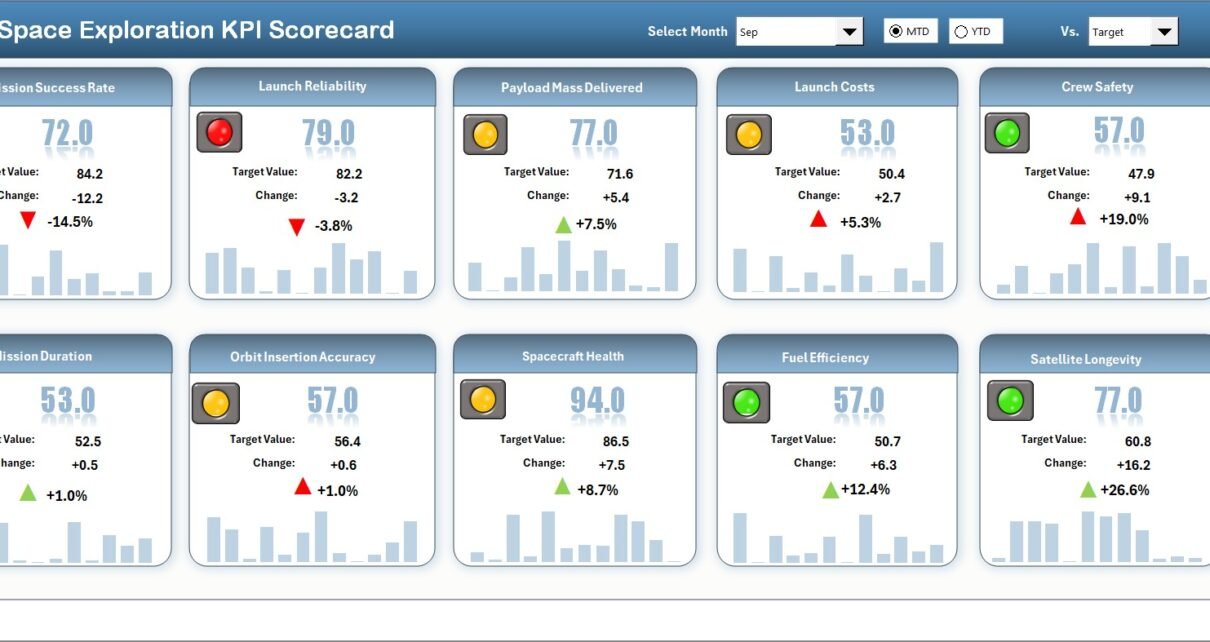
The Scorecard Sheet serves as the primary interface for viewing KPI performance.
Core Functionalities
Dropdown Menus
Users can select:
-
Month
-
MTD (Month-to-Date)
-
YTD (Year-to-Date)
The scorecard updates automatically based on selections.
Actual vs Target Comparison
The dashboard compares real performance against planned objectives for every KPI.
Visual Indicators
Color-coded formatting highlights performance status:
-
Green → Target achieved
-
Red → Target missed
-
Visual cues simplify analysis
Comprehensive KPI Overview
Users view:
-
KPI performance summary
-
MTD comparisons
-
YTD performance metrics
Therefore, decision-makers gain instant performance visibility.
Click to Purchases Space Exploration KPI Scorecard in Excel
2. KPI Trend Sheet – Performance Trend Analysis
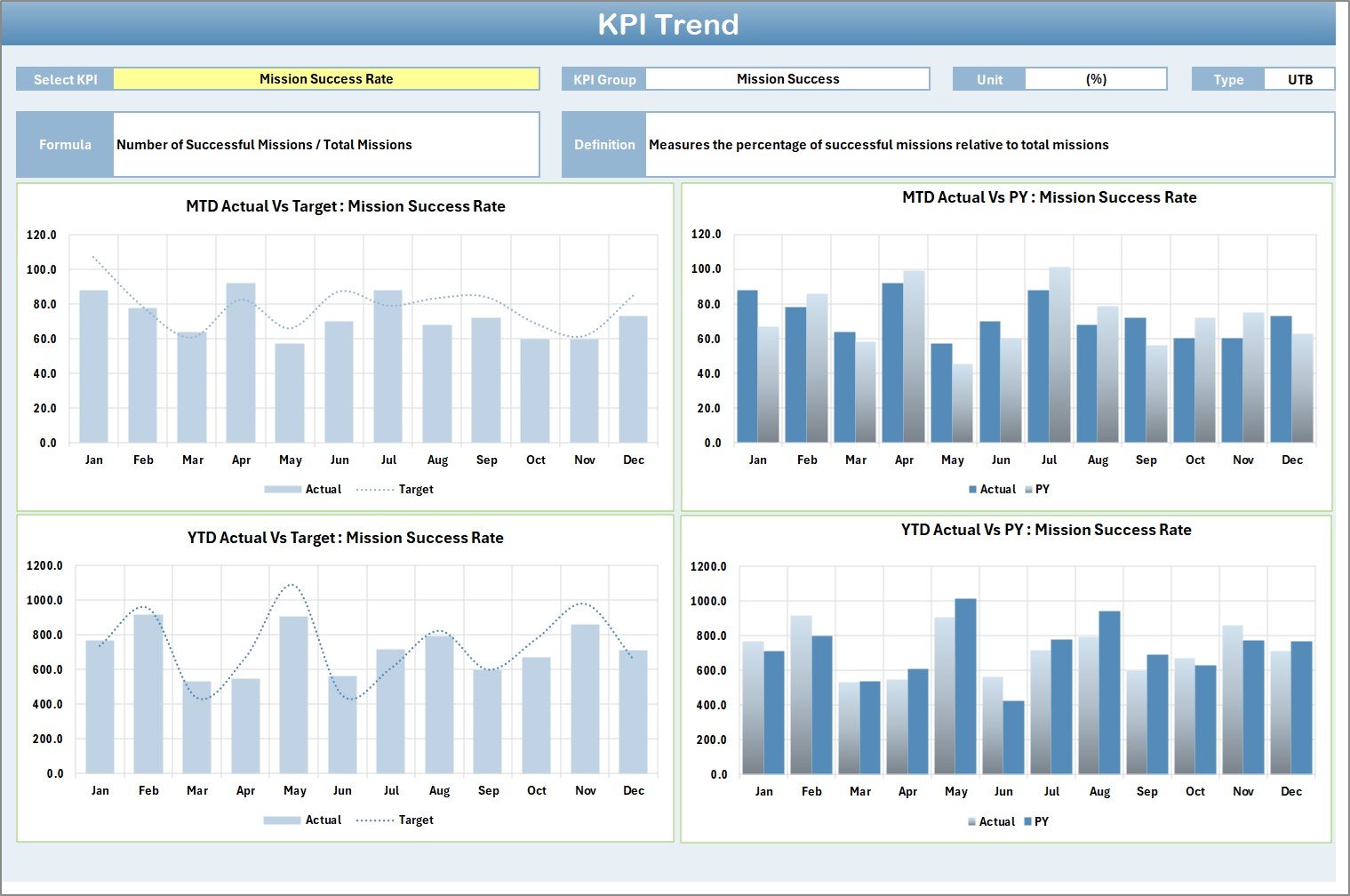
The KPI Trend Sheet provides detailed analytical insights.
Users select a KPI from the dropdown in Cell C3, and the sheet updates automatically.
Information Displayed
-
KPI Group
-
KPI Unit
-
KPI Type (Lower the Better / Upper the Better)
-
KPI Formula
-
KPI Definition
Additionally, the dashboard shows:
-
MTD Trend Charts
-
YTD Trend Charts
-
Actual vs Target vs Previous Year comparisons
Because trends reveal patterns over time, teams identify improvement opportunities faster.
3. Input Data Sheet – Data Entry Hub
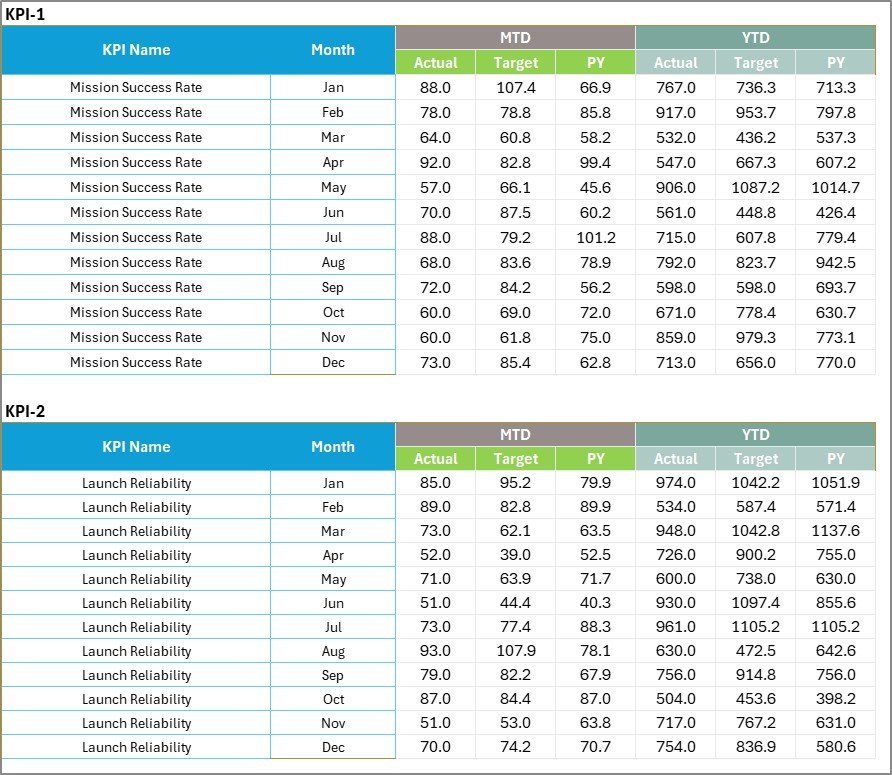
The Input Data Sheet captures operational KPI data.
Key Functions
-
Enter actual performance values
-
Record target numbers
-
Update results regularly
-
Maintain accurate tracking
This flexibility ensures the scorecard always reflects the latest mission data.
Click to Purchases Space Exploration KPI Scorecard in Excel
4. KPI Definition Sheet – KPI Documentation Center

The KPI Definition Sheet standardizes KPI understanding across teams.
Users enter:
-
KPI Name
-
KPI Group
-
Unit of Measurement
-
KPI Formula
-
KPI Definition
Because definitions remain centralized, teams avoid confusion and maintain reporting consistency.
Which KPIs Can Be Tracked in Space Exploration?
Organizations may track various mission and operational KPIs.
Mission Performance KPIs
-
Mission Success Rate
-
Launch Accuracy
-
Payload Deployment Success
-
Mission Duration Efficiency
Engineering KPIs
-
System Reliability Rate
-
Component Failure Rate
-
Testing Completion Percentage
-
Development Cycle Time
Research KPIs
-
Scientific Data Collection Volume
-
Experiment Success Rate
-
Research Milestone Achievement
Operational KPIs
-
Resource Utilization
-
Budget Variance
-
Team Productivity
-
Risk Resolution Time
Tracking these metrics ensures mission accountability and continuous improvement.
Click to Purchases Space Exploration KPI Scorecard in Excel
How Does the KPI Scorecard Improve Decision-Making?
A structured KPI scorecard transforms raw data into actionable intelligence.
Faster Performance Analysis
Managers identify issues immediately.
Improved Strategic Planning
Leadership aligns missions with measurable outcomes.
Data Transparency
Teams understand expectations clearly.
Better Resource Allocation
Organizations focus on high-impact activities.
Therefore, mission execution becomes more efficient.
Advantages of Space Exploration KPI Scorecard in Excel
✅ Centralized Performance Monitoring
All KPIs appear in one structured interface.
✅ Easy Customization
Organizations modify KPIs based on mission needs.
✅ Automated Comparisons
Actual vs target calculations update automatically.
✅ Visual Performance Indicators
Users interpret results instantly.
✅ Trend Analysis Capability
Long-term performance becomes measurable.
✅ Cost-Effective Solution
No specialized software required.
Because of these advantages, organizations achieve better operational control.
Click to Purchases Space Exploration KPI Scorecard in Excel
How to Implement the Space Exploration KPI Scorecard?
Follow these steps for successful implementation.
Step 1: Define KPIs
Identify mission-critical performance metrics.
Step 2: Populate KPI Definitions
Add KPI information to the definition sheet.
Step 3: Enter Targets
Input expected performance values.
Step 4: Update Actual Data
Record performance regularly.
Step 5: Analyze Scorecard
Review MTD and YTD performance.
Step 6: Monitor Trends
Use trend charts for long-term analysis.
This structured process ensures accurate performance tracking.
Best Practices for the Space Exploration KPI Scorecard
To maximize effectiveness, apply these best practices.
Maintain Accurate Data
Validate inputs before analysis.
Update KPIs Regularly
Ensure current mission performance visibility.
Focus on Critical Metrics
Avoid unnecessary KPIs.
Use Trend Analysis
Monitor performance evolution.
Standardize KPI Definitions
Ensure organization-wide clarity.
Conduct Periodic Reviews
Evaluate performance monthly or quarterly.
Consistent monitoring drives better mission outcomes.
Common Mistakes to Avoid
Avoid these errors while using KPI scorecards:
-
Tracking too many KPIs
-
Ignoring trend analysis
-
Using unclear KPI formulas
-
Updating data inconsistently
-
Misinterpreting visual indicators
Instead, maintain structured reporting discipline.
Future of KPI Scorecards in Space Exploration
As technology advances, KPI scorecards will evolve further.
Future improvements may include:
-
Real-time spacecraft telemetry integration
-
AI-driven mission analytics
-
Predictive performance modeling
-
Automated reporting dashboards
-
Cloud-based collaboration
Organizations adopting KPI tracking today prepare for future innovation.
Click to Purchases Space Exploration KPI Scorecard in Excel
Who Can Benefit from This Scorecard?
This template supports:
-
Space Agencies
-
Aerospace Companies
-
Research Institutions
-
Satellite Operators
-
Engineering Teams
-
Mission Managers
Because the system remains simple, both technical and management teams benefit equally.
Conclusion
Space exploration demands precision, accountability, and continuous performance monitoring. Without structured KPI tracking, organizations struggle to evaluate mission success effectively.
The Space Exploration KPI Scorecard in Excel provides a powerful yet simple solution. It centralizes performance data, automates comparisons, and delivers visual insights that improve strategic decision-making.
Moreover, its structured worksheets, trend analysis, and KPI definitions create a reliable framework for monitoring mission progress.
Therefore, organizations can enhance efficiency, reduce risks, and achieve mission goals confidently using this Excel-based KPI scorecard.
Click to Purchases Space Exploration KPI Scorecard in Excel
Frequently Asked Questions (FAQs)
1. What is a Space Exploration KPI Scorecard?
It is an Excel-based performance tracking tool designed to monitor space mission KPIs.
2. Can KPIs be customized?
Yes. Users can modify KPIs according to mission requirements.
3. How often should data be updated?
You should update data monthly or after each mission milestone.
4. Do I need advanced Excel skills?
No. Basic Excel knowledge is sufficient.
5. Why use MTD and YTD analysis?
They help measure short-term and long-term performance trends.
6. Can this scorecard track multiple missions?
Yes. You can include multiple KPIs across different missions.
7. Is this template suitable for research organizations?
Yes. Research teams can track experiment and project performance easily.
Click to Purchases Space Exploration KPI Scorecard in Excel
Visit our YouTube channel to learn step-by-step video tutorials