Introduction
Effective membership management requires clear visibility into key performance indicators (KPIs) that track progress and highlight areas needing attention. The Membership Management KPI Scorecard is a ready-to-use Excel template designed to help organizations measure, analyze, and improve their membership performance across key metrics. This comprehensive KPI Scorecard allows for dynamic data input, insightful visualizations, and trend analysis—all aimed at enhancing strategic decision-making.4
Click to buy Membership Management KPI Scorecard in Excel
Key Features of Membership Management KPI Scorecard
- Multi-Sheet Design: The template includes four specialized worksheets for different aspects of KPI management.
- Dynamic Dropdown Menus: Easily select analysis periods such as month, Month-to-Date (MTD), and Year-to-Date (YTD).
- Actual vs. Target Comparison: Quickly gauge performance by comparing real results to set targets.
- Visual Performance Indicators: Use color-coded visuals and conditional formatting for instant performance insights.
- Trend Analysis: View MTD and YTD trends for actual, target, and previous year (PY) numbers.
- Simple Data Entry: The Input Data Sheet facilitates quick and accurate recording of KPI data.
- KPI Definitions and Formulas: Understand what each KPI means, how it’s calculated, and its impact on membership management.
Dashboard Pages Explanation
1. Scorecard Sheet

The Scorecard Sheet is the primary interface for viewing KPI performance. Its main features include:
- Dropdown Menus: Seamlessly select the month, MTD, or YTD periods for analyzing performance.
- Actual vs Target Values: Compare current performance against targets to identify how well objectives are being met.
- Visual Indicators: Color-coded visuals or conditional formatting highlight performance status instantly.
- Comprehensive KPI Overview: Includes all relevant information such as MTD and YTD comparisons in one consolidated view.
2. KPI Trend Sheet

This worksheet allows for in-depth trend analysis of each KPI with features such as:
- KPI Selection: Choose the KPI to analyze via the dropdown in cell C3.
- KPI Details: Displays KPI Group, Units, KPI type (whether a lower or upper value is better), formula, and definition.
- Trend Charts: Visualize MTD and YTD trends for Actual, Target, and Previous Year (PY) numbers.
3. Input Data Sheet
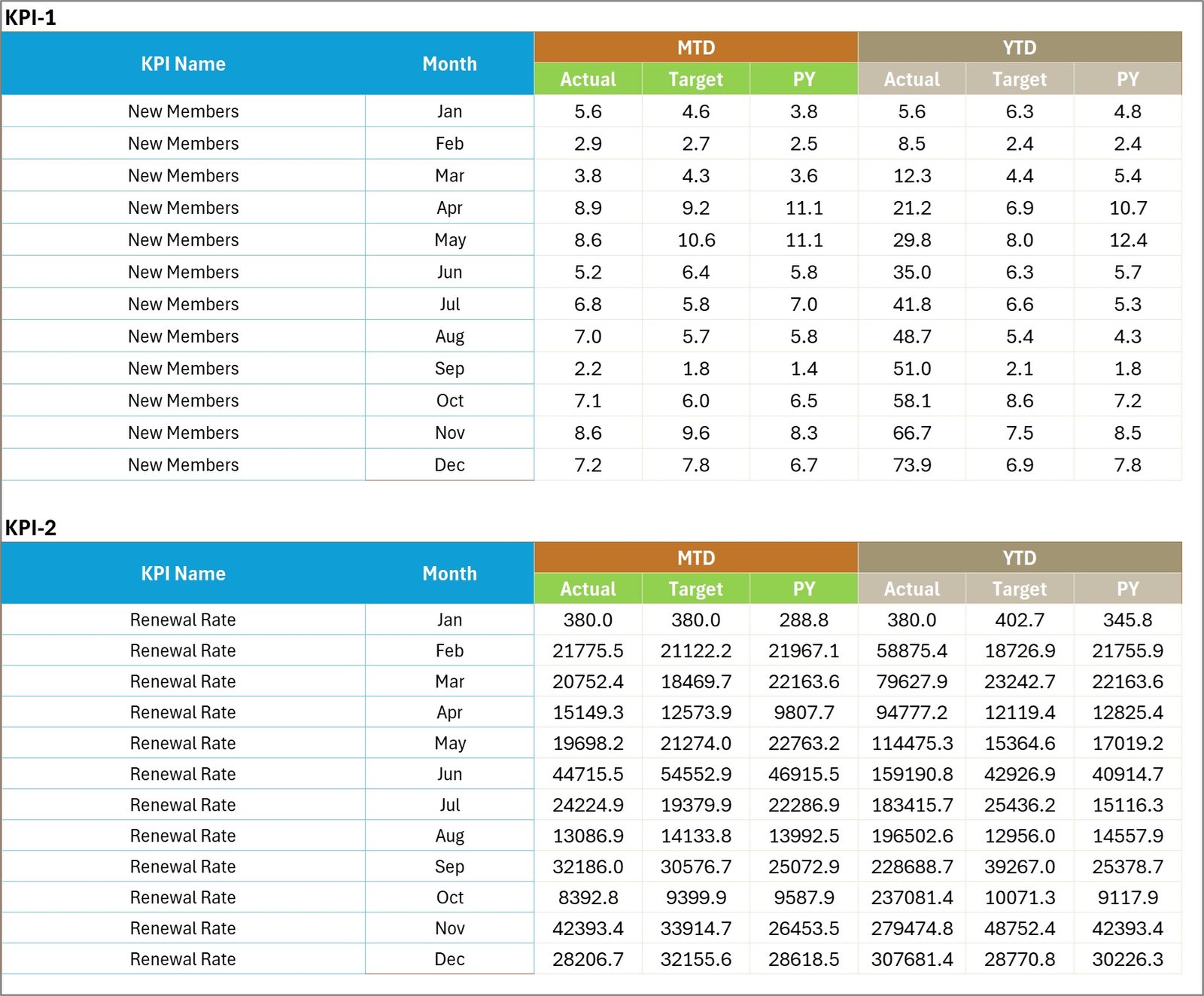
This sheet serves as the data entry point where you record all KPI metrics. Key advantages include:
- Data Entry: Enter actual values, targets, and other key measurements for each KPI.
- Flexibility: Update data easily to keep the Scorecard current with the latest results.
4. KPI Definition Sheet Tab

KPI Definition sheet tab
This tab contains all critical definitions and descriptions for better KPI understanding, including:
- KPI Name
- KPI Group
- Unit
- Formula
- KPI Definition
Advantages of Membership Management KPI Scorecard
- Holistic View: Consolidates all membership KPIs into a single, easy-to-understand dashboard.
- Ease of Use: Intuitive dropdown menus and clear definitions make it accessible even for non-technical users.
- Real-Time Insights: Quickly update and analyze performance data to make timely decisions.
- Customizable: Modify KPIs, targets, and definitions to fit your organization’s unique membership goals.
- Data Accuracy: Centralized input sheet reduces redundancy and chances of data inconsistencies.
- Performance Tracking: Enables organizations to monitor trends and take proactive action against decline or underperformance.
Opportunities for Improvement
- Integrate Power BI for more interactive and advanced visual analytics.
- Add automated alerts or notifications when KPIs fall below target levels.
- Include benchmarking capabilities by integrating industry average data.
- Provide mobile-friendly dashboard versions for on-the-go access.
Best Practices
- Set Clear KPI Targets: Define realistic and measurable KPI targets to ensure meaningful analysis.
- Regular Data Updates: Consistently update KPI data for accurate and timely insights.
- Review Trends Frequently: Use the trend sheet to identify early performance shifts and respond accordingly.
- Train Users: Ensure all stakeholders understand KPI definitions and how to use the scorecard.
- Customize Appropriately: Tailor the scorecard to your organization’s specific goals for relevance.
FAQs
- Q: Can this scorecard be used for non-membership KPIs?
A: Yes, while designed for membership metrics, it can be adapted for other KPI tracking. - Q: Is the template compatible with Google Sheets?
A: It is built for Excel; some features like conditional formatting may differ in Google Sheets. - Q: How frequently should data be updated?
A: Monthly updates are recommended for meaningful tracking and analysis. - Q: Are there any automation features?
A: This version does not include macros but can be enhanced with VBA or Power Automate.
Conclusion
The Membership Management KPI Scorecard offers a powerful, user-friendly solution to track and improve the performance of membership programs. By consolidating data inputs, visual dashboards, and trend analysis into one cohesive template, organizations can stay ahead of membership challenges, make informed decisions, and drive success.
Download this ready-to-use scorecard to streamline your membership monitoring efforts and unlock the true potential of your data.
Watch the step-by-step video tutorial:
Click to buy Membership Management KPI Scorecard in Excel
For further analytics techniques and demos, visit Microsoft Excel Support and our YouTube channel to watch the demo.