
Content marketing has become one of the most powerful strategies for businesses to attract customers, build brand authority, and generate leads. Today, companies invest heavily in content creation, campaign management, social media promotion, and digital storytelling. As a result, content marketing agencies handle multiple clients, campaigns, platforms, and budgets simultaneously.
However, managing all this information manually through spreadsheets or separate reports often becomes complicated. Agencies struggle to track campaign performance, measure profitability, and analyze marketing effectiveness across platforms.
Therefore, marketing teams increasingly rely on data-driven analytics dashboards to monitor performance and make better decisions.
One of the most effective tools for this purpose is the Content Marketing Agencies Dashboard in Power BI.
The Content Marketing Agencies Dashboard in Power BI is an interactive business intelligence solution designed to monitor campaign performance, revenue growth, engagement metrics, production costs, and profitability across different marketing channels.
Moreover, this dashboard transforms raw marketing data into visual insights using charts, KPI cards, and dynamic filters, enabling agencies to analyze performance quickly and efficiently.
Because Power BI offers powerful data visualization and real-time analytics, agencies can track key marketing metrics, evaluate campaign results, and optimize strategies based on data insights.
In this comprehensive guide, we will explore the Content Marketing Agencies Dashboard in Power BI, including its features, dashboard structure, advantages, best practices, and frequently asked questions.
Click to Purchases Content Marketing Agencies Dashboard in Power BI
What is a Content Marketing Agencies Dashboard in Power BI?
A Content Marketing Agencies Dashboard in Power BI is an interactive reporting system that helps agencies track marketing performance metrics across campaigns, platforms, clients, and regions.
Instead of analyzing separate marketing reports, this dashboard consolidates all performance indicators into a single analytical interface.
Using this dashboard, agencies can monitor:
-
Campaign costs
-
Revenue generated from campaigns
-
Profit and profit margins
-
Conversion rates
-
Engagement rates
-
Client performance by region
-
Platform-based marketing effectiveness
Furthermore, Power BI enables agencies to filter and analyze data dynamically, making it easier to identify performance trends and opportunities.
As a result, marketing leaders can make faster and smarter decisions that improve campaign results and maximize profitability.
Why Do Content Marketing Agencies Need Performance Dashboards?
Content marketing agencies manage multiple projects simultaneously. Each project involves various platforms, clients, account managers, and campaign objectives.
However, without a centralized reporting system, agencies often face several operational challenges.
For example:
-
Marketing performance data remains scattered across different systems
-
Agencies struggle to track campaign profitability
-
Teams cannot easily evaluate client performance
-
Marketing managers find it difficult to identify high-performing platforms
-
Agencies lack clear insights into engagement and conversion rates
Therefore, agencies require a comprehensive marketing analytics dashboard.
A dashboard provides a clear overview of performance metrics and enables agencies to:
-
Monitor marketing ROI
-
Track campaign costs and revenue
-
Analyze engagement and conversion rates
-
Compare performance across platforms and regions
-
Evaluate account manager performance
Consequently, the Content Marketing Agencies Dashboard in Power BI becomes a critical tool for marketing performance analysis.
Key Features of the Content Marketing Agencies Dashboard in Power BI
The Content Marketing Agencies Dashboard provides powerful analytics capabilities designed specifically for marketing teams.
Some of the key features include:
Interactive KPI Cards
The dashboard displays important marketing metrics using KPI cards for quick performance insights.
Dynamic Filters (Slicers)
Users can filter the dashboard by multiple criteria such as agency name, platform, campaign objective, or time period.
Multi-page Analytical Structure
The dashboard includes several pages that analyze different aspects of marketing performance.
Platform Performance Tracking
Users can evaluate content production costs and revenue by platform.
Client Region Analysis
Agencies can analyze marketing performance across different geographic regions.
Profitability Analysis
The dashboard calculates profit and profit margins to measure campaign profitability.
Monthly Performance Trends
Users can monitor marketing trends across months.
Data Visualization
Charts and graphs present complex data in a simple and visually appealing format.
Click to Purchases Content Marketing Agencies Dashboard in Power BI
Structure of the Content Marketing Agencies Dashboard in Power BI
The dashboard contains five analytical pages, each designed to analyze specific marketing performance metrics.
1. Overview Page – Marketing Performance Summary

The Overview Page provides a quick snapshot of overall marketing performance.
At the top of the dashboard, slicers allow users to filter the data based on selected parameters.
KPI Cards
The overview page includes five KPI cards.
Total Cost (USD)
Displays the total campaign cost across all marketing platforms.
Revenue
Shows the total revenue generated from marketing campaigns.
Profit (USD)
Represents the net profit after subtracting costs from revenue.
Conversion Rate (%)
Shows the percentage of visitors who convert into leads or customers.
Profit Margin (%)
Displays the profitability percentage of marketing campaigns.
Charts on the Overview Page
The overview page includes four analytical charts.
Content Production Cost by Platform
Shows how much money agencies spend on each marketing platform.
Engagement Rate (%)
Displays audience interaction with content such as clicks, shares, and comments.
Revenue by Client Region
Shows which geographic regions generate the highest revenue.
Profit USD by Account Manager
Displays profit generated by different account managers.
These charts help agencies quickly identify profitable clients, high-performing platforms, and cost distribution.
2. Agency Name Analysis – Agency Performance Insights
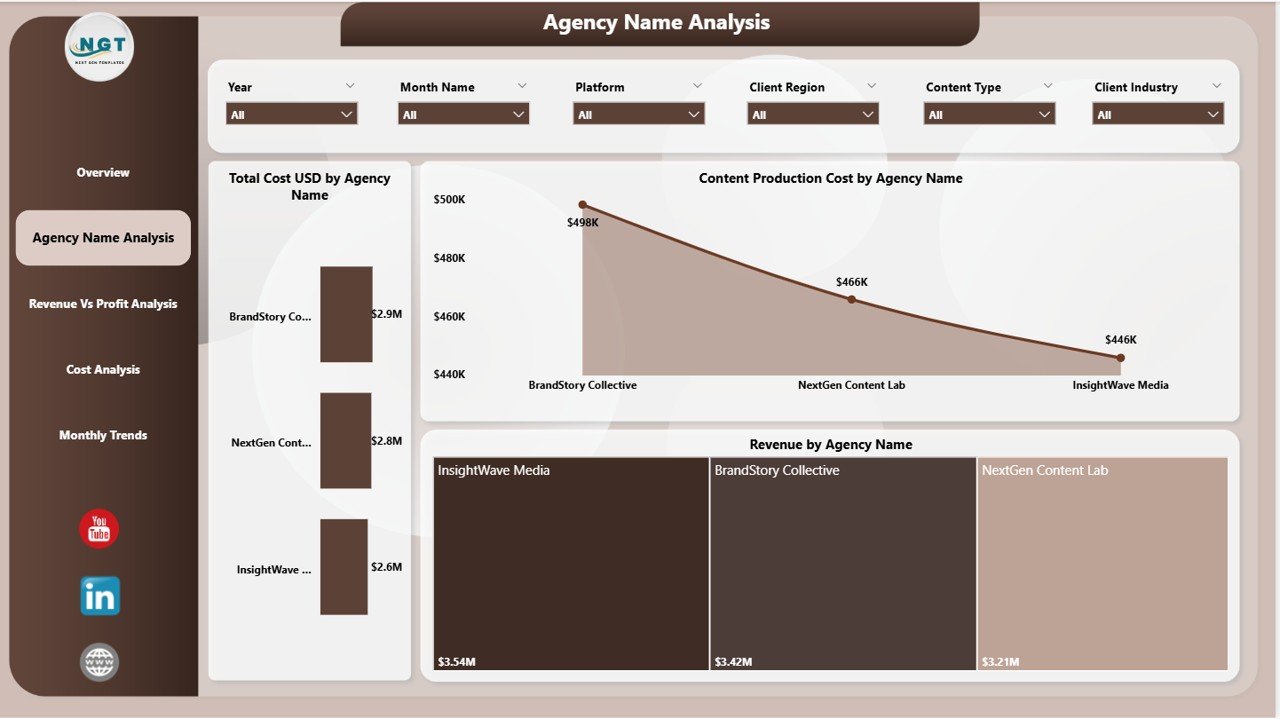
The Agency Name Analysis Page focuses on performance comparison across different agencies.
Slicers allow users to filter results based on selected parameters.
Charts in This Page
Total Cost USD by Agency Name
Shows how much each agency spends on content production.
Content Production Cost by Agency Name
Displays detailed cost breakdown for each agency.
Revenue by Agency Name
Shows which agencies generate the highest revenue.
This analysis helps businesses compare agency performance and evaluate return on investment.
3. Revenue vs Profit Analysis – Campaign Profitability Insights

The Revenue vs Profit Analysis Page evaluates the relationship between marketing revenue and profitability.
Charts in This Page
Revenue by Platform
Shows which content platforms generate the highest revenue.
Revenue by Campaign Objective
Analyzes revenue generated based on campaign goals such as brand awareness, lead generation, or product promotion.
Profit Margin (%) by Agency Name
Displays profitability percentages across agencies.
This page helps marketing leaders identify the most profitable campaigns and platforms.
4. Cost Analysis – Marketing Cost Breakdown

The Cost Analysis Page focuses on marketing spending patterns.
Understanding cost distribution helps agencies control budgets and improve profitability.
Charts in This Page
Content Production Cost by Client Region
Shows which regions require higher content production investment.
Agency Fee by Account Manager
Displays fees charged by different account managers.
Total Cost USD by Platform
Shows spending across various marketing platforms.
This analysis helps agencies allocate budgets more effectively.
5. Monthly Trends – Marketing Performance Over Time

The Monthly Trends Page analyzes marketing performance trends across different months.
This page helps agencies understand seasonal marketing performance and long-term growth patterns.
Charts in This Page
Revenue by Month Name
Shows how revenue changes throughout the year.
Total Campaigns by Month Name
Displays the number of campaigns executed each month.
Total Cost USD by Month Name
Shows monthly marketing expenditure.
These insights help agencies plan campaigns more effectively.
Click to Purchases Content Marketing Agencies Dashboard in Power BI
Advantages of the Content Marketing Agencies Dashboard in Power BI
Using this dashboard provides numerous benefits for marketing agencies.
Better Marketing Performance Monitoring
Agencies can track campaign performance metrics in one place.
Improved Decision Making
Visual data insights help marketing leaders make faster decisions.
Clear Revenue and Profit Analysis
The dashboard shows detailed profitability metrics.
Efficient Campaign Management
Agencies can monitor campaign costs and results easily.
Improved Client Performance Insights
Marketing teams can evaluate which clients generate the highest returns.
Platform Performance Analysis
Agencies can identify the most effective content platforms.
Enhanced Data Visualization
Power BI charts simplify complex marketing data.
Opportunities for Improvement
Although the dashboard already provides powerful analytics, agencies can enhance it further.
Possible improvements include:
-
Integrating real-time marketing data from CRM systems
-
Adding lead generation metrics
-
Tracking customer acquisition cost (CAC)
-
Monitoring campaign ROI
-
Including social media follower growth
-
Adding website traffic analytics
-
Creating client-specific performance reports
These enhancements would provide deeper marketing insights.
Best Practices for the Content Marketing Agencies Dashboard in Power BI
Organizations should follow best practices to maximize dashboard effectiveness.
Define Clear Marketing KPIs
Identify metrics that directly impact marketing performance.
Maintain Accurate Data Sources
Ensure campaign data remains updated and reliable.
Use Consistent Data Definitions
Maintain uniform definitions for revenue, costs, and engagement metrics.
Monitor Campaign Trends
Analyze trends instead of focusing only on monthly results.
Train Marketing Teams
Ensure teams understand how to interpret dashboard insights.
Regularly Review Dashboard Metrics
Update KPIs as marketing strategies evolve.
Conclusion
The Content Marketing Agencies Dashboard in Power BI provides a powerful analytics solution for tracking marketing performance across campaigns, platforms, agencies, and regions.
Instead of relying on multiple disconnected reports, agencies can centralize all marketing metrics into a single interactive dashboard.
With features such as KPI cards, platform analysis, profitability insights, cost tracking, and monthly trend analysis, the dashboard enables marketing teams to monitor performance effectively.
Moreover, Power BI’s dynamic visualization capabilities allow users to identify trends, compare results, and optimize marketing strategies quickly.
Therefore, agencies that adopt this dashboard can improve campaign management, enhance decision-making, and maximize marketing ROI.
Click to Purchases Content Marketing Agencies Dashboard in Power BI
Frequently Asked Questions (FAQs)
What is a Content Marketing Agencies Dashboard in Power BI?
It is an interactive reporting dashboard that tracks marketing campaign performance using Power BI visuals and analytics.
Who can use this dashboard?
Marketing agencies, digital marketers, campaign managers, and marketing analysts can use this dashboard.
What metrics does the dashboard track?
The dashboard tracks metrics such as campaign cost, revenue, profit, engagement rate, conversion rate, and marketing trends.
Can beginners use this dashboard?
Yes. Once the data source is connected, users can easily interact with filters and charts.
Can this dashboard track multiple agencies?
Yes. The dashboard supports analysis across multiple agencies, clients, platforms, and campaigns.
Why is Power BI useful for marketing analytics?
Power BI provides powerful data visualization, advanced analytics, and real-time reporting capabilities.
Click to Purchases Content Marketing Agencies Dashboard in Power BI
Visit our YouTube channel to learn step-by-step video tutorials


