In today’s competitive beauty industry, managing salon operations efficiently is no longer optional—it is essential. Beauty salons handle multiple services, appointments, staff schedules, product inventories, and customer relationships every single day. However, many salon owners still rely on scattered spreadsheets or manual tracking methods. As a result, they struggle to monitor performance, control costs, and grow their business effectively.
Click to Purchases Beauty Salons Dashboard in Excel
Therefore, businesses now shift towards smarter solutions. That’s exactly where the Beauty Salons Dashboard in Excel becomes a game-changing tool. 🚀
This powerful and ready-to-use dashboard helps you track revenue, analyze customer trends, monitor costs, and improve decision-making—all in one place.
In this detailed guide, you will learn everything about this dashboard, including its features, structure, advantages, best practices, and frequently asked questions.
🤔 What is a Beauty Salons Dashboard in Excel?
A Beauty Salons Dashboard in Excel is an interactive reporting tool that helps salon owners and managers track and analyze business performance using charts, KPIs, and data tables.
Instead of using multiple files, you can centralize all your salon data into one dashboard. As a result, you save time, reduce errors, and improve visibility.
It helps you track:
-
💰 Revenue and profit margins
-
📅 Total appointments and rebookings
-
💄 Product costs and operating expenses
-
🏬 Performance by salon branches
-
🌍 Regional and referral insights
-
📊 Monthly trends and growth
Therefore, this dashboard transforms raw salon data into meaningful insights that support smarter decisions.
❓ Why Do Beauty Salons Need a Dashboard?
Click to Purchases Beauty Salons Dashboard in Excel
Running a beauty salon involves multiple moving parts. Without proper tracking, it becomes difficult to understand what works and what needs improvement.
However, with a dashboard, you gain full control over your business.
Key reasons why salons need a dashboard:
-
📊 Centralized Data Management
You can view all your data in one place instead of switching between files. -
⏱️ Save Time and Effort
Automation reduces manual calculations and reporting work. -
📈 Better Decision-Making
Visual insights help you identify trends quickly. -
💸 Cost Control
You can monitor product and operating costs easily. -
🎯 Improve Customer Retention
Track rebooking percentages and membership trends.
As a result, salon owners can focus more on growth instead of manual tracking.
📊 Key Features of the Beauty Salons Dashboard in Excel
This dashboard comes with a structured and user-friendly design. Moreover, it includes multiple analytical pages that provide deep insights.
🔹 Page Navigator
-
Located on the left side
-
Allows easy navigation between dashboard pages
-
Improves user experience
📄 1. Overview Page – Get a Complete Business Snapshot
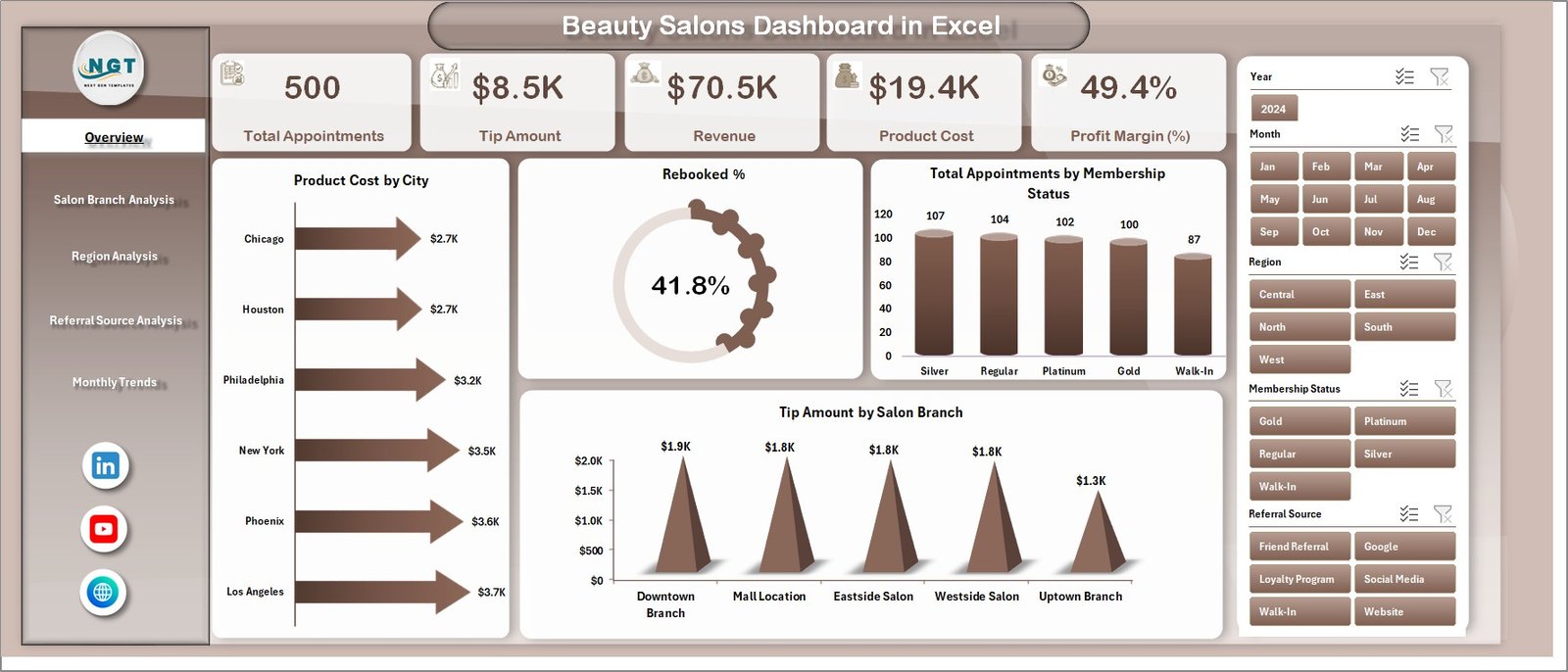
The Overview Page acts as the main dashboard. It gives you a quick summary of your salon performance.
🔹 KPI Cards:
-
Total Revenue
-
Total Appointments
-
Rebooked %
-
Total Profit
🔹 Charts Included:
-
📍 Product Cost by City
-
🔁 Rebooked % Analysis
-
👥 Total Appointments by Membership Status
-
💵 Tip Amount by Salon Branch
Therefore, this page helps you understand your business at a glance.
Click to Purchases Beauty Salons Dashboard in Excel
🏬 2. Salon Branch Analysis – Which Branch Performs Best?
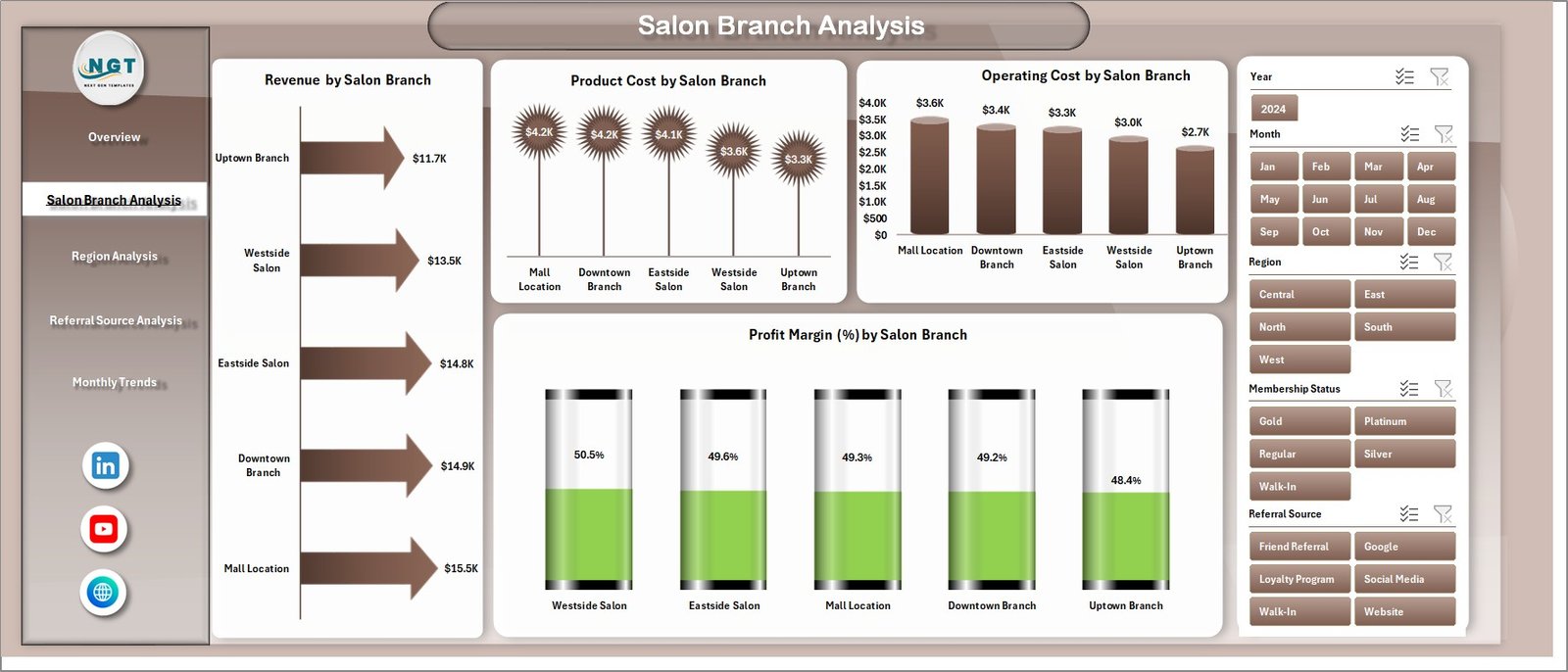
This page focuses on analyzing performance across different salon branches.
🔹 Charts Included:
-
Revenue by Salon Branch
-
Product Cost by Salon Branch
-
Operating Cost by Salon Branch
-
Profit Margin % by Salon Branch
Why this matters:
-
You can identify top-performing branches
-
You can detect underperforming locations
-
You can optimize operations branch-wise
🌍 3. Region Analysis – How Does Your Business Perform Across Regions?
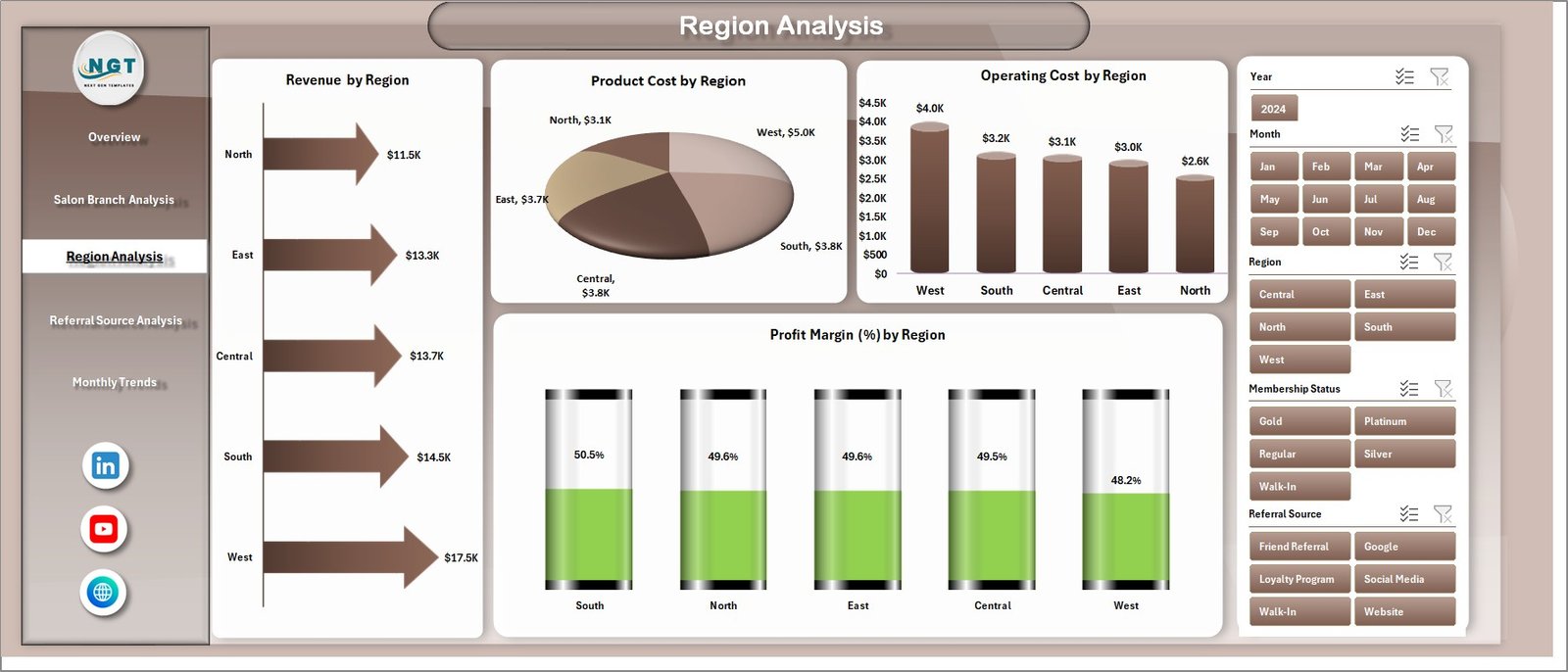
The Region Analysis Page provides geographical insights into your salon operations.
🔹 Charts Included:
-
Revenue by Region
-
Product Cost by Region
-
Operating Cost by Region
-
Profit Margin % by Region
Benefits:
-
Understand regional demand
-
Adjust pricing strategies
-
Allocate resources effectively
🔗 4. Referral Source Analysis – Where Are Your Customers Coming From?
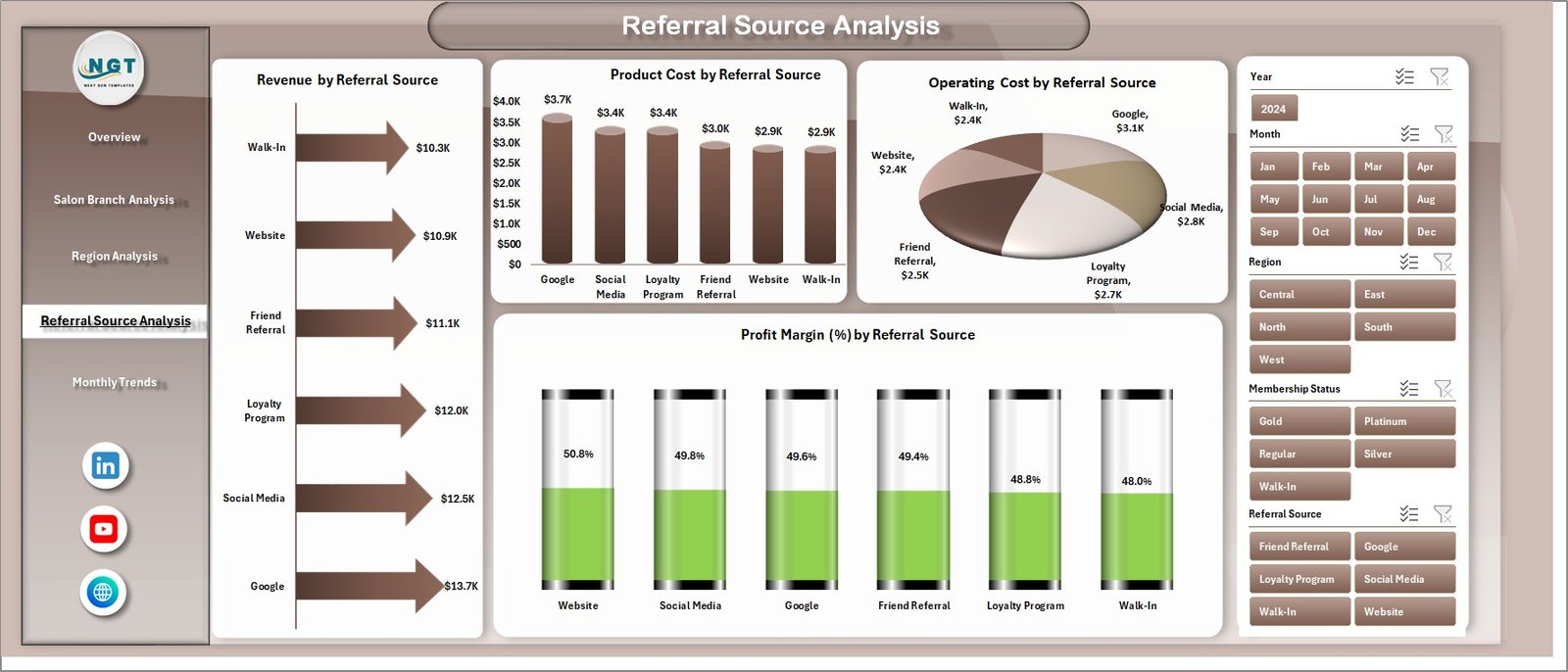
Customer acquisition plays a key role in salon growth. Therefore, this page helps you analyze referral sources.
🔹 Charts Included:
-
Revenue by Referral Source
-
Product Cost by Referral Source
-
Operating Cost by Referral Source
-
Profit Margin % by Referral Source
Insights you gain:
-
Identify top marketing channels
-
Improve ROI on promotions
-
Focus on high-performing referral sources
-
Click to Purchases Beauty Salons Dashboard in Excel
📅 5. Month Analysis – Track Trends Over Time
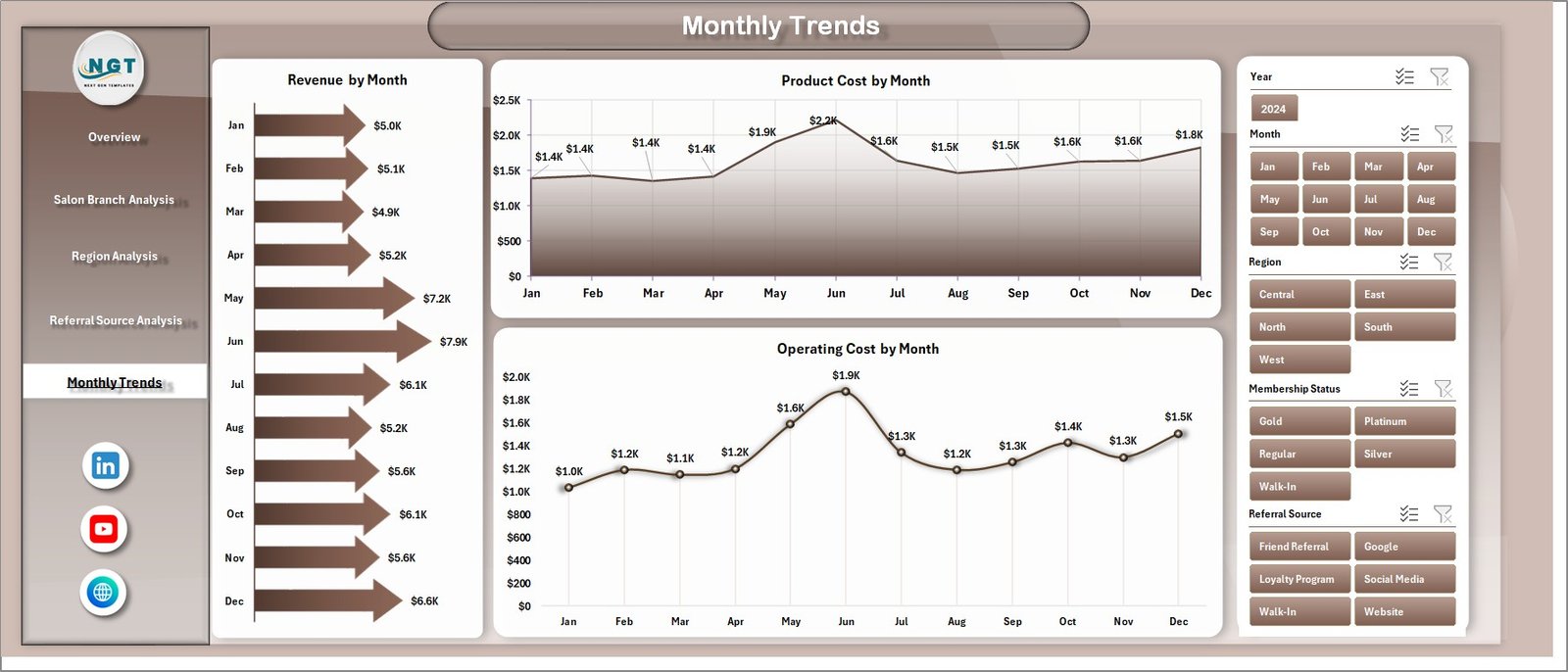
The Month Analysis Page helps you monitor performance over time.
🔹 Charts Included:
-
Revenue by Month
-
Product Cost by Month
-
Operating Cost by Month
Why it matters:
-
Identify seasonal trends
-
Track growth patterns
-
Plan future strategies
📂 Support Sheet & Data Sheet – The Backbone of the Dashboard
🔹 Data Sheet:
-
Stores all raw data
-
Includes appointments, revenue, costs, and customer details
🔹 Support Sheet:
-
Helps manage calculations
-
Supports backend formulas and logic
Therefore, these sheets ensure smooth dashboard functionality.
🚀 Advantages of Beauty Salons Dashboard in Excel
Using this dashboard offers multiple benefits. Let’s explore them.
✅ 1. Better Business Visibility
You can monitor every aspect of your salon in one place. As a result, you gain complete control.
✅ 2. Improved Decision-Making
Since you get real-time insights, you can take faster and smarter decisions.
✅ 3. Increased Profitability
You can identify cost leakages and optimize pricing strategies.
✅ 4. Enhanced Customer Experience
By tracking appointments and rebookings, you improve customer retention.
✅ 5. Time-Saving Automation
Excel formulas and charts automate calculations, which saves valuable time.
Click to Purchases Beauty Salons Dashboard in Excel
⚠️ Opportunities for Improvement in Salon Management
Although dashboards provide powerful insights, you can still improve processes further.
🔹 Common areas for improvement:
-
Data accuracy and consistency
-
Regular updates of data
-
Staff training for dashboard usage
-
Integration with booking systems
-
Automation of data entry
Therefore, continuous improvement ensures maximum value from your dashboard.
🏆 Best Practices for the Beauty Salons Dashboard in Excel
To get the most out of your dashboard, you should follow these best practices.
🔹 1. Keep Your Data Clean
Always ensure accurate and updated data. Otherwise, insights may become misleading.
🔹 2. Update Data Regularly
Update your dashboard daily or weekly to maintain relevance.
🔹 3. Use Filters and Slicers
Filters help you analyze specific segments easily.
🔹 4. Focus on Key KPIs
Do not overload the dashboard. Instead, track only important metrics.
🔹 5. Train Your Team
Ensure your staff understands how to use the dashboard effectively.
🔹 6. Customize Based on Needs
Adapt the dashboard according to your salon’s requirements.
📈 How Does This Dashboard Help Grow Your Salon Business?
Click to Purchases Beauty Salons Dashboard in Excel
This dashboard does not just track data—it drives growth.
Here’s how:
-
📊 Identifies profitable services
-
💡 Highlights customer trends
-
📉 Reduces unnecessary costs
-
📍 Improves branch performance
-
🎯 Enhances marketing strategies
As a result, you build a more efficient and profitable salon business.
🔮 Future Scope of Salon Dashboards
As technology evolves, dashboards will become even more powerful.
Future enhancements may include:
-
Integration with booking software
-
Real-time data tracking
-
AI-based predictions
-
Automated reporting
Therefore, adopting dashboards today prepares your salon for the future.
📝 Conclusion
The Beauty Salons Dashboard in Excel is a powerful tool that simplifies salon management. It helps you track performance, analyze trends, control costs, and improve decision-making.
Moreover, it eliminates the complexity of manual reporting and provides clear, actionable insights. As a result, you can focus on delivering better services and growing your business.
If you want to stay ahead in the beauty industry, then this dashboard is a must-have solution. 🚀
❓ Frequently Asked Questions (FAQs)
1. What is the main purpose of a Beauty Salons Dashboard?
It helps track salon performance, including revenue, appointments, costs, and customer trends.
2. Is this dashboard suitable for small salons?
Yes, both small and large salons can use this dashboard effectively.
3. Do I need advanced Excel skills to use this dashboard?
No, the dashboard is user-friendly and easy to use.
4. How often should I update the dashboard?
You should update it daily or weekly for accurate insights.
5. Can I customize this dashboard?
Yes, you can modify it based on your salon’s needs.
6. What type of data is required?
You need data related to appointments, revenue, costs, customers, and branches.
7. Does it support multiple salon branches?
Yes, it includes branch-wise analysis.
8. How does it help in marketing?
It shows referral source performance, which helps optimize campaigns.
9. Can I track monthly trends?
Yes, the Month Analysis page tracks performance over time.
10. Is it better than manual spreadsheets?
Yes, it is faster, more accurate, and provides better insights.
Visit our YouTube channel to learn step-by-step video tutorials