In today’s fast-moving digital world, Celebrity Merchandising Dashboard in Excel has become a massive revenue driver. Fans eagerly buy merchandise from their favorite celebrities, and businesses need smart tools to track and analyze this data. So, how can you monitor sales, revenue, and customer behavior efficiently?
Click to Purchases Celebrity Merchandising Dashboard in Excel
The answer is simple — Celebrity Merchandising Dashboard in Excel.
This powerful and ready-to-use dashboard helps you analyze performance across products, celebrities, and sales channels in one place. Moreover, it transforms raw data into meaningful insights, allowing you to make faster and smarter decisions.
Let’s explore everything about this dashboard in detail.
What is a Celebrity Merchandising Dashboard in Excel? 🤔
A Celebrity Merchandising Dashboard in Excel is an interactive reporting tool that tracks and analyzes merchandise sales related to celebrities.
It helps you:
- Monitor total revenue and sales performance
- Analyze product trends and customer preferences
- Track marketing spend and ROI
- Compare celebrity performance
- Identify profitable sales channels
In addition, it provides real-time insights using dynamic charts, slicers, and KPI cards.
Why Do You Need a Celebrity Merchandising Dashboard? 📌
Managing merchandising data manually takes time and often leads to errors. However, with this dashboard, you can simplify everything.
Here’s why this dashboard is essential:
- You get a complete business overview in seconds
- You can track celebrity-wise performance easily
- You can identify best-selling products quickly
- You can optimize marketing spend effectively
- You can make data-driven decisions confidently
As a result, you improve efficiency and increase profitability.
Click to Purchases Celebrity Merchandising Dashboard in Excel
Key Features of the Celebrity Merchandising Dashboard 🚀
This Excel dashboard includes multiple advanced features that make analysis simple and effective.
🔹 Page Navigator
The dashboard includes a page navigator on the left side, which allows smooth navigation across all analytical pages. Therefore, you can switch between insights without any hassle.
Click to Purchases Celebrity Merchandising Dashboard in Excel
How Many Pages Are Included in the Dashboard? 📑
This dashboard contains 5 powerful analytical pages, each designed to focus on a specific area of business performance.
1. Overview Page – What Does It Show? 📊
Click to Purchases Celebrity Merchandising Dashboard in Excel
The Overview Page provides a high-level snapshot of your merchandising business.
🔹 KPI Cards
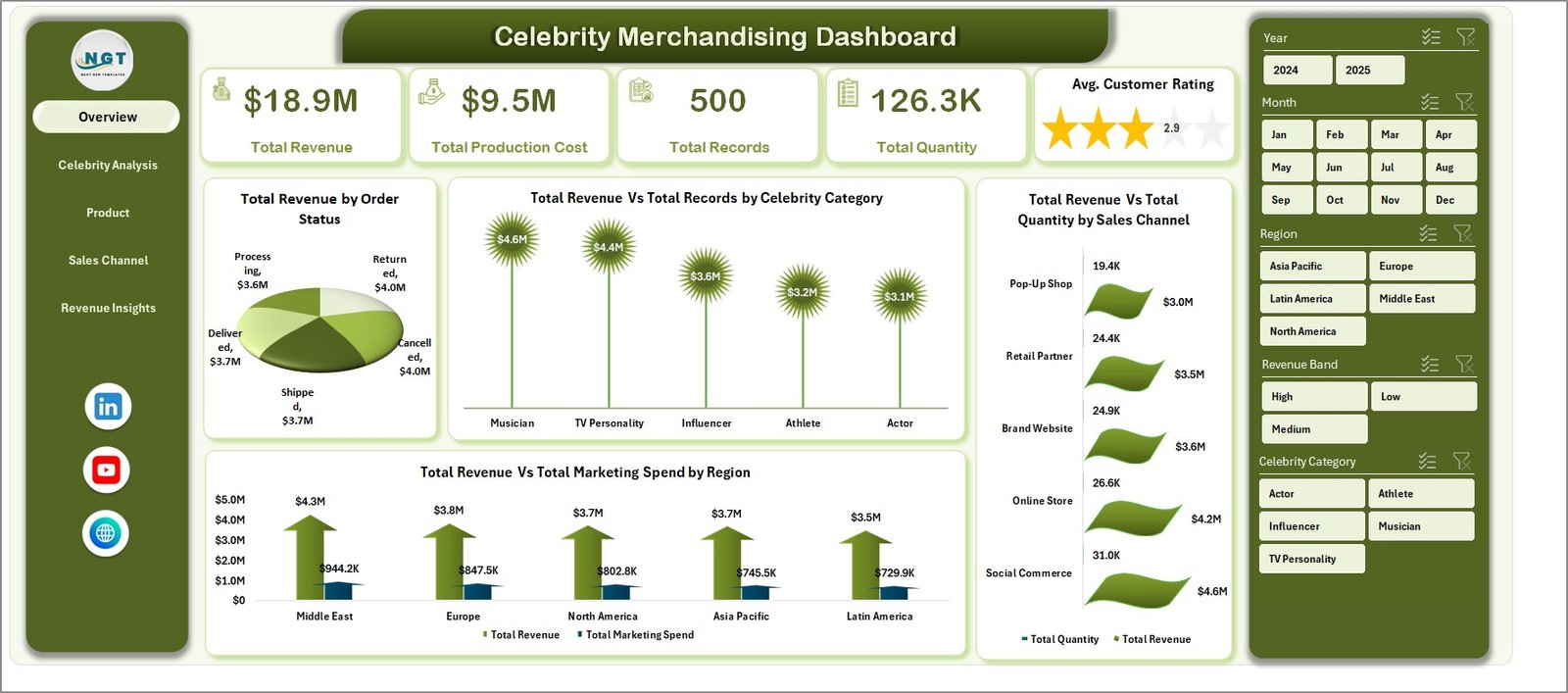
At the top, you will find 4 key cards:
- Total Revenue
- Total Records
- Total Quantity
- Total Marketing Spend
These KPIs give you instant insights into business performance.
🔹 Charts on Overview Page
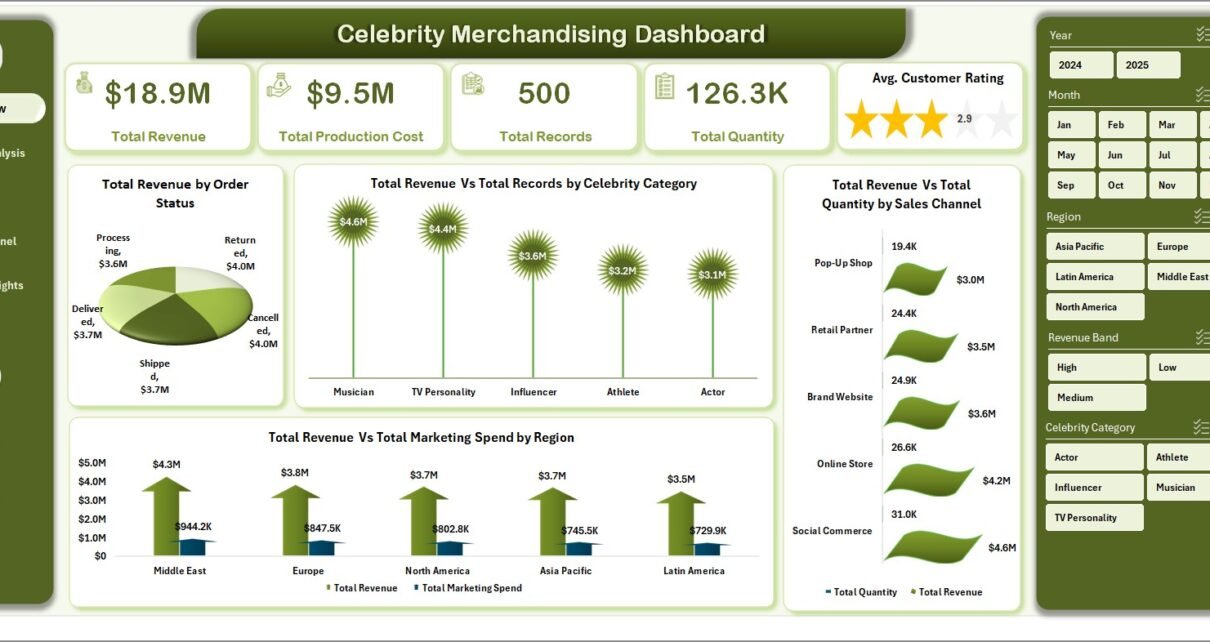
📌 Total Revenue by Order Status
This chart shows how revenue varies across different order statuses such as completed, pending, or cancelled. Therefore, you can quickly identify operational efficiency.
📌 Total Revenue vs Total Records by Celebrity Category
This comparison helps you understand which celebrity categories generate higher revenue and engagement.
📌 Total Revenue vs Total Quantity by Sales Channel
This chart highlights which sales channels perform best in terms of revenue and quantity sold.
📌 Total Revenue vs Total Marketing Spend by Region
This visual helps you evaluate how effectively your marketing spend drives revenue across different regions.
🔹 Slicers (Filters)
On the right side, you will find slicers such as:
- Celebrity Category
- Region
- Sales Channel
- Order Status
These filters allow you to customize your analysis instantly.
2. Celebrity Analysis – Which Celebrity Performs Best? 🌟
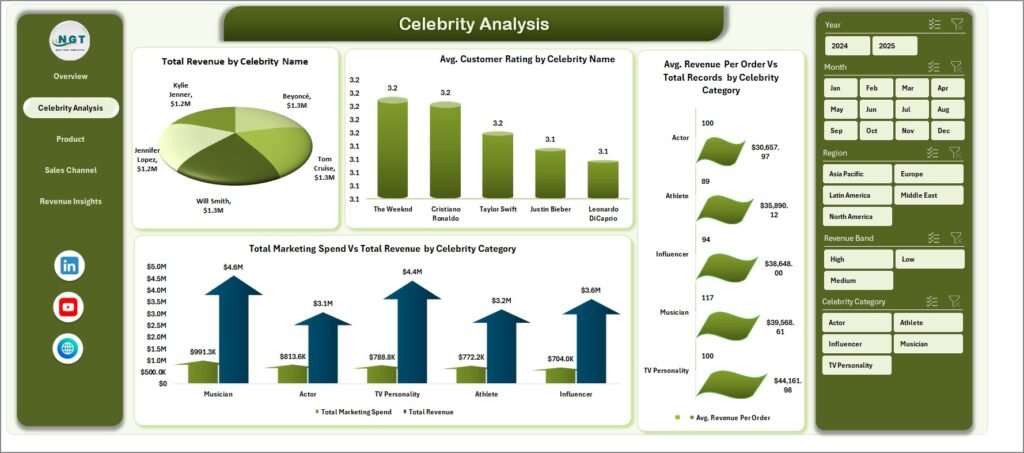
This page focuses on analyzing individual celebrity performance.
🔹 Charts Included
📌 Total Revenue by Celebrity Name
This chart shows which celebrity generates the highest revenue.
📌 Average Customer Rating by Celebrity Name
This helps you understand customer satisfaction levels for each celebrity’s merchandise.
📌 Avg Revenue Per Order vs Total Records
This comparison reveals how efficiently each celebrity converts orders into revenue.
📌 Total Marketing Spend vs Total Revenue
This chart shows whether marketing efforts for each celebrity deliver good returns.
🔹 Why This Page Matters?
Because it helps you:
- Identify top-performing celebrities
- Improve marketing strategies
- Focus on high-value partnerships
3. Product Performance – Which Products Sell the Most? 🛍️
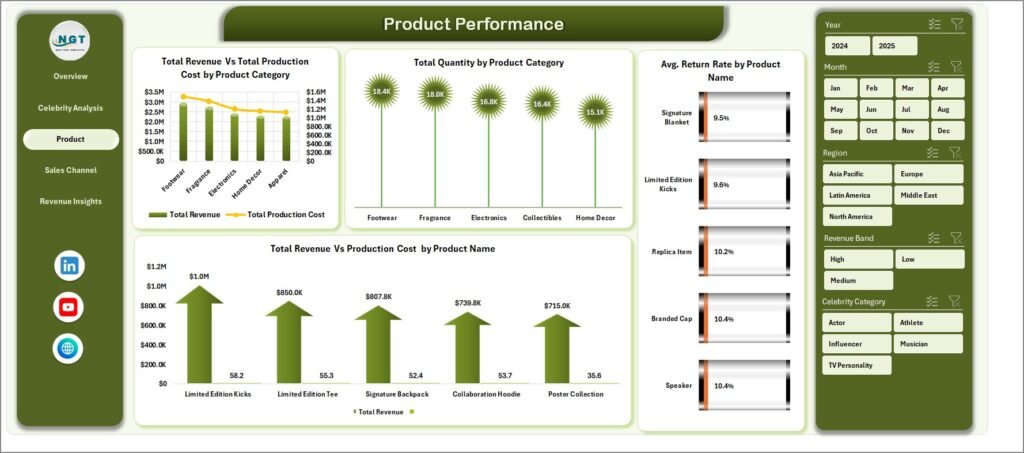
This page helps you evaluate product-level performance.
🔹 Charts Included
📌 Total Revenue vs Total Production Cost by Product Category
This chart shows profitability across product categories.
📌 Total Quantity by Product Category
It helps you identify the most popular product categories.
📌 Average Return Rate by Product Category
This highlights which products have higher return rates, allowing you to fix issues.
📌 Total Revenue by Product Name
This chart identifies top-selling individual products.
🔹 Key Insights You Can Get
- Best-selling product categories
- High-return products
- Profitability comparison
- Product demand trends
4. Sales Channel Analysis – Where Do Your Sales Come From? 🌐
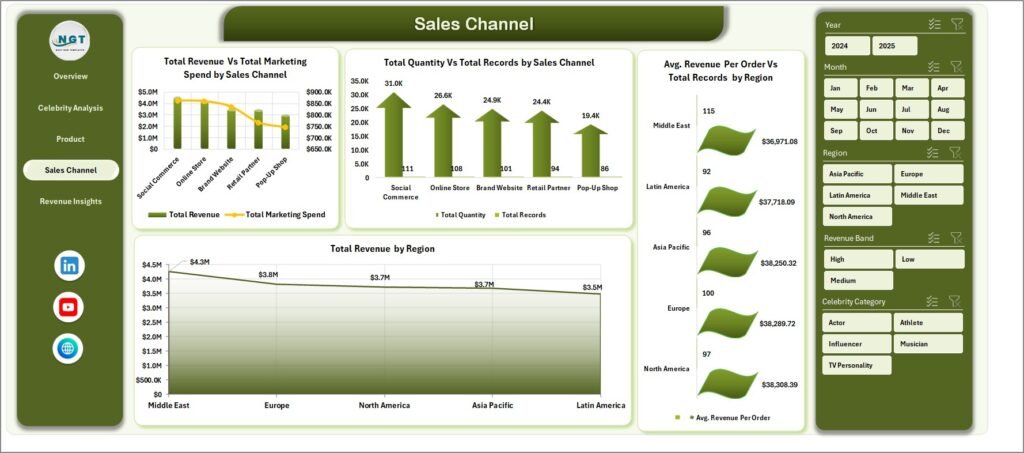
This page focuses on sales performance across different channels.
🔹 Charts Included
📌 Total Revenue vs Marketing Spend by Sales Channel
This helps you evaluate the efficiency of each sales channel.
📌 Total Quantity vs Total Records by Sales Channel
This shows how different channels contribute to total sales volume.
📌 Avg Revenue Per Order vs Total Records by Region
This chart reveals how different regions perform in terms of revenue efficiency.
📌 Total Revenue by Region
This visual helps you identify top-performing regions.
🔹 Why This Page is Important?
Because it allows you to:
- Optimize sales channels
- Increase ROI on marketing
- Focus on high-performing regions
- Click to Purchases Celebrity Merchandising Dashboard in Excel
5. Revenue Insights – What Trends Can You Identify? 📈
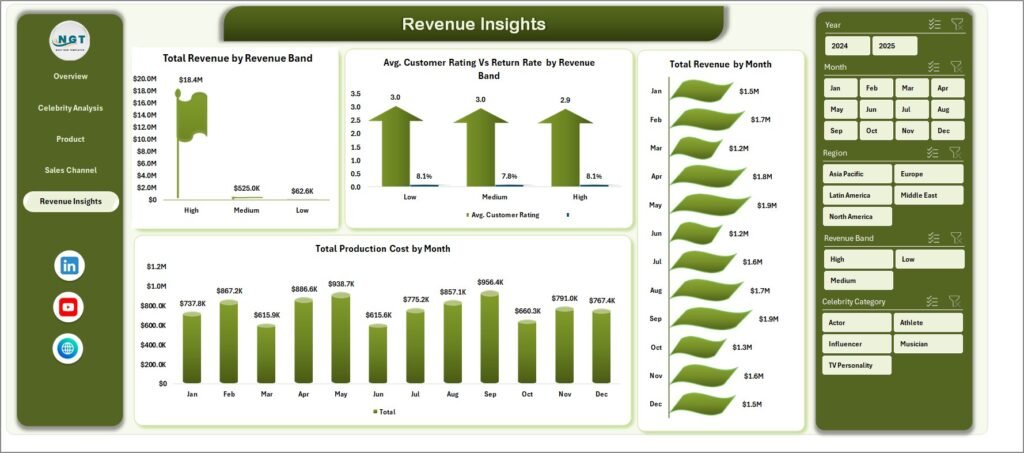
This page provides deeper insights into revenue trends.
🔹 Charts Included
📌 Total Revenue by Revenue Band
This chart groups revenue into different ranges to show distribution.
📌 Avg Customer Rating vs Return Rate by Revenue Band
This helps you understand how customer satisfaction impacts returns.
📌 Total Revenue by Month
This shows monthly revenue trends and seasonality.
📌 Total Product Cost by Month
This helps you track production costs over time.
🔹 Key Benefits of This Page
- Identify seasonal trends
- Track cost vs revenue
- Improve forecasting
- Optimize pricing strategies
How Does This Dashboard Work? ⚙️
The dashboard works using structured data and Excel features.
🔹 Data Sheet
The data sheet stores all raw data, including:
- Celebrity Name
- Product Category
- Sales Channel
- Revenue
- Quantity
- Marketing Spend
- Customer Ratings
🔹 Support Sheet
The support sheet helps in:
- Creating pivot tables
- Storing calculations
- Managing backend logic
- Click to Purchases Celebrity Merchandising Dashboard in Excel
🔹 Interactive Features
- Slicers for filtering
- Pivot charts for analysis
- Dynamic formulas
- Conditional formatting
Therefore, the dashboard updates automatically when you refresh the data.
Advantages of Celebrity Merchandising Dashboard in Excel ✅
Using this dashboard offers several benefits.
✔️ Easy Data Visualization
You can convert complex data into simple charts and insights.
✔️ Faster Decision Making
You can quickly analyze trends and take action.
✔️ Improved Marketing ROI
You can track marketing spend vs revenue effectively.
✔️ Better Celebrity Performance Tracking
You can identify top-performing celebrities easily.
✔️ Centralized Data Management
You can manage all data in one place.
✔️ User-Friendly Interface
Even beginners can use this dashboard without difficulty.
Best Practices for Celebrity Merchandising Dashboard 📌
Click to Purchases Celebrity Merchandising Dashboard in Excel
To get the best results, you should follow these best practices.
✔️ Keep Data Clean and Updated
Always maintain accurate and up-to-date data.
✔️ Use Consistent Naming
Ensure consistency in celebrity names and product categories.
✔️ Monitor KPIs Regularly
Check KPI cards frequently to track performance.
✔️ Use Filters Effectively
Apply slicers to explore deeper insights.
✔️ Optimize Marketing Spend
Focus on high-performing channels and regions.
✔️ Analyze Trends Monthly
Review monthly data to identify patterns and seasonality.
How Can Businesses Use This Dashboard? 💼
Different businesses can use this dashboard effectively.
🔹 Merchandise Stores
Track product sales and revenue.
🔹 Celebrity Management Agencies
Analyze celebrity performance and partnerships.
🔹 E-commerce Platforms
Monitor sales channels and customer behavior.
🔹 Marketing Teams
Evaluate campaign performance and ROI.
Conclusion 🎯
The Celebrity Merchandising Dashboard in Excel is a powerful tool that simplifies data analysis and improves business decisions.
It helps you track revenue, analyze celebrity performance, monitor product trends, and optimize marketing strategies. Moreover, it provides a complete view of your merchandising business in one place.
If you want to save time, reduce errors, and boost profitability, this dashboard is a must-have solution.
Frequently Asked Questions (FAQs) ❓
1. What is a Celebrity Merchandising Dashboard in Excel?
It is an interactive tool that helps track and analyze merchandise sales related to celebrities using charts, KPIs, and filters.
2. Can beginners use this dashboard?
Yes, the dashboard is user-friendly and easy to use, even for beginners.
3. What type of data is required?
You need data such as revenue, product category, celebrity name, sales channel, quantity, and customer ratings.
4. Can I customize the dashboard?
Yes, you can modify charts, KPIs, and filters based on your business needs.
5. How often should I update the data?
You should update the data regularly, preferably daily or weekly, for accurate insights.
6. Does this dashboard work without internet?
Yes, since it is built in Excel, it works offline.
7. Can I use this dashboard for other industries?
Yes, you can customize it for other industries like retail, fashion, or e-commerce.
Visit our YouTube channel to learn step-by-step video tutorials
Click to Purchases Celebrity Merchandising Dashboard in Excel