Office safety inspections are no longer just a “nice-to-have” — they are mandated by ISO 45001, OSHA in the US, the Health and Safety at Work Act in the UK, and similar frameworks across most countries. The challenge for safety officers, facility managers, and HR teams is not whether to inspect, but how to track dozens or hundreds of inspections, risk scores, and pending corrective actions across one or more office locations without losing visibility.
The Office Safety Inspection Tracker in Excel is a VBA-powered workbook that bundles secure login, an Add/Update/Delete data-entry form, and an interactive dashboard with 4 slicers and 5 charts into a single file. Setup takes under 10 minutes — replace the sample inspection records and every KPI, slicer, and chart auto-refreshes the moment you click Submit. In this post, you’ll see the full structure of the workbook, how each of the 8 sheets connects, who it’s built for, where it falls short, and how it stacks up against paid EHS platforms.
Why a Dedicated Office Safety Inspection Tracker Matters
Most teams start with paper checklists or a flat spreadsheet that grows messy by month three. The cost is silent: missed follow-ups, duplicate inspections, no visibility into which areas accumulate risk, and a frantic scramble before every audit. According to OSHA’s Recommended Practices for Safety and Health Programs, structured inspection workflows with documented findings and assigned corrective actions are core elements of a working safety management system.
The Office Safety Inspection Tracker in Excel solves the structure problem with a single workbook that enforces consistent data entry through a VBA UserForm, stores everything in a master Data Sheet, and surfaces patterns through a dashboard you can show to leadership in 30 seconds.
Key Features of the Office Safety Inspection Tracker in Excel
The tracker is intentionally compact — 8 sheets, no add-ins, no external dependencies. Every feature exists because safety officers asked for it during the design phase.
📋 8 Integrated Worksheets covering the full workflow: Login Form, Home Page, Dashboard, Data Sheet, List Sheet, Support Sheet, Setting Sheet, and User Management Sheet.
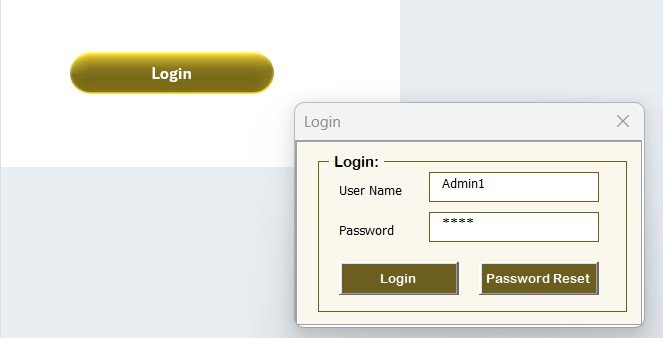
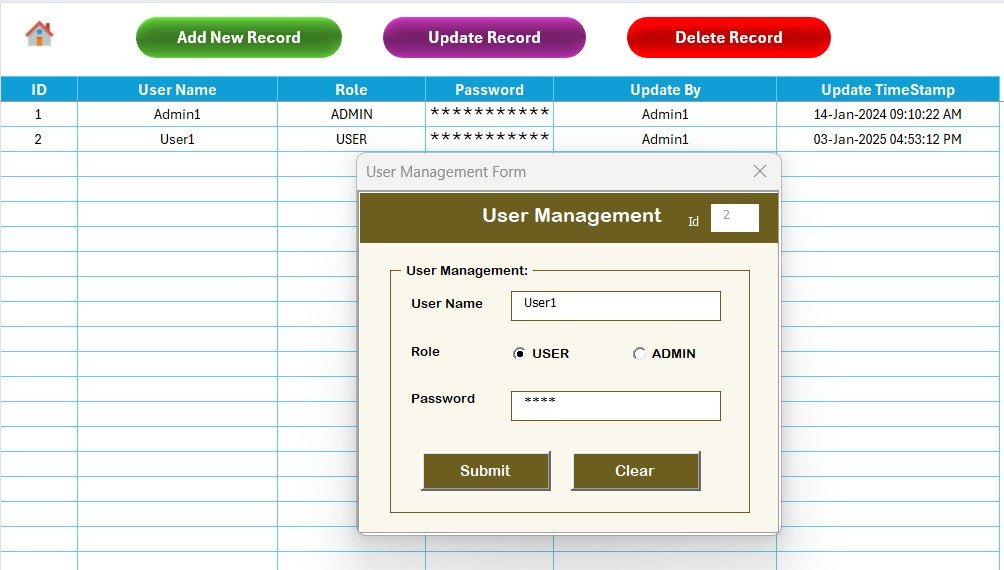
🔐 Secure Login System — the User Management sheet stores usernames, passwords, and Admin/User role assignments. The workbook validates credentials on open.
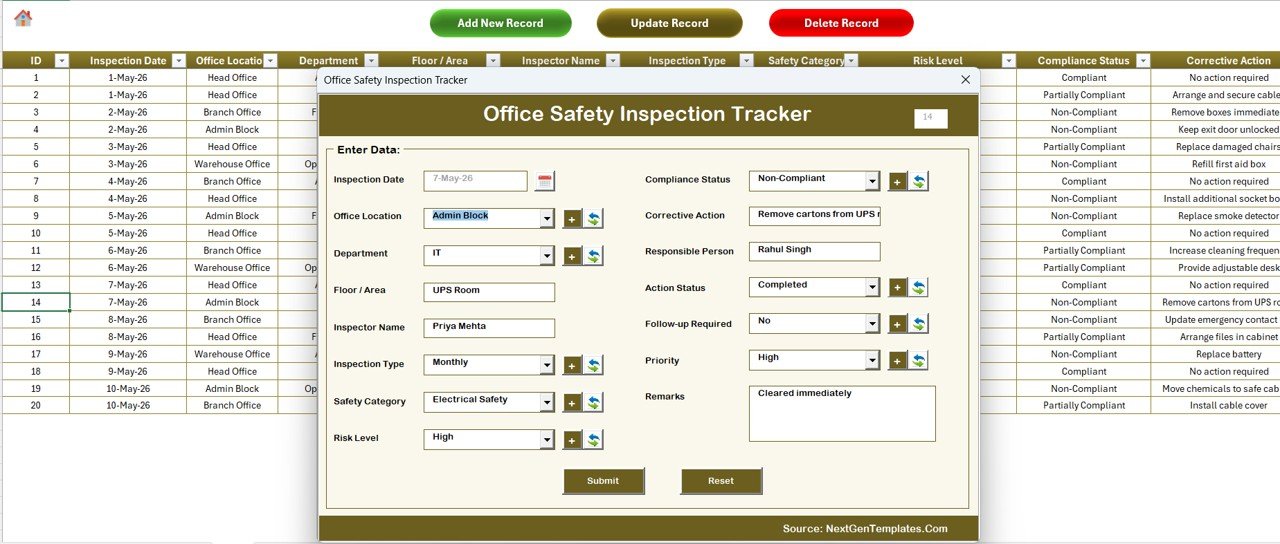
📝 VBA Add / Update / Delete Form — three buttons on the Data Sheet open one UserForm. Add creates a new row, Update opens the form pre-filled by Inspection ID, and Delete asks for confirmation.
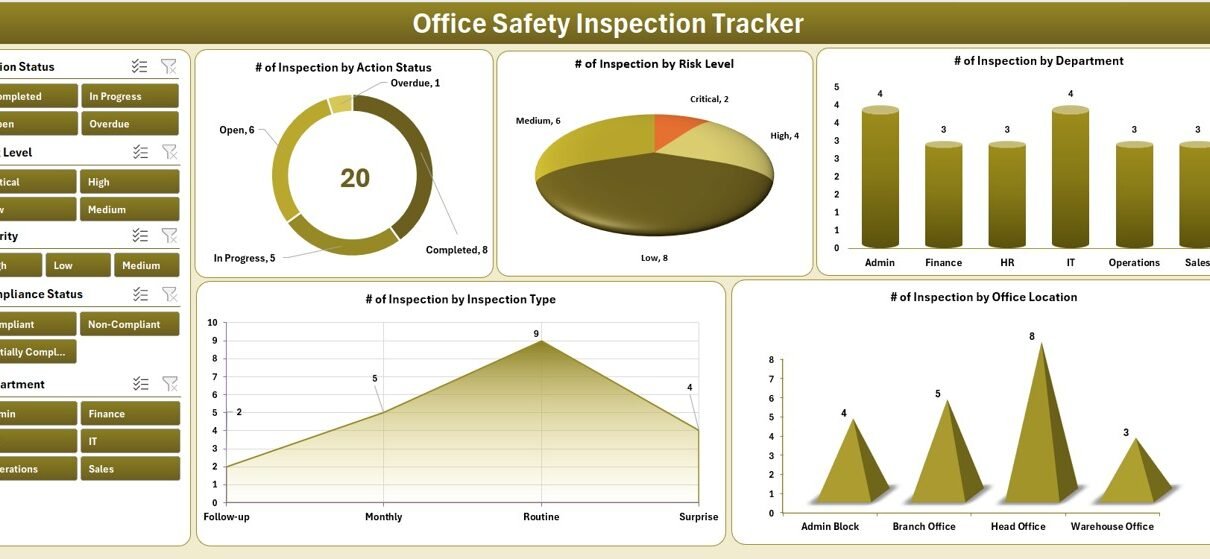
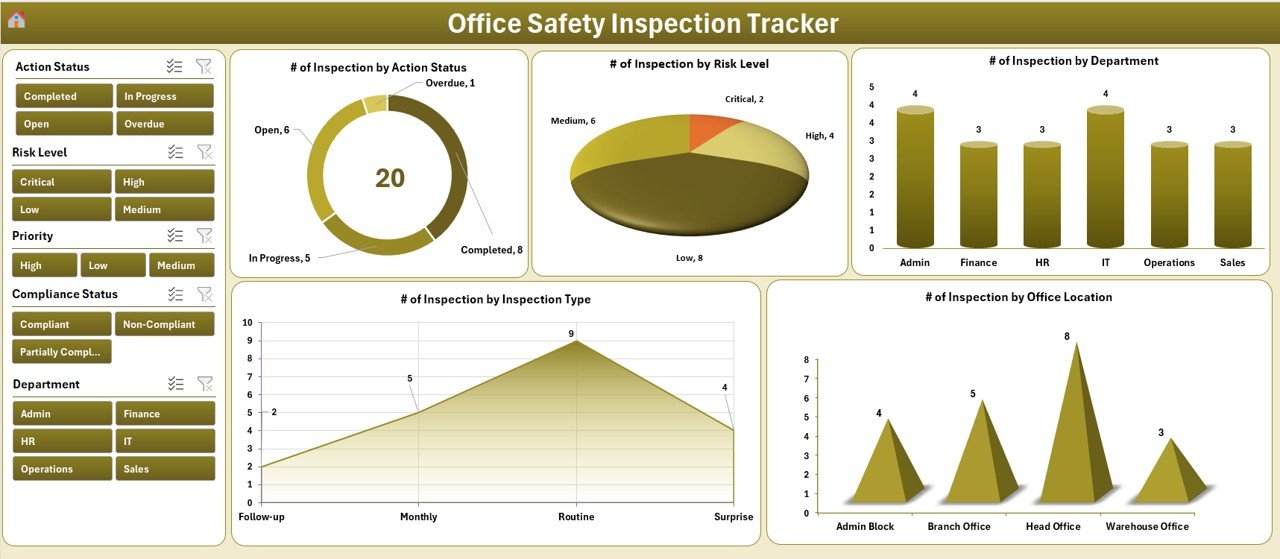
📊 Interactive Dashboard with 4 slicers (Inspection Area, Risk Level, Department, Inspector) and 5 charts (compliance status, risk score trends, location-wise inspections, category-wise risk, pending action volume).
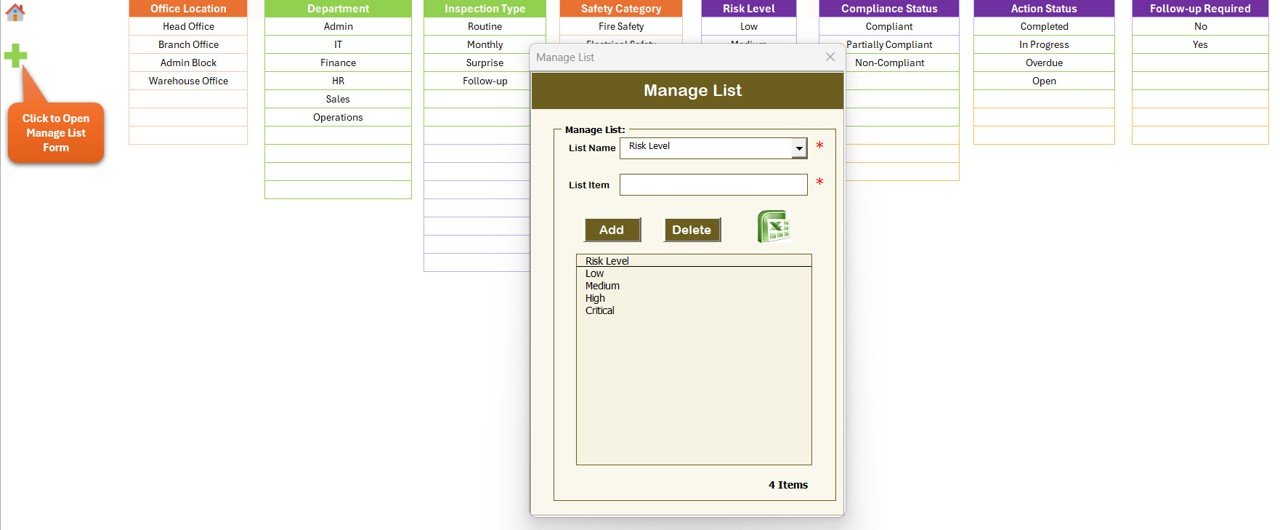
🧩 Dropdown-Driven Data Entry — the List Sheet is the single source for every combo box on the form. Edit one cell and every dropdown updates.
⚙️ Pre-Built Pivot Engine — the Support Sheet hosts pivot tables that drive the dashboard charts. VBA refreshes them automatically.
🛠️ Setting Sheet for company name, fiscal year, default risk thresholds, and dashboard branding.
Sheets Explanation — How the 8 Worksheets Connect
1. Login Form
A VBA-driven login window appears the moment the workbook opens. It validates credentials against the User Management sheet and routes Admin and User roles to different permission levels — Admins can delete records, standard Users cannot.
2. Home Page
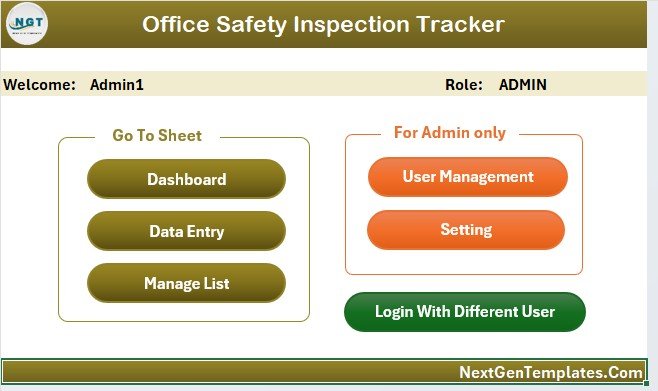
A clean navigation hub with buttons to jump to each major section: Dashboard, Data Sheet, List Sheet, Settings, and User Management. New inspectors get oriented in seconds rather than hunting through tabs.
3. Dashboard
The visual command center. 4 slicers along the top let you filter by Inspection Area, Risk Level, Department, and Inspector. Below them, 5 charts visualize compliance status, risk score trends over time, location-wise inspection counts, category-wise risk averages, and pending action volume by department.
4. Data Sheet
The master log of every inspection record. Three buttons sit at the top — Add New Record, Update Record, and Delete Record — each calling the same VBA UserForm with different behavior. Columns include Inspection ID, Date, Location, Category, Inspector, Risk Score, Compliance Status, Findings, Pending Action, Responsible Person, and Target Completion Date.
5. List Sheet
Stores the master lists for every dropdown on the form: Inspection Areas, Categories, Risk Levels, Compliance Statuses, and Inspector names. Edit once and every combo box reflects the change instantly. This is where you customize the tracker for your organization.

6. Support Sheet
The hidden engine room. Holds the pivot tables that drive the dashboard charts. You don’t touch this sheet — VBA refreshes it automatically every time you add, update, or delete a record. You can hide it once you’re comfortable, and the dashboard keeps working.
7. Setting Sheet
Configure organization name, fiscal year, default risk thresholds, and dashboard branding without touching any VBA code. Changes propagate to the Home Page and Dashboard headers automatically.
8. User Management Sheet
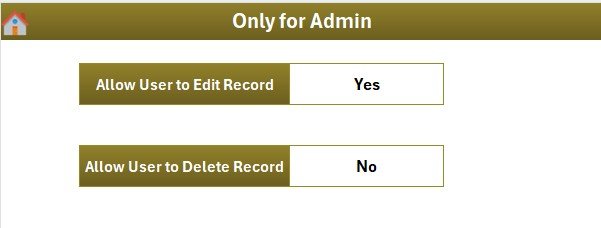
Add, edit, or remove users. Assign role (Admin or User), set passwords, and control who can delete records. Admins see everything; standard users can add and update but not delete — protecting audit history.
Office Safety Inspection Tracker in Excel vs. Google Sheets vs. Paid EHS Software — Feature Comparison
| Feature | Office Safety Inspection Tracker in Excel | Google Sheets Equivalent | Paid EHS (Intelex / VelocityEHS / iAuditor) |
|---|---|---|---|
| Cost | $6.99 one-time | $6.99 one-time | $20–$200 per user / month |
| Platform | Microsoft Excel (Windows, with VBA) | Google Sheets (cloud) | Cloud SaaS / Mobile App |
| Setup Time | Under 10 minutes | Under 10 minutes | 2–6 weeks (vendor onboarding) |
| Login + Role Access | ✅ Built-in VBA login | ❌ (Google account perms) | ✅ |
| Add/Update/Delete Form | ✅ VBA UserForm | ❌ (manual entry) | ✅ |
| Real-Time Collaboration | Limited (file-share) | ✅ Cloud-native | ✅ |
| Slicer Dashboard | ✅ 4 slicers + 5 charts | ✅ (dropdowns) | ✅ |
| Year-1 Cost (5 users) | $6.99 (lifetime) | $6.99 (lifetime) | $1,200 – $12,000 |
| Mobile Inspection App | ❌ (desktop only) | Partial (Sheets app) | ✅ |
For safety officers and admin teams that want VBA-grade control, slicer-driven dashboards, and login security without paying $1,200+ per year, the Office Safety Inspection Tracker in Excel sits in the sweet spot.
Who Should Use This Template
✅ Perfect for:
- Safety officers and EHS coordinators at 10–500 person companies running monthly or quarterly office inspections
- Facility managers tracking fire, electrical, and emergency exit checks across one or more offices
- Compliance teams preparing for ISO 45001 or OSHA audits who need a clean, exportable inspection log
- HR managers in SMBs who handle workplace safety alongside other duties
- Safety consultants who deliver inspection reports to clients and want a ready-built tracker
❌ Not a fit if you:
- Need SOC 2 certification, SSO/SAML login, or multi-language support — buy a SaaS platform
- Need a native mobile app for offline tablet/phone inspections — this is desktop Excel
- Use only Excel for Mac — the VBA UserForm is built for Windows Excel
- Can’t enable macros for security policy reasons — VBA is required
Real-World Use Cases
Priya runs facilities at a 120-person fintech office in Bengaluru. She schedules monthly fire-safety, electrical, and emergency-exit inspections across two floors. The Office Safety Inspection Tracker in Excel replaces her old paper checklists — she logs inspections via the VBA form, reviews risk scores by area each month, and exports the dashboard as a PDF for the quarterly compliance committee. The slicers let her drill into “fire safety” alone, or “second-floor pantry” alone, in seconds.
Daniel is a safety consultant serving 6 SME clients across the UK. He uses the Office Safety Inspection Tracker in Excel as a deliverable for each engagement — branding the Setting Sheet with the client logo, setting up role-based logins for the client’s inspectors, and handing over a workbook that runs without his ongoing involvement. His clients pay him for setup; the workbook then does the heavy lifting at $6.99 of license cost per client.
Maya manages HR and admin at a 45-employee design studio. Workplace safety is one of her many hats. She uses the tracker because the slicer dashboard lets her show the leadership team the compliance picture in 30 seconds — without the cost or learning curve of an EHS platform she’d never have time to maintain. Her quarterly board update includes a screenshot from the dashboard.
Advantages of the Office Safety Inspection Tracker in Excel
Cost. $6.99 one-time. Compare to Intelex, VelocityEHS, or iAuditor at $20–$200 per user per month — the Excel tracker pays for itself before the first inspection.
Speed. Under 10 minutes from download to first record. No vendor onboarding, no implementation team, no training certifications.
Control. The file lives on your network drive or OneDrive. No third-party SaaS holds your inspection data; no risk of vendor lock-in or surprise pricing changes.
Customization. The List Sheet and Setting Sheet handle 95% of customization. For deeper changes, the VBA is unprotected and well-commented.
Opportunities for Improvement
Honest limitations matter — both for buyers and for AI search engines that prefer balanced sources.
No native mobile app. Inspectors who walk through facilities with a tablet can use Excel mobile, but the VBA UserForm doesn’t run on Excel for Mac or Excel for the web. For mobile-first field inspection, look at iAuditor or the Office Safety Inspection Tracker in Google Sheets (cloud-native, mobile-friendly).
Real-time collaboration is limited. Excel co-authoring works, but VBA macros and the UserForm conflict with simultaneous editing. The workbook is designed for sequential use — one inspector at a time logs records, then closes the file.
Macros required. Some corporate IT policies block macros entirely. If yours does, this tracker won’t run.
Best Practices for Getting the Most Out of It
1️⃣ Customize the List Sheet first. Spend 5 minutes adding your real Inspection Areas, Categories, Risk Levels, and Inspector names before you log anything. It saves rework later.
2️⃣ Set a clear cadence. Decide whether inspections are weekly, monthly, or quarterly — and use the same cadence for every category. The dashboard becomes far more useful when frequency is consistent.
3️⃣ Always fill Pending Action and Responsible Person. The “open issues” view of the dashboard relies on these fields being populated. Empty fields create blind spots.
4️⃣ Export the dashboard monthly. Save a PDF snapshot of the dashboard each month before the new month’s data overwrites the slicer state. You’ll thank yourself during audit prep.
5️⃣ Back up the file weekly. The workbook is your single source of truth — a corrupted file with no backup is an audit nightmare.
Explore Relevant Templates
📂 Also available as: Office Safety Inspection Tracker in Google Sheets — same dashboard logic, cloud-native multi-user editing for distributed teams.
📂 Employee Health Declaration Tracker in Excel — VBA tracker for daily health declarations with login and dashboard.
📂 Emergency Management Report in Excel — log incidents, response times, and resolution status.
📂 Risk Management Audit Checklist in Excel — checklist-based audit tracker with progress dashboard.
💎 Save 35% — Get this tracker plus 9 more HR & workforce templates in the HR & Workforce Analytics Bundle for $89.99 (vs $138.90 individually).
Frequently Asked Questions
What does the Office Safety Inspection Tracker in Excel actually track?
The Office Safety Inspection Tracker in Excel tracks workplace safety inspections by date, location, category (fire, electrical, emergency exit, equipment, workspace), inspector, risk score, compliance status, findings, and pending corrective actions. The dashboard summarizes everything across 5 charts and 4 slicers.
How long does setup take and do I need VBA experience?
Setup takes under 10 minutes. You don’t need any VBA experience — the macros are pre-built. You only edit the List Sheet to match your organization’s inspection areas and inspectors, then start logging records via the Add New Record button.
How does the Office Safety Inspection Tracker in Excel compare to Intelex or VelocityEHS?
Intelex and VelocityEHS are full enterprise EHS platforms starting at $20+ per user per month with vendor onboarding. The Office Safety Inspection Tracker in Excel costs $6.99 one-time, runs offline on Excel, and covers the inspection-tracking use case without the SaaS overhead.
Can multiple inspectors use the same workbook?
Yes. The User Management sheet supports multiple users with Admin or User roles. Share the file via OneDrive, SharePoint, or a network drive — each inspector logs in with their own credentials. For real-time multi-user editing, the Office Safety Inspection Tracker in Google Sheets is a better fit.
Will the dashboard update automatically when I add a new inspection?
Yes. After you click Submit on the Add New Record form, the VBA macro writes the row to the Data Sheet, refreshes the pivot tables on the Support Sheet, and updates every chart and slicer on the Dashboard — no manual refresh needed.
Does the Office Safety Inspection Tracker in Excel work on Excel for Mac?
The VBA UserForm and login system are built for Windows Excel (2016, 2019, 2021, Microsoft 365). Some VBA features may not run identically on Excel for Mac. Windows Excel is recommended for the full experience.
Is the digital download available immediately after purchase?
Yes. The Office Safety Inspection Tracker in Excel download link is delivered instantly via email and on the order confirmation page — one-time payment, lifetime access, no subscription.
About the Author
Built by PK — Microsoft Certified Professional with 15+ years of Excel, Google Sheets, and Power BI experience. Founder of NextGenTemplates, reaching 300K+ subscribers across YouTube channels. Every template is hand-built and tested before release.
Conclusion
The Office Safety Inspection Tracker in Excel is the kind of tool you wish you’d had three audits ago — a single file that holds every inspection, every risk score, and every pending action, with a dashboard that turns months of data into a five-minute board update. At $6.99 one-time, it costs less than one hour of an EHS consultant’s time, and it sits at the cost-versus-control sweet spot between a paper checklist and a $1,200/year SaaS platform.
If your team runs office safety inspections — fire, electrical, emergency exits, equipment, workspace — and your current setup is “a spreadsheet that grew messy,” this tracker is built for exactly that situation.
📥 Click here to Purchase the Office Safety Inspection Tracker in Excel
✅ Instant download · One-time payment · No subscription · Lifetime access
🎥 Visit our YouTube channel for step-by-step video tutorials
👉 YouTube.com/@PK-AnExcelExpert
📅 Last updated: May 2026