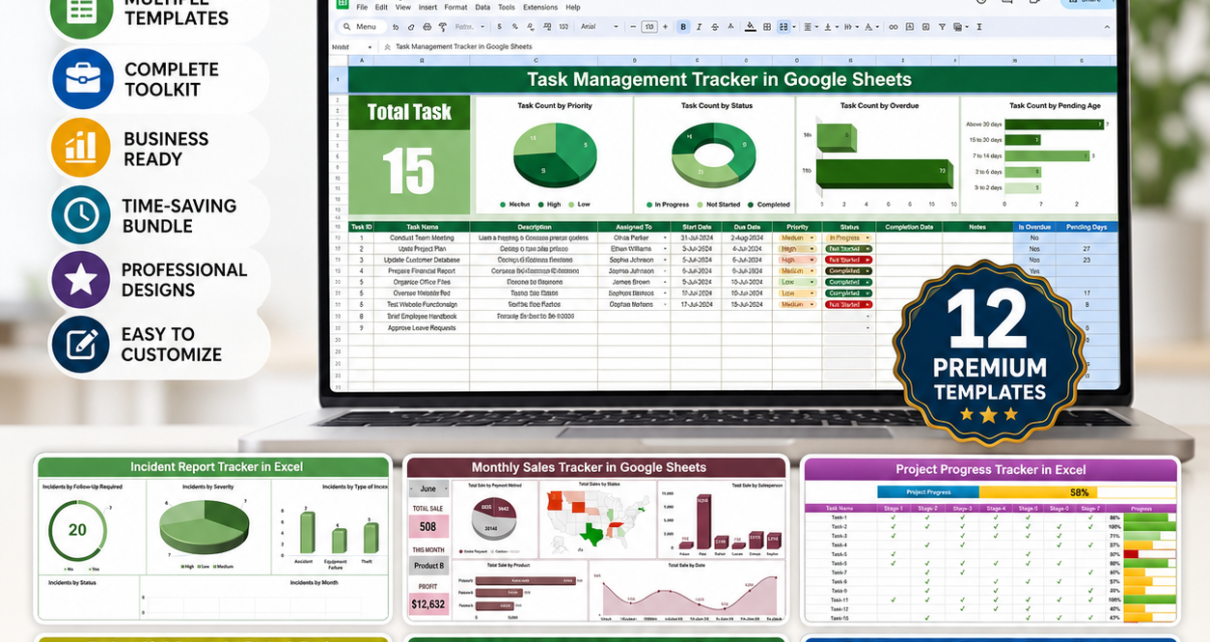
If your tasks live in one spreadsheet, your incidents live in an email thread, and your equipment maintenance schedule lives in someone’s memory, you already know how quickly that patchwork falls apart. The Tracker Toolkit is a 12-template bundle from NextGenTemplates that brings task, incident, sales, project, HR, equipment, purchasing, leave, student, billing, and budget tracking into one consistent set of Excel and Google Sheets files — for 44% less than buying each one separately.Tracker Toolkit
Why a Tracker Bundle Beats Buying One-Off Templates
Most businesses accumulate trackers the same way they accumulate junk drawers — one at a time, whenever a specific problem gets painful enough. HR builds a leave tracker in year one. Operations bolts on an incident log in year two. By year three there are six spreadsheets with six different formatting conventions and nobody remembers which one is current. The Tracker Toolkit sidesteps that by giving every department a matching set of pre-built trackers from day one, all with the same design logic: sample data, dropdown-driven inputs, colour-coded status, and a dashboard summary.Tracker Toolkit
Because the bundle spans both Excel and Google Sheets, teams don’t have to standardise on a single platform to benefit — the HR team can run the Excel-based Employee Disciplinary Action Tracker while Sales works in the Google Sheets Monthly Sales Tracker, and both stay within the same visual and functional standard.Tracker Toolkit
Key Features of the Tracker Toolkit
Every tracker in the bundle ships with a working dashboard, not just a blank data table. Task, project, and sales trackers include KPI cards and completion charts. The incident, disciplinary, and equipment logs include severity or status classification with corrective-action ownership fields. The leave, birthday, billing, and budget trackers include calendar-style or trend-based visual summaries. None of them require you to write a single formula — every calculation, dropdown list, and conditional format is pre-built, so you spend your first ten minutes entering real data instead of debugging VLOOKUPs.Tracker Toolkit
The bundle also covers six departments in a single purchase: Operations (tasks, projects, purchase orders), HR (disciplinary actions, leave, birthdays), Sales & Finance (monthly sales, monthly budget, client billing), Safety (incident reporting), Facilities (equipment maintenance), and Education (student assignments). For a manager who oversees more than one function — a common reality at small and mid-sized businesses — that breadth is the actual value proposition, not just the discount.
What’s Included in the Tracker Toolkit
1. Task Management Tracker in Google Sheets
A real-time collaborative task board with priority tagging, deadline tracking, and a colour-codedTracker Toolkit completion dashboard. View the standalone product →
2. Incident Report Tracker in Excel Tracker Toolkit
Logs workplace incidents with severity classification and corrective-action tracking, structured to align with OSHA 300-style recordkeeping. View the standalone product →
3. Monthly Sales Tracker and Report in Google Sheets
Converts raw transaction data into a monthly performance report with target vs actual, top reps, and top products. View the standalone product →Tracker Toolkit
4. Project Progress Tracker in Excel
Tracks milestone completion with automated calculations and colour-coded progress bars for at-a-glance status. View the standalone product →
5. Employee Disciplinary Action Tracker in Excel
A secure, structured record of HR disciplinary cases, actions taken, and resolution status for compliance purposes. View the standalone product →
6. Equipment Maintenance Log Tracker in Excel
Logs service history, scheduled maintenance, and downtime for machines and equipment in one auditable file. View the standalone product →
7. Student Assignment Tracker in Google Sheets
Tracks assignments, due dates, and grades with real-time progress visuals for teachers and academic coordinators. View the standalone product →
8. Purchase Order Tracker in Google Sheets
Manages vendors, delivery status, and payment tracking for every purchase order in one filterable sheet. View the standalone product →
9. Annual Leave Tracker with Daily & Monthly View in Excel
Displays employee leave on a colour-coded calendar with automated leave-balance summaries. View the standalone product →
10. Birthday and Anniversary Tracker in Google Sheets
A searchable tracker for important personal and team dates, with reminders built into the layout. View the standalone product →
11. Client Billing and Payment Tracker in Google Sheets
Monitors client invoices, payment status, and outstanding balances with visual income trend charts. View the standalone product →
12. Monthly Budget Tracker in Microsoft Excel
Plans and tracks monthly income, expenses, and savings goals with an automated summary dashboard. View the standalone product →
Smart Comparison — Buying Individually vs the Tracker Toolkit
| Tracker | Platform | Individual Price |
|---|---|---|
| Task Management Tracker | Google Sheets | $6.99 |
| Incident Report Tracker | Excel | $6.99 |
| Monthly Sales Tracker and Report | Google Sheets | $6.99 |
| Project Progress Tracker | Excel | $4.99 |
| Employee Disciplinary Action Tracker | Excel | $6.99 |
| Equipment Maintenance Log Tracker | Excel | $6.99 |
| Student Assignment Tracker | Google Sheets | $6.99 |
| Purchase Order Tracker | Google Sheets | $6.99 |
| Annual Leave Tracker | Excel | $6.99 |
| Birthday and Anniversary Tracker | Google Sheets | $6.99 |
| Client Billing and Payment Tracker | Google Sheets | $6.99 |
| Monthly Budget Tracker | Excel | $6.99 |
| Individual Total | $81.88 | |
| Tracker Toolkit Price | $45.99 (Save $35.89 / 44%) |
Advantages of Buying the Bundle
- One purchase, six departments covered — no need to evaluate and buy trackers one at a time as each new need surfaces.
- Consistent design language — every tracker follows the same dropdown-driven, dashboard-first structure, so switching between them has almost no learning curve.
- Lower cost per template — the bundle works out to roughly $3.83 per tracker versus $6.82 buying individually.
- Cross-platform flexibility — Excel trackers for offline, single-owner use; Google Sheets trackers for teams that need live collaboration.
- No recurring cost — a one-time purchase versus the monthly per-user pricing of dedicated SaaS tools for task management, incident logging, or CRM-style tracking.
Best Practices for Rolling Out the Tracker Toolkit
- Start with the trackers solving your loudest problem first. Don’t try to deploy all 12 in week one — pick the one or two that replace the messiest current process.
- Keep the sample data until you’re comfortable with how the dashboard and formulas respond, then clear it and start logging real records.
- Standardise file storage. Keep the Excel trackers on a shared OneDrive/SharePoint folder and the Google Sheets trackers in a shared Drive folder so the whole team can find them.
- Assign an owner per tracker. A tracker nobody is responsible for updating drifts into uselessness within a few months — assign clear ownership from day one.
- Review dashboards on a set cadence — weekly for tasks and incidents, monthly for sales, budget, and leave.
Explore More Templates
Frequently Asked Questions
What do I receive after purchasing the Tracker Toolkit?
You get access to all 12 tracker files — 6 Excel workbooks you can download directly, and 6 Google Sheets templates with a copy link that creates your own editable version in Google Drive.
Do I need both Excel and Google Sheets to use this bundle?
You’ll get the most value having access to both, since 6 templates are built in each platform, but each individual tracker works independently — you can use only the Excel or only the Google Sheets templates if that’s all your team needs.
Is this a subscription?
No. The Tracker Toolkit is a one-time purchase. There are no recurring fees, no per-user charges, and no expiry date on your access to the files.
Can I customise the trackers?
Yes. Every dropdown list, column, colour rule, and chart is fully editable in both the Excel and Google Sheets templates.
Can multiple people use the Google Sheets trackers at once?
Yes — Google Sheets supports real-time multi-user editing natively. Just share the file with your team and set the appropriate permission level.
Is there support if I get stuck setting one up?
Each template includes a purchase note and instructions, and video walkthroughs for many of these trackers are available on our YouTube channels.
Get the Tracker Toolkit Today
12 Trackers · Excel + Google Sheets · Individual Total $81.88
Bundle Price: $45.99
🎥 Subscribe to YouTube.com/@PKAnExcelExpert and YouTube.com/@NeoTechNavigators for template walkthroughs and tutorials.