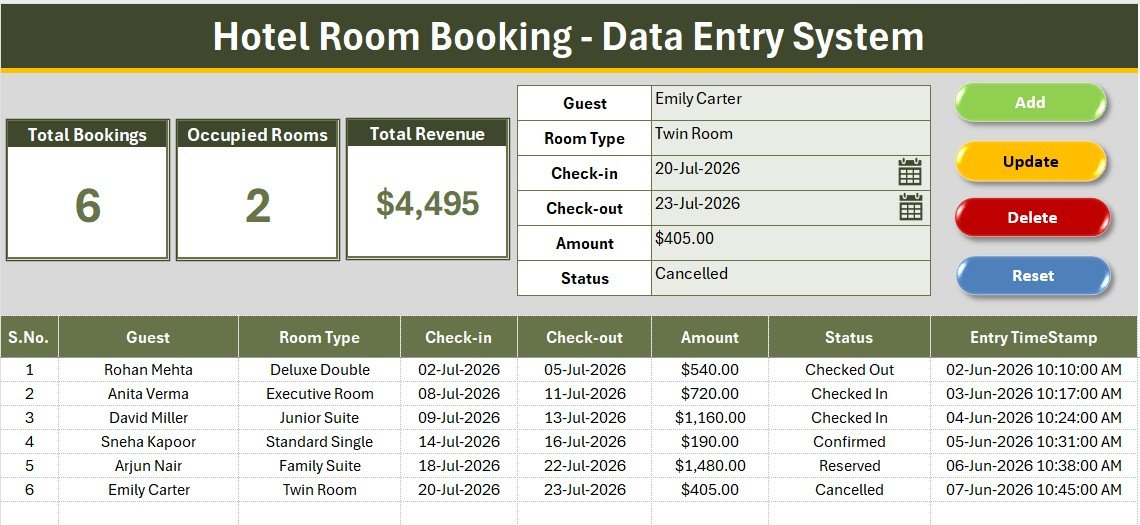
The Hotel Room Booking Data Entry System in Excel captures reservations through a 6-field form, tracks 3 live KPI cards, and ships with 11 pre-loaded room types and 6 booking statuses. Four VBA macros — Add, Update, Delete and Reset — drive every action, and the whole thing installs in under 10 minutes. A comparable cloud property management system costs $50–$150 per property per month; this workbook is a one-time $5.99.
Most small hotels, B&Bs and guest houses don’t fail at booking management because they lack software — they fail because their booking record is a paper register or a spreadsheet where three staff members type “Deluxe Dbl”, “deluxe double” and “DD” into the same column. Once room types drift, occupancy numbers stop meaning anything. The Hotel Room Booking Data Entry System in Excel fixes that at the source: bookings only enter the system through a validated form, so every row is clean, numbered and time-stamped.
Key Features of the Hotel Room Booking Data Entry System in Excel
- Six-field booking form – Guest, Room Type, Check-in, Check-out, Amount and Status. Room Type and Status are dropdown-driven, so nobody types a room category by hand.
- Four VBA macros –
Add_Recordwrites a new booking,Update_Recordedits the selected row,Delete_Recordremoves it after a confirmation prompt, andReset_Formclears the panel. - Three live KPI cards – Total Bookings, Occupied Rooms and Total Revenue recalculate the moment a booking is added, edited or deleted. No pivot refresh, no manual formulas.
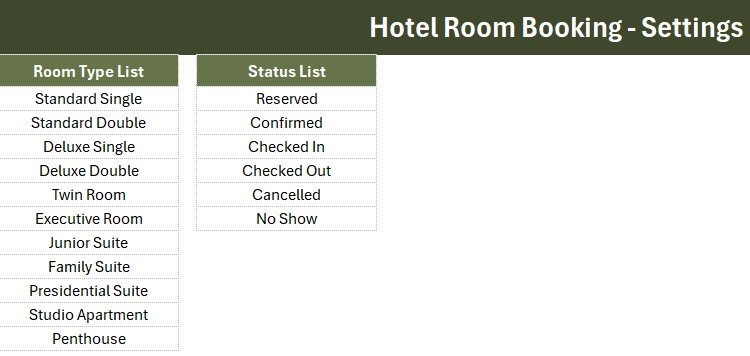
- Eleven room types out of the box – Standard Single, Standard Double, Deluxe Single, Deluxe Double, Twin Room, Executive Room, Junior Suite, Family Suite, Presidential Suite, Studio Apartment and Penthouse.
- Six-stage booking lifecycle – Reserved, Confirmed, Checked In, Checked Out, Cancelled and No Show.
- Auto S.No and Entry TimeStamp – every booking row is sequentially numbered and date-time stamped by the macro, giving you an audit trail.
- Click-to-edit – double-click any booking row and it loads straight back into the form for editing.
The Occupied Rooms card is worth pausing on. It doesn’t count every booking — it counts only bookings whose Status is Checked In. That single design decision is what turns the workbook from a booking log into a genuine occupancy view: at 8am your front desk can see exactly how many rooms are physically full.
Sheets Explanation
Sheet 1: Data Entry Dashboard
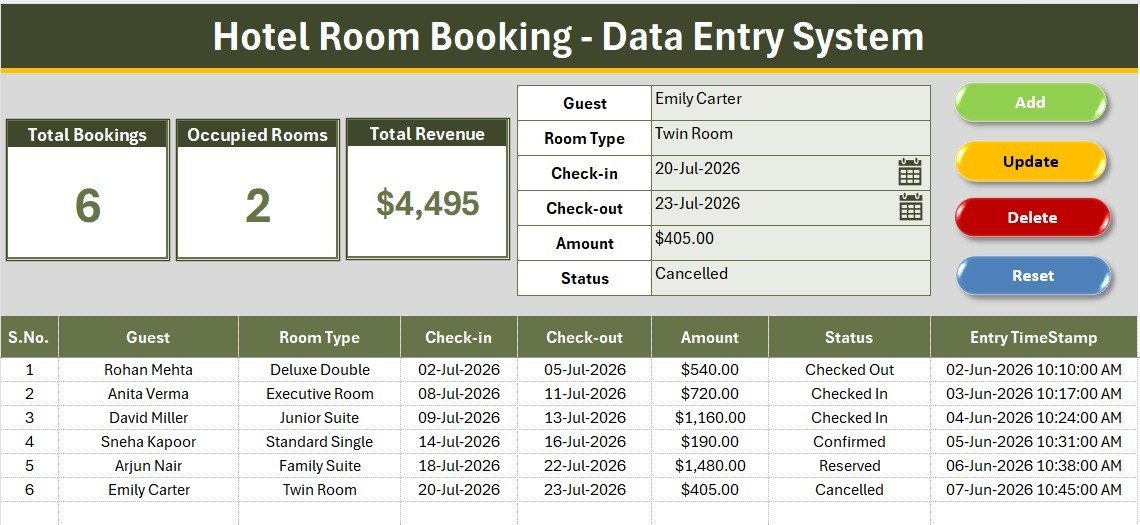
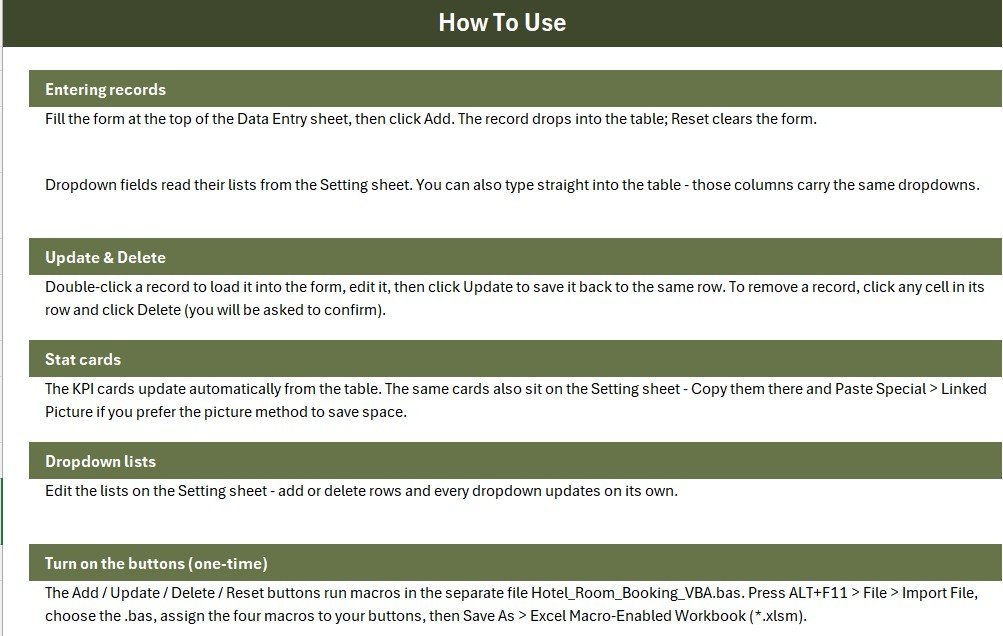
The main working sheet. A gray dashboard panel holds the three KPI cards alongside the six-field booking form, with the Add, Delete, Update and Reset buttons arranged in a 2×2 block. Below the panel sits the bookings table with auto S.No, a currency-formatted Amount column and an Entry TimeStamp column that fills itself.
Sheet 2: Setting Sheet
This is where the two dropdown source lists live — the 11 room types and the 6 booking statuses — connected to the form through named ranges and Excel data validation. Edit a list here and the form dropdown updates immediately — no VBA changes needed. The three KPI cards are duplicated on this sheet as well, so you can copy them into a report as a linked picture.
Sheet 3: Instructions Sheet
A step-by-step activation guide covering the VBA module import, assigning the four macros to the buttons, and saving the workbook as a macro-enabled .xlsm file. A fourth sheet, Get More Templates, links back to related tools on NextGenTemplates.
Hotel Room Booking Data Entry System vs. Google Sheets vs. Cloudbeds / Little Hotelier — Feature Comparison
| Feature | Hotel Room Booking Data Entry System in Excel | Google Sheets Booking Sheet | Cloudbeds / Little Hotelier (PMS) |
|---|---|---|---|
| Cost | $5.99 one-time ✅ | Free, but built by you | $50–$150 / property / month |
| Platform | Excel 2016+ / Microsoft 365 (Windows) | Browser | Cloud SaaS |
| Setup time | Under 10 minutes ✅ | 2–6 hours of building | 1–3 days onboarding |
| Add / Update / Delete form | Built-in VBA buttons ✅ | Manual row editing | ✅ Included |
| Live occupancy & revenue KPIs | 3 cards, auto-recalculating ✅ | Formulas you write yourself | ✅ Included |
| Works offline | ✅ Fully offline | ❌ Needs internet | ❌ Needs internet |
| Real-time team collaboration | ❌ Single-file (share via OneDrive) | ✅ Yes | ✅ Yes |
| Channel manager / OTA sync | ❌ Not included | ❌ Not included | ✅ Included |
| Year-1 cost (single property) | $5.99 ✅ | $0 + your time | $600–$1,800 |
For small hotels, B&Bs and guest houses that want a proper booking form and live occupancy numbers without paying $600+ a year for a PMS, the Hotel Room Booking Data Entry System sits in the sweet spot.
Who Should Use This Template
Perfect for:
- Owners of small hotels, B&Bs, guest houses and homestays with 5–40 rooms
- Front-desk staff who need a clean form instead of typing into raw spreadsheet rows
- Serviced-apartment and hostel operators tracking bookings, occupancy and revenue offline
- Anyone migrating off a paper register or an unstructured shared spreadsheet
Not a fit if:
- You need OTA / channel-manager sync with Booking.com, Expedia or Airbnb — that needs a real PMS
- Several people must edit bookings simultaneously in real time — look at the Web App Based Hotel Booking Management System instead
- You are Mac-only — the VBA macros require Excel on Windows
- You need card payments, invoicing or housekeeping modules built in
Real-World Use Cases
Meera runs a 14-room boutique guest house in Goa. Every walk-in and phone reservation goes into the form. When a guest arrives she switches the status to Checked In, and each morning she reads the Occupied Rooms card to know how many rooms are free before the day starts — without paying $89 a month for Little Hotelier.
Daniel manages a 22-unit serviced-apartment block in Manchester. His two front-desk staff share the workbook over OneDrive and enter every booking through the form, so room types stay standardised across shifts. At month-end he sorts the bookings table by Check-out and reads Total Revenue straight off the KPI card for the owner’s report.
Priya inherited a family hostel that ran on a paper register. She rewrote the Setting sheet with dorm-bed categories, keyed in the last quarter’s bookings, and now has a searchable, time-stamped booking history plus a live occupancy count — inside a single Excel file that keeps working when the hostel Wi-Fi drops.
Advantages of the Hotel Room Booking Data Entry System
- Cost – $5.99 once, versus $600–$1,800 in year one for a cloud PMS. For a property doing 20 bookings a month, that difference is real money.
- Data integrity – dropdown-driven Room Type and Status make dirty data structurally impossible, which is the single biggest reason spreadsheet booking logs go bad.
- Speed – a booking takes about 15 seconds to enter through the form; the KPI cards refresh instantly.
- Offline-first – no internet, no login, no vendor. The file works on a laptop behind the reception desk.
- Ownership – you own the workbook and the VBA. Nothing expires, and no one raises your price next year.
Opportunities for Improvement
Being honest about the limits matters more than overselling. This is a data entry system, not a property management system:
- No OTA integration. Bookings from Booking.com or Airbnb must be keyed in manually.
- No double-booking check. The workbook will happily accept two bookings for the same room type on overlapping dates — it doesn’t hold a room inventory. If you need availability blocking, a calendar-based tool is a better fit.
- Single-user by design. Two people editing the same .xlsm at once will hit file-lock conflicts.
- Windows-only. Form-Control button macros don’t run in Excel for Mac or Excel Online.
- No rate calendar. Amount is entered per booking, so seasonal pricing lives in the user’s head, not the file.
If any of those are dealbreakers, the honest answer is that you’ve outgrown a spreadsheet and should look at a hosted system.
Best Practices
- Customise the Setting sheet first. Delete the room types you don’t have. A dropdown listing a Presidential Suite you don’t own is noise.
- Keep the status discipline. Update Reserved → Confirmed → Checked In → Checked Out as it happens. The Occupied Rooms card is only as truthful as your status column.
- Enter Amount as the total booking value, not the nightly rate — that keeps the Total Revenue KPI meaningful.
- Delete the six sample bookings before you go live, so your first month’s numbers aren’t inflated.
- Back up weekly. Keep a dated copy on OneDrive or Google Drive; a single .xlsm is a single point of failure.
- Graduate to analytics later. Once you have a few hundred bookings, feed the table into the Hotel and Hospitality Revenue Dashboard in Excel for occupancy, ADR and RevPAR trends.
Explore Relevant Templates
- Service Booking Data Entry System in Excel – the same form-and-KPI engine tuned for appointment and service bookings.
- Hotel Chains KPI Dashboard in Excel – multi-property KPI reporting for groups and chains.
- Restaurant Order Data Entry System in Excel – pair it with your F&B outlet.
- Hotel Booking Checklist in Google Sheets – a lightweight front-desk checklist companion.
Also available as: Web App Based Hotel Booking Management System (multi-user, browser-based) and Hotel Hospitality Revenue Dashboard in Google Sheets.
💎 Save 44% — get all 7 hospitality tools in the Hospitality & Restaurant Bundle for $49.99 instead of $88.93.
Frequently Asked Questions
What does the Hotel Room Booking Data Entry System track?
The Hotel Room Booking Data Entry System tracks Guest name, Room Type, Check-in date, Check-out date, Amount and booking Status across three live KPI cards: Total Bookings, Occupied Rooms and Total Revenue. Every booking is auto-numbered and time-stamped on entry.
How long does setup take?
Setup takes under 10 minutes. Import the VBA module via ALT+F11, assign the four macros to the four buttons, save the file as .xlsm, then edit the room-type and status lists on the Setting sheet. The Hotel Room Booking Data Entry System is ready to use immediately after that.
Can I change the room types and booking statuses?
Yes. Both lists live on the Setting sheet and are wired to the form through named ranges. Add, rename or delete any room type or status in the Hotel Room Booking Data Entry System and the form dropdowns update automatically — no VBA editing required.
How does this compare to Cloudbeds or Little Hotelier?
Cloudbeds and Little Hotelier are full property management systems with channel-manager and OTA sync, costing $50–$150 per month. The Hotel Room Booking Data Entry System is a $5.99 one-time Excel tool covering booking capture, occupancy and revenue — ideal for small properties that don’t need OTA integration.
Does it prevent double bookings?
No. The Hotel Room Booking Data Entry System is a booking log, not an availability engine — it does not hold room inventory or block overlapping dates. If you need automatic double-booking prevention, use a calendar-based booking tool or a hosted PMS instead.
Do I need to know VBA to use it?
No. The VBA in the Hotel Room Booking Data Entry System is already written. You import the .bas module once, assign four macros to the buttons, and never touch code again. The Instructions sheet walks through every click.
Which Excel versions are supported?
The Hotel Room Booking Data Entry System works in Excel 2016, 2019, 2021 and Microsoft 365 on Windows. Excel for Mac and Excel Online do not support Form-Control button macros, so Windows Excel is required for the Add, Update, Delete and Reset features.
About the Author
Built by PK — Microsoft Certified Professional with 15+ years of Excel, Google Sheets and Power BI experience. Founder of NextGenTemplates, reaching 300K+ subscribers across YouTube channels. Every template is hand-built and tested before release.
Conclusion
If your booking record is a paper register or a spreadsheet nobody trusts, the fix isn’t a $1,200-a-year subscription — it’s a validated form, a clean table and three numbers that are always right. The Hotel Room Booking Data Entry System in Excel gives you all three in a file you own outright.
🛒 Click here to Purchase the Hotel Room Booking Data Entry System in Excel
✅ Instant download · One-time payment · No subscription · Lifetime access
🎥 For step-by-step video tutorials, visit Youtube.com/@PK-AnExcelExpert
Last updated: July 2026