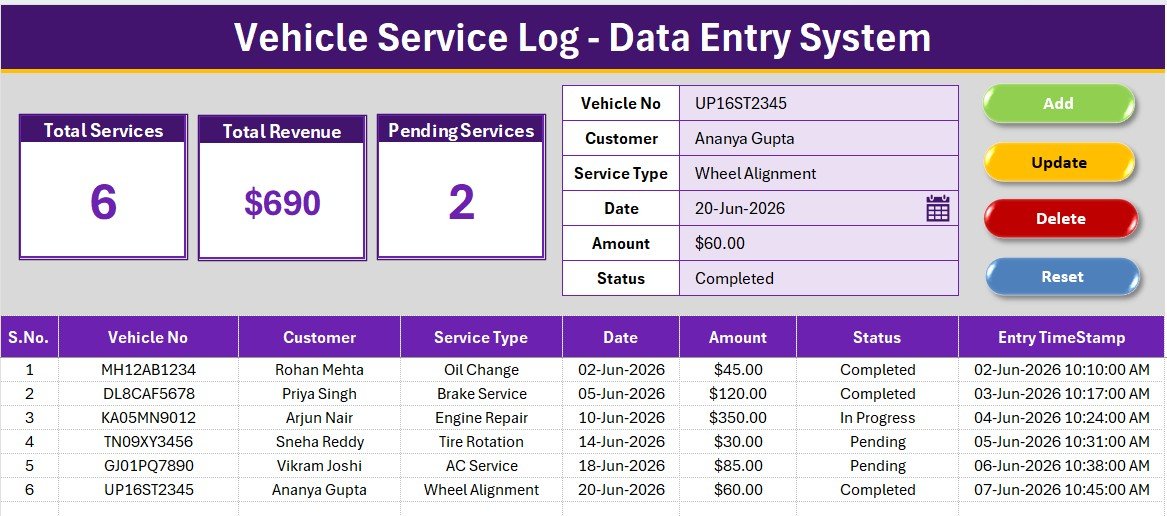
The Vehicle Service Log Data Entry System in Excel logs every job through a 6-field entry form, tracks 3 live KPI cards, and runs on 206 live formulas that recalculate the moment a record is added, updated, or deleted. Four VBA macros — Add, Update, Delete, and Reset — replace manual retyping, and setup takes under 10 minutes.
Independent garages, small vehicle fleets, and part-time mechanics often track service jobs across paper tickets, text messages, and scattered spreadsheets. A vehicle service log data entry system in Excel solves this by giving every job a single, dropdown-driven home — no more hunting for which vehicle came in last Tuesday or how much a brake job actually cost.
Key Features of the Vehicle Service Log Data Entry System in Excel
🔹 Six-Field Service Form — Vehicle No, Customer, Service Type, Date, Amount, and Status. Service Type and Status are dropdown-driven, so every job log stays consistent no matter who’s at the front desk.
🔹 Four VBA Macros — Add_Record, Update_Record, Delete_Record, and Reset_Form handle every action. A double-click loader pulls any row straight back into the form for fast edits.
🔹 Three Live KPI Cards — Total Services, Total Revenue, and Pending Services recalculate instantly from 206 live formulas — no manual refresh, no pivot tables.
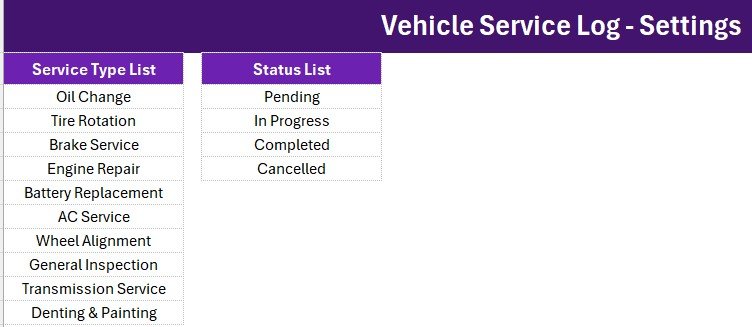
🔹 10 Pre-Loaded Service Types — Oil Change, Tire Rotation, Brake Service, Engine Repair, Battery Replacement, AC Service, Wheel Alignment, General Inspection, Transmission Service, and Denting & Painting, fully editable on the Setting sheet.
🔹 Auto S.No & Entry Timestamp — Every job gets an automatic serial number and timestamp without typing either by hand.
Template Structure — Sheets Explained
Data Entry Dashboard
The main sheet holds the 6-field service form at the top, the 3 KPI cards on a gray dashboard panel, four flat-color Add/Update/Delete/Reset buttons, and the live records table below with auto S.No and Entry Timestamp columns.
Setting Sheet
Holds the Service Type and Status dropdown source lists that power the form’s data validation, plus a duplicated set of the 3 KPI cards for linked-picture reporting elsewhere in the workbook.
Instructions & Get More Templates
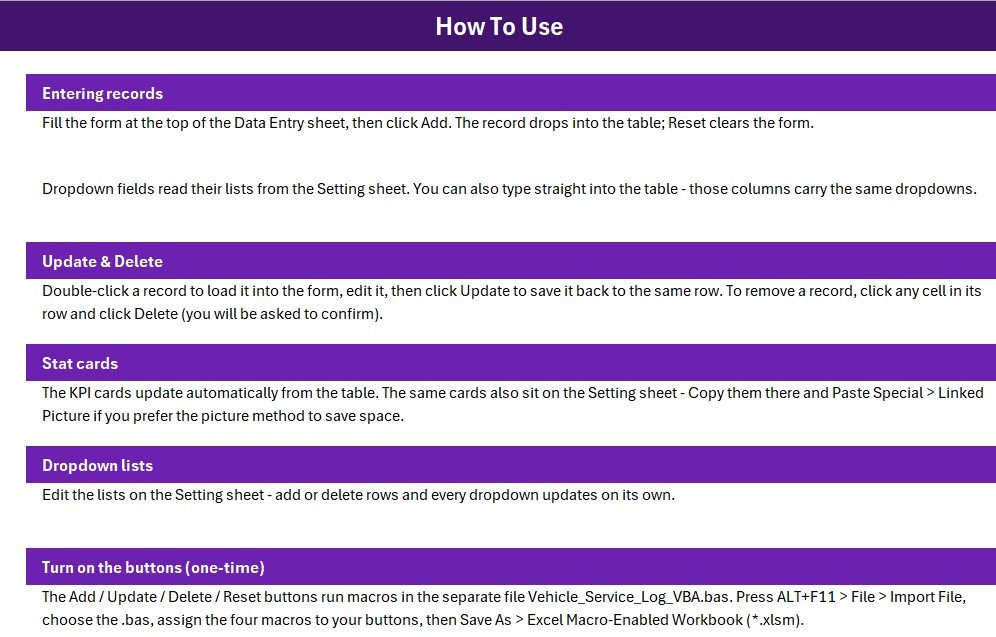
Walks through the one-time VBA activation steps — importing the .bas module, wiring the four macro buttons, and saving as .xlsm — plus a page pointing to more NextGenTemplates data entry systems.
Vehicle Service Log Data Entry System in Excel vs. Google Sheets Equivalent vs. Paid Shop Management Software — Feature Comparison
| Feature | Vehicle Service Log Data Entry System in Excel | Google Sheets Equivalent | Tekmetric / Shop-Ware / Mitchell 1 |
|---|---|---|---|
| Cost | $5.99 one-time | $5 – $12 one-time | $129 – $379 / shop / month |
| Platform | Microsoft Excel (.xlsm) | Google Sheets (cloud) | Cloud SaaS |
| Setup time | Under 10 minutes | 10 – 15 minutes | 2 – 6 weeks (onboarding) |
| Works offline | ✅ Yes | ❌ No (needs internet) | ❌ No (needs internet) |
| Per-user fees | ✅ None | ✅ None (within Workspace) | ❌ $30 – $80 per user / mo |
| Add/Update/Delete via buttons | ✅ 4 VBA macros built-in | ⚠️ Apps Script required | ✅ Built-in |
| Live KPI cards | ✅ 3 cards, 206 formulas | ⚠️ DIY formulas | ✅ Built-in (premium tier) |
| Year-1 cost at 5 users | $5.99 total | ~$10 total | $7,740 – $22,740 |
For independent garages and small fleets that want a clean job log with live stats — without paying $130+ per month for shop management software — the Vehicle Service Log Data Entry System in Excel sits in the sweet spot.
Who Should Use This Template
Perfect for:
- Independent auto repair shops and garages with 1–10 mechanics logging jobs on paper or scattered spreadsheets
- Small vehicle fleet operators who need a simple service history per vehicle
- Front-desk service advisors who need a fast, dropdown-driven form
- Bookkeepers tracking service revenue and outstanding jobs for a small repair business
Not a fit if:
- You run a multi-branch chain needing centralized cloud access for several advisors at once
- You need VIN decoding, parts ordering, or OEM repair information (use Mitchell 1 / ALLDATA)
- You need digital vehicle inspections or text-message customer approvals (use Tekmetric / Shop-Ware)
Real-World Use Cases
Marcus runs a 3-bay independent garage in Phoenix. He logs every job at the front desk as customers drop off their cars, then checks the Pending Services KPI each evening to see which vehicles are still waiting on parts — without paying a monthly shop-management bill.
Priya manages a 6-vehicle delivery fleet for a local bakery. She logs every oil change, tire rotation, and brake job, and the Total Revenue and Total Services cards give her a quick monthly spend snapshot she forwards straight to the owner.
Arjun is a part-time mechanic who also services his neighbours’ cars. He uses the dropdown-driven form to keep a clean paper trail of every job and amount charged — useful for his own records and for customers who want proof of service history.
Advantages of the Vehicle Service Log Data Entry System in Excel
The biggest advantage is speed of entry: dropdowns for Service Type and Status mean the front desk never types a service name from scratch, which keeps every log consistent and searchable. The second advantage is cost — a one-time $5.99 purchase replaces a $130+/month shop-management subscription for shops that don’t need parts ordering or VIN decoding. Third, because the workbook works fully offline, garages in areas with unreliable internet can keep logging jobs without interruption.
Opportunities for Improvement
The system is intentionally single-user and file-based, so it doesn’t support several service advisors editing the same file at once — a cloud-based Google Sheets or web-app version would suit multi-branch teams better. It also doesn’t include VIN decoding, parts inventory, or digital vehicle inspection photos, which dedicated shop-management platforms offer at a much higher price. Buyers who need those features should look at Tekmetric, Shop-Ware, or Mitchell 1 instead.
Best Practices
Keep the Setting sheet’s dropdown lists tidy — add new service types there rather than typing free text into the form. Save a fresh backup copy of the workbook monthly, since it’s a single-file system with no cloud sync. Hide the Setting sheet before sharing the file with anyone outside the front desk, and review the Pending Services KPI at the end of each day to catch jobs that need a follow-up call.
Explore Relevant Templates
🔹 Gym Membership Data Entry System in Excel — same 4-button VBA architecture for member tracking.
🔹 Hotel Room Booking Data Entry System in Excel — same form-plus-KPI pattern for hotel front desks.
🔹 Auto Repair Dashboard in Excel — pairs well once you have enough job history to analyze branch and mechanic performance.
🔹 Vehicle Maintenance Checklist in Google Sheets — a lighter checklist-style option for scheduled maintenance reminders.
Frequently Asked Questions
What does the Vehicle Service Log Data Entry System in Excel track?
The Vehicle Service Log Data Entry System in Excel tracks Vehicle No, Customer, Service Type, Date, Amount, and Status for every job, plus 3 live KPI cards — Total Services, Total Revenue, and Pending Services — that update automatically as records are added.
Do I need VBA or macro experience to use this?
No. You only need to import the included .bas module once via ALT+F11 → File → Import, then assign the four macros to buttons. The Instructions sheet walks through every step, and no coding is required afterward.
How long does setup take?
Setup takes under 10 minutes. Import the VBA module, add four buttons over the Add/Update/Delete/Reset cells, save as .xlsm, and the system is ready to log jobs.
How does this compare to Tekmetric or Shop-Ware?
Tekmetric and Shop-Ware are full shop management systems with VIN decoding and parts ordering, costing $129–$379 per shop per month. The Vehicle Service Log Data Entry System in Excel is a one-time $5.99 job log for shops that just need clean data entry and live KPI cards.
Can I add or change the service types and statuses?
Yes. Both dropdown lists live on the Setting sheet — edit them there and the form’s dropdowns update automatically across the workbook.
Is the file editable, and can I add my shop logo?
Yes. The workbook is fully editable — change the theme color, fonts, KPI labels, or add your shop logo to the Data Entry sheet.
Will I get future updates?
Your purchase includes lifetime access to the version you download. Free walkthroughs and improvements are published on the PK-AnExcelExpert YouTube channel.
About the Author
Built by PK — Microsoft Certified Professional with 15+ years of Excel, Google Sheets, and Power BI experience. Founder of NextGenTemplates, reaching 300K+ subscribers across YouTube channels. Every template is hand-built and tested before release.
Conclusion
The Vehicle Service Log Data Entry System in Excel gives independent garages and small fleets a fast, dropdown-driven way to log every job and see live revenue and pending-work stats — without a monthly software bill. Click here to Purchase the Vehicle Service Log Data Entry System in Excel.
✅ Instant download · One-time payment · No subscription
Last updated: July 2026