If you run IT for a small or mid-sized organisation, you probably wear two hats that rarely fit together. One week you are chasing SLA breaches in the helpdesk queue; the next you are assembling security metrics for a board deck or scrambling for audit evidence. The tooling market answers this with two expensive answers — an ITSM platform and a GRC suite — each billed per user, per month, forever.
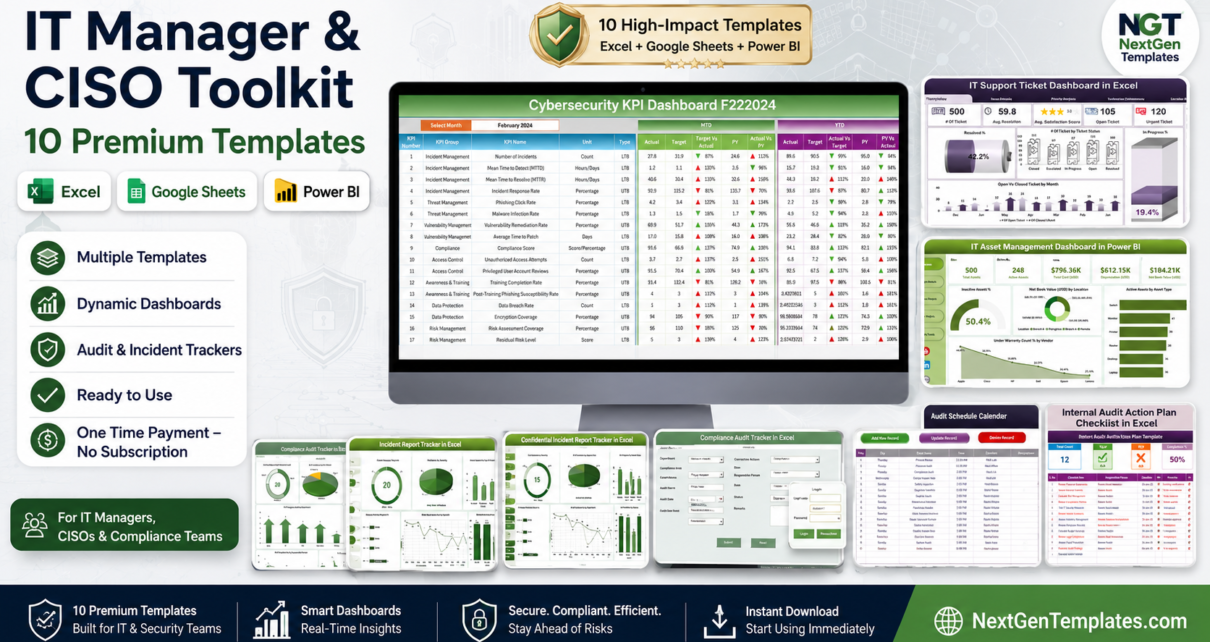
The IT Manager & CISO Toolkit is the cheaper, faster answer: 10 premium templates spanning Excel, Google Sheets and Power BI that cover helpdesk analytics, cybersecurity KPIs, IT asset management, incident reporting, audit scheduling and compliance tracking. Bought separately these ten files come to $114.90. As a bundle they are $79.99 — you save $34.91, a 30% discount, on a one-time purchase with no seats, no renewals and no data leaving your machine.IT Manager & CISO Toolkit
🛡️ IT Manager & CISO Toolkit — 10 Premium Templates
$114.90 → $79.99 (save $34.91)
Why a Template Pack Instead of a Platform?
This is worth answering honestly, because the answer is not always “buy the templates.” Enterprise ITSM and GRC platforms earn their money when you have multiple sites, dedicated security staff, formal ISO 27001 or SOC 2 certification, and a need for automated workflows, role-based field security and audit-proof change logs. If that describes you, buy the platform.
But most IT functions are not that. They are one to five people supporting 50-500 users, running the helpdesk in a ticketing tool that reports badly, tracking assets in a spreadsheet someone built in 2019, and producing security metrics by hand the week before a board meeting. For that team, an ITSM licence at $40-$100 per user per month solves a reporting problem with a procurement problem. A structured template pack solves it for the price of a team lunch.
The other consideration is data residency. Incident reports, especially confidential ones, often contain material you would rather not push into a third-party cloud. Every file in this pack runs locally — Excel on your desktop, Power BI Desktop on your machine, and the Google Sheets file in whichever Workspace tenant you already trust.
Key Features of the IT Manager & CISO Toolkit
Security and Risk Reporting You Can Show a Board
The Cybersecurity KPI Dashboard is the piece most security leads reach for first. It tracks threat detection volume, incidents by severity, mean time to detect and mean time to respond, patch compliance rates and phishing simulation results. The charts refresh as you add rows, which means your quarterly board metric is a copy-paste rather than an afternoon of manual chart-building.
Helpdesk Analytics That Answer the Awkward Questions
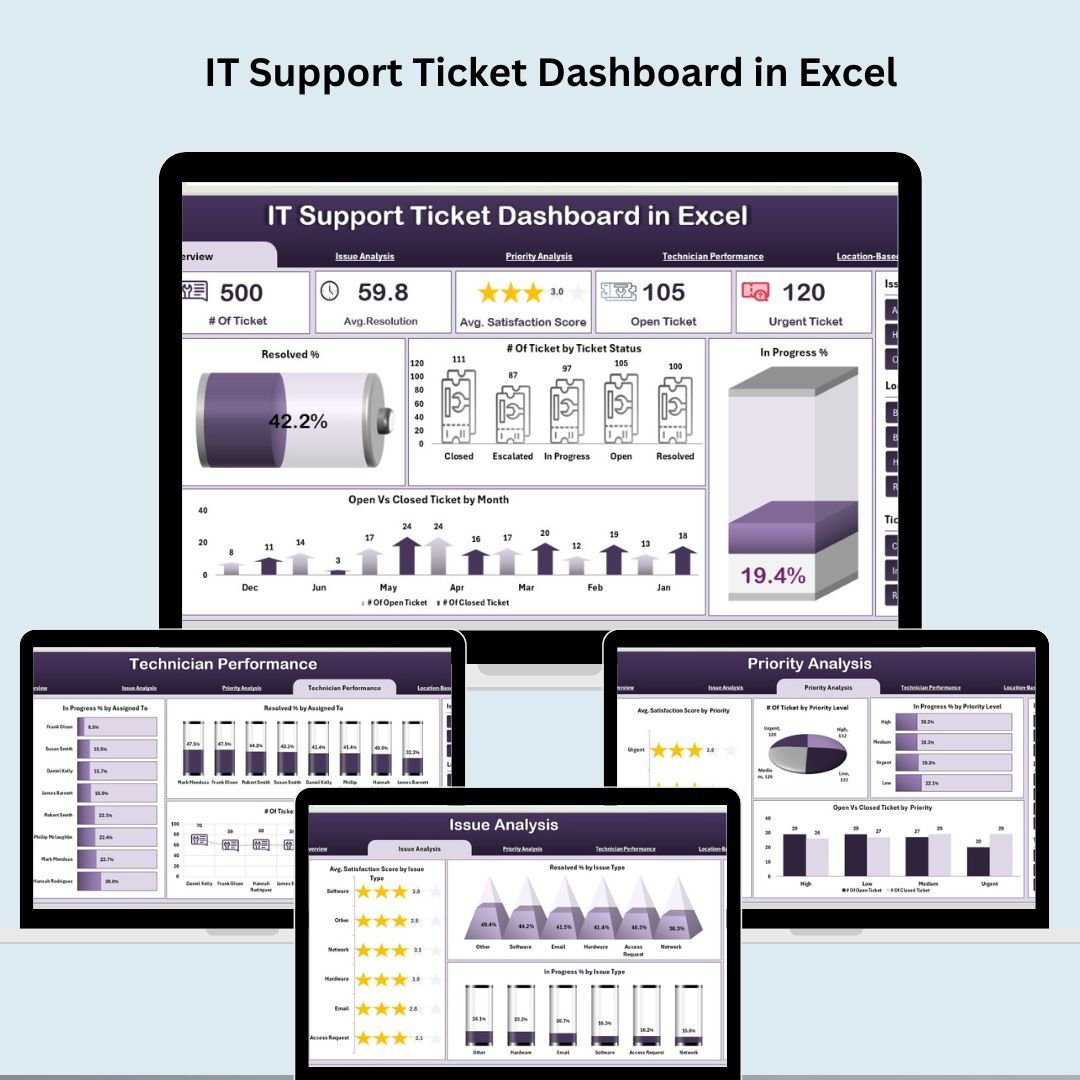
The IT Support Ticket Dashboard covers ticket volume trends, SLA compliance rates, first-response and resolution times, priority distribution and per-technician workload. When someone asks whether you need another headcount, this is the dashboard that answers it with evidence rather than sentiment.
Asset Lifecycle Visibility in Power BI
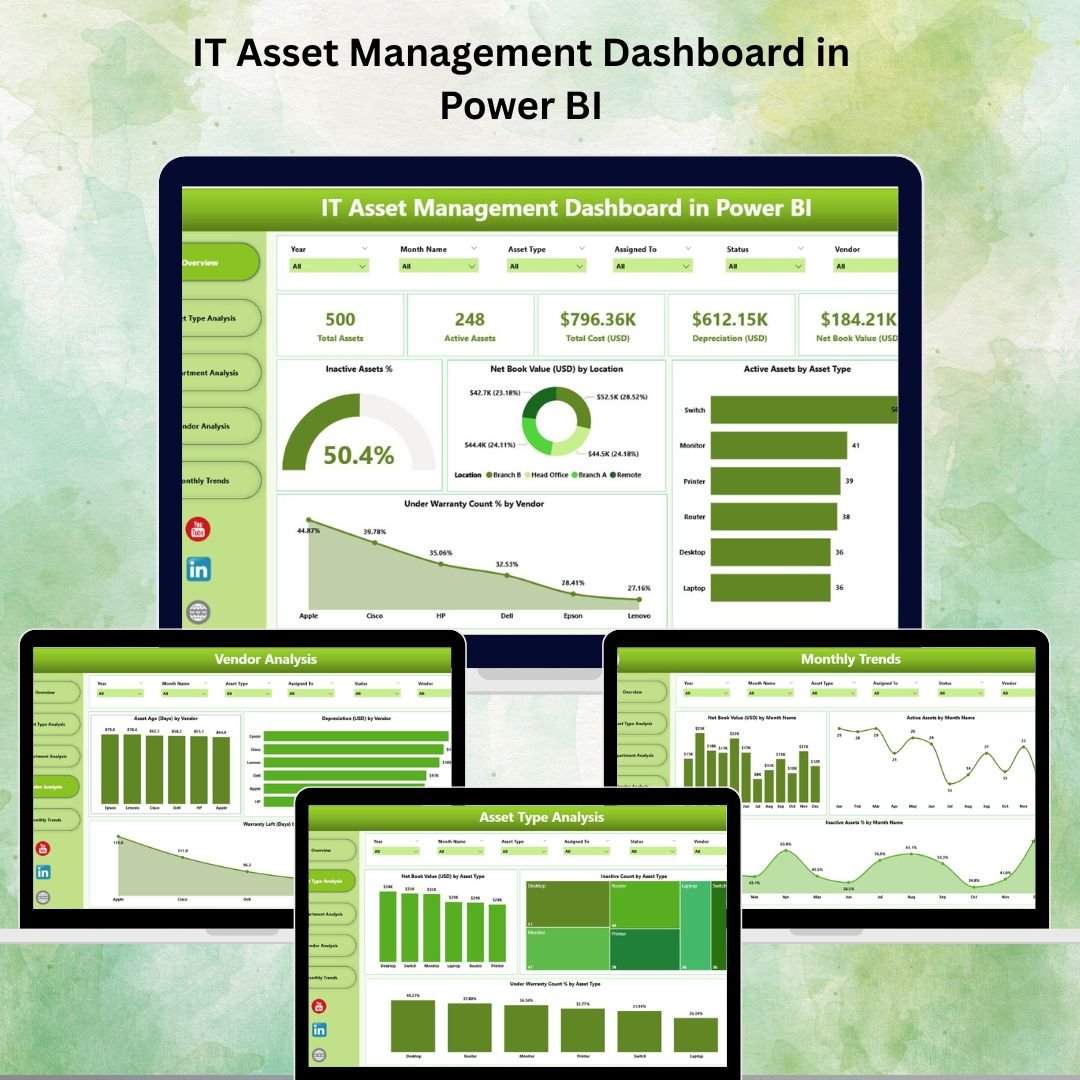
The IT Asset Management Dashboard is a full Power BI report covering asset counts by category and location, warranty and lease expiry alerts, assignment tracking, depreciation schedules and vendor performance. Warranty expiry alone tends to pay for the bundle — most organisations discover they are paying support on decommissioned kit, or running critical hardware with lapsed cover.
A Two-Tier Incident Reporting System
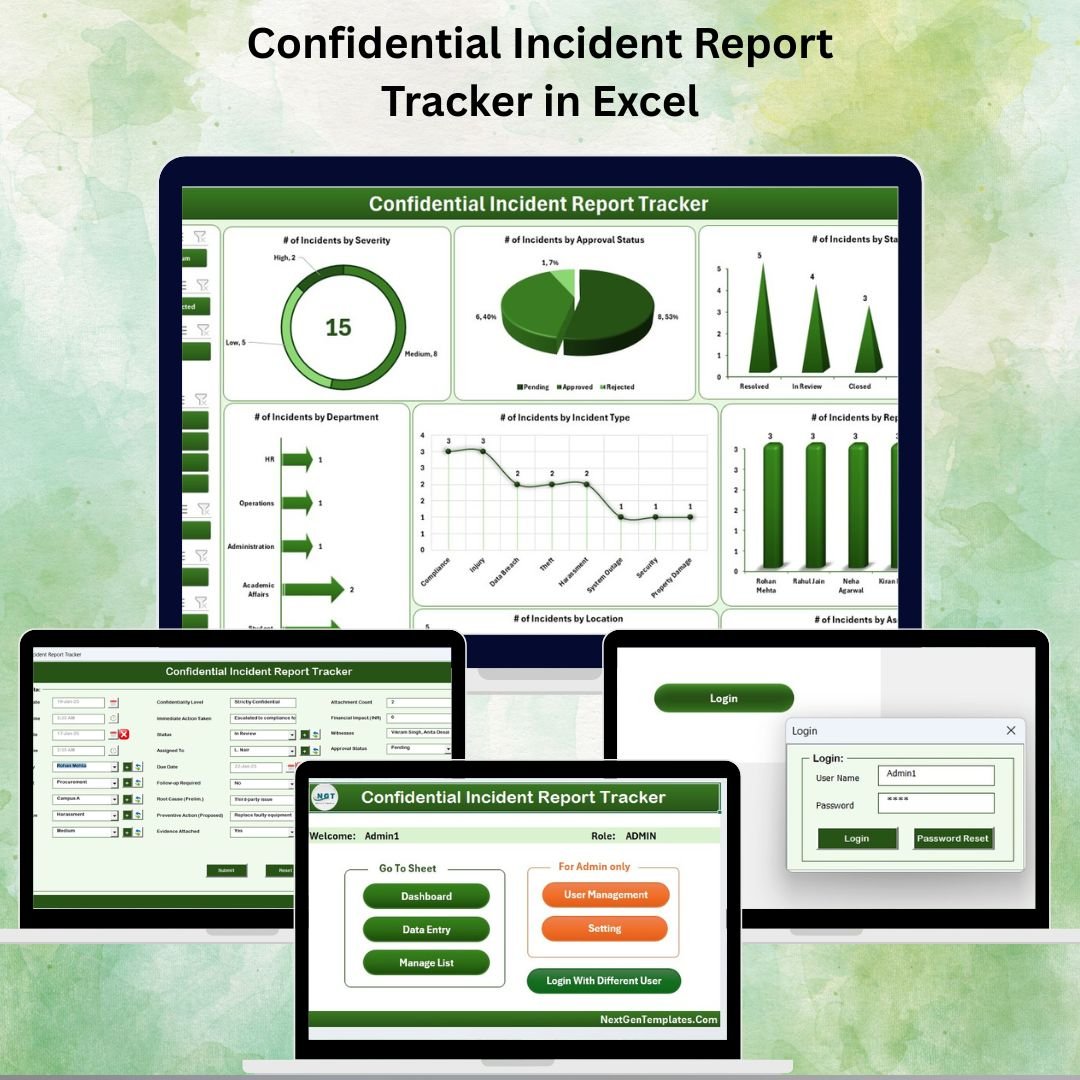
This is the detail that separates the pack from a generic dashboard collection. You get a standard Incident Report Tracker for routine logging, plus a separate Confidential Incident Report Tracker for cases that must not live in a shared workbook — active security investigations, whistleblower reports, HR-sensitive events. Most teams eventually improvise this separation badly. Here it is built in.
A Complete Audit Stack, Not Just a Tracker
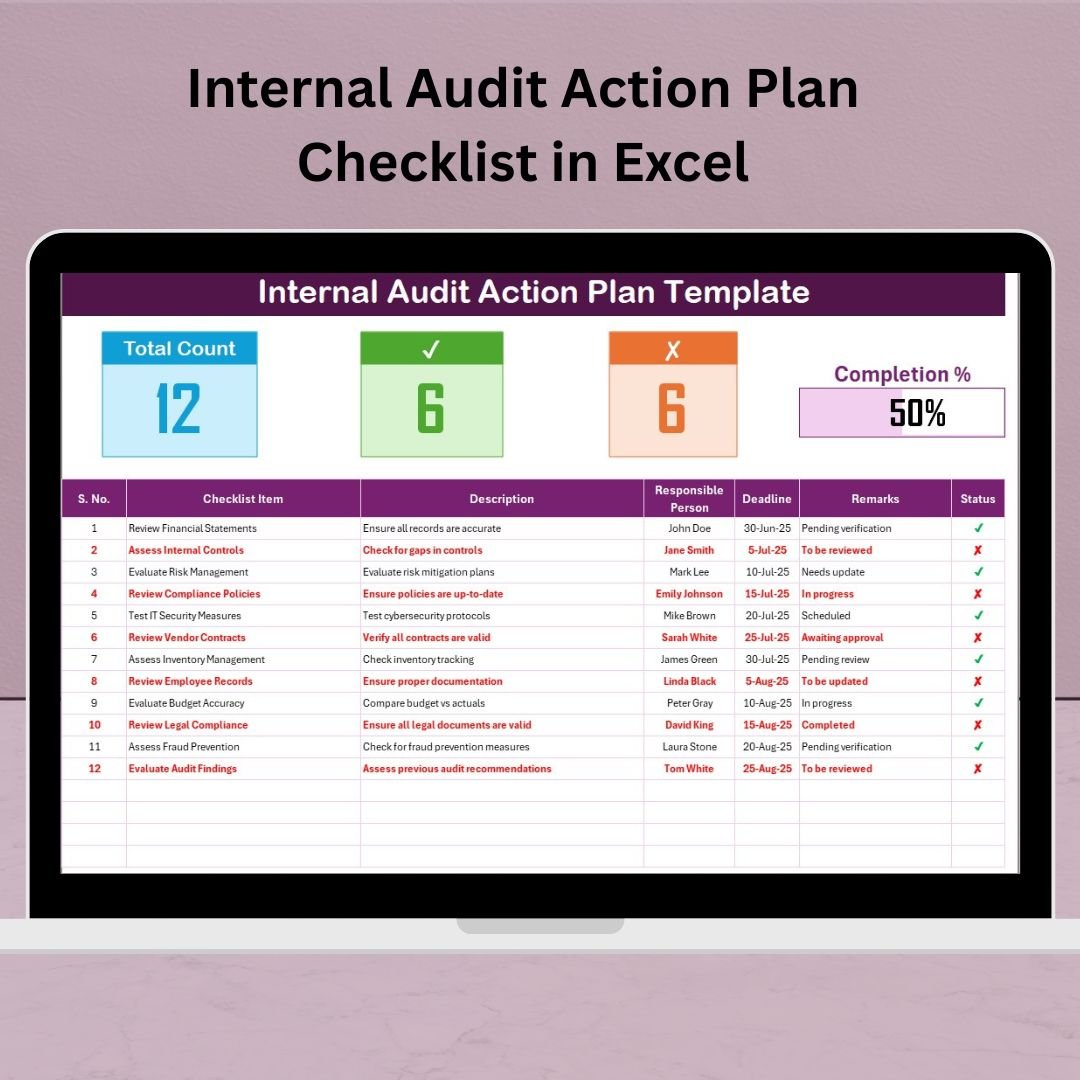
Audit readiness is a cycle, not a document, so the pack covers all three stages: the Audit Schedule Calendar to plan the year and spot coverage gaps, the VBA-driven Compliance Audit Tracker (with secure login and structured entry forms) to run the audit and log findings, and the Internal Audit Action Plan Checklist to make sure every finding is owned, dated and closed before the next cycle begins.
What’s Included in the Bundle
1. Cybersecurity KPI Dashboard in Excel — $12.99
Threat volume, incident severity breakdown, MTTD and MTTR, patch compliance and phishing test results in one auto-refreshing Excel dashboard. View the template →

2. IT Support Ticket Dashboard in Excel — $17.99
Ticket volume, SLA compliance, response and resolution times, priority mix and technician performance. The core helpdesk reporting layer. View the template →
3. IT Asset Management Dashboard in Power BI — $17.99
Hardware and software inventory, warranty and lease expiry, assignment, depreciation and vendor performance in a full Power BI report. View the template →
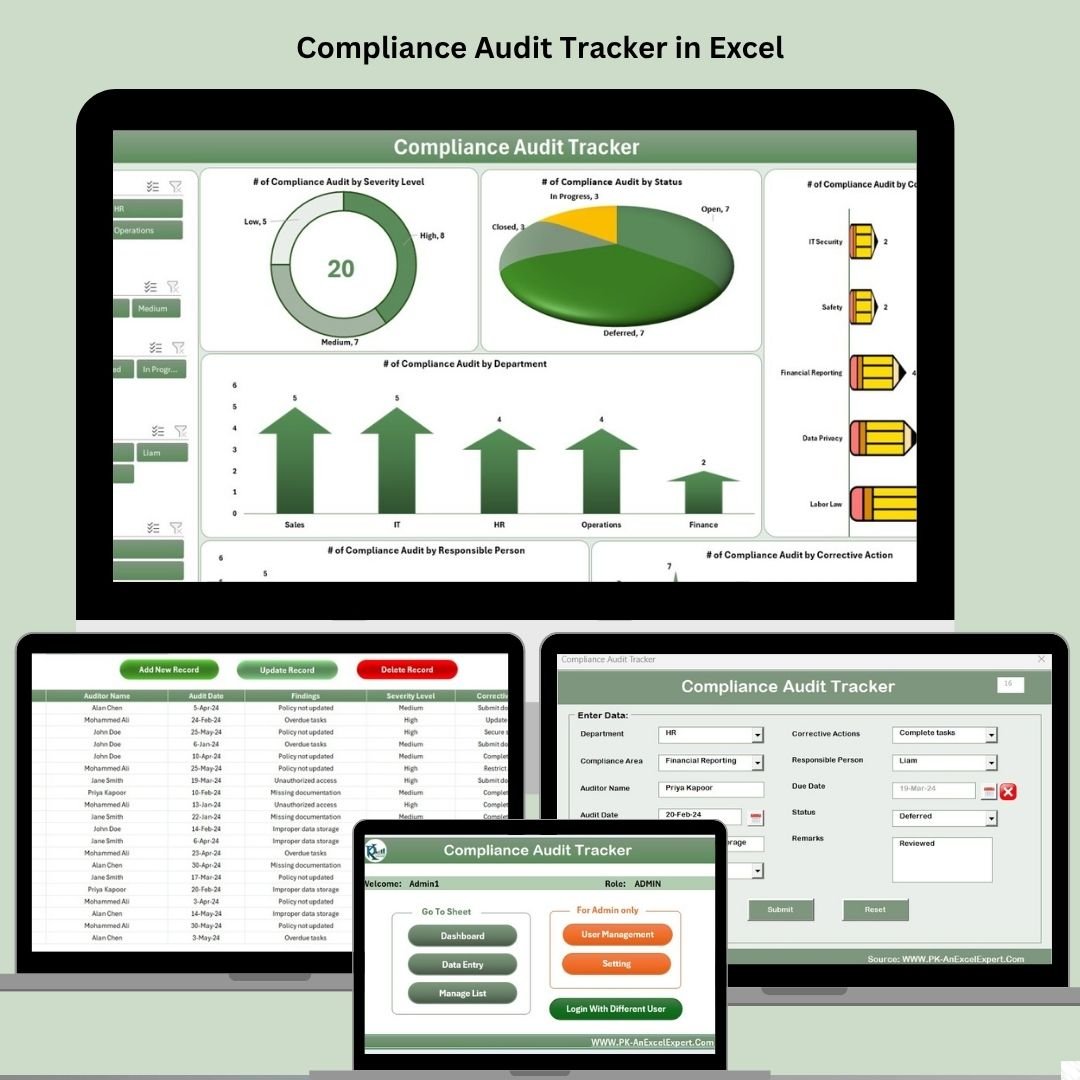
4. Compliance Audit Tracker in Excel — $6.99
A VBA-driven system with secure login, structured entry forms and a live audit dashboard. Track control status, findings, owners and remediation progress. View the template →
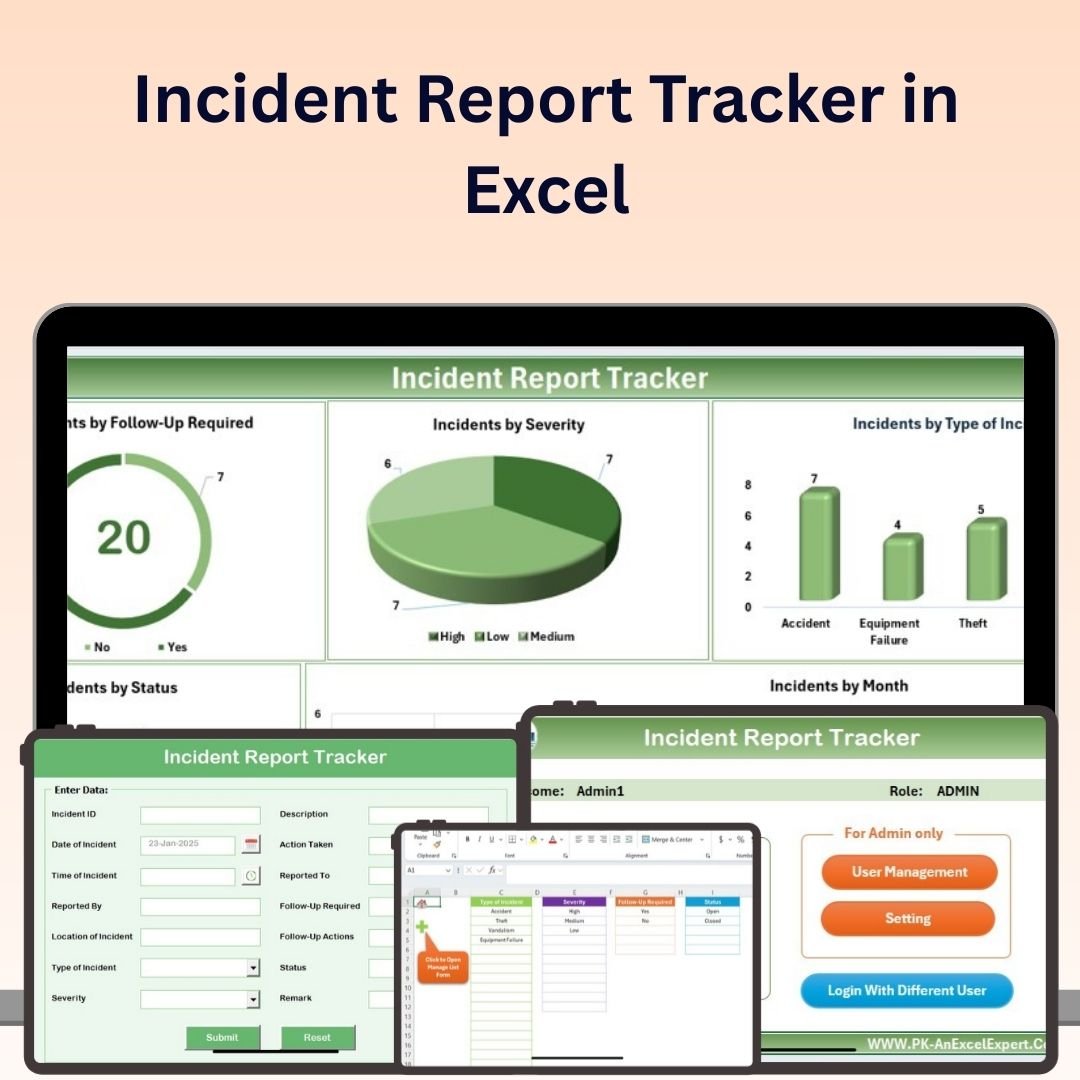
5. Incident Report Tracker in Excel — $6.99
Severity classification, corrective-action ownership, target dates and resolution status, with trend charts by type, department and month. View the template →
6. Confidential Incident Report Tracker in Excel — $6.99
The restricted-access counterpart for security investigations, whistleblower reports and HR-sensitive cases. View the template →
7. Audit Schedule Calendar in Excel — $4.99
Plan internal, external and vendor audits across the year, assign auditors and see coverage gaps before they turn into findings. View the template →

8. Internal Audit Action Plan Checklist in Excel — $1.99
Convert every audit finding into an owned action with a due date and status, so nothing stays open until the next cycle. View the template →
9. Inventory Management and Profit Analysis Dashboard in Google Sheet — $17.99
The collaborative element of the pack. Track stock levels, reorder points, supplier performance and margin analysis in real time, shareable with procurement and finance. View the template →

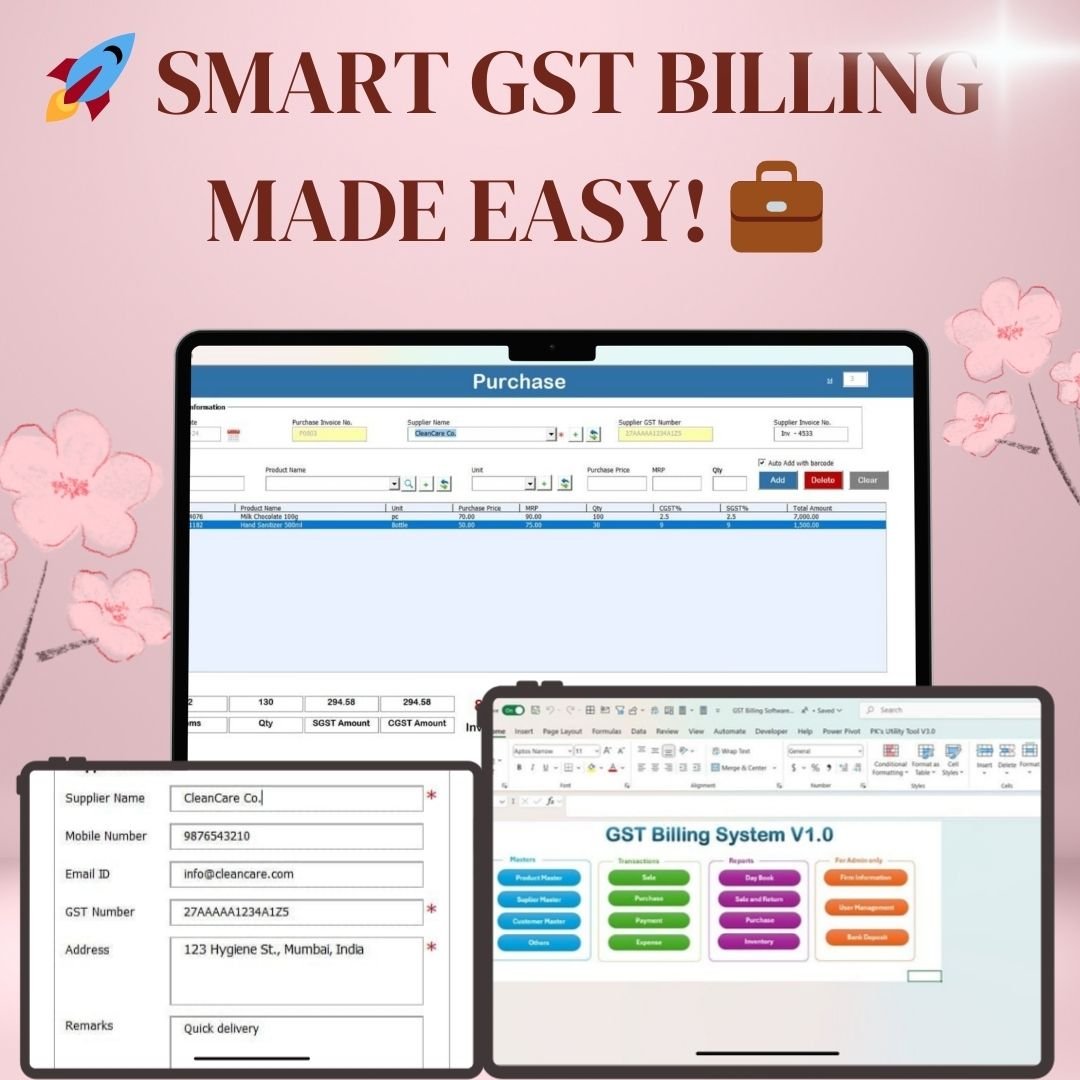
10. GST Billing Software V1.0 — $19.99
A complete VBA billing system for raising GST-compliant invoices, tracking customers and producing tax summaries — useful for MSPs and IT consultancies billing clients in India. View the template →
Smart Comparison — Individual vs Bundle
| # | Template | Platform | Individual Price |
|---|---|---|---|
| 1 | Cybersecurity KPI Dashboard | Excel | $12.99 |
| 2 | IT Support Ticket Dashboard | Excel | $17.99 |
| 3 | IT Asset Management Dashboard | Power BI | $17.99 |
| 4 | Compliance Audit Tracker | Excel + VBA | $6.99 |
| 5 | Incident Report Tracker | Excel | $6.99 |
| 6 | Confidential Incident Report Tracker | Excel | $6.99 |
| 7 | Audit Schedule Calendar | Excel | $4.99 |
| 8 | Internal Audit Action Plan Checklist | Excel | $1.99 |
| 9 | Inventory Management & Profit Analysis | Google Sheets | $17.99 |
| 10 | GST Billing Software V1.0 | Excel + VBA | $19.99 |
| Individual Total | — | $114.90 | |
| Bundle Price | All three | $79.99 — save $34.91 (30%) |
At $79.99 the effective cost is $8.00 per template against an $11.49 average individually. The bundle becomes the better buy the moment you want four or more of the ten files.
Strategic Advantages of Buying the Bundle
Coverage you would not have bought piecemeal. Nobody shops for an Audit Schedule Calendar. They shop for a ticket dashboard, then discover mid-audit that they have no schedule, no findings log and no action tracker. The bundle front-loads that coverage for less than the cost of buying the three audit files separately later.
One consistent design language. Every template shares the same structural conventions — a settings sheet, a data sheet, a dashboard. Learn one and you can navigate all ten, which matters when you are handing a file to a colleague.
Three platforms lets you match the tool to the audience. Excel for the analyst who wants to pivot everything, Google Sheets for the file procurement needs to edit alongside you, Power BI for the executive who wants a clean visual. Same underlying data discipline, three delivery formats.
No renewal cliff. A one-time purchase cannot be repriced at renewal, cannot lose a feature to a tier change, and cannot hold your historical data hostage if you stop paying.
Best Practices for Deploying the Toolkit
- Deploy one file at a time. The most common failure mode is trying to stand up all ten at once. Pick the dashboard that solves this month’s most painful problem, get it running with real data, then move to the next.
- Customise dropdowns before entering real data. Replace the sample departments, incident types, severity tiers and technician names first. Retagging historical records later is tedious and error-prone.
- Log near-misses, not just incidents. Your best leading indicator is the volume of events that almost mattered. A log containing only serious incidents has nothing to trend.
- Keep the confidential tracker genuinely separate. Different folder, different permissions, different people. The moment it sits alongside the general log, it stops being confidential.
- Set a review cadence and stick to it. Helpdesk and security dashboards weekly, asset and audit dashboards monthly. Dashboards nobody looks at decay into stale data within a quarter.
- Start a fresh file each year. Archive the previous year rather than letting one workbook grow indefinitely. Faster refresh, cleaner audit trail.
- Never edit historical entries. Add a correction row referencing the original. Auditors care about the trail as much as the number.
Explore More Templates
If the toolkit is more than you need right now, browse the individual categories: Dashboard Templates, Excel Trackers, and Template Bundles. You may also want the IT and Cybersecurity Operations Bundle — a smaller, Excel and Power BI only pack at a lower price point if you do not need the Google Sheets or billing components.
Frequently Asked Questions
What exactly do I receive after purchase?
A single download containing all ten files: eight Excel workbooks (two of which include VBA macros), one Google Sheets template and one Power BI report file. Each arrives with sample data so you can see how the dashboards behave before loading your own records.
Do I need Power BI Pro or a paid Google Workspace plan?
No. Power BI Desktop is free and sufficient to open, edit and refresh the asset management report — you only need a paid licence if you want to publish and share it via the Power BI Service. The Google Sheets template works on any free Google account.
Are the VBA files safe, and will macros run in my environment?
The Compliance Audit Tracker and GST Billing Software use VBA for their forms and login screens. You will need to enable macros when you first open them, and depending on your organisation’s policy you may need to add the file location to your Trusted Locations. If your environment blocks macros entirely, the other eight files are unaffected.
How does this differ from the IT and Cybersecurity Operations Bundle?
That bundle is a tighter, Excel and Power BI only pack aimed at IT operations reporting. This toolkit is broader: it adds the second confidential incident tracker, the full three-part audit stack, a Google Sheets collaborative dashboard and GST-compliant billing. Choose the operations bundle if you want core IT dashboards at a lower price; choose this toolkit if you also own audit, compliance and client billing.
Can my whole team use these files?
Yes. There are no per-user licences or activation limits. Store the files on your shared drive and your team can use them. For genuine simultaneous multi-user editing, save the Excel files to SharePoint or OneDrive and open them in Microsoft 365, or use the Google Sheets template.
Will these templates satisfy an ISO 27001 or SOC 2 auditor?
They will help you produce the evidence an auditor asks for — control status, findings logs, remediation tracking, incident records and audit schedules. They are not a certified compliance system and do not provide tamper-evident logging or role-based field security. If you are pursuing formal certification, treat these as your working documents and expect to supplement them.
Is there support if I get stuck?
Yes. Reach out through the contact page on NextGenTemplates.com, and the walkthrough videos on our YouTube channel cover the structure and customisation of most of these dashboards in detail.
Final Thoughts
Most IT leaders do not have a data problem — the tickets, assets and incidents are all being recorded somewhere. What they lack is a reporting layer that turns those records into something a board, an auditor or a budget committee will accept. That layer does not have to cost thousands a year.
The IT Manager & CISO Toolkit gives you ten production-quality dashboards covering the full remit of a modern IT and security function, across the three platforms your stakeholders actually use, for a single payment of $79.99 instead of $114.90.
Ready to consolidate your IT and security reporting?
10 premium templates — helpdesk, cybersecurity, assets, incidents and a complete audit stack. Excel + Google Sheets + Power BI. One payment, unlimited users, nothing uploaded to the cloud.
$114.90 → $79.99 (save $34.91 — 30% off)
Watch the Walkthroughs
For step-by-step builds of dashboards like these — plus VBA automation, Power BI modelling and Excel formula deep-dives — subscribe to YouTube.com/@PKAnExcelExpert. New tutorials every week.