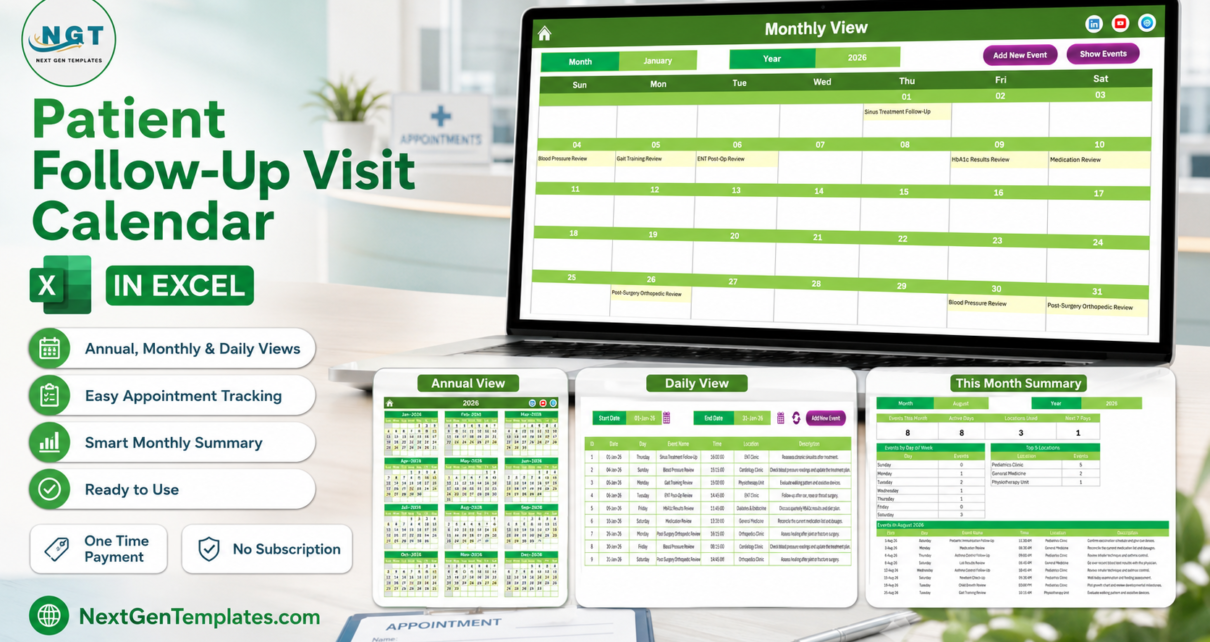
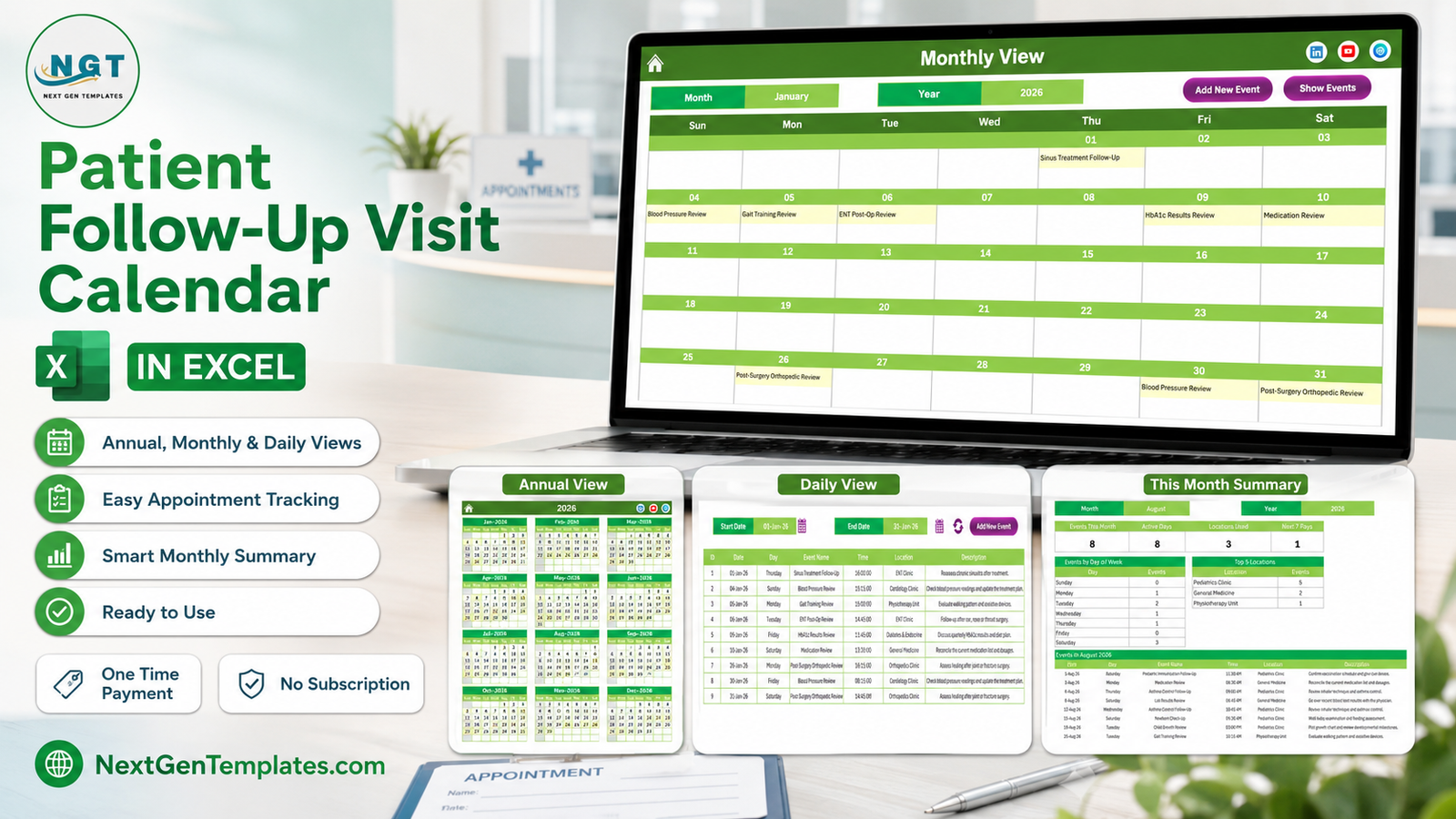
The Patient Follow-Up Visit Calendar in Excel is a seven-worksheet, macro-driven calendar workbook that ships with 100 pre-filled sample follow-up visits dated across the whole of 2026 – 1 January to 30 December, with every month populated – spread over eight clinic departments and stored in a seven-field events database. Four views – Annual, Monthly, Daily and This Month – all read from that one Events sheet, so a visit typed once shows up everywhere. Setup takes under 10 minutes.
Most small clinics and outpatient departments do not need booking software to run their review clinics. They need to see, on one page, which department is busy on which day, when the quarterly diabetes reviews fall, and whether next Tuesday already has three post-op checks on it. That is a calendar problem, not a clinical-systems problem – and this workbook solves exactly that, offline, for a one-time price.
Before anything else, a clear boundary. This workbook is a scheduling calendar. It is not a patient record system, not an EHR or EMR, and not a practice management or patient-recall system. It is not HIPAA, GDPR or any other health-data-protection compliant or certified. It has no access control, no encryption and no audit trail. It takes no online bookings, sends no reminders, recalls, SMS or email notifications, connects to no clinical, insurance or billing system, and tracks no treatment plans, outcomes or clinical progress – nothing in it should inform a clinical or continuity-of-care decision. It holds only what you type into your own copy of the file, and a spreadsheet passed around a clinic is not an appropriate place to store patient-identifiable information. Worth knowing: the Events sheet has no patient name and no patient ID column at all, and the 100 shipped samples contain no patient identifiers anywhere. That is deliberate, and it is how the workbook should be used.
Key Features of the Patient Follow-Up Visit Calendar in Excel
- Four calendar views from one list. Annual View, Monthly View, Daily View and This Month all read the Events sheet. There is no second copy of the schedule to keep in step.
- 100 sample visits already written in clinic language. Forty-four distinct visit types – HbA1c Results Review, ENT Post-Op Review, Medication Review, Post-Surgery Orthopedic Review, Post-Angioplasty Review, Heart Failure Monitoring, Gait Training Review, Fracture Healing Review, Pediatric Immunization Follow-Up, Tumor Marker Review and more – not “Event 1, Event 2”.
- Eight clinic departments built into the sample data – General Medicine, Diabetes & Endocrine, Cardiology Clinic, Orthopedics Clinic, Pediatrics Clinic, ENT Clinic, Physiotherapy Unit and Oncology Clinic.
- VBA record management. Add New Record, Update Record and Delete Record buttons above the Events table, plus Add New Event and Show Events buttons on the Monthly and Daily views.
- A pop-up entry form with a date picker on Date and a clock picker on Time, capturing Event Name, Location and Description – and a Day field that fills itself from the date you choose. There is no patient-identity field.
- A Setting sheet offering any year from 2021 to 2051, the starting month, the week start day, two highlight weekdays, an event-shading switch, and five colour themes: Default, Blue, Red, Black and Orange.
Worksheets Explained
Home Menu
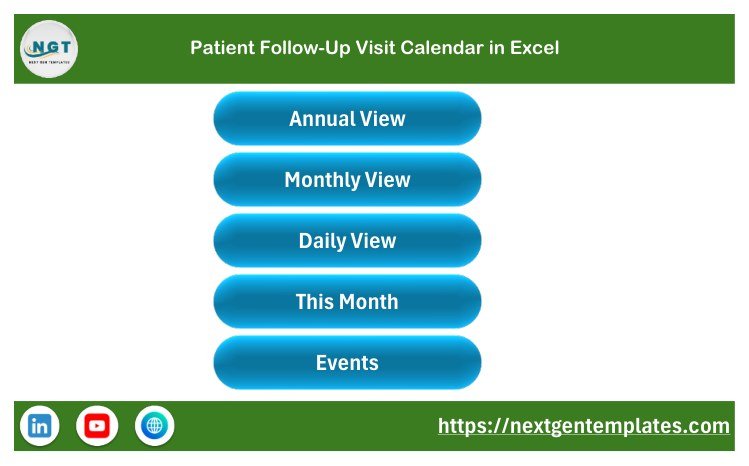
The landing sheet: workbook title plus five navigation buttons – Annual View, Monthly View, Daily View, This Month and Events. Anyone at a reception desk reaches a view in one click.
Annual View
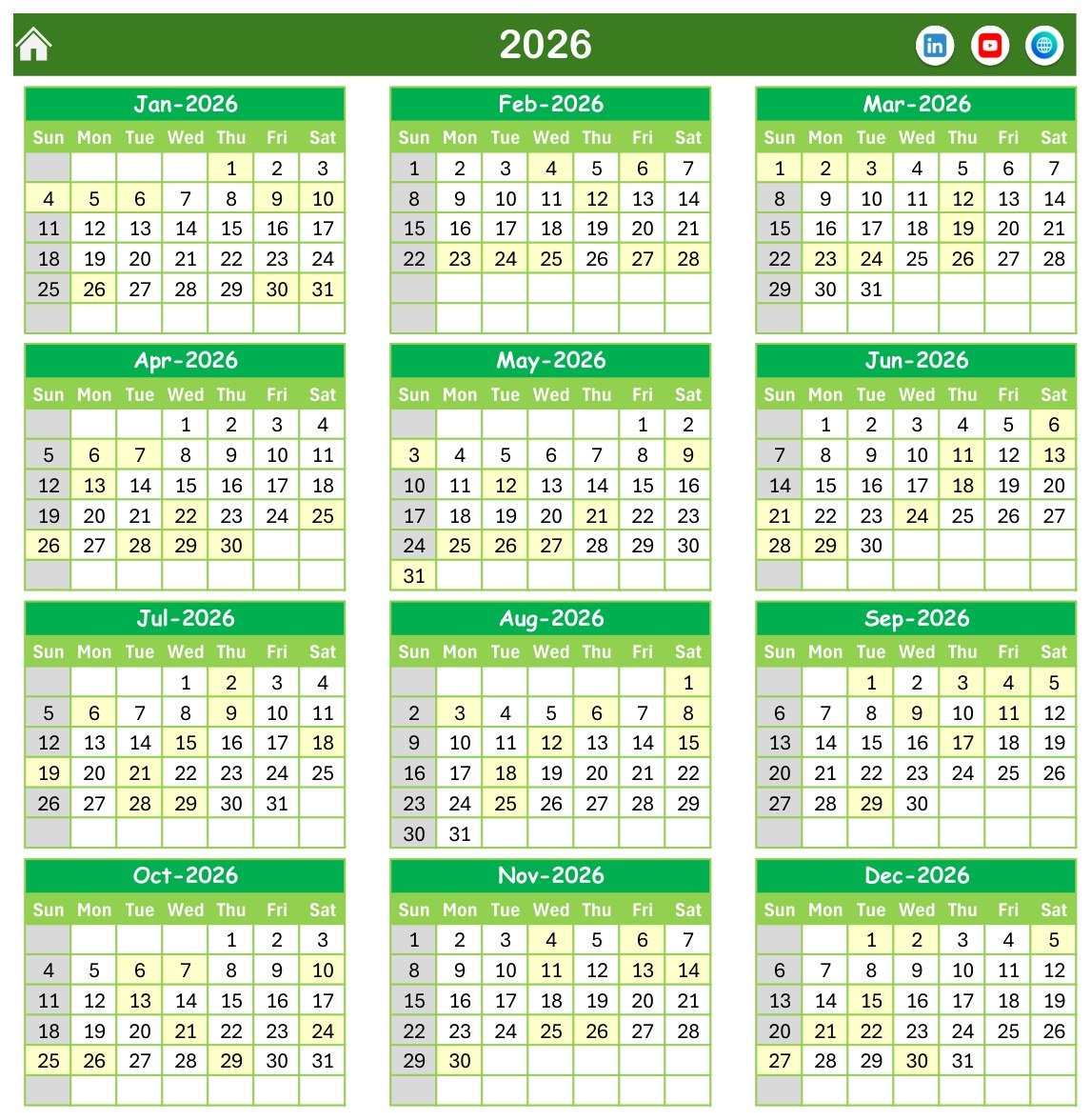
All twelve months of the selected year on one page, four rows by three columns, with Sun-to-Sat headers. Days carrying a follow-up visit are shaded, so the shape of the year – the busy stretches and the quiet weeks – is visible without scrolling.
Monthly View
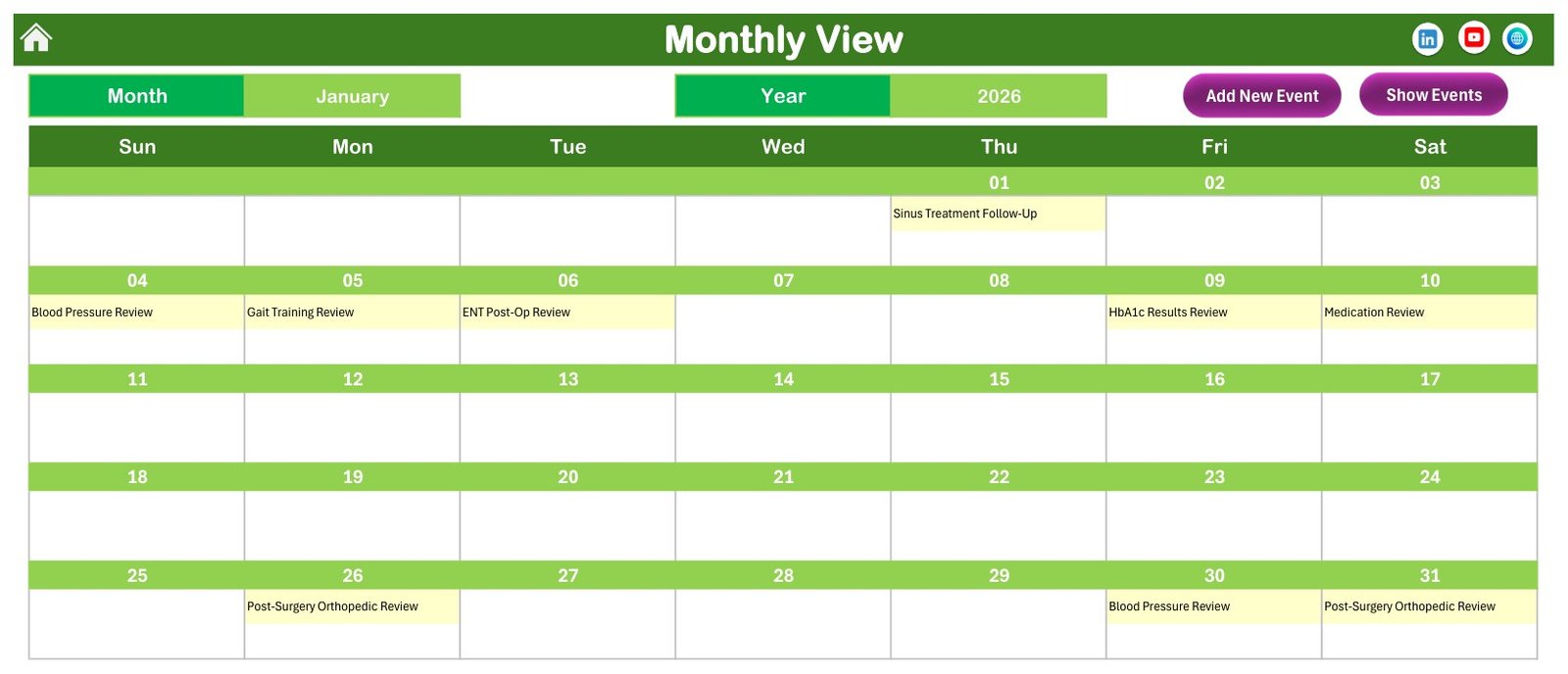
A month grid driven by Month and Year selectors, with the visit name printed inside each date cell. The January 2026 sample shows nine visits: Sinus Treatment Follow-Up on the 1st, Blood Pressure Review on the 4th, Gait Training Review on the 5th, ENT Post-Op Review on the 6th, HbA1c Results Review on the 9th, Medication Review on the 10th, Post-Surgery Orthopedic Review on the 26th, Blood Pressure Review on the 30th and Post-Surgery Orthopedic Review on the 31st.
Daily View
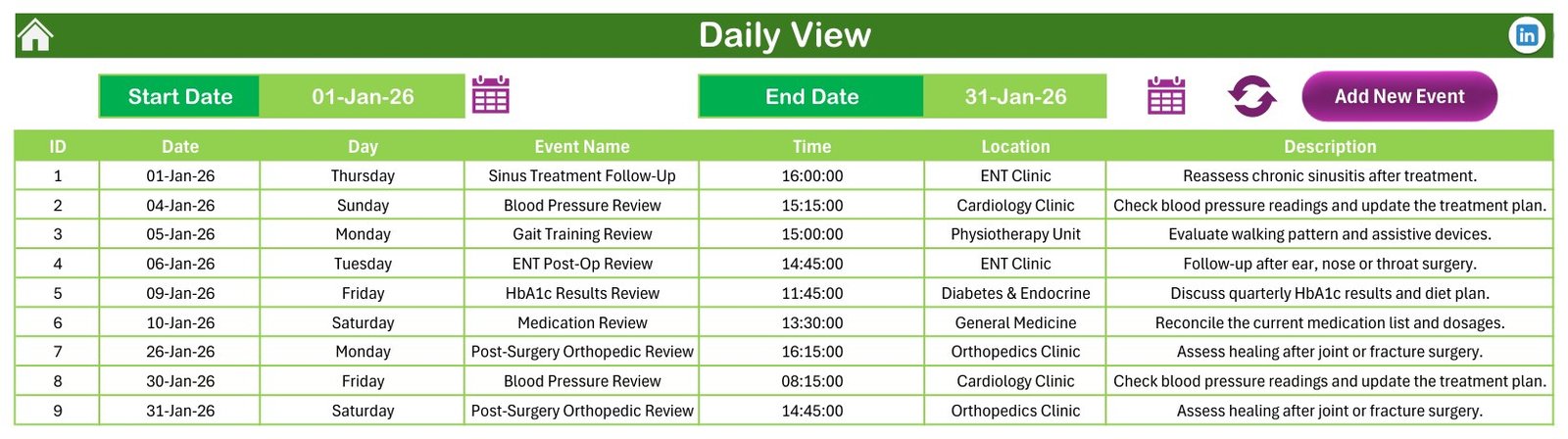
Set a Start Date and an End Date and the sheet lists every visit in that window as a printable run sheet: ID, Date, Day, Event Name, Time, Location and Description. The shipped range is 01-Jan-26 to 31-Jan-26 and returns the nine January visits, each with its department and a one-line note such as “Discuss quarterly HbA1c results and diet plan.”
This Month Summary
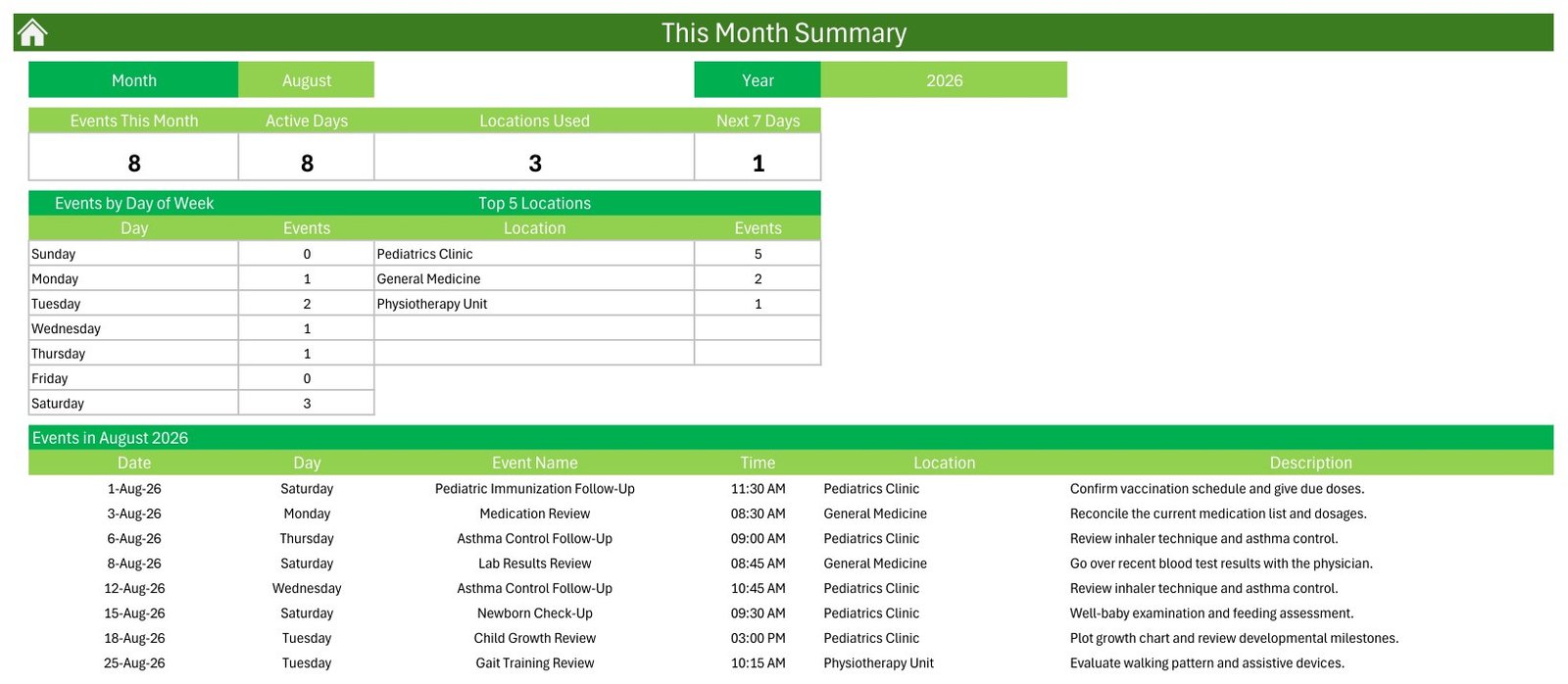
Pick a month and year and the sheet counts for you. Four cards – Events This Month, Active Days, Locations Used and Next 7 Days – sit above an Events by Day of Week table and a Top 5 Locations ranking, with the full month listed beneath. In the shipped August 2026 sample the cards read 8, 8, 3 and 1; the weekday table shows three Saturdays, two Tuesdays and one each on Monday, Wednesday and Thursday; and the departments rank Pediatrics Clinic 5, General Medicine 2, Physiotherapy Unit 1. Only three rows appear under Top 5 Locations because only three departments were used that month.
Events Database
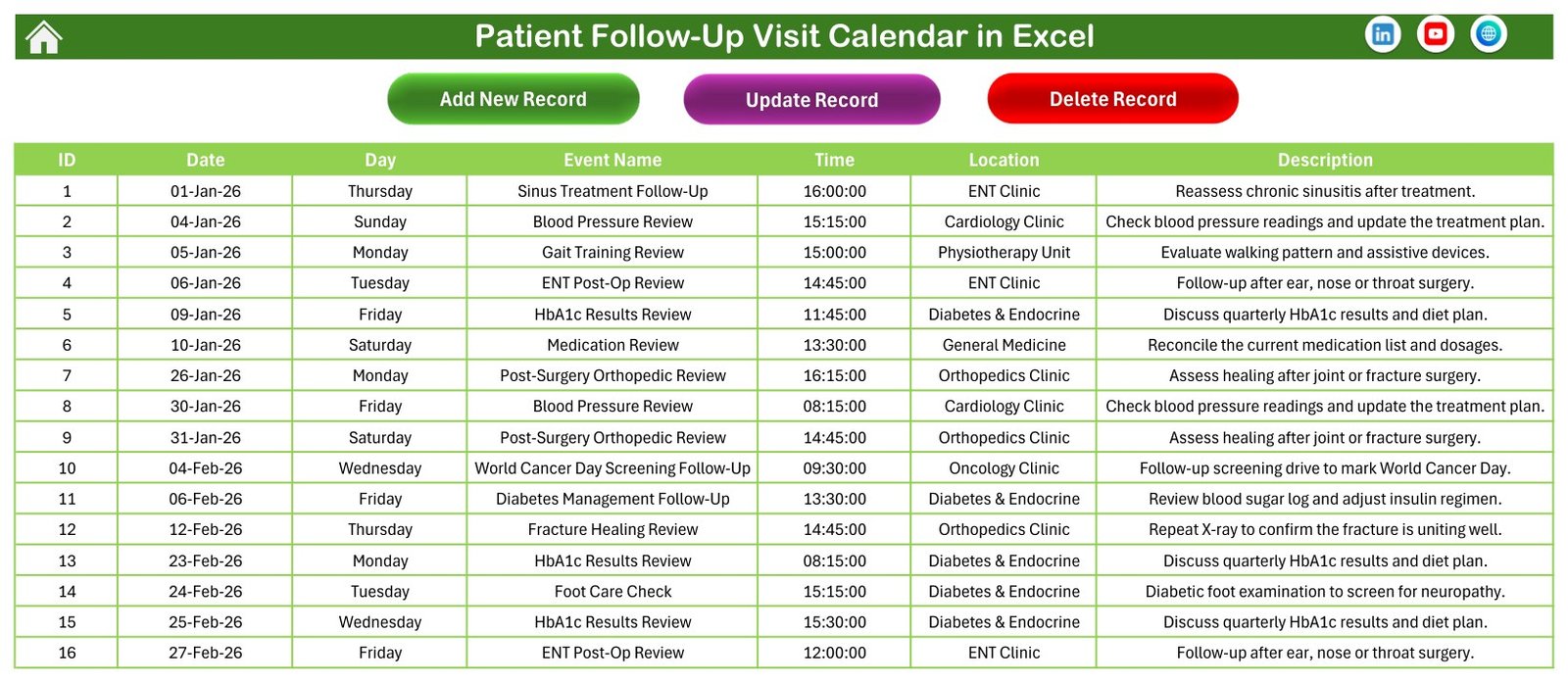
The single source every view reads from: 100 rows under seven columns – ID, Date, Day, Event Name, Time, Location and Description – with Add New Record, Update Record and Delete Record buttons above the table. Department volumes in the sample year are General Medicine 15, Diabetes & Endocrine 15, Cardiology Clinic 14, Orthopedics Clinic 14, Pediatrics Clinic 12, ENT Clinic 11, Physiotherapy Unit 11 and Oncology Clinic 8.
The Entry Form
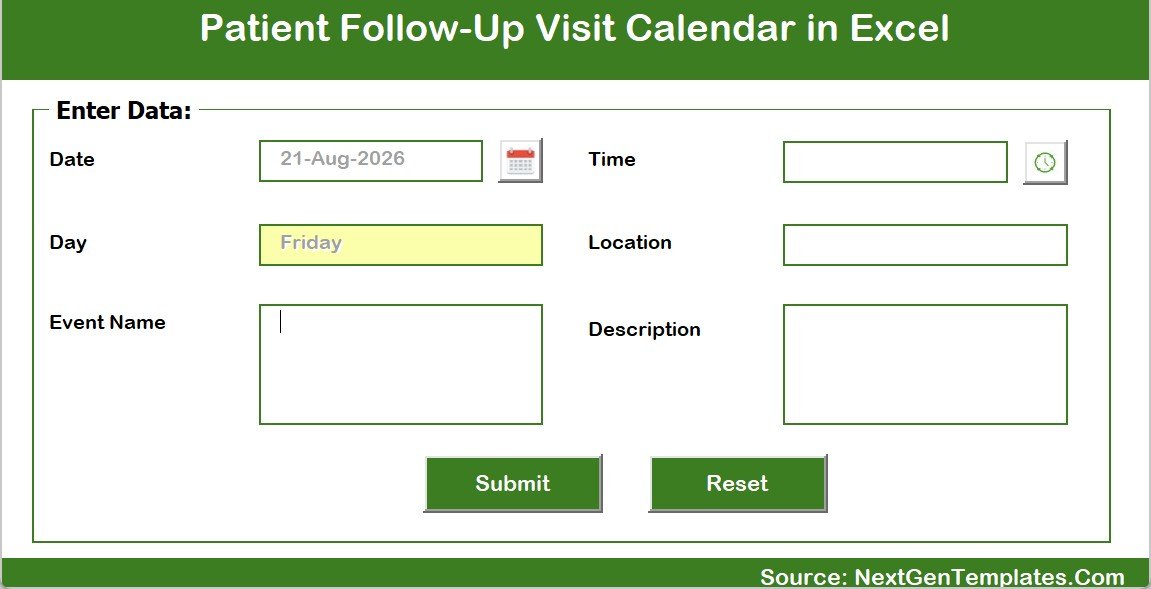
Clicking Add New Record opens a pop-up “Enter Data” form: Date with a date picker, Day filled automatically, Event Name, Time with a clock picker, Location and Description, plus Submit and Reset. Records go in through the form, so dates and times stay in a consistent format and every view keeps working.
Setting
The control panel behind the calendar: year (2021 to 2051), the month the calendar starts with, the day your week begins, two weekdays to highlight, whether event days are shaded, and one of five colour themes. Change the year and every view redraws around your own dates.
Excel Calendar vs. Google Sheets vs. Practice Booking Software
| Feature | Patient Follow-Up Visit Calendar in Excel | Google Sheets calendar | Practice booking software |
|---|---|---|---|
| Cost | $4.99 one-time | Free with a Google account | Typically $45-95 per practitioner / month |
| Platform | Excel for Windows desktop (.xlsm, macros required) | Browser, any device | Browser and mobile app |
| Setup time | Under 10 minutes | Under 10 minutes | Days – onboarding, imports, training |
| Works fully offline | Yes | No | No |
| Annual, Monthly, Daily and summary views in one file | All four, built in | Usually one view | Yes |
| Sample data written for follow-up clinics | 100 visits, 44 types, 8 departments | Build it yourself | Empty on day one |
| Patient self-booking online | No | No | Yes |
| Automated recalls, SMS or email reminders | No – it sends nothing | No | Yes |
| Patient records, clinical notes, billing | No – a calendar, not a clinical system | No | Yes |
| Access control, encryption, audit trail | None | Sharing permissions only | Yes |
| Year-1 cost for a 5-practitioner clinic | $4.99 total | $0 | $2,700-5,700 |
| You own the file, no vendor lock-in | Yes | Tied to a Google account | No |
For a small clinic that wants its review sessions laid out clearly by date, time and department – without paying per practitioner every month for software it does not need – this workbook sits in the sweet spot. If patients must book themselves online, if recalls have to go out automatically, or if you need clinical notes, buy real practice software instead.
Who It’s For – and Who It’s Not For
Built for: small clinics and outpatient departments laying out follow-up sessions by date, time and department; receptionists and coordinators who print a week’s run sheet and pin it up; multi-department practices juggling cardiology, orthopedics, ENT, diabetes and physiotherapy slots in one shared diary; and anyone planning a year of review clinics in advance who wants the busy and quiet stretches visible at a glance.
Not for: storing patient-identifiable or clinical information – the file has no access control, no encryption and no audit trail, and no patient field by design; anyone needing an EHR, EMR, practice management or patient-recall system; clinics needing online self-booking, automated recalls, reminders, insurance claims or billing; practices requiring a certified, access-controlled system; anything that informs clinical or continuity-of-care decisions; Mac-only or tablet-only teams, since the buttons and forms need Excel for Windows desktop with macros enabled; and teams needing several people editing the same calendar at once.
How to Use It
- Unzip the download and open the .xlsm in Excel for Windows. Click Enable Content – the buttons and the pop-up form are VBA and will not run otherwise.
- On the Setting sheet, pick your year, starting month, week start day, highlight weekdays and colour theme.
- On the Events sheet, see how the 100 sample rows are structured, then delete them when you are ready.
- Click Add New Record and fill the form: date, time, department in Location, visit type in Event Name, short note in Description. Keep to visit types and internal references – never patient names or clinical detail.
- Check the Monthly View: the visit now sits inside its date cell, and the Annual View shades that day.
- Use the Daily View with a start and end date to print a day’s or a week’s run sheet, and This Month for the counts and the busiest departments.
- To change or remove a visit, select its row and use Update Record or Delete Record. Always save as .xlsm – saving as .xlsx silently strips the macros.
Real-World Use Cases
A multi-department outpatient clinic. Eight departments share one diary. The coordinator books review slots into the Events sheet and prints Monday’s list from the Daily View; This Month tells her that Pediatrics carried five of August’s eight sessions.
A diabetes review clinic. Quarterly HbA1c reviews, insulin titration visits and diabetic foot checks are laid out a year ahead in the Annual View, so the team can see which quarters are already full before agreeing to add a new clinic.
A small orthopedic practice. Post-surgery reviews, fracture healing checks and cast removal follow-ups sit in the Monthly View with the room in the Location field, so nobody double-books the plaster room.
A department planning its awareness calendar. Fixed-date sessions such as a World Diabetes Day follow-up camp or a World Cancer Day screening follow-up go in once, in the right month, and stay visible in the Annual View all year.
Frequently Asked Questions
Is the Patient Follow-Up Visit Calendar in Excel a patient record system, and is it HIPAA or GDPR compliant?
No. It is an offline scheduling calendar and nothing more. It is not an EHR, EMR, practice management or patient-recall system, it holds no clinical record, and it is not HIPAA, GDPR or any other health-data-protection compliant or certified. It has no access control, no encryption and no audit trail, and it does not secure whatever is typed into it. Do not store patient-identifiable information in it.
Will it send follow-up reminders or recalls to patients?
No. The workbook sends nothing at all – no SMS, no email, no recall letters, no notifications of any kind. It takes no online bookings and connects to no clinical, insurance or billing system. It is a file you open and fill in yourself. If you need automated recalls, use dedicated practice software.
What should I type instead of patient details?
Use the visit type and, where you need one, an internal reference code – “HbA1c Results Review” or “Ref 4182 – post-op review”. The Events sheet has no patient name or patient ID column, and the 100 shipped samples contain no patient identifiers anywhere. The workbook is built around visit types, departments, dates and times and works perfectly well that way. Keep real clinical detail in your governed clinical system.
Does it track treatment plans, outcomes or continuity of care?
No. It records that a visit is scheduled on a date, at a time, in a department, with a short free-text note. It carries no clinical status, no outcome, no history and no linkage between visits, and nothing in it should be used to inform a clinical or continuity-of-care decision.
Do I need macros, and does it work on Mac?
Yes to macros. The Add New Record, Update Record and Delete Record buttons and the pop-up entry form are VBA, so the workbook needs Excel for Windows desktop with content enabled. Excel for Mac, Excel on the web and mobile Excel do not run these forms reliably. Save the file as .xlsm, never .xlsx.
Can I use it for a year other than 2026?
Yes. The Setting sheet offers any year from 2021 to 2051, along with the starting month and the day your week begins. Change the year and the Annual, Monthly and Daily views redraw around your own dates.
How does it compare to the Dental or Physiotherapy calendars?
They are the same seven-sheet engine with different sample data. The Dental Clinic Appointment Calendar in Excel is written around a dental caseload and the Physiotherapy Session Calendar in Excel around rehab groups and home visits. This one is written around multi-department follow-up and review clinics.
Related Templates
- Healthcare Staff Duty Calendar in Excel – the staff rota companion to this visit calendar.
- Dental Patient Log Data Entry System in Excel – a searchable visit log with a form and summary cards rather than a calendar grid.
- Doctor Duty Roster Data Entry System in Excel – who is on duty, alongside what is scheduled.
- Medical Appointment Calendar in Google Sheets – the browser-based alternative for teams that need shared editing.
- Healthcare Administrator Toolkit – nine premium Excel templates for healthcare administration in one discounted bundle.
- Calendar & Planner Pack – twelve premium Excel and Google Sheets calendar templates at a bundle price.
About the Author
Built by PK – Microsoft Certified Professional with 15+ years of Excel, Google Sheets and Power BI experience. Founder of NextGenTemplates, reaching 300K+ subscribers across YouTube channels. Every template is hand-built and tested before release.
Conclusion
If your follow-up clinics run on a whiteboard and a paper diary, the Patient Follow-Up Visit Calendar in Excel is a small, honest upgrade: one Events sheet, four views, a form that keeps the data clean, and 100 visits already written in your language across eight departments. It will not take bookings, chase patients, send recalls or hold clinical notes – and it does not pretend to.
👉 Click here to Purchase the Patient Follow-Up Visit Calendar in Excel
Instant download · One-time payment · No subscription
🎥 For step-by-step Excel tutorials, visit Youtube.com/@PK-AnExcelExpert.
Last updated: August 2026