Drone Farming Startups Dashboard in Power BI is built for agritech founders, drone farming service operators, agriculture consultants, and startup analysts who need a clear way to review field-service performance without building a Power BI report from scratch. Drone farming teams often manage hundreds of spraying, mapping, scouting, seeding, and crop-monitoring operations across regions and months. This dashboard turns those records into KPI cards, slicers, charts, and trend views so managers can review Total Revenue, Total Operations, Total Operating Cost, Total Area Covered, Net Profit, service mix, regional performance, startup execution, and monthly progress in one PBIX file.
For official platform guidance, see Microsoft Learn for Power BI.
Key Features of Drone Farming Startups Dashboard in Power BI
- 5 Power BI report pages covering Overview, Service Analysis, Regional Insights, Startup Performance, and Monthly Trend.
- 5 executive KPI cards for Total Revenue, Total Operations, Total Operating Cost, Total Area Covered, and Net Profit.
- Service type analysis to compare profit margin, total operations, revenue, and operating cost by service type.
- Regional reporting for profit margin, average satisfaction score, revenue, and operating cost by region.
- Startup benchmarking for net profit, completed operations, and monthly net profit movement.
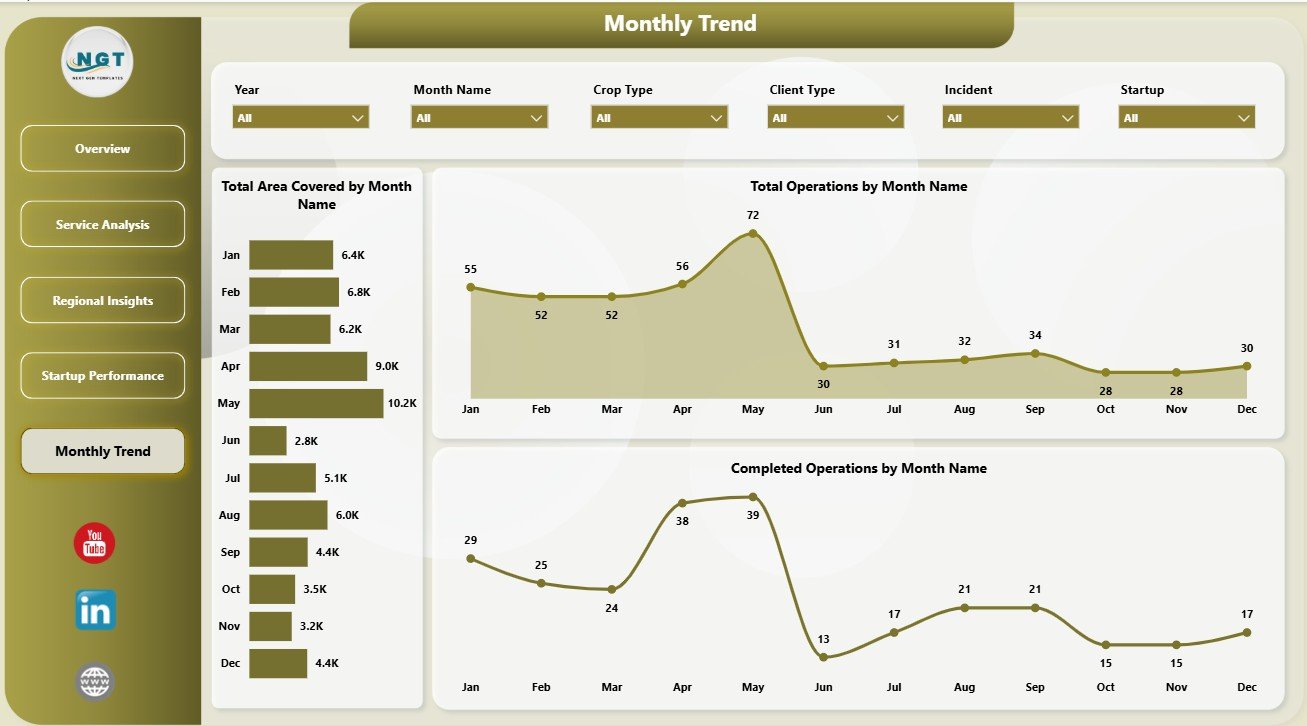
- Monthly trend tracking for area covered, total operations, and completed operations.
- Interactive slicers so users can filter dashboard views quickly without rebuilding visuals.
- Editable PBIX file for Power BI Desktop customization, data-source replacement, publishing, and sharing.
Dashboard Pages Explanation
1. Overview Page
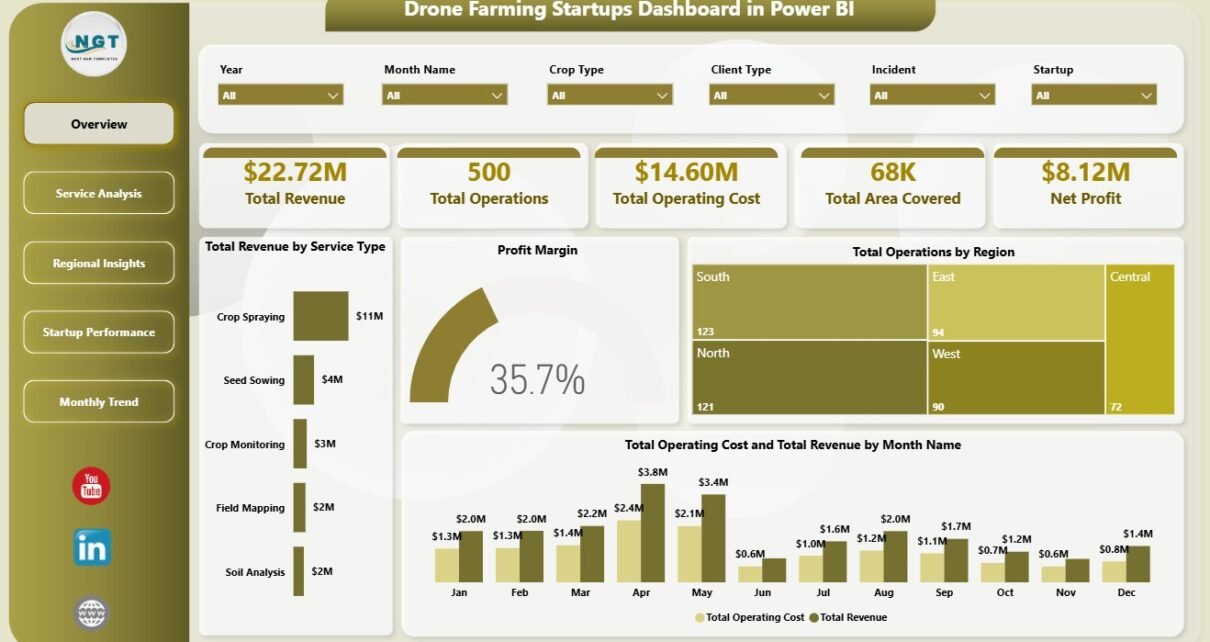
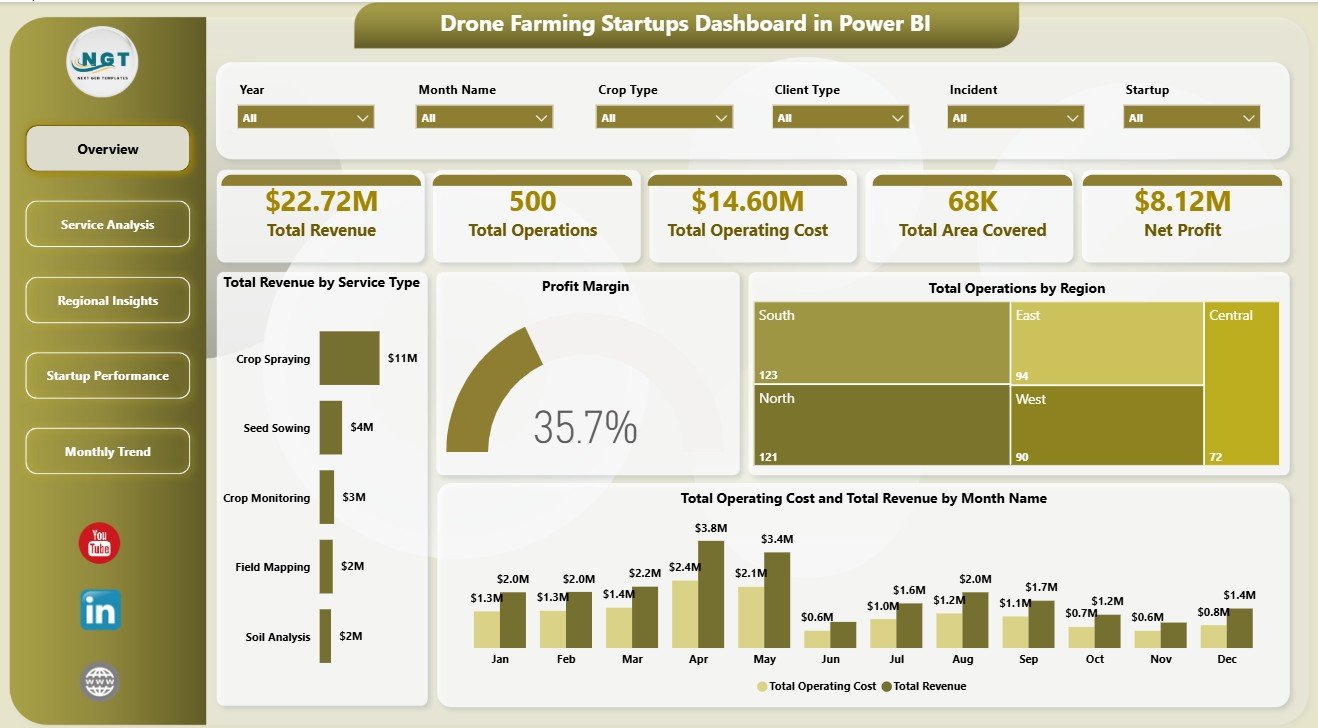
The Overview Page gives a high-level summary of the full drone farming startup operation. The top KPI cards show Total Revenue, Total Operations, Total Operating Cost, Total Area Covered, and Net Profit, helping leaders understand financial scale, field workload, operating pressure, land coverage, and profit before drilling into details.
Total Revenue by Service Type: This chart compares revenue contribution across drone farming services. It helps identify whether spraying, mapping, crop monitoring, seeding, or scouting is creating the strongest income stream.
Profit Margin: This visual gives a quick profitability read after operating cost. It helps founders see whether service growth is producing enough margin to support pilots, equipment, travel, batteries, and maintenance.
Total Operations by Region: This chart shows where most service activity is happening. It helps managers assign drone crews, schedule field visits, and identify regions that need more operational capacity.
Total Operating Cost and Total Revenue by Month Name: This chart compares monthly revenue with monthly delivery cost. It helps users spot months where demand increased but cost also rose sharply.
2. Service Analysis
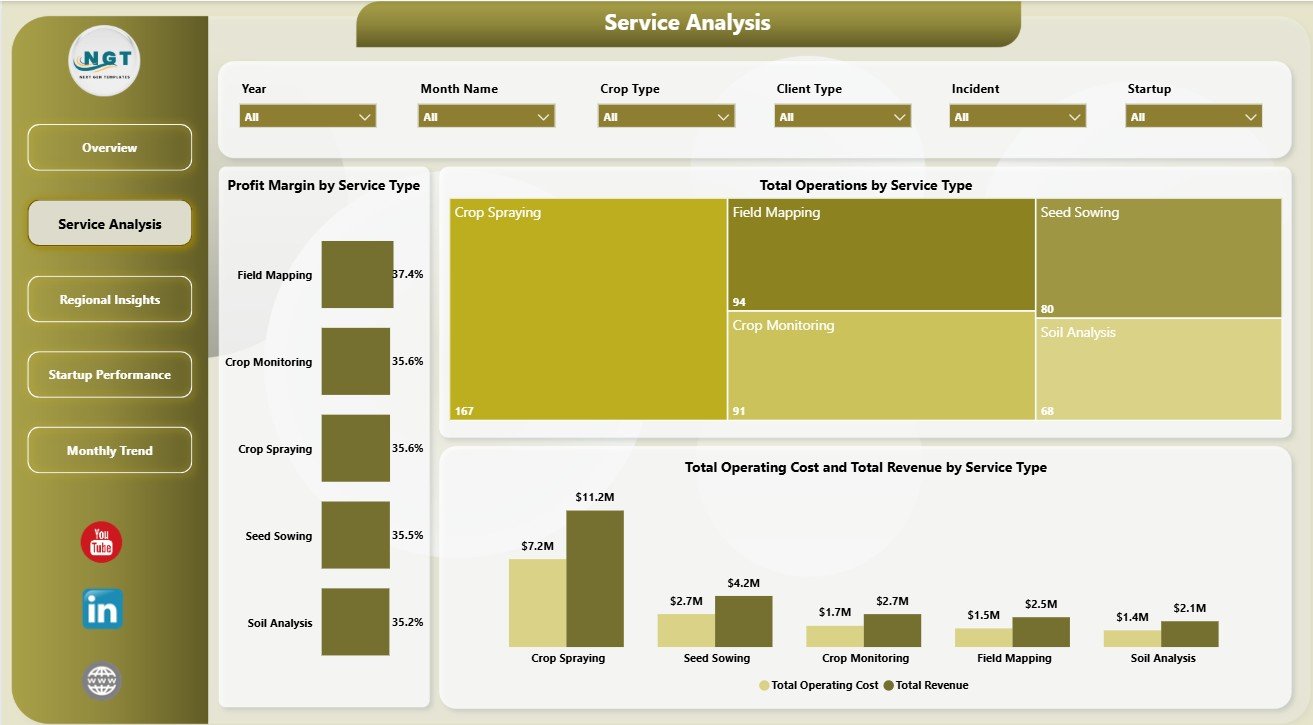
The Service Analysis page focuses on service categories. Profit Margin by Service Type shows which services protect margin, Total Operations by Service Type shows delivery volume, and Total Operating Cost and Total Revenue by Service Type compares cost-to-revenue performance across the service portfolio.
3. Regional Insights
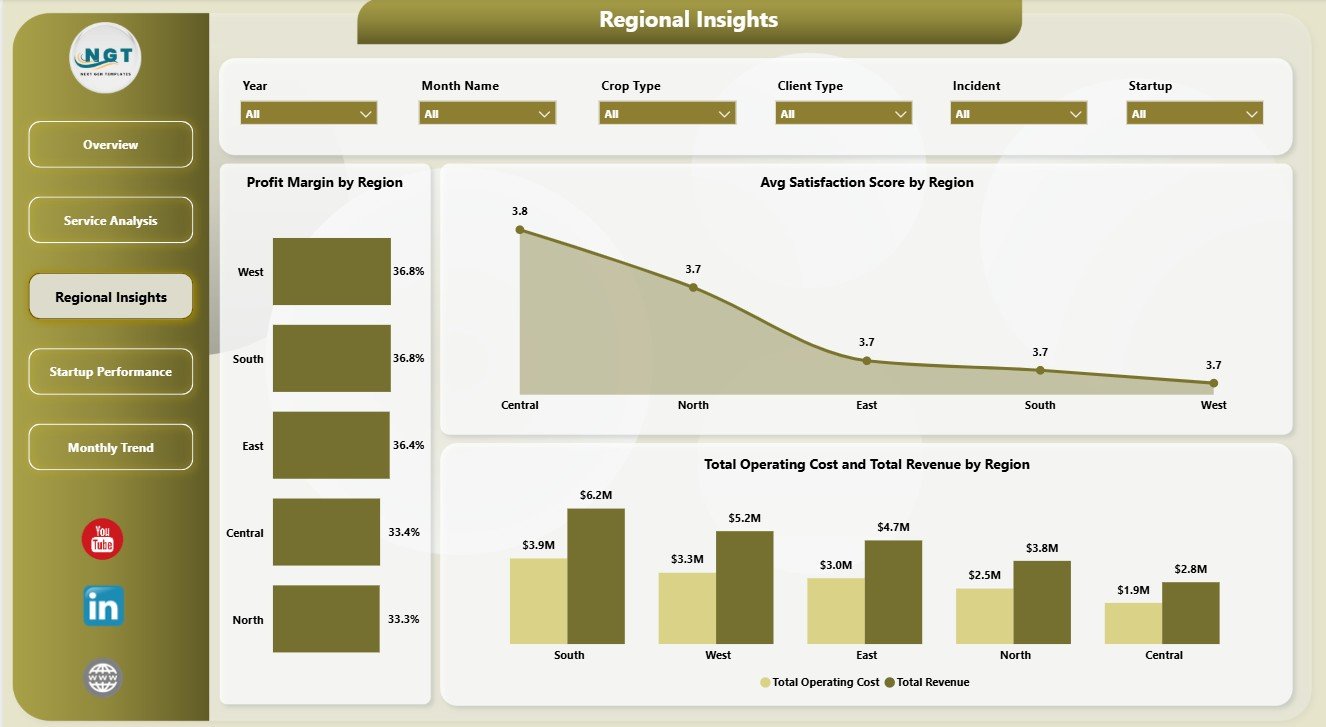
The Regional Insights page compares territory-level performance. Profit Margin by Region highlights profitable markets, Avg Satisfaction Score by Region shows customer experience, and Total Operating Cost and Total Revenue by Region explains whether each region is scaling efficiently.
4. Startup Performance
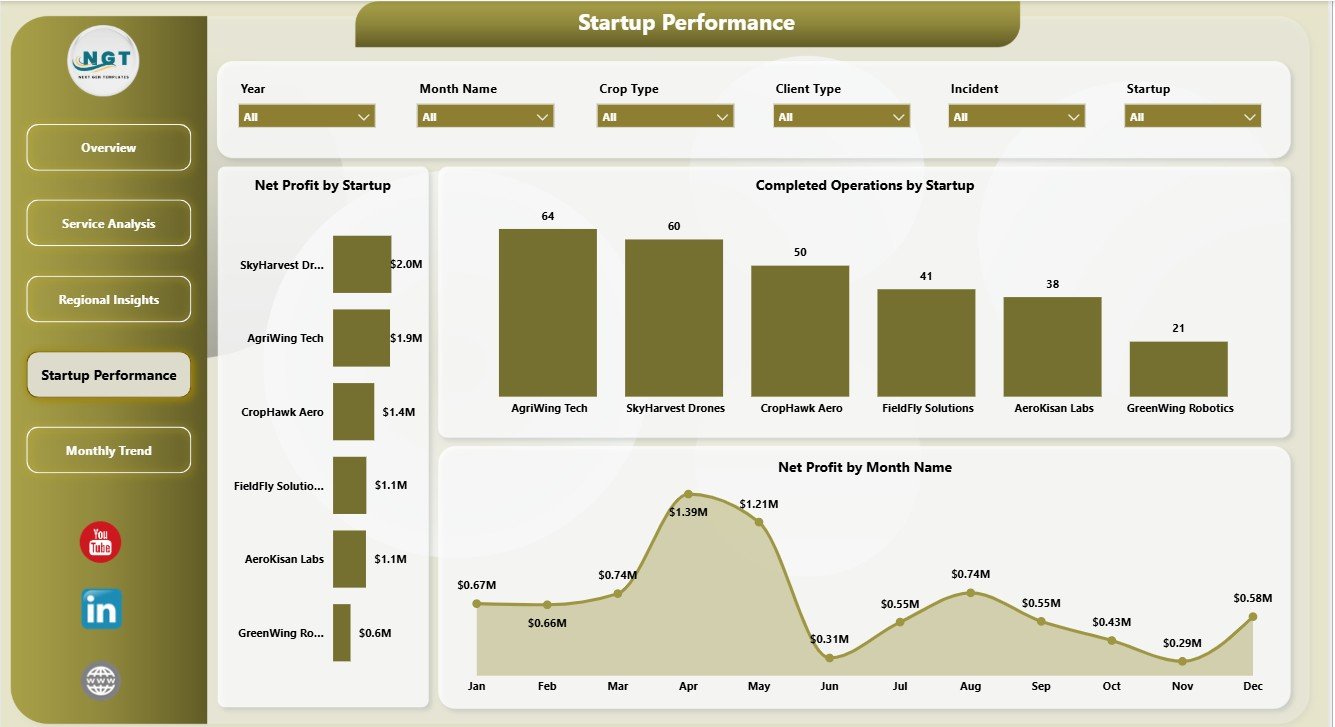
The Startup Performance page helps compare drone farming startups, branches, or internal business units. Net Profit by Startup shows financial contribution, Completed Operations by Startup tracks execution output, and Net Profit by Month Name shows whether profitability is rising or slipping over time.
5. Monthly Trend
The Monthly Trend page helps users understand operating seasonality. Total Area Covered by Month Name shows field scale, Total Operations by Month Name shows workload movement, and Completed Operations by Month Name shows how much work is being delivered each month.
Drone Farming Startups Dashboard in Power BI vs. Tableau vs. Paid Farm SaaS – Feature Comparison
| Feature | Drone Farming Startups Dashboard in Power BI | Tableau alternative | Paid farm management SaaS |
|---|---|---|---|
| Cost | $17.99 one-time | Requires Tableau licensing | Recurring subscription |
| Platform | Power BI Desktop and Power BI Service | Tableau Desktop or Cloud | Vendor cloud platform |
| Setup time | Open PBIX, connect data, refresh | Dashboard must be rebuilt | Requires onboarding |
| Real-time team collaboration | Available through Power BI Service | Available through Tableau Cloud | Usually included |
| Mobile access | Available through Power BI apps after publishing | Available through Tableau mobile | Usually included |
| Customizable fields | Editable model, measures, and visuals | Editable if rebuilt or licensed | Limited by vendor settings |
| Share with link | Possible through Power BI Service | Possible through Tableau Cloud | Usually included |
| Year-1 cost at 5 users | $17.99 plus any Microsoft licensing | Often much higher licensing cost | Often hundreds or thousands |
| Drone farming analytics | Pre-built across 5 report pages | Manual dashboard build required | Depends on vendor plan |
Who Should Use This Template
This template is useful for drone farming startups, farm-service operators, agritech accelerators, agriculture consultants, rural operations managers, and Power BI users who already maintain structured service records. It works well when the goal is to analyze service performance, regional results, startup contribution, monthly workload, and profitability from one dashboard.
It is not meant to replace flight planning software, drone control systems, GIS mapping platforms, maintenance compliance systems, or live telemetry dashboards. It is best used as a reporting layer after operational data has been exported or connected to Power BI.
Real-World Use Cases
Aarav, agritech founder: Aarav reviews Total Revenue, Total Operating Cost, and Net Profit before monthly investor updates. The dashboard helps him explain whether service growth is translating into profit or being absorbed by delivery cost.
Meera, operations manager: Meera checks Completed Operations by Startup and Total Operations by Region after each field cycle. She uses the dashboard to plan crews, assign equipment, and identify regions where delivery capacity is tight.
Daniel, agriculture consultant: Daniel compares Profit Margin by Region and Avg Satisfaction Score by Region for multiple client territories. This gives him a practical way to recommend where drone services should expand next.
Advantages of Drone Farming Startups Dashboard in Power BI
- Fast setup: Users can begin from a ready PBIX file instead of designing pages, measures, and visuals manually.
- Business visibility: Revenue, cost, profit, operations, and area coverage are visible in one report.
- Service-level clarity: Managers can compare service types to see which offerings deserve more sales focus.
- Regional review: Profit margin and satisfaction views help connect market growth with delivery quality.
- Power BI flexibility: Users can edit visuals, add measures, change data sources, and publish the report if required.
Opportunities for Improvement
As a template, the dashboard depends on clean source data. Users should keep service type names, region names, startup names, dates, revenue, operating cost, completion fields, area covered, and satisfaction scores consistent. Advanced users may extend it with pilot utilization, drone model, crop type, farm size, weather, battery cycles, maintenance cost, or customer renewal fields.
Best Practices
- Keep one row per operation or service record so Power BI summarizes correctly.
- Use consistent service type and region names to avoid duplicate slicer values.
- Review operating cost together with revenue, not separately.
- Track completed operations every month to catch delivery bottlenecks early.
- Use Power BI Desktop for editing and Power BI Service for team sharing when needed.
- Refresh the report after every source data update.
Explore Relevant Templates
You can purchase the Drone Farming Startups Dashboard in Power BI from NextGenTemplates. You may also want to review the Drone Farming Startups Dashboard in Excel, Vertical Farming Dashboard in Power BI, and the full Power BI Dashboard Templates category.
Frequently Asked Questions
What is the Drone Farming Startups Dashboard in Power BI?
It is a Power BI dashboard template for tracking drone farming startup revenue, operating cost, net profit, area covered, operations, service types, regions, startup performance, satisfaction, and monthly trends.
What KPI cards are included on the Overview page?
The Overview page includes Total Revenue, Total Operations, Total Operating Cost, Total Area Covered, and Net Profit cards.
Can I add my own data?
Yes. Replace or connect the sample source data with your own structured drone farming records, then refresh the report in Power BI Desktop.
What pages are included?
The PBIX file includes Overview, Service Analysis, Regional Insights, Startup Performance, and Monthly Trend pages.
Can I customize the dashboard?
Yes. You can edit visuals, measures, fields, slicers, colors, and page layouts inside Power BI Desktop.
Is this dashboard a drone flight management system?
No. It is an analytics dashboard for operational and financial records. It does not control drones, manage live flights, or replace GIS and compliance tools.
About the Author
Built by PK – Microsoft Certified Professional with 15+ years of Excel, Google Sheets, and Power BI experience. Founder of NextGenTemplates, reaching 300K+ subscribers across YouTube channels. Every template is hand-built and tested before release.
Conclusion
The Drone Farming Startups Dashboard in Power BI gives agritech teams a practical way to review drone farming revenue, cost, profit, operations, field coverage, service performance, regional performance, startup delivery, and monthly trends. It is a useful starting point for teams that want fast Power BI analytics before investing in larger custom systems.
Visit our YouTube channel for step-by-step Excel and Power BI tutorials: Youtube.com/@PKAnExcelExpert.
Click here to purchase Drone Farming Startups Dashboard in Power BI