Courier and logistics operations move at high speed every day. However, without clear visibility into shipments, delivery performance, costs, and returns, courier businesses struggle to stay profitable and competitive. That is exactly where a Courier Services Dashboard in Excel becomes a powerful and practical solution.
In this detailed guide, you will learn what a Courier Services Dashboard in Excel is, why it matters, how it works, and how each dashboard page supports better operational decisions. Moreover, you will discover its advantages, best practices, and frequently asked questions. By the end of this article, you will clearly understand how this ready-to-use Excel dashboard helps courier companies improve efficiency, reduce costs, and increase customer satisfaction.
Click to Purchases Courier Services Dashboard in Excel
What Is a Courier Services Dashboard in Excel?
A Courier Services Dashboard in Excel is a ready-to-use, interactive, and data-driven Excel reporting tool designed to monitor courier operations in one centralized place.
Instead of managing scattered spreadsheets, manual registers, or static reports, this dashboard consolidates all key courier metrics such as:
Total shipments
Returned shipment percentage
Shipping costs
Revenue performance
Delivery time analysis
As a result, courier managers, logistics teams, and operations heads can track performance clearly and take faster, data-driven decisions.
Why Do Courier Companies Need a Courier Services Dashboard?
Courier businesses handle thousands of shipments every month. However, without structured reporting, several challenges arise. Therefore, a Courier Services Dashboard in Excel becomes essential.
Common Challenges Without a Dashboard
Lack of visibility into returned shipments
Rising shipping costs without explanation
Difficulty comparing courier partners
No clarity on service type performance
Delays in identifying problem zones
Because of these challenges, businesses often lose revenue and customer trust.
How the Dashboard Solves These Problems
Centralizes all shipment data in one Excel file
Provides visual insights using charts and KPI cards
Allows month-wise and category-wise analysis
Supports faster corrective actions
How Does a Courier Services Dashboard in Excel Work?
The Courier Services Dashboard in Excel works using structured data tables, pivot tables, pivot charts, slicers, and KPI cards.
Here is how it functions step by step:
Data gets stored in a structured Data Sheet
Pivot tables summarize the data
Pivot charts visualize the insights
Slicers filter data dynamically
KPI cards highlight key metrics instantly
As a result, users can explore data without writing formulas repeatedly.
What Are the Key Features of the Courier Services Dashboard in Excel?
This dashboard includes multiple smart features that improve usability and analysis.
Page Navigator
Located on the left side
Allows one-click navigation across dashboard pages
Saves time and improves user experience
Right-Side Slicers
Filter data by Month, Zone, Courier Partner, Service Type, and more
Instantly refresh all charts and KPIs
Enable interactive analysis without manual work
Visual KPI Cards
Highlight critical metrics at a glance
Support quick performance reviews
Improve executive-level reporting
How Does the Overview Page Help in Decision-Making?
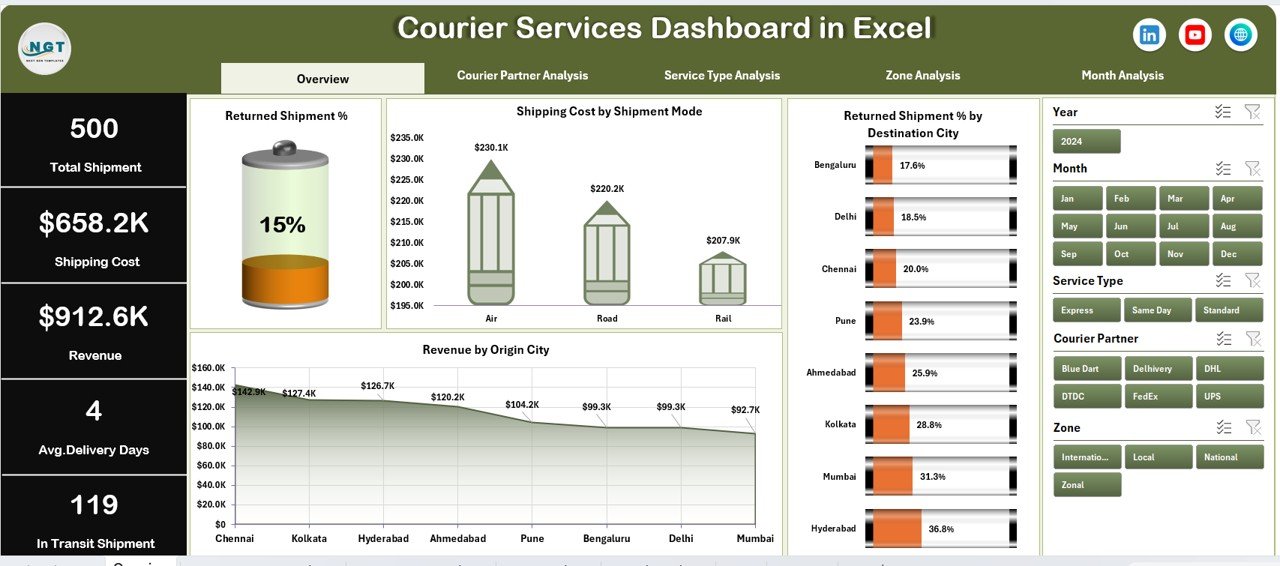
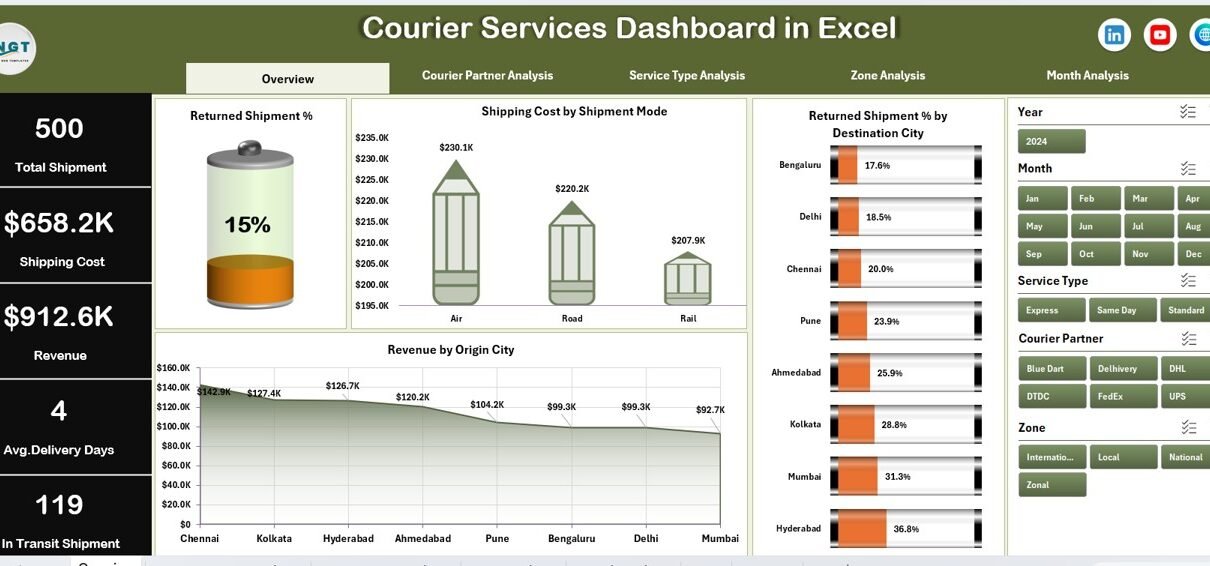
The Overview Page acts as the control center of the dashboard. It provides a quick snapshot of overall courier performance.
Key Elements of the Overview Page
KPI Cards (5 Cards)
Total Shipments
Total Revenue
Total Shipping Cost
Returned Shipment %
Average Delivery Days
These cards help management understand performance instantly.
Charts on the Overview Page
1. Returned Shipment %
Shows overall return rate
Helps identify quality and delivery issues
2. Shipping Cost by Shipment Mode
Compares air, road, and express modes
Highlights cost-intensive shipment methods
3. Returned Shipment % by Destination City
Identifies cities with high return rates
Helps improve last-mile delivery strategies
4. Revenue by Origin City
Shows revenue contribution by city
Supports resource allocation decisions
How Does the Courier Partner Analysis Page Improve Partner Evaluation?
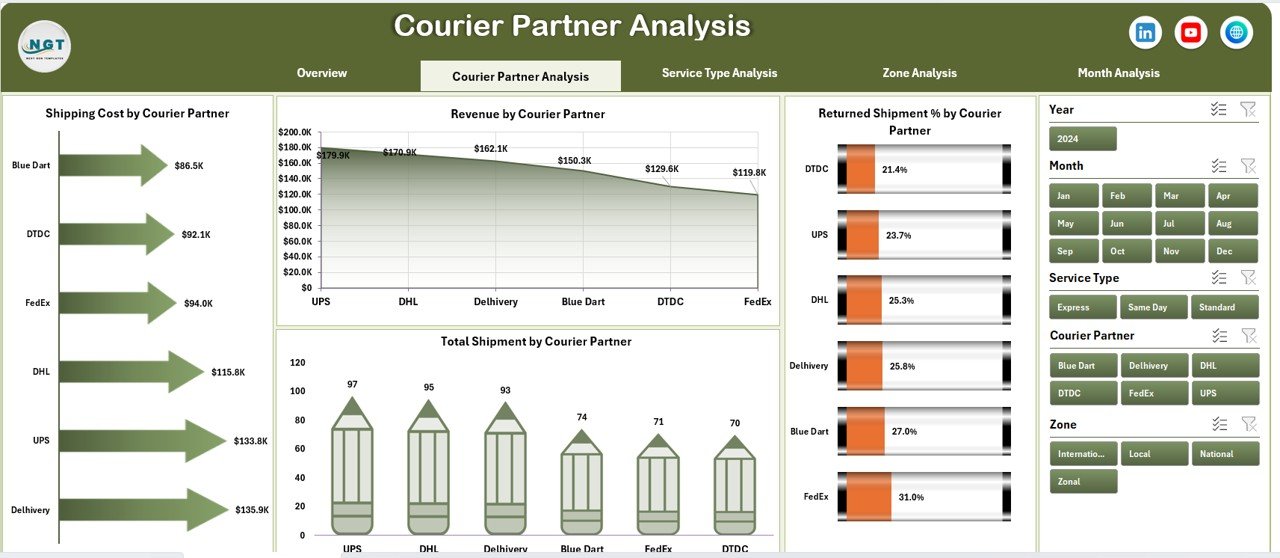
Courier businesses often work with multiple courier partners. Therefore, evaluating their performance becomes crucial.
Purpose of Courier Partner Analysis Page
Compare courier partners objectively
Identify high-performing and underperforming partners
Optimize partner contracts
Charts on Courier Partner Analysis Page
Click to Purchases Courier Services Dashboard in Excel
1. Returned Shipment % by Courier Partner
Highlights partners with higher return rates
Supports corrective action and renegotiation
2. Shipping Cost by Courier Partner
Shows cost efficiency of each partner
Helps reduce logistics expenses
3. Total Shipment by Courier Partner
Displays workload distribution
Identifies dependency risks
4. Revenue by Courier Partner
Compares revenue contribution
Supports strategic partnerships
Why Is Service Type Analysis Important in Courier Operations?
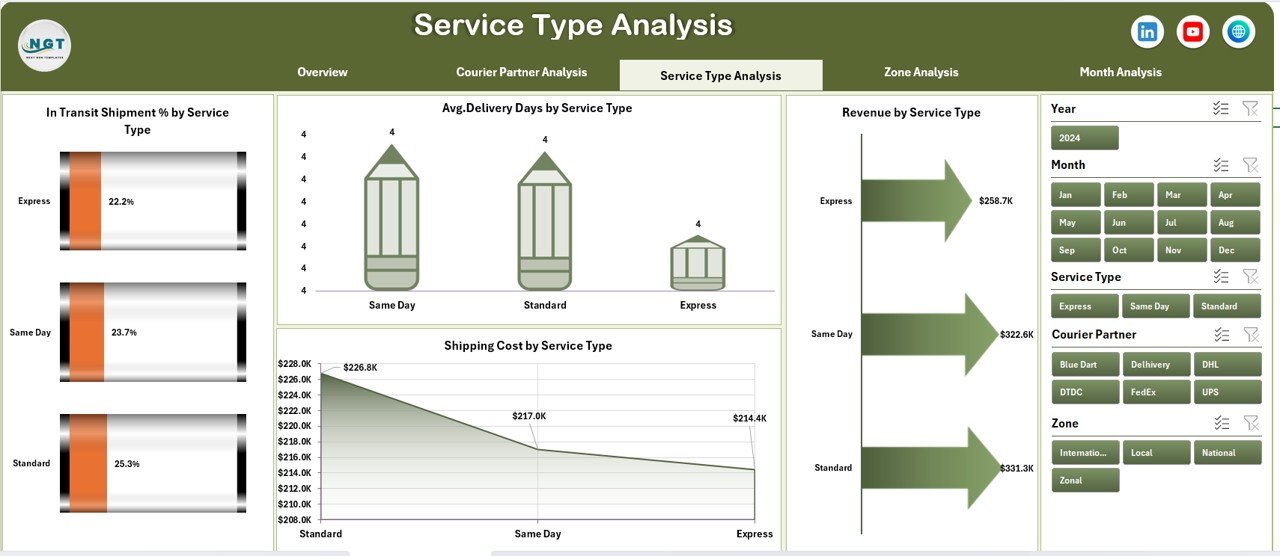
Courier companies offer multiple service types such as standard, express, and same-day delivery. Each service behaves differently.
Benefits of Service Type Analysis
Understand delivery speed and cost trade-offs
Improve pricing strategies
Enhance service quality
Charts on Service Type Analysis Page
1. In Transit Shipment % by Service Type
Highlights service delays
Improves operational planning
2. Average Delivery Days by Service Type
Measures service efficiency
Helps meet customer expectations
3. Revenue by Service Type
Identifies profitable services
Supports service expansion decisions
4. Shipping Cost by Service Type
Tracks cost drivers
Enables cost optimization
Click to Purchases Courier Services Dashboard in Excel
How Does Zone Analysis Support Regional Optimization?
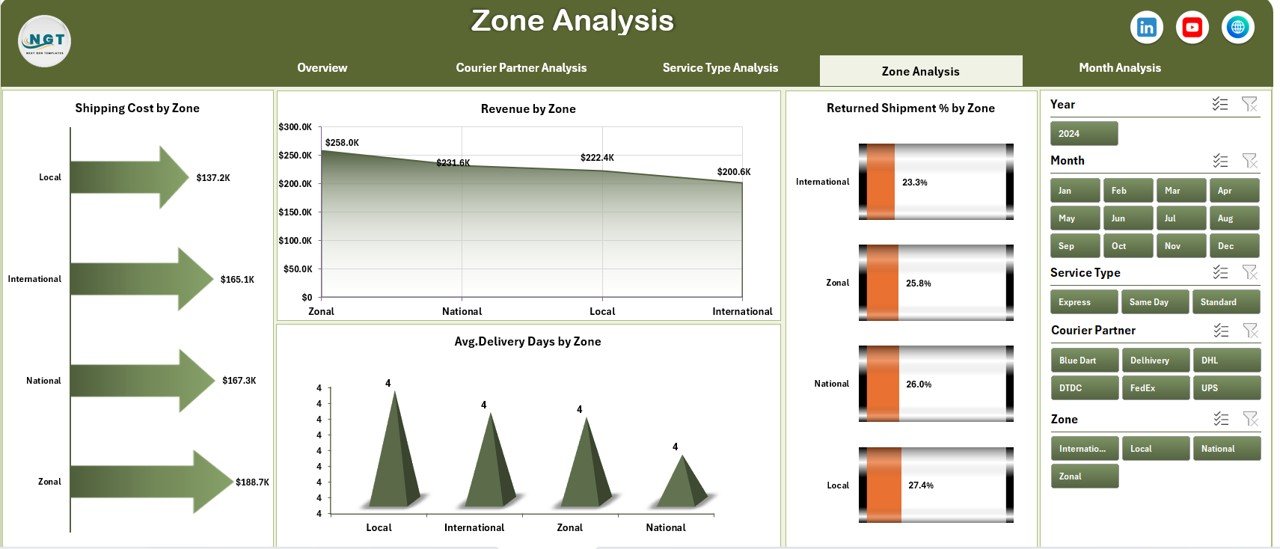
Different zones behave differently due to distance, infrastructure, and demand patterns. Therefore, zone-wise analysis becomes essential.
Purpose of Zone Analysis Page
Compare zone-wise performance
Improve regional delivery planning
Control costs effectively
Charts on Zone Analysis Page
1. Shipping Cost by Zone
Highlights high-cost zones
Helps optimize routing
2. Revenue by Zone
Identifies profitable regions
Supports expansion strategies
3. Returned Shipment % by Zone
Detects problem areas
Improves service reliability
4. Average Delivery Days by Zone
Measures delivery speed regionally
Enhances SLA compliance
How Does Month Analysis Help in Trend Identification?
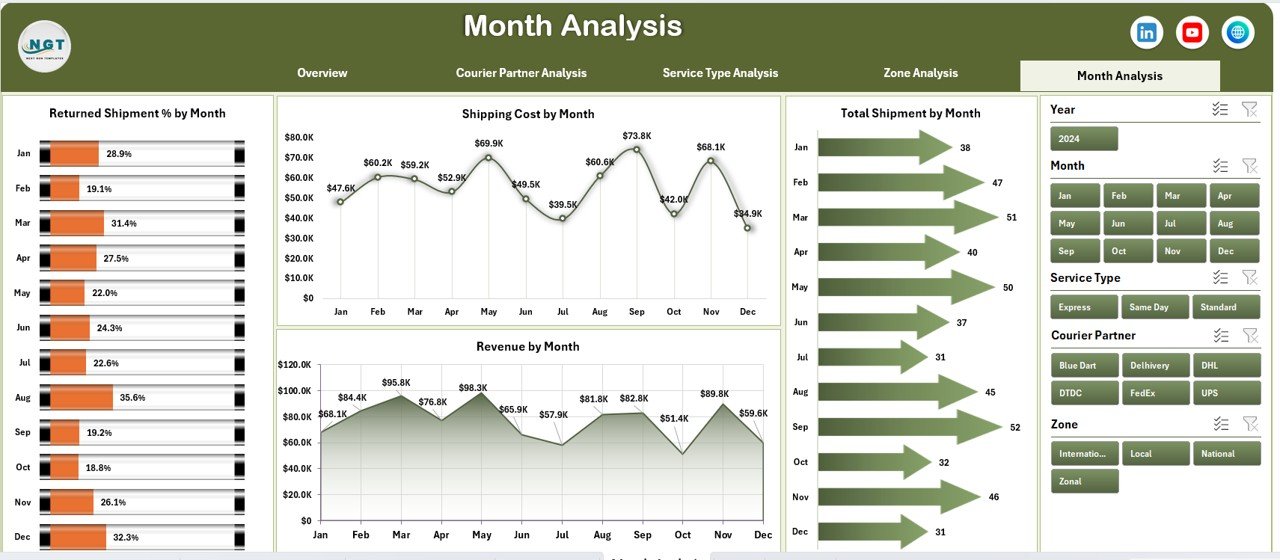
Courier operations change month by month due to demand cycles and seasonal trends.
Why Month Analysis Matters
Tracks performance trends
Identifies seasonal spikes
Supports forecasting
Charts on Month Analysis Page
1. Shipping Cost by Month
Tracks monthly cost fluctuations
Improves budgeting
2. Revenue by Month
Highlights revenue growth or decline
Supports sales planning
3. Returned Shipment % by Month
Identifies quality issues over time
Helps reduce returns
4. Total Shipment by Month
Tracks volume trends
Improves capacity planning
What Is the Role of the Data Sheet and Support Sheet?
Data Sheet
Stores all transactional shipment data
Acts as the backbone of the dashboard
Supports pivot-based reporting
Support Sheet
Contains helper tables
Stores lookup values and parameters
Improves dashboard performance
Advantages of Courier Services Dashboard in Excel
Using a Courier Services Dashboard in Excel delivers multiple operational and strategic advantages.
Key Advantages
Centralized courier performance tracking
Real-time insights with slicers
Cost and revenue visibility
Improved partner evaluation
Faster decision-making
Easy customization
No advanced technical skills required
Best Practices for the Courier Services Dashboard in Excel
Following best practices ensures long-term dashboard success.
Recommended Best Practices
Maintain clean and structured data
Update data regularly
Use consistent naming conventions
Limit slicers to essential fields
Review KPIs monthly
Train users on interpretation
Back up the Excel file regularly
Who Can Use a Courier Services Dashboard in Excel?
This dashboard suits multiple roles and industries.
Ideal Users
Courier companies
Logistics service providers
E-commerce businesses
Supply chain managers
Operations analysts
Business owners
How Does This Dashboard Improve Business Performance?
A Courier Services Dashboard in Excel improves business outcomes by:
Reducing shipping costs
Lowering return rates
Improving delivery times
Enhancing partner accountability
Increasing profitability
Conclusion: Is a Courier Services Dashboard in Excel Worth Using?
Absolutely. A Courier Services Dashboard in Excel transforms raw courier data into meaningful insights. It simplifies tracking, improves visibility, and supports smarter decisions across operations.
Because it uses Excel, businesses can implement it quickly without heavy investment. Moreover, its interactive design ensures continuous improvement in courier performance.
If you want better control over shipments, costs, and revenue, this dashboard becomes an essential tool.
Frequently Asked Questions (FAQs)
Click to Purchases Courier Services Dashboard in Excel
What is a Courier Services Dashboard in Excel used for?
It helps track shipments, delivery performance, costs, returns, and revenue in a centralized Excel dashboard.
Can I customize this dashboard?
Yes, you can easily customize KPIs, charts, and slicers based on business needs.
Does this dashboard require advanced Excel skills?
No, basic Excel knowledge is sufficient to use and update the dashboard.
Can this dashboard handle large data volumes?
Yes, it supports large datasets using pivot tables efficiently.
How often should I update the data?
You should update data monthly or weekly for accurate insights.
Is this dashboard suitable for small courier businesses?
Yes, both small and large courier businesses can benefit from it.
Visit our YouTube channel to learn step-by-step video tutorials