In today’s digital age, data is one of the most valuable assets for any business. From customer information to employee records and financial transactions, organizations handle sensitive information every single day. With the increasing number of data breaches and stricter regulatory requirements such as GDPR, HIPAA, and CCPA, protecting this data is no longer optional—it is a necessity.
Companies that fail to protect personal and confidential data face severe consequences, including regulatory fines, loss of customer trust, and long-term reputational damage. At the same time, businesses that take proactive measures to safeguard data enjoy stronger relationships with customers and more resilience against cyber threats.
Click to Purchases Data Privacy Tracking Checklist in Excel
One practical way to maintain accountability, monitor compliance, and ensure consistent data protection is by using a Data Privacy Tracking Checklist in Excel.
This article will walk you through everything you need to know about this ready-to-use Excel template, including its features, benefits, best practices, and real-world use cases. By the end, you’ll understand how to integrate it into your organization for seamless privacy management.
What is a Data Privacy Tracking Checklist in Excel?
A Data Privacy Tracking Checklist in Excel is a structured tool designed to help organizations plan, track, and monitor all their data privacy activities in one place. It acts as a digital roadmap for privacy compliance by listing essential tasks, assigning responsibilities, setting deadlines, and tracking progress.
Unlike complex software that may require technical expertise, Excel provides a simple, familiar, and flexible platform that employees across all departments can use with ease.
The checklist is more than just a table. It is a system that combines status tracking, responsibility management, and progress visualization in a single file, making it the perfect starting point for businesses looking to strengthen their privacy practices without investing in costly solutions.
Key Features of the Data Privacy Tracking Checklist Template
This template is designed with both simplicity and functionality in mind. It includes two main worksheet tabs that make it user-friendly and efficient.
Data Privacy Tracking Checklist Sheet Tab
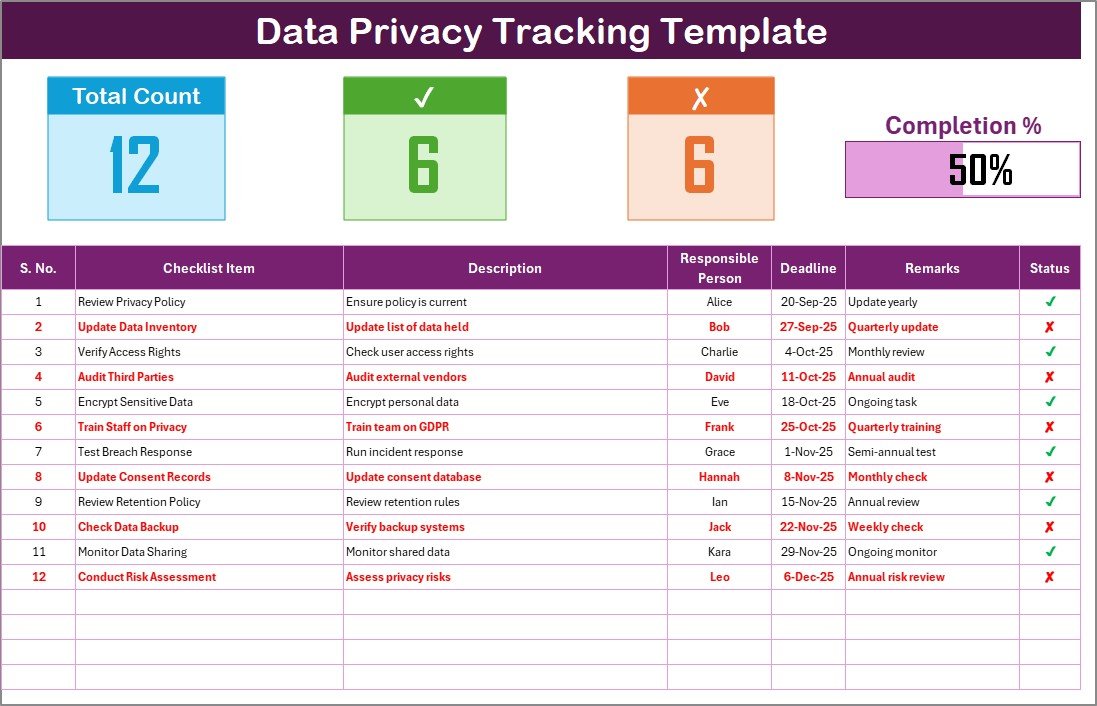
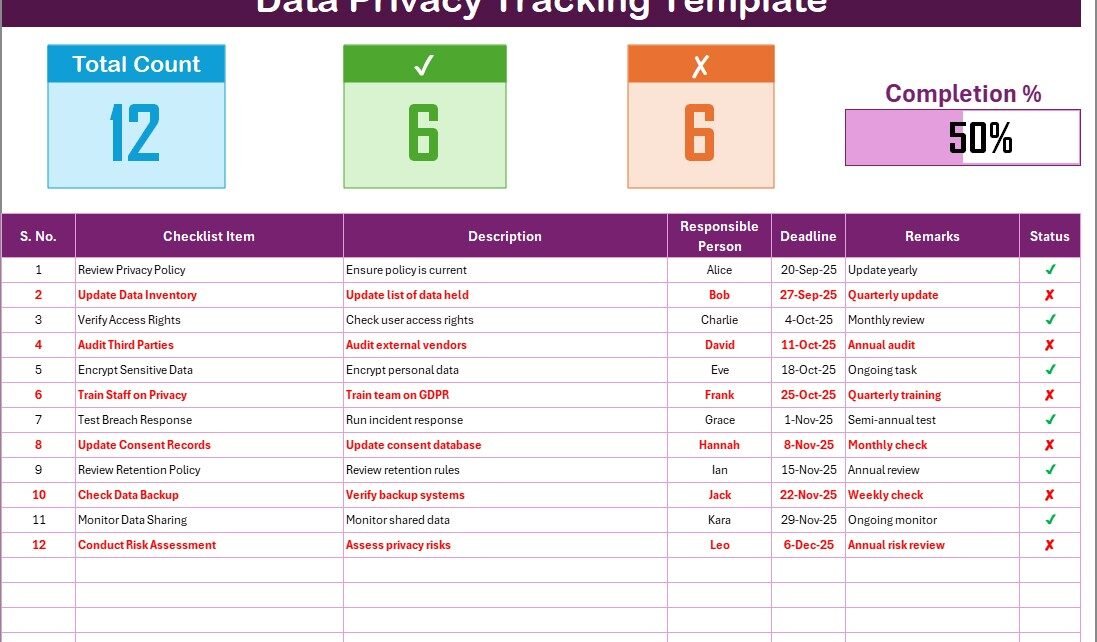
This is the main sheet where you will capture and monitor all your checklist information.
Top Section:
-
Displays the total number of checklist items.
-
Shows the number of completed items and the number of pending items.
-
Includes a progress bar to visually track completion percentage.
Checklist Table Columns:
-
Serial No. – Automatically numbered for easy reference.
-
Checklist Item – The specific privacy task (e.g., “Encrypt stored data,” “Review data access logs”).
-
Description – A short explanation of the task.
-
Responsible Person – Assigned team member responsible for completing the task.
-
Deadline – Due date to ensure timely completion.
-
Remarks – Space for quick notes or updates.
-
Status – Marked as ✔ (completed) or ✘ (not completed).
This sheet gives you a real-time overview of your organization’s data privacy efforts.
List Sheet Tab
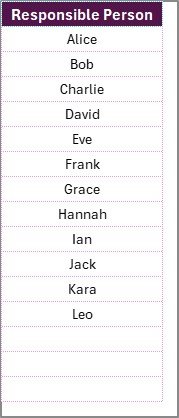
The List Sheet serves as a supporting database that captures the unique list of responsible persons. This ensures you can use dropdown menus in the main table, making it easy to assign and track responsibilities without manual entry errors.
Together, these two sheets form a comprehensive yet simple privacy management system.
Why Should You Use a Data Privacy Tracking Checklist?
Click to Purchases Data Privacy Tracking Checklist in Excel
You might wonder: why not just manage privacy tasks through emails or informal notes? The answer lies in structure and accountability.
Here are the main reasons to use a checklist:
-
It reduces the chances of missing critical compliance steps.
-
It assigns clear responsibilities, eliminating confusion.
-
It provides visibility across the team, ensuring transparency.
-
It supports audits by offering a structured record of privacy efforts.
-
It saves time by consolidating information in one place.
Advantages of Using a Data Privacy Tracking Checklist in Excel
Implementing this template offers several benefits:
✅ Simplicity: No need for complex tools—Excel is easy to use and already familiar to most employees.
✅ Accountability: Assign tasks directly to team members to avoid ambiguity.
✅ Progress Monitoring: Visual indicators like progress bars make it easy to see how much work is complete.
✅ Compliance Readiness: The checklist helps prepare for audits and inspections.
✅ Cost-Effective: No expensive software subscriptions are needed.
✅ Flexibility: Can be customized to fit your company’s unique compliance requirements.
✅ Scalability: Suitable for small businesses as well as large enterprises.
How to Use the Data Privacy Tracking Checklist
Using the template is straightforward. Here’s a step-by-step guide:
-
Download the Template and open it in Excel.
-
Go to the List Sheet and add the names of employees responsible for data privacy tasks.
-
Switch to the Checklist Tab and fill in your tasks under the “Checklist Item” column.
-
Add Descriptions and Deadlines for each task.
-
Assign a Responsible Person using the dropdown list.
-
Update Status regularly with ✔ or ✘ as tasks are completed or pending.
-
Monitor Progress through the automatic count and progress bar at the top.
By following these steps, your organization can create a living document that ensures ongoing compliance and accountability.
Best Practices for the Data Privacy Tracking Checklist
To make the most of this template, follow these best practices:
-
Keep It Updated: Regularly update task status to ensure accuracy.
-
Be Specific: Write clear and actionable checklist items.
-
Set Realistic Deadlines: Avoid overloading team members with unrealistic timelines.
-
Review Weekly: Conduct weekly reviews to track progress and make adjustments.
-
Assign Clear Ownership: Always assign each task to one responsible person.
-
Use Short Descriptions: Keep task descriptions simple for quick understanding.
-
Archive Completed Tasks: Store completed checklists for audit and compliance history.
Opportunities for Improvement
While the Excel template is highly useful, there is always room for enhancement. Consider these opportunities:
-
Integration with Tools: Connect Excel with task management software like Microsoft Teams or Outlook for reminders.
-
Automation: Use simple Excel macros or formulas to send alerts when deadlines approach.
-
Customization: Add additional columns for priority levels, compliance category, or risk level.
-
Data Security: Protect the Excel file with a password to ensure only authorized staff can access it.
Real-World Use Cases
The Data Privacy Tracking Checklist can be applied across different industries and departments.
-
Healthcare: Track compliance with HIPAA regulations, ensuring patient records remain confidential.
-
Finance: Manage GDPR-related tasks and protect sensitive financial data.
-
Education: Ensure student data protection in compliance with FERPA.
-
Retail & E-commerce: Monitor customer data handling practices to maintain trust.
-
IT Companies: Track internal audits, encryption standards, and access control logs.
Conclusion
Data privacy is no longer just a technical issue—it is a core business requirement. Organizations must take proactive steps to safeguard sensitive information, maintain compliance, and build trust with stakeholders.
The Data Privacy Tracking Checklist in Excel is a cost-effective, practical, and user-friendly solution that empowers businesses of all sizes to take control of their privacy responsibilities. By using this template, you ensure that no task falls through the cracks, responsibilities are clearly assigned, and progress is always visible.
If you want to strengthen your data privacy practices without overcomplicating the process, this Excel checklist is the perfect starting point.
Frequently Asked Questions (FAQs)
1. What is a Data Privacy Tracking Checklist?
A Data Privacy Tracking Checklist is a structured tool that helps businesses list, assign, and track privacy compliance tasks.
2. Why should I use Excel for data privacy tracking?
Excel is familiar, flexible, cost-effective, and easy to customize, making it an ideal platform for tracking tasks without complex software.
3. Can I customize the template?
Yes, you can add columns, change formats, and adapt it to match your organization’s specific compliance needs.
4. How often should I update the checklist?
Ideally, you should update it weekly or after completing any privacy-related task to ensure accuracy.
5. Is this checklist suitable for small businesses?
Yes, the template is scalable. It works for both small businesses with limited resources and large organizations handling complex privacy needs.
6. Can the checklist help during audits?
Absolutely. It provides a structured record of your organization’s data privacy efforts, making audits smoother and more transparent.
7. How do I protect the checklist file itself?
You can set a password in Excel, restrict editing access, or store the file on a secure cloud platform with role-based permissions.
Visit our YouTube channel to learn step-by-step video tutorials