In today’s fast-paced business environment, ethics and conduct play a crucial role in shaping organizational integrity and trust. Companies that uphold strong ethical values and transparent conduct guidelines gain the confidence of employees, customers, and investors alike. However, maintaining ethical compliance isn’t just about creating policies—it’s about implementing actionable steps to ensure adherence.
That’s where an Ethics and Conduct Action Plan Checklist in Excel becomes essential. It helps organizations track ethical practices, monitor employee behavior, and ensure that everyone aligns with corporate conduct standards.
This article explains what this checklist is, its key components, structure, benefits, best practices, and how to use it effectively to promote ethical accountability across all levels.
Click to Purchases Ethics and Conduct Action Plan Checklist in Excel
📘 What Is an Ethics and Conduct Action Plan Checklist in Excel?
An Ethics and Conduct Action Plan Checklist in Excel is a ready-to-use digital template that helps companies systematically manage, monitor, and improve ethical practices within their operations.
Instead of relying on manual documentation or scattered files, this Excel-based checklist brings everything together in one place. It ensures that employees follow corporate ethics policies, comply with regulations, and take corrective actions whenever needed.
This tool not only simplifies ethical management but also makes reporting and performance tracking transparent and measurable.
📊 Structure of the Template
The Ethics and Conduct Action Plan Checklist Template in Excel includes two main worksheet tabs designed for simplicity and usability.
Let’s look at each component in detail:
1️⃣ Ethics and Conduct Action Plan Checklist Sheet Tab
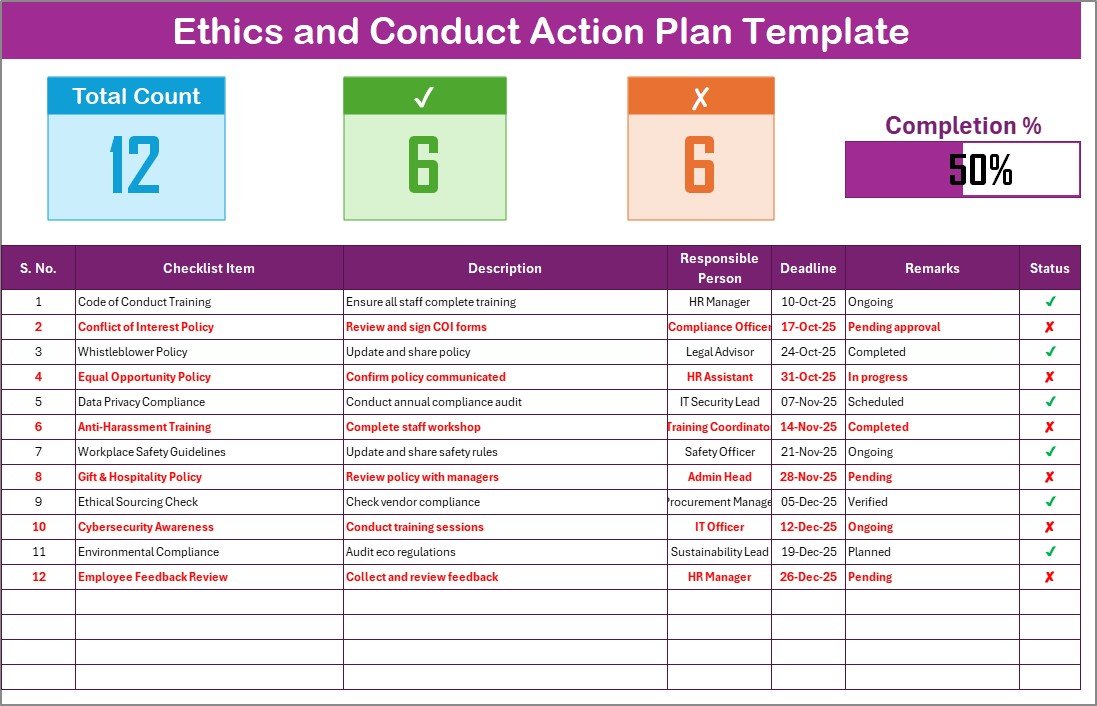
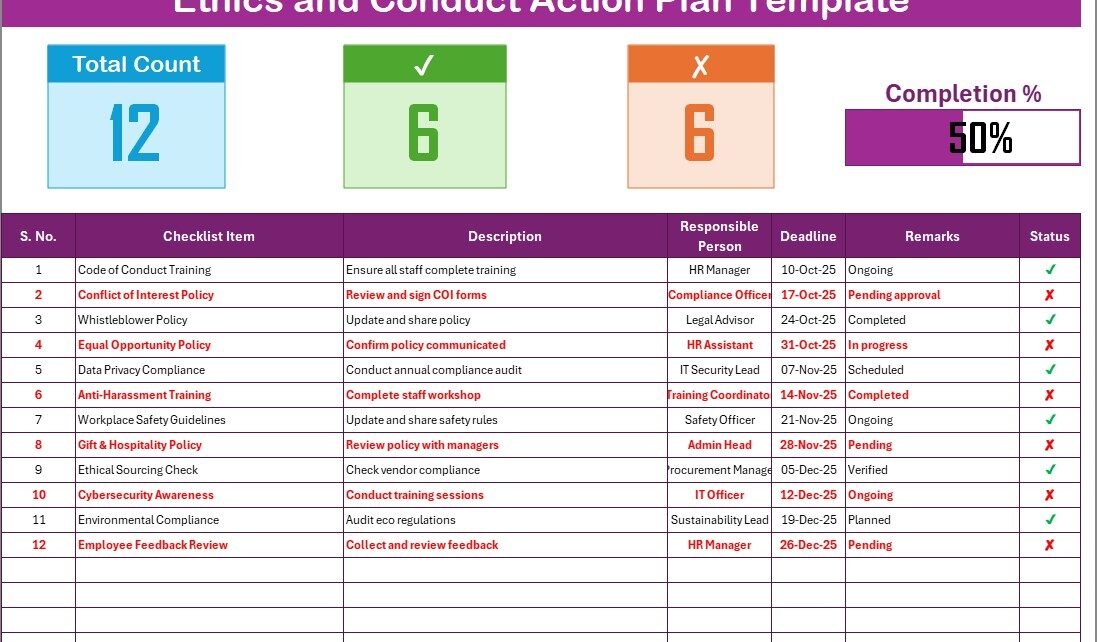
This is the main sheet tab of the template where you record all ethical actions and compliance activities.
Top Section:
-
Displays total count of checklist items.
-
Shows checked count (✔) for completed tasks.
-
Displays crossed count (✘) for pending or non-compliant tasks.
-
Includes a progress bar that dynamically shows the percentage of completed actions.
Checklist Table:
This is the working area where you update the ethics and conduct records. It includes the following columns:
-
Serial No. – Unique ID for each checklist item.
-
Checklist Item – The name of the ethical or conduct item to be monitored.
-
Description – Short explanation of what needs to be done or reviewed.
-
Responsible Person – The individual accountable for the task.
-
Deadline – The due date for completing the task.
-
Remarks – Notes or observations.
-
Status – Use ✔ for completed or ✘ for pending.
2️⃣ List Sheet Tab
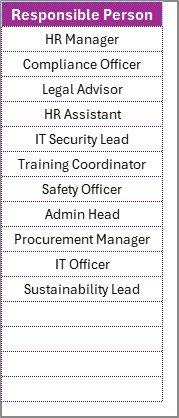
This sheet maintains a unique list of Responsible Persons used to populate dropdown lists in the main sheet.
It ensures data consistency and avoids manual entry errors.
🧠 Why Is Ethical Conduct Important in Organizations?
Before diving deeper into the Excel template, it’s important to understand why ethics and conduct matter in the workplace.
Strong ethical standards form the foundation of trust, transparency, and accountability. They help employees make fair decisions, prevent misconduct, and maintain the organization’s reputation. Ethical conduct also:
-
Builds a positive work culture.
-
Minimizes legal risks and compliance issues.
-
Promotes transparency in decision-making.
-
Enhances the organization’s credibility in the market.
Thus, an actionable checklist helps bridge the gap between written policies and day-to-day implementation.
🧩 Key Features of the Ethics and Conduct Action Plan Checklist Template
This Excel template is designed with a balance of simplicity and functionality. Below are its core features:
-
✅ Ready-to-use structure: Predefined columns and formulas make it plug-and-play.
-
📅 Deadline tracking: Helps teams monitor time-bound compliance activities.
-
👤 Responsible Person dropdown: Ensures accountability and avoids data duplication.
-
📈 Progress visualization: Automatic percentage bar helps visualize progress at a glance.
-
💡 Customizable design: Easily modify items, colors, or categories to match company needs.
-
🧾 Simple and professional layout: User-friendly design for managers, HR, and compliance teams.
-
🔍 Error-free validation: Drop-downs reduce manual input errors.
With these features, any organization—big or small—can maintain a transparent ethics monitoring system.
Click to Purchases Ethics and Conduct Action Plan Checklist in Excel
🧮 How to Use the Ethics and Conduct Action Plan Checklist in Excel
Here’s a simple step-by-step guide to help you use the template effectively:
Step 1: Open the Template
Start by opening the Excel file. You’ll find two sheets—Checklist and List.
Step 2: Fill in the Responsible Person List
Go to the List tab and add the names of employees or managers responsible for ethics compliance.
These names will automatically appear in the dropdown menu of the main checklist.
Step 3: Enter Checklist Details
On the main sheet, fill in the checklist items.
Examples include:
-
Code of Conduct Training
-
Anti-Bribery Policy Review
-
Data Privacy Audit
-
Conflict of Interest Declaration
-
Whistleblower Program Review
Step 4: Assign Responsible Person and Deadline
Assign each checklist item to a specific person and set a completion date.
Step 5: Update Status Regularly
Mark ✔ for completed and ✘ for pending items. The progress bar will update automatically.
Step 6: Review and Improve
Use the checklist insights to identify weak areas and take corrective actions.
🧭 Benefits of Using an Excel-Based Ethics and Conduct Checklist
Using Excel for managing ethical conduct offers several advantages over traditional paper-based or complex software systems.
1️⃣ Simplicity and Accessibility
Anyone with basic Excel knowledge can use the template easily—no training required.
2️⃣ Cost-Effective
Unlike expensive compliance software, this checklist is free or low-cost.
3️⃣ Real-Time Tracking
Instant updates and visual progress indicators make it easy to track ethical initiatives in real-time.
4️⃣ Customization
You can modify checklist items, columns, or design layouts to match specific industry requirements.
5️⃣ Transparency
Because the checklist is centralized, all stakeholders can see what has been completed and what remains pending.
🏢 Who Can Use the Ethics and Conduct Action Plan Checklist?
This checklist suits a wide range of professionals and departments. Some key users include:
-
Human Resources (HR) teams to track ethics training and employee compliance.
-
Compliance Officers for regulatory reporting and audit preparation.
-
Management Teams to oversee conduct standards across departments.
-
Internal Auditors for verifying compliance practices.
-
Project Managers ensuring that ethical conduct aligns with project goals.
Whether your organization is in finance, healthcare, education, or manufacturing, this checklist adapts easily to your needs.
💼 Advantages of Ethics and Conduct Action Plan Checklist in Excel
Using this checklist in Excel brings several operational and strategic advantages:
-
🧠 Encourages accountability: Employees know their roles and timelines.
-
🕒 Saves time: Automatic calculations reduce manual work.
-
📊 Improves visibility: Managers can see progress instantly.
-
🧩 Supports audits: Provides proof of ethical monitoring and compliance activities.
-
💬 Boosts communication: Teams can discuss and resolve conduct issues faster.
-
⚙️ Enhances consistency: Ensures ethical rules are followed uniformly across departments.
When used regularly, it becomes a strong foundation for ethical culture in your organization.
🔧 Best Practices for the Ethics and Conduct Action Plan Checklist
To make the most of your checklist, follow these best practices:
1️⃣ Keep It Updated
Review and update checklist items every quarter to include new ethical guidelines or policies.
2️⃣ Define Clear Responsibilities
Ensure each task has a responsible person. Shared accountability prevents confusion.
3️⃣ Use Conditional Formatting
Highlight delayed tasks or unethical practices in red to make them visible at a glance.
4️⃣ Automate Calculations
Use Excel formulas for total count, completed tasks, and progress percentage.
5️⃣ Review Progress Regularly
Schedule monthly or quarterly reviews to assess ethical improvements.
6️⃣ Maintain Confidentiality
Restrict access to sensitive information to maintain privacy.
7️⃣ Archive Past Data
Keep previous checklists archived for audit trails and compliance documentation.
Click to Purchases Ethics and Conduct Action Plan Checklist in Excel
🧰 How This Checklist Supports Corporate Governance
Corporate governance thrives on ethical principles.
This Excel checklist acts as a bridge between corporate vision and ethical execution.
By aligning it with company policies, it ensures every decision follows moral and legal standards.
It promotes:
-
Fair decision-making.
-
Transparency in actions.
-
Timely corrective actions.
-
Employee accountability and trust.
🔍 How Often Should You Update Your Ethics and Conduct Action Plan?
Ideally, you should review and update your checklist quarterly.
However, if your organization faces regulatory changes, new business risks, or mergers, you may need more frequent updates.
Always ensure your checklist reflects current ethical policies, laws, and workplace culture.
✨ Tips for Maintaining Ethical Awareness Across the Organization
Maintaining an ethical culture goes beyond having a checklist.
Here are some tips to build a strong ethical environment:
-
📚 Conduct regular ethics training.
-
💬 Encourage open communication channels.
-
🧾 Recognize employees for ethical behavior.
-
🚫 Implement strict anti-bribery and anti-corruption measures.
-
🕵️ Conduct surprise audits or reviews.
-
🧭 Integrate ethics in performance evaluations.
🧩 Real-World Use Case
A global manufacturing firm adopted this Excel-based ethics checklist to monitor employee compliance across 12 regions.
Within six months, they:
-
Reduced ethical violations by 45%.
-
Increased reporting transparency.
-
Improved audit readiness and internal communication.
The key takeaway: Consistency and accountability transformed their compliance framework.
🏁 Conclusion
An Ethics and Conduct Action Plan Checklist in Excel is more than a tool—it’s a commitment to organizational integrity.
By tracking, reviewing, and improving ethical practices, you build a culture of trust, compliance, and transparency.
This Excel template simplifies complex monitoring processes and provides a clear roadmap for maintaining conduct standards.
Whether you’re a startup or a large enterprise, implementing this checklist ensures that ethical values remain at the heart of your organization’s operations.
Click to Purchases Ethics and Conduct Action Plan Checklist in Excel
❓ Frequently Asked Questions (FAQs)
1️⃣ What is an Ethics and Conduct Action Plan Checklist in Excel?
It’s an Excel-based tool designed to track ethical practices, conduct audits, and ensure compliance within organizations.
2️⃣ How often should I update the checklist?
You should review and update it quarterly or whenever new ethical policies are introduced.
3️⃣ Can I customize the template?
Yes, you can easily add or modify columns, colors, and formulas to match your organization’s requirements.
4️⃣ Who should use this checklist?
HR teams, compliance officers, and managers responsible for employee conduct and ethical standards.
5️⃣ What are the benefits of using Excel for ethical tracking?
Excel offers cost-effectiveness, accessibility, real-time monitoring, and customizable features.
6️⃣ Is this template suitable for small businesses?
Absolutely! It works perfectly for startups, SMEs, and large enterprises alike.
7️⃣ How does the progress bar work?
The progress bar automatically updates based on the number of ✔ and ✘ marks entered in the status column.
Click to Purchases Ethics and Conduct Action Plan Checklist in Excel
Visit our YouTube channel to learn step-by-step video tutorials
Watch the step-by-step video tutorial: