Managing compliance tasks while working remotely in the finance sector can feel overwhelming. Regulations keep changing, deadlines are strict, and missing one compliance event can lead to penalties or reputational damage. To address these challenges, we have designed a Finance Compliance Remote Work Calendar in Excel.
This ready-to-use calendar template brings structure, automation, and simplicity to your compliance management. With features like annual, monthly, and daily views, event tracking, and automated reminders, it ensures finance professionals stay on top of their compliance responsibilities without stress.
Click to Purchases Finance Compliance Remote Work Calendar in Excel
In this article, we will explore the features, advantages, best practices, and opportunities for improvement of the Finance Compliance Remote Work Calendar. We will also answer the most common questions at the end.
Why Do You Need a Finance Compliance Remote Work Calendar?
Remote work has changed how finance teams handle compliance. Without a centralized tool, tasks may slip through the cracks. A compliance calendar:
-
Ensures timely tracking of tax filings, audits, financial reporting deadlines, and regulatory updates.
-
Brings transparency by keeping all tasks and events visible to everyone.
-
Reduces stress and errors caused by manual tracking.
-
Creates a digital workspace for managing events and records.
Excel makes this process easier because it is flexible, cost-effective, and widely used. Our Excel-based calendar allows compliance teams to organize and manage all events in one place with interactive controls.
Key Features of the Finance Compliance Remote Work Calendar
The template includes five well-structured worksheets that allow users to manage compliance schedules effectively. Let’s go through each tab in detail.
Home Sheet Tab
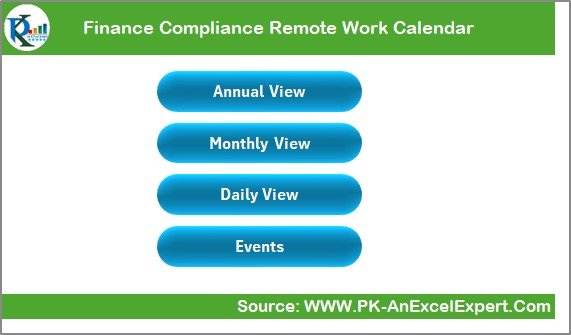
The Home sheet acts as the dashboard and index page. It contains four navigation buttons:
-
Annual View – Jump directly to the yearly calendar.
-
Monthly View – View events of a selected month.
-
Daily View – Analyze compliance events for specific dates.
-
Events – Access the entire database of compliance events.
This navigation structure makes the calendar user-friendly and eliminates the hassle of scrolling through multiple sheets.
Click to Purchases Finance Compliance Remote Work Calendar in Excel
Annual View Sheet Tab
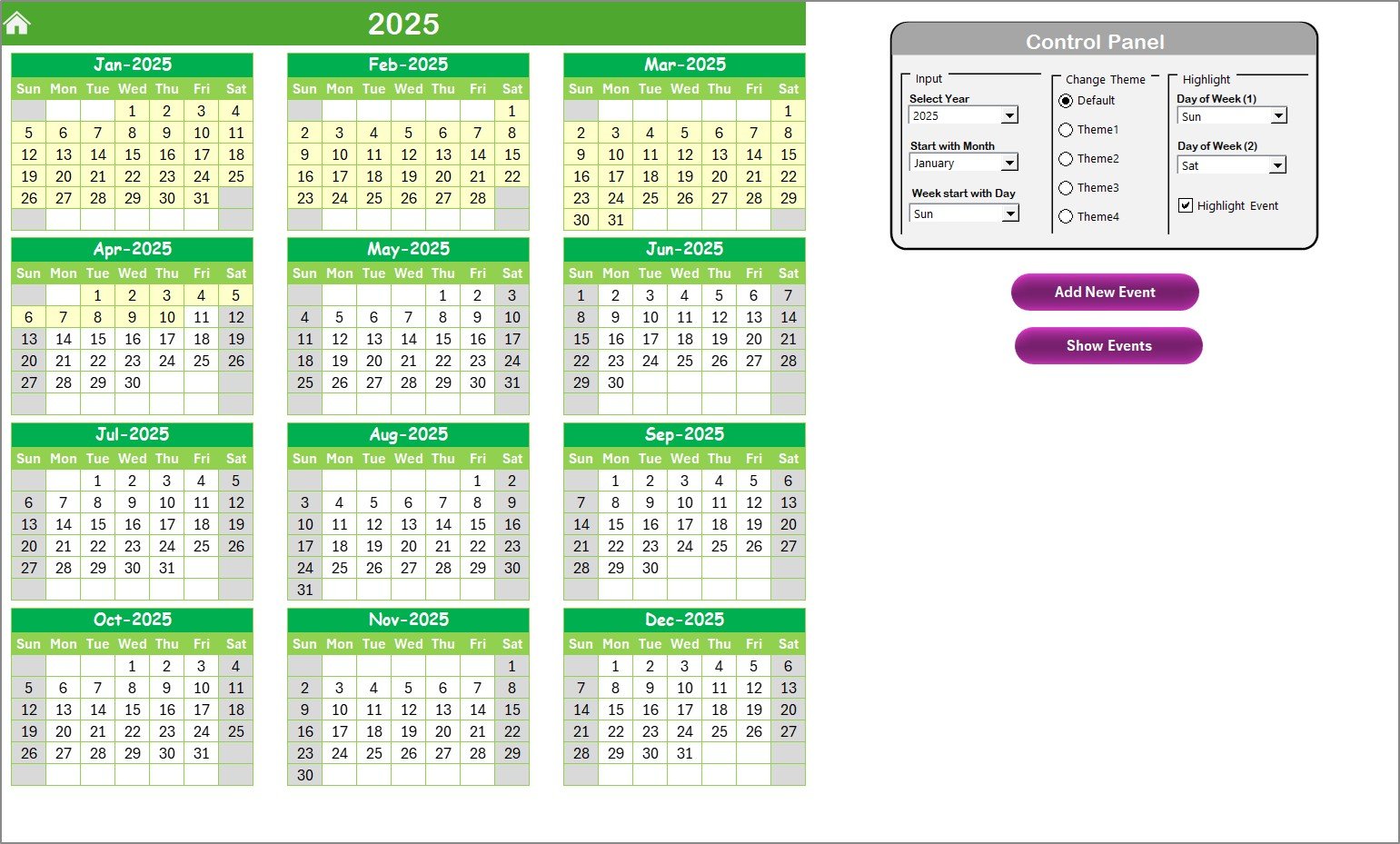
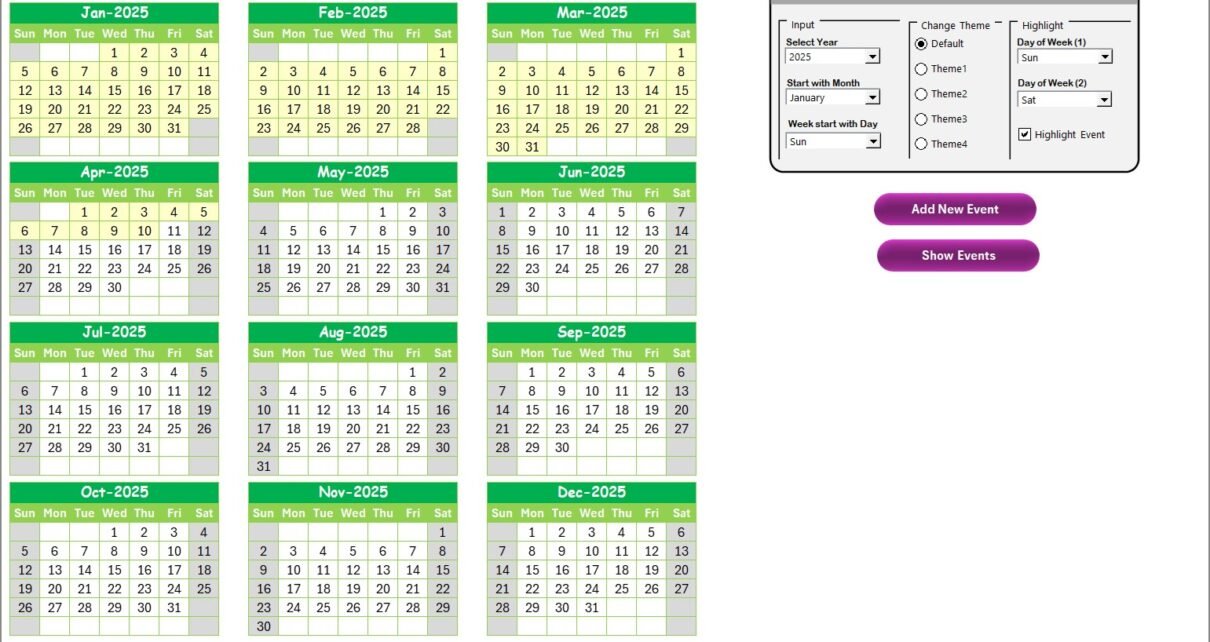
The Annual View gives a bird’s-eye view of all twelve months.
Control Panel Options:
- Input Group – Choose the year, start month, or starting day of the week.
- Change Theme Group – Pick from five color themes to customize the calendar.
- Highlight Group – Highlight weekends (e.g., Saturday, Sunday) or compliance events in yellow.
-
Add New Event Button: Select a date, click the button, and fill in the event form.
-
Show Event Button: Instantly see the list of events for any selected date.
This view is ideal for compliance managers who want to plan ahead for the full year.
Monthly View Sheet Tab
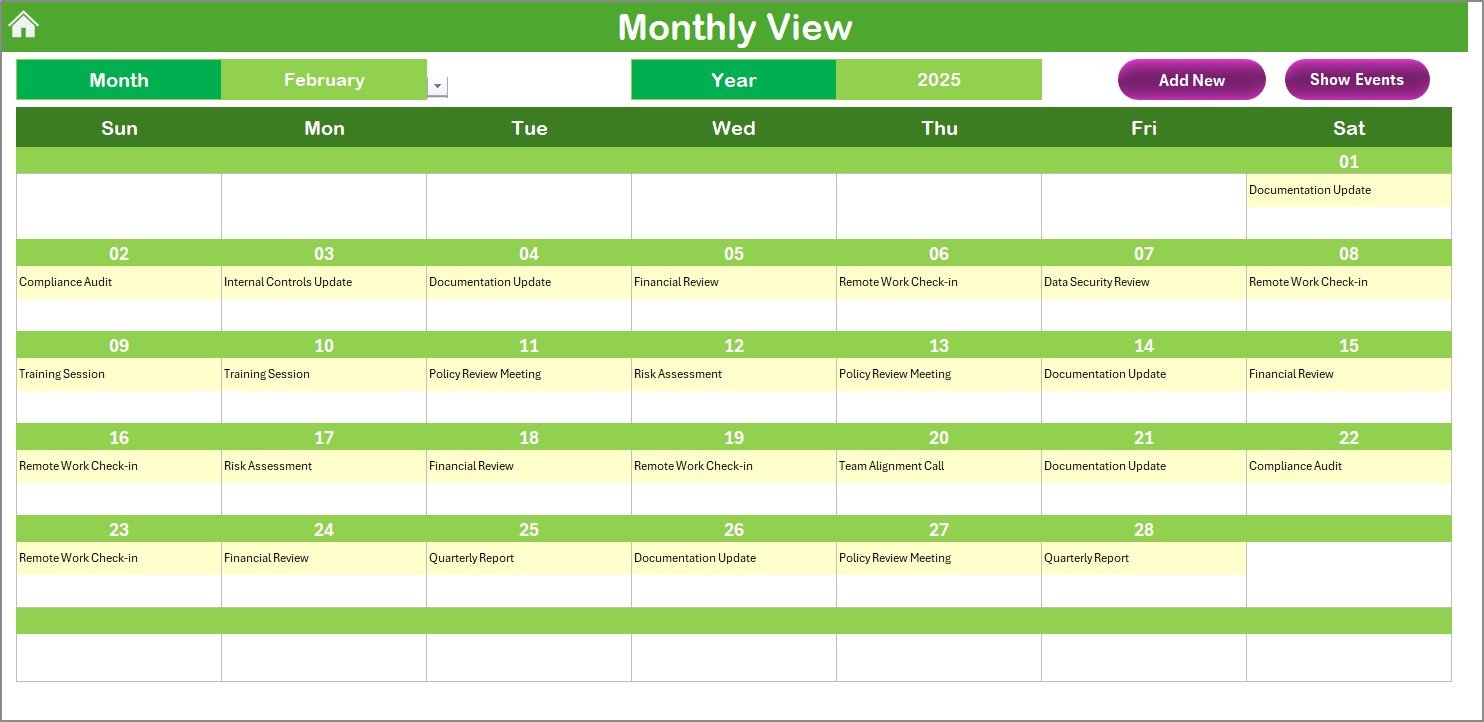
The Monthly View allows focused tracking of events in a selected month.
-
At the top, users can select the month and year.
-
The calendar displays one event per date and indicates if there are multiple events with a “more than 1…” tag.
Two buttons are available:
- Add New Event – Create a new compliance event for the chosen date.
- Show Event – Display all events scheduled for the day.
This feature helps finance teams manage busy months with high compliance workloads, such as the financial year-end.
Daily View Sheet Tab
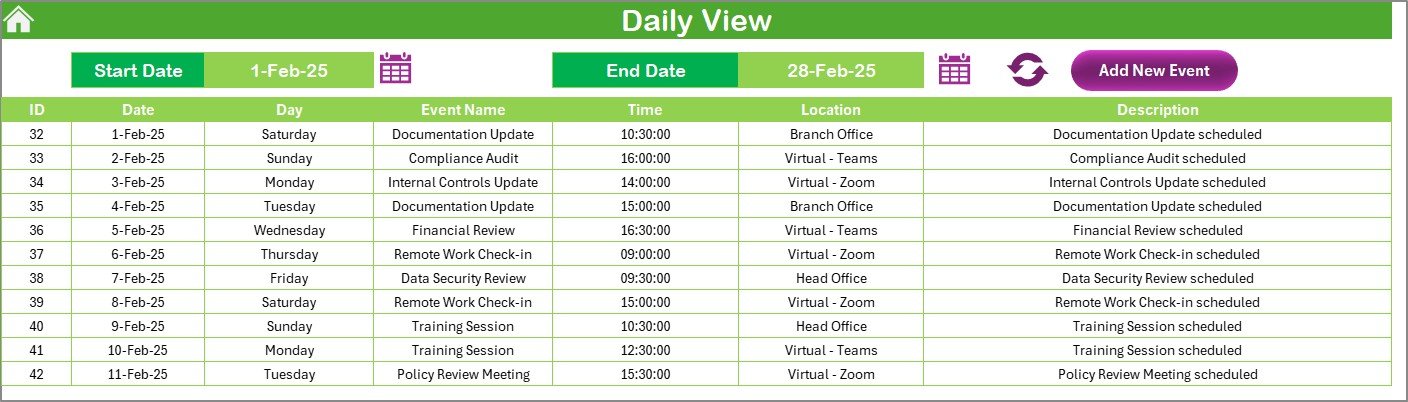
The Daily View helps track compliance events in detail.
-
Enter a date range using the start and end date fields.
-
Use the Refresh button to update the event list.
-
Add new events through the Add New Event button.
This is particularly useful for audit week, tax filing days, or multiple compliance tasks happening close together.
Events Sheet Tab
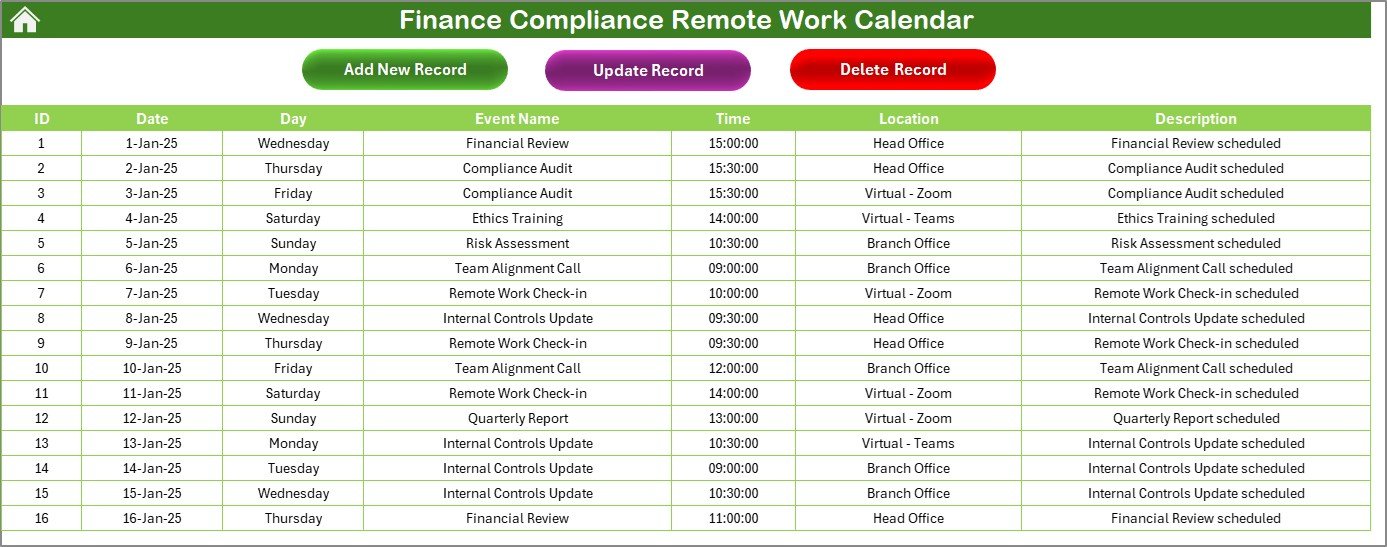
The Events Sheet acts as the database of all compliance-related events.
Click to Purchases Finance Compliance Remote Work Calendar in Excel
It includes the following columns:
-
ID: Auto-generated number for unique tracking.
-
Date: Scheduled date of the event.
-
Day: Day of the week.
-
Event Name: Name of the compliance task.
-
Time: Time slot for the event.
-
Location: Physical or virtual location.
-
Description: Short details about the event.
On the top, three buttons make database management simple:
-
Add New Record – Create a new entry.
-
Update Existing Record – Modify details of an event.
-
Delete Record – Remove a record permanently.
This database ensures all compliance records remain safe, organized, and easily accessible.
Advantages of the Finance Compliance Remote Work Calendar
Using this calendar provides several benefits:
✅ Centralized Information – All compliance tasks stay in one structured file.
✅ Time-Saving – Quick navigation buttons eliminate manual searching.
✅ Flexibility – Annual, monthly, and daily views allow multiple planning levels.
✅ Customization – Change themes and highlight important days easily.
✅ Error Reduction – Automated ID generation and structured inputs prevent duplication.
✅ Improved Collaboration – Teams working remotely can follow the same calendar format.
✅ Regulatory Preparedness – Never miss tax filing deadlines, audits, or compliance checks.
Opportunities for Improvement
While the Excel calendar is powerful, it can improve further in the following areas:
🔹 Cloud Integration – Linking with platforms like OneDrive or Google Drive for real-time collaboration.
🔹 Notifications – Adding automatic email or pop-up reminders.
🔹 Mobile Compatibility – Making a version optimized for smartphones.
🔹 Role-Based Access – Restricting editing rights to avoid unauthorized changes.
🔹 Data Security – Adding password protection for sensitive compliance data.
Best Practices for Using the Finance Compliance Remote Work Calendar
To get the most out of this tool, follow these best practices:
-
Update Regularly – Add new events as soon as compliance tasks are assigned.
-
Use Color Themes Wisely – Assign specific colors for urgent vs. routine tasks.
-
Review Weekly – Check the Daily and Monthly views every Monday to stay on track.
-
Keep Records Short – Use concise descriptions to avoid clutter.
-
Backup Frequently – Save the file in cloud storage to avoid data loss.
-
Train Your Team – Ensure every member knows how to use the calendar features.
-
Leverage Filters – Use date ranges in the Daily View to avoid missing critical tasks.
How This Calendar Helps Finance Teams
-
Audit Preparation – Track upcoming audit dates and related documentation tasks.
-
Regulatory Filing – Stay on top of tax filing deadlines and financial reports.
-
Policy Reviews – Record compliance policy update meetings.
-
Training Sessions – Schedule mandatory compliance training events.
-
Board Meetings – Log high-level meetings with regulators or auditors.
This calendar works as a digital compliance assistant for finance teams operating in a remote or hybrid environment.
Conclusion
The Finance Compliance Remote Work Calendar in Excel is more than a scheduling tool. It is a compliance management solution designed to help finance teams meet deadlines, organize tasks, and reduce risks. With its structured sheets, automation features, and customization options, it ensures no compliance event gets overlooked.
By following best practices and exploring future improvements, finance teams can turn this calendar into a powerful compliance hub. Whether you are a compliance officer, finance manager, or remote team member, this tool ensures clarity, accountability, and peace of mind.
Frequently Asked Questions (FAQs)
1. What is a Finance Compliance Remote Work Calendar?
It is an Excel-based calendar designed to track and manage finance compliance tasks such as tax filings, audits, and financial reporting deadlines.
2. How does the Annual View help in compliance planning?
The Annual View provides a complete year’s calendar with customizable highlights, making it easy to plan major compliance events well in advance.
3. Can I customize the calendar themes?
Yes, the template includes five color themes. You can apply them to the entire workbook with just one click.
4. Is this calendar useful for remote teams?
Absolutely. Remote teams can use the same calendar format, ensuring everyone follows the same compliance schedule.
5. What if multiple compliance tasks fall on the same date?
The Monthly View shows one event per date and adds a “more than 1…” tag if multiple events are scheduled. You can click to view details.
6. Can I update or delete compliance records?
Yes, the Events sheet allows you to add, update, or delete records using dedicated buttons.
7. How secure is this Excel calendar?
The template is secure within Excel, but for sensitive compliance data, it is best to use password protection and cloud backup.
8. Who can benefit most from this calendar?
Finance managers, compliance officers, accountants, and auditors can benefit by ensuring tasks and deadlines are managed effectively.
Visit our YouTube channel to learn step-by-step video tutorials