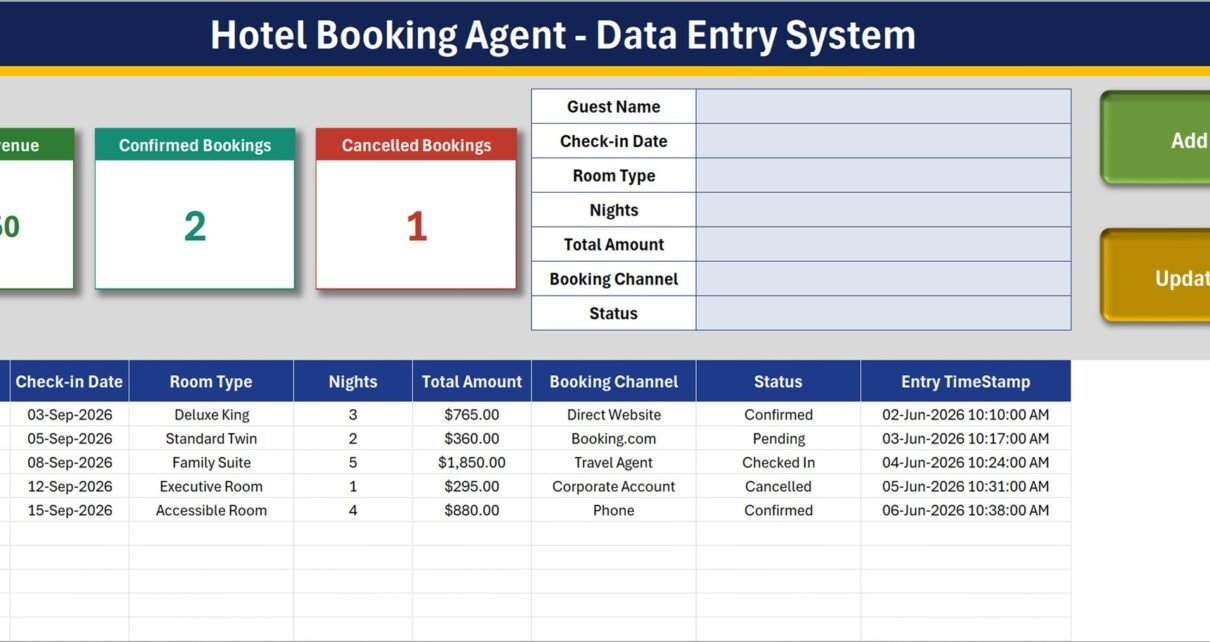
The Hotel Booking Agent Data Entry System in Excel is a macro-enabled workbook that records 7 fields per booking – Guest Name, Check-in Date, Room Type, Nights, Total Amount, Booking Channel and Status – and writes a unique Record ID plus an entry timestamp onto every row you save. Four live summary cards sit above the form, three editable dropdown lists ship with 8 entries each, and the whole file is four sheets: Data Entry, Setting, Instructions and Get More Templates. Setup takes under 10 minutes.
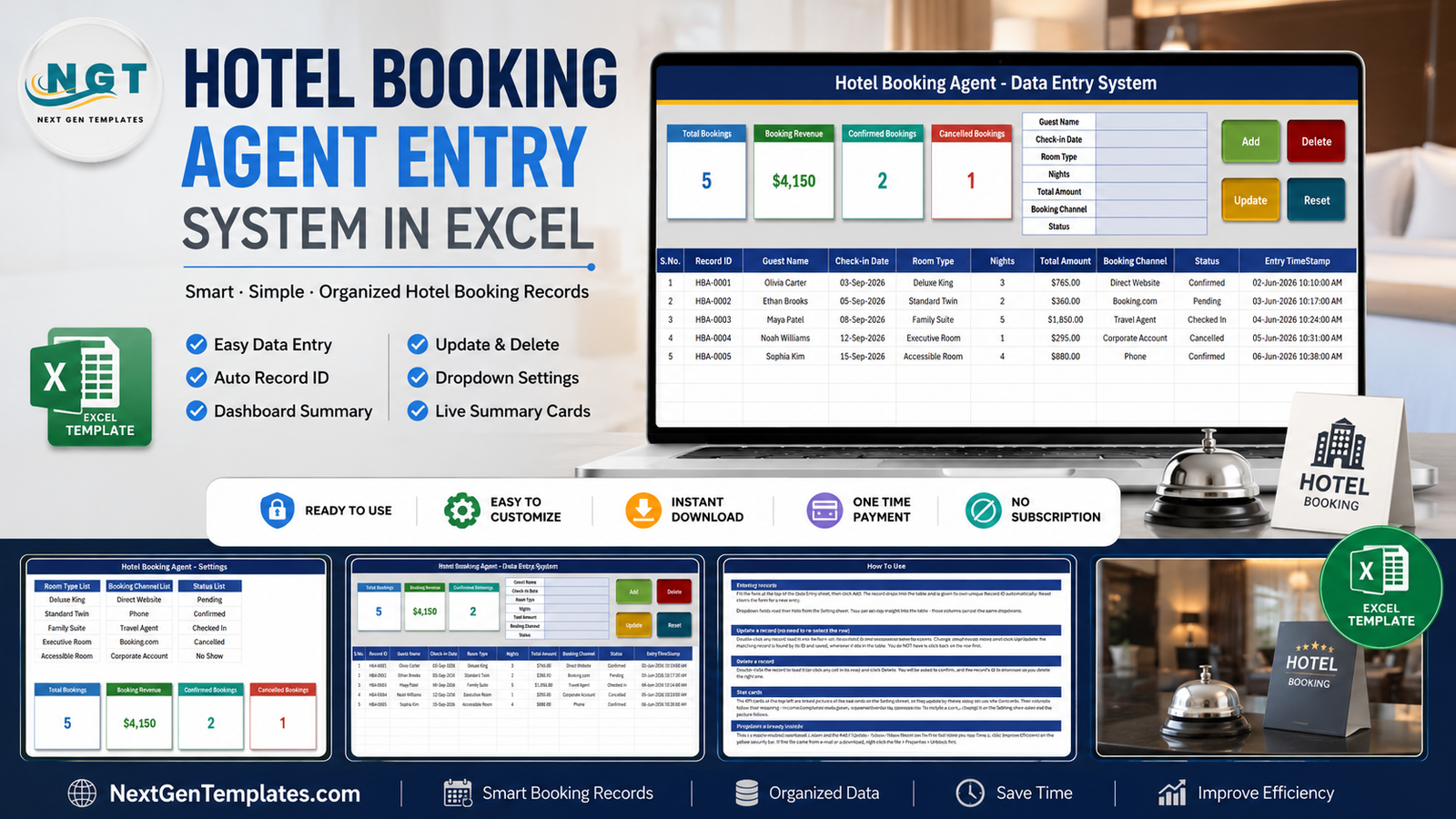
Most small booking agents keep their bookings in a plain spreadsheet that grows a new column every few weeks. Guest names get duplicated, statuses get typed three different ways, and nobody can say how many bookings came through Booking.com last month without re-reading every row. This workbook fixes the boring part of that problem: it gives you a form, forces the messy columns into dropdown lists, numbers every record for you, and keeps four running totals in view while you type. It is a ledger, not a reservation system – an important distinction we come back to below.
Key Features of the Hotel Booking Agent Data Entry System
- A 7-field entry form. Guest Name, Check-in Date, Room Type, Nights, Total Amount, Booking Channel and Status, laid out down the middle of the Data Entry sheet.
- Four working VBA buttons. Add, Update, Delete and Reset are real macros wired to the sheet. Add appends the row and stamps it; Reset clears the form for the next entry.
- Automatic Record IDs. Every booking is given a sequential ID in the HBA-0001 format, and the last table column records the Entry TimeStamp of when the row was keyed in.
- Update without re-selecting the row. Double-click a record to load it into the form. The workbook holds its Record ID behind the scenes, so Update finds and saves the right row wherever it has moved to.
- Four live summary cards. Total Bookings, Booking Revenue, Confirmed Bookings and Cancelled Bookings. They are linked pictures of the real cards on the Setting sheet, so they refresh as you type and restyle when you restyle the source.
- Three dropdown lists you control. 8 room types, 8 booking channels and 8 booking statuses, all edited on the Setting sheet. Add or delete a row and every dropdown – in the form and in the table – follows.
- Dropdowns in the table too. The table columns carry the same validation as the form, so you can key a row directly if you prefer.
Sheets Explanation
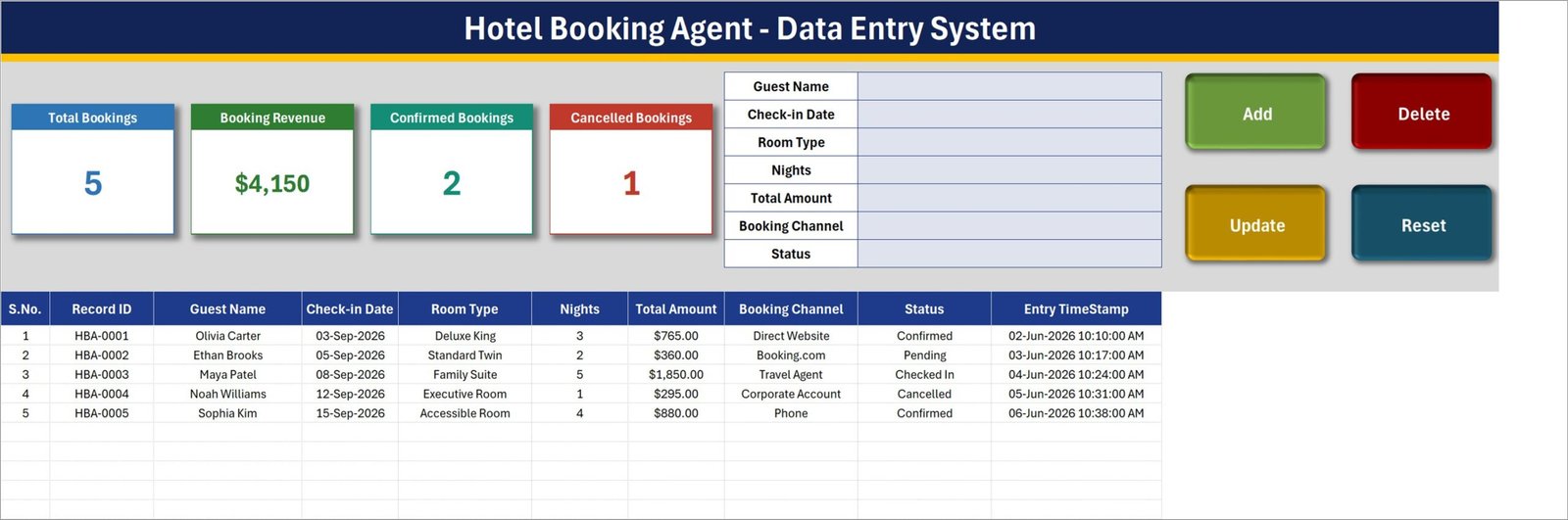
Data Entry – the form, the cards and the booking table
The entry form sits in the middle of the header band, the four summary cards on the left and the Add / Update / Delete / Reset buttons on the right. Below them the booking table runs S.No., Record ID, Guest Name, Check-in Date, Room Type, Nights, Total Amount, Booking Channel, Status and Entry TimeStamp. The five HBA-0001 to HBA-0005 rows you can see are sample data – delete them before you start.
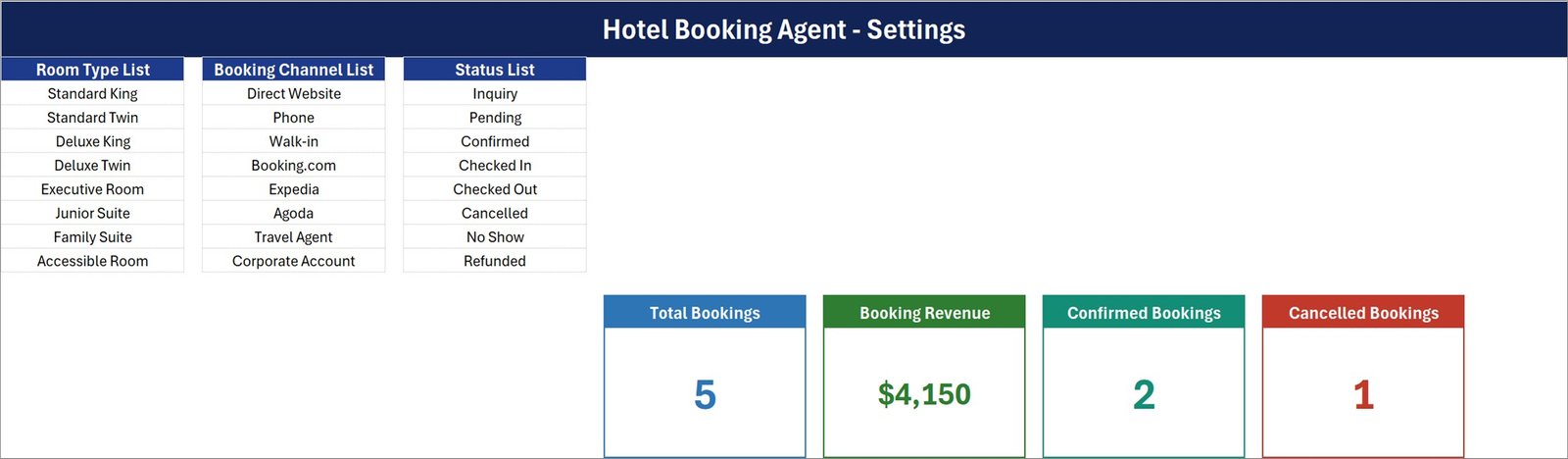
Setting – the dropdown lists and the source cards
Three lists sit side by side here. Room Type List holds Standard King, Standard Twin, Deluxe King, Deluxe Twin, Executive Room, Junior Suite, Family Suite and Accessible Room. Booking Channel List holds Direct Website, Phone, Walk-in, Booking.com, Expedia, Agoda, Travel Agent and Corporate Account. Status List holds Inquiry, Pending, Confirmed, Checked In, Checked Out, Cancelled, No Show and Refunded. The four real summary cards live on the right of this sheet – the Data Entry sheet only shows pictures of them.
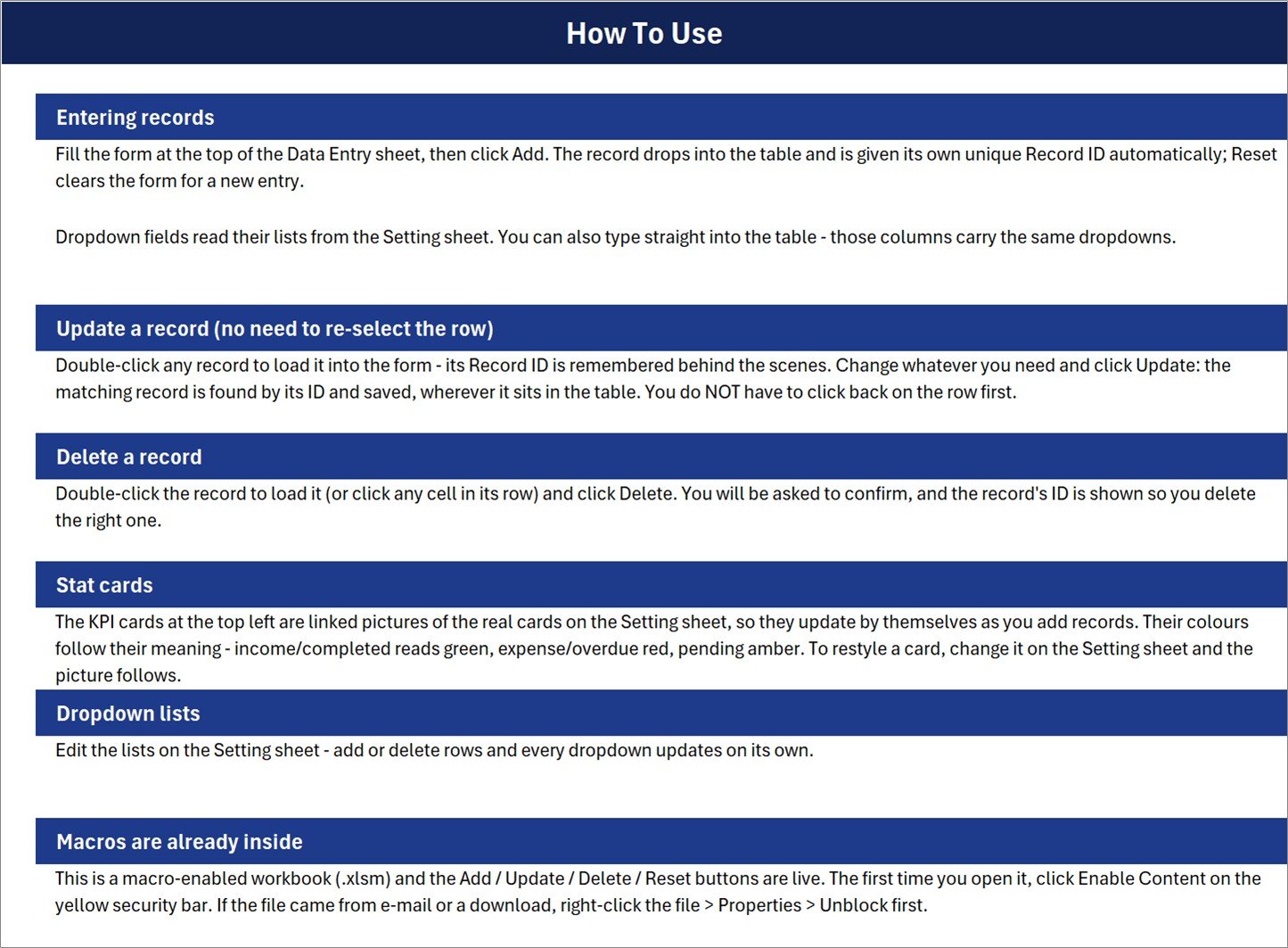
Instructions – How To Use
Six short sections: entering records, updating a record without re-selecting the row, deleting with a confirmation prompt that shows the Record ID, how the linked-picture stat cards work, editing the dropdown lists, and enabling macros the first time you open the file. It also reminds you to right-click the file and tick Unblock if it arrived by e-mail or download.
The fourth sheet, Get More Templates, is a simple link page back to the wider NextGenTemplates library.
What This Workbook Is Not
This matters more in travel than in most categories, so it is worth being blunt. The Hotel Booking Agent Data Entry System is a record-keeping workbook for an agent logging bookings that have already been made. It is not a booking engine or reservation system. It does not connect to any OTA, GDS, channel manager or hotel inventory. It does not check or hold live availability and it cannot prevent an overbooking. It does not process payments, card details or refunds – do not store card or passport numbers in it. It does not issue invoices or vouchers as legal documents, and owning it does not make an agency licensed or compliant under IATA, ATOL, ABTA or any package-travel or consumer-protection rule. It is not accounting or tax software and it gives no legal advice.
Hotel Booking Agent Data Entry System vs. a Google Sheets Log vs. Paid Booking Software
| Feature | Hotel Booking Agent Data Entry System in Excel | Google Sheets booking log | Cloudbeds / Little Hotelier / SiteMinder |
|---|---|---|---|
| Cost | $6.99 one-time ✅ | Free, but you build it yourself | $50-200+ per property per month |
| Platform | Desktop Microsoft Excel for Windows (.xlsm) | Any browser | Web plus mobile app |
| Setup time | Under 10 minutes ✅ | Hours of formula and validation work | Days, plus onboarding calls |
| Add / Update / Delete buttons | Built in via VBA ✅ | Needs Apps Script you write | Yes |
| Auto Record ID and entry timestamp | Yes, on every row ✅ | Manual formulas | Yes |
| Live availability / channel manager | No – record-keeping only | No | Yes ✅ |
| Payment and refund processing | No | No | Yes ✅ |
| Real-time team collaboration | File-based (OneDrive or shared drive) | Yes ✅ | Yes ✅ |
| Year-1 cost at 5 users | $6.99 total ✅ | $0 plus your build time | $600-2,400 |
For a small agency that needs a clean, searchable ledger of the bookings it has already placed – not live inventory and not card processing – the Hotel Booking Agent Data Entry System sits in the sweet spot.
Who Should Use This Template
Perfect for:
- Independent hotel booking agents and small travel agencies logging 10-500 bookings a month
- Corporate travel desks booking staff accommodation who need a tidy internal record
- Guest-house and homestay owners taking bookings by phone, walk-in and OTA who want one list
- Anyone on a plain spreadsheet who wants a form, Record IDs and running totals
Not a fit if:
- You need live availability, room allocation or overbooking prevention
- You need a channel manager or OTA / GDS integration
- You need to take payments, store card details or issue refunds
- You need legally valid invoices, vouchers or ATOL / ABTA / IATA documentation
- You work on a Mac, in Excel for the web or in Google Sheets – VBA will not run
Real-World Use Cases
Priya runs a two-person travel desk in Pune. She books hotel rooms for corporate clients by phone and through Booking.com and Agoda. Each evening she keys the day’s bookings into the form and tags every one with its channel. At month end she filters the Booking Channel column and finally has a defensible answer to which source actually brought in the business – without a monthly fee for property-management software she does not need.
Marcus manages a 14-room guest house on the coast. Reservations arrive by phone, walk-in and through his own website. He uses the Status list to walk a booking from Inquiry to Pending to Confirmed to Checked In, and the Cancelled Bookings card shows him how many fell through this month. Room allocation still happens on his wall chart – the workbook is the written record, not the availability system.
Anita handles travel admin for a 60-person consultancy. Staff accommodation goes on a Corporate Account, and Finance regularly queries a line on the card statement. The Record ID and Entry TimeStamp on every row let her produce who stayed where, for how many nights and at what cost, in about a minute.
Advantages of the Hotel Booking Agent Data Entry System
- It costs $6.99 once. Compared with $50-200 per property per month for property-management software, a small agency that only needs a ledger saves several hundred dollars in the first year alone.
- It removes the two habits that ruin booking spreadsheets: free-typed statuses and missing IDs. Dropdowns fix the first, automatic Record IDs fix the second.
- Nothing to learn. If someone can fill a form and click a button, they can use it. The Instructions sheet covers the rest in six paragraphs.
- It is yours to change. All three lists, the card colours and the card formulas are ordinary Excel objects on the Setting sheet. Nothing is locked behind a vendor.
- It works offline. There is no login, no sync and no service to go down mid-season.
Opportunities for Improvement
Three honest limitations, all confirmed in the shipped workbook:
- Booking Revenue is gross, not net. The card sums the whole Total Amount column with
SUM, so rows marked Cancelled, No Show or Refunded are still counted. In the sample data the card reads $4,150, which includes a $295 Cancelled booking; the confirmed-and-live figure is $3,855. Read it as gross booked value, or change the formula on the Setting sheet to aSUMIFthat excludes the statuses you do not want. - The status cards do not add up to Total Bookings, by design. The Status list has 8 entries but only two of them get a card. In the sample data Confirmed (2) plus Cancelled (1) is 3 against a Total Bookings of 5 – the Pending and Checked In rows simply have no card of their own. Nothing is wrong with the counts; there is just no card for the other six statuses. Add one on the Setting sheet with a
COUNTIFif you need it. - Only four cards, and no charts. This is a data-entry workbook, not a dashboard. If you want occupancy, ADR, RevPAR or channel-mix analysis, export the table into a reporting template instead of trying to grow this one.
Two defects that affect other workbooks in this line are not present here, and it is worth saying so: no quantity card is wrongly formatted as currency (Booking Revenue is the only currency card and it genuinely is money), and the sample entry timestamps behave correctly – bookings are keyed in early June 2026 for check-in dates in September 2026, which is exactly the right way round for a booking.
Best Practices
- Rewrite the three lists before your first entry. Cutting Room Type down to the room categories you actually sell makes the dropdown faster than typing.
- Agree on what each status means across your team before anyone starts. Inquiry versus Pending is a judgement call, and consistency is what makes the cards useful.
- Delete the five sample rows first so nothing demo ever ends up in a report you send a client.
- Keep the file on OneDrive or a shared drive and let one person key at a time. It is a workbook, not a multi-user database.
- Never store card or passport numbers in it. Keep payment details in whatever system you actually take payments in.
- Back up monthly. Save a dated copy at month end – it doubles as your archive and as a rollback if a delete goes wrong.
- If macros will not run, check the file is unblocked (right-click > Properties > Unblock) and that you are in desktop Excel. Microsoft explains the security bar in its own guide to enabling macros.
Explore Relevant Templates
- Hotel Room Booking Data Entry System in Excel – the property-side twin: a hotel logging its own room bookings, rather than an agent logging bookings placed elsewhere.
- Hotel Revenue RevPAR Dashboard in Excel – the reporting layer once you have months of booking data to analyse.
- Hotel Revenue RevPAR Dashboard in Power BI – the same analysis for teams already in Power BI.
- Hospitality and Resorts Dashboard in Google Sheets – browser-based reporting for Google Drive teams.
- Banquet Hall Tracker in Google Sheets – for the events and function-room side of the business.
- Backpacker Hostel Management System Web App – a full multi-user system when one workbook is no longer enough.
Frequently Asked Questions
Is the Hotel Booking Agent Data Entry System a booking or reservation engine?
No. The Hotel Booking Agent Data Entry System in Excel is a record-keeping workbook only. It does not connect to any OTA, GDS, channel manager or hotel inventory, it cannot check or hold live availability, it cannot prevent overbooking, and it does not process payments, card details or refunds. You log bookings you have already made.
Do I need to enable macros, and does it work on a Mac?
Yes to macros – Add, Update, Delete and Reset are VBA, so click Enable Content the first time you open the file. The Hotel Booking Agent Data Entry System is built for desktop Microsoft Excel for Windows. Excel for the web, Excel for Mac and Google Sheets will not run the buttons.
Does the Booking Revenue card exclude cancelled bookings?
No. Booking Revenue in the Hotel Booking Agent Data Entry System sums the Total Amount column for every row, including any marked Cancelled, No Show or Refunded, so read it as gross booked value. For a net figure, filter the Status column and total it yourself, or swap the formula on the Setting sheet for a SUMIF.
How many bookings can the workbook hold?
There is no fixed cap in the Hotel Booking Agent Data Entry System – the card formulas read the whole column, so the ceiling is Excel’s own sheet limit. A few thousand rows stay comfortably fast on ordinary office hardware, which covers years of work for a small agency.
Can I change the room types, channels and statuses?
Yes. All three lists sit on the Setting sheet of the Hotel Booking Agent Data Entry System and each ships with 8 entries. Add rows, delete rows or rename entries, and every dropdown in the form and in the table updates automatically. No formula editing is required.
How does this compare to Cloudbeds or Little Hotelier?
Those are property-management systems with live inventory, channel management and payment processing, typically $50 to $200 per property per month. The Hotel Booking Agent Data Entry System in Excel is a $6.99 one-time ledger. Buy the software if you need availability and payments; buy this if you need a clean record of bookings already placed.
How long does setup take?
Under 10 minutes. Open the Hotel Booking Agent Data Entry System, enable macros, edit the three lists on the Setting sheet to match your agency, delete the five sample rows, and start entering. The Instructions sheet inside the workbook explains every button in plain English.
About the Author
Built by PK – Microsoft Certified Professional with 15+ years of Excel, Google Sheets and Power BI experience. Founder of NextGenTemplates, reaching 300K+ subscribers across YouTube channels. Every template is hand-built and tested before release.
Conclusion
The Hotel Booking Agent Data Entry System in Excel does one job properly: it turns a sprawling booking spreadsheet into a form-driven ledger with Record IDs, timestamps, consistent dropdowns and four running totals. It will not check availability and it will not take a payment – and the copy above says so more than once, on purpose. What it will do is make sure that six months from now you can still say exactly what you booked, for whom, through which channel, and for how much.
👉 Click here to Purchase the Hotel Booking Agent Data Entry System in Excel
Instant download · One-time payment · No subscription
For step-by-step Excel and VBA tutorials, visit Youtube.com/@PK-AnExcelExpert.
Last updated: August 2026