Restaurants that log orders on paper tickets lose track of pending tables fast — a busy 12-table dhaba can easily have 20+ open orders at once. The Restaurant Order Data Entry System in Excel replaces that paper trail with a macro-powered workbook that captures 6 order fields and tracks 3 live KPIs — Orders, Revenue, and Active Tables — recalculating the moment you click Add.
Setup takes under 10 minutes: unzip the download, enable macros, edit the Waiter and Status dropdown lists on the Setting sheet, and the restaurant order data entry system is ready for service. This guide walks through every sheet, compares it against Google Sheets and paid POS software, and shows exactly how a small restaurant can put it to work today Restaurant Order Data Entry System in Excel.
Key Features of the Restaurant Order Data Entry System in Excel
- One-click VBA buttons — Add, Update, Delete, and Reset macros write each order straight into the records table, so staff never manually edit rows or risk breaking a formula.
- 3 live KPI cards — Orders, Revenue, and Active Tables recalculate automatically from the Status column every time an order is added or edited.
- 2 controlled dropdowns — Waiter (5 staff names) and Status (Pending, Preparing, Served, Paid) are wired through named ranges on the Setting sheet, keeping every entry clean and consistent.
- Auto records table — Every saved order gets an automatic S.No, a currency-formatted Amount, and an Entry TimeStamp column.
- Four organised sheets — Data Entry, Setting, Instructions, and Get More Templates keep the tool, its lists, and its guidance neatly separated Restaurant Order Data Entry System in Excel.
Dashboard Pages Explanation
Restaurant Order Dashboard
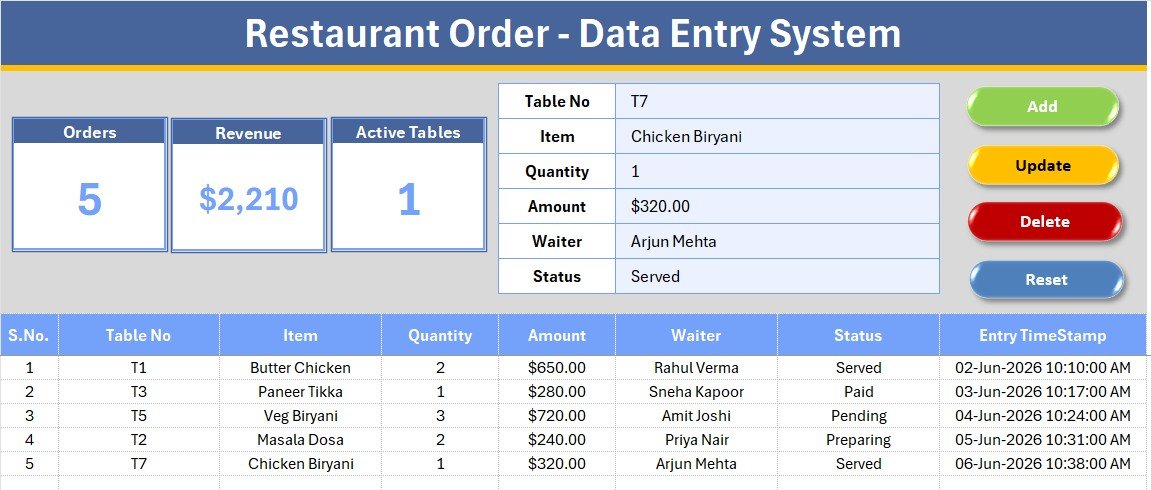
The main Data Entry screen pairs the order form — Table No, Item, Quantity, Amount, Waiter, Status — with three KPI cards (Orders, Revenue, Active Tables) and the Add, Delete, Update, and Reset buttons, all sitting above a live records table.
Order Records and Live KPI Tracking
Every order added lands in the records table with its S.No, currency Amount, and time stamp, while the cards above update to show total orders, revenue collected, and how many tables still have a pending order.
Dropdown Settings and Easy Customization
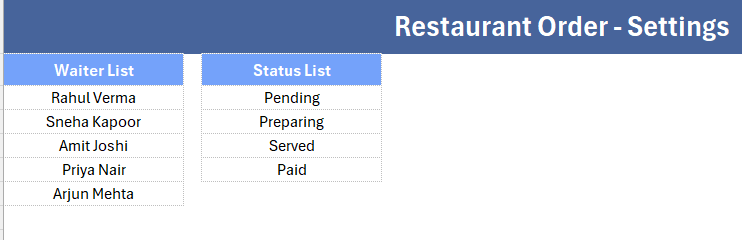
The Setting sheet holds the source lists for Waiter and Status. Edit them once and both dropdowns across the form update instantly, with no formula changes required.
Restaurant Order System vs. Google Sheets vs. Restaurant POS SaaS — Feature Comparison
| Feature | Restaurant Order System (Excel) | Google Sheets equivalent | Restaurant POS SaaS (Toast / Square) |
|---|---|---|---|
| Cost | $5.99 one-time | Free but manual to build | $60–$165 / month |
| Platform | Microsoft Excel (offline) | Google Sheets (online) | Cloud SaaS + hardware |
| Setup time | Under 10 minutes | 2–4 hours | Days of onboarding |
| Order pipeline KPIs | Built-in (Orders, Revenue, Active Tables) | Manual formulas | Included |
| Works offline | Yes | Needs internet | Needs internet |
| Customizable fields | Fully editable | Editable | Limited to plan |
| Per-user fees | None | None | Charged per terminal |
| Year-1 cost at 5 users | $5.99 total | $0 plus your time | $720–$1,980 |
For small restaurants and cafés that want a clean order log without paying per-terminal POS fees, the Restaurant Order Data Entry System sits in the sweet spot.
Who Should Use This Template
Perfect for:
- Independent restaurants, cafés, and dhabas logging table orders by hand or on paper tickets
- Small F&B outlets that want a shared, offline order register without a POS terminal
- Owners replacing a messy order pad with one structured Excel file
Not a fit if:
- You run a multi-outlet chain that needs cloud-synced kitchen display systems or card payment integration
- Your team needs real-time table-side ordering from mobile devices Restaurant Order Data Entry System in Excel.
Real-World Use Cases
Ramesh runs a 12-table dhaba in Ghaziabad. He logs every order with table number and waiter name, checks the Active Tables card to see which tables are still waiting on food, and totals the day’s Revenue card at closing time — without paying a monthly POS fee.
Sneha manages a 3-person café counter. Her team records orders in one shared file, marks each as Preparing or Served through the Status dropdown, and uses the Orders count to compare footfall day to day.
Vikram runs weekend catering out of his restaurant kitchen. He pairs this system with the Food Delivery Dashboard in Google Sheets to track dine-in orders and delivery orders side by side, without juggling two disconnected tools.
Advantages of the Restaurant Order Data Entry System
The biggest advantage is speed of adoption — staff already familiar with Excel can start logging orders in minutes, with no training on a new POS interface. The VBA buttons mean no one has to understand formulas or worry about breaking the sheet; Add, Update, Delete, and Reset handle everything. Because the workbook runs entirely offline, a slow or dropped internet connection during a busy dinner service never interrupts order logging, unlike cloud-based POS systems.
Cost is the other clear win: a one-time $5.99 purchase versus $60–$165 per month for a subscription POS platform adds up to hundreds of dollars saved in the first year alone, especially valuable for single-location restaurants and cafés operating on thin margins.
Opportunities for Improvement
The template is intentionally lightweight, which means some trade-offs. It does not print kitchen order tickets or sync automatically across multiple devices — it is a single-workbook tool for one shared computer or a single person entering orders at a time. Restaurants that need real-time table-side ordering from staff phones, split billing across guests, or integrated card payments will outgrow this template and should look at the full Restaurant POS Web App instead. There is also no built-in menu-item price lookup — the Amount field is entered manually per order, so very high-volume kitchens may find that repetitive.
Best Practices
- Set up the Waiter and Status dropdown lists on the Setting sheet before your first shift, so every entry stays consistent from day one.
- Check the Active Tables KPI card periodically during service to catch orders that have been sitting in Pending status too long.
- Save a backup copy of the workbook at the end of each week once the records table starts filling up.
- Use the Reset button between entries rather than manually clearing form cells, to avoid leaving stray data in named ranges.
Explore Relevant Templates
- Restaurant POS Web App — a full multi-user billing and kitchen order management system for restaurants that have outgrown a single-workbook tool.
- Property Enquiry Data Entry System in Excel — the same VBA data-entry pattern applied to real estate lead tracking.
- Food Delivery Dashboard in Google Sheets — visualise delivery order trends alongside your dine-in log.
💎 Save up to 44% with the Hospitality & Restaurant Bundle, which packages this style of tool with six more hospitality templates.
Frequently Asked Questions
What is the Restaurant Order Data Entry System in Excel?
It is a macro-powered Excel workbook that captures table orders across six fields and tracks Orders, Revenue, and Active Tables KPIs automatically, giving small restaurants a simple offline order register.
Do I need to enable macros to use it?
Yes. The Add, Update, Delete, and Reset buttons run on VBA, so enable macros when Excel prompts you. Once enabled, the Restaurant Order Data Entry System works entirely offline with no add-ins.
How do the Orders, Revenue, and Active Tables KPIs work?
Each KPI card reads the records table. Orders counts every logged order, Revenue sums the Amount column, and Active Tables counts orders still marked Pending — all recalculating the moment you add or edit an entry.
Can I change the Waiter and Status options?
Absolutely. Open the Setting sheet and edit the two lists; the form dropdowns update instantly through named ranges, so you can match the template to your own staff and order stages.
How does this compare to a restaurant POS system?
A POS platform like Toast or Square charges $60 to $165 per month per terminal. The Restaurant Order Data Entry System is a $5.99 one-time purchase that covers core order logging and revenue tracking for small restaurants and cafés.
How long does setup take?
Under 10 minutes. Unzip the file, enable macros, edit the Waiter and Status lists on the Setting sheet, and you can start logging orders right away.
Can multiple staff members use this at once?
The workbook is designed for one active user at a time on a shared computer, since it is a single Excel file. For simultaneous multi-device use, the Restaurant POS Web App supports real multi-user access.
About the Author
Built by PK — Microsoft Certified Professional with 15+ years of Excel, Google Sheets, and Power BI experience. Founder of NextGenTemplates, reaching 300K+ subscribers across YouTube channels. Every template is hand-built and tested before release.
Conclusion
For an independent restaurant or café that wants to replace a paper order pad with something structured, searchable, and instantly totalled, the Restaurant Order Data Entry System in Excel covers the essentials without the cost or complexity of a full POS rollout. Click here to Purchase the Restaurant Order Data Entry System in Excel from NextGenTemplates.
Instant download · One-time payment · No subscription
Last updated: July 2026