Retail operations move fast. Stores deal with daily tasks, promotions, staff coordination, inventory checks, audits, and special events. However, when teams manage these activities using emails, notebooks, or scattered spreadsheets, things quickly become confusing. Deadlines slip, events overlap, and responsibilities become unclear.
That is exactly why a Retail Task Calendar in Excel becomes an essential operational tool.
In this detailed blog post, you will learn what a Retail Task Calendar in Excel is, why retail businesses need it, how it works, its worksheet structure, key features, advantages, best practices, and frequently asked questions. By the end, you will clearly understand how this ready-to-use Excel calendar helps retail teams plan, track, and execute tasks efficiently.
Click to Purchases Retail Task Calendar in Excel
What Is a Retail Task Calendar in Excel?
A Retail Task Calendar in Excel is a structured and interactive calendar template designed to plan, schedule, and track retail-related tasks and events across different time views.
Instead of maintaining multiple files or manual planners, retail teams manage all tasks in one Excel workbook. They can view activities in annual, monthly, and daily formats, while also maintaining a centralized event database.
Because Excel supports buttons, forms, calendars, and automation, this task calendar delivers clarity, control, and consistency across retail operations.
Why Do Retail Businesses Need a Task Calendar?
Retail environments involve continuous activity. Therefore, missing even a single task can impact sales, compliance, or customer experience.
A Retail Task Calendar in Excel helps because it:
-
Centralizes all retail tasks and events
-
Improves visibility across time periods
-
Prevents missed deadlines
-
Supports better coordination
-
Reduces manual follow-ups
Moreover, Excel remains familiar to most retail teams. As a result, adoption stays quick and smooth.
How Does a Retail Task Calendar in Excel Work?
The calendar works by storing all retail events in a central database sheet and displaying them dynamically across different calendar views.
Here is how the workflow typically looks:
-
Add retail tasks or events using forms
-
Store all event details in the Events sheet
-
View tasks in annual, monthly, or daily formats
-
Highlight important days and events
-
Update or delete events when required
Because the calendar updates automatically, users always see accurate and current information.
Click to Purchases Retail Task Calendar in Excel
What Are the Key Features of the Retail Task Calendar in Excel?
This ready-to-use Retail Task Calendar template includes multiple powerful features designed specifically for retail operations.
Key Highlights at a Glance
-
Home navigation page
-
Annual, Monthly, and Daily calendar views
-
Event management using forms
-
Color themes and highlights
-
Centralized event database
-
Easy navigation with buttons
Each feature works together to simplify retail task planning and tracking.
What Worksheets Are Included in the Retail Task Calendar Template?
This Excel template includes five well-designed worksheets, each serving a specific purpose.
Click to Purchases Retail Task Calendar in Excel
1. What Is the Home Sheet and How Does It Help?
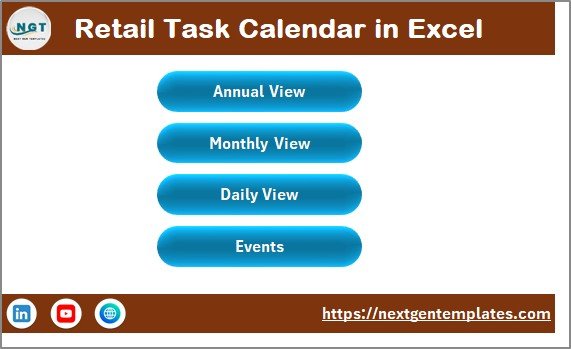
The Home Sheet acts as the index and navigation hub of the Retail Task Calendar in Excel.
Key Features of the Home Sheet
On this sheet, you see clearly designed buttons that allow quick navigation:
-
Annual View Button
-
Monthly View Button
-
Daily View Button
-
Events Button
Because of this layout, users move across the workbook without scrolling or searching. As a result, navigation becomes fast and user-friendly.
2. What Is the Annual View Sheet and Why Is It Important?
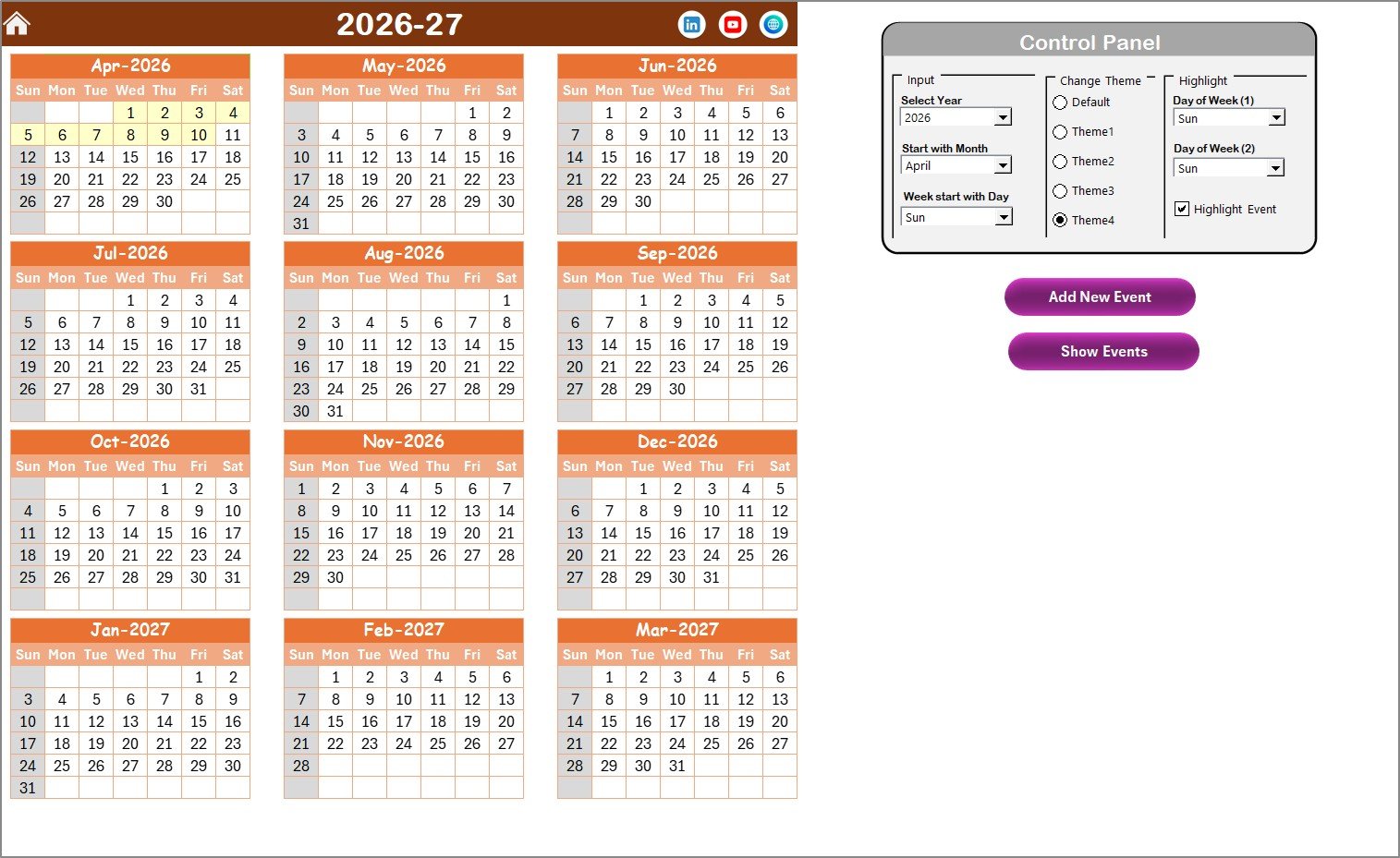
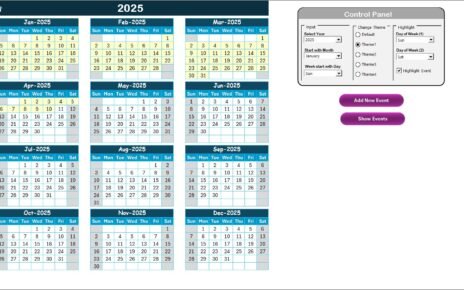
The Annual View Sheet displays all 12 months of the year in one consolidated view.
What Does the Annual View Show?
-
Full-year calendar layout
-
Visual overview of tasks and events
-
Highlighted days and events
This view helps managers plan long-term retail activities such as promotions, audits, campaigns, and seasonal events.
What Control Panel Options Are Available in the Annual View?
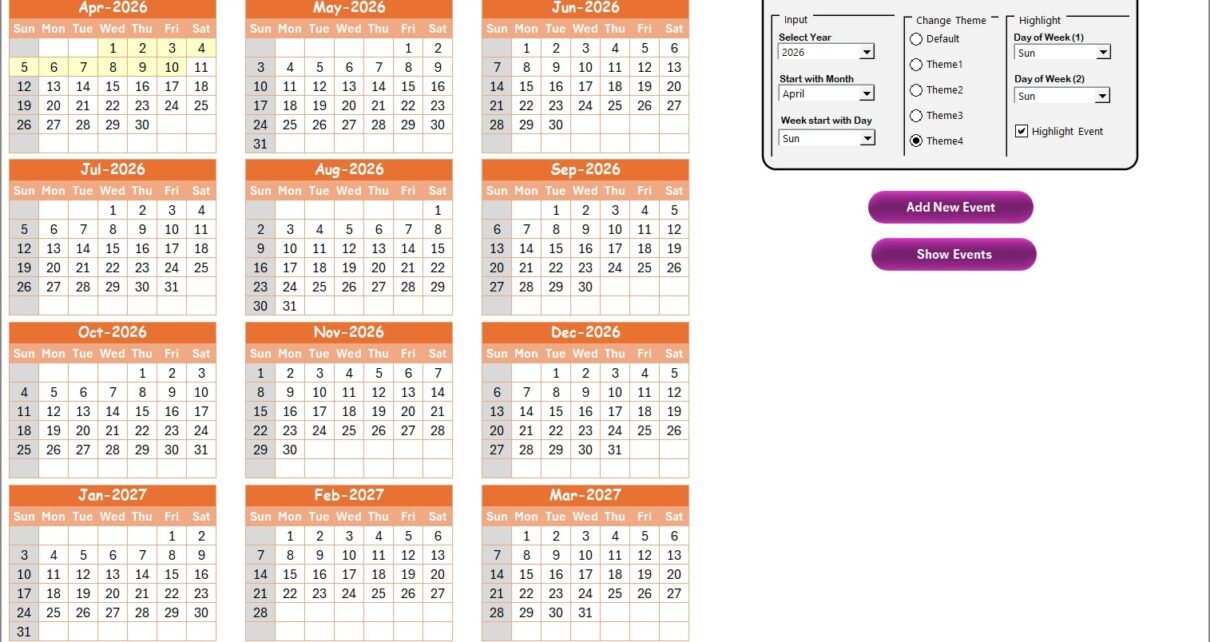
The Annual View includes a powerful Control Panel with multiple customization options.
🔹 Input Group
Using the Input Group, users can:
-
Select the Year
-
Change the starting month
-
Change the starting day of the week
As soon as users make a selection, the calendar updates automatically.
🔹 Change Theme Group
This group offers five color themes. Users can apply a theme across the entire workbook with a single click.
Because visual preference matters, this feature improves usability and presentation.
🔹 Highlight Group
This group allows users to:
-
Highlight Day of Week (1)
-
Highlight Day of Week (2)
For example, users can highlight Saturday and Sunday in grey to visually separate weekends.
Additionally, users can enable the Highlight Event checkbox to mark event days in yellow. This option makes events stand out clearly in the annual calendar.
What Does the Add New Event Button Do in the Annual View?
The Add New Event button simplifies event creation.
How It Works
-
Select a date on the calendar
-
Click the Add New Event button
-
Fill event details in the form
-
Click Submit
The calendar then adds the event to the selected date automatically.
What Is the Show Event Button Used For?
The Show Event button displays all events scheduled for the selected date. This feature helps users quickly review planned activities without switching sheets.
Click to Purchases Retail Task Calendar in Excel
3. What Is the Monthly View Sheet and How Does It Help?
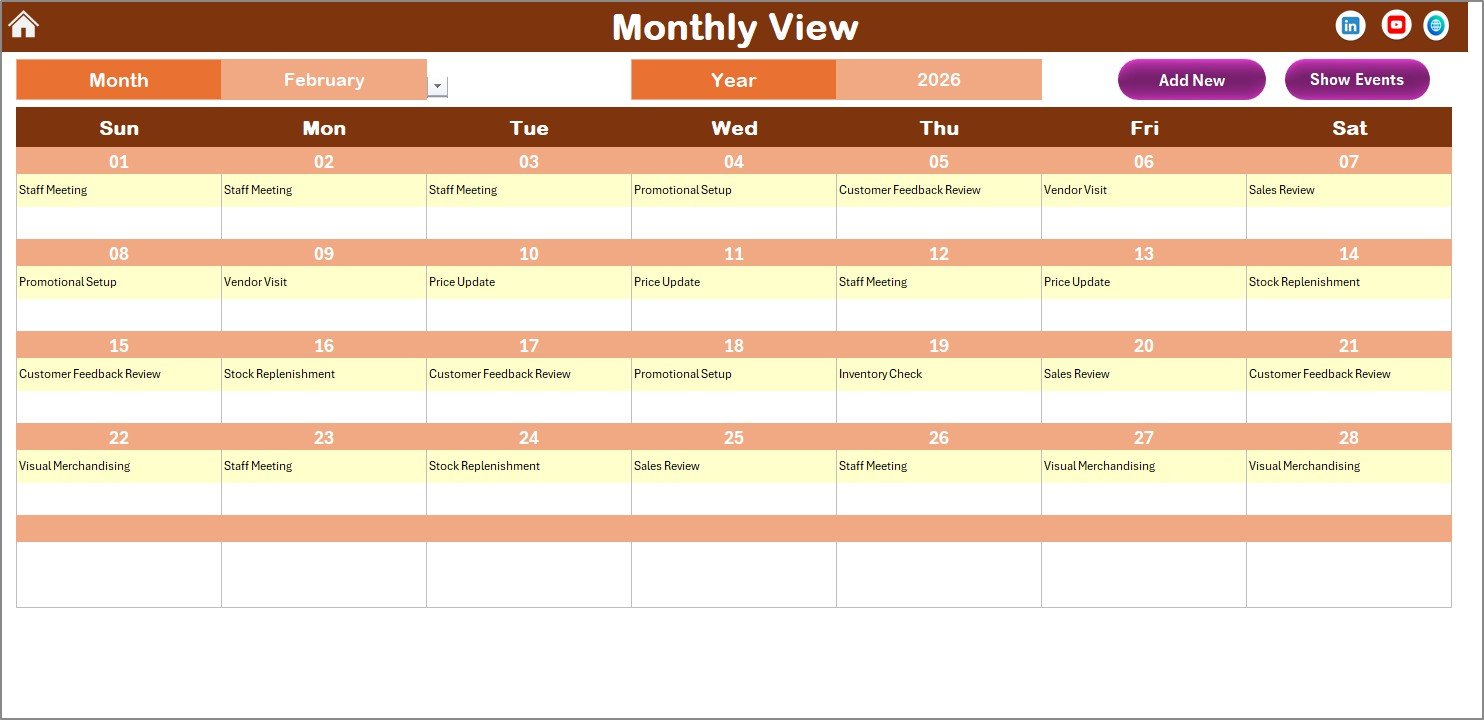
The Monthly View Sheet displays a detailed calendar for a selected month.
Key Features of the Monthly View
-
Month and Year selection at the top
-
Single-month calendar display
-
Event indicators on dates
If a date contains more than one event, the calendar displays “more than 1…”, which prompts users to open the event list.
Buttons Available in Monthly View
🔹 Add New Event Button
Users can add a new event directly from the Monthly View by selecting a date and clicking this button.
🔹 Show Event Button
This button shows all events scheduled on the selected date, helping users review tasks quickly.
Because of these features, monthly planning becomes simple and intuitive.
Click to Purchases Retail Task Calendar in Excel
4. What Is the Daily View Sheet and Why Is It Useful?
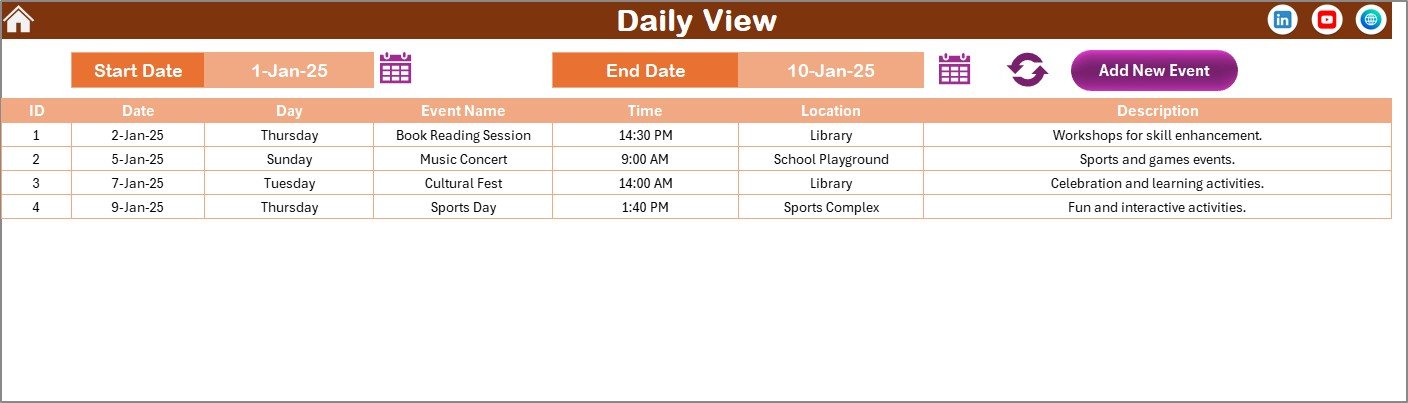
The Daily View Sheet focuses on detailed task execution.
How the Daily View Works
-
Users select a Start Date and End Date
-
Users choose dates using calendar icons
-
Clicking the Refresh button loads events for the selected range
This view displays:
-
Event name
-
Date
-
Time
-
Location
-
Description
As a result, teams gain a clear list of tasks for execution.
Add New Event Button in Daily View
The Daily View also includes an Add New Event button. Users can add events directly while reviewing daily tasks, which improves efficiency.
Click to Purchases Retail Task Calendar in Excel
5. What Is the Events Sheet and Why Is It Critical?
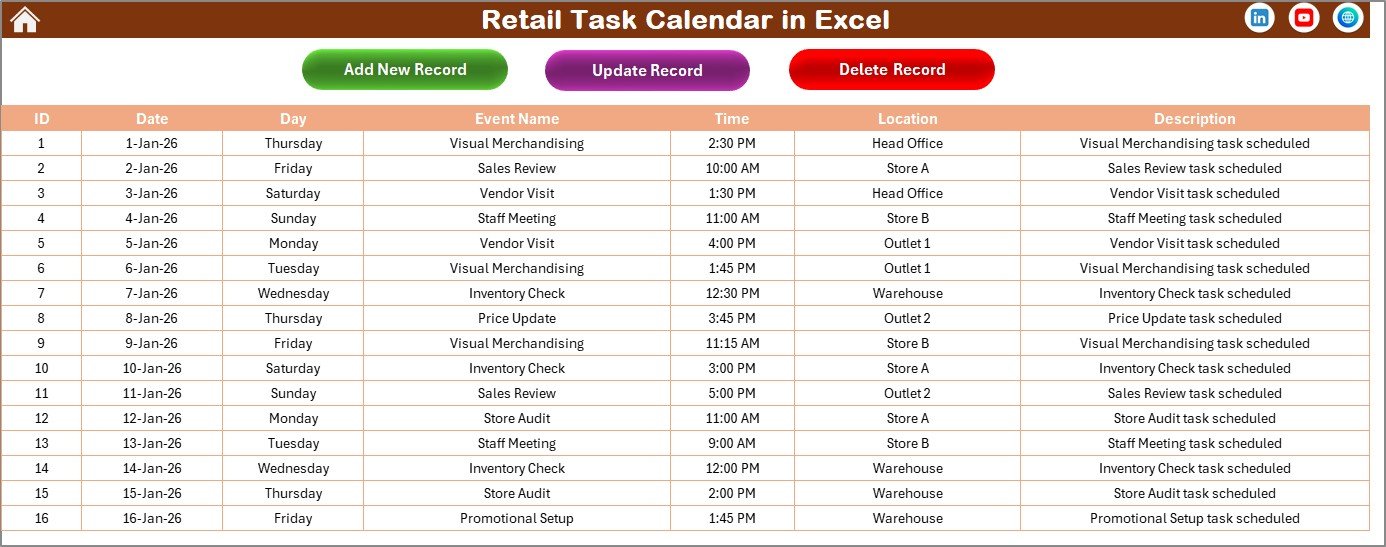
The Events Sheet acts as the database for the entire Retail Task Calendar.
Information Stored in the Events Sheet
-
ID – Auto-generated unique number
-
Date – Event date
-
Day – Day name (Monday, Tuesday, etc.)
-
Event Name – Task or event title
-
Time – Event time
-
Location – Store or location
-
Description – Short event details
Because all views pull data from this sheet, accuracy here ensures reliable reporting everywhere.
Buttons Available on the Events Sheet
🔹 Add New Record
This button opens the event form to add a new task.
🔹 Update Existing Record
Users select an event ID and click this button to update event details.
🔹 Delete Record
Users select an event ID and delete the record if the task no longer applies.
These controls provide full event lifecycle management.
What Types of Retail Tasks Can You Track Using This Calendar?
A Retail Task Calendar in Excel supports many retail activities, such as:
-
Promotional campaigns
-
Store audits
-
Inventory counts
-
Staff training sessions
-
Visual merchandising updates
-
Sales events
-
Compliance checks
Therefore, both small and large retail operations can use this calendar effectively.
How Does This Calendar Improve Retail Operations?
This calendar improves operations because it:
-
Improves planning visibility
-
Reduces missed tasks
-
Enhances team coordination
-
Simplifies event management
As a result, retail teams stay proactive instead of reactive.
Click to Purchases Retail Task Calendar in Excel
Advantages of Retail Task Calendar in Excel
Using a Retail Task Calendar in Excel offers several key benefits.
✔ Centralized Planning
All tasks and events stay in one Excel workbook.
✔ Multiple Time Views
Annual, monthly, and daily views support both planning and execution.
✔ Easy Event Management
Forms and buttons simplify adding, updating, and deleting events.
✔ Visual Clarity
Themes, highlights, and indicators improve readability.
✔ Time Savings
Automation reduces manual updates and follow-ups.
✔ Cost-Effective
Excel avoids the need for expensive scheduling tools.
✔ Customizable
Retailers can adapt the calendar to their processes.
Best Practices for the Retail Task Calendar in Excel
To maximize the value of this calendar, follow these best practices.
📌 Plan Events in Advance
Add events early to avoid last-minute confusion.
📌 Use Clear Event Names
Clear titles improve understanding across teams.
📌 Maintain the Events Sheet Carefully
Accurate data ensures reliable calendar views.
📌 Highlight Key Days
Use highlight options to mark weekends and critical days.
📌 Review Daily and Monthly Views Regularly
Frequent reviews prevent missed tasks.
📌 Keep Descriptions Short and Clear
Concise descriptions improve execution clarity.
📌 Use Themes Consistently
Consistent visuals improve usability.
Who Should Use a Retail Task Calendar in Excel?
This calendar works well for:
-
Retail store managers
-
Operations teams
-
Merchandising teams
-
Franchise managers
-
Multi-store retail chains
-
Small retail businesses
Because of its flexibility, different retail formats can adopt it easily.
How Is This Calendar Better Than Manual Retail Planning?
Manual planning often leads to:
-
Missed events
-
Poor coordination
-
Lack of visibility
In contrast, a Retail Task Calendar in Excel:
-
Centralizes tasks
-
Improves clarity
-
Enhances accountability
-
Saves time
Therefore, teams focus more on execution and results.
Click to Purchases Retail Task Calendar in Excel
Conclusion: Why Should You Use a Retail Task Calendar in Excel?
A Retail Task Calendar in Excel provides a structured, visual, and efficient way to manage retail activities across the year. Because it combines navigation, event management, and multiple calendar views in one workbook, it eliminates confusion and improves operational control.
Moreover, its ready-to-use design allows quick implementation without technical complexity. If your goal involves improving planning, coordination, and execution in retail operations, this calendar becomes a highly valuable tool.
Frequently Asked Questions (FAQs)
1. What is a Retail Task Calendar in Excel?
It is an Excel-based calendar used to plan, track, and manage retail tasks and events.
2. Can beginners use this calendar?
Yes, the buttons and forms make it easy for beginners.
3. Does the calendar support multiple views?
Yes, it includes annual, monthly, and daily views.
4. Can I customize themes and highlights?
Yes, users can apply color themes and highlight specific days.
5. Where is event data stored?
All events are stored in the Events sheet.
6. Can I update or delete events?
Yes, dedicated buttons allow updates and deletions.
7. Is this calendar suitable for multi-store retail?
Yes, it supports complex retail planning needs.
8. Does this calendar replace retail software?
While advanced tools offer more features, this Excel calendar provides a practical and cost-effective alternative.
Click to Purchases Retail Task Calendar in Excel
Visit our YouTube channel to learn step-by-step video tutorials