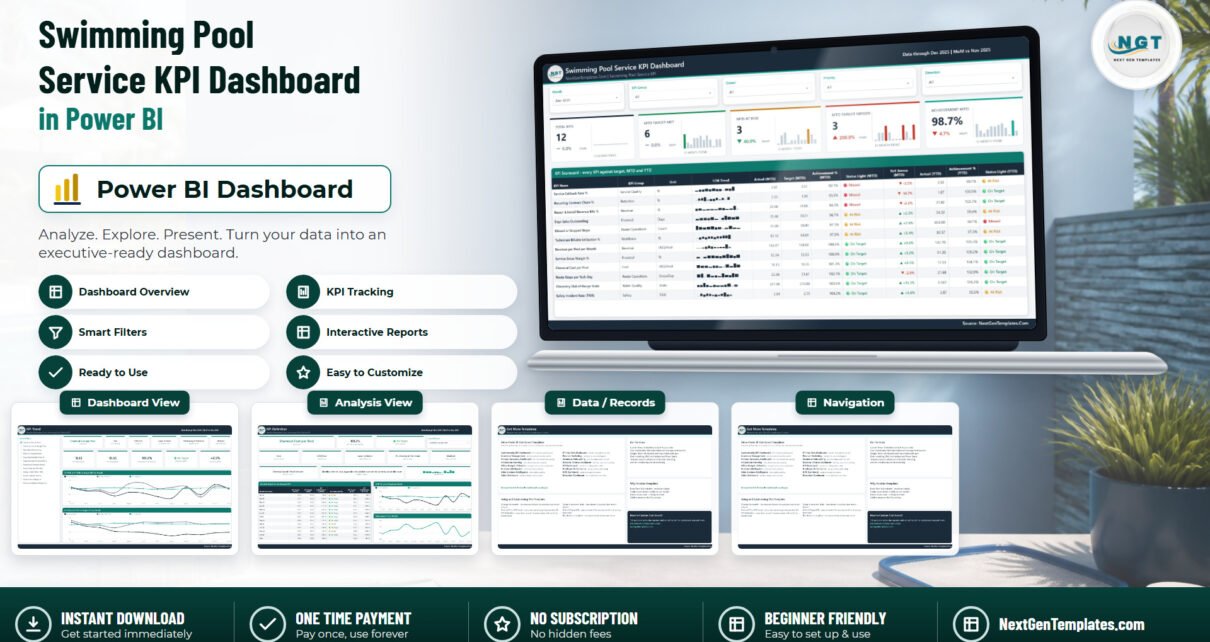
Most pool-service reporting stops at a totals sheet. Stops completed, chemicals bought, invoices raised – real numbers, but nothing in them says whether the month was good. The Swimming Pool Service KPI Dashboard in Power BI is built the other way round: twelve pool-service KPIs, each with a target, each scored for the month and for the year, each with a traffic light and a named owner. You pick a month and the whole report follows.
This post walks every page of the file, explains the December 2025 sample numbers it ships with, and is honest about the things it does not do – which, for a template that touches pool water chemistry, matters more than the feature list.
Which of the pool-service templates is this?
NextGenTemplates carries three families with deliberately similar names, and it is worth 30 seconds to land on the right one.
- KPI Dashboard – this one. A month picker, a target-versus-actual scorecard, three-state traffic lights for MTD and YTD, a KPI Trend page and a KPI Definition page. Available in Power BI and, as a separate build, in Excel.
- KPI Scorecard – a lighter single-file build with its own shorter KPI list. Live as the Swimming Pool Service KPI Scorecard in Google Sheets.
- Dashboard – the analytical line that slices revenue and volume by dimension rather than scoring against target. There is no pool-service edition of that line today; the closest neighbours are Landscaping and Pest Control.
And the Excel edition is not this file exported. They were built separately and their KPI lists barely overlap. The Power BI edition here runs 12 KPIs across 9 groups on 4 report pages. The Excel edition runs 15 KPIs across 7 groups on 11 sheets. Only Chemical Cost per Pool and Days Sales Outstanding are in both. This edition adds Revenue per Pool per Month, Service Gross Margin % and Repair & Install Revenue Mix %; the Excel edition carries CSAT, Customer Retention Rate, On-Time Service Visits, First-Visit Fix Rate, Water Chemistry Pass Rate, Seasonal Contract Renewals and Equipment Install Jobs. Choose on the KPI list you actually report, not on the tool name.
The 12 KPIs, and who owns them
Nine KPI groups, nine named owners, three priority levels. Every row on the scorecard carries all three, which is what turns a monthly review into a short list of conversations instead of a walk through twelve numbers.
| KPI | Group | Unit | Direction | Owner |
|---|---|---|---|---|
| Route Stops per Tech-Day | Route Operations | Stops/Day | Higher is better | Route Operations |
| Missed or Skipped Stops | Route Operations | Count | Lower is better | Route Operations |
| Chemistry Out-of-Range Visits | Water Quality | Visits | Lower is better | Water Quality & Compliance |
| Service Callback Rate % | Service Quality | % | Lower is better | Field Service |
| Technician Billable Utilisation % | Workforce | % | Higher is better | Workforce Planning |
| Chemical Cost per Pool | Cost | USD/Pool | Lower is better | Purchasing & Chemicals |
| Revenue per Pool per Month | Revenue | USD/Pool | Higher is better | Account Management |
| Recurring Contract Churn % | Retention | % | Lower is better | Account Management |
| Repair & Install Revenue Mix % | Revenue | % | Higher is better | Repair & Installation |
| Service Gross Margin % | Financial | % | Higher is better | Finance |
| Days Sales Outstanding | Financial | Days | Lower is better | Finance |
| Safety Incident Rate (TRIR) | Safety | TRIR | Lower is better | Safety & Compliance |
Six of the twelve are marked Critical in the shipped sample, four High and two Medium. Priority is a slicer, so a quarterly board pack can be pulled down to the six Critical rows in one click.
Why direction matters more than it sounds
Seven of these twelve KPIs are lower-is-better. If you score everything as Actual / Target, every one of those seven reads as a failure the moment the team does well – a chemical cost under budget scores 90%, a callback rate under target scores 80%, and the traffic lights turn into noise nobody trusts.
This build scores direction-aware. Higher-is-better KPIs score Actual / Target; lower-is-better KPIs score Target / Actual. In the December sample that is why Chemical Cost per Pool reads 101.2% and green: the actual came in at $18.13 per pool against an $18.35 target. Same for Safety Incident Rate (TRIR) at 104.2%, on 2.64 against a 2.75 target. Direction is a column in the data pack (UTB or LTB), so if you swap a KPI you set its direction with it.
Page 1 – KPI Scorecard
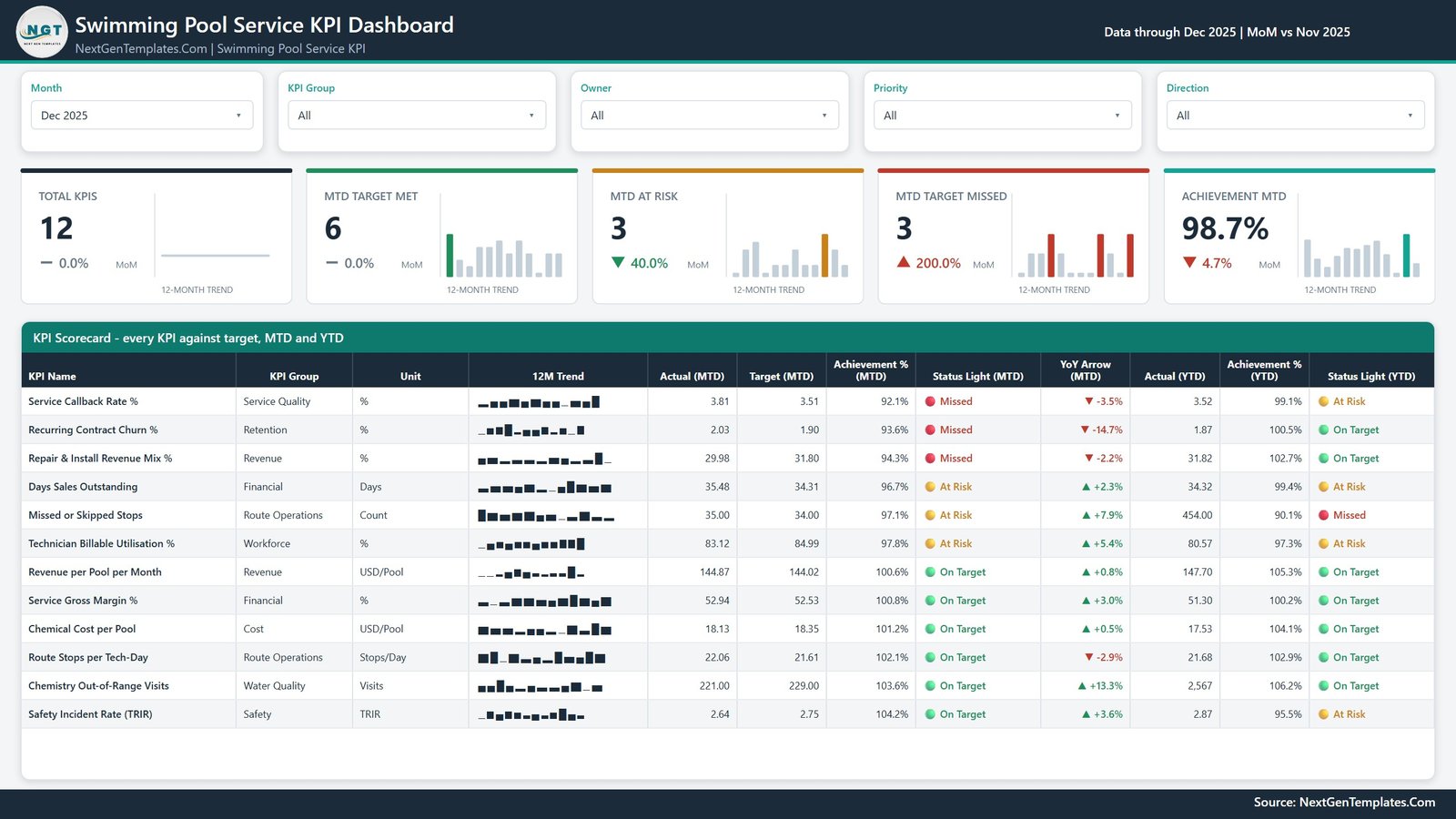
Five slicers across the top – Month, KPI Group, Owner, Priority, Direction – then five summary cards, then the table. Each card carries its own 12-month trend and a month-on-month delta: Total KPIs, MTD Target Met, MTD At Risk, MTD Target Missed and Achievement MTD.
The December 2025 sample reads 12 KPIs, 6 met, 3 at risk, 3 missed, 98.7% achievement. The scorecard table sorts worst first, so the meeting starts where it should:
- Service Callback Rate % – 3.81% against a 3.51% target, 92.1%, Missed. Year to date 3.52% and 99.1%, At Risk.
- Recurring Contract Churn % – 2.03% against 1.90%, 93.6%, Missed for the month but On Target for the year at 100.5%.
- Repair & Install Revenue Mix % – 29.98% against 31.80%, 94.3%, Missed; 102.7% and green for the year.
Then the three at risk – Days Sales Outstanding (96.7%), Missed or Skipped Stops (97.1%) and Technician Billable Utilisation % (97.8%) – and the six on target.
The row worth pointing at is Missed or Skipped Stops. For December it is amber at 97.1%. For the year it is red at 90.1%, on 454 skipped stops. That is the whole reason the two horizons print side by side: a KPI that survives the month can still be the one that is quietly losing the year, and a single-column scorecard hides exactly that.
Every row also carries a 12-month sparkline that keeps showing the full year even when you change the selected month, and a YoY arrow against the prior-year actual.
Page 2 – KPI Trend
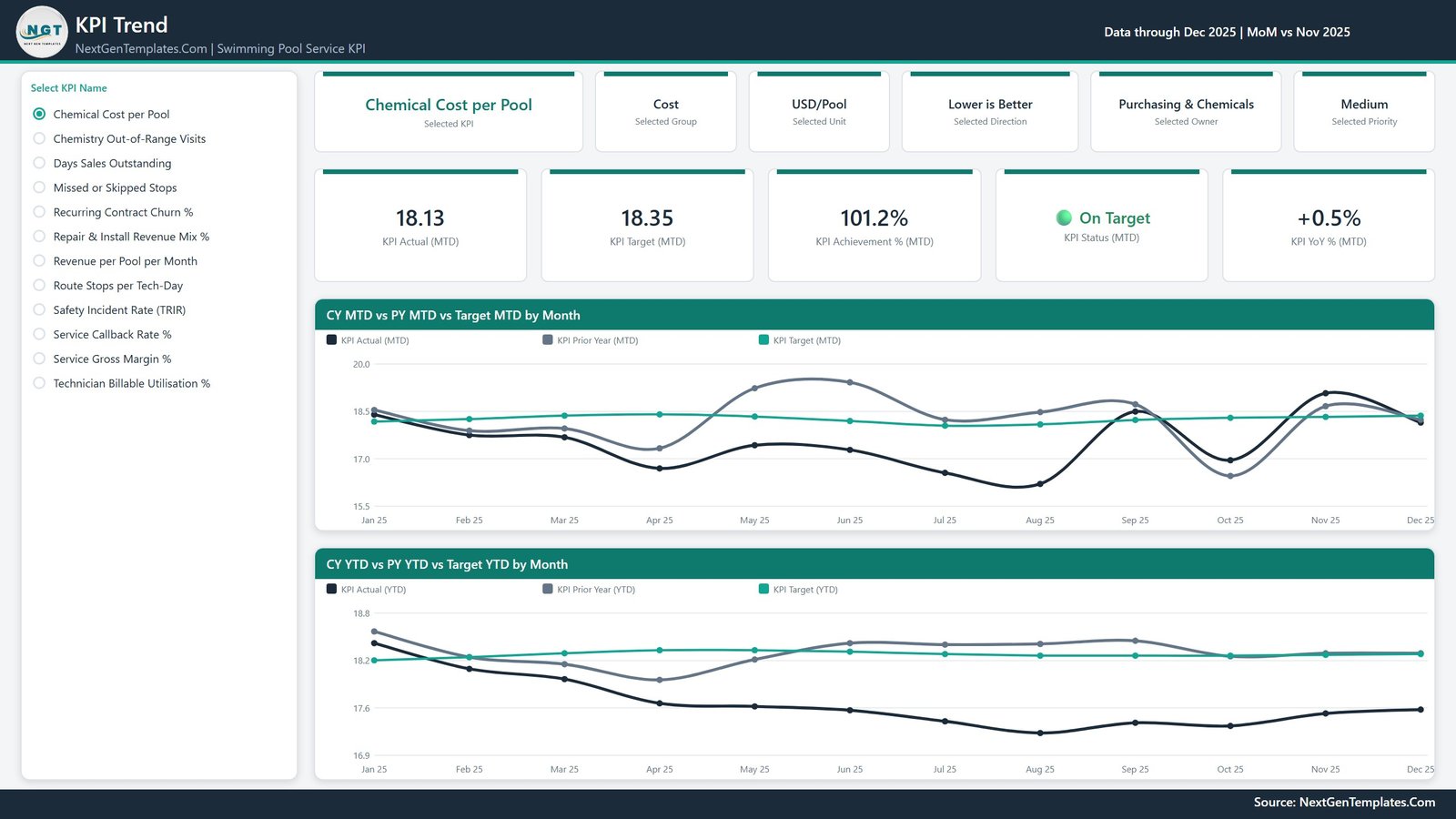
A “Select KPI Name” list runs down the left. Pick one and the page rebuilds around it: six context cards (KPI, group, unit, direction, owner, priority), five value cards (Actual MTD, Target MTD, Achievement % MTD, Status MTD, YoY % MTD) and two charts – CY MTD vs PY MTD vs Target MTD by Month and CY YTD vs PY YTD vs Target YTD by Month.
Three lines on each chart: this year, last year, target. Because the data pack ships two full years of actuals, the prior-year line is typed history rather than a modelled estimate. In the screenshot above, Chemical Cost per Pool is selected and the current-year line sits under both the target line and the prior-year line for most of the summer – which is the shape you want on a cost KPI.
Page 3 – KPI Definition
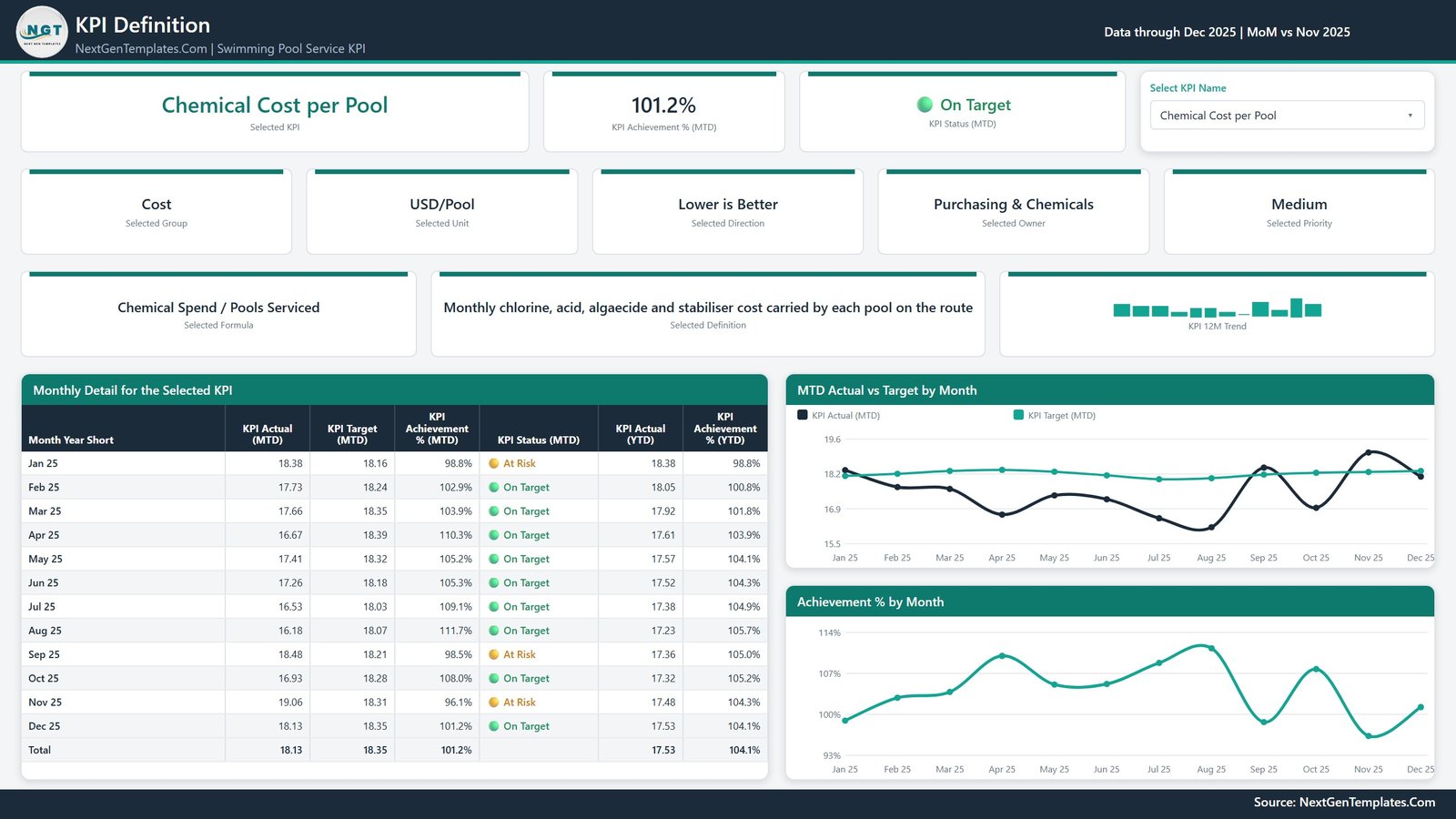
This is the page most KPI packs skip. The same KPI selector – synced with page 2, so whatever you clicked there is already applied – plus the formula and the plain-English definition of the selected KPI, printed on the page.
Chemical Cost per Pool reads “Chemical Spend / Pools Serviced”, defined as “Monthly chlorine, acid, algaecide and stabiliser cost carried by each pool on the route”. Service Callback Rate % reads “Return Visits Within 7 Days / Total Service Visits”. Having that on screen ends the recurring argument about how a number was calculated before the discussion about the number starts.
Under the cards sit a Monthly Detail for the Selected KPI table – all twelve months with MTD actual, MTD target, MTD achievement %, MTD status, YTD actual and YTD achievement %, plus a total row – and two charts, MTD Actual vs Target by Month and Achievement % by Month.
Page 4 – Get More Templates

A catalogue and customisation page – other Power BI templates, a short “Using and Customising This Template” panel, and contact details for a custom build. Behind the four visible pages sit two hidden tooltip pages, KPI Detail and Trend Detail, both 280×360, that appear on hover and never show up in the page tabs.
The data pack, and what actually drives the report
Data.xlsx has four sheets and it is the whole engine.
- Read Me – how the model works, including the rule that catches most home-made KPI packs: for a rate, ratio or index, YTD is the average of the months so far, never a sum. A compliance percentage that adds up to 1,900% by December makes every YTD chart useless.
- KPI Definition – 12 rows, one per KPI: group, name, unit, formula, definition, Type (UTB or LTB), owner, priority.
- Input_ Target – 144 rows: 12 KPIs by 12 months, MTD and YTD.
- Input_ Actual – 288 rows, because it carries 2024 as well as 2025. That second year is what every PY line and YoY arrow reads from.
Nothing in the report hard-codes a KPI name. Add a row to all three sheets, delete one, or rename a KPI in all three (the name is the join key), press Home > Refresh, and the counts, the scorecard, the selector list and every chart follow. Behind it sit 104 DAX measures and a Date table generated in Power Query. Native Power BI visuals only – nothing from AppSource, nothing to install.
Water chemistry: what this file does and does not do
One KPI here touches pool chemistry – Chemistry Out-of-Range Visits – and it is worth being precise about it.
It is a monthly count of service visits that closed with free chlorine, pH or total alkalinity outside your own published range. The file does not store test readings. There is no field for a pH value, a chlorine ppm, a cyanuric acid level, a per-pool test log or a dosing calculation, and nothing in the model validates, interprets or certifies a reading.
This template makes no public-health, water-safety, chemical-compliance or testing-certification claim. It is a management reporting file. It is not a substitute for your health-department inspection regime, your state or local pool code, your chemical handling and safety-data-sheet obligations, or the judgement of a certified pool operator. The out-of-range count is a number your own process produces; the dashboard trends it against a target you set, and that is all. The same holds for Safety Incident Rate (TRIR): a figure you type in, not an OSHA recordkeeping system.Swimming Pool Service KPI Dashboard in Power BI
What it does not do
The rest of the honest list, so nobody buys the wrong thing:
- No live data. One imported Excel workbook. No API, no gateway, no scheduled refresh, no connector to Skimmer, Pool Brain, Jobber, ServiceTitan, QuickBooks or Xero.
- No per-pool, per-route or per-technician drill-down. This is a company-level monthly scorecard; pools, routes and technicians are not dimensions in the model.
- No drill-through. The KPI Definition page is reached from the page tabs, and its selector is synced with page 2. Two hidden tooltip pages appear on hover; those are the only hidden pages.Swimming Pool Service KPI Dashboard in Power BI
- Not scheduling, dispatch, invoicing or a customer database. Days Sales Outstanding is a monitoring ratio you supply, not a receivables ledger.Swimming Pool Service KPI Dashboard in Power BI
- The targets are not benchmarks. Every figure in the file is sample data, including all twelve targets. There is no industry average and no external source behind any number. Replace them before anyone treats a traffic light as meaningful.Swimming Pool Service KPI Dashboard in Power BI
Getting it running
- Unzip all three files – the
.pbix,Data.xlsxand the user manual PDF – into one folder, and keep them together. - Open the
.pbixin Power BI Desktop. It is free from Microsoft and Windows-only. The sample data is already loaded, so look around first. - Before your first refresh: Home > Transform data > Data source settings > Change Source, and point it at your copy of
Data.xlsx. The saved path is the folder the file was built in. - Edit KPI Definition first – group, unit, formula, definition, UTB/LTB, owner, priority.
- Fill Input_ Target for your reporting year, and Input_ Actual for that year and the one before it.
- Home > Refresh. Everything follows.Swimming Pool Service KPI Dashboard in Power BI
More on this blog: Golf Course KPI Dashboard in Power BI, Yoga Studio KPI Dashboard in Power BI and IVF Centers KPI Dashboard in Power BI.Swimming Pool Service KPI Dashboard in Power BI
Frequently asked questions
Do I need a paid Power BI licence?
No. Power BI Desktop is free and opens, edits and refreshes the file on Windows. A Pro or Premium seat is only needed if you want to publish to the Power BI Service and share it.Swimming Pool Service KPI Dashboard in Power BI
Can I change the KPI list?
Yes – add, delete or rename freely across the three sheets and refresh. The counts, scorecard, selector and charts are all data-driven.Swimming Pool Service KPI Dashboard in Power BI
Does it record pool test results?
No. See the water chemistry section above: it counts out-of-range visits and stores no readings, and it makes no water-safety or compliance claim.Swimming Pool Service KPI Dashboard in Power BI
Is the Excel version the same file?
No. Different build, different KPI list – 15 KPIs, 7 groups, 11 sheets against 12 KPIs, 9 groups, 4 pages here, with only two KPIs in common. Both are listed at NextGenTemplates.Swimming Pool Service KPI Dashboard in Power BI
What do I download?
One ZIP with the .pbix, Data.xlsx and a Power BI Dashboard user manual PDF. One-time payment, lifetime access to the file.Swimming Pool Service KPI Dashboard in Power BI
Where to get it
The Swimming Pool Service KPI Dashboard in Power BI is $12.99 (regular $19.99) – one payment, no subscription, lifetime access to the file you buy.
Related templates worth a look: the Swimming Pool Service KPI Dashboard in Excel for the fifteen-KPI Excel build, the Swimming Pool Service KPI Scorecard in Google Sheets for a lighter option, and the same scorecard pattern for neighbouring trades in Plumbing and HVAC.Swimming Pool Service KPI Dashboard in Power BI