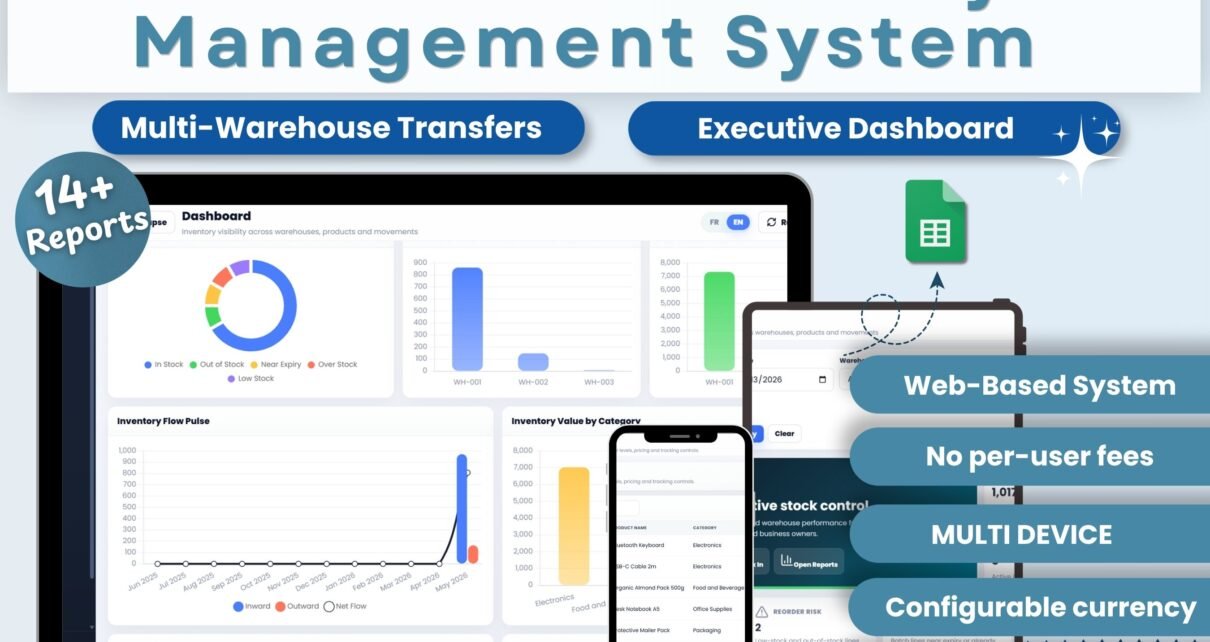
The Web-based: Advanced Inventory Management System is a Google Apps Script web app that pairs a browser front-end with Google Sheets as the database. It covers 11 fully-linked pages, 2 user roles (Admin / User), 14+ exportable reports, and a complete English / French toggle — all deployable to your own Google account in under 15 minutes. The system handles stock-in, stock-out, multi-warehouse transfers, and reason-coded adjustments with a single audit-trail ledger powering every dashboard tile.
Most small and mid-size businesses end up trapped between two bad options for inventory tracking. Either they bolt together fragile Excel files that break the moment a second person opens them, or they pay $29–$199 per month per user for cloud SaaS like Zoho Inventory, Sortly, or NetSuite. The Web-based: Advanced Inventory Management System in Google Sheets sits between those — a real web app you own, with multi-user login, a live transaction ledger, and full source code included for $49 one-time. This post walks through every page, the deployment flow, real-world use cases, comparison against paid SaaS, and the FAQs we hear most from buyers.
Key Features of the Web-based: Advanced Inventory Management System
🔹 Web-based architecture on Google Apps Script — runs in any browser, hosted on your own Google Drive. No installs, no Windows-only restrictions, works on Mac, Chromebook, and tablets. Your Google Sheet is the database, so you keep 100% ownership of every stock record.
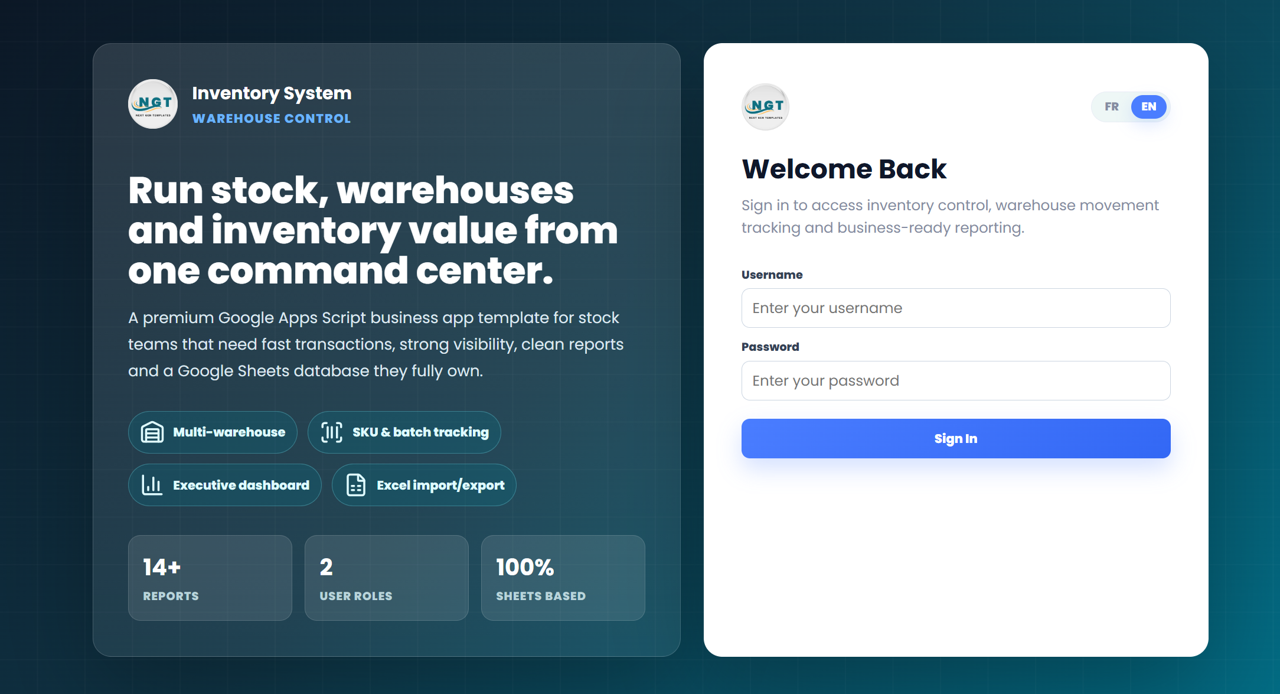
🔹 Bilingual interface — English and French — a single toggle in the top-right switches every label, button, navigation item, table header, and error message between EN and FR. Built for francophone businesses in Canada, France, Belgium, Switzerland, and across West and Central Africa.
🔹 2 role-based user types — Admin and User — Admins manage users, lists, and settings; standard Users record transactions, view stock, run reports. Login credentials validate against the embedded User Management sheet — adding a team member takes one row.
🔹 11 operational and admin pages — Dashboard, Current Stock, Stock Ledger, Reports, Product Master, Stock In / Purchases, Stock Out / Issues, Stock Transfers, Stock Adjustments, plus three Masters (Warehouses, Suppliers, Customers / Issue-To) and three Admin pages (Users, Lists, Settings).
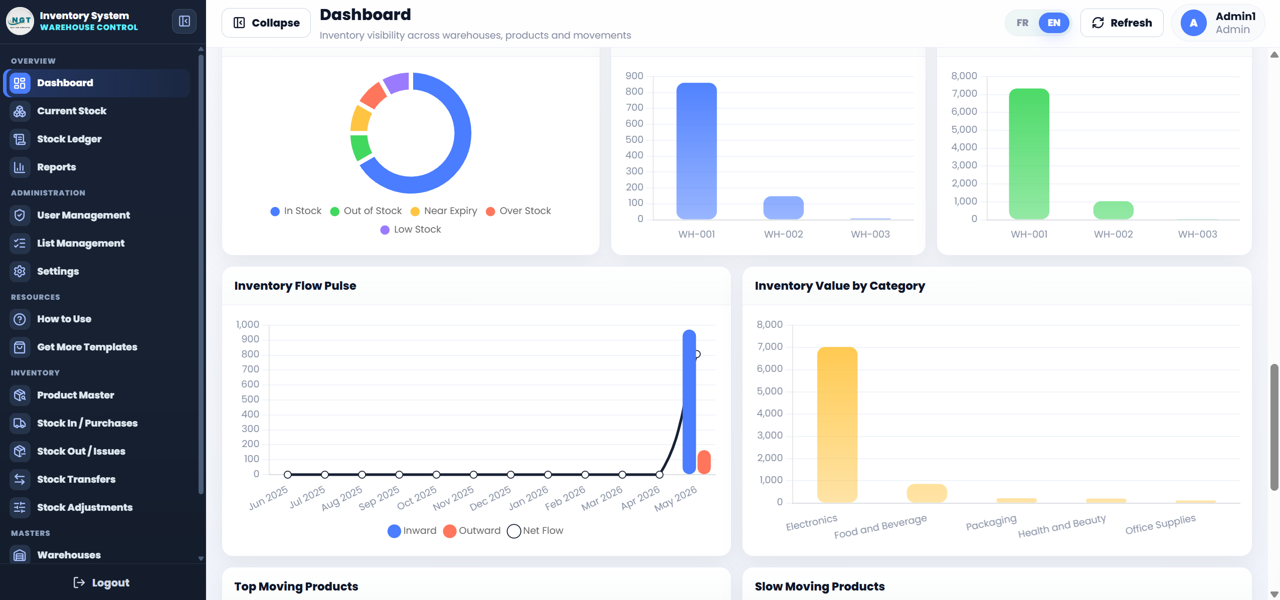
🔹 Executive Dashboard with inward vs outward trend — KPI cards plus an inward, outward, and net-flow chart drawn by Chart.js. Spot moving versus stagnant SKUs without writing a formula.
🔹 Multi-warehouse stock transfers with full ledger — every movement between warehouses, every stock adjustment with a reason code, every receipt and issue is captured in the Stock Ledger for audit. Closing balances on Current Stock recalculate live.
🔹 14+ exportable reports — filter by date range, warehouse, product, or supplier and export to Excel through SheetJS. The export runs directly in the browser — no server round-trips.
🔹 Configurable currency, tax, and default language — set your currency symbol, tax ID, default warehouse, and default language (EN or FR) once on the Settings page. The settings flow through every report and tile.
Pages Explanation — Web-based: Advanced Inventory Management System
1. Login Screen (Bilingual)
The entry point validates the username and password against the User Management sheet. The language toggle in the top-right switches the whole screen between English and French. Seeded credentials for first deployment are Admin1 / abcd (Admin role) and User1 / abcd (User role) — both should be changed immediately after the first login.
2. Dashboard
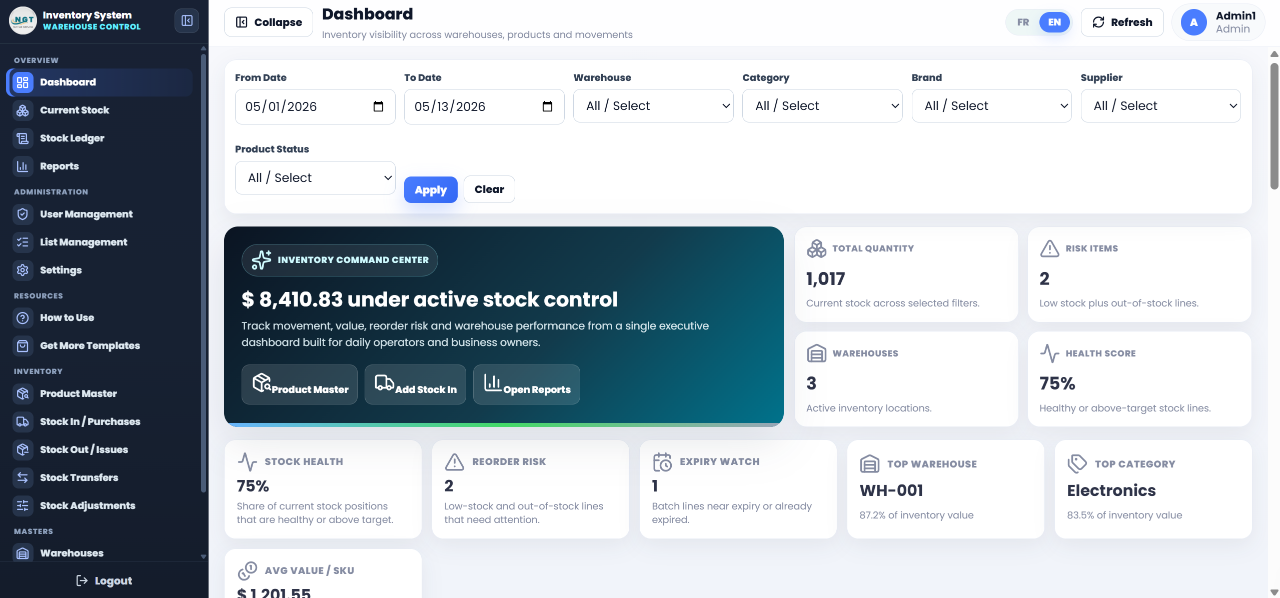
KPI tiles for total stock value, active products, top suppliers, and low-stock alerts. The main chart shows inward, outward, and net-flow per period — the single most important question for any inventory manager. A secondary view drills into top movers and category mix.
3. Current Stock
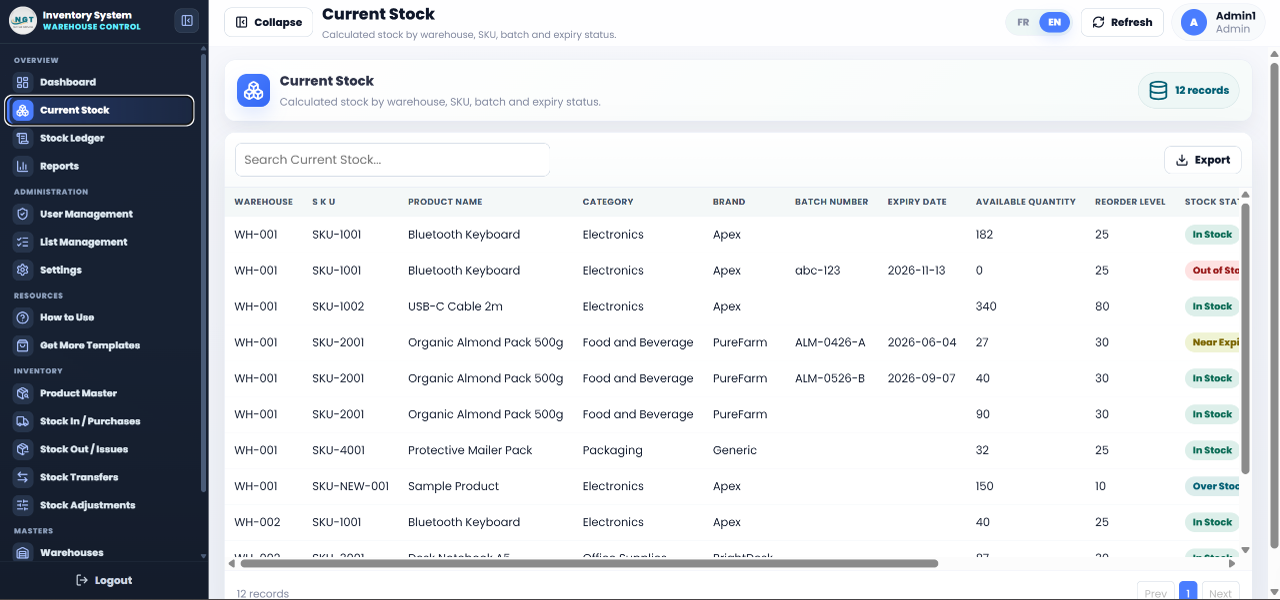
Live on-hand quantity and stock value per SKU, with SKU and batch tracking by warehouse. Low-stock items are flagged automatically using the reorder level defined on the Product Master.
4. Stock Ledger
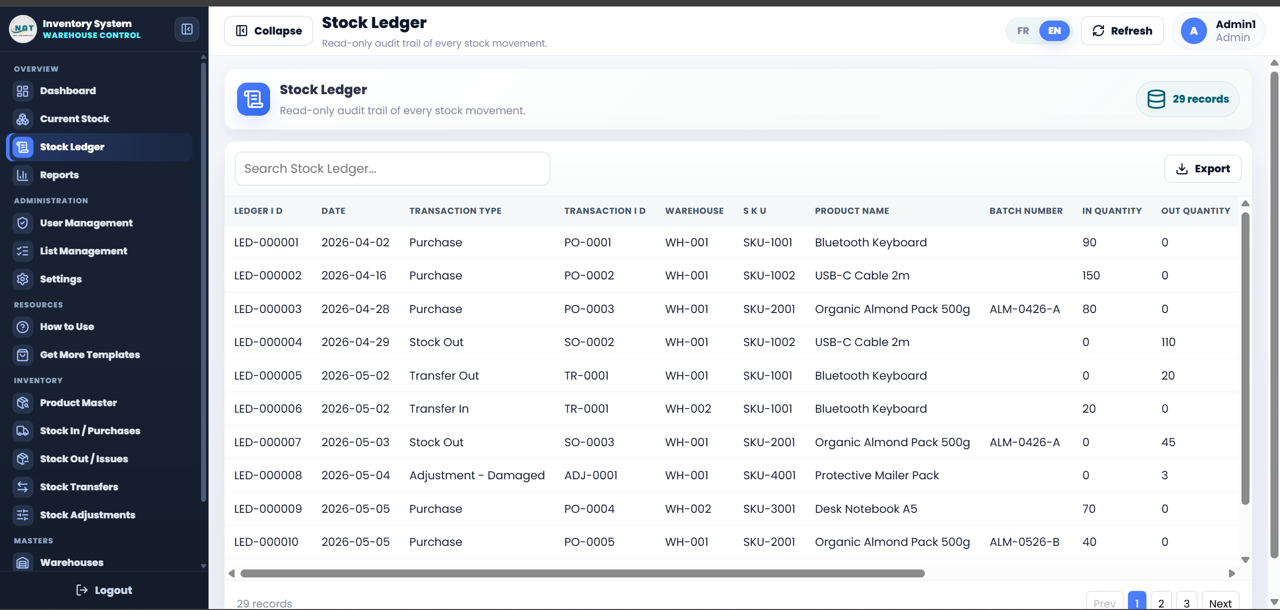
The full audit trail. Every inward, outward, transfer, and adjustment lands here with date, warehouse, product, transaction type, and remark. This is the single source of truth for inventory accuracy reviews.
5. Reports
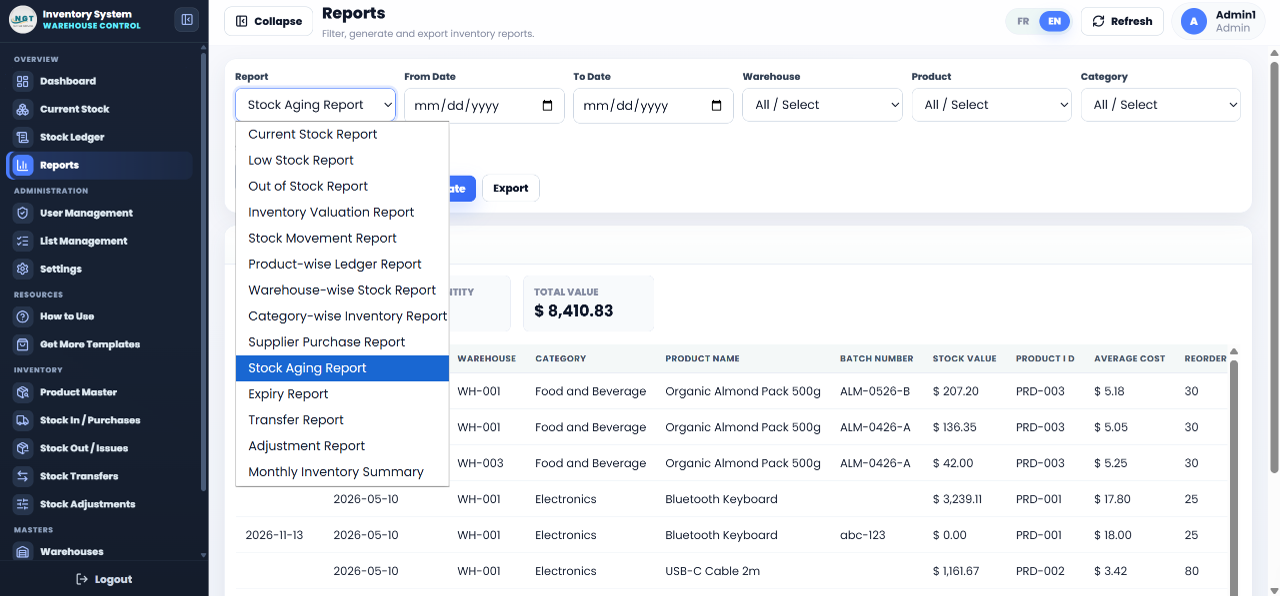
14+ pre-built reports with filters for date range, warehouse, supplier, and product. One-click Excel export via SheetJS — no copy / paste, no broken formulas, no third-party export plugin needed.
6. Product Master
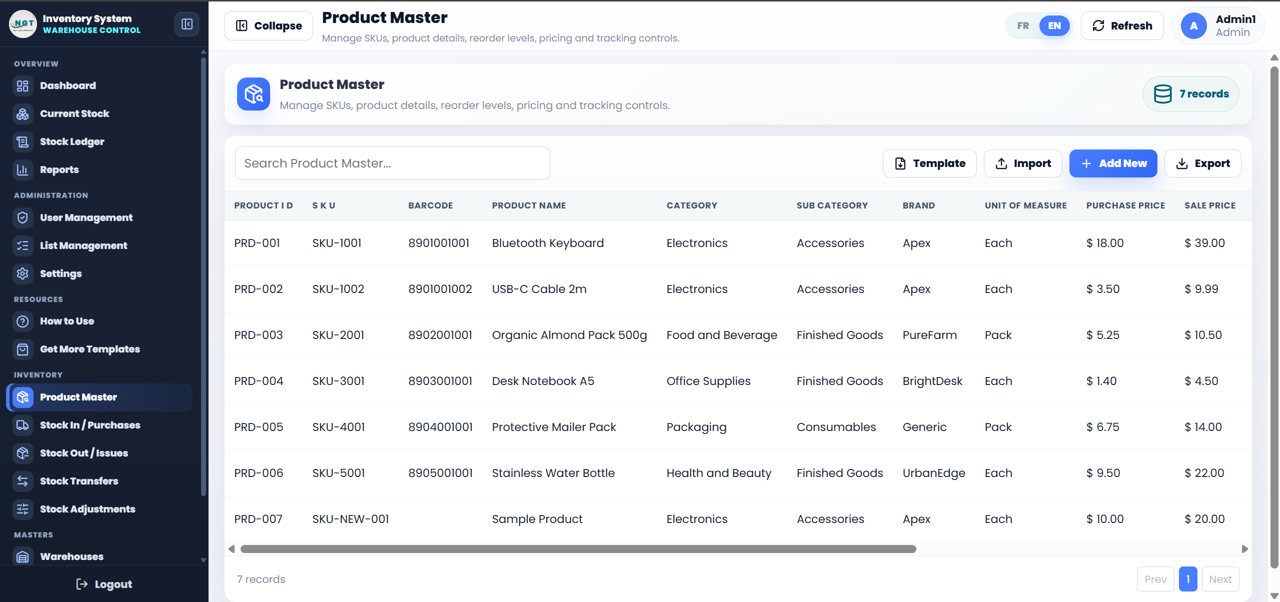
The central catalogue of every SKU with unit of measure, batch number, reorder level, default supplier, and category. The Product Master drives every dropdown and validation in the transaction pages — keep it clean and the whole system stays clean.
7. Stock In / Purchases
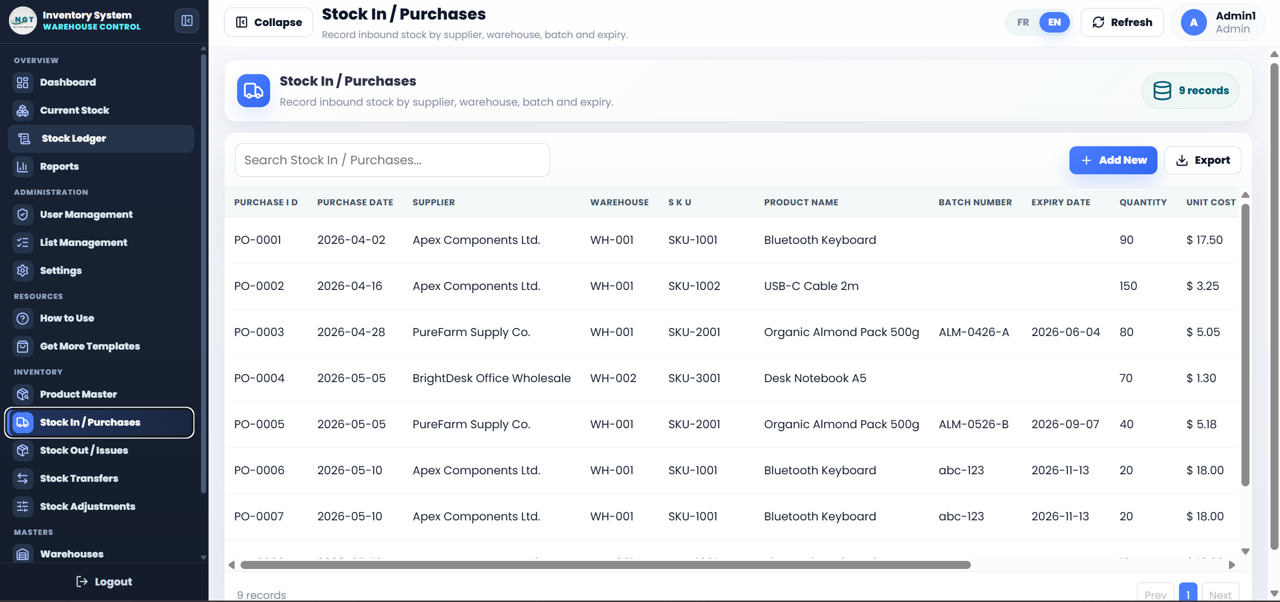
Record goods received against suppliers, with batch numbers, unit cost, warehouse, and invoice reference. Submission posts directly to the Stock Ledger and updates Current Stock.
8. Stock Out / Issues
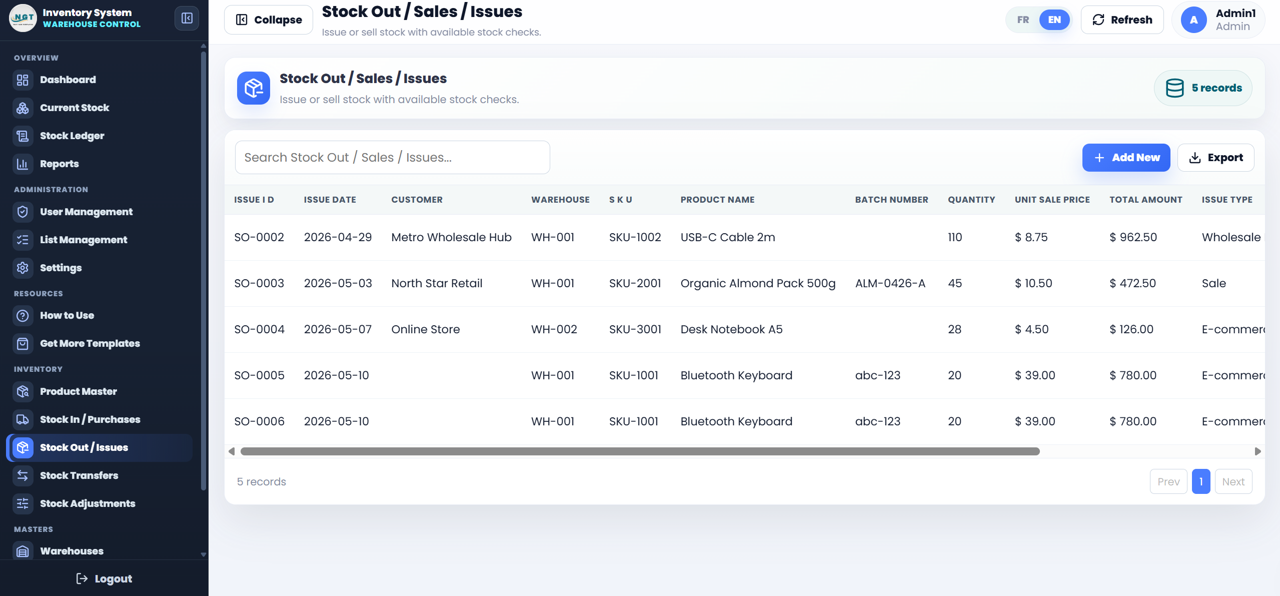
Issue stock to customers, internal departments, or projects. Captures the issue-to party, reference document, and warehouse. Updates valuation using the running average cost.
9. Stock Transfers
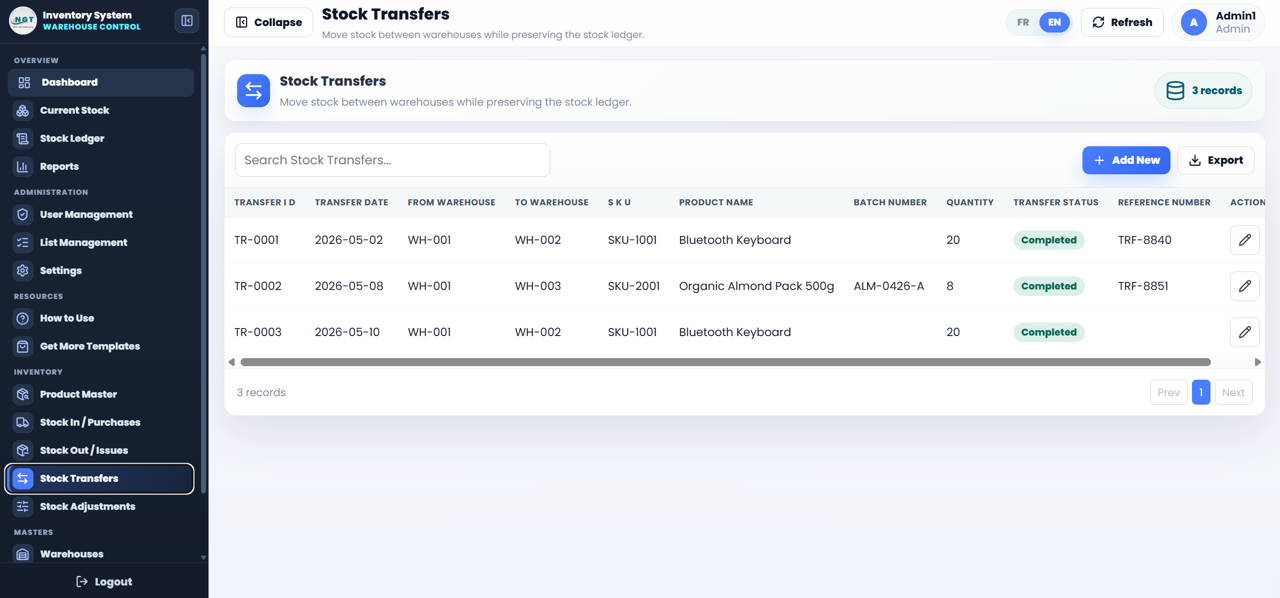
Move stock between warehouses with from / to references. Each transfer creates two linked ledger entries so the audit trail is complete on both ends — out of warehouse A, in to warehouse B.
10. Stock Adjustments
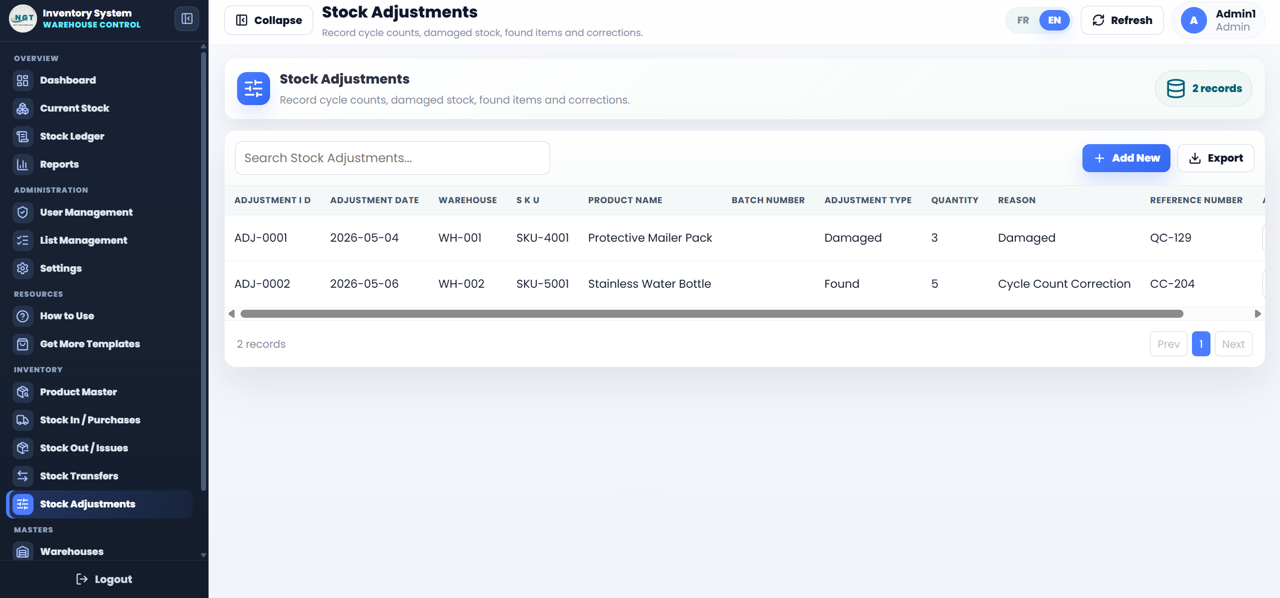
Correct stock counts after physical inventory or breakage / loss events. Each adjustment carries a reason code and a remark, so every correction stays traceable for finance and audit.
11. Masters — Warehouses, Suppliers, Customers
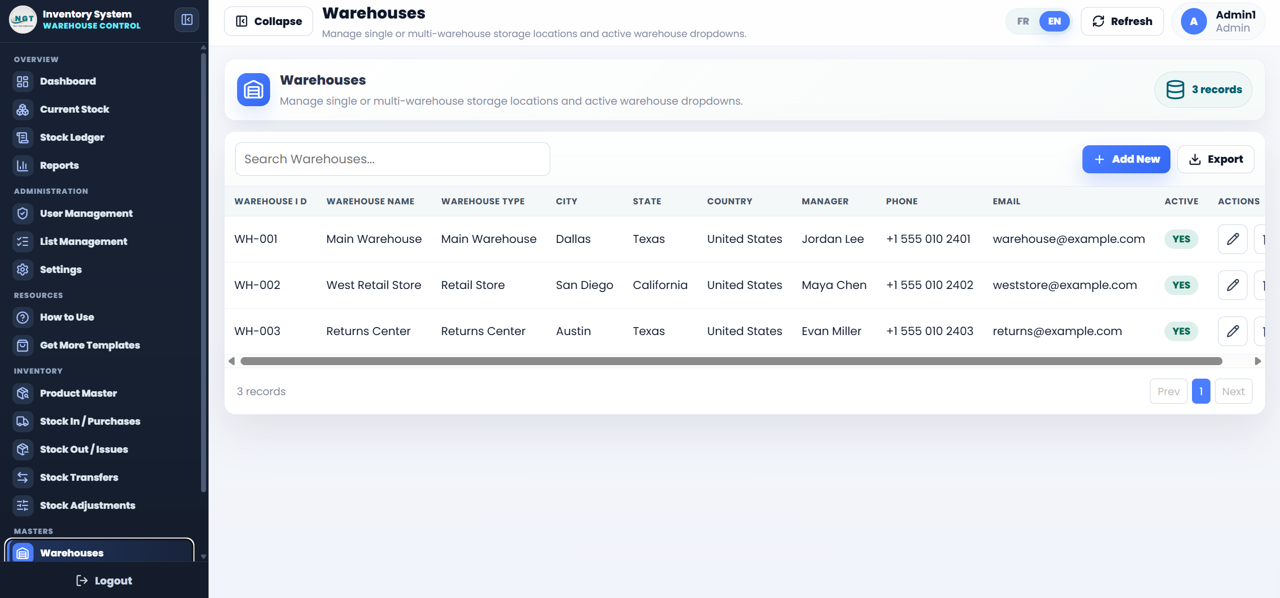
Three master-data pages feed every transaction with validated dropdowns. Add a new warehouse, supplier, or customer in one row and it appears across every form instantly.
12. Admin — Users, Lists, Settings
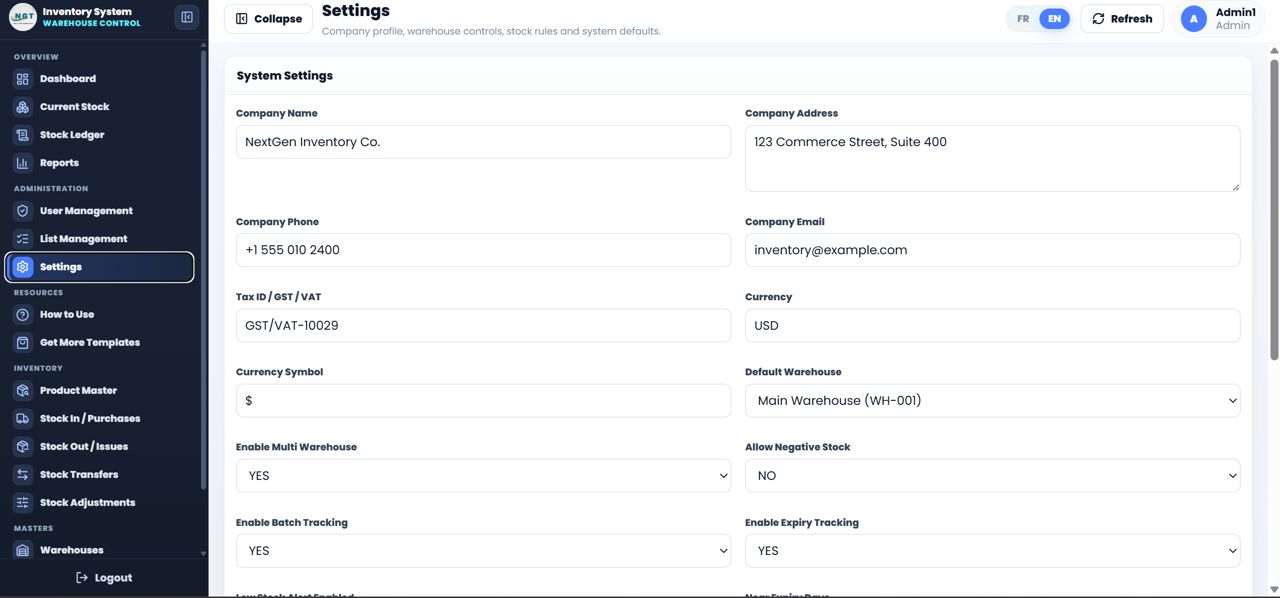
Admin-only pages to manage usernames, passwords, roles, dropdown list values, and company settings — currency symbol, tax ID, default warehouse, and default language (EN or FR).
Web-based: Advanced Inventory Management System vs. Excel Inventory Template vs. Paid Inventory SaaS — Feature Comparison
| Feature | Web-based: Advanced Inventory Management System | Excel Inventory Template | Paid SaaS (Zoho Inventory / Sortly / NetSuite) |
|---|---|---|---|
| Cost | $49 one-time ✅ | $7–$25 one-time | $29–$999 / month |
| Platform | Web app + Google Sheets ✅ | Microsoft Excel (Windows-leaning) | Cloud SaaS — vendor-hosted |
| Setup time | Under 15 minutes ✅ | 10–30 minutes | Days to weeks |
| Bilingual EN / FR toggle | Yes — one-click switch ✅ | No | Sometimes (premium tier) |
| Login + role-based access | Yes — Admin and User roles ✅ | Rare (VBA-only) | Yes (SSO available) |
| Multi-warehouse transfers | Yes — linked ledger entries ✅ | Manual sheet edits | Yes |
| Source code included | Yes — Code.gs + Index.html ✅ | Yes (formulas only) | No — vendor-locked |
| Year-1 cost at 5 users | $49 total ✅ | $7–$25 total | $1,740 – $11,988 |
| Data ownership | Your Google Drive ✅ | Your local disk | Vendor servers |
For small and mid-size businesses that want a real web-based inventory app without paying $30+ per user per month for Zoho Inventory or NetSuite, the Web-based: Advanced Inventory Management System sits in the sweet spot.
Who Should Use This Template
Perfect for:
- Small and mid-size retail, wholesale, manufacturing, and distribution businesses (5–500 staff) wanting a web-based stock app without monthly SaaS fees
- Operations managers tracking stock across 2–10 warehouse locations with transfers and adjustments
- Francophone businesses in Canada, France, Belgium, Switzerland, and West / Central Africa needing a bilingual EN / FR inventory tool
- Founders who want to own their inventory data on Google Drive instead of a vendor cloud
- Consultants and developers who want a starter Apps Script web app they can rebrand for clients
Not a fit if:
- You need SOC 2 compliance, SAML SSO, or audit-trail logs across 10,000+ SKUs and 50+ warehouses
- You need live barcode-scanner integration with hardware devices and shop-floor terminals
- You do not use a Google account — the system requires Google Apps Script to deploy
- You need real-time multi-currency revaluation with FX feeds — currency is a single fixed symbol per deployment
Real-World Use Cases
Amadou runs a 40-person electronics distribution business in Abidjan with three warehouses. His team uses the Web-based: Advanced Inventory Management System in French to record stock-in from suppliers, transfer between branches in Abidjan, Bouaké, and Yamoussoukro, and issue stock to retail customers. Every Monday he opens the Dashboard, reviews the inward / outward trend chart, and exports the slow-mover report to Excel for his procurement meeting — without paying Zoho Inventory licences in CFA francs.
Priya is the operations manager at a 90-person cosmetics manufacturer in Mumbai. She rolled out the system across two warehouses and a quality-hold area. Her warehouse supervisors log goods received against purchase orders in real time on tablets, the Stock Ledger captures every movement, and quarterly stock-count adjustments stay traceable through the reason-code column. Setup took her IT contact 12 minutes following the deployment video.
Sophie is a freelance ERP consultant in Montreal serving bilingual SME clients. She uses the system as a starter template for each new engagement, rebranding the Settings sheet, switching the default language to French for Québécois clients, and tweaking the Reports page to add client-specific filters. The included Code.gs and Index.html source files mean she controls every line of the app.
Advantages of the Web-based: Advanced Inventory Management System
🔹 Replaces $1,740–$11,988 in year-1 SaaS spend at 5 users — paid inventory SaaS averages $29–$199 per user per month, which compounds fast for a growing team. The one-time $49 means the entire team is covered for life.
🔹 Data stays on your Google Drive, not a vendor cloud. If a SaaS vendor changes their pricing, gets acquired, or shuts down, your data and workflows survive. Google Sheets is the database, and you own the deployment.
🔹 Source code is included — Code.gs and Index.html — so you can add pages, fields, language packs, or new reports without waiting for a vendor roadmap. Google Apps Script documentation is freely available and well-supported.
🔹 Real bilingual support, not Google Translate. Every label, button, and table header in the language pack is hand-translated and stored as a single source of truth — change the language toggle and the entire UI flips.
Opportunities for Improvement
🔹 No barcode-scanner hardware integration — adding a USB scanner workflow currently requires Apps Script customisation.
🔹 Single currency per deployment — the Settings page allows one currency symbol. Multi-currency revaluation with FX feeds is not built in.
🔹 No native mobile app — the system runs in a mobile browser and is responsive, but a dedicated mobile experience would need to be built as a custom layer.
Best Practices for the Web-based: Advanced Inventory Management System
🔹 Populate masters in the correct order: Warehouses → Suppliers → Customers → Product Master.
🔹 Change Admin1 / abcd immediately after deployment.
🔹 Use reason codes consistently on Stock Adjustments — a controlled list of 5–8 reasons (Damage, Theft, Count Variance, Expiry, Sample Out, etc.) keeps reporting clean.
🔹 Lock down “Who has access” on the Web App deployment. For internal use, choose “Anyone within [your domain]” instead of “Anyone with the link”.
Explore Related Templates
Pair the Web-based: Advanced Inventory Management System with these inventory and supply-chain dashboards to complete your operations stack:
- Out-of-Stock Rate KPI Dashboard in Power BI — Power BI dashboard tracking out-of-stock metrics across the supply chain
- Shelf Space Utilization KPI Dashboard in Power BI — pair for shelf-space and inventory efficiency analytics
- Supplier Performance KPI Dashboard in Power BI — track supplier-level KPIs feeding into inventory operations
- Resource Allocation KPI Dashboard in Power BI — extend the warehouse view with resource-allocation analytics
- Browse all Google Sheets Inventory Management Templates
Frequently Asked Questions
What pages does the Web-based: Advanced Inventory Management System include?
The Web-based: Advanced Inventory Management System includes 11 main pages — Dashboard, Current Stock, Stock Ledger, Reports, Product Master, Stock In / Purchases, Stock Out / Issues, Stock Transfers, and Stock Adjustments — plus three Masters (Warehouses, Suppliers, Customers) and three Admin pages (Users, Lists, Settings).
How does the bilingual English / French toggle work in this system?
A single language toggle in the top-right of the screen switches every label, button, navigation item, table header, error message, and dashboard tile between English and French. The selected language is also stored as the default in the Settings page so new users land in their correct language.
How long does deployment to a Google account take?
Deployment of the Web-based: Advanced Inventory Management System takes under 15 minutes. Create a Google Sheet, paste Code.gs and Index.html into Apps Script, deploy as a web app, and log in with the seeded Admin1 credentials. A step-by-step deployment video is linked in the download package.
How does this compare to Zoho Inventory or Sortly?
Zoho Inventory starts around $29 per organisation per month plus per-user fees, and Sortly Advanced starts around $49 per month. The Web-based: Advanced Inventory Management System is $49 one-time with no recurring fees, no per-user pricing, source code included, and your data stays in your own Google Drive.
Does it work on Mac, Chromebook, and tablets?
Yes. The system runs entirely in a browser through Google Apps Script, so it works on Windows, Mac, Chromebook, iPad, and Android tablets — anywhere you can open Chrome, Edge, Safari, or Firefox and sign in to your Google account.
Can I customise the source code or add new pages?
Yes. The download includes the full Code.gs server file and Index.html front-end file. You can add new pages, change colours, edit the language pack, add custom reports, or integrate with other Google services using Google Apps Script documentation.
Is this a one-time purchase or a subscription?
The Web-based: Advanced Inventory Management System is a $49 one-time purchase. No subscription, no per-user fees, lifetime access. You also receive the Code.gs and Index.html source files so you fully own the deployment.
About the Author
Built by PK — Microsoft Certified Professional with 15+ years of Excel, Google Sheets, and Power BI experience. Founder of NextGenTemplates, reaching 300K+ subscribers across YouTube channels (@PK-AnExcelExpert, @NextGenTemplates, @NeoTechNavigators). Every template is hand-built and tested before release.
Watch the Product Demo
Watch the Deployment Setup Guide
Conclusion
The Web-based: Advanced Inventory Management System is the rare case where you can replace a recurring SaaS bill with a one-time $49 download without giving up real features — login, role-based access, multi-warehouse transfers, a complete audit ledger, 14+ exportable reports, and a bilingual EN / FR interface. The included Code.gs and Index.html source files mean your team or developer can extend it for years.
👉 Click here to Purchase the Web-based: Advanced Inventory Management System
✅ Instant download · One-time payment · No subscription · No per-user fees · Lifetime access
🎥 Visit our YouTube channel for step-by-step tutorials: Youtube.com/@PK-AnExcelExpert
📅 Last updated: May 2026