Managing medical claims manually is slow. Paper files get misplaced. Excel sheets become scattered. Tracking approvals, rejections, reimbursements, and policy limits becomes confusing.
Now imagine handling hundreds of employee medical claims in one structured, secure, and automated system.
That is exactly why we built the Medical Claim Management System V1.0 — a powerful Excel & VBA-based tool designed for organizations, HR teams, finance departments, and healthcare administrators.
If you are looking for a ready-to-use Medical Claim Management System in Excel, this is the complete solution.
Click to Purchases Medical Claim Management System V1.0
What Is Medical Claim Management System V1.0?
Medical Claim Management System V1.0 is a fully automated Excel VBA-based application that helps organizations:
-
Manage employee medical claims
-
Track claim history
-
Control user access
-
Generate reports
-
Export data
-
Secure data using login credentials
It works inside Microsoft Excel but behaves like a complete software application with forms, buttons, filters, sorting, and role-based access control.
You do not need external databases.
Everything runs inside one structured Excel file.
Why Your Organization Needs a Medical Claim Management System
Without a proper system, organizations face:
-
❌ Duplicate claim entries
-
❌ Missing reimbursement records
-
❌ No proper filtering by date
-
❌ No audit history
-
❌ No user-level access control
-
❌ Difficulty in generating reports
With this tool, you get:
-
✅ Structured claim tracking
-
✅ Role-based security
-
✅ Easy add/update/delete options
-
✅ Excel export facility
-
✅ Date-based filtering
-
✅ Centralized claim history
This system is especially useful for:
-
Corporate HR Departments
-
Insurance Processing Teams
-
Hospitals & Clinics
-
Third Party Administrators (TPA)
-
Healthcare Finance Teams
Key Features of Medical Claim Management System V1.0
Let’s explore every module in detail.
1️⃣ Login Form (Role-Based Security)
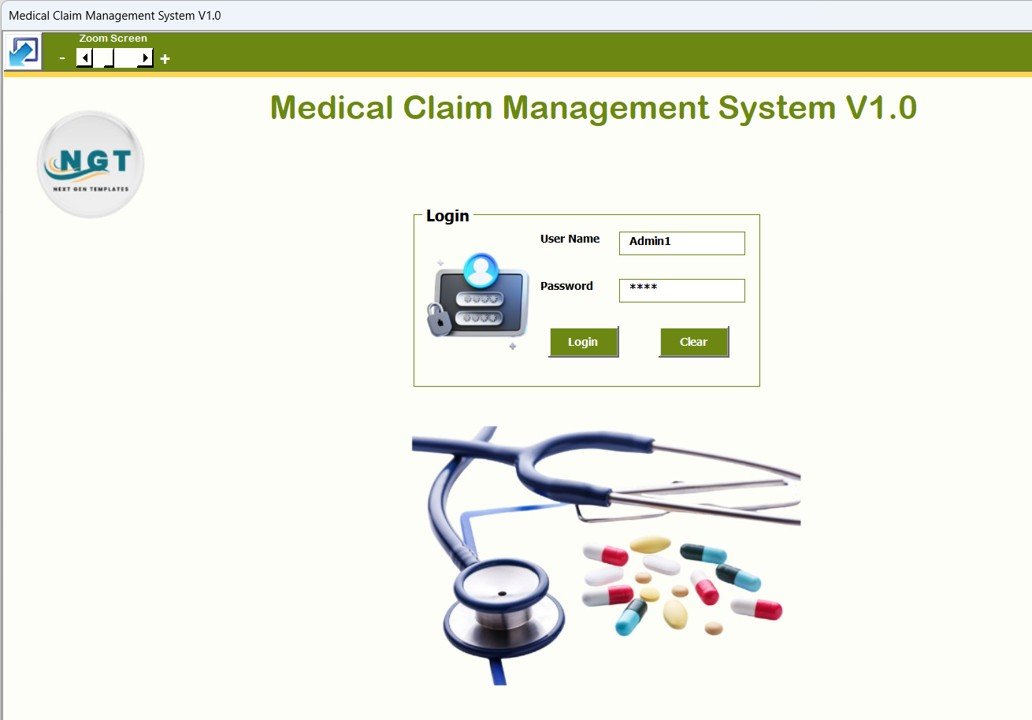
The system starts with a professional Login Form.
You simply enter:
Default Admin Login:
-
Username: Admin1
-
Password: abcd
Default User Login:
-
Username: User1
-
Password: abcd
After login, the system redirects you to the Main Claims Form.
Click to Purchases Medical Claim Management System V1.0
Why This Is Important
-
Ensures data security
-
Prevents unauthorized access
-
Allows different access permissions for Admin and Users
-
Supports password reset functionality
Only Admin can access advanced controls like User Access Control.
2️⃣ Claims 
Claims
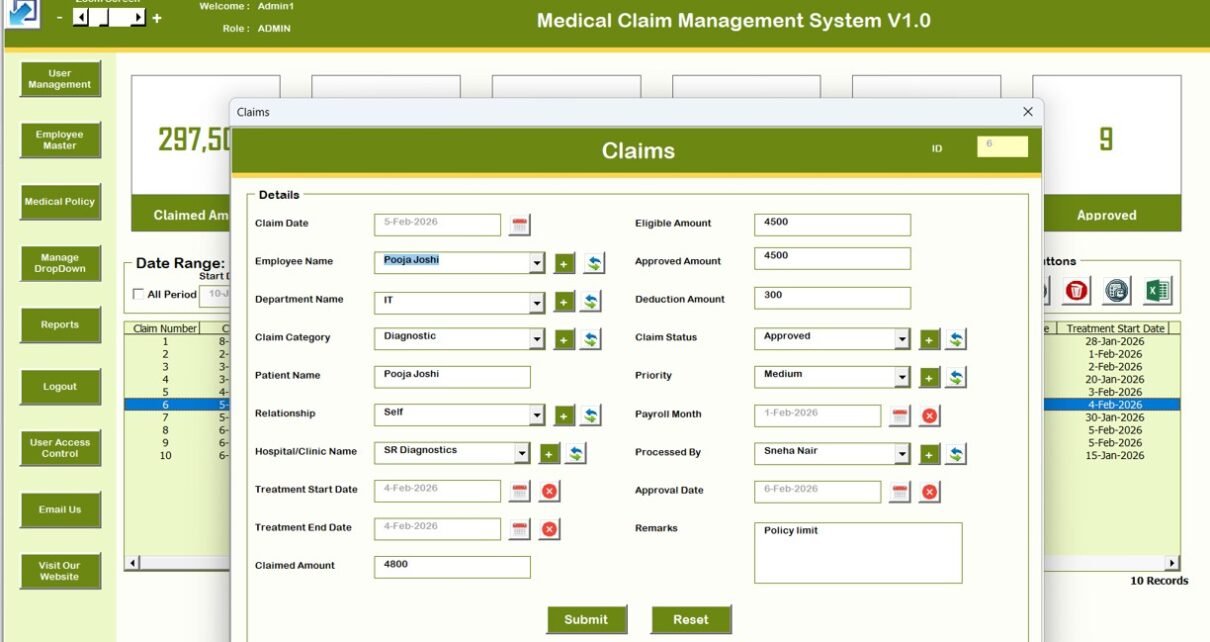
This is the heart of the system.
After login, you land on the Claims Management Main Form.
From here, you can manage everything.
📌 List Box (Center of Main Form)
At the center of the form, you will see a structured List Box displaying all claim records.
This allows you to:
-
View claims instantly
-
Select any record
-
Double-click to update
-
Track status
📌 Filters
Above the List Box, you can filter records by:
-
Date Range
-
Selected Columns
-
Custom filtering logic
This helps you analyze specific time periods or categories quickly.
📌 Sort By Feature
You can sort claim records using the Sort feature.
Sorting options help you organize data based on selected columns.
📌 Control Buttons
Below the list box, you will find powerful control buttons:
1️⃣ Add New Record
Add a completely new medical claim record.
2️⃣ Update Existing Record
-
Select a record
-
Click Update
-
Or simply double-click the record
-
Modify details
-
Click Submit
3️⃣ Delete Record
Remove unwanted or incorrect claim entries securely.
4️⃣ Export to Excel
Export the list box data into a new Excel file for:
-
External reporting
-
Management review
-
Sharing with insurance providers
This makes reporting extremely easy.
3️⃣ History Form
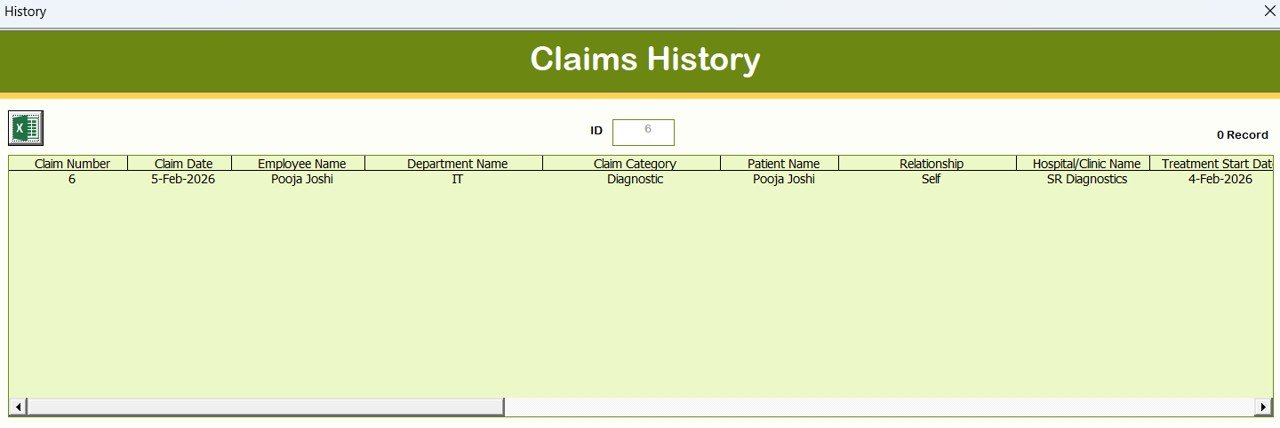
The History Form opens when you click:
-
Add New Record
-
Update Existing Record
This form allows you to:
-
Enter new claim data
-
Modify claim details
-
Submit updates
This ensures all data entries are structured and controlled.
Navigation Menu (Left Side Panel)
Click to Purchases Medical Claim Management System V1.0
The system includes a complete navigation bar for seamless control.
Let’s explore each option.
1️⃣ Firm Information
Update your organization details:
-
Company Name
-
Address
-
Contact Information
-
Registration Details
This keeps your system personalized.
2️⃣ User Management

This section allows Admin to:
-
Add new users
-
Update user details
-
Delete users
-
Reset passwords
-
Change passwords
This ensures complete user control inside the organization.
3️⃣ Manage List

Using this section, you can:
-
Add list values
-
Delete list values
This is helpful for managing dropdown fields dynamically.
4️⃣ Medical Policy
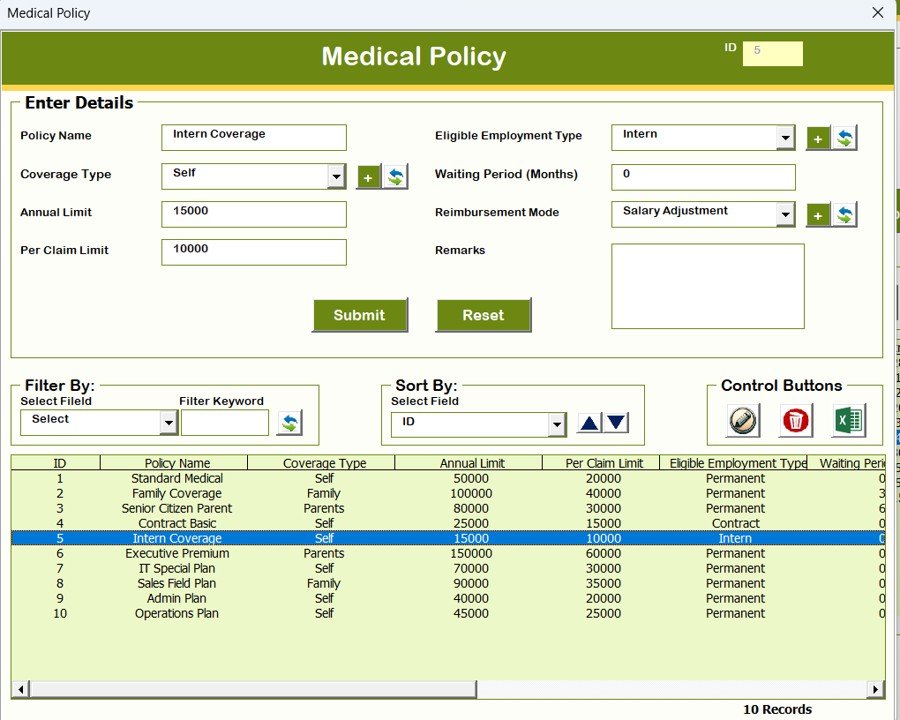
You can define and manage:
-
Policy types
-
Claim limits
-
Coverage structure
This helps align claims with policy rules.
5️⃣ Employee Master
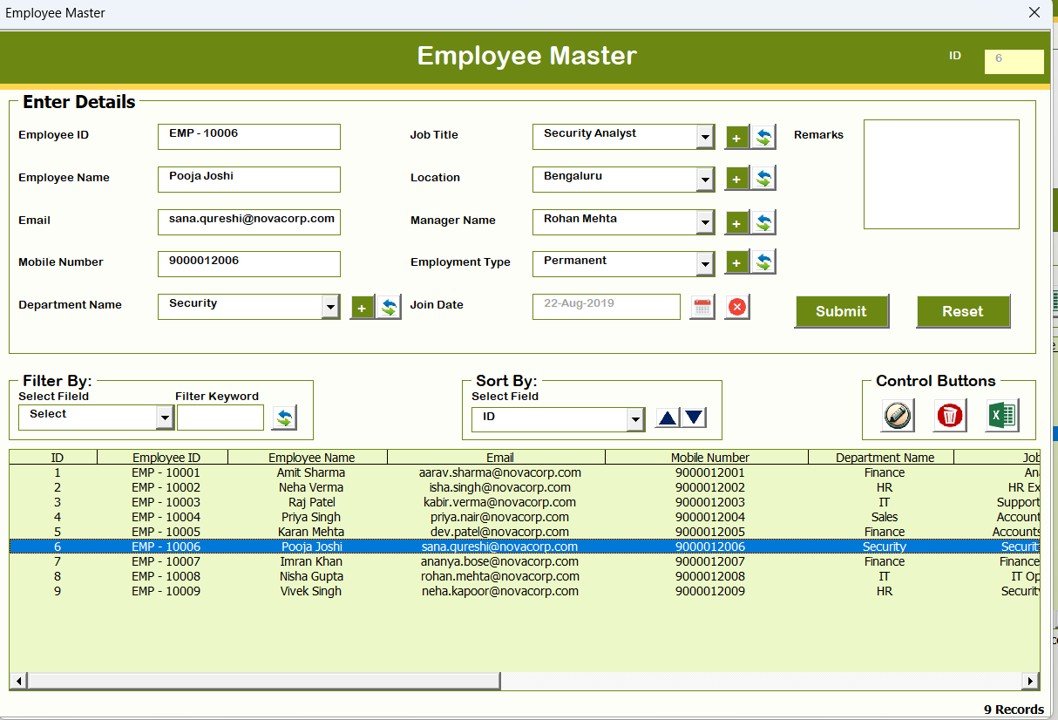
Maintain employee records:
-
Employee Name
-
Department
-
Policy coverage
-
Other master details
This ensures clean claim referencing.
6️⃣ Reports

Generate Excel-based reports for:
-
Selected date ranges
-
Filtered claim data
Reports can be used for:
-
Finance audits
-
Insurance reconciliation
-
Management review
-
Click to Purchases Medical Claim Management System V1.0
7️⃣ Manage User Access Control (Admin Only)
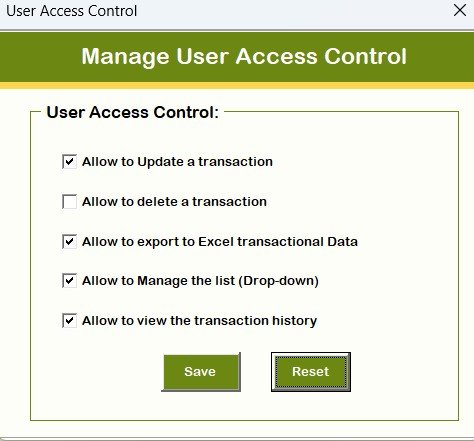
This feature allows Admin to:
-
Enable or disable specific modules
-
Assign permissions to User roles
-
Control access at feature level
This ensures proper segregation of duties.
8️⃣ Logout
When you click Logout:
-
Data is saved
-
Forms close properly
-
Excel file remains secure
9️⃣ Email Us
Need customization?
You can directly contact us for:
-
Feature modification
-
Branding updates
-
Additional modules
🔟 Visit Our Website
Clicking this button redirects you to our website where you can:
-
Explore more tools
-
Purchase additional systems
-
Upgrade your digital ecosystem
System Compatibility (Important Highlights)
⚠️ Please read carefully before purchase.
-
✅ Compatible with Windows 10 and above
-
✅ Works with Microsoft Excel 2010 and above
-
✅ Works only with Microsoft Excel Desktop Application
-
❌ Does NOT work on Mobile devices
-
❌ Does NOT work on Tablets
-
❌ Not compatible with Mac Operating System
This is a VBA-based tool and requires Excel Desktop version.
Advantages of Medical Claim Management System V1.0
-
✔ Ready-to-use structured system
-
✔ Role-based login security
-
✔ Add, Update, Delete functionality
-
✔ Dynamic filtering and sorting
-
✔ Export to Excel facility
-
✔ User access control system
-
✔ Master data management
-
✔ No external database required
-
✔ Cost-effective solution
-
✔ Fully customizable
Opportunities for Improvement
-
🔹 Add automated email notifications
-
🔹 Add dashboard analytics module
-
🔹 Add approval workflow system
-
🔹 Add claim status tracking visual dashboard
-
🔹 Add multi-branch support
Customization is available upon request.
Best Practices for Using This System
-
✔ Change default passwords immediately after installation
-
✔ Take weekly backup of the Excel file
-
✔ Assign role-based access carefully
-
✔ Maintain updated employee master records
-
✔ Use filters before exporting reports
-
✔ Restrict Admin access to authorized personnel
Frequently Asked Questions (FAQs)
Click to Purchases Medical Claim Management System V1.0
Q1: Does this system require internet connection?
No. It works completely offline.
Q2: Can I customize it for my company?
Yes. We provide customization support.
Q3: Can I use it on Mac?
No. It is not compatible with Mac OS.
Q4: Does it work on mobile?
No. It works only on Excel Desktop version.
Q5: Is coding knowledge required?
No. It is ready to use.
Why Choose This Excel VBA Medical Claim Management System?
Because it is:
-
Structured
-
Secure
-
Automated
-
Affordable
-
Professional
-
Scalable
Instead of spending thousands on complex software, you can start with this powerful Excel-based solution.
Final Words
Medical claim management should not be messy.
It should be structured. Secure. Organized.
The Medical Claim Management System V1.0 gives you full control over claims, users, policies, and reporting — all inside Microsoft Excel.
If you want a reliable, ready-to-use Medical Claim Management System in Excel, this tool is built for you.
Visit our YouTube channel to learn step-by-step video tutorials


