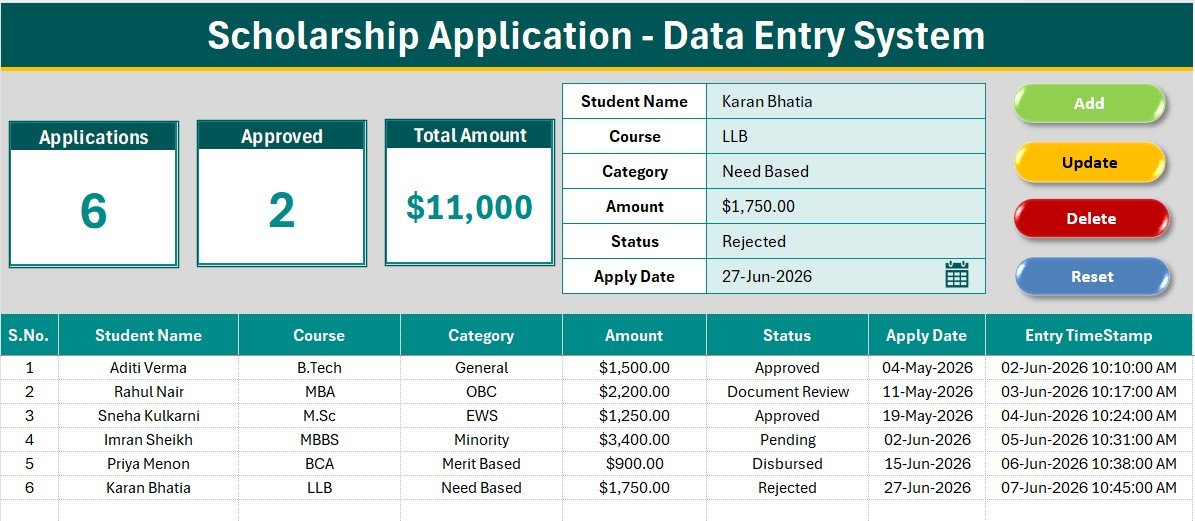
The Scholarship Application Data Entry System in Excel captures six fields per applicant — Student Name, Course, Category, Amount, Status and Apply Date — and drives three live KPI cards from that single table. Four VBA macro buttons handle Add, Update, Delete and Reset, and the Status dropdown carries a seven-stage pipeline from Pending through Disbursed. Setup runs under ten minutes: import the macro module, enable macros, paste your course list, and the register is live.
Most scholarship offices still run intake on a paper file tray or a shared spreadsheet that grows a new tab every cycle. Both fall apart the moment a trustee asks how much award money is already committed, or a student disputes whether their form arrived before the deadline. This guide walks through how the Scholarship Application Data Entry System in Excel is built, what each sheet does, where it beats a Google Sheets tracker or paid award software, and where it honestly falls short.
Key Features of the Scholarship Application Data Entry System in Excel
The workbook is deliberately small. Everything a coordinator does daily sits on one screen, and everything a coordinator configures sits on a second sheet.
- Six-field entry form. Student Name, Course, Category, Amount, Status and Apply Date. The form sits directly above the records table, so you never scroll away from what you just typed.
- Four VBA buttons. Add writes a new row at the bottom of the table. Update rewrites the selected application in place. Delete removes it behind a confirmation prompt. Reset clears the form for the next applicant.
- Three live KPI cards. Applications, Approved and Total Amount recalculate on every record, so the committed award figure is always one glance away rather than a pivot table away.
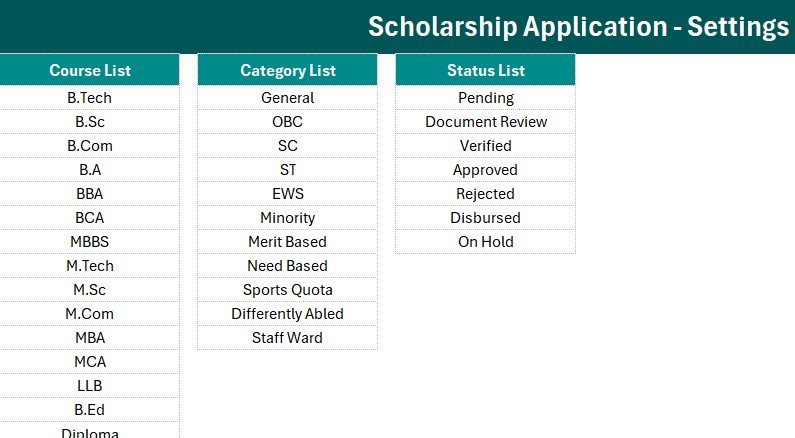
- Sixteen courses, eleven categories, seven statuses. Course covers B.Tech through Ph.D, Category covers General, OBC, SC, ST, EWS, Minority, Merit Based, Need Based and more, and Status runs Pending, Document Review, Verified, Approved, Rejected, Disbursed and On Hold. All three are editable lists, not hard-coded values.
- Currency-formatted Amount column. The award value feeds the Total Amount card directly, which is what turns a list of applications into a funding position.
- Auto serial number and entry timestamp. Each row is numbered automatically and stamped with the moment it was recorded — the detail that settles a deadline dispute.
- Unlimited records. No row cap and no per-applicant licence. One intake round or an entire academic year.
Because the dropdowns are driven by Excel data validation against named ranges rather than typed text, adding a new course in September takes one row on the Setting sheet and nothing else.
Sheets Explanation
Sheet 1: Data Entry
The working screen. A gray dashboard panel holds the three KPI stat cards, the six-field form sits beneath it next to the four coloured action buttons, and the records table begins at row 15 with S.No, the six fields and the Entry TimeStamp column. Everything a scholarship officer does day to day happens here.
Sheet 2: Setting
The configuration sheet. It stores the source lists behind every dropdown — course names, applicant categories and the seven award statuses — plus a duplicate set of the KPI stat cards. Those duplicates exist so you can copy them and use Paste Special to Linked Picture inside a committee pack or a donor report, and the numbers stay live.
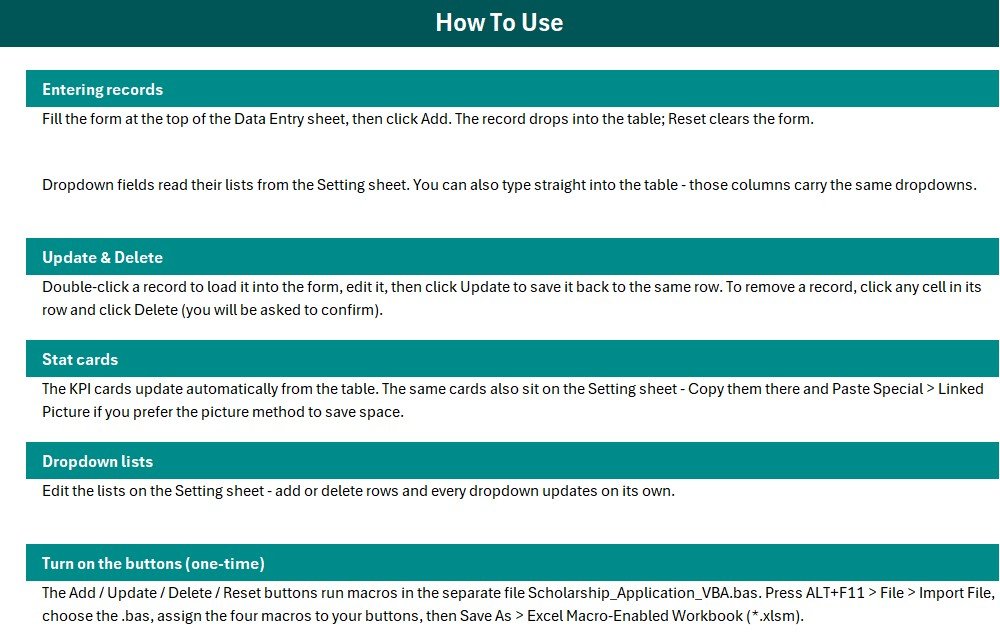
Sheet 3: Instructions
A short, plain-language setup guide: how to enable macros, how to attach each of the four macros to its button shape, and how to swap in your own courses and categories. It is written for a scholarship coordinator on a Sunday evening, not for a developer.
A fourth Get More Templates sheet is included, and the VBA ships as a separate .bas module so you import it once and save the workbook as .xlsm.
Scholarship Application Data Entry System in Excel vs. Google Sheets vs. Paid Scholarship Software — Feature Comparison
| Feature | Scholarship Application Data Entry System (Excel) | Google Sheets scholarship tracker | Paid software (Blackbaud Award Management / AwardSpring) |
|---|---|---|---|
| Cost | $5.99 one-time ✅ | Free, but build it yourself | $3,000–15,000 per year |
| Platform | Microsoft Excel 2013 or later | Browser only | Browser + vendor portal |
| Setup time | Under 10 minutes ✅ | 2–4 hours to build formulas | Weeks, plus vendor onboarding |
| Works offline | Yes — fully offline ✅ | No | No |
| Add / Update / Delete buttons | Built-in VBA macros ✅ | Manual row editing | Yes |
| Award status pipeline | 7 stages, fully editable ✅ | Build your own list | Vendor-defined workflow |
| Applicant financial data stays on your device | Yes ✅ | Stored in Google cloud | Stored on vendor servers |
| Customisable fields | Rename or add any field ✅ | Yes | Limited to vendor schema |
| Year-1 cost for a 5-person committee | $5.99 total ✅ | $0 + your build time | $3,000+ |
For scholarship offices that want a defensible application register without a five-figure software line item, the Scholarship Application Data Entry System in Excel sits in the sweet spot.
Who Should Use This Template
Perfect for:
- School, college and university scholarship coordinators handling 50–2,000 applications per intake
- Small education trusts and CSR teams awarding merit or need-based grants
- NGO programme officers who report committed award value to a donor each quarter
- Coaching institutes and training centres running fee-waiver or sponsorship schemes
Not a fit if:
- You need students to apply online — this system logs applications, it does not collect them
- You need applicant logins, document uploads or automated award letters
- Your office runs on Chromebooks only, since VBA needs desktop Excel
- Five reviewers must edit the same file at the same time throughout the day
Real-World Use Cases
Anjali coordinates scholarships at a 4,000-student private university. July intake brings roughly 300 applications across two weeks. She logs each one as it reaches her desk and marks the incomplete files Document Review. On Friday she filters the records table by that status and walks into the committee meeting with an exact count of files still waiting on income certificates — a job that previously meant an afternoon of sorting paper folders.
Thomas runs a small education trust that funds twelve students a year. He uses the Category field to separate Merit Based from Need Based awards, and reads the Total Amount card straight off the sheet when his board asks how much of the annual corpus is already committed. No pivot table, no summary tab to refresh.
Fatima manages CSR education grants for a manufacturing group. She keeps one workbook per financial year, marks each award Disbursed only after the bank transfer clears, and exports the filtered list as audit evidence. An award-management platform she would genuinely use for six weeks a year was never going to survive the budget conversation.
Advantages of the Scholarship Application Data Entry System in Excel
It costs $5.99 once. Entry-level award-management software starts around $3,000 a year and assumes you are running a continuous programme. A trust awarding twelve scholarships a year is paying platform pricing for a spreadsheet-sized problem.
It works with no internet. Rural campuses, committee rooms with the Wi-Fi switched off, a coordinator working on a train — the system does not care. Nothing syncs, nothing times out, and no applicant’s income details leave the laptop.
It removes the two errors that ruin scholarship data. Dropdowns kill spelling drift, so B.Tech and BTech never split one course into two lines of a year-end report. The auto timestamp settles the argument about when a form was submitted. Both problems are the reason intake reconciliation usually costs an afternoon.
It is genuinely editable. Rename a field, add a Sponsor column, restyle the teal header bar in your institution’s colours. Nothing is locked and the VBA is readable rather than obfuscated. If you have worked through any of our other Excel data entry systems before, the structure will look familiar within a minute.
Opportunities for Improvement
An honest list, because no template fits everyone:
- No application collection. The system records that an application arrived; it does not store the PDF, the transcript or the income certificate. Pair it with a shared folder if you need the artefacts.
- No reviewer scoring. There is no rubric, no weighted score and no multi-reviewer workflow. Committees still decide in the room.
- No applicant-facing view. Sharing means exporting or printing. There is no portal and no automatic status email.
- Single-editor by design. Two people can co-author through OneDrive, but macro-enabled workbooks are happiest with one person at a time.
- Three cards, not a dashboard. If you want approval rate by category over three years, a full scholarship KPI scorecard is the better companion.
- Excel Online cannot run it. VBA is desktop-only, on Windows or Mac.
Best Practices
- Fill the Setting sheet first. Enter every course, category and status you use before logging a single application. Retrofitting a dropdown after 200 rows means re-checking those rows.
- Keep the status list tight. Seven stages is already generous. Adding Waitlisted is fine; adding eleven variations makes the Approved card meaningless.
- Enter the Amount at approval, not at application. Log the requested figure only if your programme awards the requested amount. Otherwise the Total Amount card reports demand rather than commitment.
- Log daily during intake. Two minutes as each file arrives beats a Friday backlog, and the timestamps stay meaningful as evidence.
- Use Update, never manual edits. Typing straight into the table bypasses the form logic and can desync the timestamp.
- Archive each cycle. Save the year’s workbook as its own file before clearing, so year-on-year approval comparisons remain possible.
- Trust the macro source. Enable macros only for files you obtained yourself; Microsoft explains the settings in its macro security guide.
Explore Relevant Templates
- Admission Enquiry Data Entry System in Excel — the stage before a scholarship application: log every enquiry and its follow-up.
- Tuition Payment Log Data Entry System in Excel — track what students actually pay once the waiver is applied.
- Student Attendance Data Entry System in Excel — the same form-and-KPI layout for daily attendance; many scholarships carry an attendance condition.
- Hostel Room Allotment Data Entry System in Excel — for institutions where the award includes accommodation; the detailed guide is here.
- School Admin Dashboard in Excel — a full multi-page dashboard when three KPI cards are no longer enough.
Frequently Asked Questions
What does the Scholarship Application Data Entry System in Excel track?
The Scholarship Application Data Entry System in Excel tracks six fields per record: Student Name, Course, Category, Amount, Status and Apply Date, plus an automatic serial number and entry timestamp on every row. Three KPI cards summarise applications, approvals and total award value.
How long does setup take?
Under ten minutes. Import the .bas module, save the file as .xlsm, enable macros, then replace the sample course and category lists on the Setting sheet. The Scholarship Application Data Entry System in Excel is ready to log applications immediately after that.
Do I need to know VBA to use it?
No. The macros behind Add, Update, Delete and Reset are already written, and the Instructions sheet shows how to attach each one to its button. You do this once, and never open the VBA editor again.
How does this compare with paid scholarship software like Blackbaud Award Management?
Award-management platforms host applications, run reviewer scoring and cost thousands per year. The Scholarship Application Data Entry System in Excel costs $5.99 once, runs offline, and keeps applicant financial data on your own machine. It registers and reports applications rather than collecting them.
Can I change the status list or add more courses?
Yes. Every dropdown reads a named range on the Setting sheet, so adding a course or a status such as Waitlisted takes one row. The form picks the change up immediately, with no formula edits anywhere.
Can I change the currency from dollars to rupees or euros?
Yes. The Amount column and the Total Amount KPI card use standard Excel currency formatting, so selecting the column and switching the format symbol converts the whole system in one step. No formulas need rewriting.
Will it work on Excel for Mac or Excel Online?
It runs on desktop Excel 2013 and later on Windows and on Excel for Mac with macros enabled. Excel Online cannot execute VBA, so the four buttons will not work in a browser tab.
About the Author
Built by PK — Microsoft Certified Professional with 15+ years of Excel, Google Sheets, and Power BI experience. Founder of NextGenTemplates, reaching 300K+ subscribers across YouTube channels. Every template is hand-built and tested before release.
Conclusion
Scholarship intake rarely fails because coordinators are careless. It fails because the tool is a file tray that gets reshuffled, or a spreadsheet with no validation, no timestamp and no running total of committed funds. The Scholarship Application Data Entry System in Excel fixes all three with a six-field form, four macro buttons, a seven-stage status pipeline and three live KPI cards — at a one-time price a department head can approve without a procurement cycle.
👉 Click here to Purchase the Scholarship Application Data Entry System in Excel
Instant download · One-time payment · No subscription
🎥 For step-by-step Excel and VBA video tutorials, visit Youtube.com/@PK-AnExcelExpert.
Last updated: August 2026