The Homework Submission Data Entry System in Excel captures seven fields per assignment — Student Name, Class & Section, Subject, Assignment Title, Due Date, Submission Date and Status — and drives three live KPI cards from that single table. Four VBA macro buttons handle Add, Update, Delete and Reset, so a teacher logging 40 submissions never touches a formula. Setup runs under ten minutes: import the macro module, enable macros, paste your class list, and the system is live.
Most teachers still track homework on paper registers or in a spreadsheet that grows a new tab every term. Both break down the moment a parent asks which three assignments their child missed in September. This guide walks through how the Homework Submission Data Entry System in Excel is built, what each sheet does, where it beats a Google Sheets tracker or a paid LMS, and where it honestly falls short.
Key Features of the Homework Submission Data Entry System in Excel
The workbook is deliberately small. Everything a teacher needs sits on one screen, and everything a teacher configures sits on a second sheet.
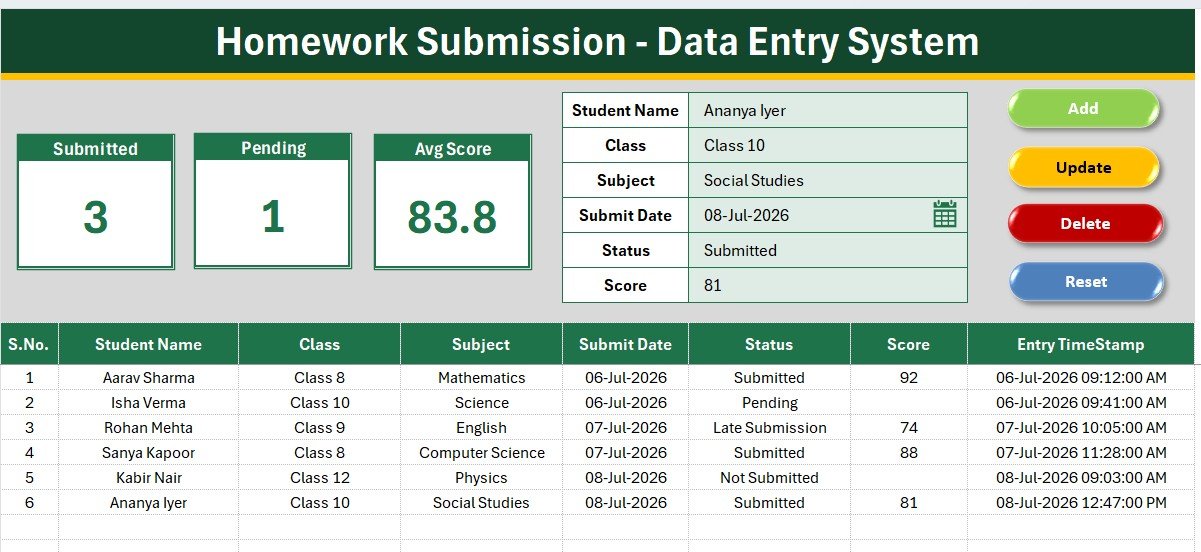
- Seven-field entry form. Student Name, Class & Section, Subject, Assignment Title, Due Date, Submission Date and Status. The form sits directly above the records table, so you never scroll away from what you just typed.
- Four VBA buttons. Add writes a new row at the bottom of the table. Update rewrites the selected record in place. Delete removes it behind a confirmation prompt. Reset clears the form for the next entry.
- Three live KPI cards. Total Assignments Logged, Submitted On Time and Pending Submissions recalculate on every record, so the pending count is always one glance away.
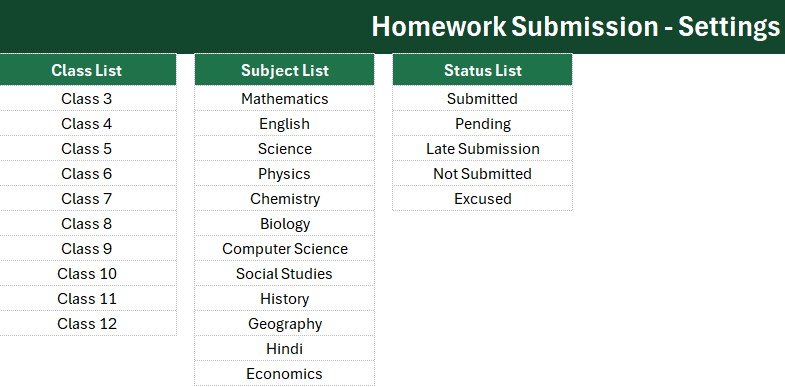
- Dropdown lists from named ranges. Class & Section, Subject and Status are validated against lists on the Setting sheet, which is what stops Maths and Math becoming two subjects in a term report.
- Auto serial number and entry timestamp. Each row is numbered automatically and stamped with the moment it was recorded — useful when a submission date is disputed.
- Unlimited records. There is no row cap and no per-student licence. One class or an entire grade, term after term.
Because the validation is driven by Excel data validation rather than hard-coded lists, adding a subject in September takes one row on the Setting sheet and nothing else.
Sheets Explanation
Sheet 1: Data Entry
The working screen. A gray dashboard panel holds the three KPI stat cards, the seven-field form sits beneath it next to the four coloured action buttons, and the records table begins at row 15 with S.No, the seven fields and the Entry TimeStamp column. Everything a teacher does day to day happens here.
Sheet 2: Setting
The configuration sheet. It stores the source lists behind every dropdown — classes and sections, subject names, and the submission statuses you want to allow — plus a duplicate set of the KPI stat cards. Those duplicates exist so you can copy them and use Paste Special to Linked Picture inside a report or a parent newsletter, and the numbers stay live.
Sheet 3: Instructions
A short, plain-language setup guide: how to enable macros, how to attach each of the four macros to its button shape, and how to swap in your own classes and subjects. It is written for a class teacher on a Sunday evening, not for a developer.
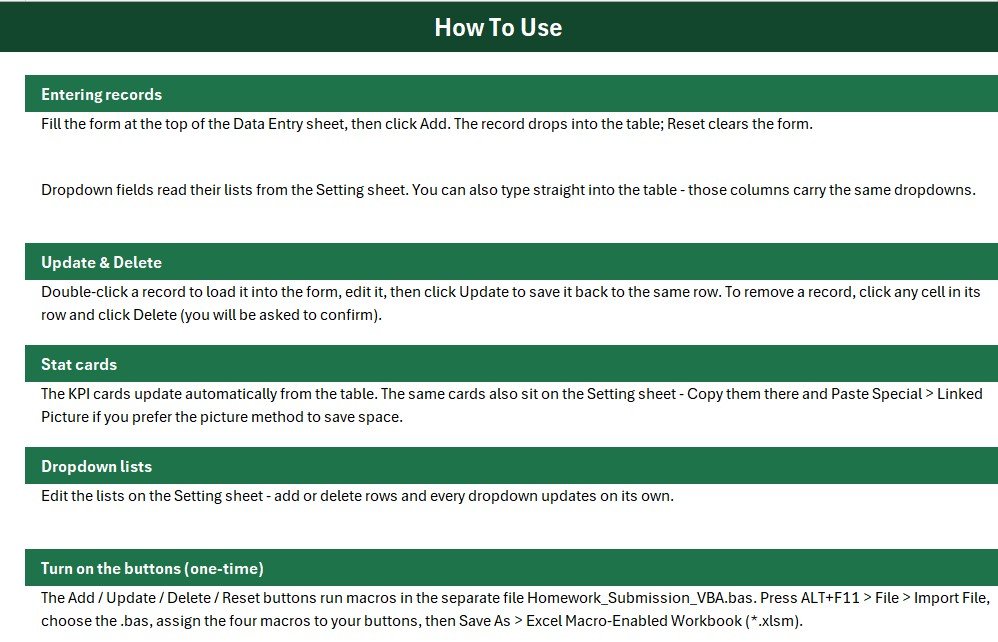
A fourth Get More Templates sheet is included, and the VBA ships as a separate .bas module so you import it once and save the workbook as .xlsm.
Homework Submission Data Entry System in Excel vs. Google Sheets vs. Paid LMS — Feature Comparison
| Feature | Homework Submission Data Entry System (Excel) | Google Sheets homework tracker | Paid LMS (Canvas / Teachmint) |
|---|---|---|---|
| Cost | $5.99 one-time ✅ | Free, but build it yourself | $4–15 per teacher / month |
| Platform | Microsoft Excel 2013 or later | Browser only | Browser + vendor app |
| Setup time | Under 10 minutes ✅ | 2–4 hours to build formulas | Days, plus school IT approval |
| Works offline | Yes — fully offline ✅ | No | No |
| Add / Update / Delete buttons | Built-in VBA macros ✅ | Manual row editing | Yes |
| Real-time team collaboration | Via OneDrive co-authoring | Yes ✅ | Yes ✅ |
| Student data stays on your device | Yes ✅ | Stored in Google cloud | Stored on vendor servers |
| Customisable fields | Rename or add any field ✅ | Yes | Limited to vendor schema |
| Year-1 cost for 5 teachers | $5.99 total ✅ | $0 + your build time | $240–900 |
For teachers who want a dependable submission log without asking the school to fund an LMS licence, the Homework Submission Data Entry System in Excel sits in the sweet spot.
Who Should Use This Template
Perfect for:
- Class and subject teachers tracking daily or weekly homework for 20–200 students
- Home tutors and coaching-centre owners who need a per-batch submission record
- School coordinators compiling term-end submission compliance summaries
- Homeschooling parents logging assignments across several subjects at once
Not a fit if:
- You need students to upload files — this system logs submissions, it does not collect them
- You need parent logins, SSO, or automated reminder emails
- Your school runs on Chromebooks only, since VBA needs desktop Excel
- Several teachers must edit the same file at the same time throughout the day
Real-World Use Cases
Meera teaches Class 7 Science at a 600-student CBSE school. Lab reports come in across three days, so she logs each one as it lands and marks the rest Pending. On Friday she filters the records table by Pending, prints the short list, and works through her parent-communication calls in twenty minutes instead of flipping through a paper register she used to lose every term.
Daniel runs a maths coaching centre with four batches. He reuses the Class & Section field as the batch name, so one workbook covers everyone. The Submitted On Time card gives him a single defensible number to quote at monthly parent reviews — no per-student platform fee, no login for parents to forget.
Priya coordinates middle school at an IB campus. Each teacher keeps their own copy. At term end she pastes all the records tables into one workbook, sorts by Status, and produces a submission-compliance summary for the academic head in about fifteen minutes.
Advantages of the Homework Submission Data Entry System in Excel
It costs $5.99 once. Five teachers on a paid LMS at $4 per month each will spend $240 in the first year. The same five teachers share this workbook for the price of a coffee, forever.
It works with no internet. Village schools, exam halls with the Wi-Fi switched off, a teacher marking on a train — the system does not care. Nothing syncs, nothing times out, and no student name leaves the laptop.
It removes the two errors that ruin homework data. Dropdowns kill spelling drift, and the auto timestamp settles the argument about when something was handed in. Both problems are the reason term reports usually need an afternoon of cleanup.
It is genuinely editable. Rename a field, add a Marks column, restyle the header bar in your school colours. Nothing is locked, and the VBA is readable rather than obfuscated. If you have worked through any of our Excel data entry systems before, the structure will look familiar within a minute.
Opportunities for Improvement
An honest list, because no template fits everyone:
- No file collection. The system records that an assignment arrived; it does not store the PDF. Pair it with a shared folder if you need the artefacts.
- No parent-facing view. Sharing means exporting or printing. There is no portal and no automatic email.
- Single-editor by design. Two teachers can co-author through OneDrive, but macro-enabled workbooks are happiest with one person at a time.
- No charts out of the box. You get three KPI cards, not a dashboard. If you want submission trends by subject over a term, a full education KPI dashboard is the better companion.
- Excel Online cannot run it. VBA is desktop-only, on Windows or Mac.
Best Practices
- Fill the Setting sheet first. Enter every class, section and subject you teach before logging a single record. Retrofitting a dropdown after 200 rows means re-checking those rows.
- Keep statuses to four or five. Submitted On Time, Late, Pending, Not Submitted and optionally Resubmitted. More than that and the KPI cards stop telling a clear story.
- Log daily, not weekly. Two minutes at the end of each class beats an hour on Friday, and the timestamps stay meaningful.
- Use Update, never manual edits. Typing straight into the table bypasses the form logic and can desync the timestamp.
- Save a term-end copy. Archive each term as its own file before clearing, so year-on-year comparisons are still possible.
- Trust the macro source. Enable macros only for files you obtained yourself; Microsoft explains the settings in its macro security guide.
Explore Relevant Templates
- Exam Marks Entry Data Entry System in Excel — the natural next step once the homework is in and graded. Its full write-up is here.
- Online Class Tracker Data Entry System in Excel — logs classes taught, hours and attendance in the same layout.
- Library Book Issue Data Entry System in Excel — issue and return tracking for the school library; the detailed guide is here.
- Online Certification Providers Dashboard in Excel — a full multi-page education dashboard when three KPI cards are no longer enough.
Frequently Asked Questions
What does the Homework Submission Data Entry System in Excel track?
The Homework Submission Data Entry System in Excel tracks seven fields per record: Student Name, Class & Section, Subject, Assignment Title, Due Date, Submission Date and Status, plus an automatic serial number and entry timestamp on every row.
How long does setup take?
Under ten minutes. Import the .bas module, save the file as .xlsm, enable macros, then replace the sample class and subject lists on the Setting sheet. The Homework Submission Data Entry System in Excel is ready to log records immediately after that.
Do I need to know VBA to use it?
No. The macros behind Add, Update, Delete and Reset are already written, and the Instructions sheet shows how to attach each one to its button. You do this once, and never open the VBA editor again.
How does this compare with a paid LMS like Canvas or Teachmint?
An LMS collects files and manages whole courses at $4–15 per teacher each month. The Homework Submission Data Entry System in Excel costs $5.99 once, runs offline, and keeps student data on your own machine. It logs and reports submissions rather than hosting them.
Can I add more subjects or change the status list?
Yes. Every dropdown reads a named range on the Setting sheet, so adding a subject or a status such as Resubmitted takes one row. The form picks the change up immediately, with no formula edits anywhere.
Will it work on Excel for Mac or Excel Online?
It runs on desktop Excel 2013 and later on Windows and on Excel for Mac with macros enabled. Excel Online cannot execute VBA, so the four buttons will not work in a browser tab.
About the Author
Built by PK — Microsoft Certified Professional with 15+ years of Excel, Google Sheets, and Power BI experience. Founder of NextGenTemplates, reaching 300K+ subscribers across YouTube channels. Every template is hand-built and tested before release.
Conclusion
Homework tracking rarely fails because teachers are careless. It fails because the tool is a paper register that gets lost, or a spreadsheet with no validation and no audit trail. The Homework Submission Data Entry System in Excel fixes both with a seven-field form, four macro buttons, three live KPI cards and a timestamp on every row — at a one-time price a teacher can pay themselves.
👉 Click here to Purchase the Homework Submission Data Entry System in Excel
Instant download · One-time payment · No subscription
🎥 For step-by-step Excel and VBA video tutorials, visit Youtube.com/@PK-AnExcelExpert.
Last updated: July 2026