Inventory accuracy plays a critical role in every business. Whether you manage a retail store, warehouse, manufacturing unit, or distribution center, you must conduct regular inventory audits. However, without a structured system, audit processes become messy and time-consuming.
Therefore, businesses need a simple yet powerful solution.
The answer is clear.
You need an Inventory Audit Planner Checklist in Excel.
This ready-to-use Excel template helps you organize, track, and monitor your inventory audit activities in a structured format. Moreover, it simplifies task tracking, assigns responsibilities, and shows progress instantly. Consequently, you improve audit accuracy and accountability.
In this detailed guide, you will learn:
-
What an Inventory Audit Planner Checklist in Excel is
-
Why inventory audits need structured planning
-
Detailed explanation of both worksheets
-
How the checklist improves control and accountability
-
Advantages of Inventory Audit Planner Checklist in Excel
-
Best Practices for using the checklist
-
Frequently Asked Questions
Let us explore everything step by step.
Click to Purchases Inventory Audit Planner Checklist in Excel
📊 What Is an Inventory Audit Planner Checklist in Excel?
An Inventory Audit Planner Checklist in Excel is a structured task management template designed to plan and track inventory audit activities.
Instead of managing audit tasks through emails or scattered notes, you can:
-
Record audit tasks
-
Assign responsible persons
-
Set deadlines
-
Track completion status
-
Monitor progress percentage
Because the template uses built-in tracking features, you gain complete visibility of your audit process.
🏬 Why Do Businesses Need an Inventory Audit Planner?
Inventory audits ensure stock accuracy and financial reliability. However, without proper planning, audits become disorganized.
For example, you may face:
-
Missed checkpoints
-
Delayed verifications
-
Lack of accountability
-
Incomplete documentation
-
Poor coordination among teams
Therefore, structured audit planning becomes essential.
An Inventory Audit Planner helps you:
-
Maintain stock accuracy
-
Reduce financial discrepancies
-
Improve accountability
-
Track task completion
-
Ensure timely audit closure
Moreover, when you track progress visually, you prevent delays and confusion.
Click to Purchases Inventory Audit Planner Checklist in Excel
📁 What Are the Worksheets in the Inventory Audit Planner Checklist in Excel?
This template includes 2 structured worksheets:
1️⃣ Inventory Audit Planner Checklist (Main Sheet)
2️⃣ List Sheet
Let us understand each sheet clearly.
1️⃣ Inventory Audit Planner Checklist Sheet – Main Control Panel
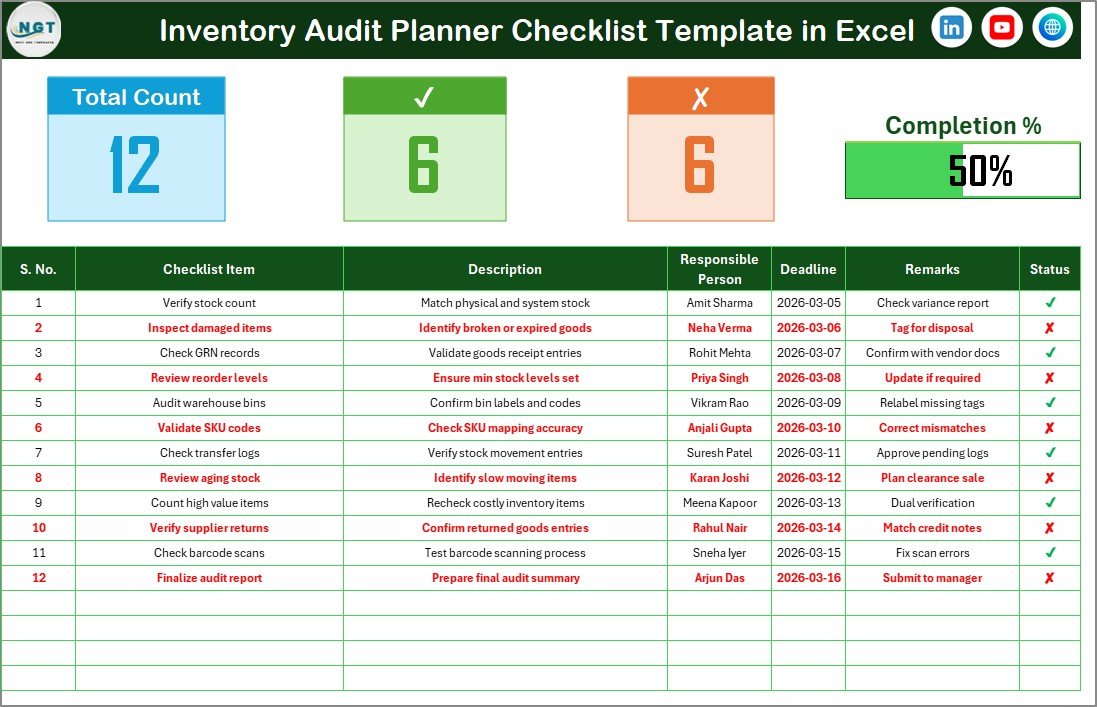
This is the primary working sheet where you manage audit tasks.
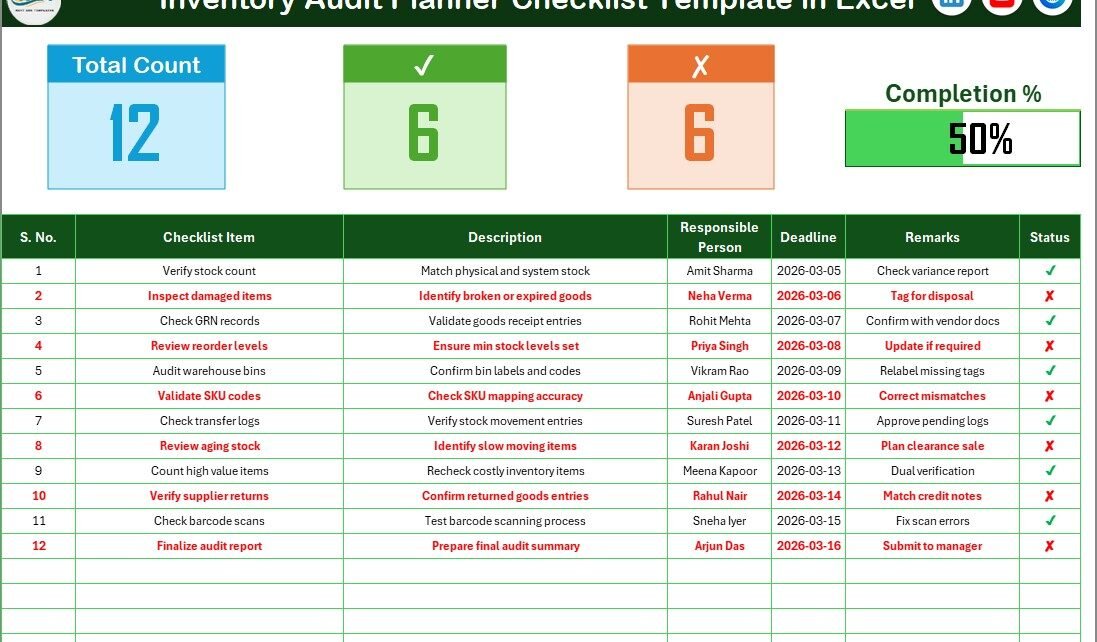
🔝 Top Section – Audit Summary Overview
At the top of the sheet, you will find:
-
Total Count
-
Checked Count
-
Crossed Count
-
Progress Bar showing Checked %
Because of this summary section, you can instantly see:
-
Total tasks created
-
Tasks completed
-
Tasks pending
-
Overall audit progress
Therefore, managers can monitor audit status without scrolling through the entire list.
📋 Checklist Table – Task Management Area
Below the summary section, you will find the main checklist table.
Here, you update the Status column using:
-
✔ (Completed)
-
✘ (Not Completed)
This simple visual approach makes task tracking easy and clear.
Columns in the Checklist Table
The table contains the following structured columns:
-
Serial No.
-
Checklist Item
-
Description
-
Responsible Person
-
Deadline
-
Remarks
-
Status
How Does This Structure Help?
-
Serial No. keeps tasks organized.
-
Checklist Item defines the audit task clearly.
-
Description explains task details.
-
Responsible Person assigns accountability.
-
Deadline ensures timely completion.
-
Remarks allow notes or observations.
-
Status updates progress instantly.
Because of this structure, your audit process remains transparent and well-documented.
Click to Purchases Inventory Audit Planner Checklist in Excel
2️⃣ List Sheet – Responsible Person Drop-Down Control

The List Sheet supports the main checklist.
In this sheet, you capture the unique list of Responsible Persons.
The template uses this list to create a drop-down menu in the main sheet.
Therefore:
-
You avoid manual typing errors.
-
You maintain consistency in names.
-
You improve data accuracy.
This small feature significantly enhances professionalism and control.
📦 How Can Businesses Use This Checklist Effectively?
You can use the Inventory Audit Planner Checklist in various ways.
Retail Stores
-
Stock count verification
-
Shelf-to-system comparison
-
Damaged item inspection
Warehouses
-
Batch verification
-
Location audit
-
Expiry date inspection
Manufacturing Units
-
Raw material count
-
Work-in-progress verification
-
Finished goods audit
Distribution Centers
-
Dispatch verification
-
Goods received validation
-
Inventory reconciliation
Because the template remains flexible, you can customize it according to your industry.
Click to Purchases Inventory Audit Planner Checklist in Excel
⭐ Advantages of Inventory Audit Planner Checklist in Excel
The Inventory Audit Planner Checklist in Excel provides multiple benefits.
✅ 1. Structured Audit Planning
You organize audit tasks clearly in one sheet.
✅ 2. Real-Time Progress Tracking
The progress bar shows completion percentage instantly.
✅ 3. Improved Accountability
Assign responsible persons for each task.
✅ 4. Deadline Monitoring
Track due dates easily.
✅ 5. Simple Status Updates
Use ✔ and ✘ for quick tracking.
✅ 6. Error Reduction
Drop-down lists reduce manual entry mistakes.
✅ 7. Easy Customization
You can add or modify checklist items easily.
Click to Purchases Inventory Audit Planner Checklist in Excel
🛠️ Best Practices for Inventory Audit Planner Checklist in Excel
To maximize the effectiveness of this checklist, follow these best practices.
✔️ 1. Define Clear Audit Objectives
Before starting, list clear audit goals.
✔️ 2. Assign One Responsible Person per Task
Avoid multiple ownership confusion.
✔️ 3. Set Realistic Deadlines
Allow enough time for proper verification.
✔️ 4. Update Status Immediately
Mark tasks as ✔ once completed.
✔️ 5. Review Progress Daily
Monitor the progress bar regularly.
✔️ 6. Maintain Updated Responsible Person List
Keep the drop-down list current.
✔️ 7. Archive Completed Audits
Save completed checklists for documentation and compliance.
📊 How Does This Checklist Improve Audit Accuracy?
This checklist improves audit accuracy by:
-
Providing structured task sequencing
-
Ensuring accountability
-
Highlighting pending tasks
-
Preventing missed verification steps
-
Offering visual progress tracking
Because you track every task, you reduce audit risks significantly.
Click to Purchases Inventory Audit Planner Checklist in Excel
🚀 Why Choose Excel for Inventory Audit Planning?
Excel offers flexibility and ease of use.
-
No special software required
-
Easy to share
-
Simple customization
-
Automated progress calculations
-
Professional reporting structure
Therefore, Excel remains a reliable tool for audit planning.
🏁 Conclusion
Inventory audits protect businesses from financial loss and operational errors. However, without structured planning, audits become inefficient and stressful.
The Inventory Audit Planner Checklist in Excel provides:
-
Clear task management
-
Progress tracking
-
Responsibility assignment
-
Deadline control
-
Professional audit documentation
Moreover, it simplifies your audit workflow and strengthens operational control.
If you want better inventory accuracy and smoother audit execution, this ready-to-use template offers the perfect solution.
Start planning. Start tracking. Start auditing with confidence. 📦📊
Click to Purchases Inventory Audit Planner Checklist in Excel
❓ Frequently Asked Questions (FAQs)
1. Who can use this Inventory Audit Planner Checklist?
Retail stores, warehouses, manufacturing units, and distribution centers can use it.
2. Do I need advanced Excel knowledge?
No. You only need basic Excel skills to update tasks and status.
3. Can I customize checklist items?
Yes. You can add, edit, or delete checklist items as needed.
4. How does the progress bar work?
The progress bar calculates completion percentage based on ✔ status.
5. Can I track multiple audits?
Yes. You can duplicate the template for different audit cycles.
6. Does this template help with compliance documentation?
Yes. You can store completed checklists for internal and external audit records.
Click to Purchases Inventory Audit Planner Checklist in Excel
Visit our YouTube channel to learn step-by-step video tutorials