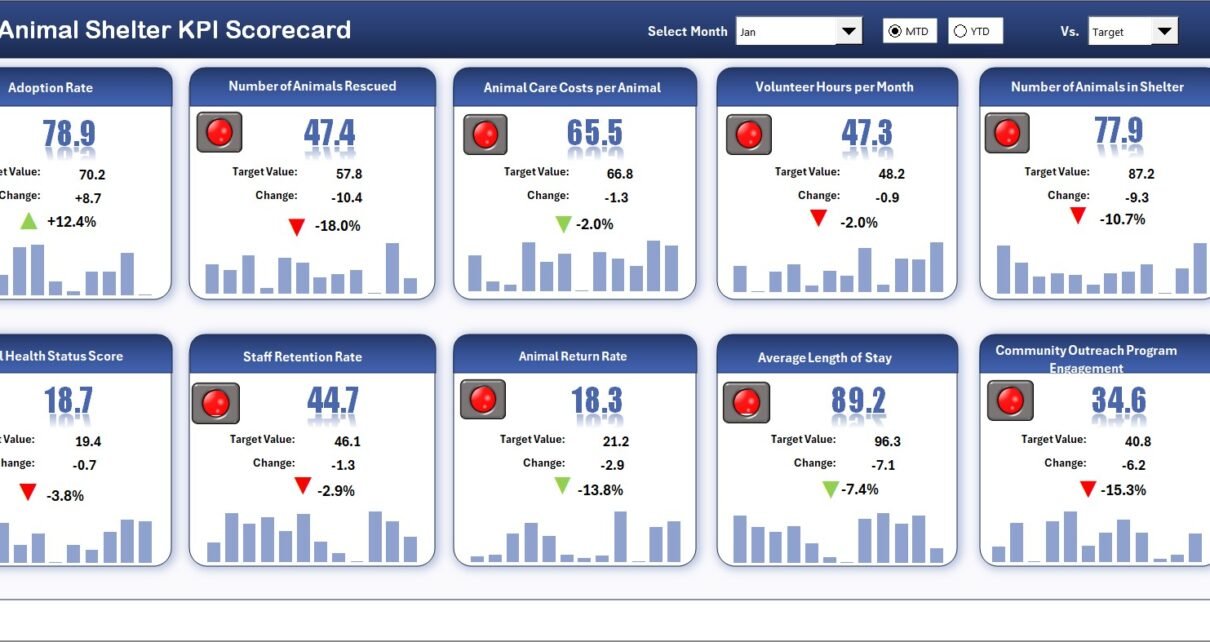
The Animal Shelter KPI Scorecard in Excel tracks 15+ key performance indicators across 4 structured worksheets, delivering MTD and YTD comparisons, trend charts, and color-coded conditional formatting in a single Excel file. According to the ASPCA, over 6.3 million companion animals enter U.S. shelters every year — and shelters that track KPIs like adoption rate, live release rate, and average length of stay consistently outperform those relying on ad hoc reporting.
Click here to Purchase the Animal Shelter KPI Scorecard in Excel
This ready-to-use scorecard template gives animal shelter directors, non-profit rescue coordinators, and municipal animal control agencies a structured way to monitor performance without paying for monthly shelter management software. Replace the sample data with your own numbers and every chart, indicator, and summary updates automatically in under 10 minutes.
Key Features of Animal Shelter KPI Scorecard in Excel
Click here to Purchase the Animal Shelter KPI Scorecard in Excel
The Animal Shelter KPI Scorecard in Excel includes 4 dedicated worksheets: Scorecard, KPI Trend, Input Data, and KPI Definition. It tracks 15+ pre-built KPIs including adoption rate, live release rate, intake volume, average length of stay, euthanasia rate, return-to-owner rate, foster placement rate, volunteer hours, spay/neuter rate, donations received, and cost per animal.
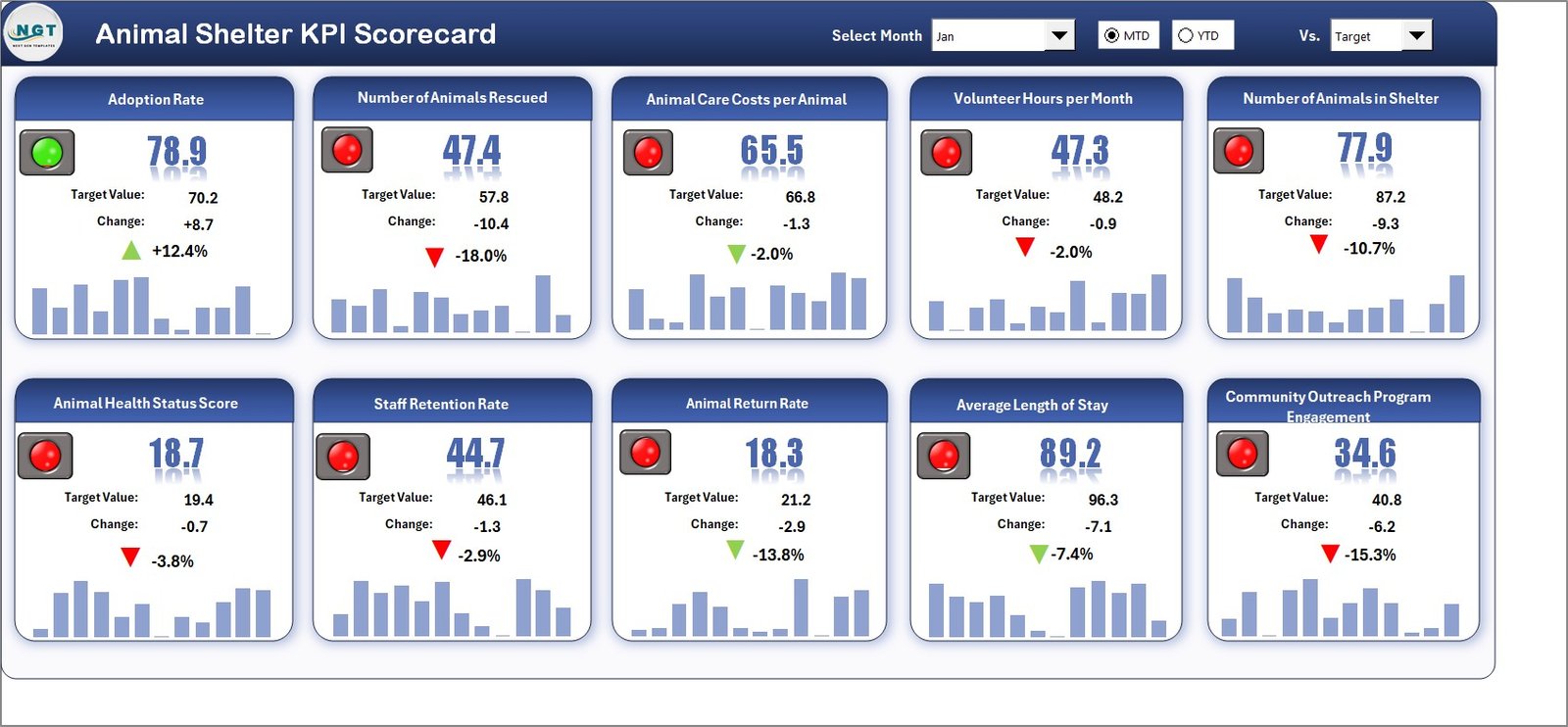
Each KPI is classified as “Upper the Better” or “Lower the Better” to ensure correct benchmarking. The scorecard uses conditional formatting with traffic-light color coding — green for on-track, red for below-target — so managers identify underperforming areas at a glance. Dropdown menus let you toggle between any month and switch between MTD and YTD views without modifying formulas.
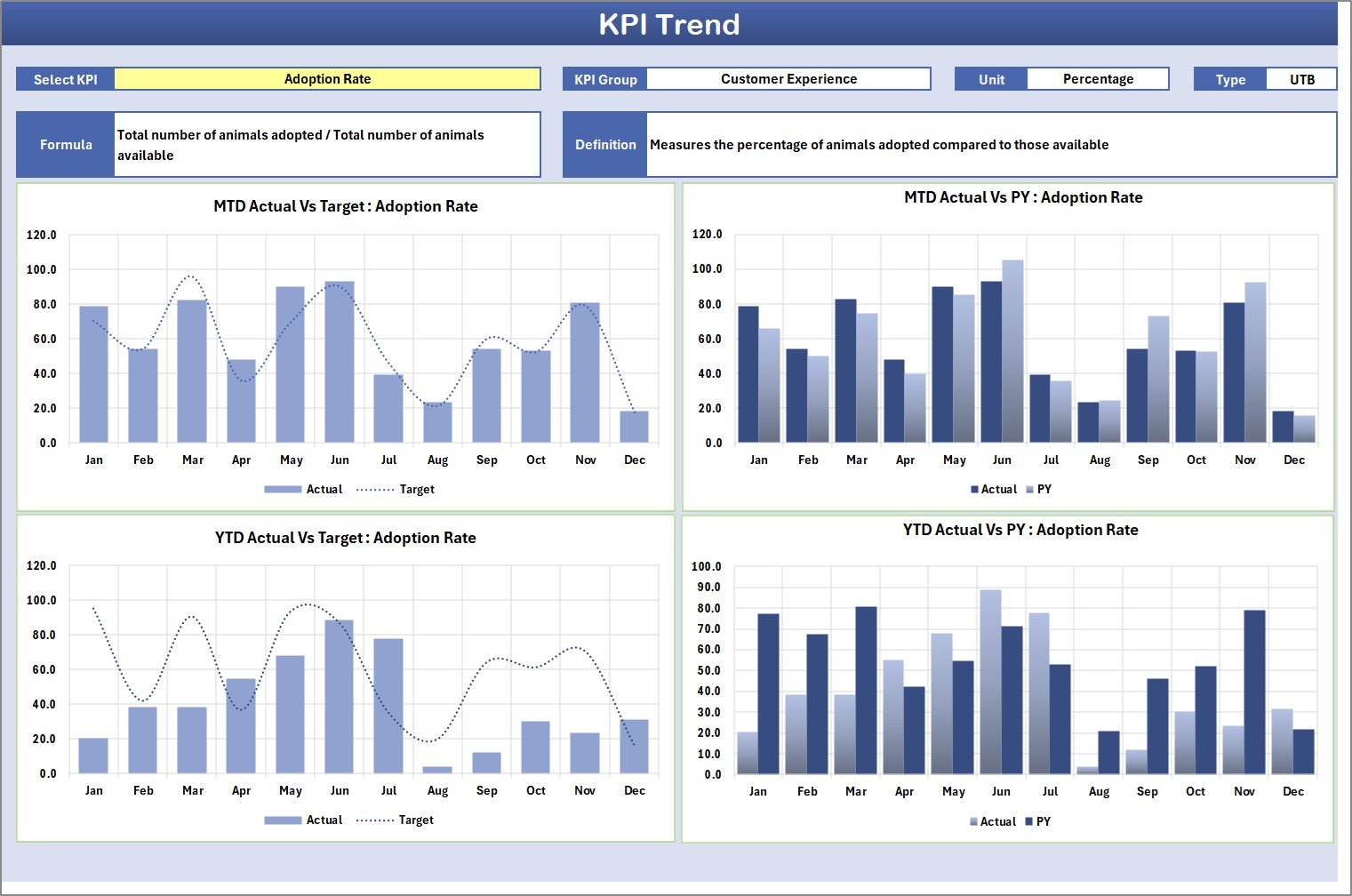
The KPI Trend sheet generates visual charts comparing Actual vs Target vs Prior Year data for any selected metric. This year-over-year trend analysis is the feature most commonly requested by shelter boards and grant-making organizations when reviewing quarterly performance reports.
Dashboard Pages Explanation
1. Scorecard Sheet
The Scorecard sheet is the main interface where you view KPI performance at a glance. Key features include dropdown menus to select the reporting month, MTD or YTD toggle for period analysis, Actual vs Target value comparisons for each KPI, and color-coded visual indicators using conditional formatting. This single sheet provides a complete overview of all shelter metrics — from operational efficiency to financial health — in a print-ready layout suitable for board presentations.
Scorecard Sheet
2. KPI Trend Sheet
Select any KPI name from the dropdown available on range C3 to see its detailed trend analysis. The sheet displays the KPI Group, Unit of KPI, Type (Lower the Better or Upper the Better), Formula, and Definition. Below the metadata, MTD and YTD trend charts plot Actual, Target, and Prior Year numbers for visual year-over-year comparison. This sheet is particularly useful for identifying seasonal patterns — for example, adoption rates typically spike during spring months while intake volumes peak in summer.
KPI Trend Sheet
3. Input Data Sheet
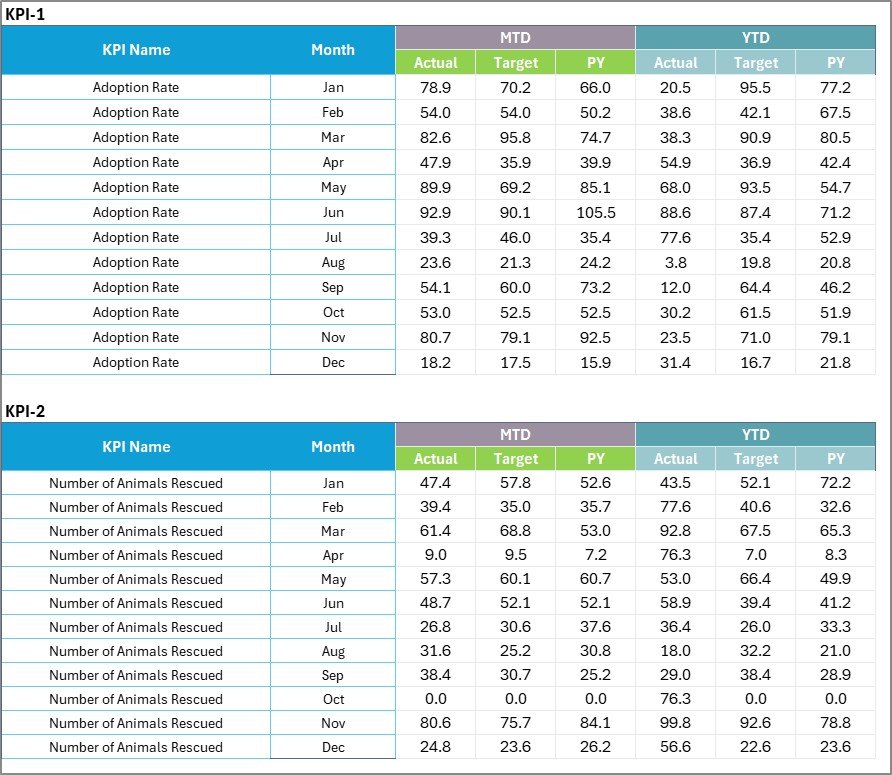
The Input Data sheet is where you enter all KPI data. Record actual values, targets, and prior year metrics for each KPI by month. The layout is straightforward — one row per KPI, one column per month. Update the data as new results become available and the Scorecard and Trend sheets refresh automatically. No formulas to edit, no manual chart updates required.
Input Data Sheet
4. KPI Definition Sheet
In this sheet tab, you enter the KPI Name, KPI Group, Unit, Formula, and KPI Definition. This sheet serves as the single source of truth for every metric tracked in your shelter — ensuring all staff members, board members, and auditors reference the same definitions. The pre-configured KPIs align with Shelter Animals Count and ASPCA reporting standards, but you can customize every field to match your organization’s specific terminology.

KPI Definition Sheet
Animal Shelter KPI Scorecard vs. Google Sheets Scorecard vs. Shelter Management Software — Feature Comparison
| Feature | Animal Shelter KPI Scorecard in Excel | Google Sheets Scorecard | Shelter Management Software (Shelterluv / PetPoint) |
|---|---|---|---|
| Cost | $12.99 one-time | Free (build from scratch) | $50–200/month |
| Platform | Microsoft Excel (desktop + web) | Google Sheets (browser-based) | Cloud SaaS |
| Setup Time | Under 10 minutes | 4–8 hours (manual build) | 2–4 weeks onboarding |
| Offline Access | Full offline support | Limited offline | Requires internet |
| Customizable KPIs | Fully editable | Fully editable | Limited to vendor fields |
| Trend Charts | Built-in MTD/YTD charts | Manual chart creation | Built-in |
| Year-1 Cost (3 users) | $12.99 total | $0 (DIY time cost) | $600–2,400 |
| Data Ownership | 100% local files | Google Drive | Vendor-hosted |
For animal shelters that need KPI tracking without paying monthly SaaS fees or spending days building spreadsheets from scratch, the Animal Shelter KPI Scorecard in Excel sits in the sweet spot.
Who Should Use This Template
Click here to Purchase the Animal Shelter KPI Scorecard in Excel
Perfect for:
- Animal shelter directors and operations managers tracking adoption rates, intake trends, and live release metrics across monthly and yearly periods
- Non-profit animal rescue organizations that report KPIs to boards, donors, and grant-making bodies
- Municipal animal control agencies required to submit monthly or quarterly performance scorecards to city or county leadership
- Veterinary clinics and humane societies monitoring capacity utilization, cost per animal, and spay/neuter program effectiveness
Not a fit if:
- You operate a large multi-location shelter network needing real-time API integrations with Shelterluv, PetPoint, or other shelter management platforms
- Your organization requires HIPAA-grade data encryption, role-based access controls, or SOC 2 compliance
- You need built-in animal record management (intake forms, medical records, microchip tracking) — this scorecard tracks KPIs, not individual animal data
Real-World Use Cases
Maria runs a 40-kennel municipal animal shelter in Texas. She uses the Animal Shelter KPI Scorecard to track monthly adoption rates, average length of stay, and live release percentages. Each quarter, she presents the YTD scorecard to the city council — replacing the manual Word documents she used to spend 6 hours compiling. The standardized KPI definitions from the Definition sheet ensure her reports are consistent with ASPCA terminology.
James coordinates a non-profit rescue in Oregon. His board requires monthly donor reports showing cost-per-animal, volunteer hours, and donations received. The KPI Trend sheet lets him show year-over-year improvements visually — which directly contributed to a 15% increase in grant funding by demonstrating measurable progress on live release rates.
Dr. Patel oversees three humane society branches in Florida. Each branch enters their monthly data into separate copies of the scorecard. The standardized KPI definitions ensure consistent reporting across locations — euthanasia rate, spay/neuter rate, and capacity utilization are measured the same way everywhere, enabling meaningful cross-branch comparisons.
Advantages of Animal Shelter KPI Scorecard in Excel
Click here to Purchase the Animal Shelter KPI Scorecard in Excel
The most significant advantage is cost efficiency — $12.99 one-time versus $50–200/month for shelter management software. For small to mid-sized shelters operating on tight budgets, this represents savings of $600–2,400 annually while still delivering structured KPI tracking.
The template requires zero technical skills beyond basic Excel data entry. There are no macros, no VBA code, and no complex formulas to maintain. The pre-built conditional formatting, dropdown menus, and chart templates handle all the visualization automatically. It works equally well in Excel Desktop and Excel Online (Microsoft 365), giving teams flexibility between local and cloud-based workflows.
Data ownership is another key benefit. Your shelter’s performance data stays on your local machine or internal network — no vendor lock-in, no subscription cancellation risks, and no concerns about third-party data policies. If you also track mental health services metrics or telehealth KPIs for associated programs, those templates follow the same Excel-based approach for a unified analytics stack.
Opportunities for Improvement
The scorecard is designed for single-location tracking. Multi-site shelter networks would need to maintain separate files for each location and manually consolidate data for cross-branch comparisons — a limitation compared to cloud-based platforms that aggregate data automatically.
There is no real-time data connection. All data entry is manual, meaning KPIs reflect the most recent manual update rather than live operational data. Shelters that need up-to-the-minute intake counts or live adoption status boards would need to supplement this template with their shelter management system.
The template does not include individual animal record tracking. It is a KPI-level scorecard, not a case management system. Shelters that need intake forms, medical records, microchip databases, or adoption contracts should pair this scorecard with dedicated shelter management software like Shelterluv or PetPoint.
Best Practices
Click here to Purchase the Animal Shelter KPI Scorecard in Excel
Update the Input Data sheet on the same day each month — consistency in data entry timing prevents MTD comparisons from being skewed by incomplete periods. Many shelter managers find the first business day of each month works best, entering the prior month’s finalized numbers.
Review the KPI Definition sheet with your team before first use. Confirm that every metric’s formula and unit matches your organization’s internal reporting standards. Small definition mismatches — like whether “Adoption Rate” includes fosters or only permanent adoptions — can create confusion in board reports later.
Use the KPI Trend sheet’s Prior Year comparison before board meetings. Year-over-year trend lines are the most persuasive data format for grant applications and donor presentations because they demonstrate sustained progress rather than point-in-time snapshots.
Keep a backup copy of the original template before customizing. If you modify KPI names or add new metrics, having the original file lets you compare your customizations against the default structure.
Explore Relevant Templates
Browse related templates on NextGenTemplates that complement the Animal Shelter KPI Scorecard:
📊 Mental Health Services Report in Excel — Track therapy sessions, patient outcomes, and service utilization metrics for healthcare organizations and associated shelter counseling programs.
📊 Teacher Training Institutes KPI Dashboard in Excel — Monitor training program effectiveness, completion rates, and certification metrics — useful for shelter volunteer training programs.
📊 Startup Growth KPI Scorecard in Google Sheets — Prefer Google Sheets? This scorecard uses a similar structure in a browser-based format.
📊 Digital Marketing KPI Scorecard in HTML — Track your shelter’s social media outreach and digital fundraising campaign performance.
Looking for more? Browse the full Excel Dashboard Templates collection with 2,000+ ready-to-use templates.
Frequently Asked Questions
Click here to Purchase the Animal Shelter KPI Scorecard in Excel
What KPIs does the Animal Shelter KPI Scorecard track?
The Animal Shelter KPI Scorecard tracks 15+ metrics including adoption rate, live release rate, intake volume, average length of stay, euthanasia rate, return-to-owner rate, foster placement rate, volunteer hours, spay/neuter rate, donations received, and cost per animal. All update automatically when you enter monthly data.
Does the scorecard work with Microsoft Excel Online?
Yes, the Animal Shelter KPI Scorecard works in both Excel Desktop and Excel Online (Microsoft 365 web app). Conditional formatting and dropdown menus function across both platforms. No macros or VBA required.
How long does it take to set up?
Setup takes under 10 minutes. Open the file, enter your KPI definitions on the Definition sheet, input your first month’s data on the Input Data sheet, and the Scorecard and Trend sheets populate automatically.
Can I add custom KPIs specific to my shelter?
Yes. The KPI Definition sheet lets you add, rename, or remove any metric. Define the KPI name, group, unit, formula, and description — the Scorecard and Trend sheets will include your custom KPIs in the next data refresh.
How does this compare to Shelterluv or PetPoint software?
Shelterluv and PetPoint cost $50–200/month and focus on animal record management. The Animal Shelter KPI Scorecard costs $12.99 one-time and focuses specifically on KPI tracking and performance visualization — it complements shelter management software rather than replacing it.
Can I track multiple shelter locations in one file?
This scorecard is designed for single-location tracking. For multiple branches, create one copy per location with identical KPI definitions — ensuring consistent metric comparison across your organization.
Is this template compatible with Mac?
Yes, the Animal Shelter KPI Scorecard works on Mac with Microsoft Excel for Mac. Since there are no VBA macros, all features — conditional formatting, dropdowns, and charts — function identically on both Windows and Mac platforms.
About the Author
Built by PK — Microsoft Certified Professional with 15+ years of Excel, Google Sheets, and Power BI experience. Founder of NextGenTemplates, reaching 300K+ subscribers across YouTube channels. Every template is hand-built and tested before release.
Conclusion
The Animal Shelter KPI Scorecard in Excel gives shelter managers, non-profit coordinators, and animal control agencies a structured, affordable way to track performance metrics that matter. With 15+ pre-built KPIs, MTD/YTD trend analysis, and color-coded performance indicators, this template replaces hours of manual reporting with a 10-minute data entry routine.
Click here to Purchase the Animal Shelter KPI Scorecard in Excel
✅ Instant download · One-time payment · No subscription · Lifetime access
Visit our YouTube channel for step-by-step video tutorials: Youtube.com/@PK-AnExcelExpert


