According to the Centers for Medicare and Medicaid Services (CMS), home health agencies must track quality metrics across patient outcomes, caregiver performance, and operational efficiency to maintain accreditation and reimbursement eligibility. The Home Health Care KPI Scorecard in Excel tracks 10+ critical KPIs across 4 structured worksheets, with MTD and YTD comparisons, 12-month trend charts, and color-coded conditional formatting. Setup takes under 10 minutes — replace the sample data with your agency’s numbers and every scorecard view updates automatically.
Many home health agencies rely on scattered spreadsheets or expensive SaaS platforms costing $140-350 per provider per month to monitor patient readmission rates, caregiver visit compliance, and satisfaction scores. This ready-to-use Excel scorecard consolidates all those metrics into a single workbook — for a one-time payment of $12.99 with no subscription fees, no per-user charges, and lifetime access to updates.
Key Features of the Home Health Care KPI Scorecard in Excel
Click here to Purchase the Home Health Care KPI Scorecard in Excel
The Home Health Care KPI Scorecard in Excel is a ready-to-use template designed specifically for home health care agencies. Here are the key features that make this scorecard an essential tool for tracking patient care and operational performance:
- 4-Worksheet Structure — Scorecard, KPI Trend, Input Data, and KPI Definition sheets provide a single workbook for monitoring patient outcomes, caregiver productivity, readmission rates, and service delivery efficiency.
- MTD and YTD Performance Tracking — Each KPI shows Actual vs Target values for the selected month and year-to-date, plus Previous Year comparison. Select any month from the dropdown and the entire scorecard refreshes instantly.
- Color-Coded Visual Indicators — Conditional formatting highlights KPIs meeting targets in green and underperforming metrics in red. The scorecard applies LTB (Lower the Better) and UTB (Upper the Better) logic automatically per KPI type.
- 12-Month KPI Trend Charts — Select any KPI from the dropdown on the KPI Trend sheet to view MTD and YTD trend lines for Actual, Target, and Previous Year numbers side by side.
- Structured KPI Definitions — Every KPI includes its group, unit of measurement, formula, and plain-language definition on the dedicated KPI Definition sheet.
- Dropdown-Driven Navigation — All views are controlled through dropdowns, making it easy for non-technical staff to navigate the scorecard.
Dashboard Pages Explanation
Click here to Purchase the Home Health Care KPI Scorecard in Excel
In this article we have created Home Health Care KPI Scorecard in Excel. This is a ready to use Scorecard template. Below are the key features of this KPI Scorecard:
In this template, we have 4 worksheets:
1. Scorecard Sheet
Home Health Care KPI Scorecard in Excel
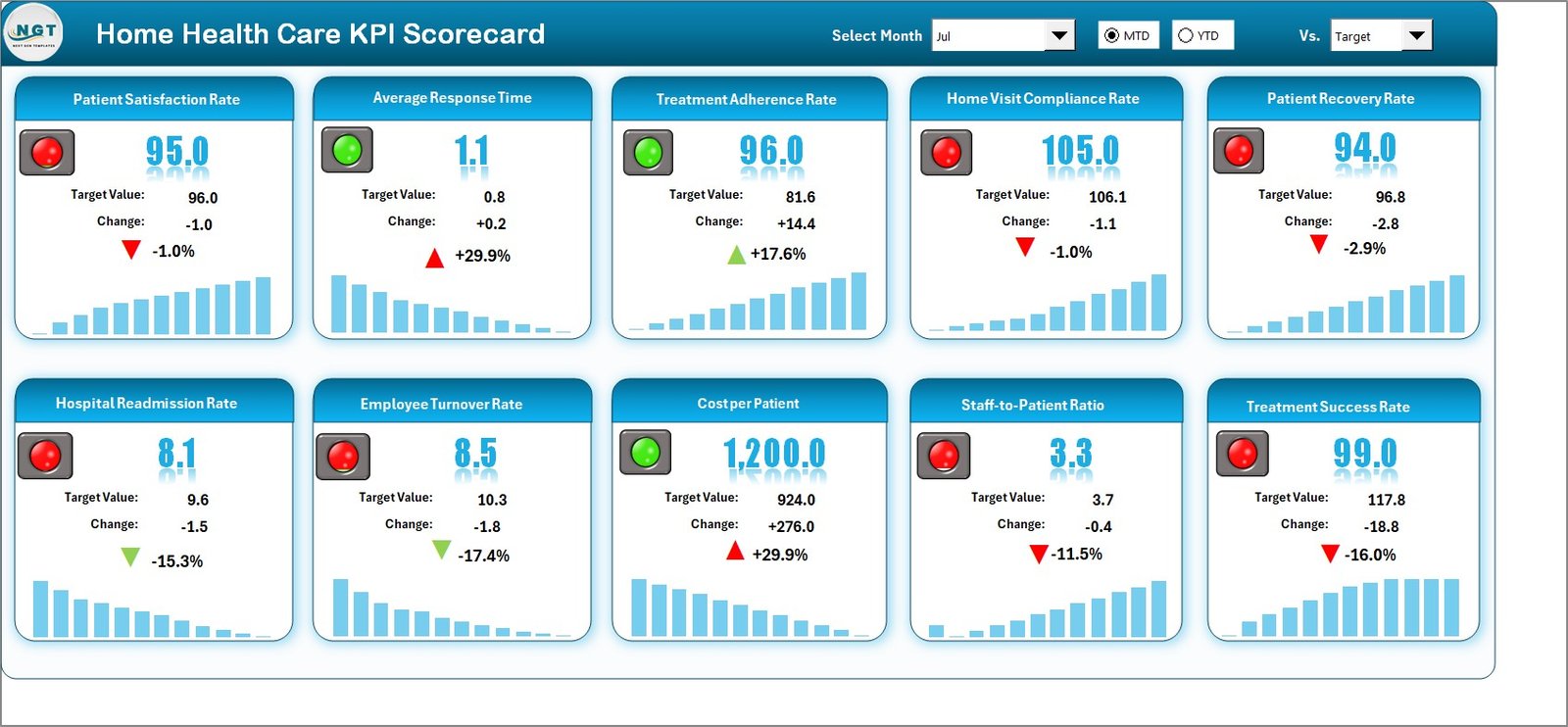
The Scorecard sheet is the main interface where you can view KPI performance. Key features include:
- Dropdown Menus — Select the month, MTD (Month-to-Date), or YTD (Year-to-Date) for performance analysis.
- Actual vs Target Values — Compare actual performance against targets for each KPI.
- Visual Indicators — Quickly see performance status using color-coded visuals or conditional formatting.
- KPI Overview — Display all relevant information about KPIs, including MTD and YTD comparisons.
2. KPI Trend Sheet
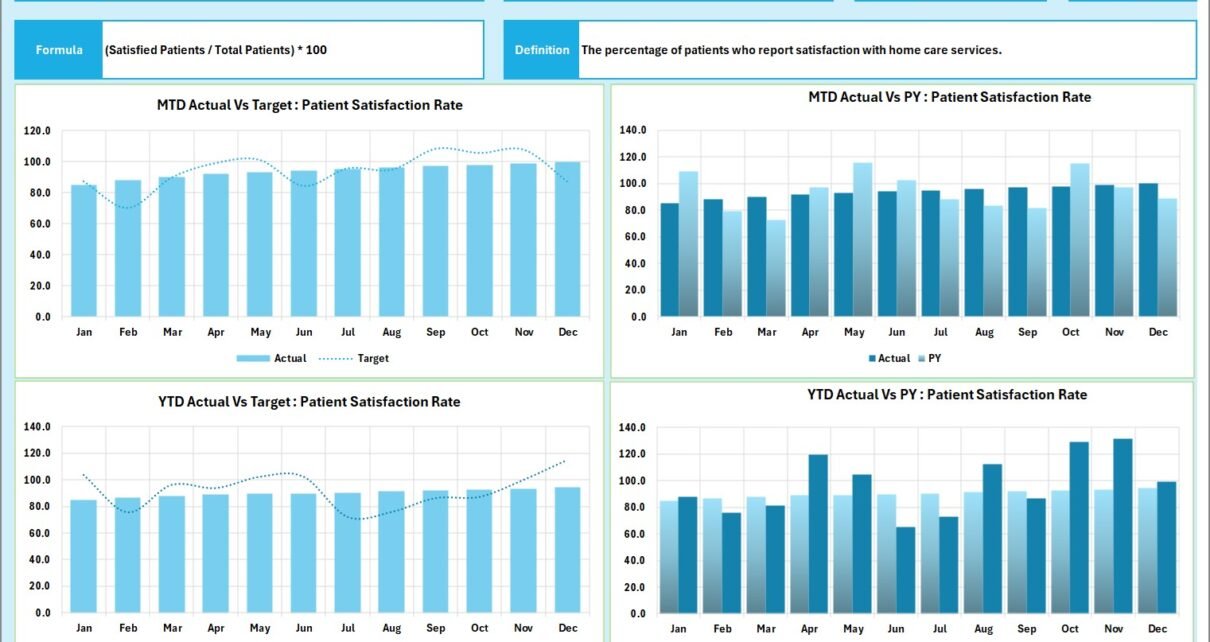
Here you can select the KPI name from the dropdown available on range C3. We have displayed the KPI Group, Unit of KPI, Type of KPI (Lower the Better or Upper the Better), Formula of the KPI and Definition of the KPI.
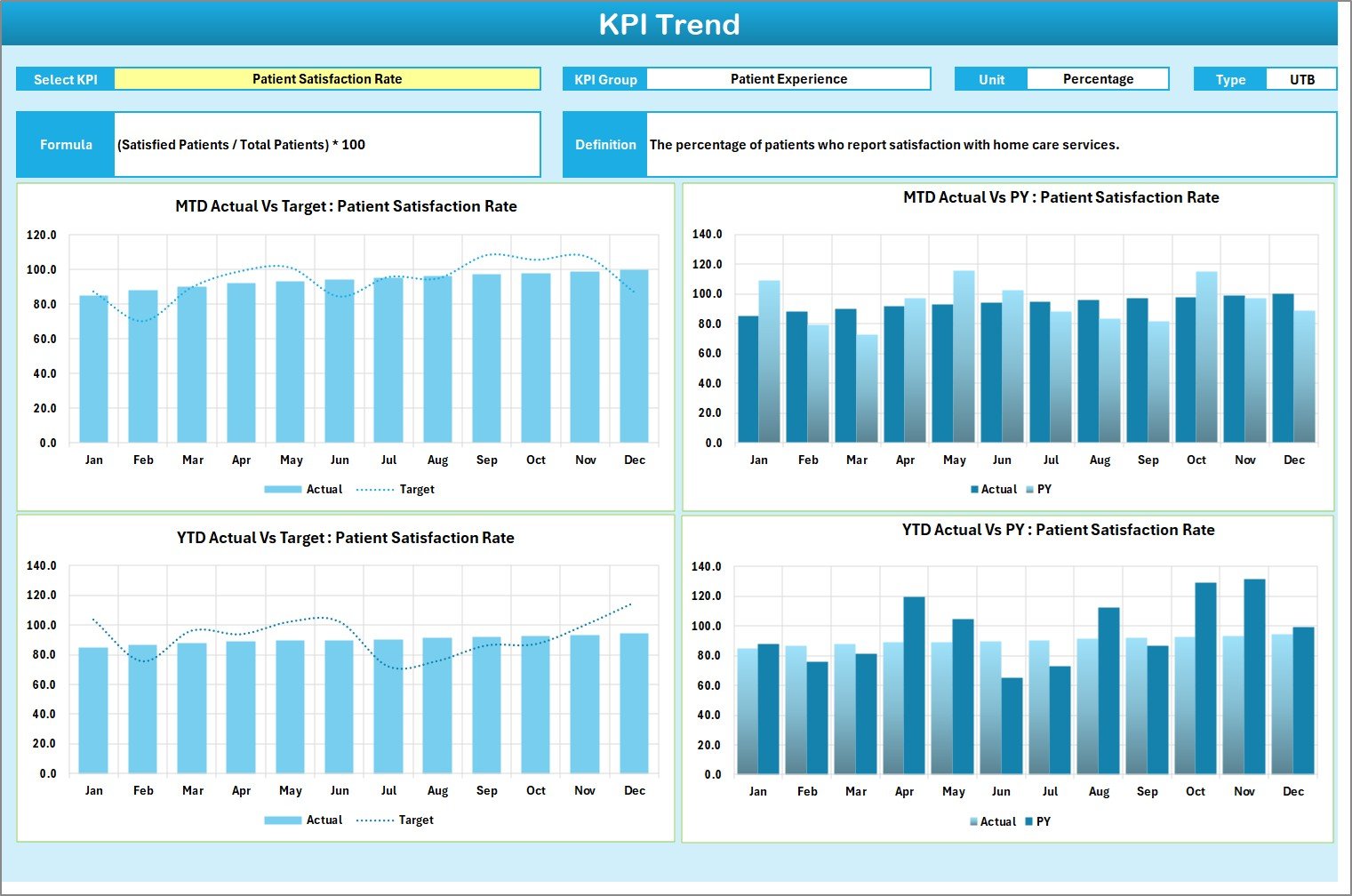
KPI Trend Sheet
We are also showing the MTD and YTD trend chart for Actual, Target and PY numbers. This helps agency managers spot seasonal patterns in patient outcomes, identify months where caregiver visit compliance dips, and plan staffing adjustments proactively.
3. Input Data Sheet
The Input Data sheet is where you enter all KPI data.
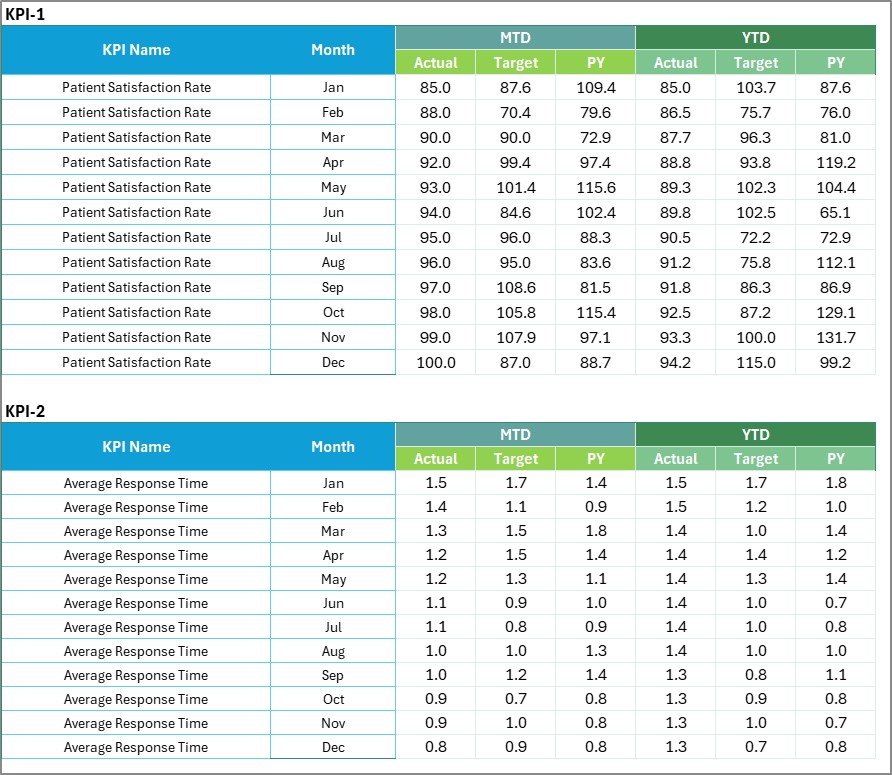
Input Data Sheet
- Data Entry — Record actual values, targets, and other metrics for each KPI on a monthly basis.
- Flexibility — Easily update data as new results become available, ensuring the scorecard remains current.
4. KPI Definition Sheet
In this sheet tab, you have to enter the KPI Name, KPI Group, Unit, Formula and KPI definition.

KPI Definition Sheet
This sheet serves as the master reference for all tracked metrics. When new KPIs are added or existing ones are modified, the definitions here ensure every team member understands what each metric measures and how it is calculated.
Home Health Care KPI Scorecard vs. Google Sheets vs. Athenahealth — Feature Comparison
| Feature | Home Health Care KPI Scorecard in Excel | Google Sheets Equivalent | Athenahealth / Kareo |
|---|---|---|---|
| Cost | $12.99 one-time | Free (build from scratch) | $140-350/provider/month |
| Platform | Microsoft Excel (offline) | Browser-based | Cloud SaaS |
| Setup Time | Under 10 minutes | 8-20 hours (manual build) | 2-6 weeks onboarding |
| Real-Time Team Collaboration | Via OneDrive/SharePoint | Built-in | Built-in |
| Customizable KPIs | Fully editable | Fully editable | Limited to vendor fields |
| Offline Access | Full offline use | Limited offline | No offline mode |
| MTD/YTD Trend Charts | Built-in with dropdowns | Manual chart setup | Preset reports only |
| Year-1 Cost (5 Users) | $12.99 total | $0 (+ build hours) | $8,400-21,000 |
| Data Ownership | 100% yours | Google servers | Vendor-hosted |
For home health agencies that want structured KPI tracking without paying per-provider SaaS fees, the Home Health Care KPI Scorecard in Excel sits in the sweet spot.
Who Should Use This Template
Click here to Purchase the Home Health Care KPI Scorecard in Excel
Perfect for:
- Home health agency administrators tracking patient outcomes and caregiver performance across 5-200 staff members
- Clinical directors at home care organizations monitoring readmission rates, patient satisfaction, and visit compliance
- Quality improvement coordinators preparing monthly and quarterly performance reports for accreditation bodies
- Small to mid-size home health agencies that need KPI tracking without investing in enterprise software
Not a fit if:
- You run a large hospital system requiring EHR-integrated dashboards with real-time patient data feeds
- You need HIPAA-compliant cloud hosting with role-based access controls and audit trails built into the tool
- You require automated data import from billing, scheduling, or electronic health record systems
Real-World Use Cases
Maria manages a 45-caregiver home health agency in Texas. She uses the Home Health Care KPI Scorecard to track monthly patient readmission rates, caregiver visit compliance, and patient satisfaction scores. Before board meetings, she selects the YTD view and prints a one-page summary — no separate report-building needed.
David is a quality director at a home care company serving 3 counties. He uses the KPI Trend sheet to compare fall incident rates across quarters, identifies which months spike, and adjusts caregiver training schedules accordingly. The color-coded indicators flag underperforming metrics before they become compliance issues.
Priya runs a small home nursing service with 12 staff. She replaced a manual Excel tracker that took 2 hours to update monthly. With this scorecard, she enters data in 15 minutes and gets instant MTD/YTD views with trend charts — saving 20+ hours per year on reporting alone.
Advantages of the Home Health Care KPI Scorecard in Excel
Click here to Purchase the Home Health Care KPI Scorecard in Excel
- Cost-Effective — At $12.99 one-time, it replaces SaaS tools that charge $140-350 per provider per month, saving thousands annually for small to mid-size agencies.
- Immediate Setup — No training sessions, implementation consultants, or IT support required. Download, open in Excel, replace sample data, and start tracking KPIs in under 10 minutes.
- Full Data Ownership — Your patient and operational data stays on your local machine or your organization’s network. No third-party cloud vendor holds your sensitive healthcare metrics.
- Offline Accessibility — Works without internet connectivity, making it ideal for field supervisors and managers who travel between patient locations.
- Fully Customizable — Add, remove, or rename KPIs on the KPI Definition sheet. The scorecard adapts to your agency’s specific tracking requirements without vendor-imposed limitations.
Opportunities for Improvement
- Manual Data Entry — KPI data must be entered manually each month. Agencies with automated billing or scheduling systems may prefer a tool with direct data integration.
- Single-User Editing — While the file can be shared via OneDrive or SharePoint, simultaneous multi-user editing may cause version conflicts. Assigning a single data owner for monthly updates is recommended.
- No Built-In HIPAA Compliance — The Excel file itself does not include encryption, access controls, or audit trails. Agencies handling protected health information (PHI) should follow their organization’s data security policies when storing and sharing this file.
Best Practices
Click here to Purchase the Home Health Care KPI Scorecard in Excel
- Update monthly — Enter KPI data within the first week of each new month to maintain accurate MTD and YTD calculations.
- Assign a data owner — Designate one team member responsible for updating the Input Data sheet to prevent version conflicts and ensure data consistency.
- Review KPI definitions quarterly — As your agency’s priorities shift, update the KPI Definition sheet to reflect current tracking needs. Remove metrics that are no longer relevant and add new ones tied to accreditation or quality improvement goals.
- Use the KPI Trend sheet during team meetings — Select individual KPIs to review their 12-month trends with your clinical team. Trend analysis helps identify root causes of performance dips more effectively than monthly snapshots alone.
- Save a backup copy — Before making significant changes to KPI definitions or data structure, save a dated backup of the workbook to preserve historical data.
Explore Relevant Templates
If you found this Home Health Care KPI Scorecard useful, explore these related templates on NextGenTemplates:
- Substance Abuse Center KPI Scorecard in Excel — Track recovery and treatment KPIs using the same scorecard format.
- Telehealth Dashboard in Excel — Monitor virtual care metrics across 5 interactive dashboard pages.
- Public Health KPI Scorecard in Google Sheets — Same scorecard concept in Google Sheets for browser-based teams.
- Hospital Patient Flow Dashboard in Google Sheets — Track patient admissions, discharges, and bed occupancy rates.
- Veterinary Clinic Dashboard in HTML — Interactive HTML dashboard for clinic operations monitoring.
Frequently Asked Questions
Click here to Purchase the Home Health Care KPI Scorecard in Excel
What KPIs does the Home Health Care KPI Scorecard track?
The Home Health Care KPI Scorecard in Excel tracks 10+ key performance indicators including patient readmission rate, caregiver visit compliance, patient satisfaction score, fall incident rate, medication error rate, and average length of stay. All metrics update automatically when you replace the sample data with your own agency’s figures.
Can I customize the KPIs in this scorecard?
Yes. The KPI Definition sheet lets you add, rename, or remove any KPI. Update the corresponding rows in the Input Data sheet and the Scorecard and Trend sheets reflect changes automatically. No formulas need manual adjustment.
How does this compare to Athenahealth for home health care tracking?
The Home Health Care KPI Scorecard in Excel costs $12.99 one-time versus Athenahealth at $140-350 per provider per month. For agencies wanting focused KPI tracking without full EHR costs, this scorecard delivers MTD/YTD comparisons and trend charts at a fraction of the price.
How long does it take to set up?
Setup takes under 10 minutes. Download the file, open in Microsoft Excel, enter your KPI definitions and monthly data on the Input Data sheet, and the Scorecard and Trend sheets populate automatically with color-coded performance indicators.
Does this scorecard work with Google Sheets?
This version is designed for Microsoft Excel. For Google Sheets users, check the Public Health KPI Scorecard in Google Sheets or browse the full KPI Dashboard collection on NextGenTemplates.
Is my data stored online?
No. The Home Health Care KPI Scorecard runs entirely in Microsoft Excel on your local machine. Your patient and operational data stays on your computer unless you choose to share the file via OneDrive or SharePoint.
Can I use this for accreditation reporting?
Yes. The MTD and YTD views, color-coded indicators, and structured KPI definitions make it straightforward to generate quality reports for accreditation bodies. Print the Scorecard sheet in YTD view for a one-page performance summary ready for submission.
About the Author
Built by PK — Microsoft Certified Professional with 15+ years of Excel, Google Sheets, and Power BI experience. Founder of NextGenTemplates, reaching 300K+ subscribers across YouTube channels (@PK-AnExcelExpert, @NextGenTemplates, @NeoTechNavigators). Every template is hand-built and tested before release.
Conclusion
The Home Health Care KPI Scorecard in Excel gives home health agencies a structured, cost-effective way to track patient care metrics, caregiver performance, and operational efficiency — all in a single Excel workbook. With 10+ KPIs, MTD/YTD comparisons, 12-month trend charts, and color-coded indicators, this scorecard replaces expensive SaaS subscriptions and manual tracking methods.
Click here to Purchase the Home Health Care KPI Scorecard in Excel
Instant download · One-time payment · No subscription · Lifetime access
Visit our YouTube channel for step-by-step video tutorials: Youtube.com/@PK-AnExcelExpert