The global reinsurance market handled over $330 billion in gross written premiums in 2025, yet most reinsurance operations teams still track treaty performance, ceded premiums, and loss ratios using disconnected spreadsheets and manual reports. The Reinsurance Services KPI Dashboard in Excel consolidates 15+ reinsurance KPIs across 7 interactive worksheets, with MTD and YTD comparisons, conditional formatting arrows, and 12-month trend charts — all auto-updating from 3 simple input sheets.
Whether you manage treaty portfolios at a cedant, broker, or specialty insurer, this ready-to-use KPI dashboard template replaces hours of manual reporting with a 10-minute data refresh. Define your own KPI names, formulas, and targets — the dashboard handles all calculations, comparisons, and visualizations automatically.
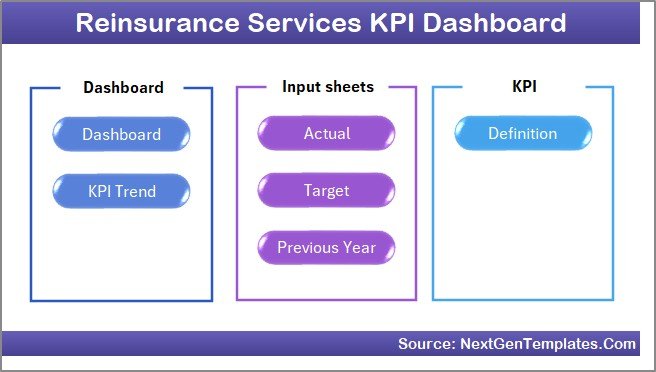
Key Features of Reinsurance Services KPI Dashboard in Excel
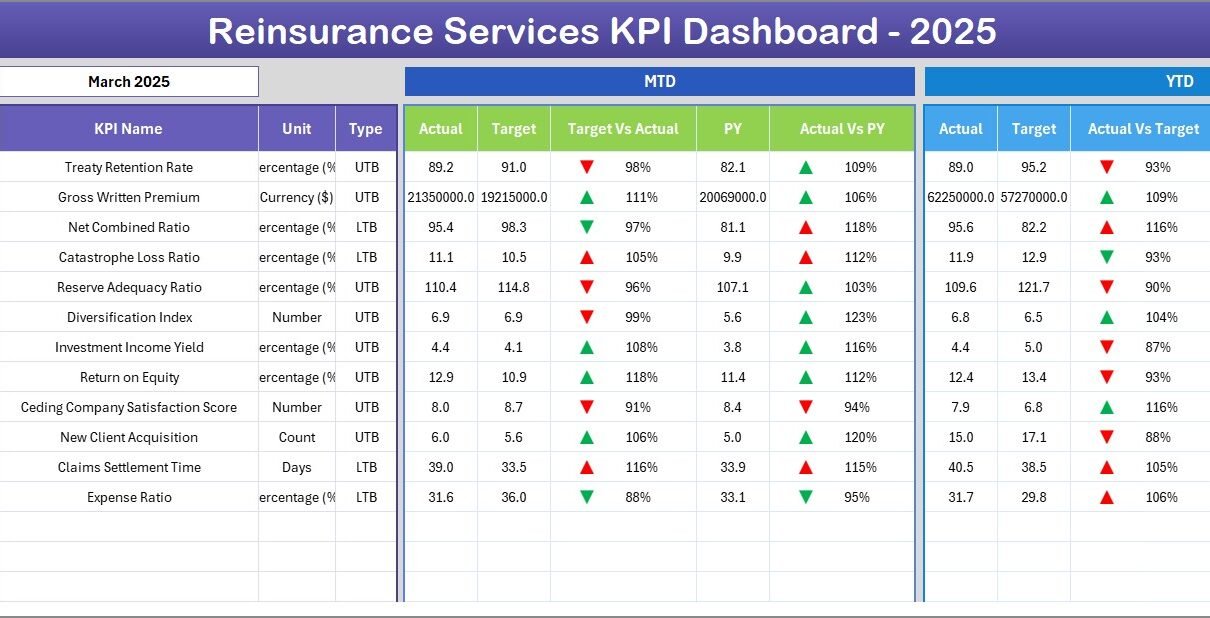
The Reinsurance Services KPI Dashboard in Excel tracks 15+ customizable KPIs across 7 purpose-built worksheets. Each metric displays MTD Actual, Target, and Previous Year data alongside YTD equivalents, with conditional formatting arrows flagging performance direction instantly.
The dashboard includes a KPI Trend sheet that plots 12-month Actual vs Target vs Previous Year trend lines for any selected KPI. A month selector dropdown on the Dashboard sheet refreshes every number on the page with a single click — no pivot tables, no slicers, no VBA macros required.
Three separate input sheets for Actual, Target, and Previous Year data keep entry organized and error-free. The KPI Definition sheet stores each metric’s name, group, unit, formula, definition, and type (Lower the Better or Upper the Better), feeding this metadata automatically to the KPI Trend sheet for on-screen reference.
Built entirely with standard Excel formulas, the dashboard works on Excel 2016, 2019, 2021, Microsoft 365, and Excel for Mac without any compatibility issues. The Home sheet provides 6 one-click navigation buttons for instant access to any worksheet.
Dashboard Pages Explanation
1. Home Sheet
This is an index sheet with 6 navigation buttons that jump directly to each worksheet. It serves as the central hub for the entire Reinsurance Services KPI Dashboard in Excel.
2. Dashboard Sheet
👉 Click here to Purchase Reinsurance Services KPI Dashboard in Excel
The main analytics view of the Reinsurance Services KPI Dashboard in Excel. Select a month from the dropdown on cell D3 and the entire dashboard refreshes. It displays MTD Actual, Target, and Previous Year data alongside YTD Actual, Target, and Previous Year data. Conditional formatting up/down arrows highlight Target vs Actual and PY vs Actual variances at a glance.
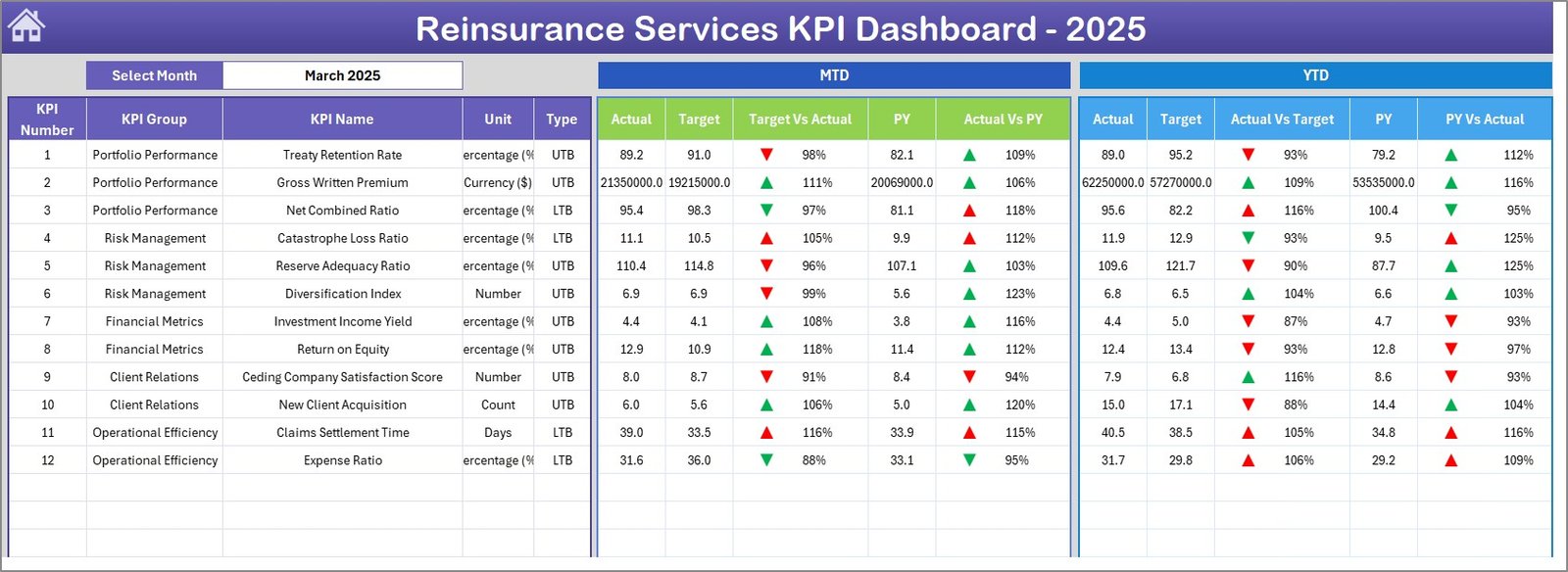 Reinsurance Services KPI Dashboard
3. KPI Trend Sheet
Select any KPI from the dropdown on cell C3 to view its KPI Group, Unit, Type (LTB/UTB), Formula, and Definition. Below, MTD and YTD trend charts plot Actual, Target, and Previous Year lines across 12 months for detailed performance analysis.
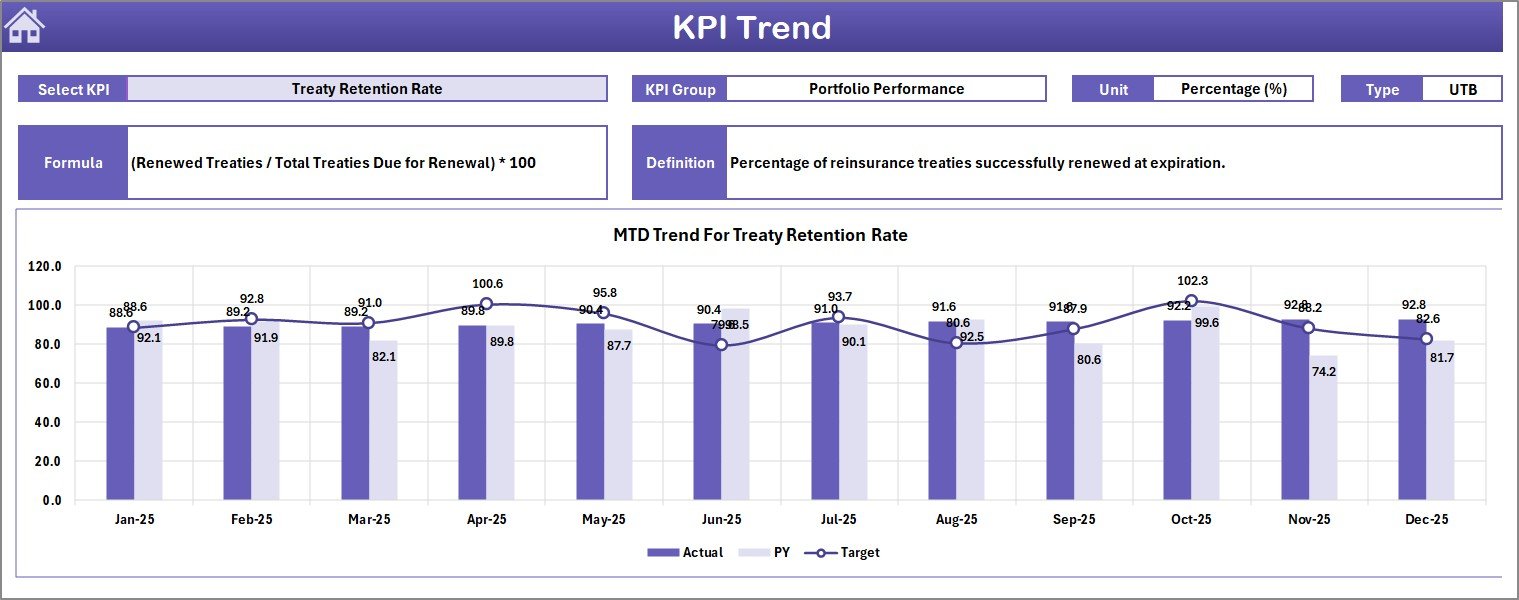 KPI Trend Sheet
4. Actual Numbers Input Sheet
Enter actual MTD and YTD numbers for each KPI per month. Change the first month of your fiscal year on cell E1 to align with your reporting calendar.
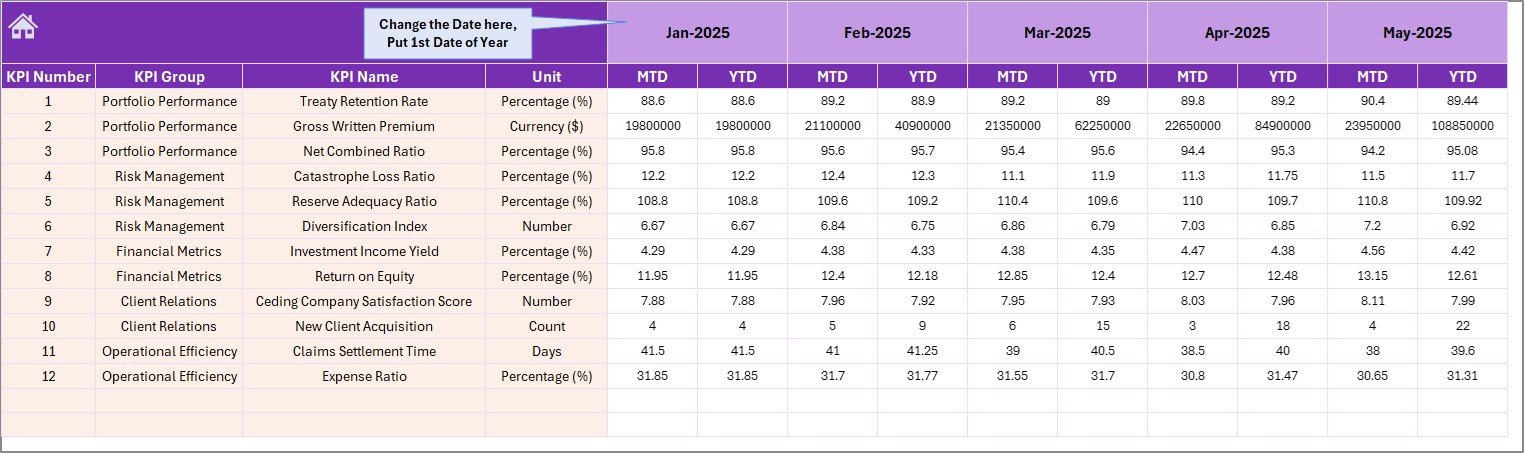 Actual Numbers Input Sheet
5. Target Number Input Sheet
Enter target numbers for each KPI as MTD and YTD values for every month of the year.
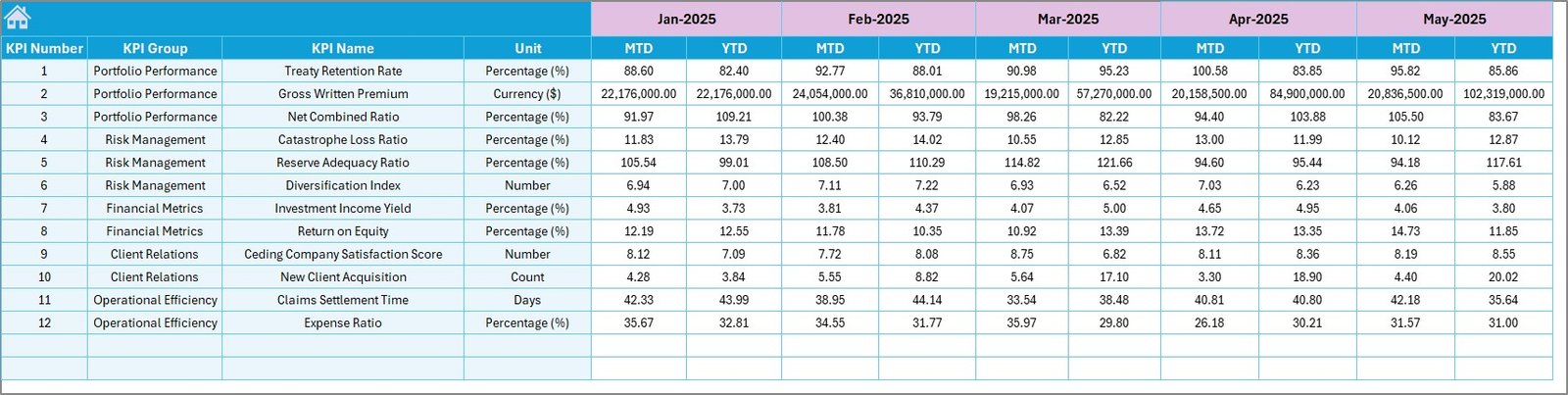 Target Number Input Sheet
6. Previous Year Number Sheet
Enter previous year data in the same format as the current year to enable year-over-year comparisons across all KPIs.
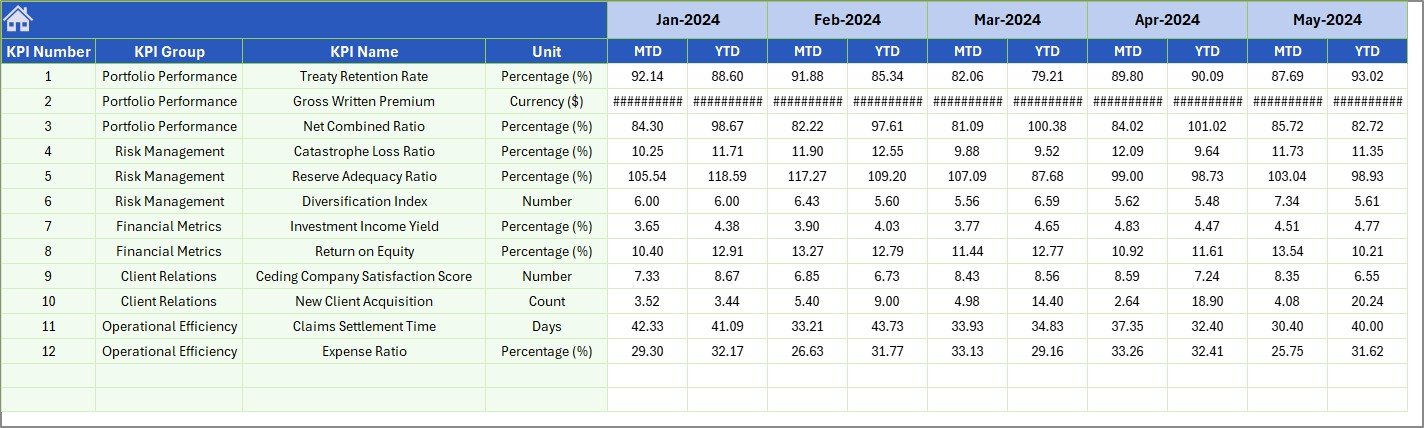 Previous Year Number Input Sheet
7. KPI Definition Sheet
Define each KPI’s Name, Group, Unit, Formula, Definition, and Type (LTB or UTB). The KPI Trend sheet references this data automatically for on-screen display.
 KPI Definition Sheet
Reinsurance Services KPI Dashboard in Excel vs. Google Sheets vs. Swiss Re Analytics — Feature Comparison
| Feature | Reinsurance Services KPI Dashboard in Excel | Google Sheets Equivalent | Swiss Re / Gen Re Analytics |
|---|---|---|---|
| Cost | $14.99 one-time | $9.99 one-time (separate purchase) | $200–$500/user/month |
| Platform | Microsoft Excel (desktop) | Google Sheets (browser) | Cloud SaaS |
| Setup Time | Under 10 minutes ✅ | 10–15 minutes | 4–12 weeks implementation |
| Real-time Collaboration | Via OneDrive/SharePoint | Built-in | Built-in |
| Customizable KPIs | Unlimited ✅ | Manual setup | Limited to plan |
| Offline Access | Full offline ✅ | Limited | No |
| Year-1 Cost (5 users) | $14.99 total ✅ | $9.99 total | $12,000–$30,000 |
| MTD/YTD Trend Charts | Built-in ✅ | Manual | Varies by plan |
| Treaty Performance KPIs | Built-in ✅ | With manual setup | Advanced automation |
For reinsurance teams that want structured KPI tracking without paying $200–$500/user/month for enterprise analytics, the Reinsurance Services KPI Dashboard in Excel sits in the sweet spot.
Who Should Use This Template
👉 Click here to Purchase Reinsurance Services KPI Dashboard in Excel
✅ Perfect for:
- Reinsurance account managers at cedants and brokers with 5–200 employees tracking treaty performance, ceded premiums, and claims recovery monthly
- Reinsurance operations leads needing monthly MTD/YTD KPI reports for leadership presentations and board reviews
- Actuarial analysts comparing actual loss ratios and recovery rates against annual targets
- Insurance consultants delivering structured reinsurance KPI scorecards to client companies
❌ Not a fit if:
- You need API integrations with treaty administration systems like RiMS or Sequel
- Your organization requires automated data feeds from catastrophe modeling platforms like RMS or AIR
- You need SOC 2 compliance with audit trails on KPI data changes
Real-World Use Cases
Anita manages reinsurance operations at a mid-size insurer in Singapore. She uses the Reinsurance Services KPI Dashboard in Excel to track ceded premium ratio, treaty loss ratio, and claims recovery rate across 8 active treaties monthly. Before quarterly reviews, she selects the relevant month on the Dashboard sheet and exports it as a PDF — replacing a 5-hour manual reporting process with a 10-minute refresh.
Mark runs the reinsurance desk at a specialty insurer in London. He enters monthly targets for retrocession efficiency, net retention ratio, and catastrophe reserve adequacy. The conditional formatting arrows instantly show him which KPIs missed target and by how much — helping him prepare variance reports for the CFO without building pivot tables from scratch.
Priya is a reinsurance consultant in Mumbai. She uses the KPI Trend sheet to present 12-month performance trajectories to her cedant clients during quarterly strategy sessions. Comparing Actual vs Target vs Previous Year helps her clients spot seasonal patterns in treaty renewals and plan capacity allocation accordingly.
Advantages of Reinsurance Services KPI Dashboard in Excel
The Reinsurance Services KPI Dashboard in Excel eliminates the gap between raw data entry and actionable reporting. Three separate input sheets ensure data stays organized, while the Dashboard and KPI Trend sheets transform that data into visual comparisons and trend lines automatically.
At $14.99 one-time, a 5-person reinsurance team saves $12,000–$30,000 annually compared to enterprise analytics platforms. The template requires no IT setup, no vendor onboarding, and no recurring subscription — download, enter data, and start tracking within 10 minutes.
The KPI Definition sheet ensures every team member interprets metrics consistently. Whether you track ceded premium ratio, treaty loss ratio, or retrocession efficiency, the formula and definition are documented in one place and referenced automatically throughout the dashboard.
Opportunities for Improvement
👉 Click here to Purchase Reinsurance Services KPI Dashboard in Excel
The dashboard relies on manual monthly data entry. Teams with automated data pipelines from policy administration systems may need to export data to Excel before updating the input sheets. Real-time collaboration requires OneDrive or SharePoint — for teams that prefer browser-based editing, the Reinsurance KPI Dashboard in Google Sheets offers native multi-user editing.
The template does not include automated email alerts for KPI threshold breaches. Teams that need notification-based monitoring may want to pair this dashboard with a simple VBA macro or Power Automate flow for email triggers.
Best Practices
Update the Actual Numbers Input sheet at the same time each month — consistency in data entry timing improves trend accuracy. Set the first month on cell E1 to match your fiscal year start so all MTD/YTD calculations align with your reporting calendar.
Use the KPI Definition sheet to document not just what each metric measures but how it should be interpreted. Marking KPIs as LTB (Lower the Better) or UTB (Upper the Better) ensures the conditional formatting arrows display correctly on the Dashboard and KPI Trend sheets. Review and refine your KPI list quarterly — adding or removing metrics as your reinsurance strategy evolves keeps the dashboard focused and relevant.
Explore Relevant Templates
🔹 Reinsurance KPI Dashboard in Google Sheets — Browser-based reinsurance KPI tracking with real-time collaboration and the same MTD/YTD structure.
🔹 Insurance Brokers KPI Dashboard in Excel — Same 7-sheet Excel KPI structure for insurance brokerage teams tracking policy retention, claims ratio, and commission performance.
🔹 Underwriting Efficiency KPI Dashboard in Google Sheets — 15+ underwriting KPIs with MTD/YTD trends and conditional formatting arrows.
🔹 Reinsurance KPI Dashboard in Excel — An earlier Excel-based reinsurance KPI template with the same 7-sheet structure.
🔹 Browse All KPI Dashboard Templates — Explore our full library across Excel, Power BI, Google Sheets, and HTML.
Frequently Asked Questions
👉 Click here to Purchase Reinsurance Services KPI Dashboard in Excel
What KPIs does the Reinsurance Services KPI Dashboard in Excel track?
The Reinsurance Services KPI Dashboard in Excel tracks any KPI you define — ceded premium ratio, treaty loss ratio, claims recovery rate, retrocession efficiency, net retention ratio, catastrophe reserve adequacy, and more. You enter KPI names and definitions on the KPI Definition sheet.
How long does setup take for this reinsurance dashboard?
Setup takes under 10 minutes. Enter your KPI definitions, fill in actual and target numbers for the current month, and the Dashboard sheet auto-populates with MTD and YTD comparisons, conditional formatting arrows, and trend charts.
Can I customize this for other insurance verticals?
Yes. The KPI Definition sheet is fully flexible — rename KPIs for underwriting, claims management, actuarial, or direct insurance operations. The structure works for any MTD/YTD KPI tracking use case in insurance.
Does this dashboard work on Mac?
Yes. The Reinsurance Services KPI Dashboard in Excel uses only standard formulas — no macros, no VBA. It works on Excel for Mac, Excel 2016, 2019, 2021, and Microsoft 365 without compatibility issues.
How does this compare to enterprise reinsurance analytics?
Enterprise platforms like Swiss Re or Gen Re analytics cost $200–$500 per user per month and require weeks of implementation. This template costs $14.99 one-time with no subscription, delivering 90% of the reporting value at a fraction of the cost.
Can multiple users share this dashboard?
Yes. Save the file on OneDrive or SharePoint for real-time co-authoring with your reinsurance team. For native browser-based collaboration, consider the Google Sheets version.
Is there a Google Sheets version available?
Yes. The Reinsurance KPI Dashboard in Google Sheets offers the same KPI tracking structure with native real-time collaboration. Also available: Underwriting Efficiency KPI Dashboard in Google Sheets.
About the Author
Built by PK — Microsoft Certified Professional with 15+ years of Excel, Google Sheets, and Power BI experience. Founder of NextGenTemplates, reaching 300K+ subscribers across YouTube channels. Every template is hand-built and tested before release.
Conclusion
The Reinsurance Services KPI Dashboard in Excel gives reinsurance teams a structured, formula-driven performance tracking system that replaces manual reporting with automated MTD/YTD comparisons, trend charts, and conditional formatting arrows — all in a single Excel file.
✅ Instant download · One-time payment of $14.99 · No subscription · Lifetime access
👉 Click here to Purchase Reinsurance Services KPI Dashboard in Excel
Visit our YouTube channel for step-by-step video tutorials: Youtube.com/@PK-AnExcelExpert
For more Excel dashboard templates and resources, visit Microsoft Learn — Excel Add-ins Documentation.