Most small dental clinics track patients in one of two ways: a paper register that nobody can total up, or a raw spreadsheet that turns into a mess of misspelled treatment names within a month. Neither answers the two questions a clinic owner actually asks on a Friday evening — how much did we bill this month, and who still owes us? The Dental Patient Log Data Entry System in Excel is built specifically around those two questions.

Key Features of the Dental Patient Log Data Entry System in Excel
A six-field entry form built for a front desk. The form captures Patient Name, Mobile, Treatment, Date, Fee and Status. Treatment and Status are wired to dropdown lists rather than free text, which is the single change that keeps your reporting usable six months down the line. “Root Canal”, “root canal” and “RCT” typed by three different staff members become three different categories in any pivot table — dropdowns prevent that entirely.
Three KPI cards that recalculate on every entry. Total Patients counts every record in the log, Total Revenue sums the Fee column, and Pending Cases counts each row where Status equals Pending. These are live Excel formulas — COUNTA, SUM and COUNTIF respectively — not typed-in numbers, so the panel moves the instant a record is added, edited or deleted.
Four VBA macros run the entire log. Add_Record writes a new row to the bottom of the table and stamps the entry time. Update_Record edits the currently selected row in place. Delete_Record removes it after a confirmation prompt. Reset_Form clears the input line so the next patient can be entered immediately. There are no formulas to drag down and no rows to insert by hand.
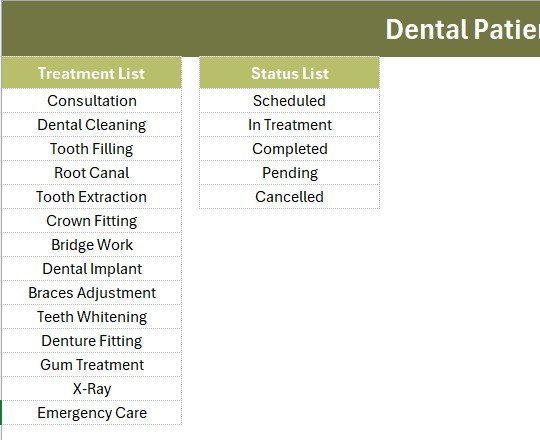
Fourteen treatment types, ready to use. Consultation, Dental Cleaning, Tooth Filling, Root Canal, Tooth Extraction, Crown Fitting, Bridge Work, Dental Implant, Braces Adjustment, Teeth Whitening, Denture Fitting, Gum Treatment, X-Ray and Emergency Care. Five status values — Scheduled, In Treatment, Completed, Pending and Cancelled — cover the appointment lifecycle.
Automatic serial numbers and timestamps. Column A numbers each record with a self-healing formula that reindexes when rows are removed, and the final column records an Entry TimeStamp for every row. When two staff members share the file over a network drive, that timestamp settles any question about when a record was logged.
Template Structure Explained
Data Entry Sheet
The main working screen. A dark olive heading bar sits above the three KPI cards, followed by the six-field entry form and the colour-coded Add, Delete, Update and Reset buttons arranged in a 2×2 block. The records table begins directly below with auto serial numbers, currency-formatted fees and the Entry TimeStamp column.
Setting Sheet
Holds the two dropdown source lists — 14 Treatment options and 5 Status values — plus a duplicate set of the KPI cards. Edit a list here and the Data Entry dropdown updates immediately, because the validation points at a named range rather than a fixed cell list. The duplicated cards can be copied and pasted as a Linked Picture into any monthly report.
Instructions Sheet
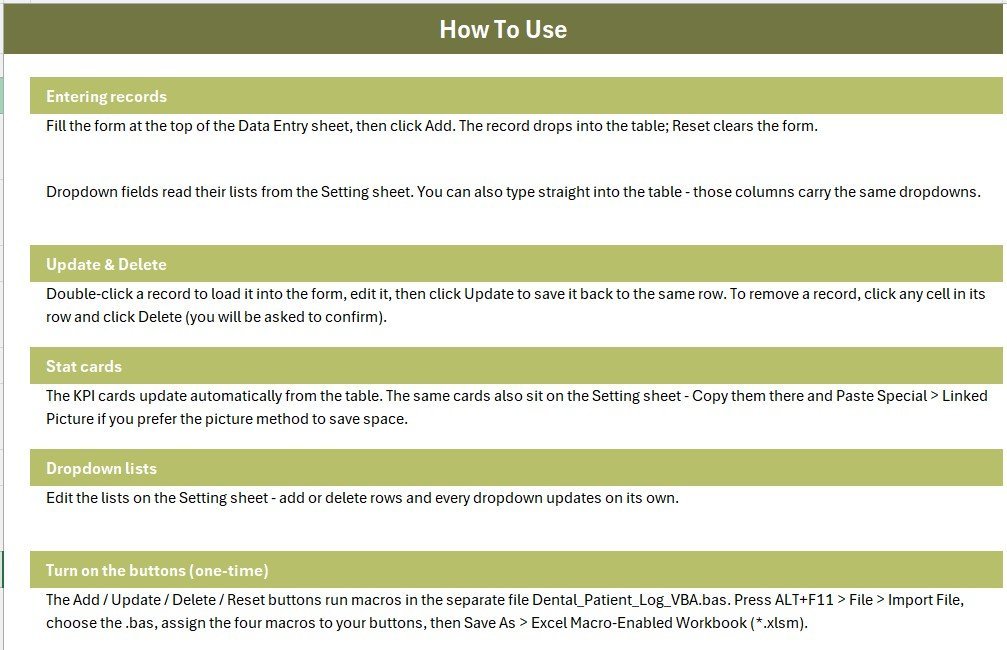
Step-by-step activation notes covering the VBA import, button assignment and the one-time Save As to .xlsm format. A fourth sheet, Get More Templates, links back to related products so you can extend the system later.
Dental Patient Log vs. Google Sheets vs. Paid Dental Practice Software — Feature Comparison
| Feature | Dental Patient Log (Excel) | Google Sheets Equivalent | Dentrix Ascend / Curve Dental |
|---|---|---|---|
| Cost | $5.99 one-time | Free, but built by you | $300–$600 per month |
| Platform | Excel 2016+ / Microsoft 365 | Browser only | Cloud only |
| Setup time | Under 10 minutes | 3–6 hours to build | 2–6 weeks onboarding |
| Works offline | ✔ Fully offline | ✘ Needs internet | ✘ Needs internet |
| Real-time team collaboration | Via shared drive | ✔ Yes | ✔ Yes |
| Customisable fields | ✔ Fully editable | ✔ Yes | Limited to vendor schema |
| Patient data stays on your machine | ✔ Yes | ✘ Stored by Google | ✘ Stored by vendor |
| Insurance claims & e-prescribing | ✘ Not included | ✘ Not included | ✔ Included |
| Year-1 cost at 5 users | $5.99 total | $0 + your build time | $3,600–$7,200 |
For clinics that want a clean patient and fee log without paying four figures a year for a full practice-management suite, the Dental Patient Log Data Entry System in Excel sits in the sweet spot.
Who Should Use This Template
Perfect for:
- Single-chair and 2–4 chair dental clinics logging 20–300 patient visits a month
- Front-desk staff who need a fast entry form instead of typing into a raw spreadsheet
- Clinic owners who want a monthly revenue and pending-payment figure without opening accounting software
- Dental students and new practitioners setting up their first patient register
Not a fit if:
- You need insurance claim submission, e-prescribing or dental imaging integration
- You run a multi-branch group needing simultaneous multi-user editing across locations
- You are required to run a HIPAA-audited system with access logs and role-based permissions
- You work on Mac only — the VBA macros require Excel for Windows
Real-World Use Cases
Dr. Anita runs a two-chair clinic in a residential neighbourhood. She logs every visit with treatment and fee, then checks the Pending Cases card each Friday to see which patients still owe for a root canal or crown fitting. Before this, that number lived in her head. She is not paying $400 a month for practice-management software she would use for one tenth of its features.
Ravi manages the front desk at a three-dentist practice. He enters patients as they check out, marks each one Scheduled, In Treatment or Completed, and sends the month’s records to the practice accountant. When a dentist queries whether a payment was recorded, the Entry TimeStamp column settles it in seconds.
Sneha is a final-year dental student running a supervised community camp. She recorded 180 screenings over a single weekend on a laptop with no internet at the camp site, tracking treatment type and status offline, then handed a clean summary to her faculty supervisor on Monday.
Advantages of the Dental Patient Log Data Entry System in Excel
It removes data-entry drift. Dropdown-driven fields mean your treatment categories stay consistent from January to December, so a year-end summary is a two-minute pivot table rather than an afternoon of cleaning text. Microsoft’s own guidance on applying data validation to cells covers why this matters for any shared workbook.
The cost comparison is not close. A cloud dental suite at $400 a month costs $4,800 in year one. This workbook costs $5.99 once, with no renewal, no per-chair pricing and no user seats to manage. For a clinic whose actual need is “log the visit, log the fee, flag the unpaid ones”, that gap is hard to justify.
Your patient data never leaves the building. The file runs entirely offline. There is no account, no sync and no vendor holding your records — which is a meaningful consideration for a small practice handling health information without a compliance team.
You own it and can change it. Add a column for referring dentist, widen the Fee format for a different currency, or extend the treatment list to 40 entries. Nothing is locked behind a vendor’s feature roadmap.
Opportunities for Improvement
An honest assessment matters more than a sales pitch, so here is where this template stops. It is a log, not a practice-management system. There is no appointment calendar view, no automated SMS reminders, no insurance claim workflow and no clinical charting or imaging. If you need those, a paid suite is the correct purchase.
Multi-user editing is limited. Two people can share the file on a network drive, but not edit it simultaneously the way Google Sheets allows. The VBA buttons are Windows-only, so Mac users fall back to typing rows directly into the table — everything else still works.
Finally, there is no built-in backup. Set up a scheduled copy to a cloud folder or an external drive yourself; the workbook will not do it for you.
Best Practices
- Customise the Setting sheet before your first real entry. Replace the 14 sample treatments with your own procedure names and pricing categories so your history is consistent from record one.
- Delete the six sample rows once you have explored them. Leaving them in will skew your Total Revenue and Total Patients cards.
- Use Status consistently. Pending should mean “payment outstanding” or “treatment incomplete” — pick one meaning and brief your staff, because the Pending Cases KPI counts that exact word.
- Save a fresh copy at the start of each financial year and archive the previous one. Ten thousand rows in a single sheet will slow the workbook down.
- Back up weekly. Copy the .xlsm to a cloud folder every Friday — it takes ten seconds and protects a year of records.
Explore Relevant Templates
- Patient Appointment Data Entry System in Excel — book and track appointments alongside your patient log.
- Prescription Record Data Entry System in Excel — log medicines, dosage and prescribing dentist.
- Lab Test Booking Data Entry System in Excel — track lab work sent out for crowns, bridges and dentures.
- Vaccination Record Data Entry System in Excel — same form-and-KPI layout for immunisation records.
- Healthcare Administrator Toolkit — save 40% on all 9 healthcare templates in one bundle.
- VBA Management Systems Mega Pack — five full macro-driven management systems.
Frequently Asked Questions
What does the Dental Patient Log Data Entry System in Excel track?
The Dental Patient Log Data Entry System in Excel tracks six fields per visit — Patient Name, Mobile, Treatment, Date, Fee and Status — and rolls them into three live KPI cards: Total Patients, Total Revenue and Pending Cases. Every metric updates automatically as records are added.
How long does setup take?
Setup takes under 10 minutes. You import one VBA module through the Visual Basic editor, place four buttons over the coloured cells on the Data Entry sheet, and save the file as .xlsm. The Instructions sheet inside the workbook walks through each step.
How does this compare to Dentrix or Curve Dental?
Dentrix and Curve Dental are full practice-management suites with insurance claims, imaging and e-prescribing, priced around $300–$600 per month. The Dental Patient Log Data Entry System in Excel costs $5.99 once and covers patient logging, treatment records, fees and pending follow-ups — nothing more.
Can I add my own treatment types?
Yes. Open the Setting sheet and edit the Treatment list — the workbook ships with 14 options including Root Canal, Dental Implant and Braces Adjustment. The dropdown on the Data Entry form expands automatically as you add rows to that list.
Do I need macros enabled?
Yes. The Add, Update, Delete and Reset buttons in the Dental Patient Log Data Entry System in Excel are VBA macros. Excel prompts you to enable content the first time you open the .xlsm file. You can still type directly into the records table if you prefer not to use macros.
Does it work on Mac or Google Sheets?
The workbook opens on Mac and can be uploaded to Google Sheets, but the four VBA buttons only run in Excel for Windows. On other platforms the form, dropdowns, KPI formulas and records table still work — you simply type rows in manually.
How many records can it hold?
The Dental Patient Log Data Entry System in Excel handles several thousand rows comfortably. For a clinic logging 300 visits a month, that is years of history. Archive to a fresh copy each financial year to keep the workbook responsive.
About the Author
Built by PK — Microsoft Certified Professional with 15+ years of Excel, Google Sheets, and Power BI experience. Founder of NextGenTemplates, reaching 300K+ subscribers across YouTube channels. Every template is hand-built and tested before release.
Conclusion
If your clinic’s patient records currently live in a paper register or an untidy spreadsheet, the Dental Patient Log Data Entry System in Excel gives you a structured form, consistent dropdowns and three numbers that actually matter — patients, revenue and pending cases — for the price of a coffee. It will not replace Dentrix, and it does not try to.
👉 Click here to Purchase the Dental Patient Log Data Entry System in Excel
Instant download · One-time payment · No subscription
🎥 For step-by-step video tutorials, visit Youtube.com/@PK-AnExcelExpert
Last updated: August 2026