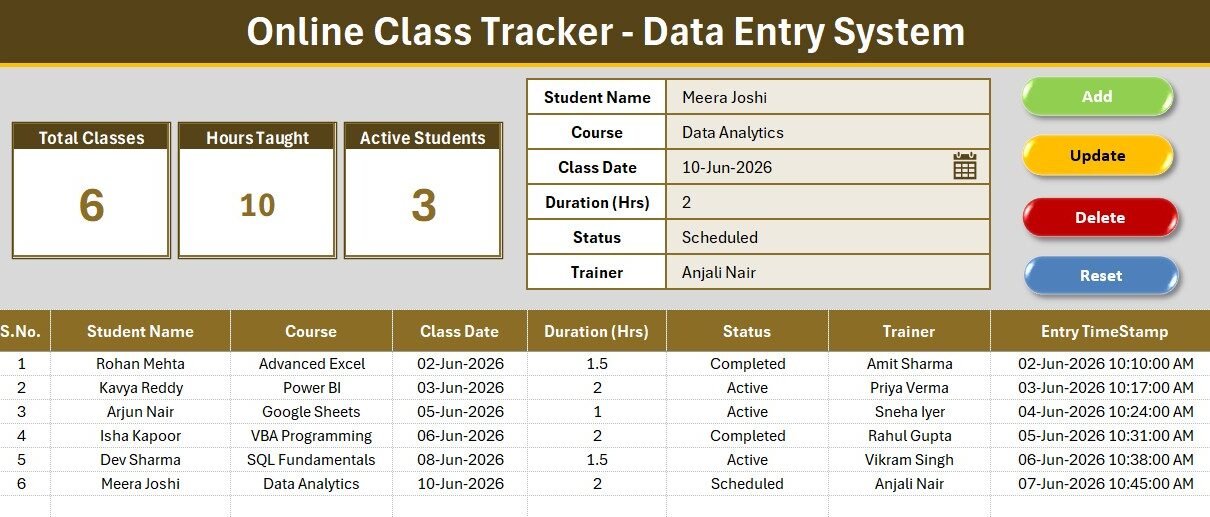
The Online Class Tracker Data Entry System in Excel logs every online session across 6 fields and updates 3 live KPI cards — Total Classes, Hours Taught, and Active Students — the moment you click Add. Built on VBA, it turns a plain spreadsheet into a one-click class log that runs fully offline in Microsoft Excel on Windows and Mac, with no subscription and no per-tutor fee.
Private tutors and coaching academies often start with a messy sheet where every class is typed by hand, courses are spelled three different ways, and totals never quite add up. This Online Class Tracker fixes that with a structured form, three dropdowns, and automatic numbering and timestamps, so a full month of sessions stays clean and countable. Online Class Tracker Data Entry System in Excel.
Key Features of the Online Class Tracker Data Entry System
- Six-field entry form — captures Student Name, Course, Class Date, Duration, Status, and Trainer for every online class in seconds.
- Three live KPI cards — Total Classes, Hours Taught, and Active Students recalculate on every Add, Update, or Delete.
- VBA-powered buttons — Add, Update, Delete, and Reset run instantly; double-click any row to load it back into the form and edit it.
- Three smart dropdowns — Course, Status, and Trainer read from an editable Setting sheet, keeping records typo-free.
- Auto S.No and timestamp — every record is numbered and time-stamped automatically for a clean audit trail.
- Fully offline — no login, no internet, no monthly bill; your class data lives in one file.
Sheets Explanation
Class Entry Dashboard
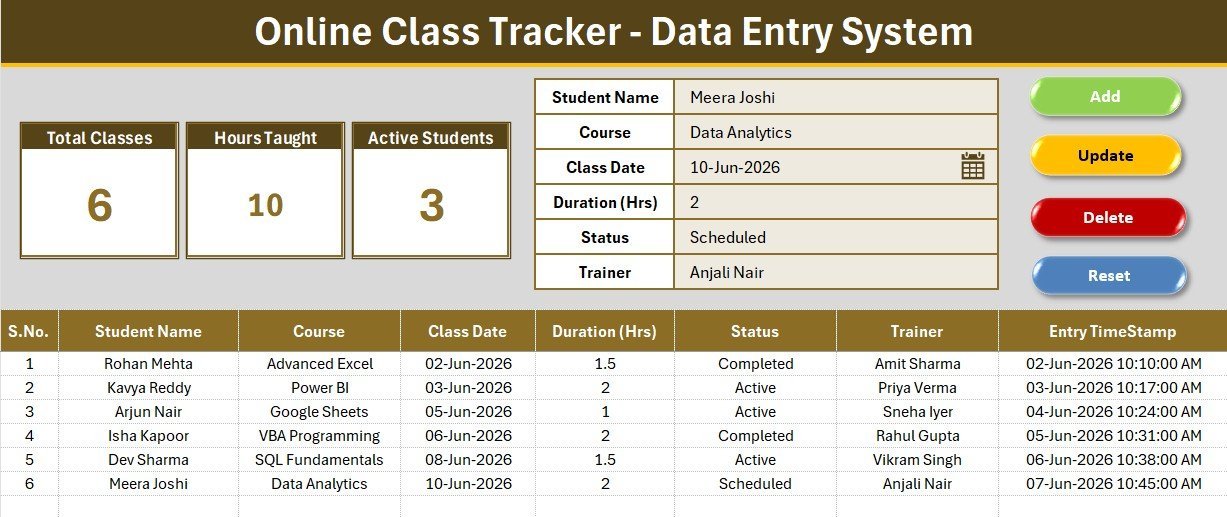
The main sheet holds the entry form at the top, the three KPI cards, and the running records table below. Every class you log appears in the table with its own S.No and timestamp, so the whole term sits in one scrollable view.
Entry Form and Live KPI Cards
The form fields — Student Name, Course, Class Date, Duration, Status, and Trainer — feed straight into the records table when you click Add. The Total Classes, Hours Taught, and Active Students cards sit above the table and refresh automatically, so you always see your teaching load without writing a single formula.
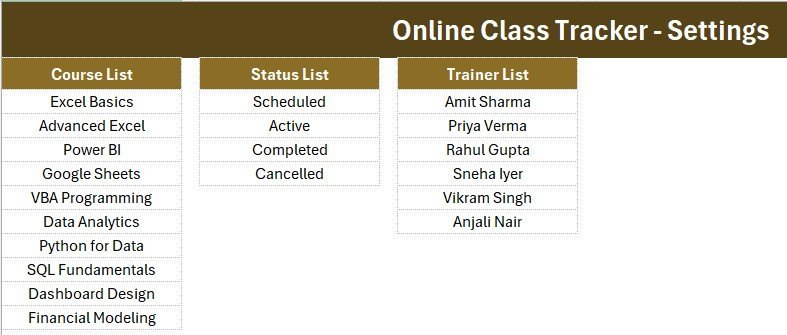
Setting Sheet and Records Table
The Setting sheet holds the Course, Status, and Trainer lists that power the three dropdowns. Edit those lists once with your own courses and trainers, and every future entry stays consistent. The records table below the form stores each session permanently, ready to filter or export.
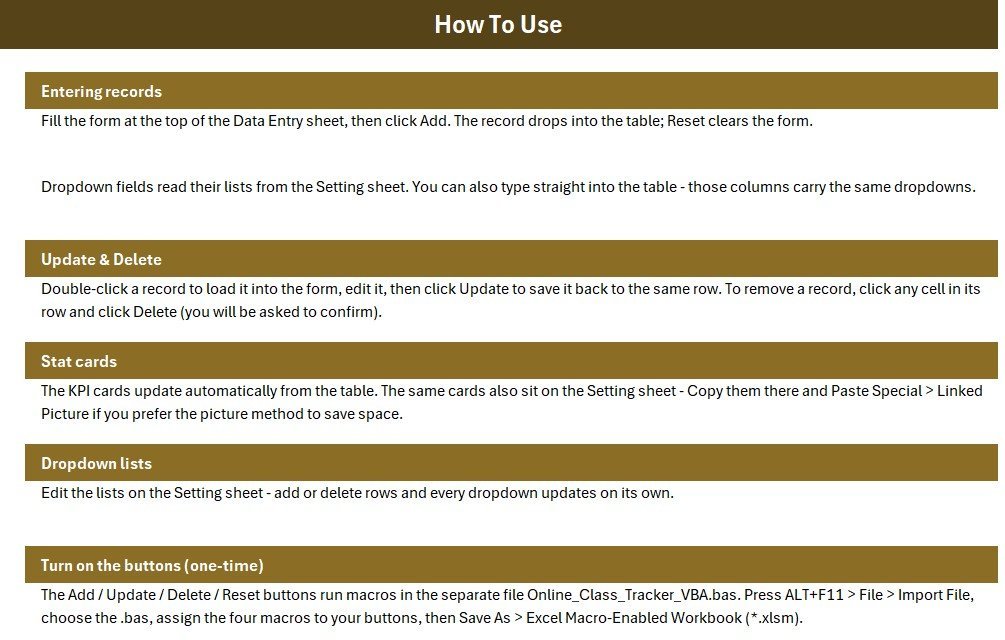
The workbook also ships with an Instructions sheet for enabling macros and using each button, and a Get More Templates sheet linking to related tools. If you also track who attended, pair it with our guide to attendance sheets in Excel.
Online Class Tracker vs. Google Sheets vs. Tutoring SaaS — Feature Comparison
| Feature | Online Class Tracker (Excel) | Google Sheets equivalent | Teachworks / MyMusicStaff |
|---|---|---|---|
| Cost | $5.99 one-time ✅ | Free but manual to build | $15–$65 / month |
| Platform | Microsoft Excel (Win + Mac) | Google Sheets (browser) | Cloud web app |
| Setup time | Under 5 minutes ✅ | Hours to build formulas | Days of onboarding |
| One-click Add / Update / Delete | Yes — VBA buttons ✅ | Needs Apps Script | Yes |
| Works offline | Yes ✅ | No — needs internet | No — needs internet |
| Live KPI cards | 3 built-in ✅ | Manual formulas | Yes (paid tiers) |
| Per-user fees | None ✅ | None | Charged per tutor |
| Year-1 cost at 5 tutors | $5.99 total ✅ | $0 + build time | $900–$3,900 |
For tutors and small academies that want one-click class logging without a monthly tutoring-CRM bill, the Online Class Tracker Data Entry System in Excel sits in the sweet spot.
Who Should Use This Template
Perfect for:
- Private tutors and online instructors logging sessions per student and course
- Coaching classes and training academies tracking classes, hours taught, and active students
- Freelance trainers wanting an offline, one-time-purchase alternative to a monthly app
Not a fit if:
- You need student billing, automated invoicing, or online payment collection
- You require cloud sync, multi-user live editing, or a mobile app from anywhere
Real-World Use Cases
Ravi runs an online coaching class for 40 students. Each evening he logs the day’s sessions with course and trainer, and the Hours Taught card tells him exactly how many teaching hours he billed that week — without a $29/month tutoring subscription eating into his margin.
Meera manages a small language academy with four trainers. She uses the Trainer dropdown to attribute every class, then checks Active Students at month-end to see which trainers are carrying the load before planning the next batch of courses.
Sana is a freelance IELTS tutor. She keeps every session in one offline file, double-clicking past rows to fix durations, and hands a clean class log to students who ask for proof of their completed hours.
Advantages of the Online Class Tracker Data Entry System
The biggest advantage is speed with structure. Because the form, dropdowns, and buttons do the heavy lifting, a tutor can log a full evening of classes in under a minute and trust that the Total Classes and Hours Taught figures are correct. There are no formulas to break and no columns to accidentally overwrite.
The second advantage is cost. A $5.99 one-time purchase replaces a recurring tutoring-app fee that can run into hundreds of dollars a year once you add tutors. For solo tutors and small academies that only need class logging and running totals, that is a meaningful saving with no feature they will miss.
Opportunities for Improvement
This is an offline, single-file tool, so it does not sync across devices or support simultaneous multi-user editing the way a cloud app does. It also does not handle invoicing or online payments — it logs classes and totals, not money owed. Academies that need billing or a shared live database should treat this as a fast front-end log and export to their finance system, or step up to a dashboard tool. For institute-level reporting, our Teacher Training Institutes KPI Dashboard in Excel is a natural next step.
Best Practices
- Fill in your own Course, Status, and Trainer lists on the Setting sheet before your first entry, so the dropdowns match your business.
- Enter Duration in consistent units (hours) so the Hours Taught card stays accurate.
- Double-click a row to edit rather than typing over the table directly — this keeps the numbering and timestamps intact.
- Keep a dated backup copy at month-end before you start a fresh batch of classes.
Because the buttons rely on macros, make sure macros are enabled. Microsoft’s own guide to enabling macros explains the one-time setting.
Explore Relevant Templates
- Student Attendance Data Entry System in Excel — track who attended each class.
- Exam Marks Entry Data Entry System in Excel — record results per student and subject.
- Tutoring Business Dashboard in Google Sheets — a cloud-based reporting option.
- Related reads: Online Order Tracker Data Entry System and Gym Membership Data Entry System.
💎 Save 68% — get this plus 7 more education tools in the Education & School Management Bundle.
Frequently Asked Questions
What fields does the Online Class Tracker Data Entry System track?
The Online Class Tracker Data Entry System in Excel captures six fields per session — Student Name, Course, Class Date, Duration, Status, and Trainer — plus an automatic S.No and entry timestamp on every record.
Do I need macros enabled?
Yes. The Add, Update, Delete, and Reset buttons run on VBA, so click Enable Content when Excel prompts you. Macros also power the live KPI cards; without them the buttons will not run.
How long does setup take?
Under 5 minutes. Unzip the file, enable macros, edit the Course, Status, and Trainer lists on the Setting sheet, and start logging classes. No account or internet connection is required.
How does this compare to a tutoring SaaS like Teachworks?
Tutoring apps charge $15–$65 per month, often per tutor. The Online Class Tracker Data Entry System in Excel is a $5.99 one-time purchase that runs offline with no per-seat fees — ideal for tutors who only need class logging and KPI totals.
Can I add my own courses and trainers?
Yes. The Course, Status, and Trainer dropdowns read from an editable Setting sheet. Change those lists once and every future entry uses your own values, keeping records consistent across the term.
Does it work on Mac?
Yes. The Online Class Tracker Data Entry System runs in Microsoft Excel on both Windows and Mac, provided macros are enabled for the VBA form buttons.
About the Author
Built by PK — Microsoft Certified Professional with 15+ years of Excel, Google Sheets, and Power BI experience. Founder of NextGenTemplates, reaching 300K+ subscribers across YouTube channels. Every template is hand-built and tested before release.
Conclusion
If you teach online and want your class log to count itself, the Online Class Tracker Data Entry System in Excel does exactly that — a clean form, three dropdowns, and live KPI cards that update on every click. Click here to purchase the Online Class Tracker Data Entry System in Excel.
Instant download · One-time payment · No subscription.
🎥 For step-by-step video tutorials, visit YouTube.com/@PK-AnExcelExpert.
Last updated: July 2026