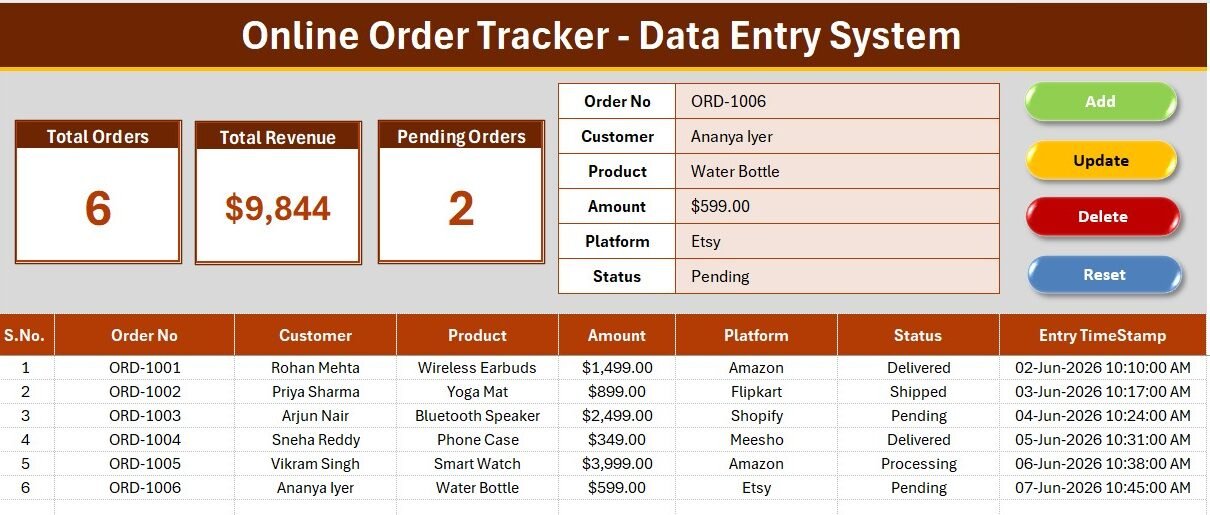
The Online Order Tracker Data Entry System in Excel logs every online order in one workbook using a VBA-powered form with four one-click actions — Add, Update, Delete and Reset — feeding 5 live KPI cards and a running order log. Setup takes under 5 minutes: unzip the file, enable macros, and start entering orders while the stat cards recalculate automatically.
If you sell on a website, Instagram, WhatsApp or a marketplace, order details usually scatter across chat screenshots, notebooks and half-finished spreadsheets. This order tracker Excel template replaces that mess with a single structured data entry form, so you always know how many orders are pending, how many were delivered, and how much money is tied up in unpaid orders — all offline, with no monthly subscription.
Key Features of the Online Order Tracker Data Entry System
- 🧾 VBA data entry form — capture around 9 fields per order (Order ID, Order Date, Customer Name, Product, Quantity, Order Amount, Sales Channel, Order Status and Payment Status) from one clean panel.
- ⚡ Four one-click buttons — Add saves a new order, Update edits the selected record, Delete removes it, and Reset clears the form. No manual copy-paste into rows.
- 📊 5 live KPI cards — Total Orders, Pending Orders, Delivered Orders, Cancelled Orders and Total Order Value refresh the moment you save an order.
- 🔽 3 dropdown lists — Order Status, Payment Status and Sales Channel are driven by an editable Setting sheet, keeping every entry consistent and easy to filter.
- 🗃 Running order log — every saved order lands in a structured records table you can sort, filter and print.
- 💻 Runs fully offline — works in Microsoft Excel on any Windows PC with no internet, login or per-user fee.
This system tracks 5 headline KPIs and stores unlimited order rows in a single sheet, so a solo seller and a small fulfilment team can both run their entire order book from one file. Because the buttons run standard Excel VBA macros, you own the logic outright and can extend it whenever you need to.
Sheets Explanation
Order Entry Dashboard
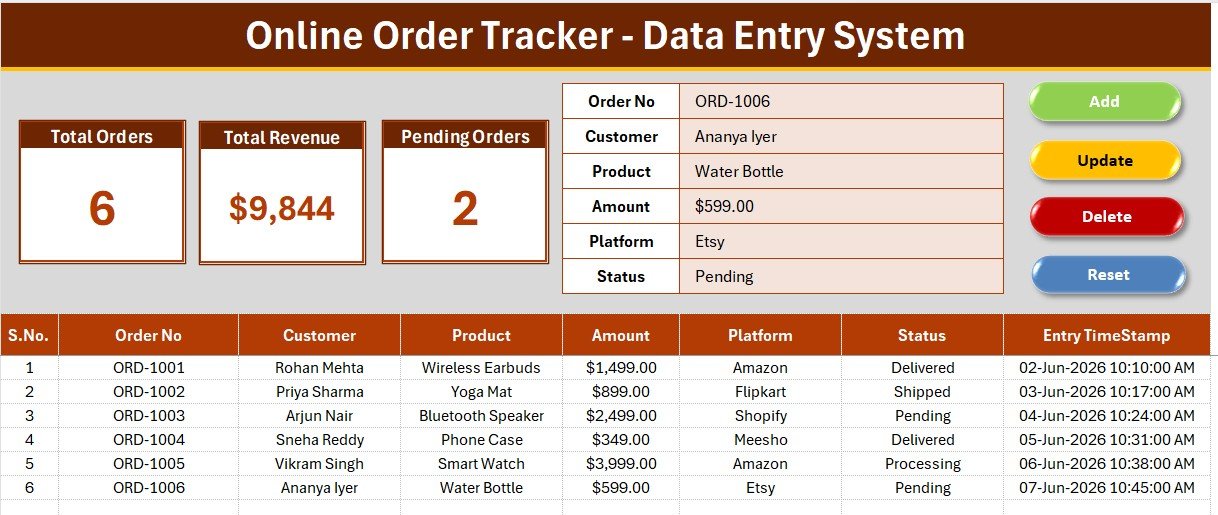
The main sheet combines the data entry form, the 5 KPI stat cards and the order log on one screen. You fill the form, click Add, and the cards for Total Orders, Pending and Total Order Value update instantly — no refresh, no formulas to drag.
Data Entry Form and Dropdown Fields
A closer look at the entry panel and its dropdowns for Order Status, Payment Status and Sales Channel, alongside the Add, Update, Delete and Reset buttons that run the underlying VBA macros. Dropdowns prevent typos, so every order stays clean and reportable.
Order Records and Setup Guide
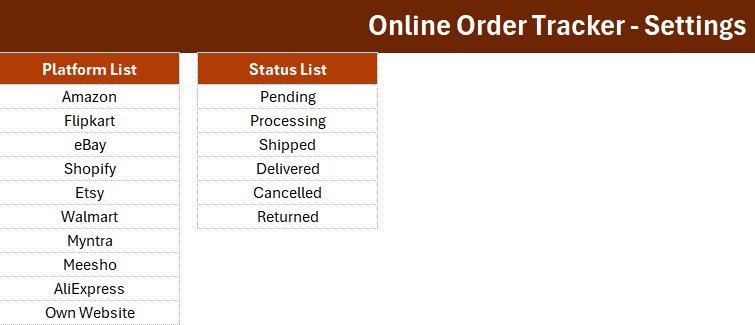
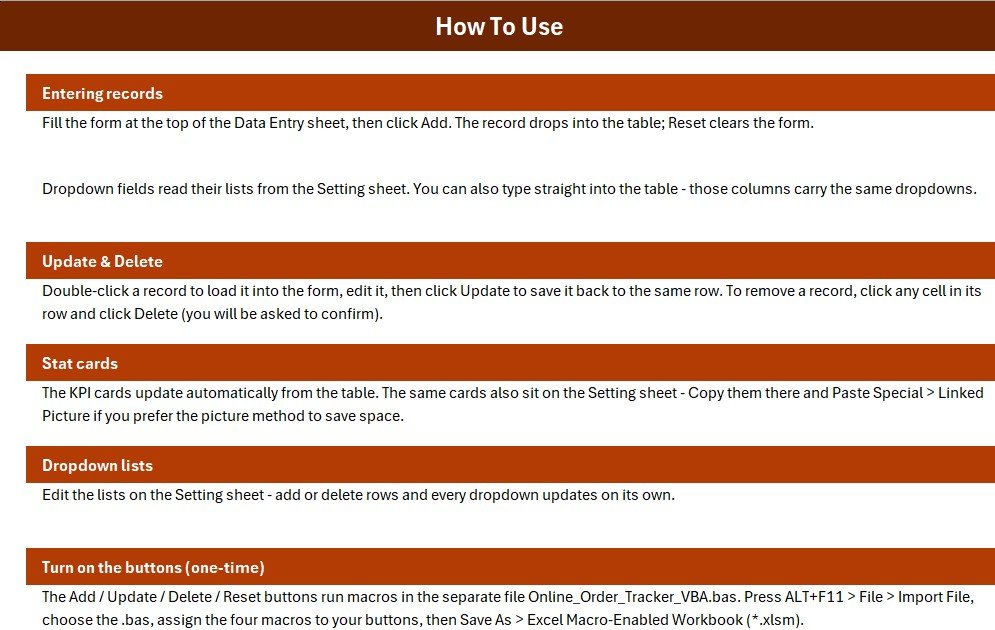
The records table holds the full order history for sorting and filtering, while the Setting and Instructions sheets let you edit dropdown values and follow a short step-by-step setup. Everything a new user needs sits inside the workbook.
Online Order Tracker vs. Google Sheets vs. Paid Order Management SaaS
| Feature | Online Order Tracker (Excel) | Google Sheets Order Tracker | Paid OMS (Zoho Inventory / Cin7) |
|---|---|---|---|
| Cost | $5.99 one-time ✅ | Free to about $12 / month | $59 to $349 / month |
| Platform | Microsoft Excel (offline) | Google Sheets (online) | Cloud SaaS |
| Setup time | Under 5 minutes ✅ | 10 to 15 minutes | Hours to days |
| Works offline | Yes ✅ | No (needs internet) | No |
| One-click Add / Update / Delete (VBA) | Yes ✅ | Manual or Apps Script | Built-in |
| Live KPI cards | 5 built-in ✅ | Manual formulas | Yes |
| Editable custom fields | Fully editable ✅ | Editable | Limited by plan |
| Multi-user real-time | No | Yes | Yes |
| Year-1 cost (5 users) | $5.99 ✅ | $0 to $720 | $3,540 to $20,940 |
For solo sellers and small teams who want structured order tracking without a recurring bill, the Online Order Tracker sits in the sweet spot — the honest trade-off is that it is single-user, so pick Google Sheets or a paid OMS if several people must edit the same file at once.
Who Should Use This Template
Perfect for:
- Small online sellers on Instagram, WhatsApp, Shopify or marketplaces handling up to a few hundred orders a month.
- Home bakers, boutiques and D2C micro-brands that want one clean order book instead of scattered chats.
- Solo founders and virtual assistants who prefer Excel and one-time tools over monthly SaaS.
Not a fit if:
- You need several staff editing the same live order list simultaneously.
- You require automatic sync with a store, courier API or payment gateway.
- Your team works only on Mac or mobile, where Excel VBA macros do not run reliably.
Real-World Use Cases
Anita runs a home-baking page on Instagram. She logs each cake order with delivery date and payment status, then uses the Pending and Total Order Value cards to see which orders still need collecting before the weekend rush.
Rahul manages a two-person clothing boutique. He records every WhatsApp and website order in the form, filters the records table by Sales Channel each month, and prints the log for his accountant — no monthly software fee.
Meera is a virtual assistant for three small stores. She keeps one workbook per client, uses Update to change an order from Processing to Delivered, and Delete to remove cancelled orders, keeping each client’s KPI cards accurate.
Advantages of the Online Order Tracker Data Entry System
- 💰 Saves money — a one-time $5.99 replaces a $59+/month order-management subscription, a difference of thousands of dollars over a year.
- ⏱ Saves time — the VBA buttons remove manual row insertion, and KPI cards remove manual reporting.
- 🔒 Keeps data private — your customer and order data stays on your own PC, not on a third-party server.
- 🔧 Fully customizable — rename fields, add dropdown values, or extend the macros to fit your workflow.
Opportunities for Improvement
Being an offline Excel tool, the Online Order Tracker is single-user and does not sync automatically with storefronts, couriers or payment gateways. It relies on VBA macros, which run on Windows Excel but not on the mobile app or reliably on Mac. Teams that outgrow single-user tracking can graduate to the Google Sheets or Power BI versions on NextGenTemplates for real-time collaboration and richer analytics.
Best Practices
- Enable macros when prompted — the Add, Update, Delete and Reset buttons will not work otherwise. See Microsoft’s guide on enabling or disabling macros in Office files.
- Keep a dated backup copy of the workbook each week so you never lose your order history.
- Edit the Setting sheet first — set your own Sales Channels and statuses before you start entering orders.
- Use the Update button rather than editing rows directly, so the KPI cards stay accurate.
Explore Relevant Templates
Building an order or fulfilment workflow? Pair this with other Excel data entry systems from PK-AnExcelExpert:
- Mobile Repair Log Data Entry System in Excel — log jobs, parts and repair status the same way.
- Salon Appointment Data Entry System in Excel — a booking-focused sibling with the same form-and-KPI layout.
- Donation Register Data Entry System in Excel — track incoming records with the same VBA engine.
- Excel VBA Tools and Utilities Pack — a bundle of ready-made VBA utilities to extend your workbook.
- OKR Management Dashboard in Excel — when you are ready to move from tracking to goal analytics.
Frequently Asked Questions
What is the Online Order Tracker Data Entry System in Excel?
The Online Order Tracker Data Entry System in Excel is a VBA-powered workbook that records online orders through a form with Add, Update, Delete and Reset buttons, then shows 5 live KPI cards and a searchable order log — all offline in Microsoft Excel.
Do I need to enable macros to use it?
Yes. The Online Order Tracker uses Excel VBA macros to power its buttons, so you must enable macros when the workbook opens. Once enabled, Add, Update, Delete and Reset work with a single click.
How long does setup take?
Setup takes under 5 minutes. Unzip the download, open the workbook, enable macros, edit the dropdown values on the Setting sheet, and start entering orders — the KPI cards begin updating immediately.
How does it compare to a paid order management system?
Paid order-management SaaS such as Zoho Inventory or Cin7 runs from $59 per month and adds cloud sync and multi-user access. The Online Order Tracker is a one-time $5.99 offline alternative for solo sellers and small teams who do not need real-time collaboration.
Can I add my own fields and statuses?
Yes. The Online Order Tracker is fully editable — you can rename fields, add Sales Channels and order statuses on the Setting sheet, and adjust the VBA macros to match your own order workflow.
Will it work on Mac or the Excel mobile app?
The Online Order Tracker is built for Microsoft Excel on Windows, because its buttons rely on VBA macros. Macros do not run on the Excel mobile app and can be unreliable on Mac, so a Windows PC is recommended.
About the Author
Built by PK — a Microsoft Certified Professional with 15+ years of Excel, Google Sheets and Power BI experience and founder of NextGenTemplates, reaching 300K+ subscribers across YouTube. Every template is hand-built and tested before release. Watch step-by-step tutorials at YouTube.com/@PK-AnExcelExpert.
Conclusion
The Online Order Tracker Data Entry System in Excel gives small sellers a clean, offline way to log orders, watch pending and delivered counts, and see total order value at a glance — without paying monthly for software. Click here to purchase the Online Order Tracker Data Entry System in Excel and start tracking today.
Instant download · One-time payment · No subscription
Last updated: July 2026


