The Gym Membership Data Entry System in Excel records every member through a 6-field VBA form, tracks 3 live KPI cards — Total Members, Total Revenue and Expiring Members — and ships with 8 pre-loaded membership plans plus 5 status options. Under the hood, 206 live formulas keep every stat current, and the one-time setup takes under 10 minutes.
Most small gyms still track members in a plain spreadsheet: no validation, no renewal alerts, and a fee column that never quite adds up. This gym membership data entry system in Excel fixes that with a proper entry form, dropdown-controlled fields and a live expiring-member counter — for a $5.99 one-time price instead of a monthly gym-software subscription.
Key Features of the Gym Membership Data Entry System in Excel
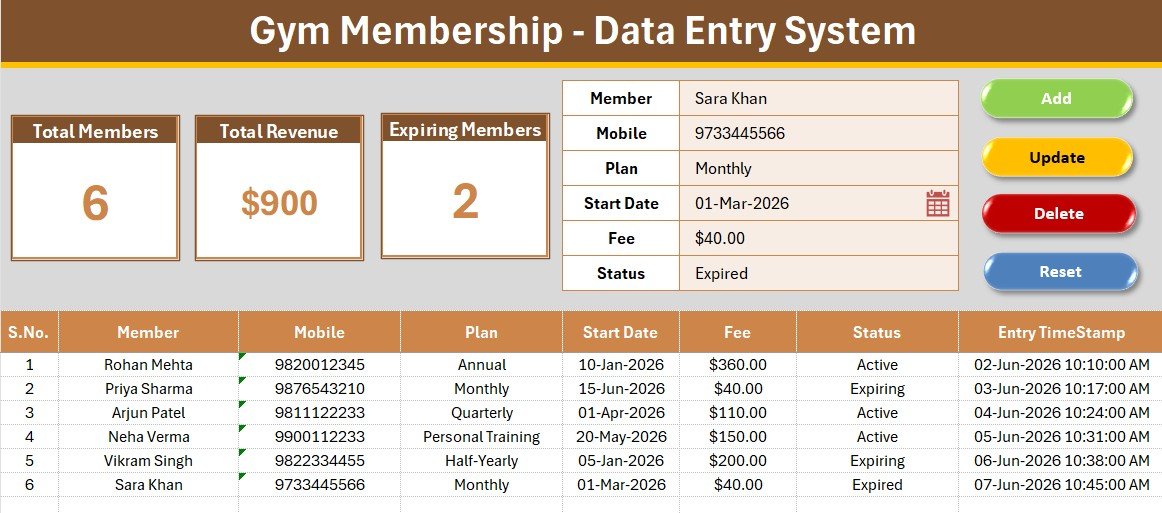
The system is built around a single rule: your front desk should never type the same thing twice. The 6-field form captures Member, Mobile, Plan, Start Date, Fee and Status, and the Plan and Status fields are dropdown-driven from a Setting sheet, so plan names stay consistent across every shift.
Four VBA macros do the heavy lifting. Add_Record saves a new member, Update_Record edits the selected row, Delete_Record removes it after a confirmation prompt, and Reset_Form clears the panel. A double-click loader pulls any existing record straight back into the form for editing.
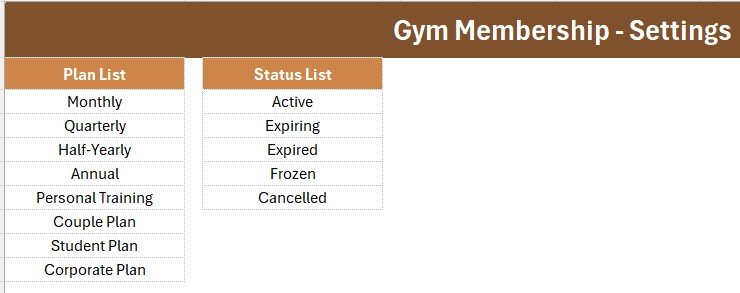
Three definitive facts worth knowing before you download: the template tracks exactly 3 KPI cards (Total Members, Total Revenue, Expiring Members) powered by COUNTA, SUM and COUNTIF; it ships with 8 membership plans (Monthly, Quarterly, Half-Yearly, Annual, Personal Training, Couple Plan, Student Plan, Corporate Plan) and 5 statuses (Active, Expiring, Expired, Frozen, Cancelled); and every record receives an automatic serial number plus an Entry TimeStamp the moment it is saved.
The workbook uses the same one-click entry engine as our Hotel Room Booking Data Entry System in Excel and the Tiffin Subscription Data Entry System in Excel, adapted for gym plans, fees and renewals.
Sheets Explanation
Data Entry Dashboard
The main sheet holds the 3 KPI cards, the member form, four colour-coded action buttons (Add, Update, Delete, Reset) and the records table with auto serial numbers, currency-formatted fees and an Entry TimeStamp column.
Member Form & Records Table
Fill the form, click Add, and the member lands in the table below. Double-click any row to load it back into the form for a one-click Update or Delete — no scrolling through hundreds of rows.
Setting Sheet
Both dropdown lists — Plan and Status — live here, along with linked copies of the KPI stat cards. Add a “Senior Citizen” plan on this sheet and it appears in the form dropdown instantly, no formula edits needed.
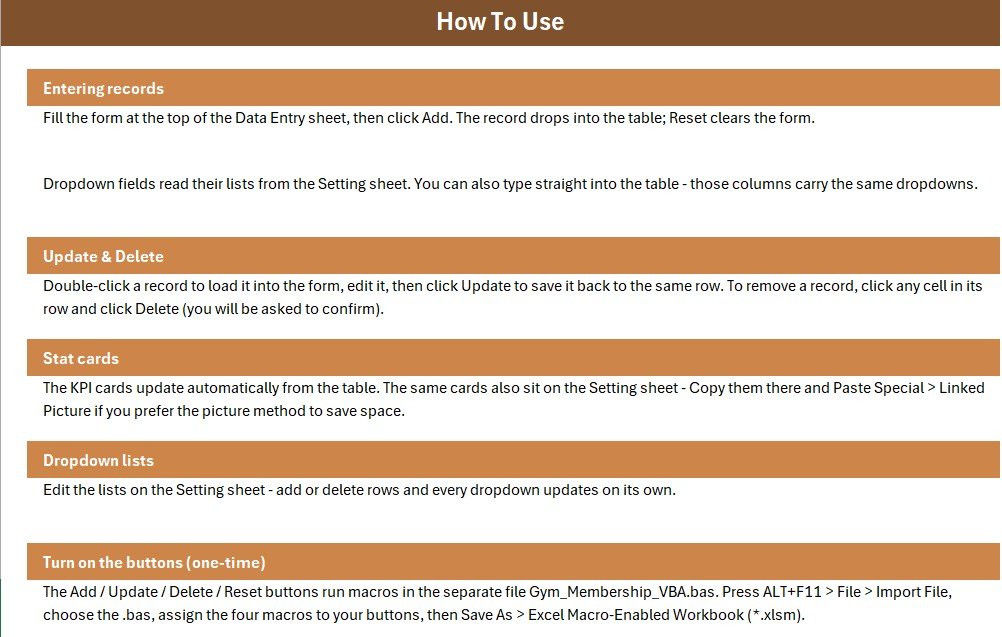
Instructions & Get More Templates
An Instructions sheet documents the one-time VBA activation step by step, and a Get More Templates sheet links to the wider NextGenTemplates catalogue.
Gym Membership Data Entry System vs. Google Sheets Tracker vs. Mindbody / Glofox — Feature Comparison
| Feature | Gym Membership Data Entry System | Google Sheets Tracker | Mindbody / Glofox |
|---|---|---|---|
| Cost | $5.99 one-time ✅ | Free–$12 one-time | $129–$399 / month |
| Platform | Microsoft Excel (desktop) | Browser | Cloud SaaS |
| Setup time | Under 10 minutes ✅ | 15–30 minutes | Days to weeks of onboarding |
| Works offline | Yes ✅ | Limited | No |
| One-click Add / Update / Delete | 4 VBA buttons + double-click edit ✅ | Manual entry | Yes |
| Expiring-member tracking | Live KPI card ✅ | Formula you build yourself | Yes |
| Customizable plans & statuses | Editable Setting sheet ✅ | Yes | Limited by plan tier |
| Year-1 cost (single location) | $5.99 ✅ | ~$12 | $1,548–$4,788+ |
For gym owners who want organised member records and renewal visibility without a monthly software bill, the Gym Membership Data Entry System in Excel sits in the sweet spot.
Who Should Use This Template
Perfect for:
- Independent gym owners with one or two locations and up to a few hundred members
- Personal trainers, yoga studios, CrossFit boxes and martial-arts academies tracking plans and fees
- Front-desk staff who need a fast, offline tool on the reception PC
- Anyone learning how a professional Excel data entry form with VBA is structured
Not a fit if:
- You run a multi-location chain that needs member self-service portals, class booking or automated payment collection
- Several staff must edit simultaneously in the browser — a Google Sheets membership tracker suits that better
Real-World Use Cases
Rakesh runs a 180-member neighbourhood gym. His front desk logs every joiner in the form, and the Expiring Members card tells him each Monday exactly who to call for renewals. He recovers fees that used to vanish with lapsed memberships — without paying $129 a month for Glofox.
Anita is a personal trainer with 35 private clients. She tracks each client’s plan, start date and fee in one sheet, and the Total Revenue card hands her an instant monthly income figure for her accountant, replacing three messy notebooks.
A CrossFit box with two coaches uses the Status dropdown to freeze memberships during injuries and travel. Because Frozen members are excluded from the Expiring count, renewal calls only go to people who actually need them.
Advantages of the Gym Membership Data Entry System in Excel
The biggest advantage is cost certainty: $5.99 once versus $1,548–$4,788 per year for entry-level gym SaaS. The second is speed — a member is added in under 15 seconds via the form, and the double-click loader makes corrections just as fast. Third, everything runs offline on the reception PC, so a broken internet connection never stops sign-ups. Finally, because the data sits in a normal Excel table, you can pivot, chart or export it any way you like — it feeds directly into tools like our Gym Retention Dashboard in Excel.
Opportunities for Improvement
Honest limits, so you buy with open eyes: this is a single-user desktop tool — two receptionists cannot type into the same file at once. It records fees but does not collect payments; there is no member-facing portal or booking calendar. Mobile entry means opening the file in Excel on a tablet rather than a dedicated app. And because the buttons run on VBA, Excel Online is not supported. If you outgrow those limits, the multi-user Gym and Fitness Center Membership Management System Web App is the natural upgrade.
Best Practices
Import the VBA module before doing anything else, and save as .xlsm immediately so the buttons never detach. Standardise your Plan list on day one — renaming plans after 300 entries means cleaning history. Review the Expiring Members card on a fixed weekday and set Status to Expiring about 15 days before a plan ends so the counter gives you a real call list. Keep a weekly backup copy of the file; it is your member database. Microsoft’s own guidance on getting started with VBA in Office and enabling macros safely is worth a read if macros are new to you.
Explore Relevant Templates
- Gym and Fitness Center Membership Management System Web App – multi-user login, roles, dashboards and reports
- Gym Retention Dashboard in Excel – churn, retention and revenue analytics for your member base
- Membership Renewal Calendar in Excel – month-by-month renewal planning
- Subscription and Membership Tracker in Google Sheets – the browser-based, collaborative alternative
- Excel VBA Tools & Utilities Pack – 8 premium VBA templates in one 40%-off bundle
Frequently Asked Questions
What does the Gym Membership Data Entry System in Excel track?
The Gym Membership Data Entry System in Excel tracks six fields per member — Member, Mobile, Plan, Start Date, Fee and Status — plus three live KPI cards: Total Members, Total Revenue and Expiring Members. Every stat recalculates automatically as records change.
Do I need to know VBA to use it?
No. The Gym Membership Data Entry System ships with a ready-made VBA module and step-by-step import instructions on its Instructions sheet. You import the file once, assign the four buttons, save as .xlsm, and never touch code again.
How does this compare to Mindbody or Glofox?
Mindbody and Glofox cost $129–$399 per month and add booking portals plus payment processing. The Gym Membership Data Entry System in Excel costs $5.99 once and covers the core job — member records, fees and renewal visibility — offline on your own PC.
How long does setup take?
Under 10 minutes. Unzip the download, open the workbook, import the VBA module via ALT+F11, add the four buttons, and save as a macro-enabled workbook. The Gym Membership Data Entry System arrives with sample records so you see it working immediately.
Can I customise the membership plans and statuses?
Yes. The Setting sheet holds both dropdown lists. Add, rename or remove plans like Monthly, Annual or Corporate, and the Gym Membership Data Entry System updates its form dropdowns instantly — no formula editing required.
Which Excel versions does it work with?
The Gym Membership Data Entry System in Excel runs on desktop Excel 2016, 2019, 2021 and Microsoft 365 for Windows, and on Mac versions that support VBA macros. Excel Online is not supported because browser Excel cannot run macros.
About the Author
Built by PK — Microsoft Certified Professional with 15+ years of Excel, Google Sheets, and Power BI experience. Founder of NextGenTemplates, reaching 300K+ subscribers across YouTube channels. Every template is hand-built and tested before release.
Conclusion
If your gym’s member list currently lives in a bare spreadsheet — or worse, a register book — the Gym Membership Data Entry System in Excel gives you a validated entry form, live revenue and renewal counters, and one-click record management for the price of a protein shake.
👉 Click here to Purchase the Gym Membership Data Entry System in Excel
✅ Instant download · One-time payment · No subscription
🎥 For step-by-step video tutorials, visit Youtube.com/@PK-AnExcelExpert
📅 Last updated: July 2026