The Tiffin Subscription Data Entry System in Excel packs a complete meal-subscription back office into one workbook: a 6-field VBA entry form, 3 live KPI cards (Active Subscriptions, Total Revenue, Renewals), 8 pre-loaded meal plans, 5 subscription statuses, and a records table with automatic serial numbers and entry timestamps. Setup takes under 10 minutes and costs $5.99 once — versus $39–$249 per month for subscription-management SaaS.
Most tiffin services, cloud kitchens, and home chefs still track subscribers in notebooks, WhatsApp chats, or bare spreadsheets — which means missed renewals, double entries, and no idea what this month’s revenue actually is. This article walks through every sheet of the Tiffin Subscription Data Entry System in Excel, how the VBA buttons work, and where it fits against DIY trackers and paid platforms.
Key Features of the Tiffin Subscription Data Entry System in Excel
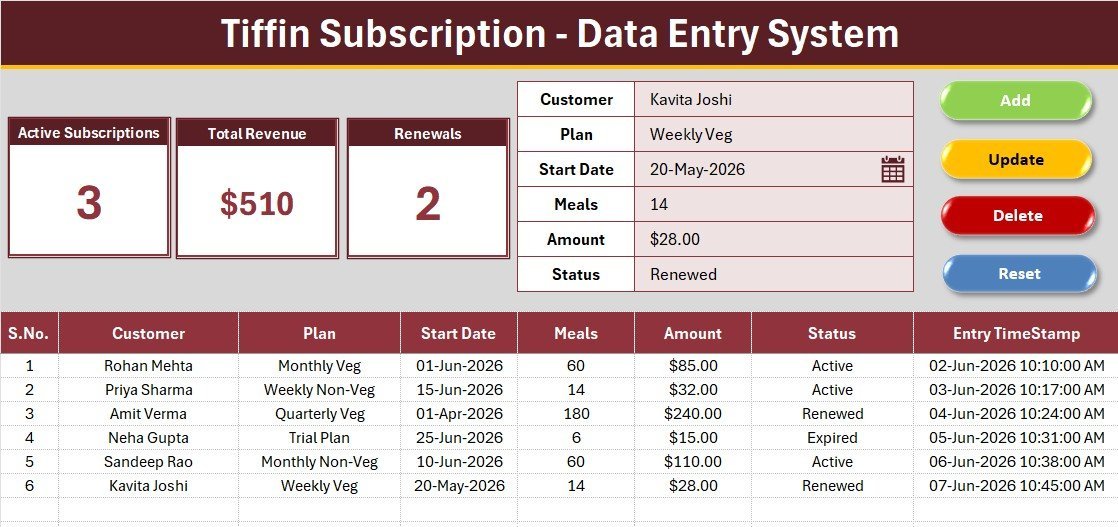
- One-click record management — four VBA buttons (Add, Update, Delete, Reset) handle every operation. The system captures 6 fields per record: Customer, Plan, Start Date, Meals, Amount, and Status.
- 3 live KPI cards — the dashboard tracks Active Subscriptions with a COUNTIF on Status, Total Revenue with a SUM on Amount, and Renewals with a COUNTIF on the Renewed status. All three recalculate the instant a record changes.
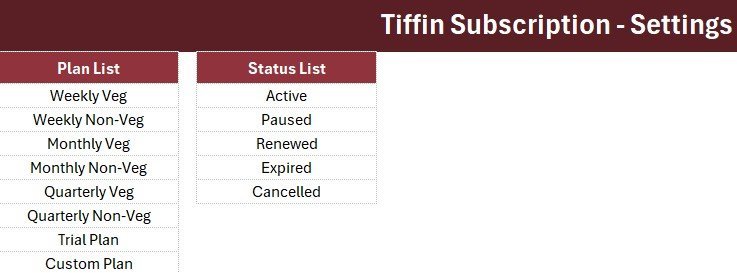
- 8 pre-loaded meal plans — Weekly Veg, Weekly Non-Veg, Monthly Veg, Monthly Non-Veg, Quarterly Veg, Quarterly Non-Veg, Trial Plan, and Custom Plan ship as an editable dropdown wired to the Setting sheet.
- Full lifecycle statuses — Active, Paused, Renewed, Expired, and Cancelled cover every stage of a subscription, so filtering the table by Status instantly answers “who needs a renewal call this week?”
- Audit-ready records — every entry gets an automatic serial number and an Entry TimeStamp, giving a clean, dated history of the subscriber base.
Sheets Explanation
Sheet 1: Data Entry Dashboard
The main working screen combines the 3 KPI cards along the top, the 6-field entry form with dropdown-driven Plan and Status fields, the 2×2 Add/Update/Delete/Reset button block, and the records table below with auto serial numbers, currency formatting on Amount, and the Entry TimeStamp column.
Sheet 2: Setting Sheet
Holds the Plan and Status dropdown source lists as named ranges plus duplicated KPI stat cards. Add a ninth meal plan or rename a status here and the form dropdowns update instantly — no formulas or code need editing.
Sheet 3: Instructions Sheet
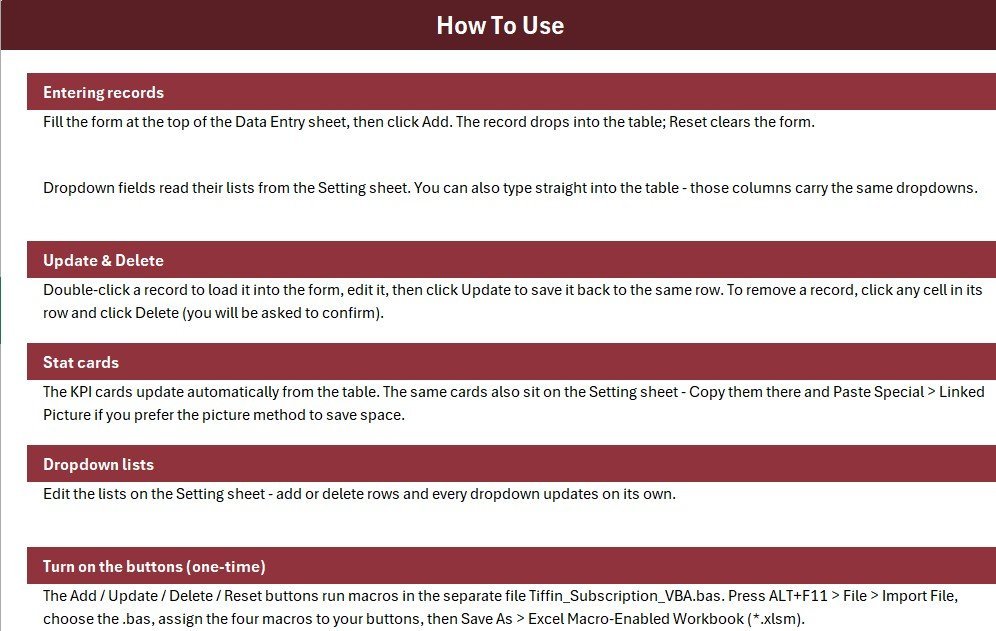
A built-in activation guide covering the one-time VBA import, macro-to-button assignment, and the Save As to .xlsm — so a non-technical operator can go from download to first entry without leaving the workbook.
Tiffin Subscription Data Entry System vs. Google Sheets vs. Zoho Subscriptions — Feature Comparison
| Feature | Tiffin Subscription Data Entry System | Google Sheets DIY Tracker | Zoho Subscriptions / Chargebee |
|---|---|---|---|
| Cost | $5.99 one-time | Free (build it yourself) | $39–$249 / month |
| Platform | Microsoft Excel (offline) | Browser only | Cloud SaaS |
| Setup time | ✅ Under 10 minutes | 3–6 hours to build | 1–2 days of configuration |
| One-click Add/Update/Delete form | ✅ Built-in VBA buttons | Manual row editing | ✅ Included |
| Real-time team collaboration | Shared drive only | ✅ Yes | ✅ Yes |
| Mobile access | Excel mobile (view) | ✅ Yes | ✅ Yes |
| Customizable fields & dropdowns | ✅ Fully editable Setting sheet | ✅ Yes, manual | Limited to plan structure |
| Works offline | ✅ Yes | Limited | ❌ No |
| Year-1 cost at 5 users | $5.99 total | $0 + your build time | $468–$2,988+ |
For tiffin services that want a real subscription entry form without paying monthly SaaS fees, the Tiffin Subscription Data Entry System sits in the sweet spot.
Who Should Use This Template
Perfect for:
- Tiffin service owners with 20–500 subscribers currently juggling notebooks, diaries, or WhatsApp groups
- Cloud kitchens and home chefs running weekly, monthly, or quarterly meal plans who need renewal and revenue visibility
- Dabba and meal-prep delivery businesses where one operator enters records on a single PC
- Anyone learning practical Excel VBA who wants a working reference for form-driven data entry — similar in spirit to our Restaurant Order Data Entry System in Excel
Not a fit if:
- You run multiple branches needing simultaneous multi-user entry — a browser-based system like the Restaurant POS Web App fits better
- You need automated recurring billing, payment gateways, or dunning emails — that is billing-SaaS territory, not a tracker’s job
Real-World Use Cases
Meena runs a 120-subscriber tiffin service from her home kitchen in Pune. Before, three notebooks held customer names, plans, and payments — and month-end revenue was a guess. Now she logs each subscriber once through the form, and the Total Revenue card gives her an exact figure every day. Monday mornings she checks the Renewals card and calls anyone whose plan lapsed.
Arjun operates a cloud kitchen serving corporate lunch plans in Bengaluru. He filters the records table by the Paused status in the last week of every month, calls those 10–15 customers, and converts about half back to Active — a retention routine that took him minutes to set up and would have cost $39/month on a subscription platform.
Priya manages orders for her mother’s weekend thali service. She uses the Trial Plan option for first-time customers, then updates their record to Monthly Veg with the Update button once they commit — the original entry timestamp preserves when each customer first tried the service.
Advantages of the Tiffin Subscription Data Entry System
The biggest gain is error prevention: because the Update and Delete buttons operate on a selected record rather than raw cells, you never overwrite the wrong row — the number-one failure mode of plain spreadsheet trackers. The KPI cards remove month-end arithmetic entirely, and the $5.99 one-time price means a tiffin service saves $462+ in year one versus the cheapest comparable SaaS tier. Because everything runs in desktop Excel, the system works offline and keeps customer data on your own machine — relevant for small food businesses that don’t want subscriber lists in a third-party cloud.
Opportunities for Improvement
Honest limitations: this is a single-operator tool — two people cannot enter records simultaneously the way they can in Google Sheets. There is no automated payment collection or reminder email; renewals still require a phone call or message. And because the buttons run on VBA, the system needs desktop Excel on Windows with macros enabled — Excel Online and mobile can view the data but not run the form. If your operation outgrows these constraints, moving to a multi-user web app is the natural next step.
Best Practices
- Enter every new customer through the form only — never type directly into the records table, or the serial numbers and timestamps lose their integrity.
- Review the Paused and Expired statuses weekly; the fastest revenue win in any subscription business is reactivating a lapsed customer.
- Customize the meal plans on the Setting sheet before your first real entry so historical records use your final plan names.
- Keep a dated backup copy of the .xlsm at month-end — one file per month gives you a free historical archive.
Explore Relevant Templates
- Tiffin Subscription Data Entry System in Excel — the product page for this template
- Property Enquiry Data Entry System in Excel — the same one-click form pattern applied to real-estate lead tracking
- Rent Collection Data Entry System in Excel — track tenants, due dates, and payments with live KPIs
- Tracker Toolkit — 12 Premium Excel + Google Sheets Templates — bundle of 12 trackers at 44% off
- Excel VBA Tools collection — all one-click data entry systems in one place
Frequently Asked Questions
What does the Tiffin Subscription Data Entry System track?
The Tiffin Subscription Data Entry System tracks 6 fields per subscription — Customer, Plan, Start Date, Meals, Amount, and Status — plus 3 live KPIs: Active Subscriptions, Total Revenue, and Renewals. Every metric updates automatically the moment you add or edit a record.
How long does setup take?
Under 10 minutes. Open the Tiffin Subscription Data Entry System, press ALT+F11, import the included VBA module, assign the four macros to the buttons, and save once as .xlsm. The built-in Instructions sheet covers every step with no coding required.
How does this compare to Zoho Subscriptions or Chargebee?
Zoho Subscriptions and Chargebee start around $39/month and are built for automated billing. The Tiffin Subscription Data Entry System costs $5.99 once and focuses on record-keeping, KPIs, and renewal tracking — the right fit when you collect payments directly from customers.
Can I add my own meal plans?
Yes. The Tiffin Subscription Data Entry System stores all Plan and Status options on the Setting sheet. Edit, add, or remove any value there and the form dropdowns update immediately, without touching formulas or VBA code.
Do I need to know VBA?
No. The VBA module ships ready-made with the Tiffin Subscription Data Entry System and is imported once during setup. Daily work happens entirely through the form and the Add, Update, Delete, and Reset buttons. For those curious how the macros work, Microsoft’s Excel VBA reference documents every object the module uses.
Which Excel versions does it support?
The Tiffin Subscription Data Entry System runs in desktop Microsoft Excel 2016, 2019, 2021, and Microsoft 365 on Windows, since macros must be enabled. Excel Online and the mobile apps can view the data but cannot execute the VBA buttons.
About the Author
Built by PK — Microsoft Certified Professional with 15+ years of Excel, Google Sheets, and Power BI experience. Founder of NextGenTemplates, reaching 300K+ subscribers across YouTube channels. Every template is hand-built and tested before release.
Conclusion
If your tiffin or meal-subscription business still lives in notebooks and chat threads, the Tiffin Subscription Data Entry System in Excel replaces all of it with one $5.99 workbook: a proper entry form, live Active/Revenue/Renewal KPIs, and a timestamped record of every subscriber.
👉 Click here to Purchase the Tiffin Subscription Data Entry System in Excel
Instant download · One-time payment · No subscription
🎥 For step-by-step video tutorials, visit Youtube.com/@PK-AnExcelExpert
Last updated: July 2026