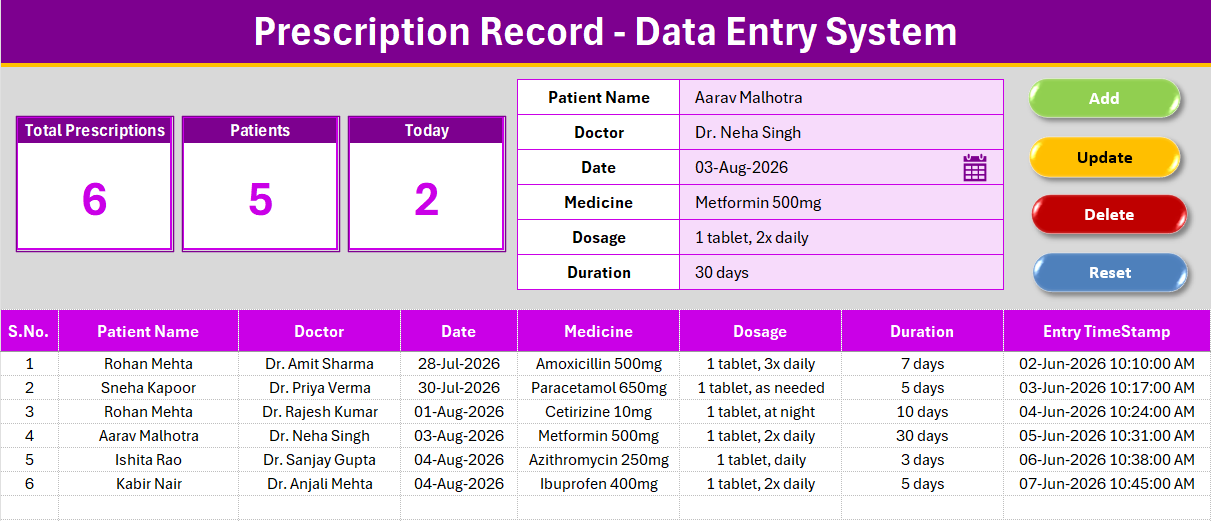
Small clinics and pharmacies that log prescriptions in a paper register or a plain spreadsheet lose two things: speed and any sense of the day’s numbers. The Prescription Record Data Entry System in Excel replaces both with a 6-field form, a Doctor dropdown pulling from 10 pre-loaded names, and 3 KPI cards — Total Prescriptions, Patients, and Today — that recalculate the instant a record is added.
Every prescription captures Patient Name, Doctor, Date, Medicine, Dosage and Duration, and every record gets an auto-numbered S.No and an Entry TimeStamp with zero manual formulas to maintain. Setup takes under 10 minutes, and the whole workbook runs offline, which matters for a front desk that doesn’t want patient data touching a cloud service.
Prescription Record Data Entry System in Excel
Click here to buy the Prescription Record Data Entry System in Excel.
Key Features of Prescription Record Data Entry System in Excel
A 6-field form built for speed. Patient Name, Doctor, Date, Medicine, Dosage and Duration sit in one input column on the Data Entry sheet. Doctor is a dropdown pulling from a named range on the Setting sheet, so front-desk staff never mistype a physician’s name.
Four VBA macros handle the entire record lifecycle. Add writes a new row, stamps the S.No formula, and logs an Entry TimeStamp. Update rewrites the row loaded by double-clicking a record. Delete removes the selected record after a confirmation prompt. Reset clears the form for the next entry.
Three KPI cards that never need a manual refresh. Total Prescriptions counts every record with a live COUNTA formula. Patients counts unique patient names, so a returning patient doesn’t inflate the count. Today counts how many prescriptions were logged so far today using a date-matched COUNTIFS formula.
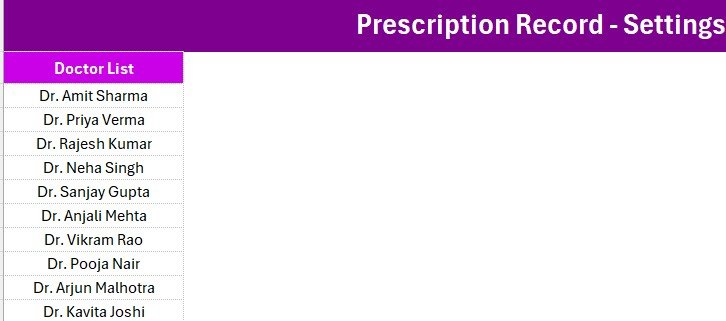
An editable Setting sheet. The Doctor list ships with 10 names, and adding or removing one updates the dropdown on the Data Entry sheet immediately. The sheet also holds a duplicate set of the KPI cards for anyone using the Copy → Paste Special → Linked Picture method in reports.
Consistent house styling. Aptos Narrow font, a dark heading bar, a gold divider line and a gray dashboard panel run through every sheet — the same structure NextGenTemplates uses across its data entry system catalog, so anyone who has used one of these tools before will recognize this one immediately.
Sheets Explanation
Data Entry Sheet
The working sheet. The 3 KPI cards sit above the form; the form captures all 6 fields; the records table below auto-numbers and time-stamps every row as it’s added.
Data Entry sheet
Setting Sheet
Holds the editable Doctor dropdown list and the duplicate KPI cards. This is where a clinic manager adds a new physician or retires one without touching any formula or named range directly.
Setting sheet
Instructions & VBA Setup
A one-page walkthrough of the one-time activation steps: importing the .bas module, wiring the four buttons, and saving as .xlsm, plus notes on how each macro behaves.
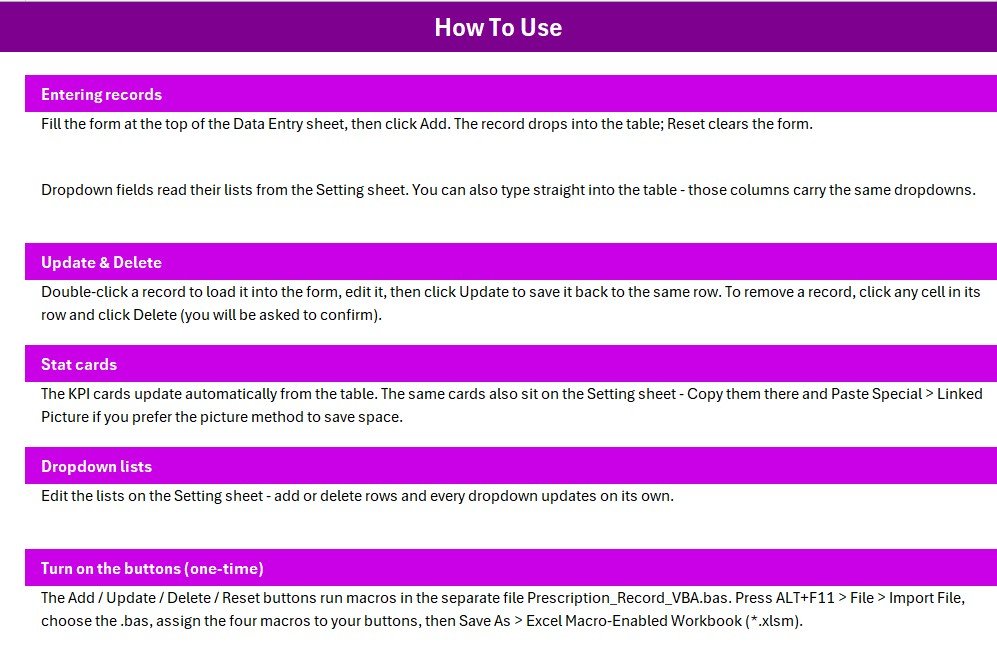
Instructions sheet
Prescription Record Data Entry System in Excel vs. Google Sheets vs. Paid Healthcare SaaS — Feature Comparison
| Feature | Prescription Record Data Entry System in Excel | Google Sheets equivalent | Paid Healthcare SaaS (e.g. DrChrono, Practice Fusion) |
|---|---|---|---|
| Cost | $5.99 one-time | Free, but you build the form and macros yourself | $50-300 / provider / month |
| Platform | Microsoft Excel + VBA | Google Sheets + Apps Script | Vendor-hosted web app |
| Setup time | Under 10 minutes | Hours of Apps Script writing | Onboarding and training required |
| Real-time team collaboration | Single-user file (shareable copy) | Multiple users live | Role-based multi-user |
| Mobile access | Via Excel mobile app | Native mobile editing | Dedicated mobile app |
| Customizable fields | Fully unlocked, edit any label | Fully customizable | Limited to vendor’s field set |
| Data stays local / offline | Yes — nothing leaves your machine | No — lives in Google’s cloud | No — hosted on vendor servers |
| Year-1 cost at 5 users | $5.99 (one license, reusable) | $0 + build time | $3,000-$18,000 |
For a solo clinic or small pharmacy that wants a prescription log without a monthly EHR bill, the Prescription Record Data Entry System in Excel sits in the sweet spot.
Who Should Use This Template
Perfect for:
- Solo practitioners and small clinics logging 5-100 prescriptions a day
- Pharmacy assistants who need a quick local log alongside a POS system
- Home-visit doctors and nurses who want an offline record on a laptop
Not a fit if:
- You run a hospital that needs HIPAA-audited, multi-user EHR software with e-prescribing to pharmacies
- Several front-desk staff need to edit the same file simultaneously in real time
Real-World Use Cases
Meera runs the front desk at a 2-doctor family clinic. She logs each prescription as patients check out, then checks the Today card each evening to reconcile the day’s visits, without paying a monthly EHR fee for a two-provider practice.
Arjun manages medication logs for a home-visit physiotherapy service. He keeps the workbook on his laptop and uses the Patients card to see how many distinct patients he’s treated this month, separate from the raw prescription count.
Divya assists at an independent pharmacy counter. She keeps this workbook open beside the billing software as a fast cross-reference log, using the Doctor dropdown to avoid retyping names for the clinic’s regular prescribers.
Advantages of Prescription Record Data Entry System in Excel
The biggest advantage is that nothing needs configuring before the first entry. The form, the dropdown, the KPI formulas, and the VBA macros are already wired together, so the only setup step is importing one .bas file and assigning four buttons. That is a stark contrast to building the same thing from a blank Excel sheet or a blank Google Sheet.
The second advantage is that patient data never leaves the machine it’s entered on. For a solo practice or small pharmacy that doesn’t want to sign a data-processing agreement with a SaaS vendor just to log prescriptions, an offline workbook removes that conversation entirely.
Opportunities for Improvement
This is a single-user Excel file, so it does not support several people editing the same workbook at once the way a cloud-hosted EHR would. Practices that need simultaneous multi-user access, e-prescribing to a pharmacy network, or insurance billing integration will outgrow this template and should look at a dedicated practice-management system instead.
Best Practices
Keep a backup copy of the workbook before your first bulk import of historical records. Standardize Doctor names in the Setting sheet before you start entering data, since a name typed two different ways will split the Patients count logic across rows inconsistently. Save as .xlsm only after testing the four macros once, and store the file on an encrypted or access-controlled drive since it may contain identifiable patient information.
For general guidance on securing spreadsheets that hold personal data, see Microsoft’s compliance documentation.
Explore Relevant Templates
Pair it with the Patient Visit Log Data Entry System in Excel or the Patient Appointment Data Entry System in Excel for a fuller front-desk toolkit. For a bigger practice, the Pharmacy Inventory and Billing Management System Web App adds inventory and billing on top of prescription tracking.
💎 Save 38% — get 8 healthcare templates including two full practice-management systems in the Healthcare & Hospital Management Bundle.
Frequently Asked Questions
What does the Prescription Record Data Entry System in Excel track?
It tracks Patient Name, Doctor, Date, Medicine, Dosage and Duration for every prescription, and rolls those records up into Total Prescriptions, Patients, and Today KPI cards that update automatically.
Does it need an internet connection?
No. The Prescription Record Data Entry System in Excel is a local Excel workbook that runs offline once macros are enabled, and no data is sent anywhere.
Can I add more doctors to the dropdown?
Yes. Open the Setting sheet, add or remove names in the Doctor list, and the dropdown on the Data Entry sheet updates immediately for every future entry.
How does this compare to a paid EHR like Practice Fusion?
Paid EHR platforms add e-prescribing, insurance billing, and multi-provider scheduling for $50-300 per provider monthly. The Prescription Record Data Entry System in Excel is a $5.99 one-time log for practices that don’t need that overhead.
How long does setup take?
Under 10 minutes: import the .bas file, assign the four macros to buttons, and save as .xlsm.
Is the Patients KPI card the same as Total Prescriptions?
No. Total Prescriptions counts every row in the table, while Patients counts unique patient names, so a patient who returns for a second prescription is only counted once toward Patients.
Which version of Excel do I need?
Any modern desktop version of Microsoft Excel that supports VBA macros — Excel 2016 or later, including Microsoft 365.
About the Author
Built by PK — Microsoft Certified Professional with 15+ years of Excel, Google Sheets, and Power BI experience. Founder of NextGenTemplates, reaching 300K+ subscribers across YouTube channels. Every template is hand-built and tested before release.
Conclusion
The Prescription Record Data Entry System in Excel gives a solo practice, small clinic, or independent pharmacy a working prescription log in under 10 minutes — a 6-field form, an editable Doctor dropdown, and 3 live KPI cards, all without a monthly subscription or a cloud data-sharing agreement.
Click here to Purchase the Prescription Record Data Entry System in Excel.
✅ Instant download · One-time payment · No subscription
Last updated: August 2026
Visit our YouTube channel for step-by-step Excel and VBA tutorials.