The Blood Donor Register Data Entry System in Excel stores 6 fields per donor and rolls them into 4 live KPI cards that recalculate the moment a record changes. The Setting sheet carries 25 editable dropdown values across 3 lists, the records table is pre-formatted for 200 donor rows, and the workbook ships with 208 verified formulas and 6 sample donors already loaded. For a one-time $5.99, a blood bank, NGO or hospital front desk gets a callable donor list without a monthly subscription.
Most small donor registers live in a WhatsApp group or a plain spreadsheet with no structure. That works until someone needs O negative at 2 a.m. and nobody can answer two questions quickly: how many O- donors do we have, and which of them are actually eligible to give right now. This Excel blood donor management system closes that gap by putting the donor form, the blood-group counts and the availability status in one screen.

Get the Blood Donor Register Data Entry System in Excel from NextGenTemplates.
Key Features of the Blood Donor Register Data Entry System in Excel
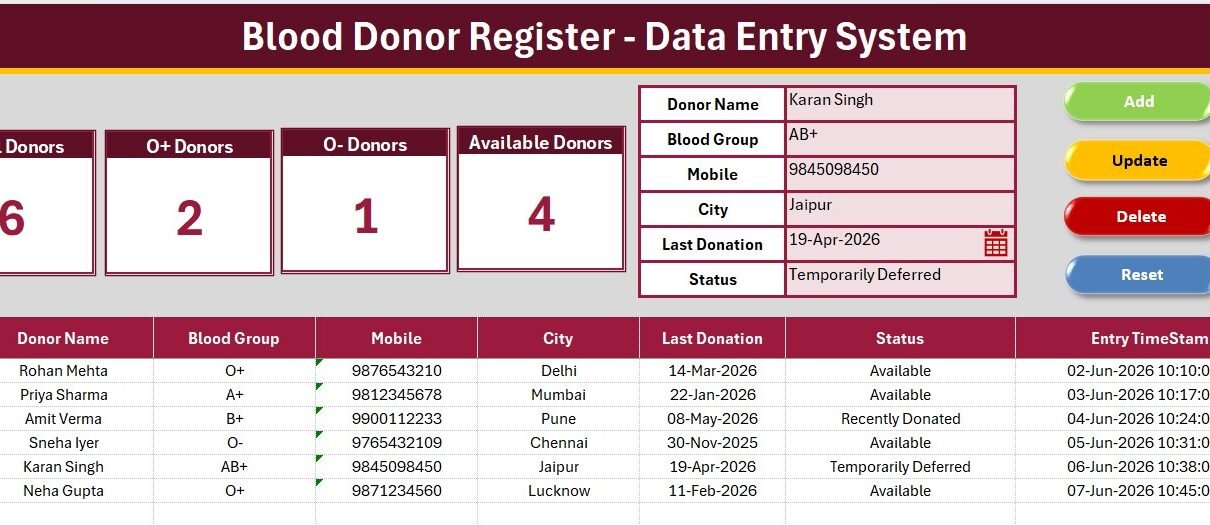
- 4 live KPI cards: Total Donors, O+ Donors, O- Donors and Available Donors, each driven by a COUNTA or COUNTIF formula reading the whole column.
- 6 donor fields: Donor Name, Blood Group, Mobile, City, Last Donation and Status, in that order across the table.
- 4 VBA buttons: Add, Update, Delete and Reset, imported from a separate .bas module so the workbook downloads clean.
- 25 editable dropdown values: all 8 blood groups, 12 cities and 5 status options, all sourced from the Setting sheet through named ranges.
- Auto serial number and Entry TimeStamp: written by the Add macro so no one has to number rows by hand.
- Double-click to edit: an optional handler loads any donor row back into the form for correction.
- 200 pre-formatted rows with frozen headers, and formulas that keep counting correctly beyond that.
- 4 sheets: Data Entry, Setting, Instructions and Get More Templates, in one deep-maroon house style.
Mobile numbers are deliberately stored as text rather than as numbers, so a leading zero survives and Excel never converts a 10-digit number into scientific notation. It is a small decision that saves a lot of re-typing on a real register.
Sheets Explanation
1 – Data Entry Sheet
This is the working screen and the only sheet most users ever touch. Four KPI cards sit along the top left, the six-field donor form sits to their right, and the Add, Delete, Update and Reset buttons form a 2×2 block beside the form. Below the panel, the records table runs S.No., Donor Name, Blood Group, Mobile, City, Last Donation, Status and Entry TimeStamp, with frozen panes so the header row stays visible as the register grows.
2 – Setting Sheet
Three source lists live here: Blood Group with all 8 groups, City with 12 starter entries, and Status with Available, Recently Donated, Temporarily Deferred, Medically Unfit and Inactive. Each list feeds its dropdown through a named range, so adding a city is a matter of typing it into the list, not editing a validation rule. The same 4 KPI cards are duplicated on this sheet so they can be copied and pasted elsewhere as a Linked Picture.

3 – Instructions and Get More Templates Sheets
Instructions covers entering records, the update and delete flow, editing the dropdown lists, and the one-time VBA activation. Get More Templates links out to the wider NextGenTemplates library. Both sheets carry the same heading bar as the rest of the workbook, so the file looks finished rather than half-built.

Blood Donor Register in Excel vs. Google Sheets Donor Tracker vs. Paid Blood Bank SaaS – Feature Comparison
| Feature | Blood Donor Register Data Entry System in Excel | Google Sheets donor tracker | Paid blood bank / donor CRM |
|---|---|---|---|
| Cost | $5.99 one-time | $8-$12 one-time | Typically subscription-priced per month |
| Platform | Microsoft Excel, works fully offline | Browser, needs internet | Vendor-hosted cloud |
| Setup time | About 5 minutes after VBA import | Under 2 minutes | Days, often with paid onboarding |
| Real-time team collaboration | One machine at a time | Native multi-user editing | Yes, billed per seat |
| Mobile access | Excel mobile app, view-oriented | Sheets app | Yes |
| Customisable fields | Full control over sheets, lists and VBA | Editable | Limited to vendor settings |
| Share with link | File copy or email | Yes | Login controlled |
| Year-1 cost at 5 users | $5.99 total | $8-$12 total | Recurring per-seat billing |
| Blood-group-wise donor counts | Built in, O+ and O- cards | Manual build | Yes |
| Works with no internet | Yes | No | No |
For blood banks, NGO drives and hospital desks that need a callable donor list without a monthly bill, the Blood Donor Register Data Entry System in Excel sits in the sweet spot.
Who Should Use This Template
Perfect for:
- Small and mid-size blood banks maintaining a callable donor list of 50 to 5,000 records
- NGOs, Rotary and Lions clubs running periodic blood donation camps
- Hospital front desks and pathology labs needing a fast blood-group-wise donor lookup
- College and corporate volunteer coordinators maintaining a standing donor panel
- Anyone who wants donor records offline on their own machine with no subscription
Not a fit if:
- You need HIPAA-certified or regulator-approved storage of medical records; a workbook is not a certified system
- Several people must edit the register at the same time, since Excel VBA works one machine at a time
- You also need unit inventory, cross-matching, component separation or expiry tracking
- You are on Mac and need the buttons, as the macros target Excel on Windows
Real-World Use Cases
Dr. Anita runs a 40-bed hospital blood bank. When a B negative request comes in overnight, she filters the Blood Group column, sorts by Last Donation, and calls the donors past the 90-day interval who are marked Available. What used to be a scroll through a WhatsApp group is now a 30-second filter.
Ravi coordinates donation camps for a Rotary club. Before each camp he checks the Total Donors card against the previous quarter, filters City to the camp location, and hands the Available list to his volunteers. Four camps a year, one $5.99 purchase, no platform fee.
Meera manages a college donor panel of roughly 600 students. Each semester she marks graduating students Inactive through the form and adds new volunteers. The O- Donors card gives her the emergency shortlist the campus clinic asks for twice a year.
Advantages of the Blood Donor Register Data Entry System in Excel
The first advantage is speed of answer. Because the KPI cards read whole columns rather than a fixed range, the Total, O+, O- and Available counts are always current. Nobody has to rebuild a pivot table before a phone call.
The second is data discipline. Blood Group, City and Status are dropdown-controlled, so the register never accumulates three spellings of the same city or five ways of writing O positive. That consistency is what makes filtering reliable when it matters.
The third is cost and ownership. The file sits on your own machine, opens without internet, and costs nothing after the initial purchase. Because the VBA source is included and unlocked, you can rename fields or add columns yourself; Microsoft’s Excel VBA reference documentation covers the object model if you want to extend the macros.
Opportunities for Improvement
Being straight about the limits: this is a donor register, not a blood bank management system. It does not track blood units, storage temperature, component separation, cross-matching or expiry dates. If you need those, the register is the wrong tool.
It is also single-user by nature. Excel VBA runs on one machine at a time, so a two-person reception desk sharing the file will run into locking. And because donor records include health-adjacent personal data, storage and consent obligations sit with you: a spreadsheet does not provide certified audit trails or access controls, so review your local requirements before loading real records.
Finally, the eligibility window is not automated. The register stores Last Donation as a date, but it does not calculate a next-eligible date for you. Adding a helper column with a simple date formula is a five-minute change if you want that.
Best Practices
- Fill in the Setting sheet before entering a single donor, especially the City list, so dropdowns are right from day one.
- Keep Status genuinely current. An out-of-date Available flag is worse than no flag, because it wastes a call in an emergency.
- Record Last Donation every time, even for a deferred donor; it is what makes the eligibility filter work.
- Use Update rather than typing over a row, so the Entry TimeStamp reflects the real edit.
- Keep a backup copy before changing formulas or adding columns.
- Collect and store donor consent for contact separately, in line with your local rules.
Explore Relevant Templates
- Blood Bank Management System Tracker in Google Sheets for the multi-user browser route (read the walkthrough).
- Blood Bank Management System Web App for full donor, stock and issue management with logins.
- Blood Banks Dashboard in Excel for the reporting layer once the register has history.
- Vaccination Record Data Entry System in Excel and Doctor Duty Roster Data Entry System in Excel for the same form-and-KPI structure.
- Healthcare Administrator Toolkit bundles 9 healthcare Excel tools at a lower combined price.
Frequently Asked Questions
What does the Blood Donor Register Data Entry System in Excel track?
The Blood Donor Register Data Entry System in Excel tracks 6 fields per donor – Donor Name, Blood Group, Mobile, City, Last Donation and Status – and shows 4 live KPI cards: Total Donors, O+ Donors, O- Donors and Available Donors. All four recalculate automatically as records change.
How long does setup take?
About 5 minutes. Import the included VBA module via ALT+F11, assign Add_Record, Update_Record, Delete_Record and Reset_Form to four buttons, and save the file as .xlsm. After that one-time activation the Blood Donor Register Data Entry System in Excel is ready for live records.
Can I edit the blood group, city and status lists?
Yes. All 25 dropdown values sit on the Setting sheet. Add or delete rows in any of the 3 lists and every dropdown in the Blood Donor Register Data Entry System in Excel updates automatically through named ranges, with no formula editing required.
How does this compare to paid blood bank software?
Paid donor CRM and blood bank platforms bill monthly per seat and add unit inventory, cross-matching and compliance modules. The Blood Donor Register Data Entry System in Excel is a one-time $5.99 purchase covering the donor register itself, running offline with no vendor lock-in.
Why does the O- card matter so much?
O negative is the universal red-cell donor group, so O- donors can supply patients of any blood type in an emergency. The Blood Donor Register Data Entry System in Excel puts that count on a dedicated card so the number is visible without filtering or sorting.
How many donor records can it hold?
The table is pre-formatted for 200 rows and the Add macro appends beyond that as needed. Because the KPI formulas in the Blood Donor Register Data Entry System in Excel read the full column, the counts stay accurate however large the register becomes.
Does it work on Mac or in Excel Online?
The workbook opens anywhere, but the Add, Update, Delete and Reset buttons need desktop Excel with macros enabled and will not run in Excel Online. For a browser-based multi-user option, use the Blood Bank Management System Tracker in Google Sheets instead.
About the Author
Built by PK – Microsoft Certified Professional with 15+ years of Excel, Google Sheets, and Power BI experience. Founder of NextGenTemplates, reaching 300K+ subscribers across YouTube channels. Every template is hand-built and tested before release.
Conclusion
If your donor list currently lives in a chat group or an unstructured spreadsheet, the Blood Donor Register Data Entry System in Excel replaces it with something that answers the emergency question in seconds: who is available, in which group, in which city, and when did they last donate. Six fields, four live cards, 25 editable dropdown values, and roughly five minutes of setup.
Click here to Purchase the Blood Donor Register Data Entry System in Excel
Instant download – One-time payment – No subscription
For more Excel and VBA tutorials, visit Youtube.com/@PK-AnExcelExpert.
Last updated: August 2026