A boarding desk can turn into a tangle of paper notes once pet names, owners, arrival dates, rooms, fees, and stay status are stored in separate places. The Pet Boarding Data Entry System in Excel keeps 9 record fields, 4 live summary cards, and 3 working sheets in one macro-enabled workbook. Its sample dataset demonstrates 6 bookings with $1,205 in recorded revenue, 2 pets checked in, and 1 pending booking. This is not a full kennel SaaS platform; it is a focused, editable Excel register for small operators who want a clear local workflow without a recurring subscription.
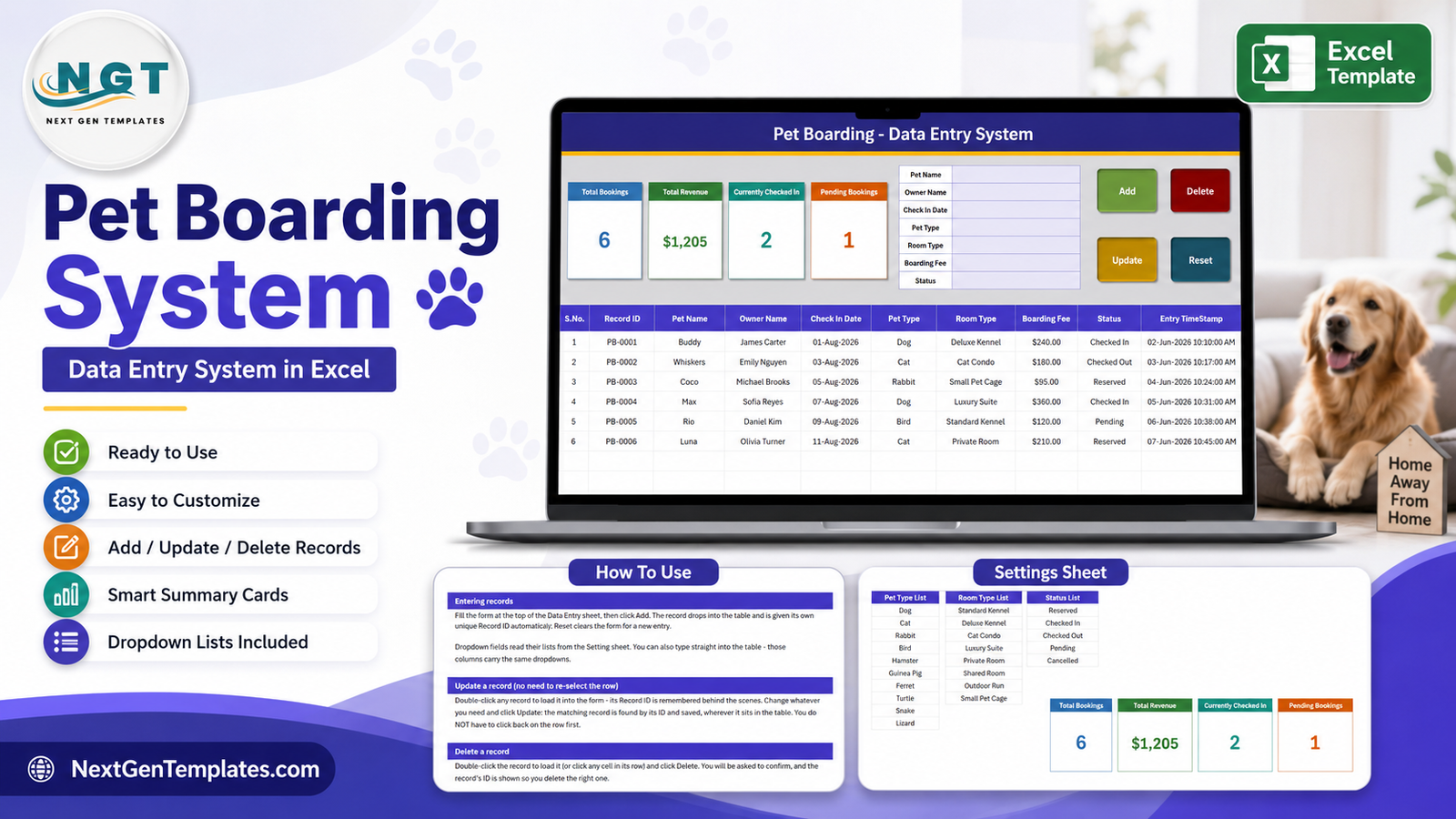
Pet boarding booking log, settings lists, and in-workbook instructions
Key Features of Pet Boarding Data Entry System in Excel
- Purpose-built booking form: capture pet name, owner name, check-in date, pet type, room type, boarding fee, and status without scrolling across the table.
- VBA action buttons: Add, Update, Delete, and Reset give the workbook a guided data-entry workflow.
- Automatic identifiers: each new entry receives a Record ID and Entry TimeStamp.
- Operational summary cards: Total Bookings, Total Revenue, Currently Checked In, and Pending Bookings refresh from the table.
- Editable reference lists: maintain pet types, room types, and statuses on the Settings sheet.
- Built-in instructions: the How To Use sheet remains inside the workbook for quick staff reference.
- Local ownership: store the workbook on your own computer or approved shared drive and keep control of the file.
Workbook Sheets Explained
Data Entry Sheet
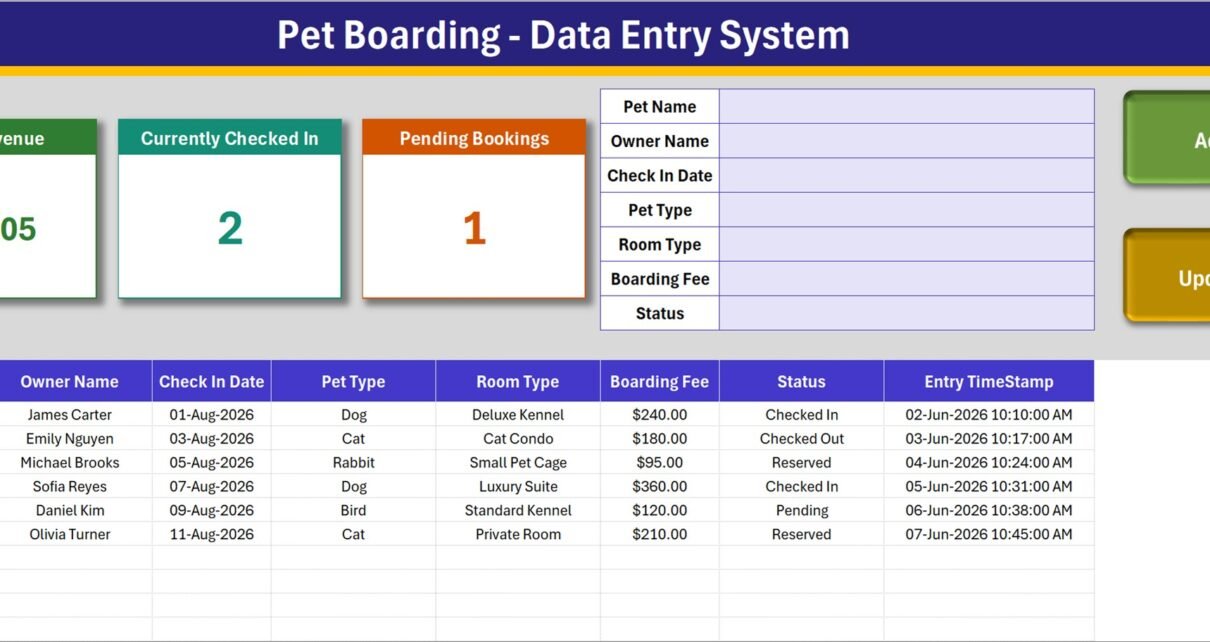
The main Data Entry sheet is where everyday work happens. Four cards across the upper left summarize the booking table. The form on the upper right provides fields for the pet, owner, check-in date, classification, room, fee, and current booking status. Green, red, amber, and blue buttons handle the four available actions.
The table underneath records S.No., Record ID, Pet Name, Owner Name, Check In Date, Pet Type, Room Type, Boarding Fee, Status, and Entry TimeStamp. The sample rows include dogs, cats, a rabbit, and a bird across kennel, condo, cage, suite, and room options. Those examples are demonstration data rather than suggested rates or operating policies.
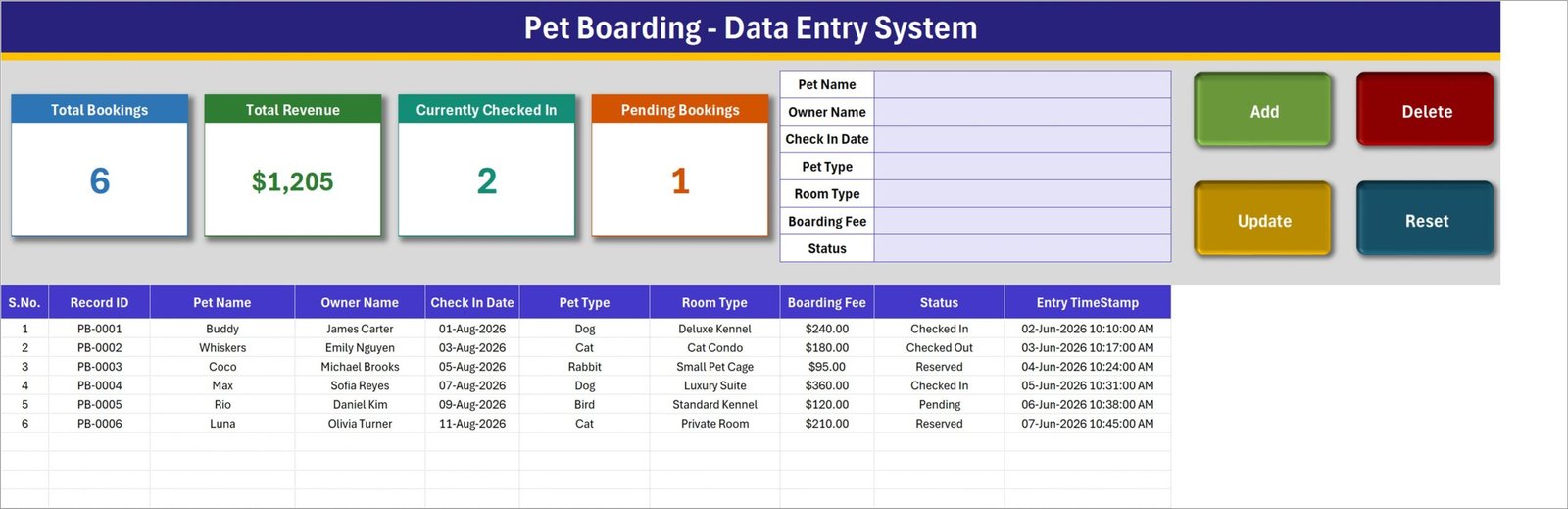
Main data-entry sheet
Settings Sheet
The Settings sheet contains three editable lists. Pet Type includes common examples such as Dog, Cat, Rabbit, Bird, Hamster, Guinea Pig, Ferret, Turtle, Snake, and Lizard. Room Type includes Standard Kennel, Deluxe Kennel, Cat Condo, Luxury Suite, Private Room, Shared Room, Outdoor Run, and Small Pet Cage. Status includes Reserved, Checked In, Checked Out, Pending, and Cancelled.
Change these values to match your facility. A cat-only boarding business can remove irrelevant pet types; a home-based sitter can replace room names with service packages. The four real summary cards also live on this sheet, while linked pictures display them on the main page.
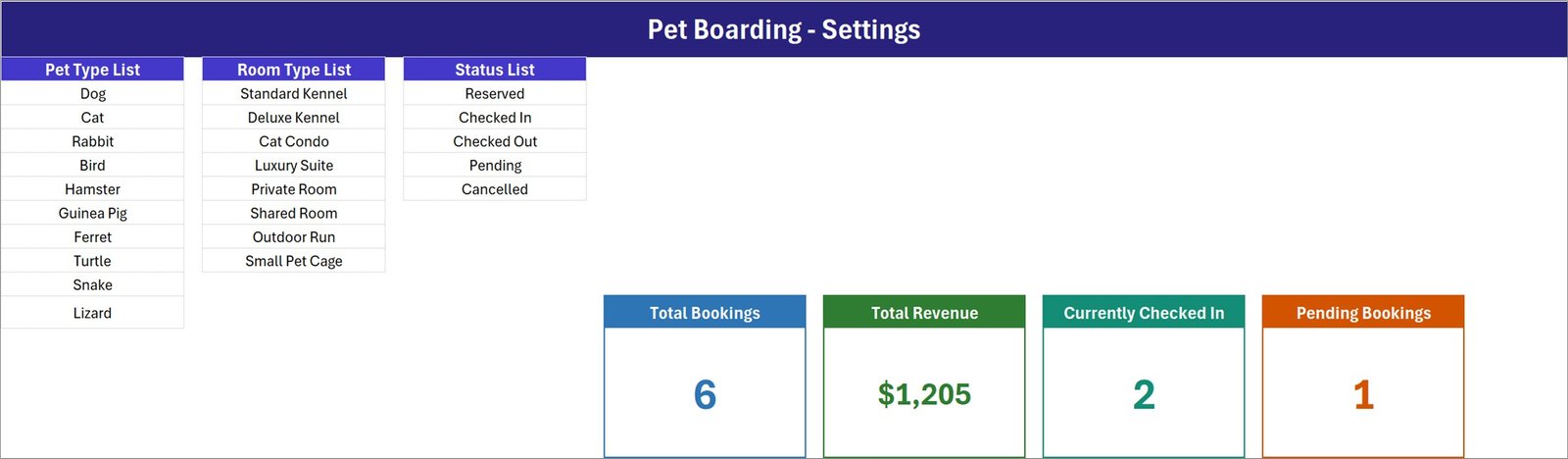
Editable dropdown sources and summary cards
How To Use Sheet
The final sheet explains record entry, record updates, deletion, stat cards, dropdown lists, and macro security. To update, double-click a record so its ID is remembered, change the form, and select Update. To delete, load the record or select a cell in its row, choose Delete, and confirm the displayed ID. This guidance helps prevent users from editing the wrong row.
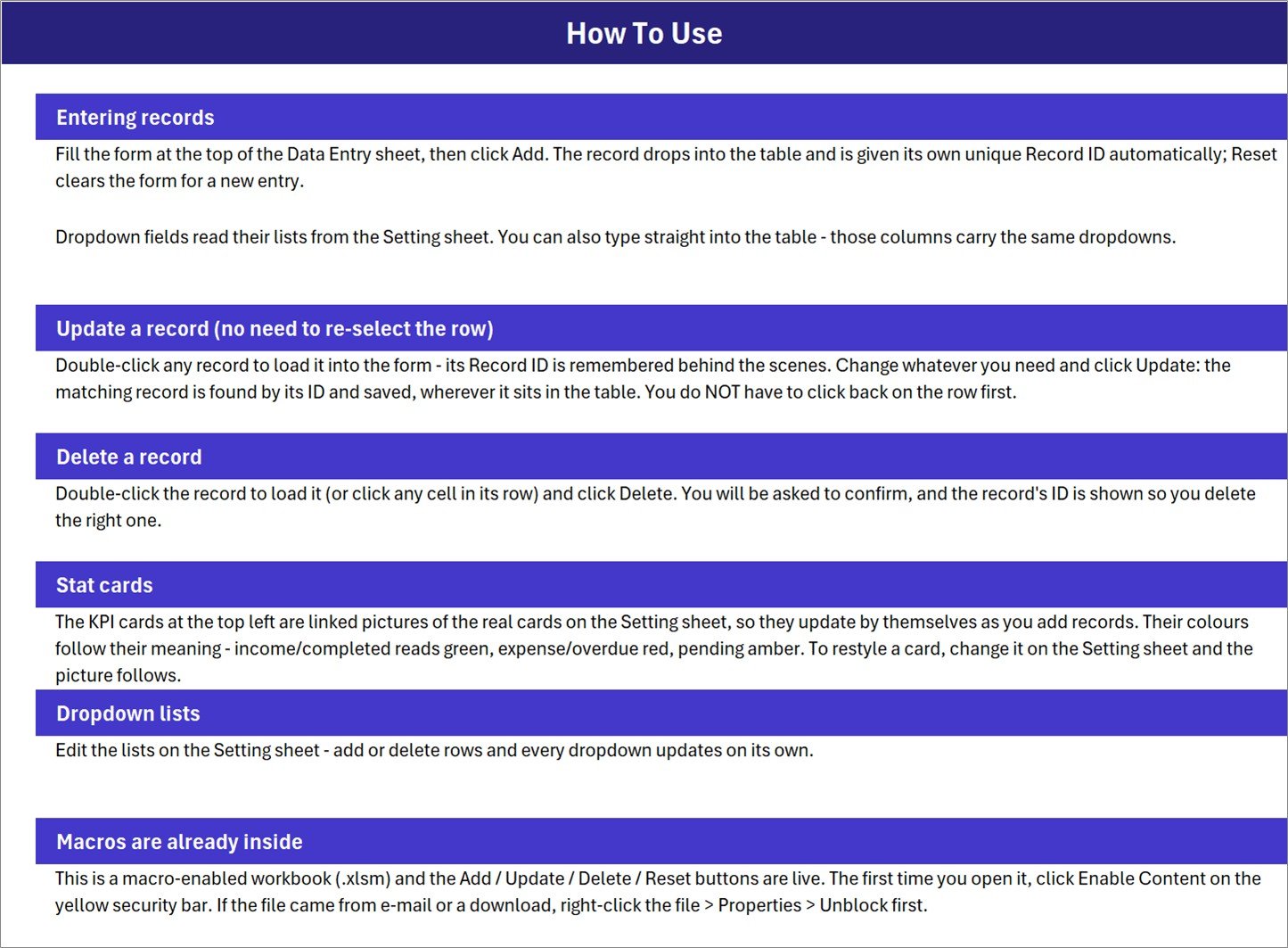
Instructions retained inside the workbook
Pet Boarding Excel Template vs. Google Sheets vs. Kennel SaaS – Feature Comparison
| Feature | This Excel system | Google Sheets alternative | Paid kennel SaaS |
|---|---|---|---|
| Price model | $6.99 one-time sale price | Template cost and workspace setup | Recurring subscription |
| Application | Desktop Microsoft Excel | Browser or mobile app | Vendor web or mobile platform |
| Initial setup | Unzip, enable macros, edit lists | Copy sheet and configure | Create account and onboard |
| Offline availability | Yes | Limited offline mode | Usually internet-dependent |
| Form controls | VBA Add, Update, Delete, Reset | Usually formulas or Apps Script | Built-in web forms |
| Concurrent users | Best for one active editor | Real-time collaboration | Usually supported by plan |
| Custom fields | Workbook is editable | Sheet is editable | Depends on vendor permissions |
| Customer portal | No | No unless custom-built | May be included |
| Year-1 cost for 5 users | $6.99, excluding Excel licenses | Depends on workspace licensing | Vendor and plan dependent |
Who Should Use This Template
The workbook fits independent kennels, home boarding services, small dog day-care providers, pet sitters, foster coordinators, and administrative assistants who need a single booking log. It works especially well when one person owns the booking file and the team does not need a live customer portal.
It is not designed for veterinary decisions, medication administration records, vaccination verification, automated capacity planning, invoices, card payments, online reservations, customer messaging, accounting reconciliation, or simultaneous multi-location use. If those functions are mandatory, a purpose-built database or kennel SaaS product is more suitable.
Real-World Use Cases
Maya: Independent Kennel Owner
Maya enters reservations as Pending or Reserved, switches them to Checked In when the pet arrives, and uses the live count during the daily handover. She edits the room list to match her actual kennel names.
Daniel: Dog Day-Care Coordinator
Daniel uses the owner and pet fields to locate repeat customers, records the booked fee, and changes Checked In records to Checked Out at collection. The timestamp provides a simple audit trail of when each entry was added.
Priya: Home Boarding Service
Priya replaces the supplied room options with Overnight Stay, Day Care, Weekend Package, and Private Care. She keeps the workbook locally and backs it up after each operating day.
Advantages of the Pet Boarding Data Entry System in Excel
Low learning curve: users who already know Excel can work with familiar cells, tables, and dropdowns. Focused scope: the workbook avoids menus and modules that a small operator may never use. Editable structure: lists, labels, formatting, and formulas remain accessible. No vendor lock-in: your records stay in an ordinary Excel workbook rather than inside a proprietary account.
The macro controls also reduce direct edits inside the table. That helps standardize routine entry, while the visible Record ID lets the operator confirm which row is being changed or deleted.
Opportunities for Improvement
A future version could add check-out dates, length-of-stay calculations, payment status, owner contact fields, pet-care notes, booking-capacity views, and printable confirmation forms. Automated email or WhatsApp reminders would require an external service or additional development. Multi-user editing would be better served by a web app or database.
The current version intentionally keeps the workflow narrow. Buyers should evaluate whether their privacy, retention, animal-care, payment, and local regulatory requirements call for extra controls before using any spreadsheet operationally.
Best Practices
- Work in desktop Excel. Excel for the web and Google Sheets do not run these VBA buttons.
- Unblock downloaded files. In Windows, right-click the .xlsm file, choose Properties, and select Unblock if shown.
- Enable macros only after confirming the source. Review Microsoft’s guidance on enabling or disabling macros in Microsoft 365 files.
- Replace the sample data. The six included records demonstrate the layout and should not remain in a live operational file.
- Standardize the dropdowns. Agree on room and status labels before staff begin entering records.
- Keep backups. Save dated copies or use approved versioned storage, particularly before structural changes.
- Protect sensitive data. Limit file access and collect only information your business genuinely needs.
Explore Relevant Templates
Pet-care operators can extend reporting with the Pet Care Services Dashboard in Excel, Pet Care Services Dashboard in Power BI, or Pet Care Business Dashboard in Google Sheets. The Vaccination Record Data Entry System in Excel is a separate administrative register; it is not part of this boarding workbook and should not be treated as clinical software.
Frequently Asked Questions
What is included in the download?
The ZIP contains the macro-enabled Pet_Boarding_System.xlsm workbook.
Do the buttons require macros?
Yes. Add, Update, Delete, and Reset are VBA-driven, so use desktop Microsoft Excel and enable content after verifying the file source.
Can I add my own pet and room categories?
Yes. Edit the reference lists on the Settings sheet to update the dropdown choices.
What does the workbook track?
It tracks pet and owner names, check-in date, pet type, room type, boarding fee, status, record ID, and entry timestamp.
Can two staff members use the file at once?
The workbook is intended primarily for one active editor. Use a database or web-based system if simultaneous editing is required.
Does it send booking confirmations?
No. The workbook does not send email, SMS, or WhatsApp messages.
Is it veterinary software?
No. It is an administrative booking log and does not provide clinical advice, treatment records, medication controls, or regulatory compliance.
About the Author
Built by PK – Microsoft Certified Professional with 15+ years of Excel, Google Sheets, and Power BI experience. Founder of NextGenTemplates, reaching 300K+ subscribers across YouTube channels. Every template is hand-built and tested before release.
Conclusion
The Pet Boarding Data Entry System in Excel is a practical middle ground between paper notes and a larger software rollout. It gives a small operation a consistent entry form, unique IDs, a nine-column booking table, editable dropdown lists, and four instantly readable summary cards. Its limits are equally clear: it is a single-workbook administrative tool, not a multi-user reservation platform or veterinary system.
Get the Pet Boarding Data Entry System in Excel from NextGenTemplates for a one-time $6.99 sale price. Instant digital download; no subscription. For more Excel automation tutorials, visit PK: An Excel Expert on YouTube. Last updated: August 18, 2026.