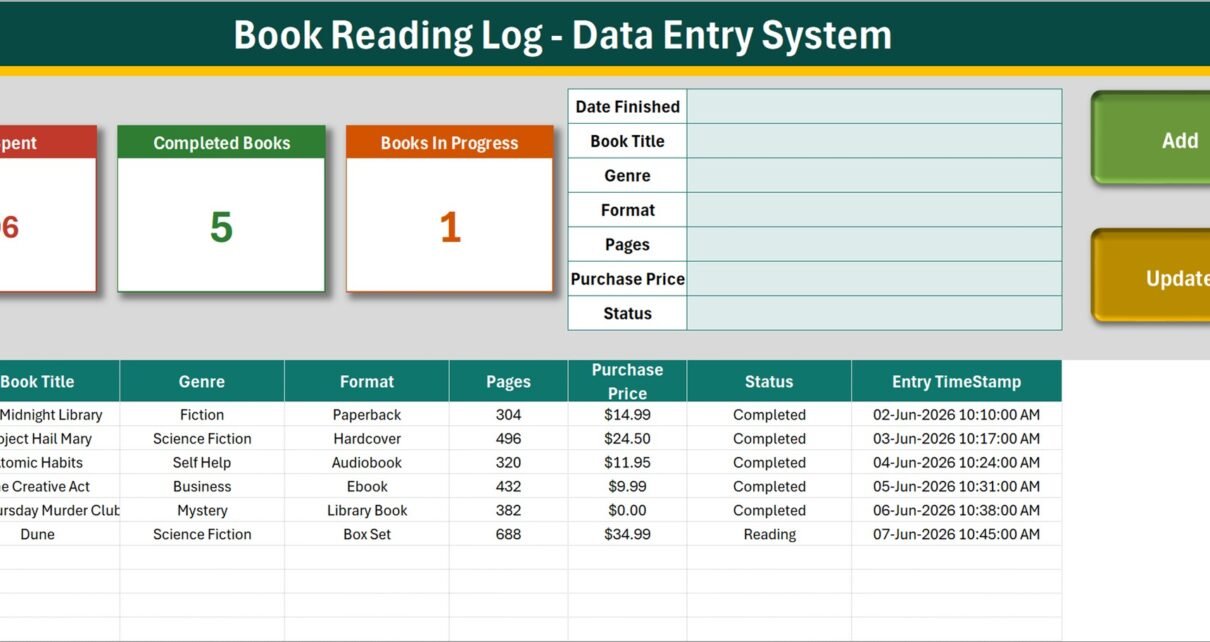
The Book Reading Log Data Entry System in Excel is a macro-enabled workbook that records 7 fields for every book you read – Date Finished, Book Title, Genre, Format, Pages, Purchase Price and Status – and writes a unique Record ID plus an entry timestamp onto every row you save. Four live summary cards sit above the form, three editable dropdown lists ship with 10, 8 and 8 entries, and the whole file is four sheets: Data Entry, Setting, Instructions and Get More Templates. Setup takes under 10 minutes.
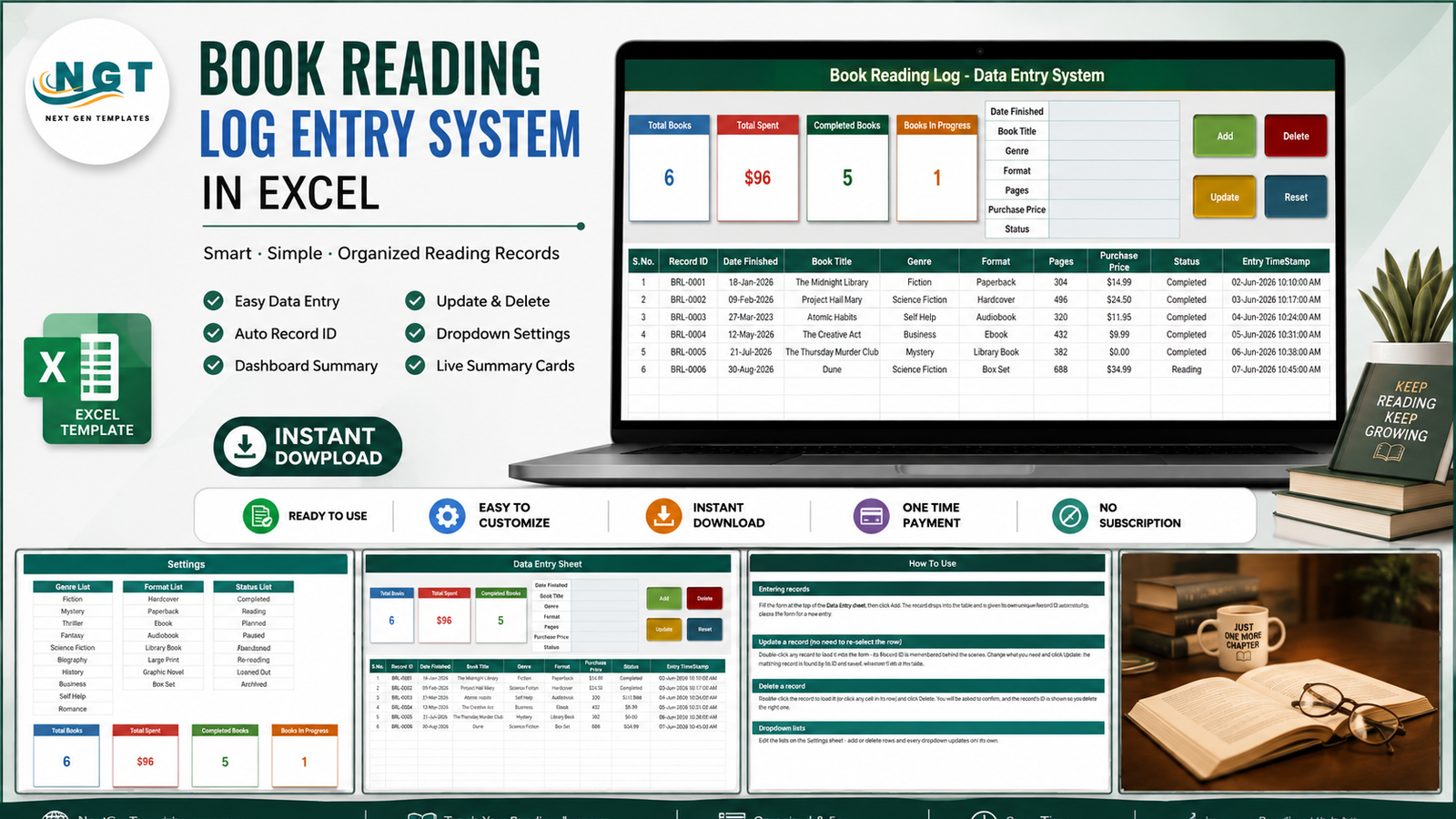
Most reading logs start as a two-column list and quietly fall apart. Genres get typed three different ways, half the rows have no date, the audiobooks are missing entirely, and nobody can say what a year of book buying actually cost. This workbook fixes the boring part of that: it gives you a form, forces the messy columns into dropdown lists, numbers every record for you, and keeps four running totals in view while you type. What it deliberately does not do is go and find anything on your behalf – and that distinction is worth getting straight before you read any further.
Key Features of the Book Reading Log Data Entry System
- A 7-field entry form. Date Finished, Book Title, Genre, Format, Pages, Purchase Price and Status, laid out down the middle of the Data Entry sheet.
- Four working VBA buttons. Add, Update, Delete and Reset are real macros wired to the sheet. Add appends the row and stamps it; Reset clears the form for the next book.
- Automatic Record IDs. Every book is given a sequential ID in the BRL-0001 format, and the last table column records the Entry TimeStamp of when the row was keyed in.
- Update without re-selecting the row. Double-click a record to load it into the form. The workbook holds its Record ID behind the scenes, so Update finds and saves the right row wherever it has moved to.
- Four live summary cards. Total Books, Total Spent, Completed Books and Books In Progress. They are linked pictures of the real cards on the Setting sheet, so they refresh as you type and restyle when you restyle the source.
- Three dropdown lists you control. 10 genres, 8 formats and 8 reading statuses, all edited on the Setting sheet. Add or delete a row and every dropdown – in the form and in the table – follows.
- Dropdowns in the table too. The table columns carry the same validation as the form, so you can key a row directly if you prefer.
- Borrowed books fit the model. Library Book is already in the Format list and the Purchase Price column takes 0.00, so a library loan sits in the log without inflating what you spent.
Sheets Explanation
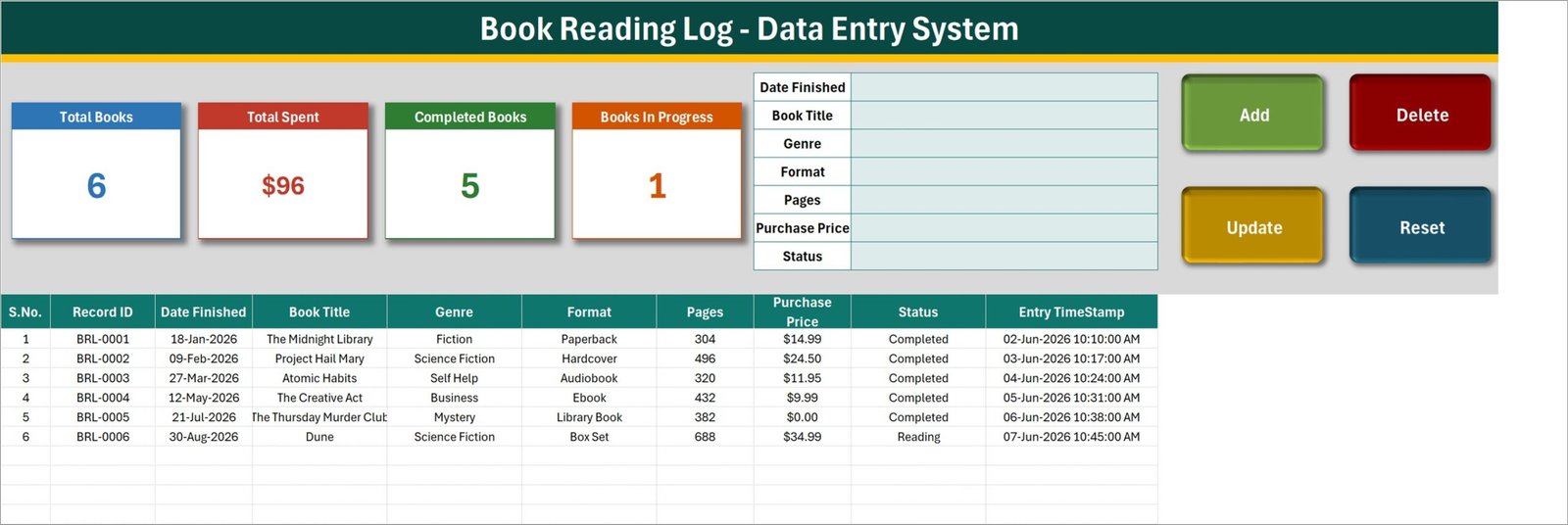
Data Entry – the form, the cards and the book table
The entry form sits in the middle of the header band, the four summary cards on the left and the Add / Update / Delete / Reset buttons on the right. Below them the book table runs S.No., Record ID, Date Finished, Book Title, Genre, Format, Pages, Purchase Price, Status and Entry TimeStamp. The six BRL-0001 to BRL-0006 rows you can see are sample data – delete them before you start.
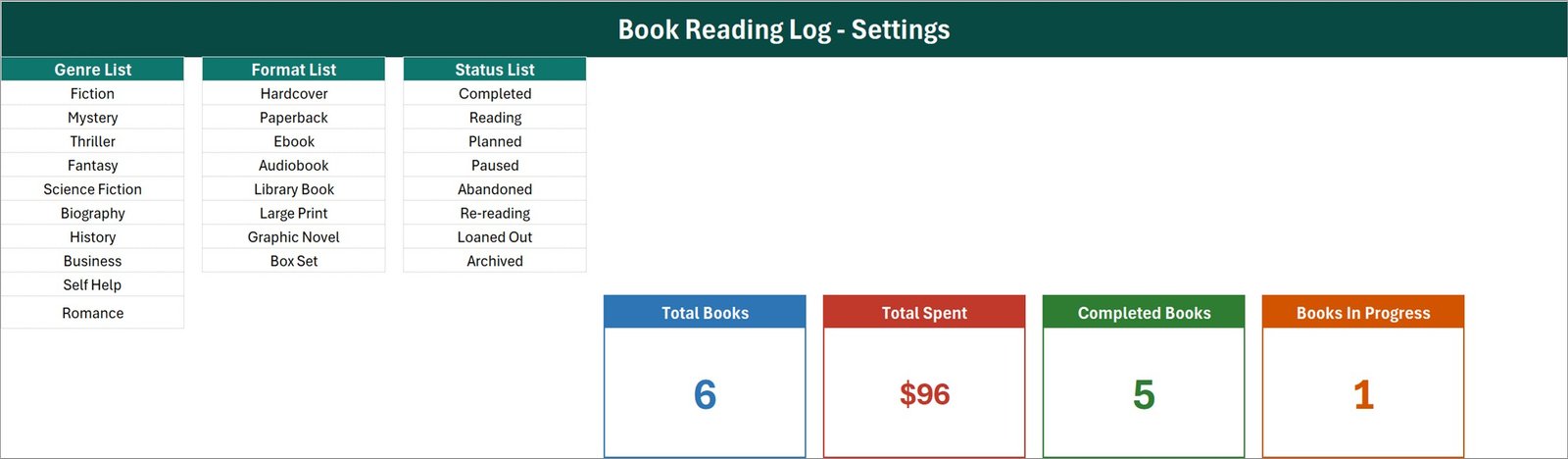
Setting – the dropdown lists and the source cards
Three lists sit side by side here. Genre List holds Fiction, Mystery, Thriller, Fantasy, Science Fiction, Biography, History, Business, Self Help and Romance. Format List holds Hardcover, Paperback, Ebook, Audiobook, Library Book, Large Print, Graphic Novel and Box Set. Status List holds Completed, Reading, Planned, Paused, Abandoned, Re-reading, Loaned Out and Archived. The four real summary cards live to the right of the lists – the Data Entry sheet only shows pictures of them.
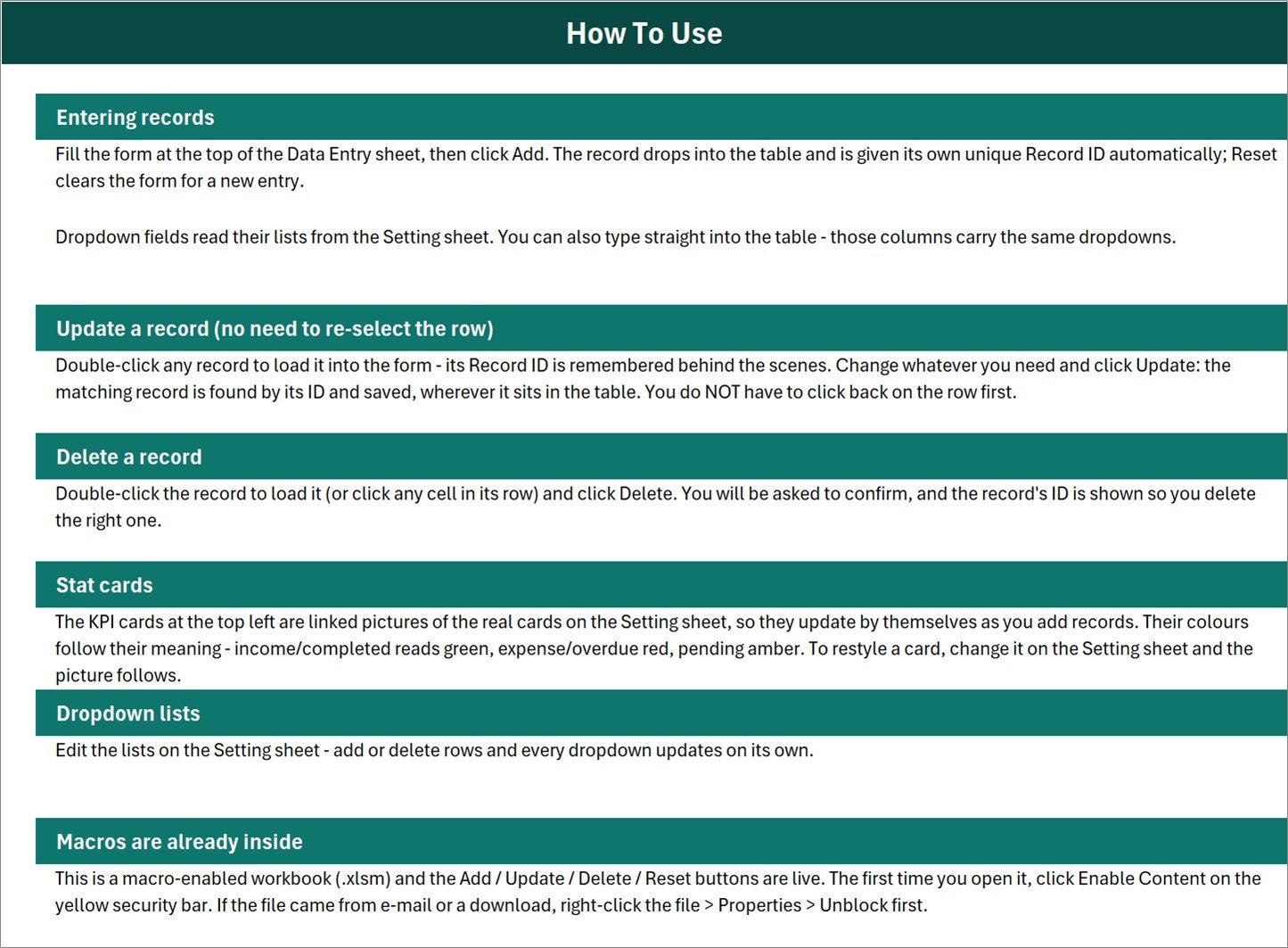
Instructions – How To Use
Six short sections: entering records, updating a record without re-selecting the row, deleting with a confirmation prompt that shows the Record ID, how the linked-picture stat cards work, editing the dropdown lists, and enabling macros the first time you open the file. It also reminds you to right-click the file and tick Unblock if it arrived by e-mail or download.
There is a fourth sheet, Get More Templates, which is a single link page back to the wider template library. It has no screenshot here because there is nothing on it to show.
What This Workbook Is Not
Reading apps have trained everyone to expect a search box that finds the book for you, so it is worth being blunt. The Book Reading Log Data Entry System is a manual record. Every field is typed in by you. It does not look up or validate ISBNs. It does not fetch titles, authors, publishers, cover art or page counts from Google Books, Open Library or any other catalogue or API. It does not sync with Goodreads, StoryGraph, Kindle, Audible or Libby, and it has no connection to a library catalogue or lending system of any kind. It tracks nothing automatically – no reading time, no percentage progress, no streaks. It is also a single-user desktop file: no accounts, no logins, no sharing, no permissions. If you are considering it for a book club, a classroom set or a small library, it will work as one person’s written record of the collection, but it is not a circulation system and it will not manage loans, due dates or reminders for a group.
Book Reading Log Data Entry System vs. a Plain Spreadsheet vs. a Reading App
| Feature | Book Reading Log Data Entry System in Excel | Plain spreadsheet you build | Goodreads / StoryGraph / Bookly |
|---|---|---|---|
| Cost | $6.99 one-time ✅ | Free, but you build it yourself | Free tier, or roughly $3-6 per month for the paid apps |
| Platform | Desktop Microsoft Excel for Windows (.xlsm) | Any spreadsheet | Web plus phone app |
| Setup time | Under 10 minutes ✅ | Hours of formula and validation work | Minutes, once you have an account |
| Add / Update / Delete buttons | Built in via VBA ✅ | None unless you write them | Yes |
| Auto Record ID and entry timestamp | Yes, on every row ✅ | Manual formulas | Hidden from you |
| Book metadata and covers looked up for you | No – you type every field | No | Yes ✅ |
| Tracks what you spent on books | Yes – Purchase Price column and a Total Spent card ✅ | If you add it | Rarely, and not as a running total |
| Your data stays on your own machine | Yes – one file, no account, works offline ✅ | Yes ✅ | No – it lives on their servers |
| Social feed, reviews and friends | No | No | Yes ✅ |
| Cost over 3 years | $6.99 total ✅ | $0 plus your build time | $0 on the free tier, or $110-215 on a paid plan |
If you want a social feed and automatic cover art, use an app. If you want a private, offline, one-file record of what you read, when you finished it and what it cost you, this workbook is built for exactly that.
Who Should Use This Template
Perfect for:
- Readers finishing 20-300 books a year who want one private list instead of an app account
- Anyone running a yearly reading challenge who wants a completed-books count and a running spend
- People who buy a lot of books and want to see what the habit costs, by format and by genre
- Excel users who prefer a form with buttons over typing into a bare grid
- Readers who want the log to stay offline, on their own PC, with no account attached to it
Not a fit if:
- You expect ISBN lookup, cover art, author data or page counts to arrive on their own
- You want it to sync with Goodreads, StoryGraph, Kindle, Audible or a library catalogue
- You need a shared system for a book club, classroom or small library – this is single-user and has no lending workflow
- You want automatic progress or reading-time tracking
- You work on a Mac, in Excel for the web or in Google Sheets – VBA will not run
Real-World Use Cases
Sam is three years into a 52-books-a-year challenge. Every time he finishes something he keys the date, the title, the genre and the format, and clicks Add. The Completed Books card is his running score. At year end he sorts the Genre column and finally has numbers behind the suspicion that the Science Fiction pile has been eating the whole year.
Nadia wants to know what reading actually costs her. She fills in Purchase Price honestly – full price for hardbacks, $0.00 for library and borrowed copies – and the Total Spent card gives her the figure without any extra work. Filtering the Format column tells her how much of it went on audiobooks, which is the answer she had been carefully not calculating.
Tom keeps a personal record of a large home library. He uses the Status list to mark a book Loaned Out when a friend takes one and Archived when he passes it on, so the log stays a truthful picture of what is still on the shelf. It is his own written record, not a lending system – the workbook sends no reminders and tracks no due dates, and he keeps a note in the Book Title cell of who has what.
Advantages of the Book Reading Log Data Entry System
- It costs $6.99 once. No account, no renewal, no plan that changes next year. Compared with a $3-6 monthly reading app, three years of logging costs less than two months of a subscription.
- It removes the two habits that ruin reading spreadsheets: free-typed genres and missing IDs. Dropdowns fix the first, automatic Record IDs fix the second.
- It tracks money, which the apps mostly do not. Purchase Price and the Total Spent card turn a reading list into a picture of a spending habit.
- Nothing to learn. If someone can fill a form and click a button, they can use it. The Instructions sheet covers the rest in six paragraphs.
- It is yours to change. All three lists, the card colours and the card formulas are ordinary Excel objects on the Setting sheet. Nothing is locked behind a vendor.
- It is private and offline. One file on your own disk. No login, no sync, no service that can shut down and take your reading history with it.
Opportunities for Improvement
Four honest observations, all confirmed in the shipped workbook rather than guessed at:
- Total Books counts the wrong column. The card formula on the Setting sheet is
COUNTA('Data Entry'!$C$15:$C$1048576), and column C is Date Finished – not the Record ID in column B. A book you add while you are still reading it, with the Date Finished left blank, is saved correctly but is not counted by the Total Books card. Either put a date in every row, or point that formula at column B instead. This is the one to fix first. - The status cards do not add up to Total Books, by design. The Status list has 8 entries but only two get a card: Completed Books counts “Completed” and Books In Progress counts “Reading”. Planned, Paused, Abandoned, Re-reading, Loaned Out and Archived rows have no card at all. In the shipped sample it happens to balance – 5 Completed plus 1 Reading against 6 Total Books – only because every sample row uses one of those two statuses. Add a
COUNTIFcard on the Setting sheet for any status you care about. - Total Spent is unfiltered. The formula is
SUM('Data Entry'!$H$15:$H$1048576), so it adds the whole Purchase Price column whatever the Status says – books you abandoned, books you only planned and books that are out on loan are all in the $96 you see in the sample. Read it as total money spent on books in the log, or swap the formula for aSUMIFif you want a narrower number. - Two sample rows are timestamped before the date they record. BRL-0005 has a Date Finished of 21-Jul-2026 but an Entry TimeStamp of 06-Jun-2026, and BRL-0006 reads 30-Aug-2026 finished against 07-Jun-2026 entered. That is an artefact of how the demo data was generated, not a bug in the macros – your own rows get a real timestamp at the moment you click Add. It is one more reason to delete all six sample rows before you begin.
- Four cards and no charts. This is a data-entry workbook, not a dashboard. If you want pages-per-month trends or a genre breakdown chart, export the table into a reporting template rather than trying to grow this one.
Best Practices
- Delete the six sample rows first. They are demo data, and two of them carry the timestamp quirk described above.
- Edit the Setting sheet before you edit anything else. Ten minutes swapping Romance for Poetry or Business for Horror will save you months of inconsistent entries.
- Always fill Date Finished. For a book you have not finished, use the date you expect to – or the date you started – so the Total Books card keeps counting. Just be consistent about which you chose.
- Use 0.00, not blank, for borrowed books. A blank reads the same as free in the total but tells you nothing later; a deliberate 0.00 says you checked.
- Add records through the form, not by pasting. The Record ID and Entry TimeStamp are written by the Add macro, so a pasted block of rows arrives without either.
- Keep one file per lifetime, not per year. The card formulas read the whole column and Excel will hold far more rows than you will ever read, so there is no reason to split.
- Back it up. It is a single file with no cloud copy behind it. Put it in OneDrive or copy it somewhere once a month.
Explore Relevant Templates
- Library Book Issue Data Entry System in Excel – the lending-side workbook, for logging books issued and returned rather than books you have read.
- Reading List Checklist Template in Excel – the simple tick-box version, if a form and Record IDs are more than you need.
- Reading List Checklist in Google Sheets – the same checklist for people who live in the browser.
- Library Services KPI Dashboard in Google Sheets – reporting for an actual library service, once counting rows is not enough.
- Specialty Bookstores Dashboard in Excel – the trade side of books: stock, titles and sales analysis.
- Class Schedule Data Entry System in Excel – the same VBA form pattern applied to a study timetable.
- Meal Planner and Grocery List in Google Sheets – another personal-life template from the same catalogue.
Frequently Asked Questions
Does the Book Reading Log Data Entry System look up book details for me?
No. Everything is typed in by hand. The Book Reading Log Data Entry System does not look up or validate ISBNs, it does not fetch titles, authors, covers, publishers or page counts from any catalogue or API, and it does not sync with Goodreads, StoryGraph, Kindle, Audible, Libby or a library system. It is a manual record of books you enter yourself.
Do I need to enable macros, and does it work on a Mac?
Yes to macros – the Add, Update, Delete and Reset buttons are VBA, so click Enable Content the first time you open the file. The Book Reading Log Data Entry System is built for desktop Microsoft Excel for Windows. Excel for the web, Excel for Mac and Google Sheets will not run the buttons.
Why does the Total Books card not count a book I just added?
Because the card counts the Date Finished column rather than the Record ID column – the formula on the Setting sheet is COUNTA('Data Entry'!$C$15:$C$1048576), and column C is Date Finished. A row you save with that date left blank, which is natural for a book you are still reading, is stored correctly but is not counted. Put a date in every row, or edit the formula to count column B.
Do the Completed and In Progress cards add up to Total Books?
Only if every row uses one of those two statuses. The Status list has 8 entries and only two of them get a card, so Planned, Paused, Abandoned, Re-reading, Loaned Out and Archived rows are simply uncounted. The sample data happens to balance at 5 plus 1 against 6 because every sample row is Completed or Reading. Nothing is wrong with the counts – there is just no card for the other six statuses.
Does the Total Spent card exclude books I abandoned or borrowed?
No. Total Spent sums the whole Purchase Price column with SUM regardless of Status, so Abandoned, Planned and Loaned Out rows are included. Borrowed and library copies contribute nothing only because you enter 0.00 for them. For a filtered figure, swap the formula on the Setting sheet for a SUMIF.
How many books can the workbook hold?
There is no fixed cap in the Book Reading Log Data Entry System – the card formulas read to the bottom of the sheet, so the ceiling is Excel’s own row limit. A few thousand rows stay comfortably fast on ordinary hardware, which is a lifetime of reading for almost anyone.
Can I change the genres, formats and statuses?
Yes. All three lists sit on the Setting sheet of the Book Reading Log Data Entry System – Genre has 10 entries, Format and Status have 8 each. Add rows, delete rows or rename entries, and every dropdown in the form and in the table updates automatically. No formula editing is required.
Can a book club or a small library share it?
Not as a shared system. This is a single-user desktop workbook with no accounts, no permissions and no sharing features, and it has no lending workflow, due dates or reminders. One person can keep it as the written record of a collection and circulate a copy, but two people cannot work in it at once.
About the Author
Built by PK – Microsoft Certified Professional with 15+ years of Excel, Google Sheets and Power BI experience. Founder of NextGenTemplates, reaching 300K+ subscribers across YouTube channels. Every template is hand-built and tested before release.
Conclusion
The Book Reading Log Data Entry System in Excel does one job properly: it turns a sprawling reading list into a form-driven record with Record IDs, timestamps, consistent genres and formats, and four running totals – including one the reading apps rarely give you, which is what the books actually cost. It will not find a cover for you and it will not sync with anything, and the copy above says so more than once, on purpose. What it will do is make sure that ten years from now you can still say exactly what you read, when you finished it, and what the habit was worth.
👉 Click here to Purchase the Book Reading Log Data Entry System in Excel
Instant download · One-time payment · No subscription
For step-by-step Excel and VBA tutorials, visit Youtube.com/@PK-AnExcelExpert.
Last updated: August 2026