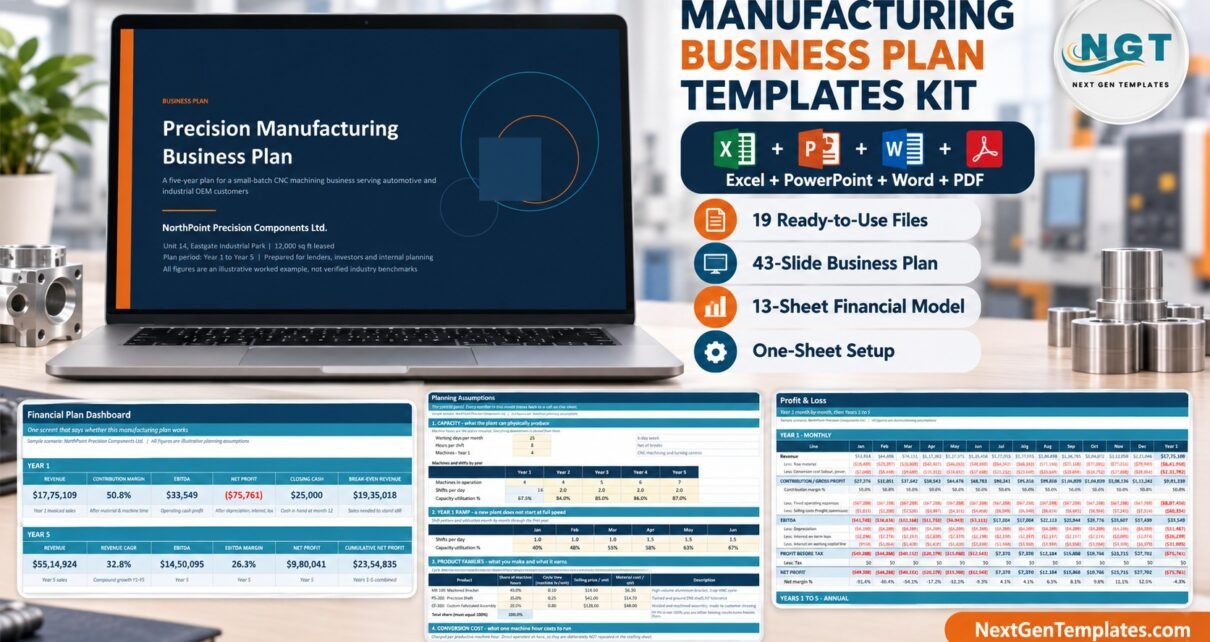
Most manufacturing business plans fail the same way: they open with a revenue figure nobody can trace back to anything physical. The Manufacturing Business Plan Templates Kit starts at the other end. It is 19 files — a 43-slide PowerPoint business plan, 10 Excel workbooks covering 51 worksheets, 3 Word documents and a 9-page PDF guide — and the five-year financial model at its centre derives every number from machine hours.
That matters because machine hours are the real ceiling on a manufacturing business. Available hours = machines x working days x shift hours x shifts. Multiply by utilisation to get productive hours, divide by cycle time to get units, subtract scrap, and you have a revenue forecast a lender can check. In this article I will walk through every file in the kit, what each sheet does, and the three or four decisions that actually decide whether a small factory makes money.
Key Features of the Manufacturing Business Plan Templates Kit
The kit is built around one fictional worked example — NorthPoint Precision Components, a four-machine CNC job shop — so the presentation, the written plan and all ten workbooks agree to the dollar. Change an assumption and every file’s story changes with it.
- Machine hours drive everything. Units come from cycle time and utilisation, not from a guessed growth rate.
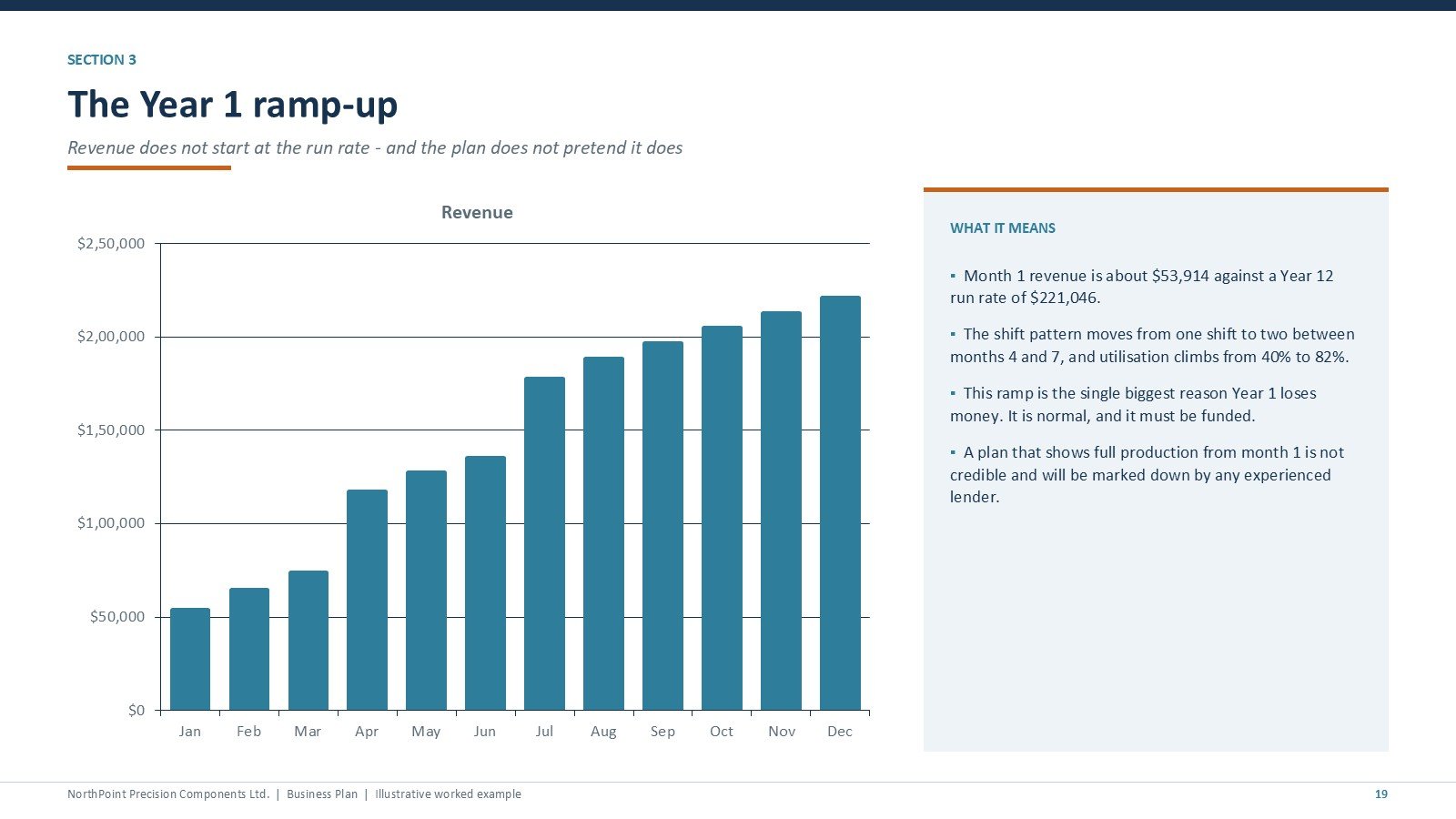
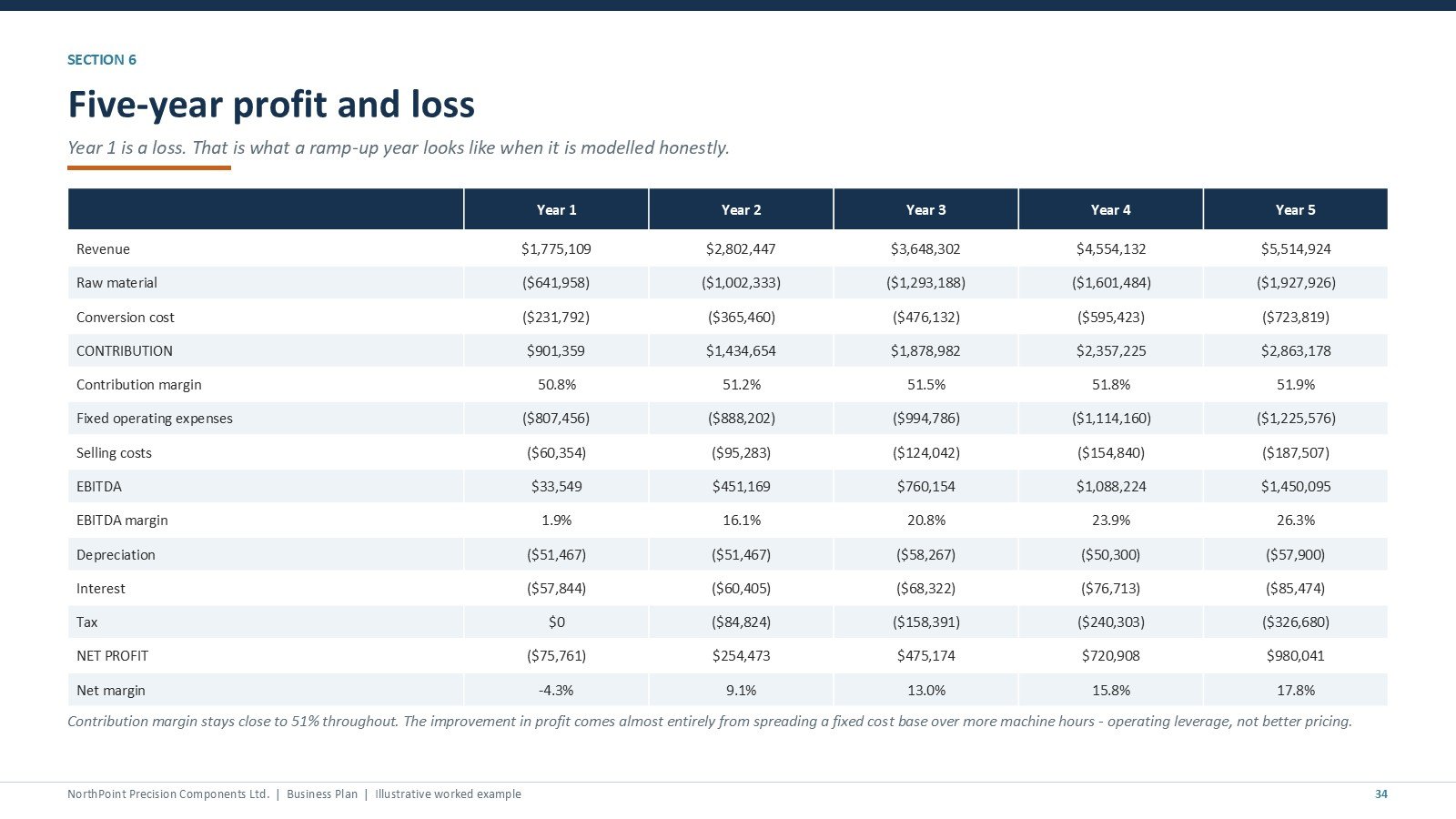
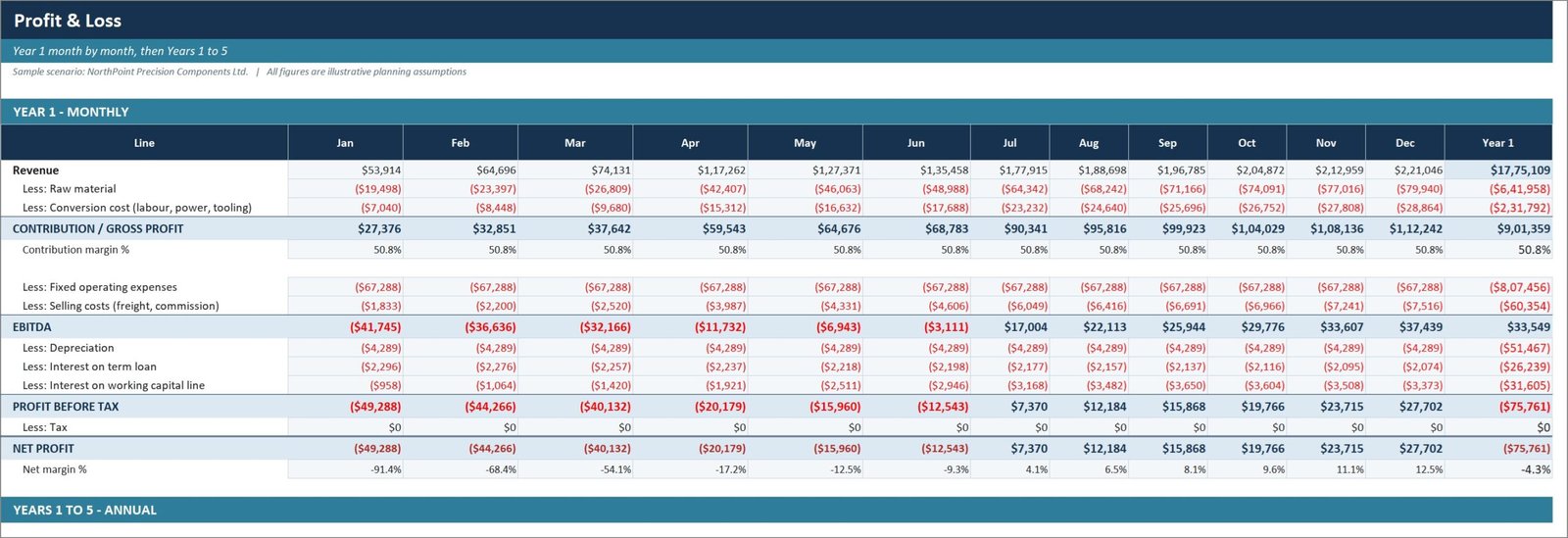
- Year 1 is allowed to lose money. The example reaches $1,775,109 of revenue at 1.9% EBITDA and a $75,761 net loss while ramping from one shift to two, then crosses break-even early in Year 2 and reaches $5,514,924 at 26.3% EBITDA by Year 5.
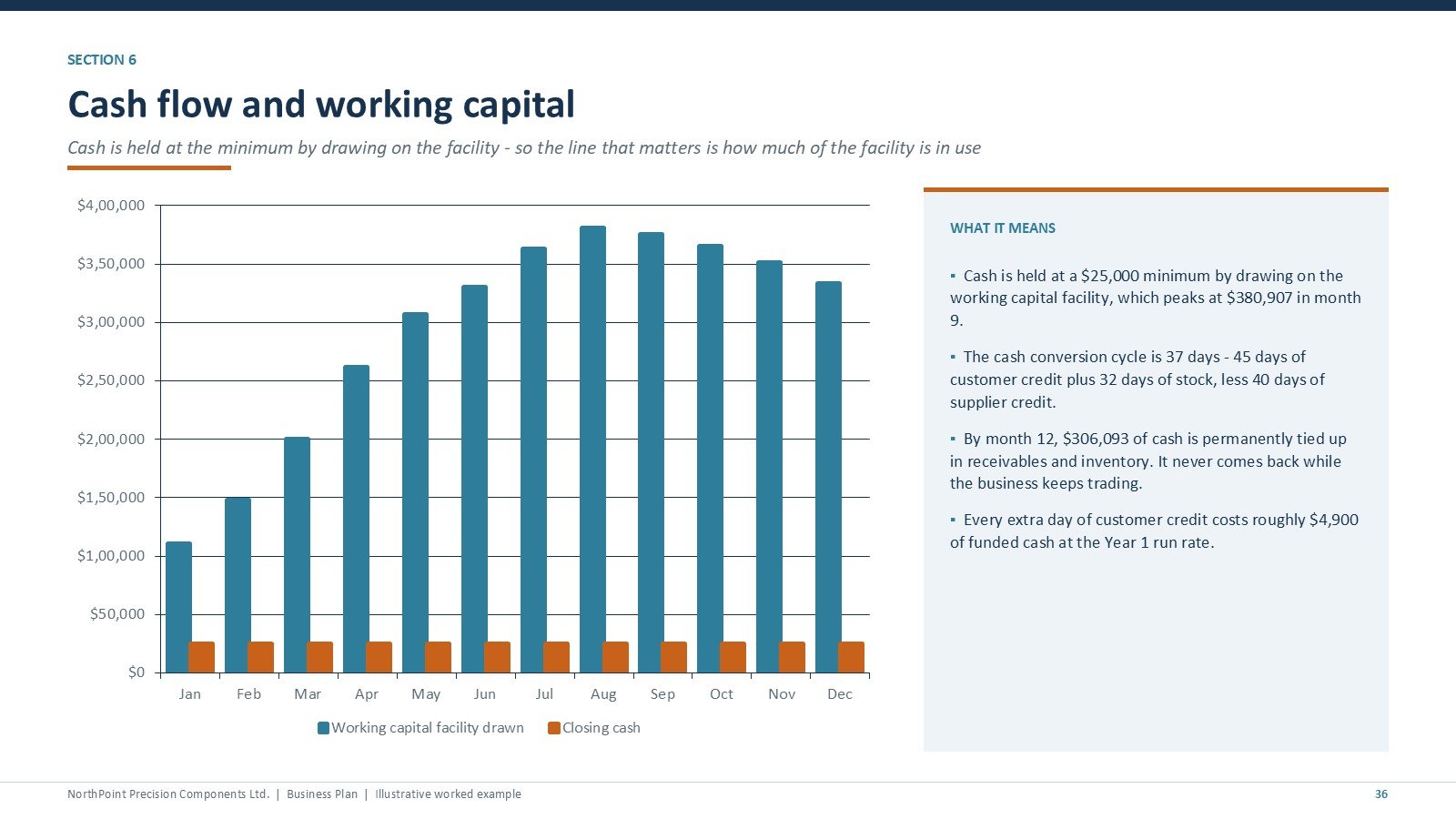
- Working capital is modelled properly. Receivables, inventory and payables are tracked separately, and a revolving facility draws automatically to hold a minimum cash balance. It peaks at $380,907 in month 9 on a 37-day cash conversion cycle.
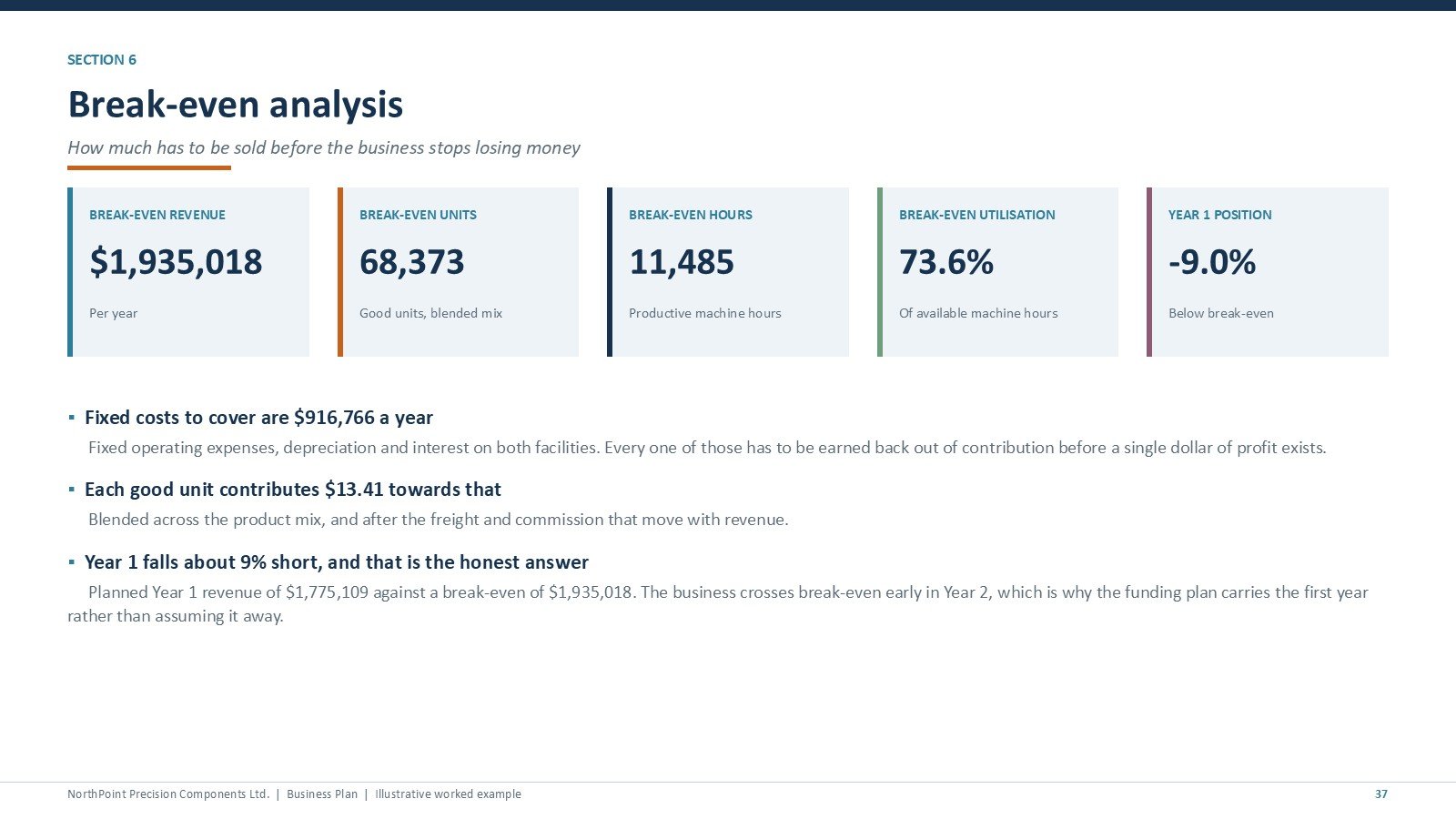
- Break-even is stated as a share of capacity. $1,935,018 of revenue, 68,373 units, or 73.6% of available machine hours just to cover fixed cost.
- Excel 2010 compatible. No MINIFS, no XLOOKUP, no dynamic arrays, no array formulas — all of which fail silently on older builds.
Every File in the Manufacturing Business Plan Templates Kit, Explained
The kit ships in seven folders. Here is what each part does and why it is there.
The 43-slide PowerPoint business plan
Seven sections: the business, the market, products and operations, sales and marketing, organisation, the financial plan and execution. Every chart and table is a native editable PowerPoint object, and 34 slides carry speaker notes explaining what a lender is actually looking for.
Manufacturing process flow
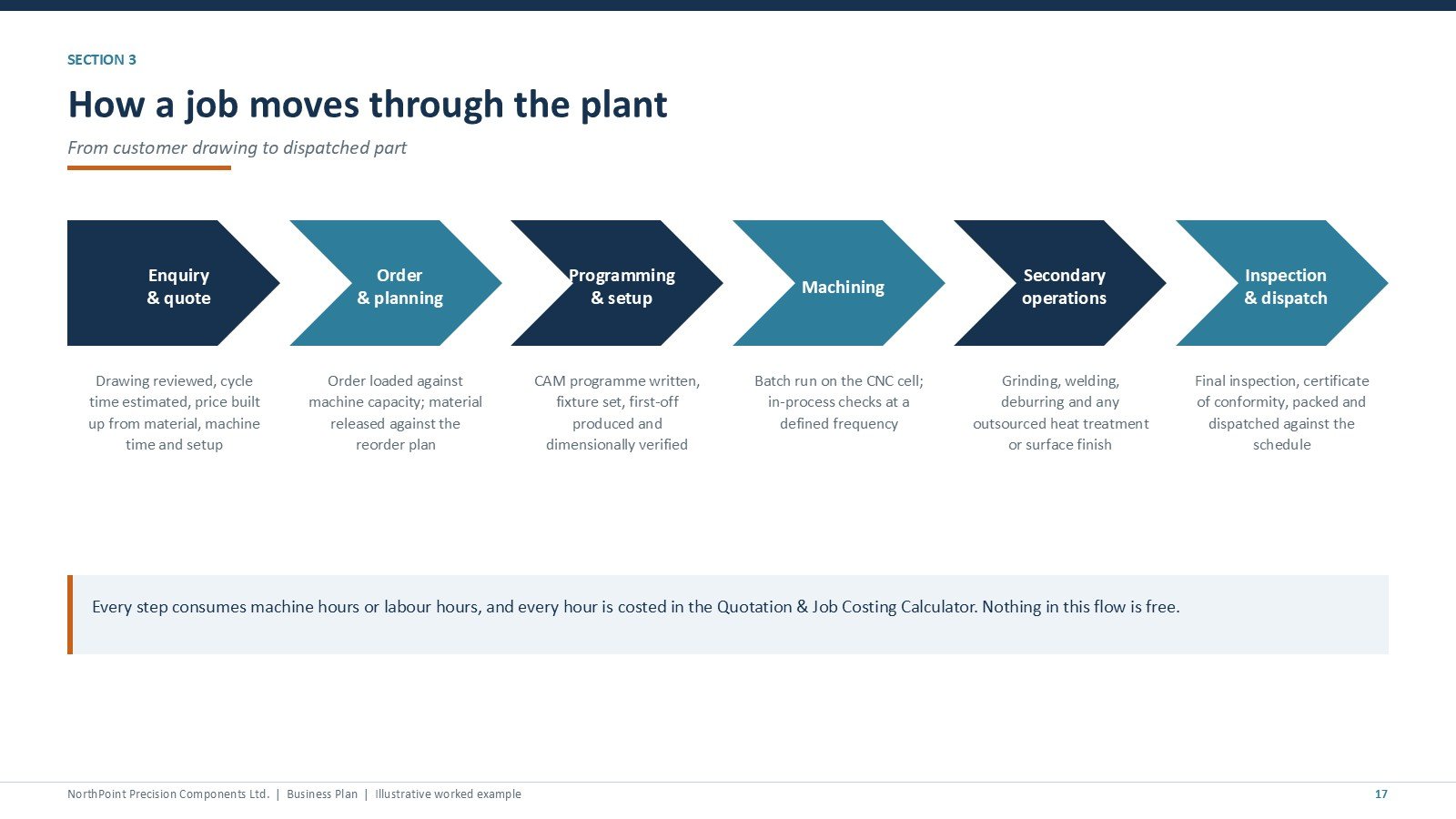
A six-step flow from enquiry and quote through order planning, CAM programming and setup, machining, secondary operations and finally inspection and dispatch. Every step consumes machine or labour hours, and every hour is costed in the quotation calculator.
Plant capacity
Available versus productive machine hours, the shift pattern, and the utilisation ramp through Year 1. The slide makes the ceiling explicit: four machines on two shifts give 19,200 available hours a year, and Year 1 converts 10,536 of them into parts.
Funding requirement and use of funds
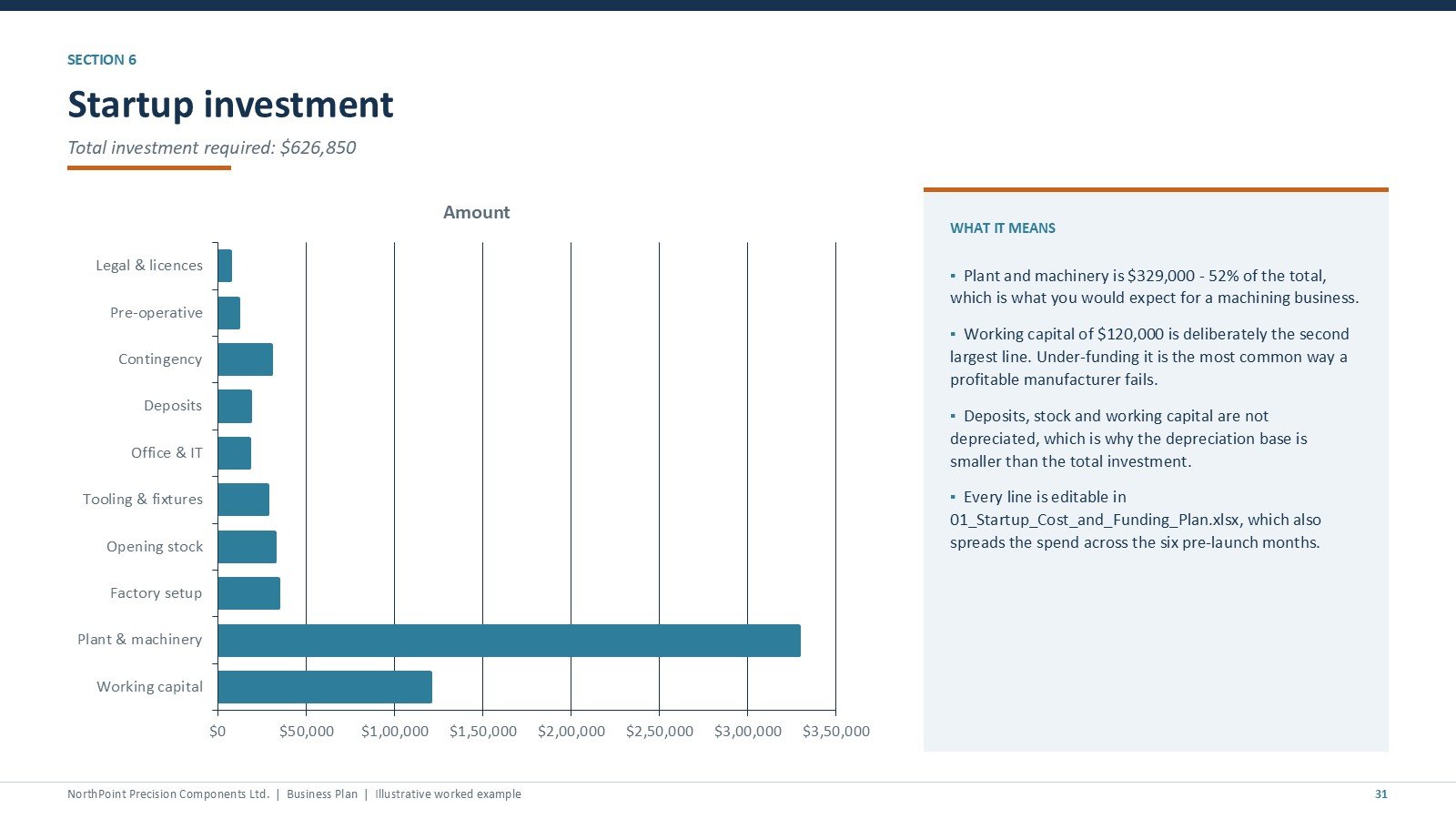
Total startup investment of $626,850 split into equity, a seven-year term loan and a revolving working capital facility, with the modelled peak draw shown against the sanctioned limit.
Five-year profit and loss
Revenue, raw material, conversion cost, contribution, fixed overheads, selling costs, EBITDA, depreciation, interest, tax and net profit across five years. Contribution margin holds near 51% throughout — the margin improvement comes from operating leverage, not from raising prices.
Cash flow and the working capital facility
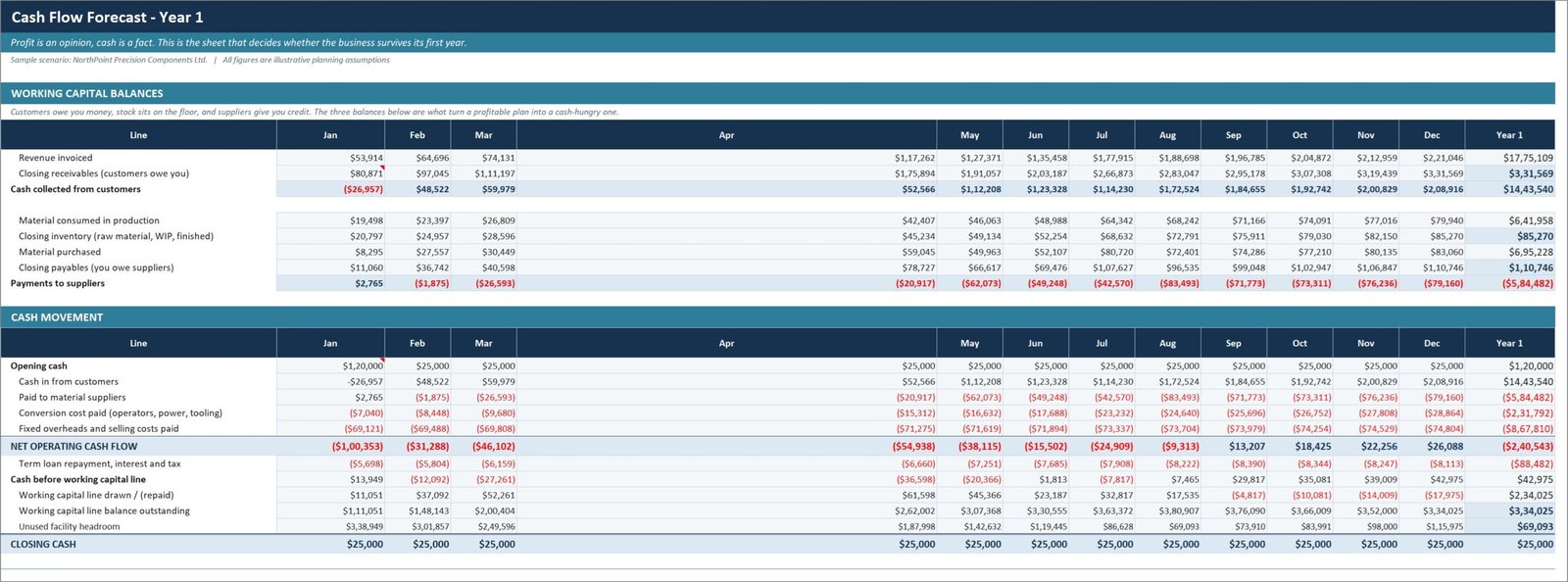
Cash is held at a $25,000 minimum by drawing on the facility, so the line that matters is how much of the facility is in use. By month 12, $306,093 of cash is permanently tied up in receivables and inventory.
Break-even analysis
Fixed costs to cover, net contribution per unit, and the break-even point expressed three ways: revenue, units and machine hours. Year 1 lands about 9% short of break-even, which is exactly why the funding plan carries it.
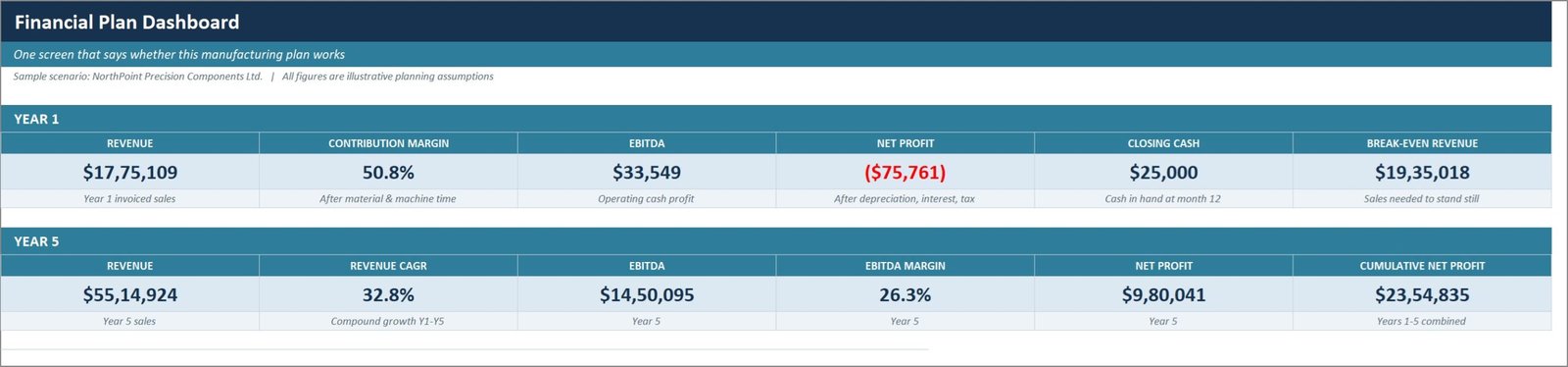
Workbook 02: the financial model dashboard
One screen answering whether the plan works. Year 1 and Year 5 revenue, contribution margin, EBITDA, net profit, closing cash and break-even revenue, plus charts for the five-year trajectory and the monthly cash balance.
The Assumptions sheet
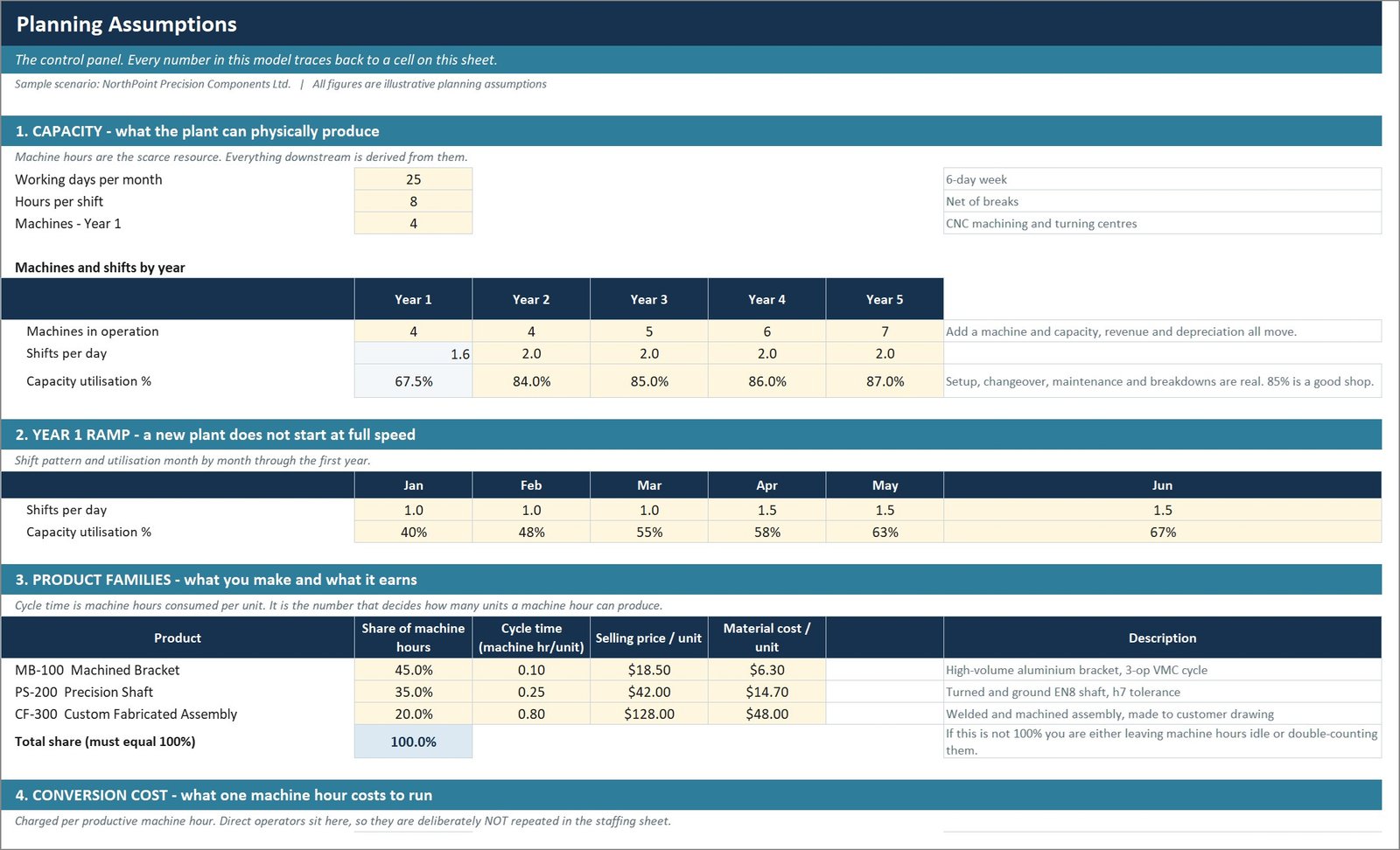
The control panel and the only sheet you normally edit. Capacity, the Year 1 ramp month by month, three product families with mix, cycle time, price and material cost, conversion cost per machine hour, scrap, inflation, funding and working capital terms.
Profit and loss, month by month
Year 1 monthly then Years 1 to 5 annually. Material and conversion cost are split out, tax is assessed on the year rather than each month, and interest covers both the term loan and the working capital line.
Cash flow forecast
Receivables, inventory and payables balances derived from your own DSO, DIO and DPO, then collections, supplier payments, conversion cost, overheads, loan repayment and the automatic facility drawdown.
Workbook 01: startup cost and funding plan
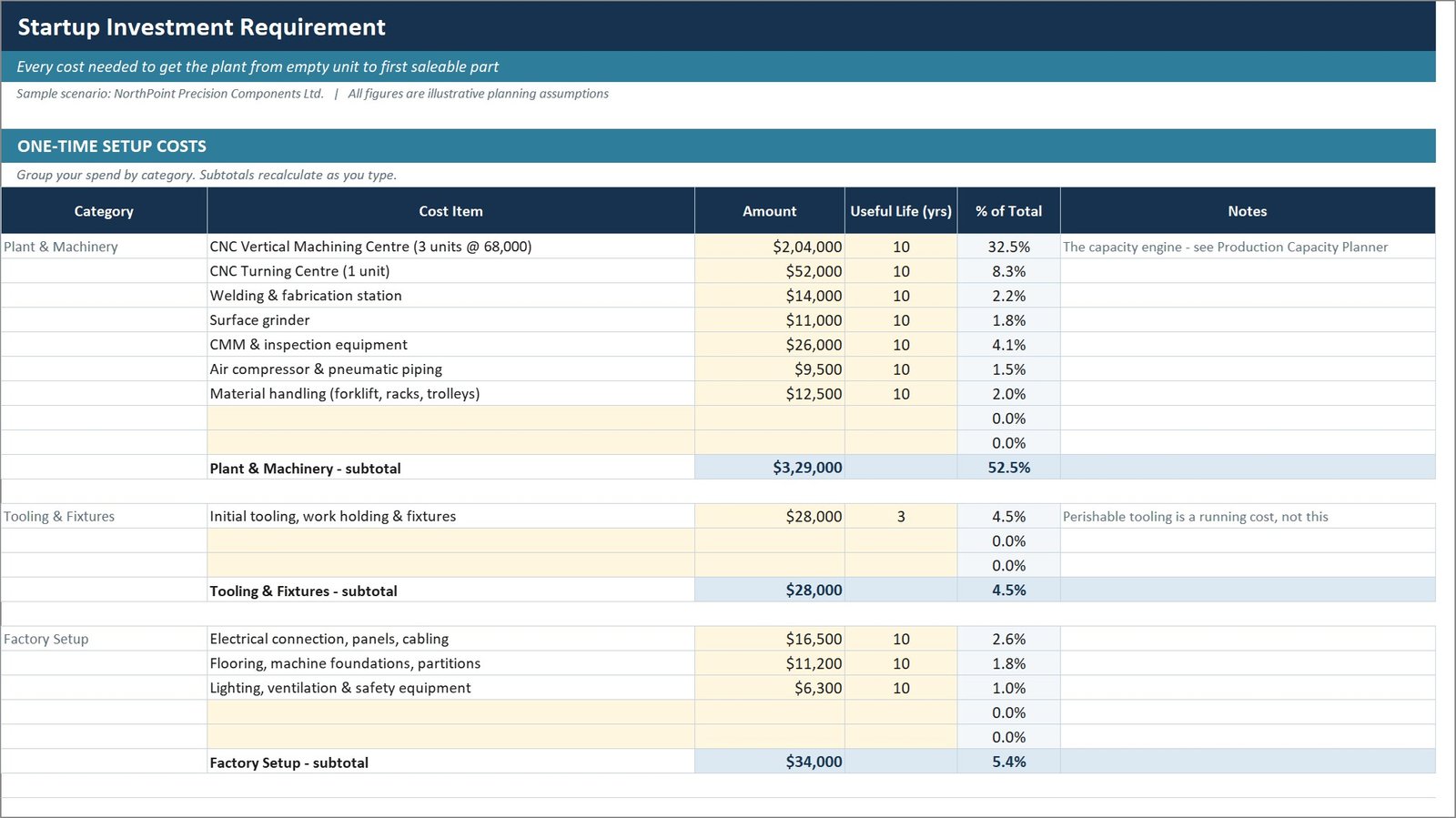
Every cost needed to get from an empty unit to the first saleable part, grouped into the six buckets a bank appraisal expects, with a contingency percentage and a sources-and-uses statement. A payment schedule spreads the spend across six pre-launch months.
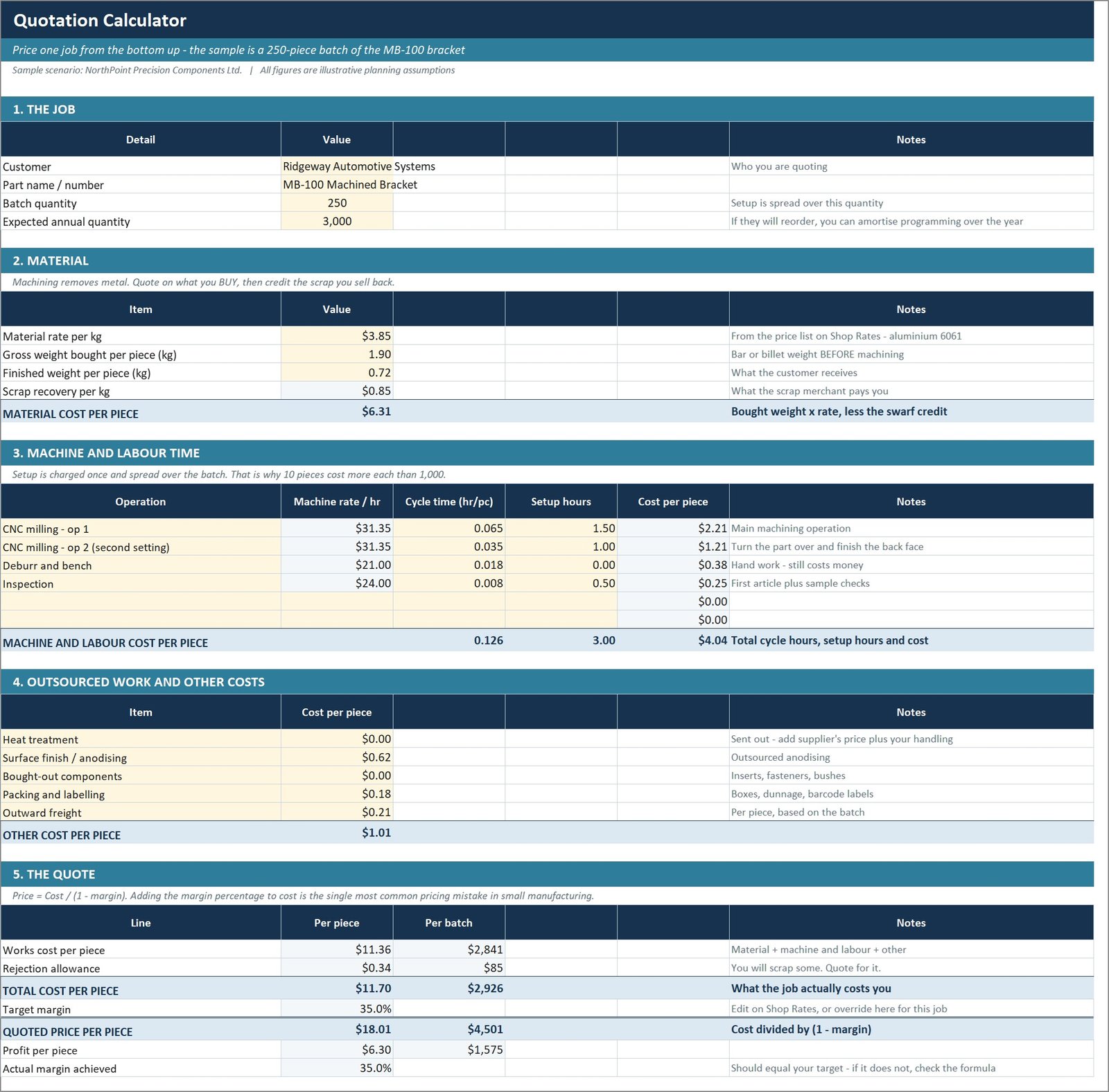
Workbook 05: quotation and job costing calculator
Shop rates per machine built from depreciation, allocated overhead, power, consumables and the operator — a rate that leaves any of those out is why busy shops are not profitable. Then a job priced from the bottom up, with a register that tracks win rate by value.
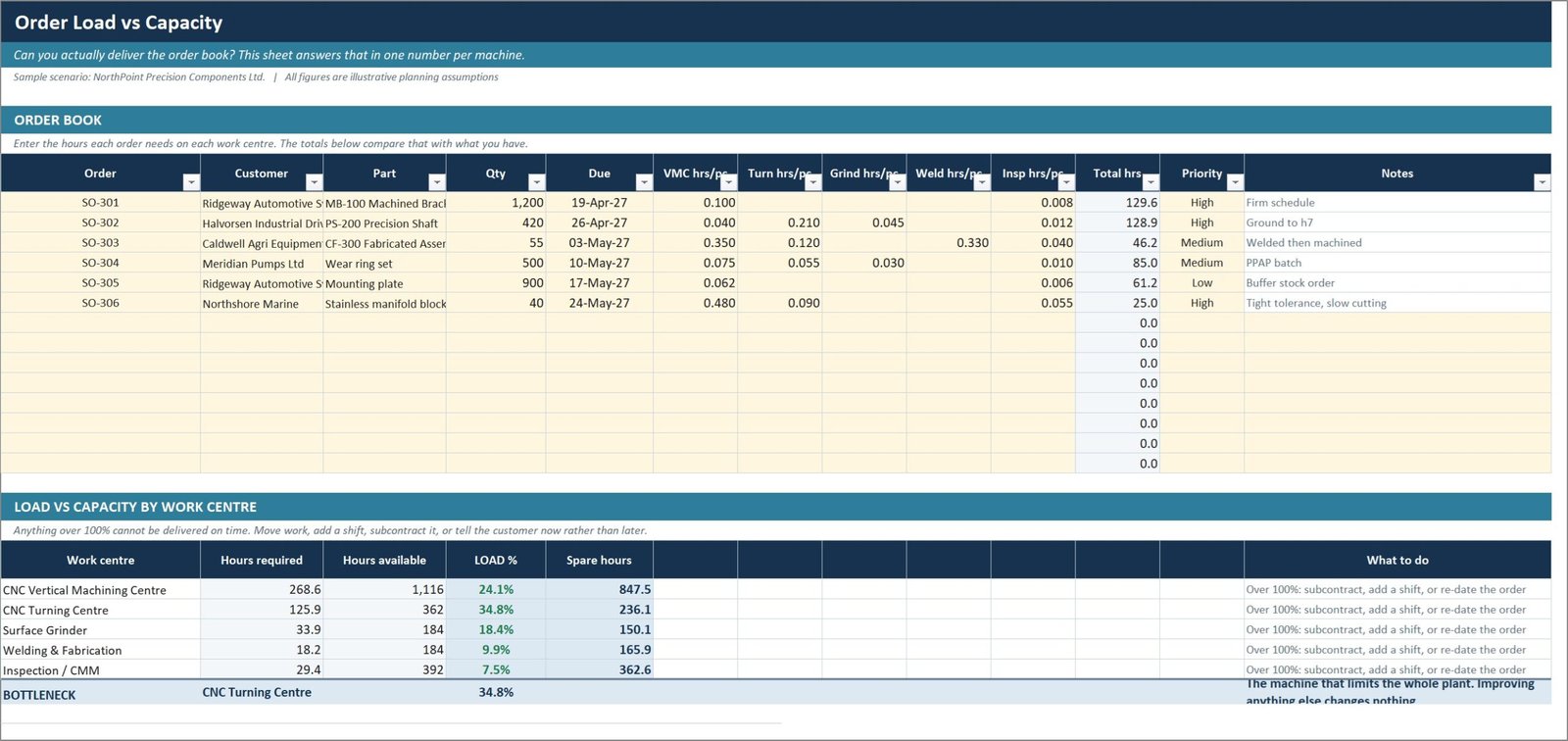
Workbook 07: production capacity planner
Order load against available hours for each work centre, with the bottleneck identified automatically. Improving any work centre that is not the bottleneck changes nothing at all. An OEE tracker sits alongside it.
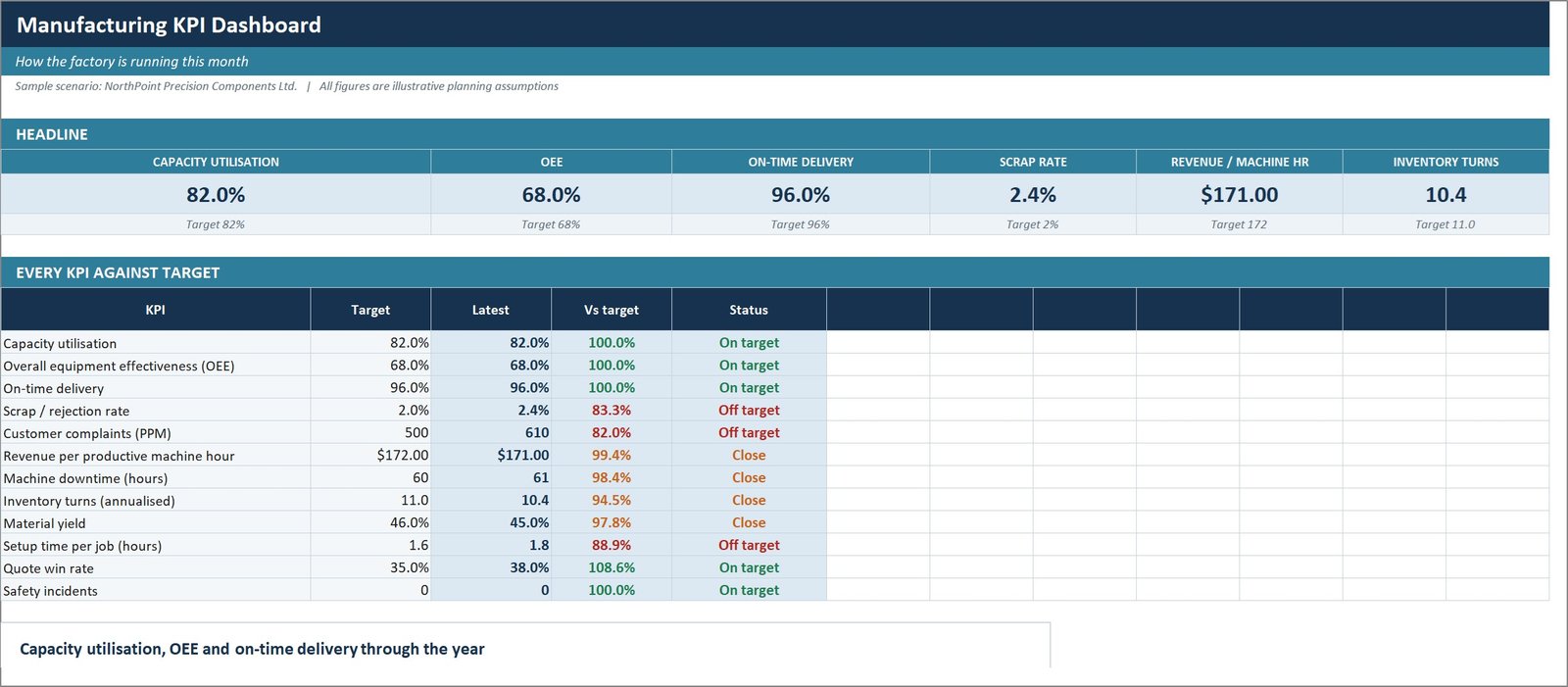
Workbook 09: manufacturing KPI dashboard
Twelve operational KPIs tracked monthly against target, with traffic lights that work correctly for both higher-is-better measures like on-time delivery and lower-is-better ones like scrap rate.
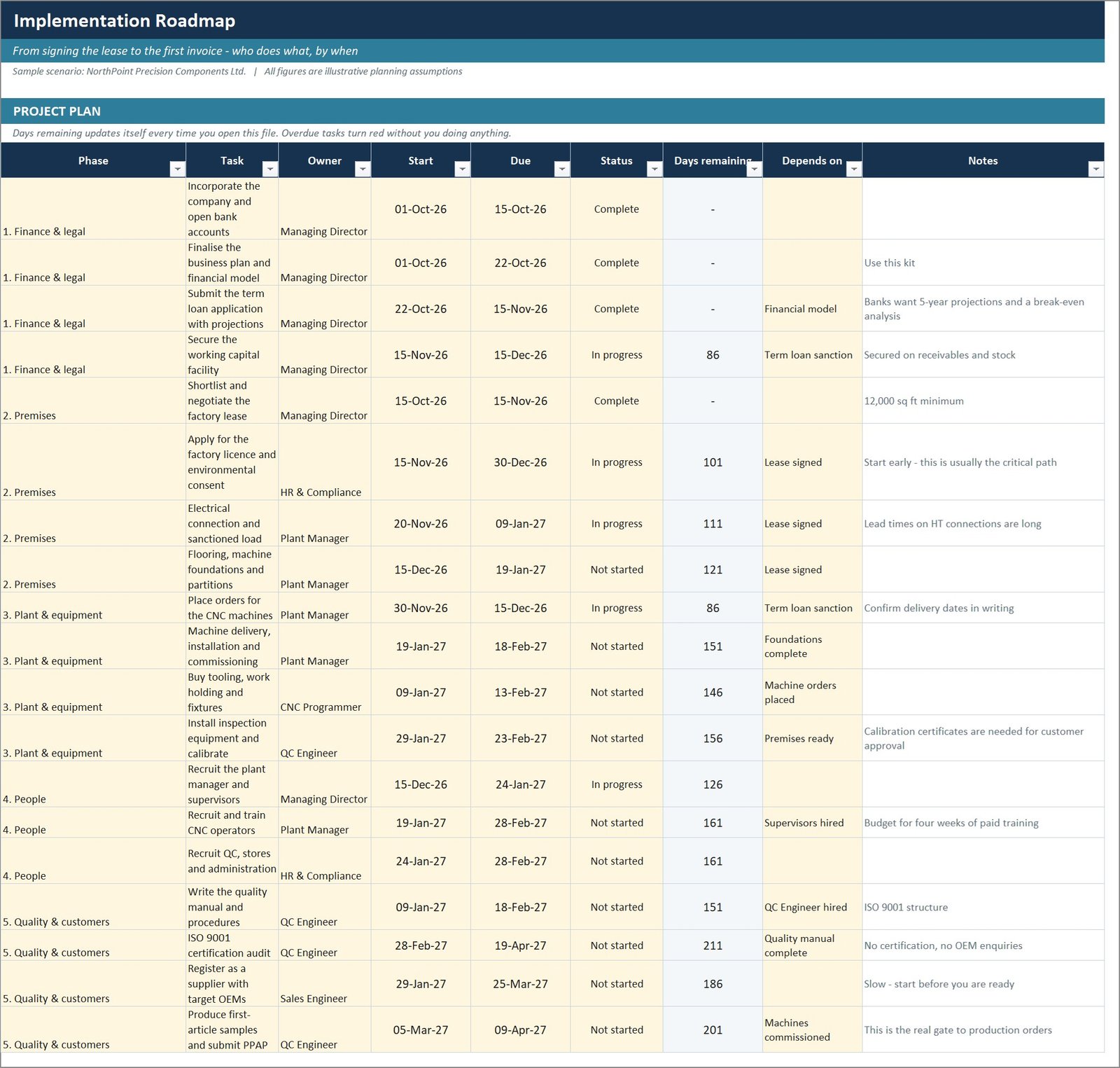
Workbook 10: implementation roadmap and risk register
Twenty-two dated tasks across six phases with owners and dependencies, where overdue items turn red from TODAY() on their own, plus twelve risks scored for likelihood and impact and a weekly action list.
The Word documents, the PDF guide and three bundled tools
The written business plan runs to 13 sections and quotes the same figures as the model. A six-phase startup checklist marks the critical-path items — the factory licence and the electrical connection, not the machines. An SOP and quality plan gives you the documented quality system OEM customers ask to see. The 9-page PDF explains every file, every sheet and the seven formulas that matter. Three finished tools are bundled as-is: an automatic organisation chart, a quality control checklist and a financial planning calendar.
Manufacturing Business Plan Templates Kit vs. a Business Plan Writer vs. LivePlan — Feature Comparison
| Feature | Manufacturing Business Plan Templates Kit | Freelance business plan writer | LivePlan / Bizplan |
|---|---|---|---|
| Cost | $23 one-time | $500 – $3,000 per plan | $20 – $50 / month, ongoing |
| Platform | Excel, PowerPoint, Word – files you own | Whatever they send back | Browser only |
| Setup time | Under 30 minutes | 2 – 6 weeks | Several hours of form filling |
| Manufacturing-specific model | Machine hours, cycle time, scrap, OEE | Depends on the writer | Generic revenue lines |
| Quotation / job costing tool | Included | Not included | Not included |
| Edit after delivery | Unlimited | Paid revisions | Only while subscribed |
| Keeps working if you stop paying | Yes | Yes | No |
| Year-1 cost | $23 | $500 – $3,000 | $240 – $600 |
| Lender-ready presentation | 43 editable slides | Usually a document only | Template export |
For founders who want a manufacturing-specific financial model without paying a consultant or renting software forever, the Manufacturing Business Plan Templates Kit sits in the sweet spot.
Who Should Use This Template
Perfect for:
- Founders opening a machine shop, fabrication unit, small factory or contract manufacturing business
- Existing small manufacturers preparing a bank or investor pack
- Consultants and accountants who build plans for manufacturing clients
- Operations managers who need capacity, quoting and KPI tools alongside the plan
Not a fit if:
- You run a service, retail, SaaS or ecommerce business – the machine-hour model will not apply
- You need ERP-grade MRP, shop-floor scheduling or barcode integration
- You are expecting industry benchmark data rather than a model you populate
- You want the plan written for you – this is a template you complete
Real-World Use Cases
Daniel is opening a four-machine CNC shop. He sizes his startup investment in workbook 01, then discovers from the cash flow that his 45-day customer terms need a far larger working capital facility than he had assumed. He takes the sources-and-uses statement and the five-year model to his bank instead of paying a consultant $2,000 for a plan he would have revised anyway.
Priya runs a 12-person fabrication unit and is considering a second shift. She replaces the assumptions with her own and models the shift change. The model shows that fixed cost absorption, not price, is what lifts her margin. She now uses the capacity planner weekly to find the bottleneck work centre before accepting new orders.
Marcus is a consultant with three manufacturing clients. He uses the quotation calculator to show each client their true machine-hour rate — in two cases it was well above what they had been quoting — and reuses the kit as the starting point for every plan.
Advantages of the Manufacturing Business Plan Templates Kit
The clearest advantage is traceability. Because every figure in the presentation and the written plan is read from the recalculated model rather than typed in, there is no risk of the deck saying one thing and the spreadsheet another — the single most common way a plan falls apart in a lender meeting.
The second is that it teaches the economics while you use it. The unit economics sheet shows contribution per machine hour alongside contribution per unit, and they rank the products differently. When the plant is full, the product to load is the one that earns most from the scarce resource, not the one with the fattest margin per piece. That distinction is worth more than the kit costs.
Third, the cost comparison is stark. A freelance plan runs $500 to $3,000 and needs revising the moment an assumption changes. A subscription tool stops working when you stop paying. This is $23 once, and you own the formulas. For more on structuring financial models, Microsoft’s own guide to formulas in Excel is a good companion.
Opportunities for Improvement
In the interest of being straight about it, there are limits. The model assumes three product families; running more means inserting rows on the Assumptions sheet and extending the capacity and revenue sheets to match, which takes a little work. The working capital facility is modelled month by month for Year 1 only — Years 2 to 5 estimate the interest from the working capital cycle rather than a full drawdown schedule, and that is stated on the sheet.
The kit is also deliberately manufacturing-shaped. A consulting or retail business would need the raw material planner replaced and the capacity planner rebuilt around a different constraint. And screenshots in the shop were captured on a machine with Indian digit grouping, so a figure may render as $17,75,109 in an image while your own copy shows $1,775,109 — the workbook formats are locale-aware and follow your regional settings.
Best Practices
- Save a clean copy before you edit. The sample data is often the quickest way to work out what a formula was supposed to do.
- Do the cash flow before the profit forecast. Profitable manufacturers fail on cash, not on margin.
- Work out your real shop rate first. If it excludes the operator or the allocated overhead, every hour you sell loses money.
- Model the ramp honestly. A plan showing full production from month one will be marked down.
- Check revenue per productive machine hour across all five years. If it drifts without a reason, the model is wrong somewhere.
Explore Relevant Templates
Once you are trading, pair the kit with a reporting dashboard: the Flooring Materials Manufacturing Dashboard in Excel and the ERP Systems Dashboard in Excel both fit the same operating picture, and the Glass Installation KPI Dashboard in Excel shows the scorecard format in a related trade. For a full multi-user system, the Freight Forwarding Management System Web App is the natural next step.
Browse more in Manufacturing Templates, Excel Dashboard Templates and Template Bundles.
If you want to see the reporting side of a manufacturing operation before you build the plan, these walkthroughs on this blog cover the same ground from the dashboard angle: the ERP Systems Dashboard in Excel shows how production, inventory and finance data come together, the Exoskeleton Tech Firms Dashboard in Excel is a good example of a niche manufacturing report, and the ESG Reporting Dashboard in Excel covers the sustainability reporting that OEM customers increasingly ask suppliers for.
Frequently Asked Questions
What is included in the Manufacturing Business Plan Templates Kit?
The kit contains 19 files: a 43-slide PowerPoint business plan, 10 Excel workbooks spanning 51 worksheets, 3 Word documents, a 9-page PDF guide and three ready-made tools. Everything is editable, and there is no subscription or per-user fee.
How long does it take to set up?
Under 30 minutes for the core model. The Manufacturing Business Plan Templates Kit is driven from a single Assumptions sheet, so entering your machines, shifts, products and prices updates capacity, revenue, cost, profit, cash flow and the KPIs automatically.
How does this compare to LivePlan or a business plan writer?
A freelance writer charges $500 to $3,000 and takes two to six weeks. LivePlan is a subscription you lose access to when you stop paying. The Manufacturing Business Plan Templates Kit is a one-time $23 purchase, you keep the files and formulas, and the model is manufacturing-specific.
Will it work in my version of Excel?
Yes. The Manufacturing Business Plan Templates Kit works in Excel 2010 and later, Microsoft 365 and Excel for Mac. The workbooks avoid MINIFS, XLOOKUP, dynamic arrays and array formulas, all of which fail silently on older builds.
Are the figures real industry benchmarks?
No. NorthPoint Precision Components is a fictional example company and every figure is an illustrative planning assumption. They exist to show how a complete plan fits together, and must be replaced with your own research before use.
Can I use it for a non-manufacturing business?
Not well. The Manufacturing Business Plan Templates Kit is built on machine hours as the scarce resource, with cycle time, scrap and utilisation driving output. A service, retail or SaaS business has a different constraint and needs a different model.
Does the kit include a quoting tool?
Yes. Workbook 05 builds a true shop rate per machine from depreciation, allocated overhead, power, consumables and the operator, then prices a job from material, machine time, setup, secondary operations and margin, with a quotation register that tracks win rate.
About the Author
Built by PK — Microsoft Certified Professional with 15+ years of Excel, Google Sheets and Power BI experience. Founder of NextGenTemplates, reaching 300K+ subscribers across YouTube channels. Every template is hand-built and tested before release.
Conclusion
A manufacturing business plan is only as good as the link between the machines on the floor and the numbers on the page. The Manufacturing Business Plan Templates Kit makes that link explicit, gives you the operational tools to keep using after the plan is written, and does it for less than the cost of one hour of a consultant’s time.
👉 Click here to purchase the Manufacturing Business Plan Templates Kit
Instant download · One-time payment · No subscription · Lifetime access
🎥 More tutorials: Youtube.com/@PK-AnExcelExpert
Last updated: September 2026