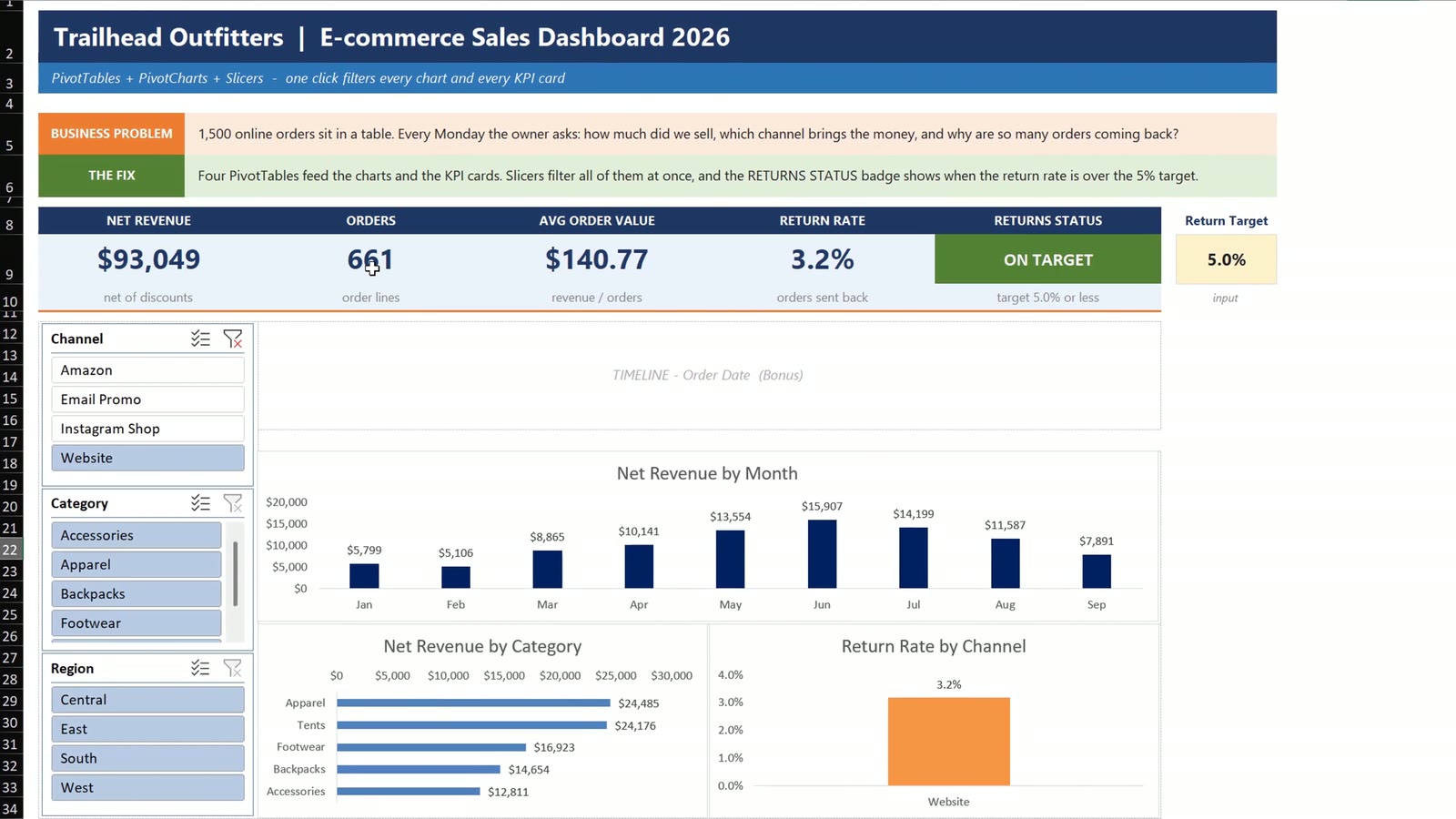
One thousand five hundred online orders, and the owner wants answers every Monday morning. In this tutorial you build an e-commerce sales dashboard in Excel where one click on a slicer filters every chart and every number. You use four PivotTables, three PivotCharts, summary cards with GETPIVOTDATA, three slicers and a timeline. The example is Trailhead Outfitters, an online outdoor gear store in Boulder, Colorado.
⬇️ Join Free on Skool & Download the Practice File
Free membership · takes 1 minute · the file is in Classroom → Free Downloads from YouTube and Cross Filter functionality in Excel chart. Microsoft explains slicers in its official slicer guide.
Want a Finished, Designed Version?
If you would rather start from a ready-made online-store dashboard, see the Online Furniture Retail Dashboard in Excel: 5 pages and 17 charts, with the same one-click filtering idea. To learn the method step by step, take the Excel Pivot Tables & Dashboards course on Next Gen Templates Academy.
Frequently Asked Questions
How do I build an e-commerce sales dashboard in Excel?
Turn your orders into an Excel Table, insert four PivotTables from that table, add PivotCharts and summary cards with GETPIVOTDATA, then insert slicers and a timeline and connect them to every pivot with Report Connections.
Why copy the first PivotTable instead of inserting a new one?
Copies share one pivot cache. A slicer can only control pivots that share its cache, so one slicer then filters every pivot and chart.
Why does my slicer not filter some charts?
A slicer only filters the pivots it is connected to. Select the slicer, open Slicer > Report Connections and tick every PivotTable. Do this again whenever you add a new pivot or slicer.
Why use GETPIVOTDATA for the cards instead of a cell reference?
A plain reference such as =Pivots!N11 points at a fixed cell and breaks when a slicer changes the pivot. GETPIVOTDATA asks for the value by its name, so it always finds the right number.
How do I get a return rate from a Return Flag column?
Use 1 for a returned order and 0 otherwise, then set the value field to Average and the format to a percentage. The average of a 1 and 0 column is the rate.
Why did my dashboard not change after I added new orders?
PivotTables do not refresh by themselves. Use Data > Refresh All, or set PivotTable Options to refresh when the file opens.
Is the practice file free?
Yes. The zip has the Practice and Solution workbooks with 1,500 example orders for the fictional store Trailhead Outfitters. The figures are example data for learning.
Download the Free Practice Files
⬇️ Join Free on Skool & Download the Practice File
Free membership · takes 1 minute · the file is in Classroom → Free Downloads from YouTube
Practice + Solution workbooks · 1,500 example orders · .zip · Excel 365 / 2021
By PK, An Excel Expert. The store, orders and figures are fictional example data for learning.
Conclusion
Four PivotTables on one cache, three PivotCharts, cards that use GETPIVOTDATA, and slicers and a timeline connected to everything give you a dashboard that updates with one click and one Refresh All. Download the free files, build it along with the video and compare with the Solution file if you get stuck.