The fashion industry changes every season, but one thing remains constant — the need for real-time performance insights. With fast-moving trends, unpredictable consumer preferences, and diverse product lines, fashion businesses need a reliable way to track and analyze their operations.
That’s where the Fashion & Apparel Dashboard in Power BI comes in. This powerful analytical tool helps you turn complex data into clear, actionable visuals that guide smarter business decisions. Whether you run a retail brand, manage an apparel supply chain, or handle merchandising performance, this dashboard delivers 360° visibility.
Click to Purchases Fashion & Apparel Dashboard in Power BI
What Is a Fashion & Apparel Dashboard in Power BI?
A Fashion & Apparel Dashboard in Power BI is a business intelligence solution designed to analyze and visualize key performance metrics across the apparel value chain. It consolidates data from multiple sources — such as Excel files, ERP systems, POS software, or inventory tools — and presents it in a dynamic, interactive dashboard format.
With this dashboard, business users can:
-
Monitor sales and profit trends by brand, category, or department.
-
Track cost efficiency and product completion rates.
-
Analyze customer satisfaction and ratings across regions.
-
Identify top-performing channels and underperforming areas.
In short, it acts as the central nervous system of your fashion business, offering insights that drive profitability and operational excellence.
Key Features of the Fashion & Apparel Dashboard in Power BI
This ready-to-use dashboard has five powerful analytical pages, each focusing on a specific business area. Let’s explore what each page delivers.
Overview Page — Get a Quick Business Snapshot

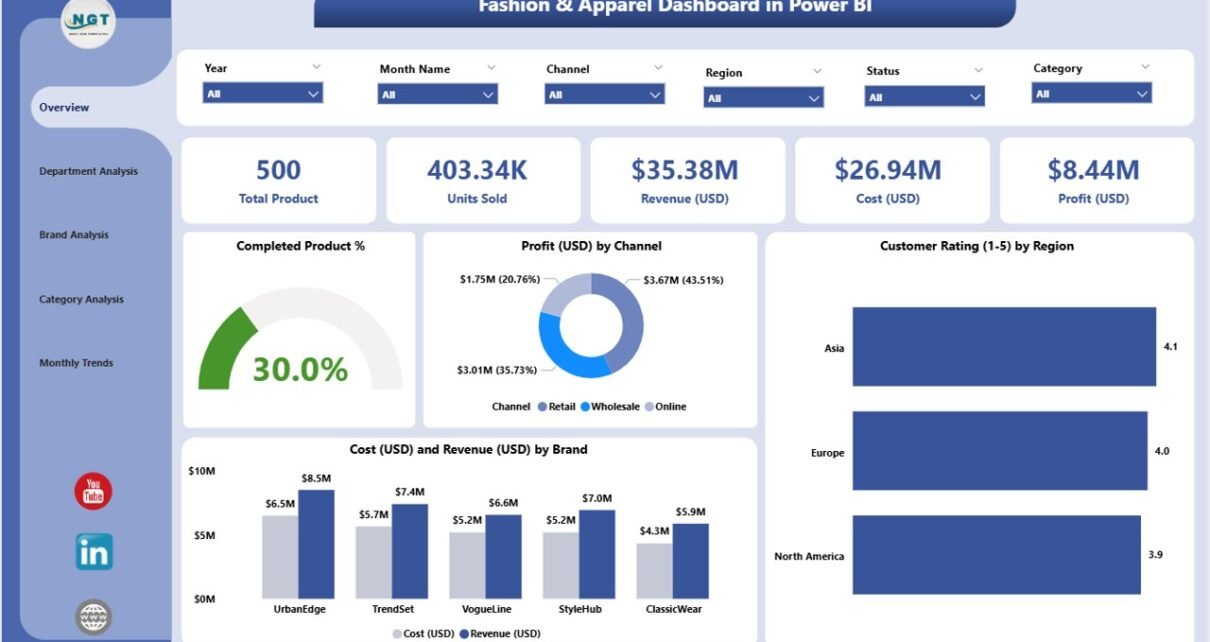
The Overview Page is your main control center. It gives you an instant look at overall performance through interactive cards and charts.
What you’ll see here:
-
Five KPI Cards:
Displaying Completed Product %, Total Cost (USD), Revenue (USD), Profit (USD), and Customer Rating (1–10).
Key Charts:
- Completed Product %: Shows production efficiency and completion rates.
- Profit (USD) by Channel: Identifies the most profitable sales channels (online, retail, wholesale, etc.).
- Customer Rating (1–10) by Region: Reveals customer satisfaction levels in each geographical area.
- Cost and Revenue (USD) by Brand: Highlights brand-wise profitability.
The Overview Page helps decision-makers quickly assess business health without diving into deep reports.
Department Analysis Page — Evaluate Performance by Department

Every department plays a vital role in the fashion business — from design to production to sales. This page allows you to compare and measure departmental efficiency.
Visual Insights Include:
-
Cost (USD) and Revenue (USD) by Department:
Understand which departments generate the most value and which require cost optimization. -
Customer Rating (1–10) by Department:
Track customer feedback linked to departmental outputs such as quality control, fulfillment, or service. -
Profit (USD) by Department:
Compare how each department contributes to overall profit.
With these visuals, managers can identify gaps, set performance benchmarks, and reward the best-performing departments.
Click to Purchases Fashion & Apparel Dashboard in Power BI
Brand Analysis Page — Understand Brand-Wise Profitability

In the fashion industry, brands often have unique identities, audiences, and profit margins. This page focuses entirely on brand-level analysis.
Charts on this Page:
-
Customer Rating (1–10) by Brand:
Understand which brands resonate best with your customers. -
Profit (USD) by Brand:
Pinpoint high-profit brands and identify those requiring marketing or pricing adjustments. -
Cost and Revenue (USD) by Brand:
Evaluate production and marketing costs against revenue to improve pricing strategies.
This view enables brand managers and executives to make data-backed decisions for pricing, promotions, and production planning.
Category Analysis Page — Track Product Segment Performance
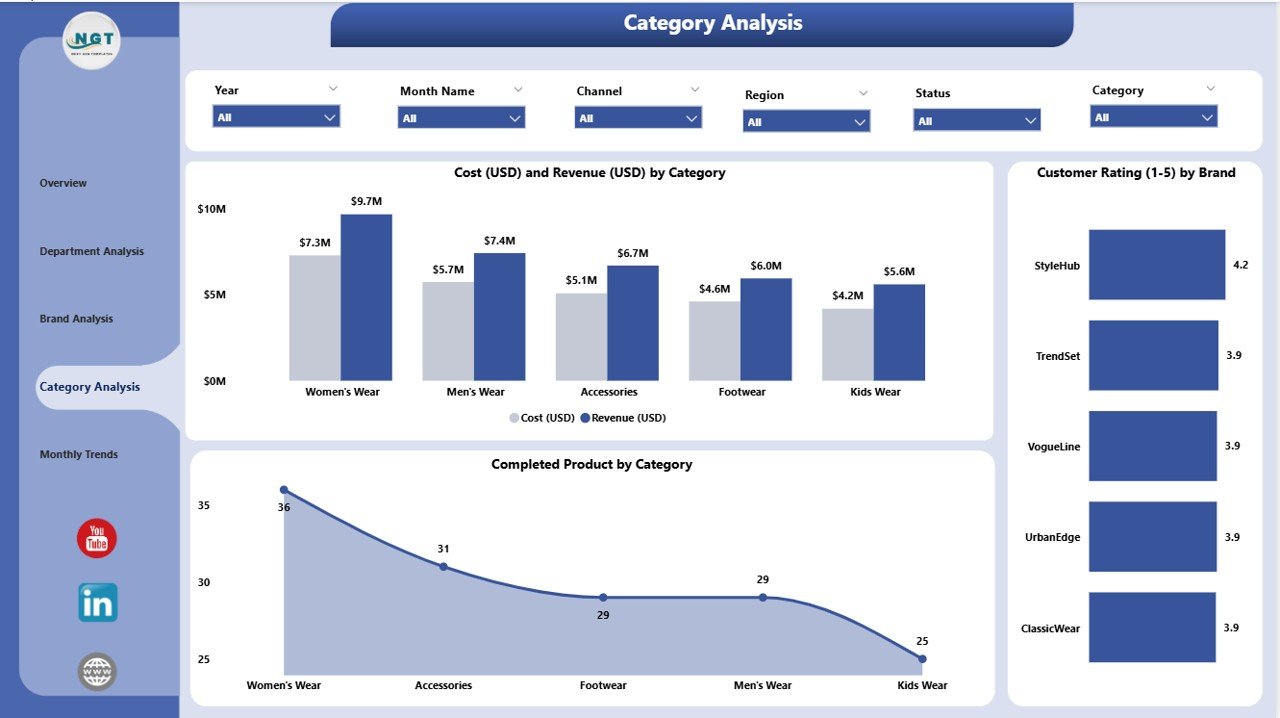
Not all product categories perform equally. Some styles become instant hits, while others struggle to move inventory. The Category Analysis Page helps you monitor category-specific performance metrics.
Charts You’ll Find:
-
Customer Rating (1–10) by Category:
See how customers rate various product lines — casual wear, formal wear, sportswear, accessories, etc. -
Profit (USD) by Category:
Identify which product categories contribute the most to total profit. -
Cost (USD) and Revenue (USD) by Category:
Compare cost efficiency and revenue generation per product category.
This insight allows you to adjust product mix, focus on high-margin categories, and align marketing strategies accordingly.
Monthly Trends Page — Track Performance Over Time
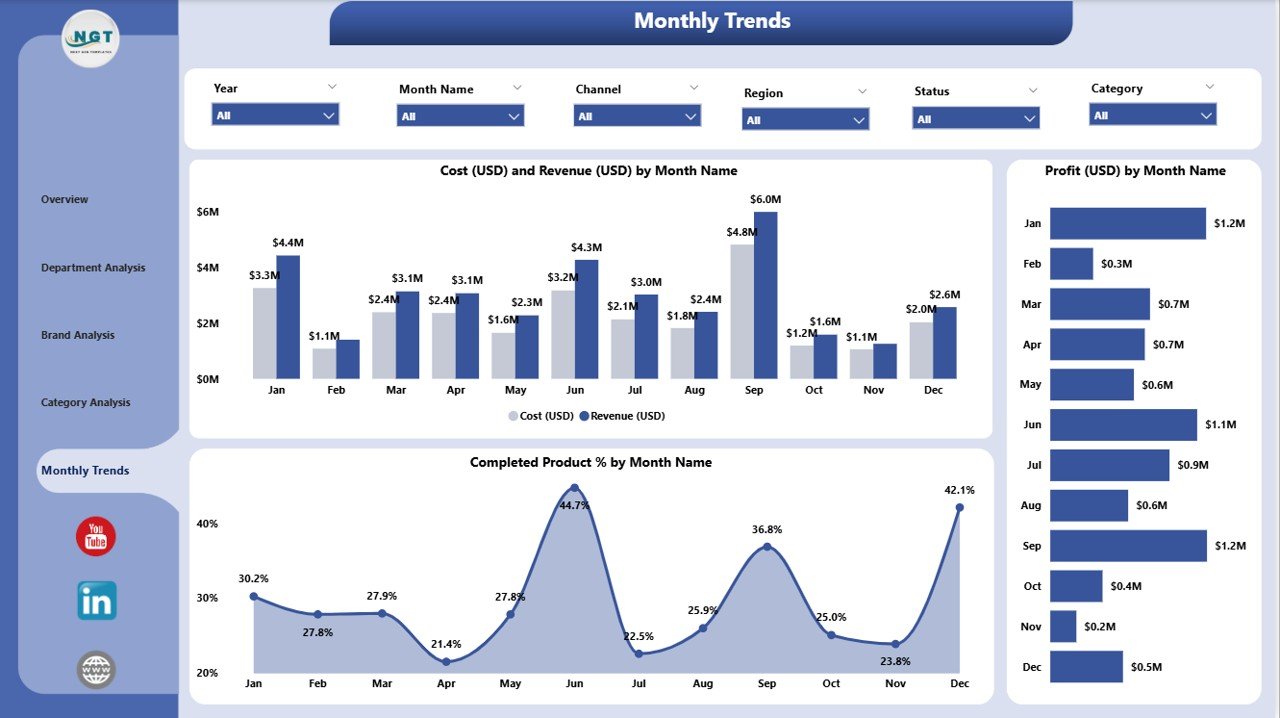
Fashion businesses thrive on seasonality. The Monthly Trends Page provides a time-based view of your key metrics.
Core Visuals Include:
-
Profit (USD) by Month:
See how profit fluctuates with seasonal demand or marketing campaigns. -
Completed Product % by Month:
Monitor how production completion varies month-to-month. -
Cost and Revenue (USD) by Month:
Detect cost spikes, track sales trends, and identify consistent growth periods.
With this temporal analysis, you can plan seasonal launches, inventory cycles, and marketing campaigns more strategically.📊 Why Choose Power BI for Fashion & Apparel Analytics?
Microsoft Power BI transforms raw data into visually stunning, interactive dashboards that make decision-making faster and smarter.
Here’s why it’s the perfect choice for the fashion and apparel industry:
-
Data Centralization: Combine sales, cost, inventory, and marketing data in one place.
-
Real-Time Insights: Track live KPIs and monitor market changes instantly.
-
Interactive Dashboards: Drill down into any metric, region, or brand with a single click.
-
Automation: Refresh data automatically from Excel or cloud sources.
-
Accessibility: Access dashboards from desktops, tablets, or mobile devices anytime.
💡 Advantages of Fashion & Apparel Dashboard in Power BI
The Fashion & Apparel Dashboard offers numerous business advantages. Let’s explore the key benefits:
✅ 1. Real-Time Visibility
Get instant insights into production, sales, and profitability metrics across brands and regions.
✅ 2. Improved Decision-Making
Analyze detailed data to identify trends, minimize losses, and seize emerging opportunities.
✅ 3. Enhanced Productivity
Automated data refresh and visualization reduce manual reporting efforts, freeing teams for strategy.
✅ 4. Accurate Forecasting
Use historical data to predict demand patterns, seasonal spikes, and future performance.
✅ 5. Customization and Scalability
Tailor visuals, KPIs, and reports as your business expands into new markets or product lines.
✅ 6. Customer-Centric Insights
Understand preferences, ratings, and satisfaction trends to enhance customer experience.
✅ 7. Cost Control
Spot inefficiencies in departments, brands, or categories and optimize spending efficiently.
How Power BI Enhances Fashion Business Intelligence
Power BI brings together data visualization, business logic, and storytelling in one unified platform.
Here’s how it enhances decision-making for fashion brands:
-
Data Integration: Combine POS, ERP, CRM, and supplier data seamlessly.
-
AI-Powered Analytics: Use predictive visuals and AI insights to forecast trends.
-
Custom Filters and Slicers: Focus on specific channels, departments, or regions dynamically.
-
Interactive Reports: Transform static Excel sheets into engaging dashboards.
-
Security and Governance: Manage user access, ensuring data integrity and compliance.
Opportunities for Improvement with the Dashboard
Click to Purchases Fashion & Apparel Dashboard in Power BI
While the dashboard provides strong analytical coverage, continuous improvement ensures even greater value.
Potential Enhancements Include:
-
Adding real-time integration with online store APIs (Shopify, Magento, etc.).
-
Including inventory turnover ratios and supply chain KPIs.
-
Introducing AI-driven product recommendation analysis.
-
Expanding data sources to include social sentiment tracking.
-
Automating alerts for underperforming categories or low customer ratings.
These enhancements will help the dashboard evolve into a comprehensive retail intelligence system.
Best Practices for Using the Fashion & Apparel Dashboard in Power BI
To make the most of this tool, follow these best practices:
💼 1. Maintain Data Accuracy
Ensure your Excel or database inputs remain updated and validated to reflect real-time performance.
📅 2. Review Dashboards Regularly
Monitor KPIs weekly or monthly to detect early signs of deviation from targets.
🔍 3. Use Slicers for Focused Analysis
Leverage Power BI slicers to filter results by region, brand, or department for deeper insights.
🧭 4. Align KPIs with Business Goals
Set clear KPI definitions — e.g., profit margin %, cost per product — and link them to strategic objectives.
⚡ 5. Automate Data Refresh
Use Power BI’s scheduling feature to refresh data automatically, avoiding manual effort.
🧠 6. Integrate with Other Tools
Combine Power BI with Excel or cloud-based systems for complete data management.
🏆 7. Train Your Teams
Provide brief training so that managers, analysts, and executives can explore insights independently.
🧶 Real-World Use Cases of Fashion & Apparel Dashboard
Let’s look at how different departments can utilize this dashboard effectively.
👗 For Design & Production Teams
Track Completed Product % to ensure production goals align with deadlines.
🛒 For Sales & Marketing Teams
Analyze Profit by Channel and Customer Ratings to refine pricing and campaign strategies.
🧾 For Finance Teams
Monitor Cost vs Revenue trends to manage budgets effectively and maximize profitability.
📦 For Inventory & Logistics Teams
Identify slow-moving products or high-return items using Category Analysis insights.
👥 For Management
View consolidated performance metrics across brands and departments for quick executive decisions.
🧩 Integration with Excel for Data Input
Since this dashboard sources its data from Excel, it ensures easy data entry and accessibility.
-
Excel acts as the backend: Users can update daily performance data easily.
-
Automatic Power BI refresh: Reflects the latest Excel entries.
-
User-friendly setup: No technical expertise required — ideal for business users.
This integration bridges the gap between traditional data management and advanced analytics.
allowing users to click, filter, and drill down into insights instantly.
✨ Conclusion
The Fashion & Apparel Dashboard in Power BI is not just a reporting tool — it’s a decision intelligence platform that empowers businesses to visualize performance, streamline operations, and maximize profits.
By combining data from Excel with Power BI’s analytical power, it gives fashion professionals a clear, data-driven roadmap for success. Whether it’s brand profitability, department efficiency, or customer satisfaction, this dashboard turns complex metrics into simple stories that guide growth.
In the fast-paced world of fashion, staying informed means staying ahead — and with this Power BI dashboard, you’re always one step ahead.
❓ Frequently Asked Questions (FAQs)
1. What is the main purpose of the Fashion & Apparel Dashboard in Power BI?
It helps fashion businesses track performance across brands, categories, and departments, offering actionable insights for decision-making.
2. Can I customize the KPIs or charts?
Yes, Power BI allows full customization. You can add, remove, or modify KPIs, filters, and visuals as per your requirements.
3. How often should I refresh the dashboard data?
It’s best to schedule automatic refreshes daily or weekly, depending on your data flow and reporting needs.
4. Can this dashboard be shared with team members?
Yes, you can share dashboards securely within your organization through Power BI Service or embed them in internal portals.
5. What data source does this dashboard use?
The dashboard uses Excel as the backend data source, but it can also connect to cloud databases or ERP systems.
6. Do I need coding knowledge to use it?
No, Power BI dashboards are intuitive and easy to use. You don’t need any coding skills to explore or interpret the visuals.
7. How does it help improve profitability?
By identifying cost-heavy departments, underperforming categories, and profitable channels, it helps you make data-driven cost and revenue decisions.
8. Is it suitable for small fashion businesses?
Absolutely. Whether you’re a boutique or a large retail chain, the dashboard scales easily to fit your business size.
Visit our YouTube channel to learn step-by-step video tutorials