Most ambulance services do not lose track of a shift because nobody planned it. They lose track of it because the plan lives in four places at once – a whiteboard in the crew room, a printed rota taped to a locker, a maintenance list on the fleet coordinator’s desk and a training schedule in somebody’s inbox. Then two vehicles go off the road for servicing in the same week, the oxygen cylinder check slides past the date nobody wrote down, and the public-holiday standby gets arranged three days out instead of eleven months.
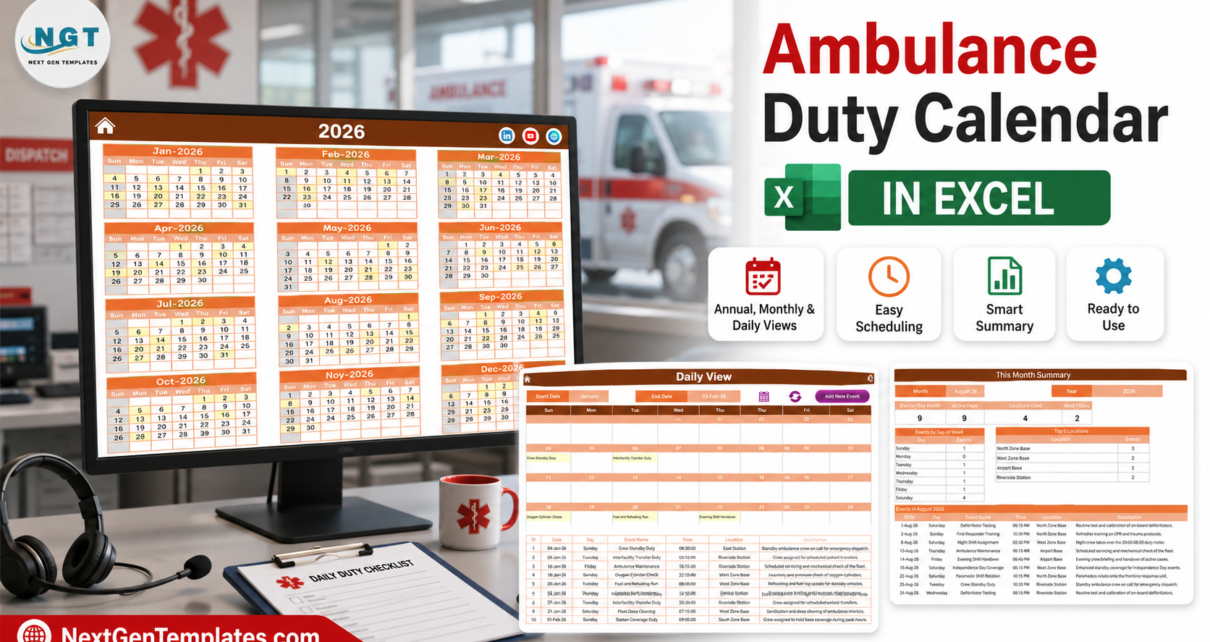
The Ambulance Duty Calendar in Excel is a small, deliberately unambitious fix for that. It is a macro-enabled workbook of 7 sheets in which you type each duty once – into a single Events table – and it appears immediately in five linked views: a printable year planner, a working month grid, a date-range day list, a monthly summary and the master table itself. It ships preloaded with 100 sample duties running from 04-Jan-2026 to 31-Dec-2026 across 7 stations and bases and 27 named duty types, so you can see how it behaves before you type a single row of your own.
Before we go further, the honest boundary. This is a planning calendar. It is not a dispatch or CAD system, not a call-taking tool, not a patient care record or ePCR, and not a clinical, regulatory or accreditation reporting system. It measures no response time, tracks no vehicle location, enforces no working-time rule, and produces no statutory return. It shows a roster you typed in, on a calendar you can print. If you need any of the other things, you need a platform, and nothing in this article should be read as suggesting otherwise.
Key Features of the Ambulance Duty Calendar in Excel
- 7 worksheets, 5 linked views. Home, Annual View, Monthly View, Daily View, This Month, Events and Setting.
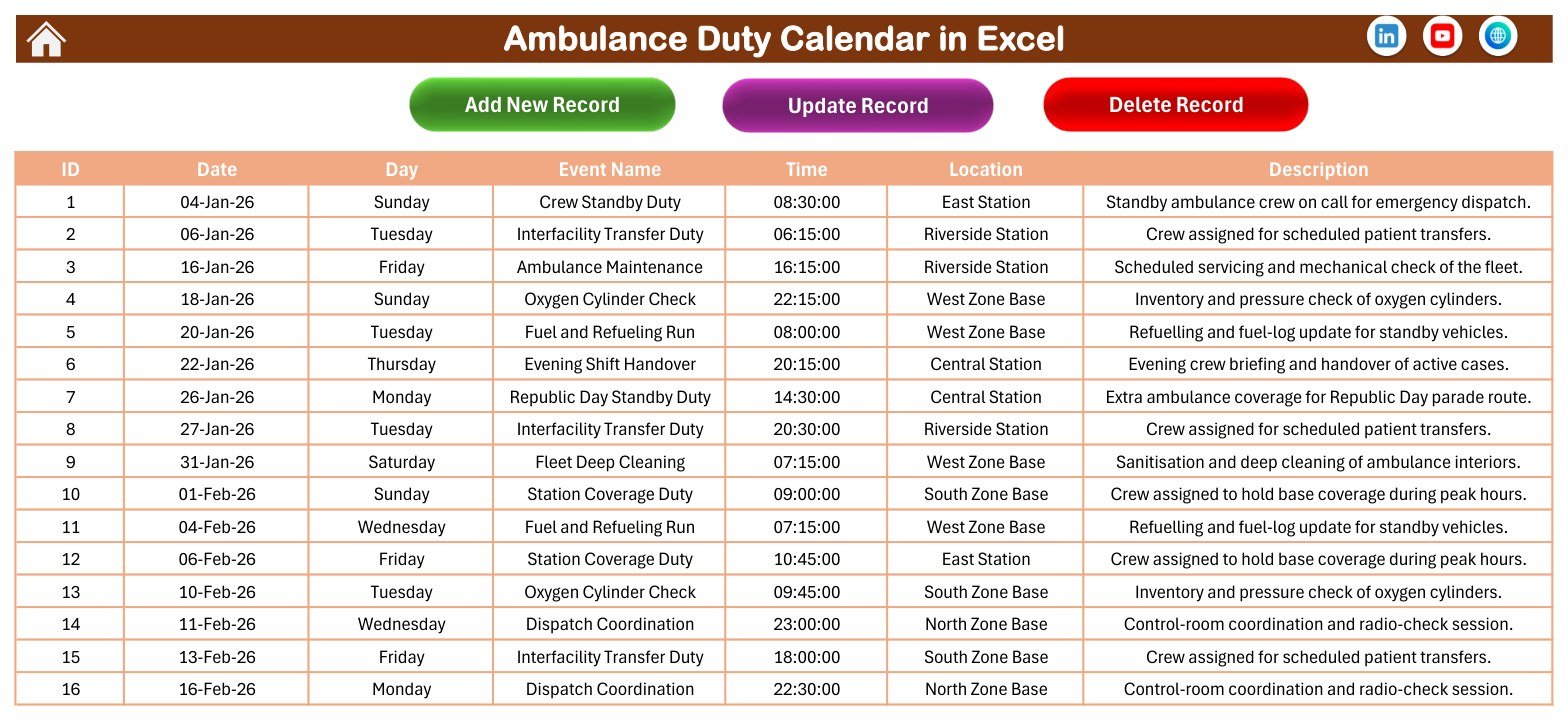
- One master table drives everything. The Events sheet holds seven columns – ID, Date, Day, Event Name, Time, Location and Description – and every calendar view reads from it, so a duty entered once appears in all of them.
- Exactly 100 sample duties, IDs 1 to 100, sorted by date, spread eight or nine to a month across the whole of 2026.
- 7 stations and bases already set up: Airport Base, Central Station, East Station, North Zone Base, Riverside Station, South Zone Base and West Zone Base.
- 27 duty types across three families – crew rostering (Station Coverage Duty, Crew Standby Duty, Night and Morning Shift Assignment, Evening Shift Handover, Paramedic Shift Rotation, Driver Duty Roster, Weekend Standby Roster, Interfacility Transfer Duty, Dispatch Coordination), fleet and equipment (Ambulance Maintenance, Vehicle Inspection, Fleet Deep Cleaning, Oxygen Cylinder Check, Defibrillator Testing, Equipment Restocking, Radio Communication Check, Fuel and Refueling Run) and readiness (Emergency Response Drill, First Responder Training).
- Times from 06:00 to 23:30 in the sample data, so night cover and small-hours handovers sit in the grid alongside daytime maintenance slots.
- 7 public-holiday standby entries pre-blocked – Republic Day, Holi, Independence Day, Gandhi Jayanti, Diwali, Christmas and New Year’s Eve.
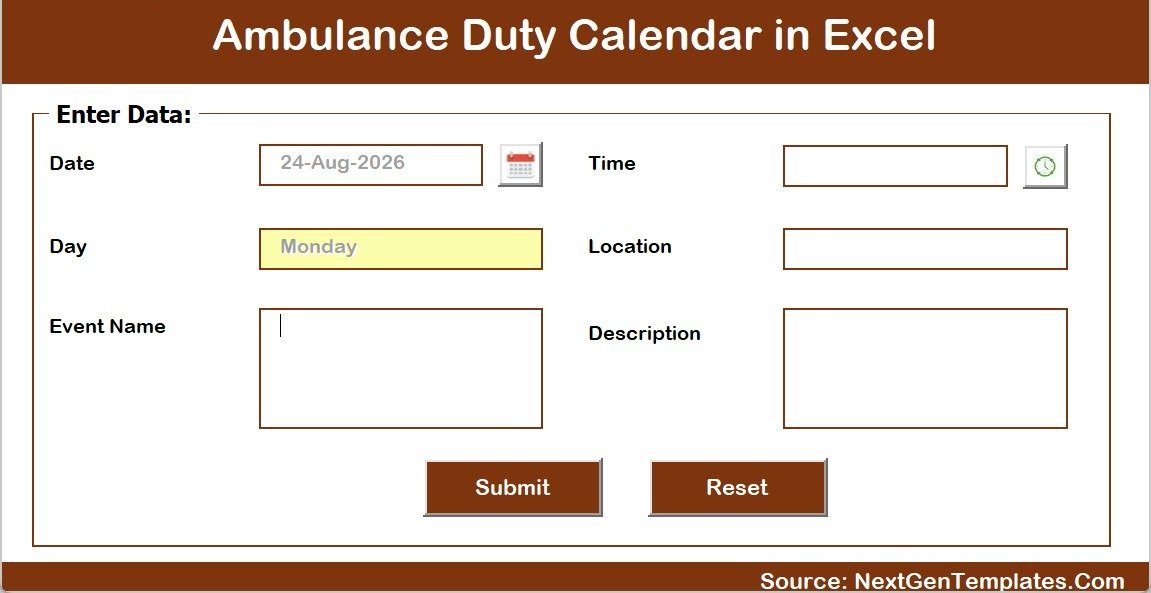
- A VBA pop-up entry form with a calendar picker on the date box, a clock picker on the time box, and a Day field that fills itself in from the date you choose.
- Add, Update and Delete controls on the Events sheet, plus Add New Event / Show Events on the Monthly View and Add New Event / refresh on the Daily View.
- 5 one-click colour themes – Default, Blue, Red, Black, Orange – applied from the Setting sheet. This file ships on Orange.
- A 2021-2051 year list, a configurable start month, a configurable week start day, two highlighted weekday columns and an event-highlight switch.
- No crew name, employee ID, licence number, contact detail or pay column anywhere. The roster is built around the duty, the time and the station.
- Macro-enabled .xlsm. Microsoft Excel for Windows, desktop only.
Sheets Explanation
1. Home – the control panel
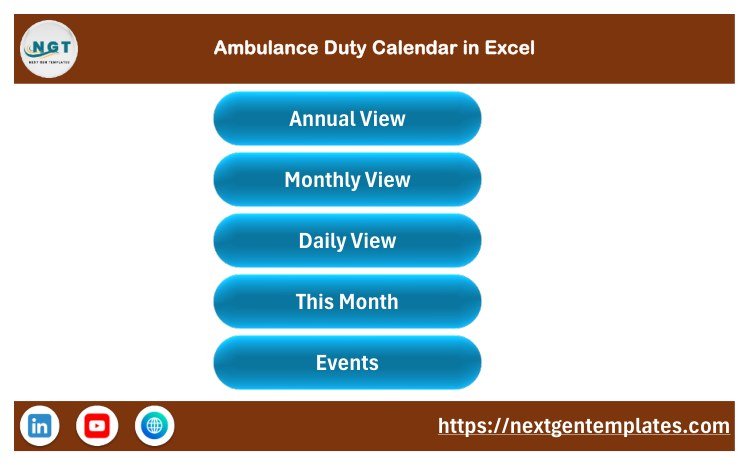
A branded landing page with five large buttons – Annual View, Monthly View, Daily View, This Month and Events – so a crew member who does not use Excel can still move around the file. The footer carries the NextGenTemplates link and social icons.
2. Annual View – the year on one page
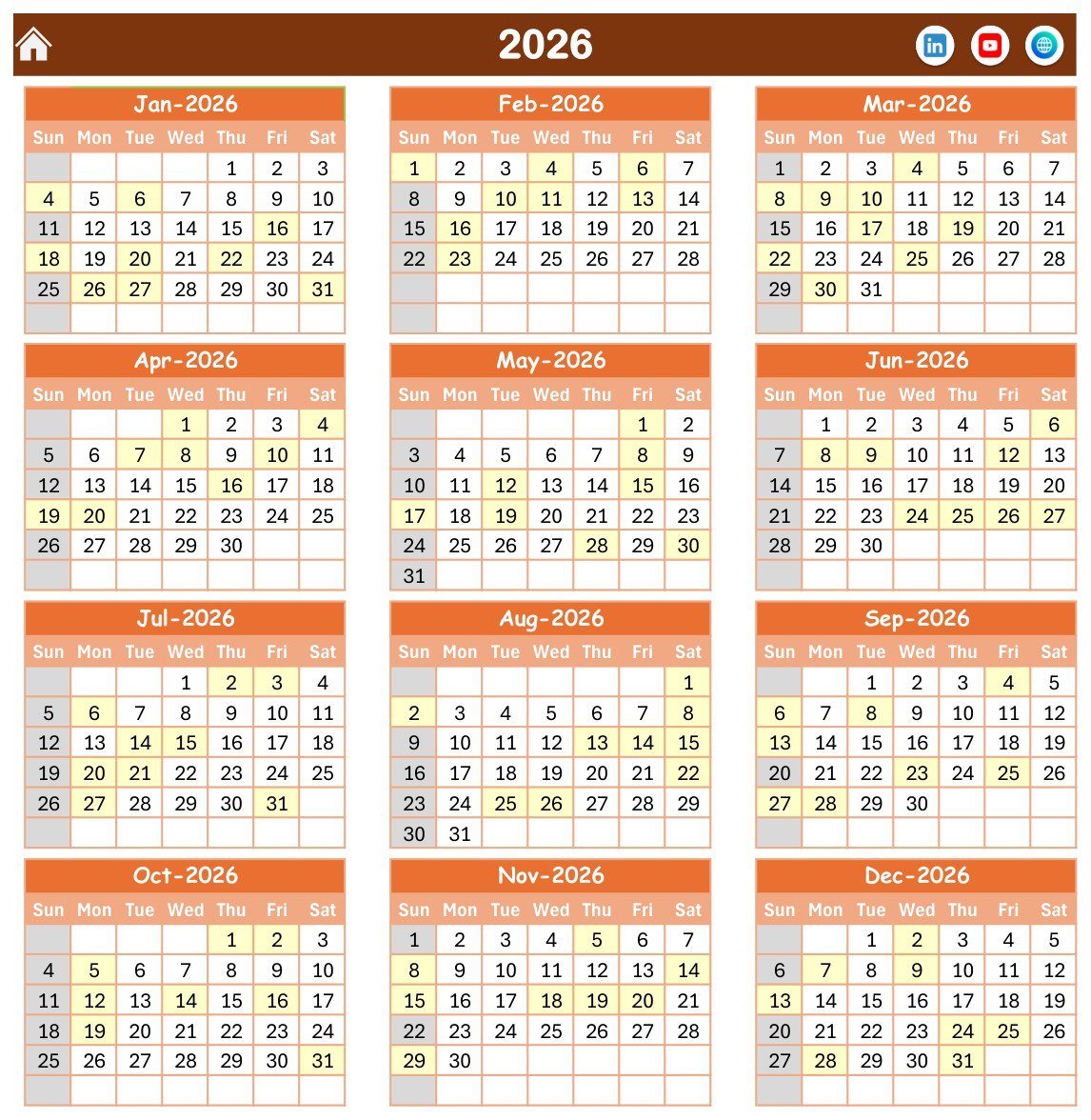
Twelve month blocks in a three-across, four-down grid for the selected year. Every date that carries a duty is shaded, Sundays are greyed, and the two weekday columns you nominate on the Setting sheet get their own highlight. It has a print area already set, and this is the sheet that goes on the crew-room wall.
Because it is driven by the same Events table, the shading is a genuine coverage map rather than a decoration: a month with a pale row is a month where nothing has been scheduled yet.
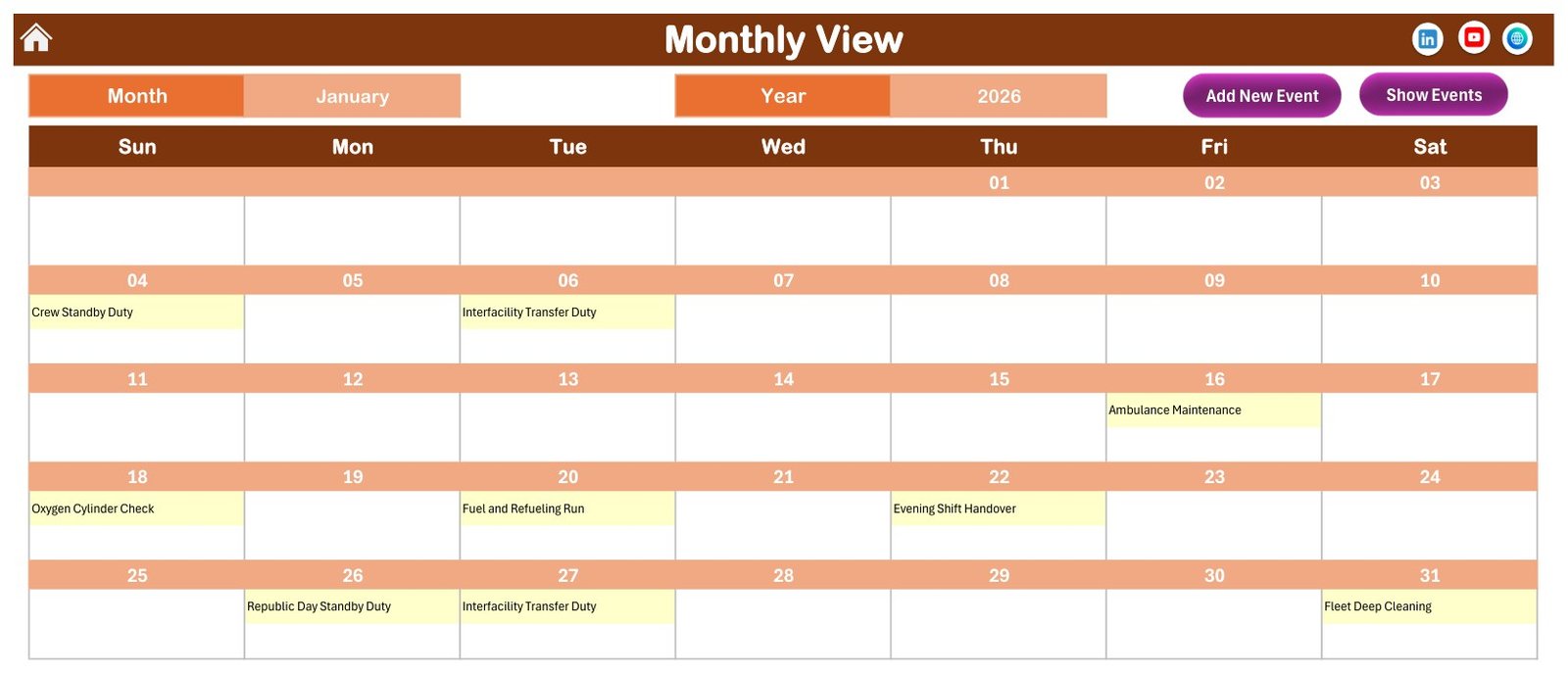
3. Monthly View – the working grid
Choose a month and a year from the two drop-downs and the grid redraws with each duty printed inside its date cell. January 2026 in the sample file shows the 04-Jan Crew Standby Duty, the 06-Jan Interfacility Transfer Duty, the 16-Jan Ambulance Maintenance, the 18-Jan Oxygen Cylinder Check, the 20-Jan Fuel and Refueling Run, the 22-Jan Evening Shift Handover, the 26-Jan Republic Day Standby Duty, the 27-Jan Interfacility Transfer Duty and the 31-Jan Fleet Deep Cleaning – nine duties, which is exactly what the Events table holds for that month.
If a date ever carries more than one duty, the cell shows the first name and an “N more” counter, and you go to the Daily View for the full list. The shipped sample has one duty per date, so you will only see that counter once you start doubling up.
4. Daily View – any window you like
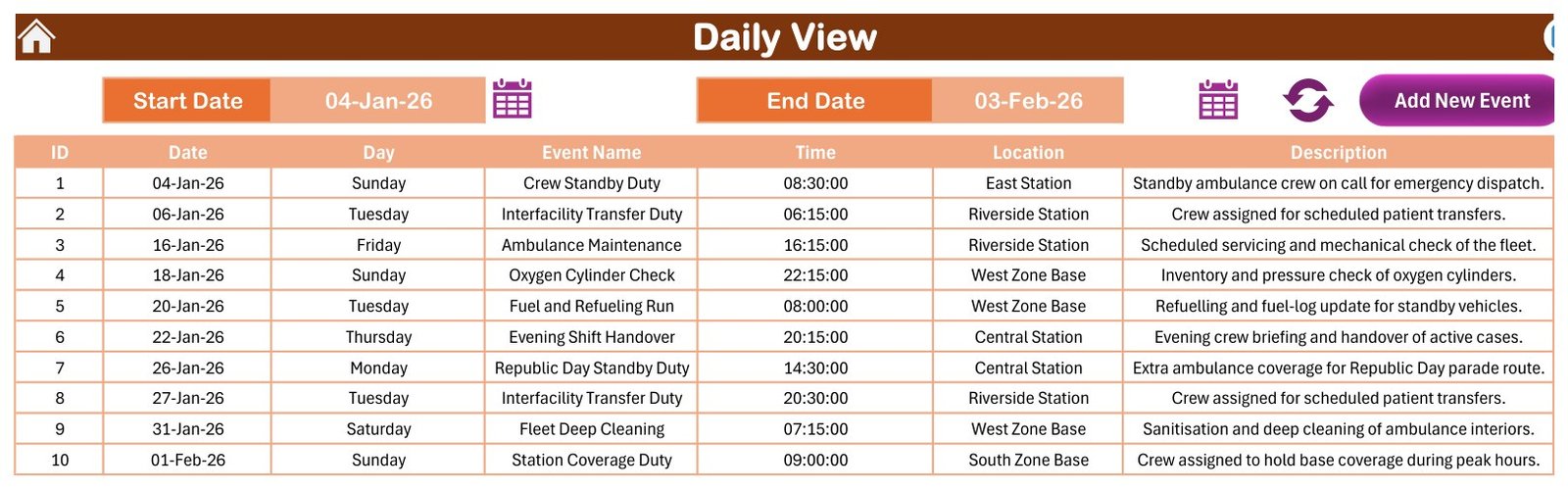
Set a Start Date and an End Date, each with its own calendar picker, and the sheet lists every duty inside that window as a plain table: ID, Date, Day, Event Name, Time, Location and Description. The file opens on 04-Jan-2026 to 03-Feb-2026, which returns the first ten duties of the year. A refresh control re-runs the filter, and an Add New Event button opens the same pop-up form used everywhere else.
This is the sheet you print for a shift board, or for a fortnight’s handover pack.
5. This Month – the summary
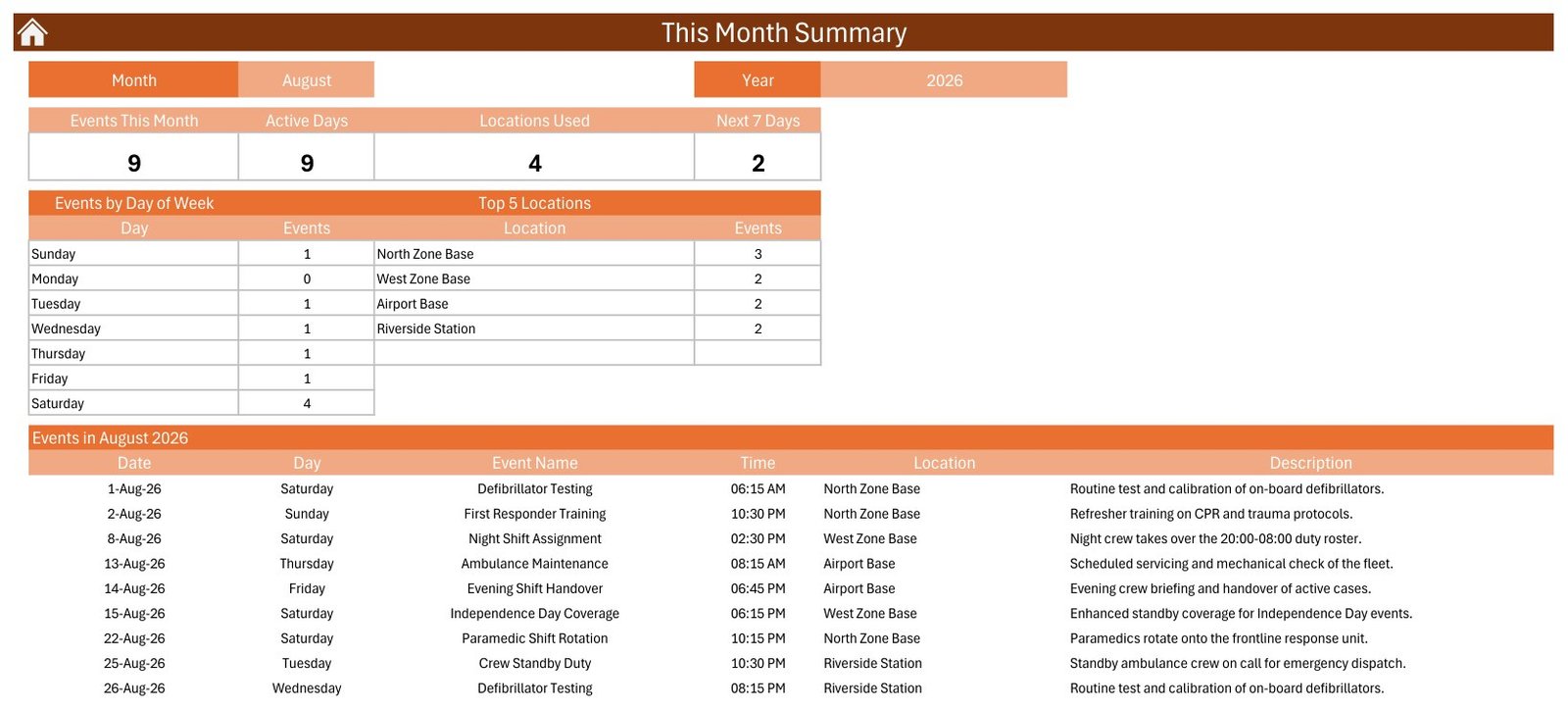
Four counts across the top – Events This Month, Active Days, Locations Used and Next 7 Days – then an Events by Day of Week table and a Top 5 Locations table, with the full month list underneath.
The file ships showing August 2026, and the numbers are worth reading as an example of what this page is for: 9 duties, on 9 active days, across 4 bases, with 2 in the next seven days. The day-of-week table shows four of the nine landing on a Saturday and none at all on a Monday, and Top 5 Locations puts North Zone Base ahead at 3. That is the kind of lopsidedness a whiteboard hides and a summary page surfaces in a glance.
6. Events – the single source of truth
One row per duty across the seven columns, with Add New Record, Update Record and Delete Record buttons above the table and a live AutoFilter on the header row. A macro keeps the table sorted by date, so rows entered out of order settle into place.
Everything the four calendar views draw comes from here. Delete a row and it vanishes from all of them; edit a time and every view picks it up.
7. The entry form
A VBA pop-up headed “Enter Data” with six fields: Date, Day, Event Name, Time, Location and Description. The date box has a calendar picker, the time box a clock picker, and the Day field is filled automatically from the date – so a Monday can never be filed as a Tuesday, which is the single most common way a hand-typed roster goes wrong. Submit writes the row; Reset clears the form. The Update Record button loads the same form with an existing row in it.
8. Setting – the control sheet
The Year (a 2021-2051 drop-down), the month the calendar starts with, the day the week starts on, two Day of Week highlight columns, a Highlight Event switch and the Whole Theme colour picker. Change the year here and every view rolls forward together.
Ambulance Duty Calendar in Excel vs. a Google Sheets roster vs. paid EMS software – Feature Comparison
| Feature | Ambulance Duty Calendar in Excel | Google Sheets roster equivalent | Paid EMS scheduling / CAD platform |
|---|---|---|---|
| Cost | $8.99 one-time | Free to $16.99 one-time | $3-$8 per employee per month, or five figures a year for CAD |
| Platform | Excel for Windows, desktop, macros required | Any browser | Vendor cloud plus mobile and in-vehicle apps |
| Setup time | Under 10 minutes | Under 10 minutes | Weeks to months, with vendor onboarding |
| Views included | 5 – Annual, Monthly, Daily range, This Month, Events table | Usually 2-3 | Many, plus per-unit and per-vehicle boards |
| Sample data to start from | 100 duties, 7 bases, 27 duty types | Usually none | None – you import your own |
| Real-time collaboration | No – one file at a time | Yes, multi-user | Yes |
| Mobile access for crews | No – Windows desktop only | Yes | Yes |
| Shift swaps and self-service | None | None | Yes |
| Live dispatch, call-taking, vehicle tracking | None – planning calendar, not a CAD | None | Yes, that is the product |
| Response-time metrics, ePCR, clinical reporting | None – it measures nothing | None | Yes, with regulatory returns |
| Time and attendance, payroll export | None | None | Yes |
| Printable year planner | Yes, print area already set | Possible, needs building | Usually a report export |
| Year-1 cost, 20-crew service | $8.99 total | $0-$16.99 total | $700-$2,000+ for scheduling alone |
Who Should Use This Template
A good fit for:
- Station managers and operations leads planning crew cover, handovers and weekend standby for the year ahead
- Small and private ambulance services, patient-transport operators and volunteer first-responder units whose roster currently lives on a whiteboard
- Fleet and equipment coordinators spacing ambulance maintenance, vehicle inspections, oxygen cylinder checks, defibrillator testing and restocking so they do not collide
- Training officers scheduling emergency response drills, first responder refreshers and radio communication checks twelve months out
- Anyone who has to hand a printed year planner or day list to crews without a login to the operations system
- Excel users who would rather own the file outright than rent a seat per crew member per month
Not a fit if:
- You need computer-aided dispatch, call-taking, unit status or vehicle tracking – this workbook does none of it and must never sit in a live response workflow
- You need patient care records, ePCR or triage notes – it is not an EHR, EMR or ePCR and has no access control, encryption or audit trail
- You need response-time performance, clinical governance, accreditation or statutory reporting – it measures nothing and produces no return of any kind
- You need HIPAA or GDPR compliance guarantees or a data-processing agreement – the workbook carries no certification whatsoever
- You need working-time rules, rest breaks or maximum-hours limits checked – it validates nothing and accepts whatever you type
- Your team works on Mac, iPad, Android or the browser – the VBA needs Excel for Windows on the desktop
Real-World Use Cases
- A three-station private ambulance service plans standby cover, night shift assignments and evening handovers a quarter ahead and prints the month grid for each crew room.
- A fleet coordinator spaces ambulance maintenance, vehicle inspections and fleet deep cleaning across the year so two vehicles are never off the road in the same week.
- An equipment officer blocks out oxygen cylinder checks, defibrillator testing, equipment restocking and radio communication checks, then uses the Annual View to confirm they do not stack up.
- A training officer schedules emergency response drills and first responder training for the year and prints the planner for the notice board.
- An operations lead blocks extra standby cover for public holidays and local events eleven months out, then prints the next fortnight from the Daily View.
- A station manager reads the This Month summary at month end to see which base carried the most scheduled duties and which weekday is consistently empty.
Advantages of the Ambulance Duty Calendar in Excel
- Enter once, see everywhere. The single Events table removes the whole class of problem where the whiteboard and the printed rota disagree.
- It prints. Two sheets have print areas already configured, which matters enormously in an environment where the plan has to be readable by someone walking past it.
- The Day field cannot drift. Because the form derives the weekday from the date, the calendar and the list can never disagree about which day a duty falls on.
- No licences, no seats, no renewal. One file, one price, yours.
- It works offline. No connection, no account, no sign-in – which is occasionally the point at a station with poor connectivity.
- Privacy by omission. With no name, ID or contact column in the schema, the file simply cannot become a staff personal-data store by accident.
- 100 rows of realistic sample data mean you evaluate a populated calendar rather than an empty grid.
Opportunities for Improvement
An honest list, because knowing the ceiling before you buy is worth more than a longer feature list:
- Single user, single file. Two people cannot edit it at once, and there is no version history beyond your own saved copies.
- Windows desktop only. The VBA forms and buttons do not run on Excel for Mac, Excel on the web, iPad or Android.
- No reminders or sync. Nothing is pushed to a phone, an inbox or Outlook. The “Next 7 Days” count only helps if somebody opens the file.
- One duty per date cell in the Monthly View. Extra duties on the same date are reduced to an “N more” counter, so a genuinely busy day has to be read on the Daily View.
- No validation of any kind. Nothing stops you scheduling the same base twice at the same hour, and nothing checks a rest break.
- Macros must be enabled, which some managed corporate environments block outright. Check your policy before buying.
- No shift-length or hours arithmetic. Each row is a start time, not a span, so the file will not total anybody’s hours.
Best Practices
- Unblock the file first. Right-click the downloaded ZIP, Properties, tick Unblock, then extract. Windows otherwise opens the workbook in Protected View and the macros never load.
- Set the Setting sheet before you type anything – year, start month, week start day, highlight columns and theme. Doing it afterwards is harmless but you will re-read the whole calendar.
- Replace the seven sample locations with your own bases early, so the Top 5 Locations table means something from the first month.
- Always add duties through the pop-up form rather than typing into the Events sheet directly – that is what keeps the Day column honest.
- Delete the 100 sample rows in one go once you have finished exploring, rather than editing them one by one into your own data.
- Keep the naming of duty types tight. “Ambulance Maintenance” and “Vehicle Maintenance” as two names for one thing will quietly ruin the Top 5 Locations and day-of-week counts.
- Print the Annual View at the start of each quarter and the Daily View each fortnight – the workbook is at its most useful on a wall.
- Keep one file per service or per region. The workbook has no filtering by base beyond the summary counts, so a very large multi-region roster is better split.
- Back it up like any spreadsheet. There is no cloud copy and no undo history beyond Excel’s own.
- Never put patient or clinical detail in the Description column. Roster the duty; keep patients in the clinical system.
Explore Relevant Templates
Other duty calendars on the same engine: the Nurse Duty Roster Calendar in Excel and the Doctor On-Call Calendar in Excel roster clinical staff instead of ambulance crews, while the Home Nursing Visit Calendar in Excel and the Veterinary Clinic Calendar in Excel schedule visits and appointments. For the equipment side of the same fleet there is the Medical Equipment Calibration Calendar in Excel.
If dispatch is what you actually need, this workbook is the wrong tool – look at the Ambulance Fleet Dispatch Management System Web App, a multi-user system with logins and roles.
Once several months of duties are recorded, the analysis layer is where the value moves: the Emergency Medical Services KPI Dashboard in Excel, the Emergency Medical Services Dashboard in Excel and the Emergency Medical Services Dashboard in Power BI. For running costs beside the roster, see the Fleet Fuel Log Data Entry System in Excel.
Frequently Asked Questions
Is this a dispatch, CAD or emergency response system?
No, and it must never be used as one. It does not take calls, does not assign a unit to an incident, does not track vehicle location or unit status, and does not talk to any dispatch, radio or telematics system. Live response belongs in your CAD.
Does it hold patient records or clinical information?
No – and please do not put any in it. It is not an EHR, EMR or ePCR, it holds no clinical data model, and it has no access control, encryption or audit trail. The 100 sample rows carry no patient names or identifiers, which is exactly how the file is intended to be used.
Does it produce response-time, compliance or statutory reports?
No. It measures no response time, no on-scene time and no utilisation, and it produces no clinical-governance return, no accreditation evidence, no regulatory submission and no HIPAA or GDPR artefact. The only figures in the file are the counts on the This Month sheet.
Does it store crew or staff names?
No. There is no crew name, employee ID, licence number, contact detail, hours or pay column anywhere. The Events table records the duty, the date, the time, the station and a description. Add a name column yourself and it becomes personal data under your own obligations.
Do I have to enable macros, and does it work on a Mac?
Yes to macros – the file is a .xlsm and every button, the navigation and the pop-up form are VBA. It targets Excel for Windows on the desktop. Excel for Mac, Excel on the web, iPad and Android are not supported.
How many sample duties are included, and can I delete them?
Exactly 100, dated 04-Jan-2026 to 31-Dec-2026 across 7 stations and bases. They are demonstration data, not a recommended roster – delete them all and the views come up empty, ready for yours.
Can I use it for a year other than 2026?
Yes. The Setting sheet carries a year list from 2021 to 2051; change the year and every view redraws.
Will it remind me when a duty is coming up?
No. There are no reminders, alerts, emails or notifications, and it does not sync with Outlook, Google Calendar or any phone. The nearest thing is the “Next 7 Days” count, which you have to open the file to read.
Can two people edit it at the same time?
No – it is a single desktop workbook, one editor at a time. If simultaneous editing matters, a Google Sheets version or a hosted tool is the right answer.
Can I change the colours to match our service branding?
Yes. The Setting sheet has a Whole Theme picker with five presets – Default, Blue, Red, Black and Orange – and one click repaints the workbook. It ships on Orange.
What exactly is in the download?
A single ZIP with two files: the macro-enabled workbook and the Excel Calendar – User Manual.pdf, the shared guide for every Excel Calendar in the range – unblocking the file, enabling macros, moving between views, adding and editing duties, changing the year and theme, printing and troubleshooting.
About the Author
Built by PK – a Microsoft Certified Professional with 15+ years of hands-on Excel, Google Sheets and Power BI experience, and the founder of NextGenTemplates, reaching 300K+ subscribers across YouTube channels. Every template is hand-built and tested before release.
Conclusion
The Ambulance Duty Calendar in Excel does one job and does it plainly: it takes the shift cover, handovers, maintenance slots, equipment checks, drills and holiday standby that an ambulance service already plans somewhere, puts them in one table, and draws them five different ways – one of which prints and goes on a wall. A hundred sample duties across a full year mean you can judge it in five minutes rather than furnishing an empty grid first.
What it will not do is equally clear, and worth repeating one last time: no dispatch, no vehicle tracking, no patient records, no response-time or statutory reporting, no reminders, no mobile, no rule checking. It is a $8.99 planning spreadsheet, not a platform. Judged as that, it replaces a whiteboard and four scattered lists with a single file that everybody reads the same way.
Get the Ambulance Duty Calendar in Excel on NextGenTemplates – and for step-by-step walkthroughs of templates like this one, visit the PK – An Excel Expert YouTube channel.