In today’s fast-moving startup ecosystem, data decides success. Startups, investors, accelerators, and analysts constantly track funding, valuation, revenue, IPO readiness, and industry performance. However, raw startup data often remains scattered across multiple reports, tools, and spreadsheets. As a result, stakeholders struggle to get a single, clear view of the startup landscape.
That is exactly where the Aristech Startups Dashboard in Power BI becomes highly valuable.
This in-depth article explains what the Aristech Startups Dashboard in Power BI is, why it matters, how it works, what pages it includes, and how organizations can take full advantage of it. Moreover, you will learn about its advantages, best practices, improvement opportunities, and frequently asked questions.
Click to Purchases Aristech Startups Dashboard in Power BI
What Is an Aristech Startups Dashboard in Power BI?
An Aristech Startups Dashboard in Power BI is a ready-to-use analytical solution designed to monitor and analyze startup ecosystem performance using interactive visuals, KPIs, dashboards, and filters.
Instead of reviewing static reports, users can:
Track startup funding trends
Analyze valuation and revenue growth
Monitor IPO-ready startups
Compare performance by industry, region, stage, and funding source
Identify patterns, risks, and opportunities in minutes
Because Power BI offers real-time interactivity, this dashboard provides fast, accurate, and visually rich insights for strategic decision-making.
Why Do Organizations Need an Aristech Startups Dashboard in Power BI?
Startup ecosystems change quickly. New funding rounds appear every month. Industries rise and fall. Valuations shift with market sentiment. Therefore, relying on manual analysis slows decision-making and increases risk.
Organizations need an Aristech Startups Dashboard because it:
Centralizes all startup KPIs in one place
Reduces dependency on multiple reports
Improves data clarity and transparency
Supports faster, evidence-based decisions
Helps investors and founders spot trends early
As a result, teams remain informed, aligned, and proactive.
Who Can Use the Aristech Startups Dashboard in Power BI?
This dashboard suits a wide range of users, including:
Venture capital firms
Angel investors
Startup accelerators and incubators
Corporate innovation teams
Economic research organizations
Startup founders and CXOs
Business analysts and consultants
Because the dashboard uses simple slicers and visuals, both technical and non-technical users can use it comfortably.
How Does the Aristech Startups Dashboard in Power BI Work?
The dashboard works through a structured flow:
Data collection from startup databases or Excel files
Data modeling in Power BI
KPI calculations using DAX measures
Interactive dashboards with slicers and charts
User-driven analysis via filters and drill-downs
As users change slicers like region, industry, or stage, all visuals update instantly. Consequently, insights remain dynamic and contextual.
What Pages Are Included in the Aristech Startups Dashboard in Power BI?
The dashboard includes five well-designed analytical pages, each focusing on a specific business question.
1. What Insights Does the Overview Page Provide?
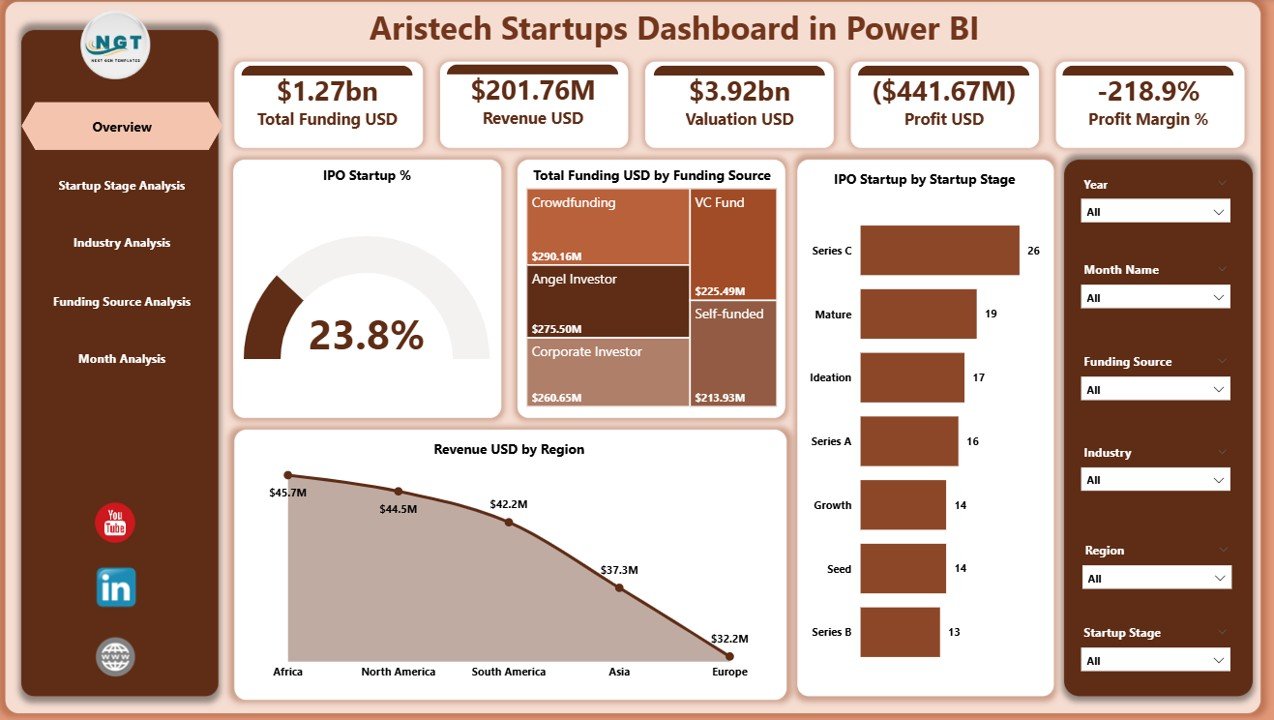
The Overview Page acts as the control center of the entire dashboard.
Key Elements of the Overview Page
Slicers: Allow users to filter data by time, region, or category
KPI Cards (4): Provide high-level snapshot metrics
Charts (4): Visualize overall startup performance trends
Key Cards Displayed
Total IPO Startup %
Total Funding USD
Valuation Trends (high-level)
Revenue Overview
Charts on the Overview Page
IPO Start-up % – Shows IPO readiness trends
Total Funding USD by Funding Source – Highlights capital inflow sources
IPO Startup by Startup Stage – Identifies which stages move toward IPO
Revenue USD by Region – Compares regional performance
Because this page summarizes everything, decision-makers gain instant clarity.
Click to Purchases Aristech Startups Dashboard in Power BI
2. How Does the Startup Stage Analysis Page Help?
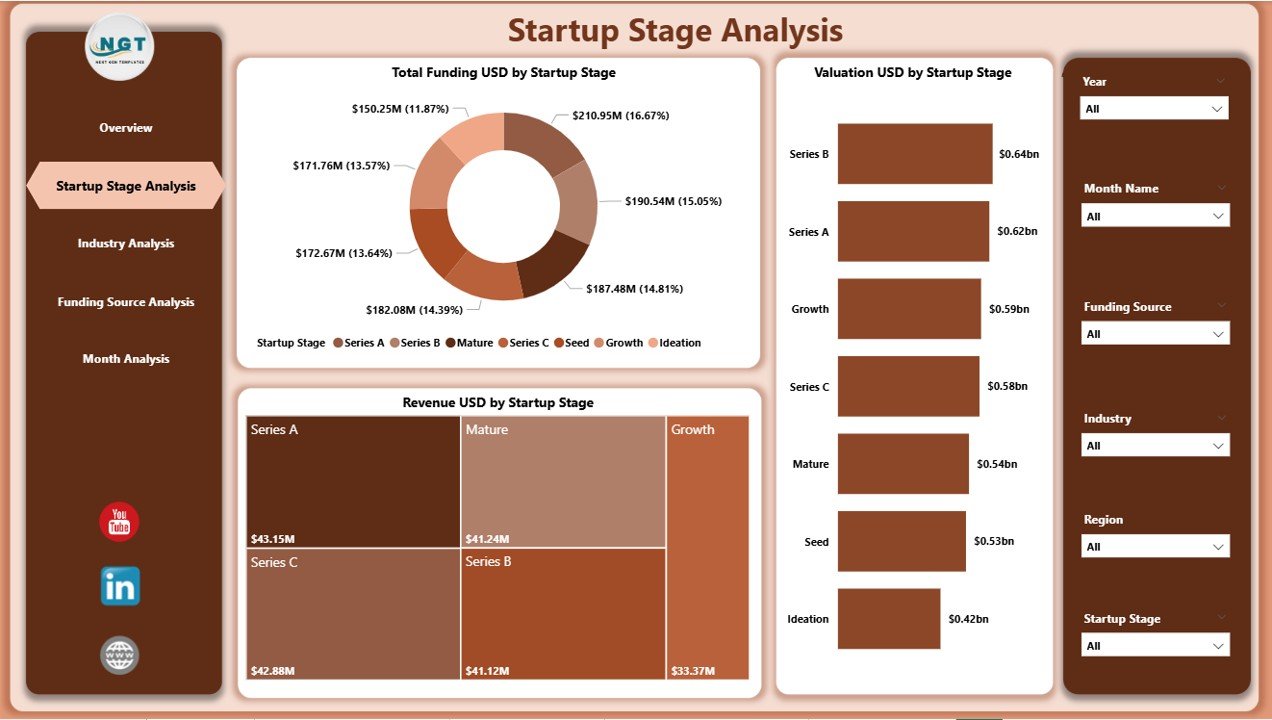
The Startup Stage Analysis Page focuses on understanding performance across various startup maturity stages.
Why Is Startup Stage Analysis Important?
Startups behave differently at each stage. Early-stage startups focus on funding and growth, while later-stage startups focus on revenue and IPO readiness. This page explains those differences clearly.
Charts Included
Total Funding USD by Startup Stage
Valuation USD by Startup Stage
Revenue USD by Startup Stage
Key Insights from This Page
Which stage attracts the highest funding
How valuations grow with maturity
Which stages generate the most revenue
As a result, investors allocate resources smarter.
3. What Can You Learn from the Industry Analysis Page?
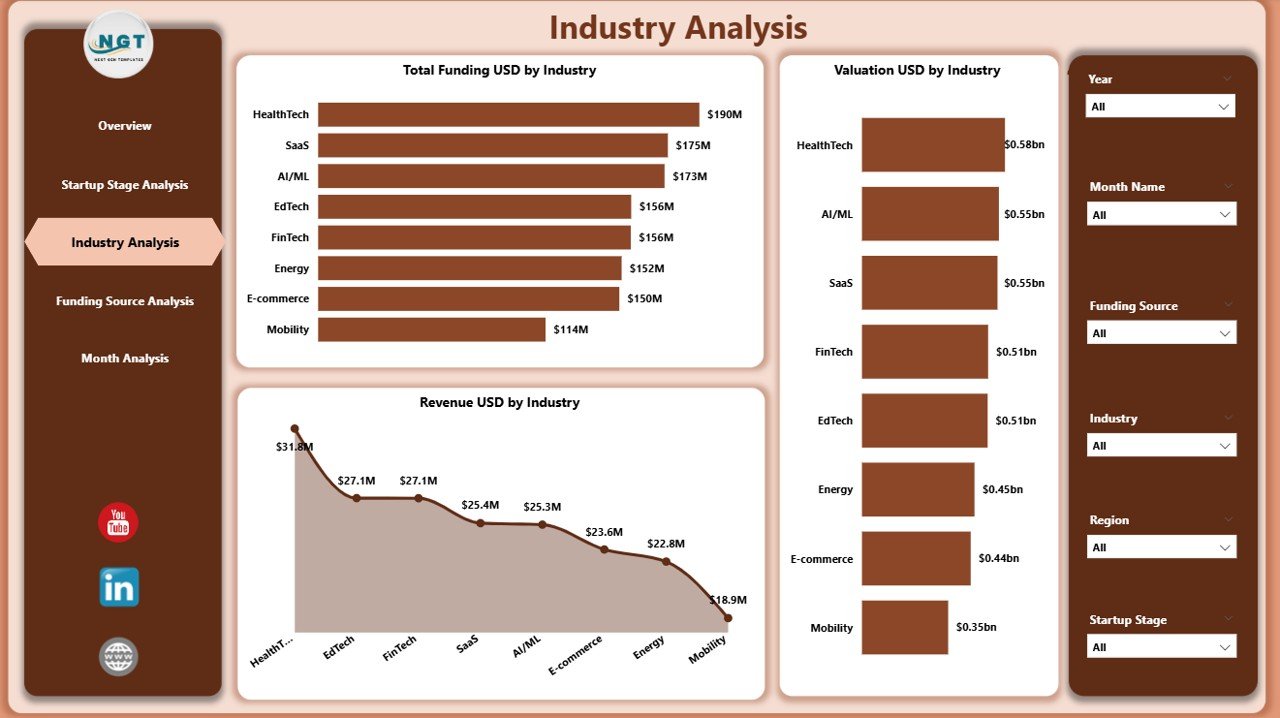
The Industry Analysis Page compares startup performance across different industries.
Why Does Industry Analysis Matter?
Market conditions vary widely across industries. Some industries grow faster, while others offer stable returns. This page highlights those differences clearly.
Charts Included
Total Funding USD by Industry
Valuation USD by Industry
Revenue USD by Industry
Benefits of Industry Analysis
Identify high-growth industries
Compare risk vs reward sectors
Spot emerging technology trends
Align investment strategy with market demand
Therefore, strategic planning becomes more accurate.
4. How Does the Funding Source Analysis Page Support Better Decisions?
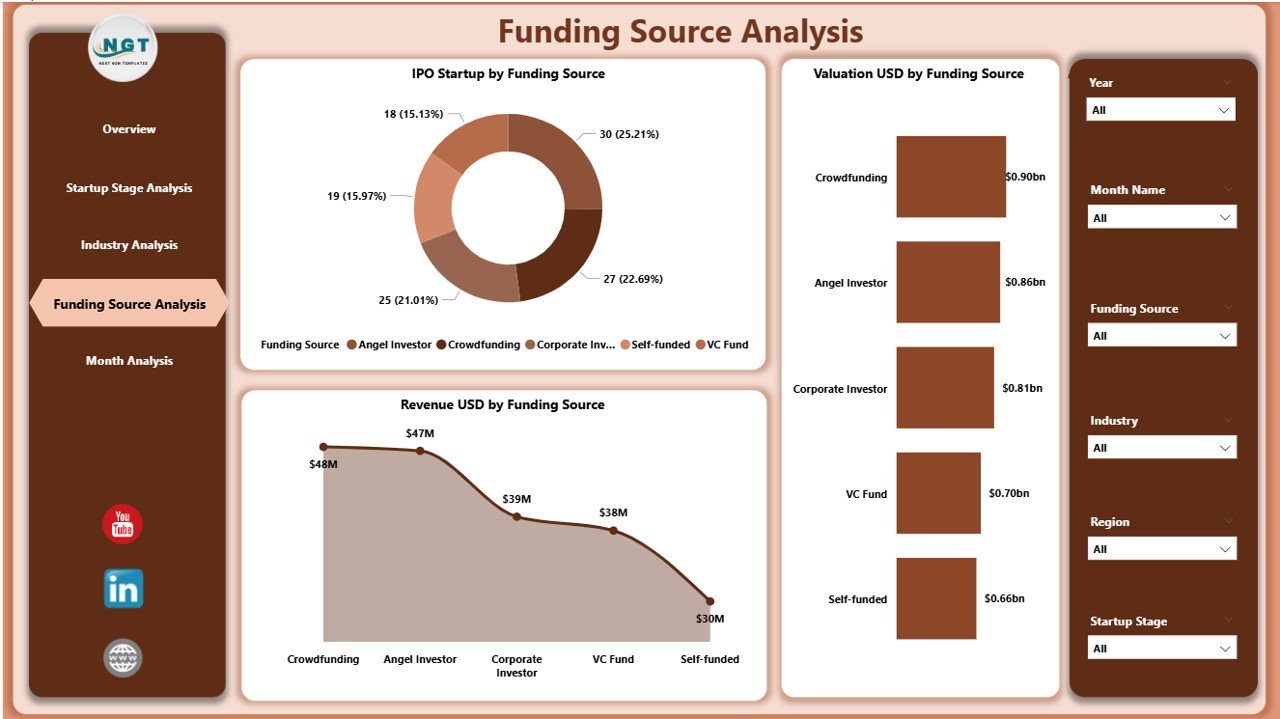
The Funding Source Analysis Page evaluates how different funding channels impact startup success.
Why Focus on Funding Sources?
Different funding sources influence startup trajectories differently. Venture capital, angel investors, and public funding produce varying outcomes.
Charts Included
IPO Startup by Funding Source
Valuation USD by Funding Source
Revenue USD by Funding Source
Insights from This Page
Which funding sources lead to higher IPO rates
How valuation changes by funding type
Which sources support revenue growth best
Hence, founders choose funding wisely.
5. Why Is the Monthly Trends Page Critical?
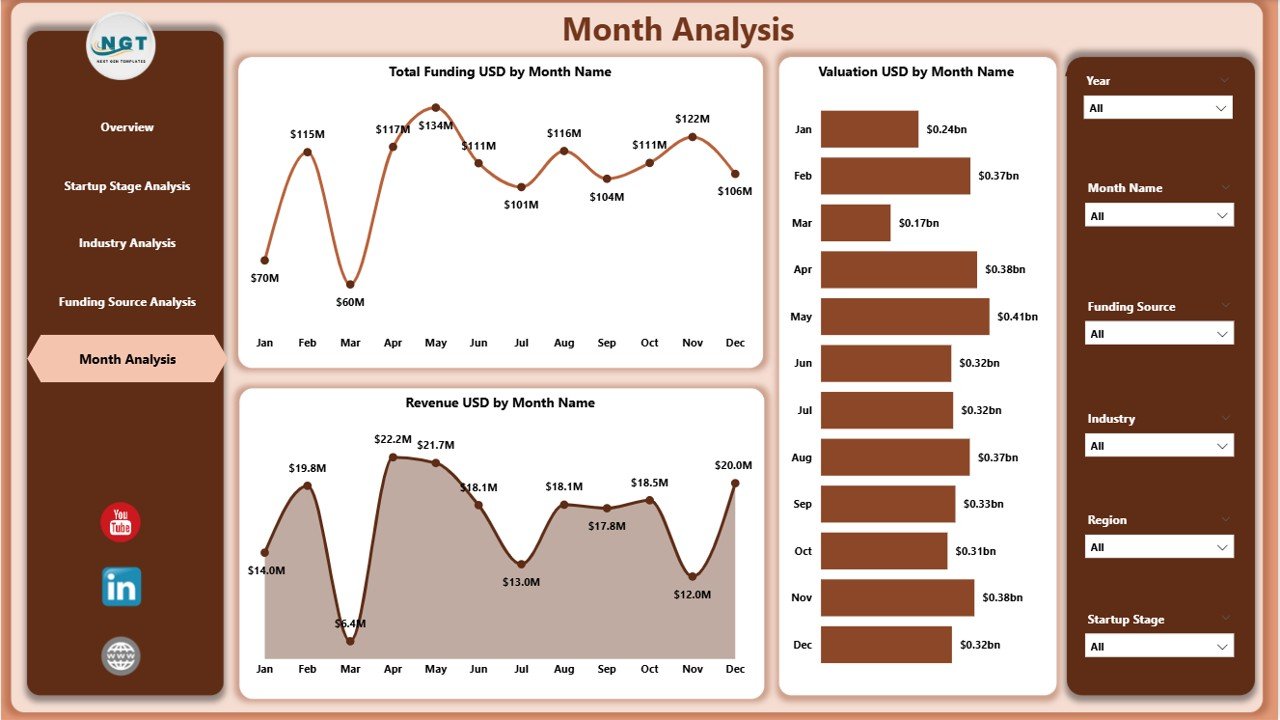
The Monthly Trends Page analyzes performance over time.
Importance of Monthly Trend Analysis
Time-based analysis reveals patterns, seasonality, and anomalies. Without trend analysis, organizations miss early signals.
Charts Included
Total Funding USD by Month
Valuation USD by Month
Revenue USD by Month
Key Outcomes
Track growth momentum
Identify funding cycles
Forecast future performance trends
Therefore, organizations stay ahead of the curve.
Click to Purchases Aristech Startups Dashboard in Power BI
Advantages of Aristech Startups Dashboard in Power BI
Using this dashboard delivers several powerful advantages.
✅ Centralized Startup Intelligence
All startup KPIs and visuals remain in one platform.
✅ Faster Decision-Making
Interactive visuals reduce analysis time.
✅ Clear Performance Visibility
Charts simplify complex datasets.
✅ Investor-Ready Reporting
Stakeholders get presentation-ready insights.
✅ Scalable and Flexible
Teams can expand KPIs and data sources easily.
Opportunities for Improvement in the Aristech Startups Dashboard
Even the best dashboards evolve. Some improvement areas include:
Adding predictive analytics for funding forecasts
Integrating live APIs from startup databases
Adding geographic map visuals
Including cohort-based analysis
Enabling drill-through pages for startup-level details
By enhancing these areas, organizations can unlock deeper value.
Best Practices for the Aristech Startups Dashboard in Power BI
Following best practices ensures maximum dashboard impact.
✅ Keep KPIs Simple and Relevant
Avoid clutter. Focus on business-critical metrics.
✅ Maintain Clean Data Models
Use consistent naming and data types.
✅ Optimize Performance
Limit unnecessary visuals and calculations.
✅ Use Clear Visual Hierarchy
Highlight important KPIs prominently.
✅ Update Data Regularly
Fresh data ensures accurate insights.
How Does This Dashboard Help Investors?
Investors benefit significantly from this dashboard because they can:
Monitor portfolio startup performance
Compare industries before investing
Identify IPO-ready startups early
Track funding efficiency
Reduce investment risk
As a result, portfolio decisions improve.
How Can Startup Founders Use This Dashboard?
Founders use this dashboard to:
Benchmark performance against peers
Understand valuation expectations
Track funding efficiency
Identify revenue growth gaps
Prepare for investor presentations
Thus, founders gain strategic clarity.
Challenges Solved by the Aristech Startups Dashboard
This dashboard effectively handles common challenges such as:
Fragmented startup data
Manual reporting delays
Lack of trend visibility
Difficulty comparing industries or stages
Poor stakeholder communication
Because of automation and visuals, these challenges disappear.
Future Scope of Aristech Startups Dashboards
In the future, this dashboard can support:
AI-driven funding predictions
Real-time investor alerts
Startup risk scoring models
ESG and sustainability metrics
Cross-country startup benchmarking
Consequently, it can evolve into a full-scale startup intelligence platform.
Conclusion: Why the Aristech Startups Dashboard in Power BI Matters
The Aristech Startups Dashboard in Power BI transforms raw startup data into actionable insights. It empowers investors, founders, and analysts to understand funding patterns, valuation trends, industry performance, and revenue growth clearly.
Because it offers interactivity, scalability, and clarity, this dashboard becomes an essential tool for modern startup analytics. Organizations that adopt it gain faster decisions, deeper insights, and stronger strategic alignment.
In a world driven by data, this dashboard delivers the competitive edge.
Frequently Asked Questions (FAQs)
What is the main purpose of the Aristech Startups Dashboard in Power BI?
The dashboard helps analyze startup funding, valuation, revenue, IPO readiness, and performance trends in one interactive view.
Can non-technical users use this dashboard?
Yes. Slicers, charts, and visuals remain user-friendly and intuitive.
Does the dashboard support multiple industries?
Yes. The Industry Analysis page compares performance across industries easily.
Can this dashboard handle large datasets?
Power BI handles large datasets efficiently with proper modeling.
Is historical trend analysis available?
Yes. The Monthly Trends page tracks funding, valuation, and revenue over time.
Can organizations customize the dashboard?
Absolutely. Users can add KPIs, visuals, or filters as needed.
Is this dashboard suitable for investors?
Yes. It supports investor decision-making, portfolio tracking, and risk analysis.
Does the dashboard support real-time data?
With live connections, Power BI can show near real-time insights.
Visit our YouTube channel to learn step-by-step video tutorials