Community management plays a critical role in modern organizations. Whether a company manages an online community, social media audience, customer forums, or brand communities, the success of these communities depends on continuous engagement, quick response times, and effective communication.
However, many organizations struggle to measure the performance of community management activities. Teams often rely on scattered reports, manual tracking, or incomplete analytics tools. As a result, it becomes difficult to understand whether community initiatives truly improve engagement, brand trust, and customer satisfaction.
Therefore, organizations need a structured system that tracks community management performance clearly.
One powerful solution is the Community Management KPI Scorecard in Excel. This ready-to-use Excel scorecard allows organizations to track key community management KPIs, compare actual performance with targets, analyze trends, and make better decisions.
Instead of analyzing multiple spreadsheets and reports, community managers can monitor all important metrics from a single centralized scorecard.
In this comprehensive guide, you will learn:
-
What a Community Management KPI Scorecard in Excel is
-
Why organizations need community management KPIs
-
Key features of the Excel scorecard template
-
Important community management KPIs
-
Advantages of using a KPI scorecard
-
Best practices for community performance monitoring
-
Practical use cases for organizations
Let us explore the details.
Click to Purchases Community Management KPI Scorecard in Excel
What is a Community Management KPI Scorecard in Excel?
A Community Management KPI Scorecard in Excel is a structured template used to track, analyze, and evaluate the performance of community management activities.
Community managers perform many tasks, including:
-
Managing online communities
-
Responding to customer questions
-
Moderating discussions
-
Monitoring brand mentions
-
Managing social media engagement
-
Organizing community events
-
Supporting brand advocacy
Without proper performance tracking, organizations cannot measure the effectiveness of these activities.
Therefore, a KPI scorecard helps organizations:
-
Monitor community engagement performance
-
Track response time metrics
-
Compare actual performance with targets
-
Analyze engagement trends
-
Improve community strategies
Because the scorecard uses Excel, organizations can easily implement it without investing in complex software tools.
Why Do Organizations Need Community Management KPIs?
Community management directly impacts brand reputation, customer loyalty, and audience engagement. However, without clear KPIs, organizations cannot measure the impact of community activities.
A KPI scorecard provides clear performance insights.
Key reasons organizations need community management KPIs
Measure engagement performance
KPIs help organizations track engagement metrics such as comments, shares, and active members.
Improve response time
Community managers must respond to customer queries quickly.
Track community growth
KPIs help measure community member growth and participation.
Evaluate content performance
Organizations can track how community content performs.
Support data-driven decisions
Managers can improve community strategies based on KPI insights.
Click to Purchases Community Management KPI Scorecard in Excel
Key Features of Community Management KPI Scorecard in Excel
The Community Management KPI Scorecard in Excel provides a structured and easy-to-use system for tracking community management performance.
The template contains four worksheets, each designed to manage KPI monitoring effectively.
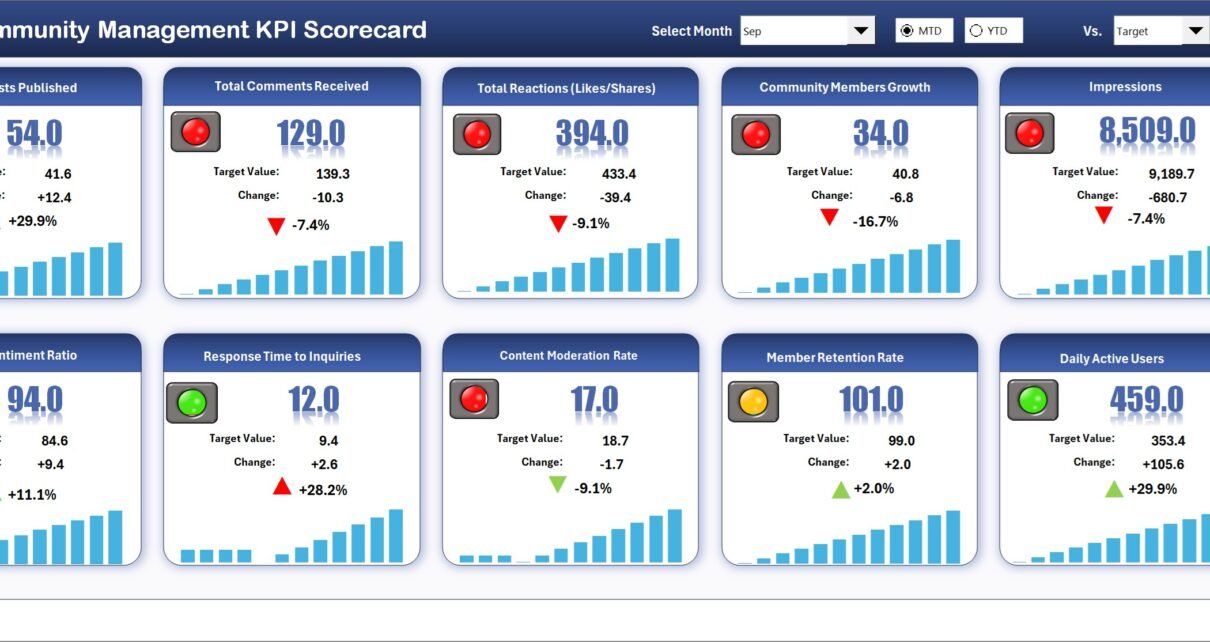
1. Scorecard Sheet (Main KPI Dashboard)
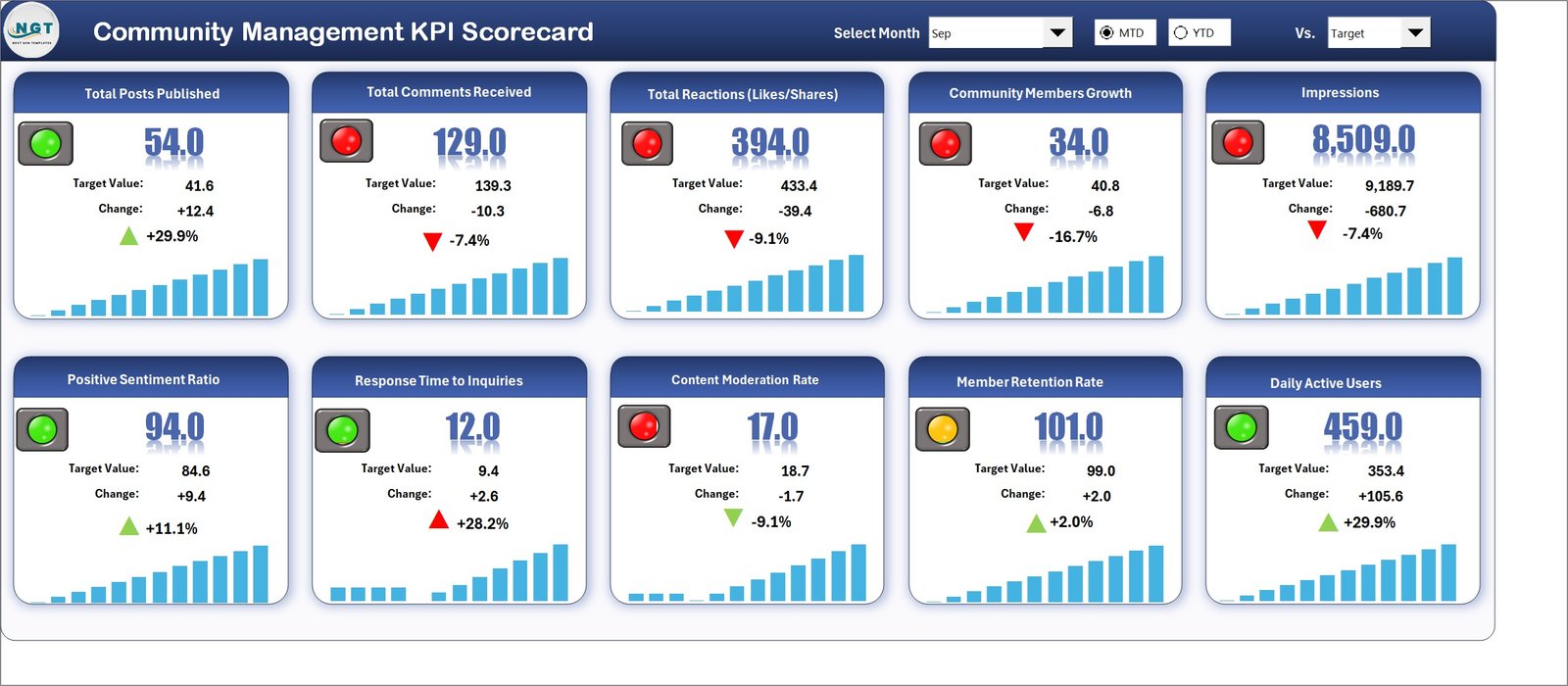
The Scorecard sheet serves as the main interface of the template.
This sheet provides a complete overview of community management KPI performance.
Performance Analysis Options
Users can select different performance views using dropdown menus.
Available options include:
-
Month selection
-
MTD (Month-To-Date) analysis
-
YTD (Year-To-Date) analysis
When users change these selections, the scorecard updates automatically.
Actual vs Target Comparison
The scorecard compares actual performance values with target values.
This comparison helps managers determine whether community performance meets expectations.
Visual Performance Indicators
The template uses color-coded indicators and conditional formatting.
These visuals help users quickly identify KPI performance status.
For example:
-
Green indicators show good performance
-
Red indicators show underperformance
Therefore, managers can instantly identify areas that require attention.
Comprehensive KPI Overview
The scorecard displays detailed information for each KPI, including:
-
KPI name
-
KPI group
-
Actual values
-
Target values
-
MTD performance
-
YTD performance
This overview helps managers evaluate community performance easily.
Click to Purchases Community Management KPI Scorecard in Excel
2. KPI Trend Sheet
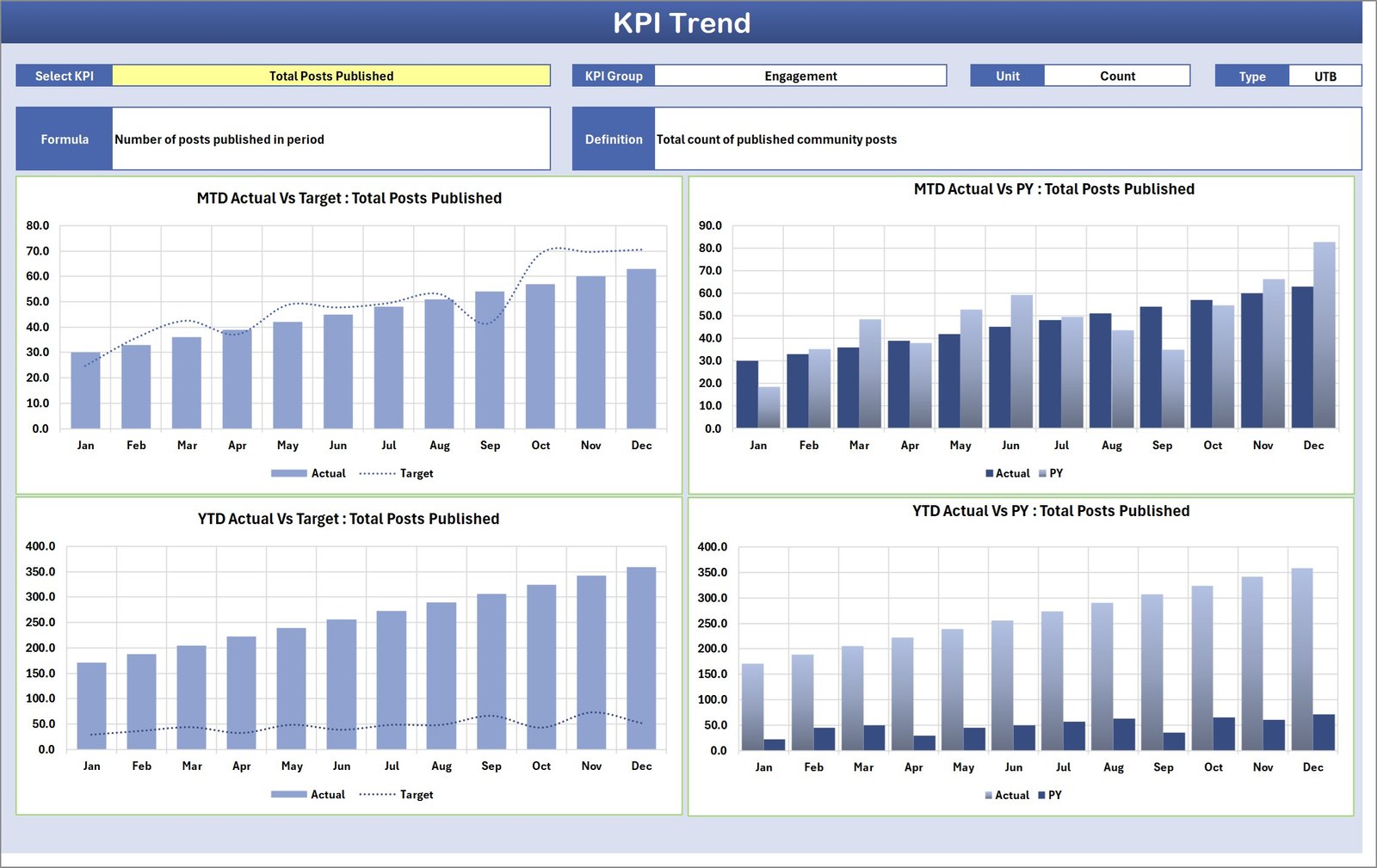
The KPI Trend sheet helps users analyze KPI performance trends.
Users can select the KPI name using the dropdown available in cell C3.
Once selected, the sheet displays detailed KPI information.
KPI Details Displayed
The sheet displays the following information:
-
KPI Group
-
Unit of KPI
-
Type of KPI
-
KPI Formula
-
KPI Definition
KPI Type Explanation
KPIs can be categorized as:
-
Lower the Better (LTB)
-
Upper the Better (UTB)
For example:
-
Response time → Lower the Better
-
Engagement rate → Upper the Better
Trend Analysis Charts
The sheet displays two trend charts.
MTD Trend Chart
Shows the monthly performance comparison for:
-
Actual values
-
Target values
-
Previous year performance
YTD Trend Chart
Shows year-to-date performance trends.
These charts help community managers analyze performance changes over time.
Click to Purchases Community Management KPI Scorecard in Excel
3. Input Data Sheet
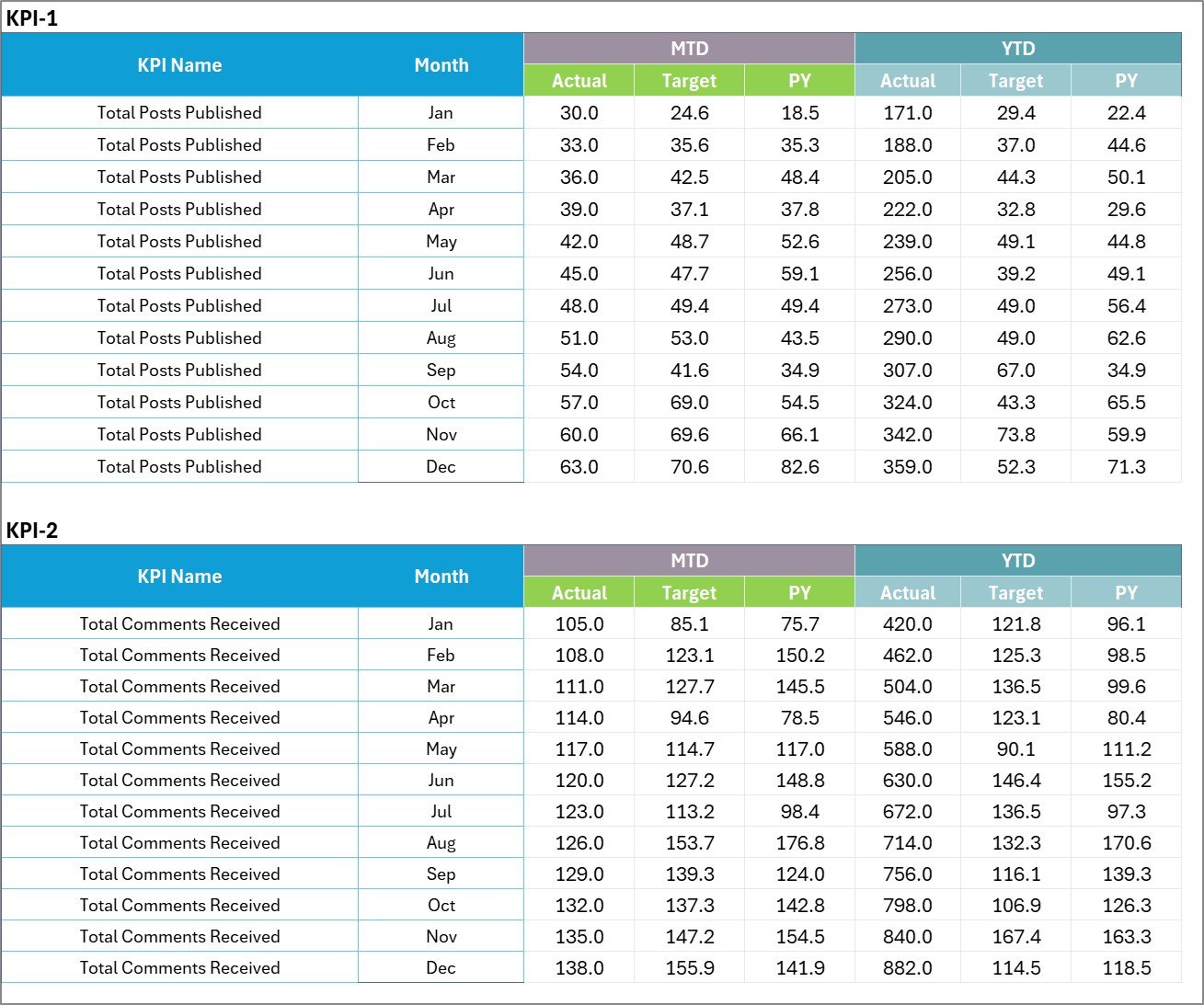
The Input Data sheet serves as the data entry sheet for KPI information.
Users must enter all KPI data in this sheet.
Data Entry Features
Users can record the following information:
-
Actual KPI values
-
Target values
-
Other performance metrics
Because this sheet allows flexible data entry, users can update the scorecard whenever new data becomes available.
Therefore, the scorecard always reflects the latest performance results.
Click to Purchases Community Management KPI Scorecard in Excel
4. KPI Definition Sheet

The KPI Definition sheet stores master information about each KPI.
This sheet ensures KPI definitions remain consistent.
Information Stored in KPI Definition Sheet
Users must enter the following details:
-
KPI Name
-
KPI Group
-
Unit of measurement
-
KPI Formula
-
KPI Definition
This information helps users understand each KPI clearly.
Important Community Management KPIs
Organizations typically track several KPIs for community management.
Some commonly used metrics include:
Engagement KPIs
-
Community engagement rate
-
Total posts and discussions
-
Comment response rate
-
Member interaction rate
Community Growth KPIs
-
New members joined
-
Active community members
-
Community growth rate
Customer Support KPIs
-
Average response time
-
Issue resolution time
-
Support satisfaction rate
Content Performance KPIs
-
Post reach
-
Content engagement rate
-
Content shares
Moderation KPIs
-
Community rule violations
-
Moderation response time
-
Spam removal efficiency
Tracking these KPIs helps organizations maintain healthy and active communities.
Click to Purchases Community Management KPI Scorecard in Excel
Advantages of Community Management KPI Scorecard in Excel
Using a structured KPI scorecard provides many benefits.
Centralized KPI monitoring
All community performance metrics appear in one place.
Better performance visibility
Managers can quickly identify engagement trends.
Improved decision making
Organizations can adjust community strategies based on KPI insights.
Easy implementation
Excel-based templates require no complex setup.
Trend analysis
Historical comparisons help identify long-term improvements.
Data transparency
Team members can view performance metrics clearly.
Best Practices for the Community Management KPI Scorecard
Organizations should follow several best practices when using this scorecard.
Define clear KPIs
Each KPI should have a clear definition and formula.
Update data regularly
Teams should update KPI data frequently.
Align KPIs with business goals
Community KPIs should support broader marketing or customer engagement goals.
Use trend analysis
Historical trends help identify long-term engagement patterns.
Monitor performance consistently
Managers should review KPIs regularly to detect issues early.
Click to Purchases Community Management KPI Scorecard in Excel
Practical Use Cases of Community Management KPI Scorecard
Organizations across industries can use this scorecard.
Social media management
Track engagement metrics across social media platforms.
Online community management
Monitor activity in customer communities or forums.
Customer engagement programs
Measure participation in brand communities.
Product feedback communities
Track discussions related to product improvements.
Marketing campaigns
Evaluate community engagement during marketing campaigns.
Conclusion
Community management has become essential for modern businesses. Active communities improve customer loyalty, strengthen brand reputation, and increase engagement.
However, organizations must measure community performance carefully.
The Community Management KPI Scorecard in Excel provides a powerful and structured solution for tracking community performance.
This Excel template helps organizations:
-
Monitor community KPIs
-
Compare targets with actual results
-
Analyze performance trends
-
Improve community engagement strategies
Because the template runs on Excel, organizations can easily implement it without expensive analytics tools.
Therefore, community managers can gain valuable insights and build stronger, more engaged communities.
Click to Purchases Community Management KPI Scorecard in Excel
Frequently Asked Questions (FAQs)
What is a Community Management KPI Scorecard?
A Community Management KPI Scorecard is a performance tracking tool used to measure engagement, growth, and responsiveness within a community.
Why should organizations track community KPIs?
Tracking KPIs helps organizations measure engagement levels, improve response time, and strengthen community relationships.
Can Excel handle KPI scorecards effectively?
Yes. Excel supports formulas, charts, and conditional formatting that allow organizations to create effective KPI scorecards.
What KPIs should community managers track?
Common KPIs include engagement rate, member growth, response time, content performance, and customer satisfaction.
How often should KPI data be updated?
Organizations should update KPI data monthly or weekly depending on reporting requirements.
Click to Purchases Community Management KPI Scorecard in Excel
Visit our YouTube channel to learn step-by-step video tutorials