Data privacy is no longer an option. Every organization, regardless of size, must handle sensitive information responsibly. With regulations such as GDPR, HIPAA, and CCPA, businesses must prove that they monitor and protect data. Without a clear structure, privacy tasks get lost in emails, spreadsheets, or personal reminders.
This is where a Data Privacy Monitoring Checklist in Excel helps. It gives you a clear structure to track tasks, assign responsibilities, and monitor progress. Since Excel is simple, accessible, and widely used, building the checklist in this format makes adoption much easier.
In this article, you will learn what a data privacy monitoring checklist is, why you need it, how to structure it in Excel, and the best practices to follow. You will also discover the advantages of using a ready-to-use template, along with frequently asked questions that clear common doubts.
Click to Purchases Data Privacy Monitoring Checklist in Excel
What Is a Data Privacy Monitoring Checklist in Excel?
A Data Privacy Monitoring Checklist in Excel is a structured tool that helps organizations track and manage their privacy-related tasks. Instead of storing privacy obligations in scattered documents or emails, the checklist consolidates them in one Excel file.
This template includes:
-
Task assignment: Assign tasks to responsible persons.
-
Deadlines: Ensure all privacy checks happen on time.
-
Progress monitoring: Track completed, pending, and overdue tasks.
-
Visual indicators: Use progress bars, counts, or check marks for quick updates.
By using Excel, you do not need special software or training. Anyone with basic spreadsheet knowledge can use it effectively.
Key Features of the Data Privacy Monitoring Checklist Template
This ready-to-use template comes with two main worksheets:
Data Privacy Monitoring Checklist Sheet
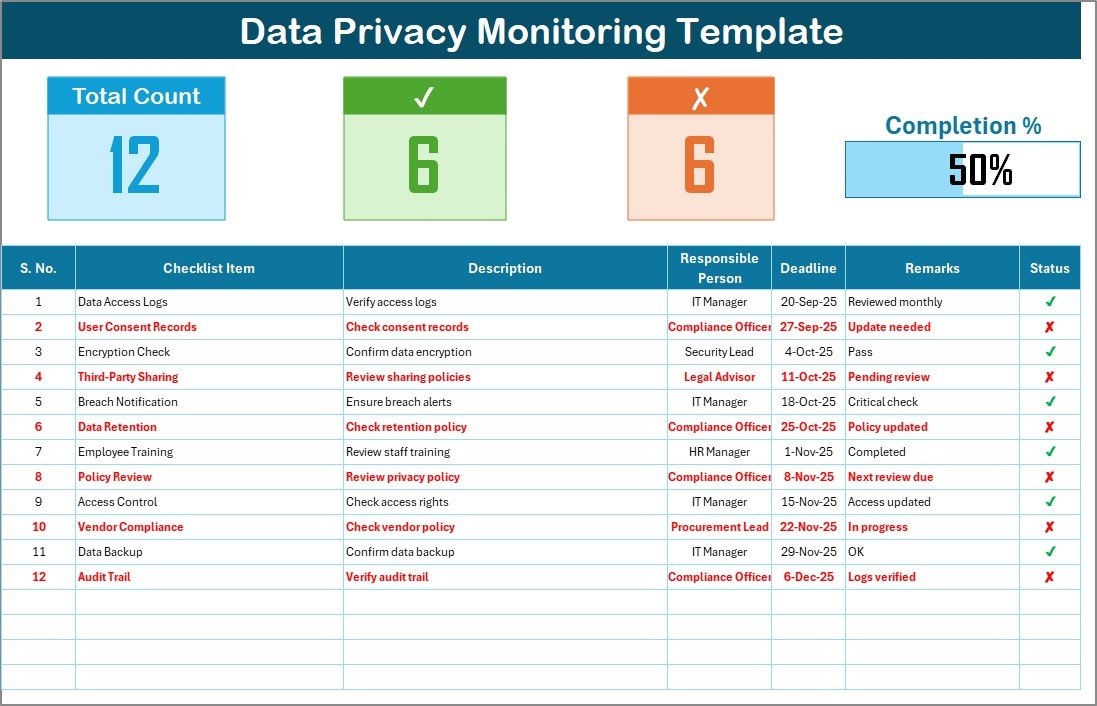
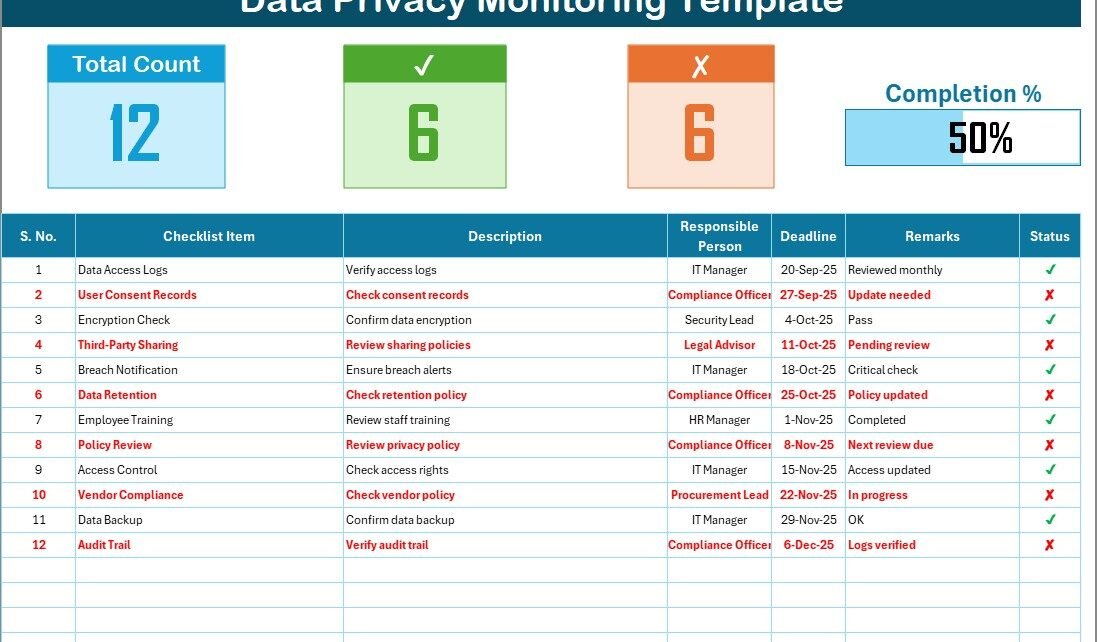
This is the main sheet where all monitoring happens.
-
Top Section: Displays summary information such as total tasks, completed tasks, pending tasks, and a progress bar for completion percentage.
Checklist Table: The main section where tasks are recorded. It includes:
- Serial No.
- Checklist Item
- Description
- Responsible Person
- Deadline
- Remarks
- Status (✔ or ✘)
List Sheet Tab
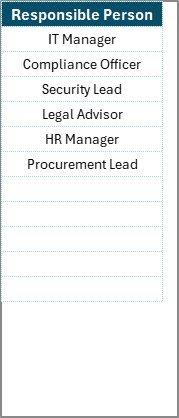
This sheet stores a unique list of responsible persons. It is used to create a dropdown list in the main table, ensuring consistency in assigning responsibilities.
Why Do You Need a Data Privacy Monitoring Checklist?
Monitoring privacy activities without structure is risky. A simple Excel checklist solves several problems:
-
Accountability: Every task has an owner and a deadline.
-
Compliance: Helps meet GDPR, HIPAA, and other data protection requirements.
-
Transparency: Managers can see progress at a glance.
-
Efficiency: Reduces duplication and avoids missed deadlines.
-
Simplicity: No need for expensive software or complex tools.
Advantages of Data Privacy Monitoring Checklist in Excel
Click to Purchases Data Privacy Monitoring Checklist in Excel
Using a data privacy checklist in Excel brings many benefits. Here are the main ones:
✅ Cost-effective: No additional software costs.
✅ Customizable: Adjust fields and structure as per your needs.
✅ Easy to use: Most employees are already familiar with Excel.
✅ Visual tracking: Use conditional formatting, progress bars, and check marks.
✅ Scalable: Suitable for small teams or large organizations.
✅ Improved compliance: Ensures no privacy task gets overlooked.
How to Create a Data Privacy Monitoring Checklist in Excel
You can either use a ready-made template or create your own. Here’s how to structure it:
-
Set up the top section: Add total task count, completed count, pending count, and a progress bar.
-
Build the checklist table: Add columns for Serial No., Checklist Item, Description, Responsible Person, Deadline, Remarks, and Status.
-
Use data validation: Create dropdowns for the Responsible Person column.
-
Apply conditional formatting: Use green for ✔ (completed) and red for ✘ (pending).
-
Add formulas:
=COUNTIF(StatusRange,"✔")for completed tasks.=COUNTIF(StatusRange,"✘")for pending tasks.=Completed/Total*100for progress percentage.-
Insert a progress bar: Use conditional formatting data bars or shapes.
Best Practices for the Data Privacy Monitoring Checklist
To make the most of your checklist, follow these best practices:
-
Keep descriptions short and clear: Avoid lengthy notes.
-
Update regularly: Do not let tasks remain unchecked for long.
-
Assign responsibilities clearly: Avoid overlapping duties.
-
Set realistic deadlines: Balance urgency with practicality.
-
Review weekly: Use the checklist as a regular agenda item in meetings.
-
Automate where possible: Use Excel formulas to reduce manual work.
-
Protect the file: Use password protection for sensitive information.
Opportunities for Improvement
Even with a good checklist, you can enhance it further:
🔹 Add dashboards: Create a separate sheet with charts showing compliance trends.
🔹 Integrate reminders: Link with Outlook or Teams to send deadline alerts.
🔹 Include risk ratings: Add a column for task priority or risk impact.
🔹 Track historical data: Maintain records year over year for audits.
🔹 Use macros: Automate repetitive updates.
Real-World Applications of Data Privacy Monitoring Checklist
The checklist is useful across different industries:
-
Healthcare: Track HIPAA compliance and patient data handling.
-
Finance: Ensure proper monitoring of customer financial records.
-
Education: Protect student records and online learning platforms.
-
Retail: Manage customer loyalty and payment data.
-
IT Services: Monitor server logs, backups, and data access control.
Common Mistakes to Avoid
While using the checklist, many organizations make avoidable mistakes:
❌ Leaving responsibilities unclear.
❌ Using vague descriptions.
❌ Ignoring deadlines.
❌ Not reviewing regularly.
❌ Overcomplicating the file with too many formulas.
Conclusion
A Data Privacy Monitoring Checklist in Excel provides a practical, affordable, and effective way to track privacy compliance. It ensures accountability, improves efficiency, and reduces the risk of data breaches. Whether you run a small business or a large enterprise, having such a checklist strengthens your privacy framework and protects sensitive data.
By following best practices, avoiding common mistakes, and customizing the template to your needs, you can make data privacy monitoring an easy and regular part of your workflow.
Frequently Asked Questions (FAQs)
1. What is a Data Privacy Monitoring Checklist?
It is a structured tool in Excel used to track data privacy tasks, responsibilities, and deadlines to ensure compliance with regulations.
2. Why should I use Excel for a privacy checklist?
Excel is cost-effective, widely available, and easy to customize without additional software.
3. Can this checklist replace compliance software?
No. It is a supportive tool for small to medium businesses. Larger firms may still require specialized software.
4. How often should I update the checklist?
You should update it weekly or after completing important tasks.
5. Can I use this checklist for GDPR compliance?
Yes. It helps you document and monitor GDPR-related tasks effectively.
6. How do I track progress in Excel?
Use formulas like COUNTIF and conditional formatting to calculate completion percentage and show progress visually.
7. Is this template suitable for all industries?
Yes. It can be customized to fit healthcare, finance, education, IT, retail, and more.
Visit our YouTube channel to learn step-by-step video tutorials
Click to Purchases Data Privacy Monitoring Checklist in Excel