Managing employee IDs and access requests sounds simple. However, in reality, it often becomes messy, slow, and risky. Many organizations still rely on emails, manual Excel sheets, or disconnected systems to manage employee access. As a result, errors increase, approvals get delayed, and security gaps appear.
That is exactly why we created the Employee ID & Access Request Management System V1.0.
This ready-to-use Excel and VBA-based tool helps organizations manage employee access requests, user roles, permissions, and reports from one centralized system. Moreover, it eliminates repetitive manual work while giving admins full control and visibility.
In this comprehensive guide, you will learn what this system is, how it works, why your organization needs it, and how it delivers real business value. Additionally, you will explore its advantages, best practices, and frequently asked questions.
Click to Purchases Employee ID & Access Request Management System V1.0
What Is Employee ID & Access Request Management System V1.0?
The Employee ID & Access Request Management System V1.0 is a desktop-based Excel tool powered by VBA automation. It allows organizations to create, manage, update, and control employee access requests efficiently.
Instead of juggling emails, spreadsheets, and approval logs, you can manage everything through structured forms, role-based access control, and automated reports.
Most importantly, this tool comes ready to use, so you do not need to build anything from scratch.
Why Do Organizations Need an Employee ID & Access Request Management System?
Employee access management directly impacts security, productivity, and compliance. Yet, many teams still struggle because they lack a structured system.
Here is why this tool becomes essential:
-
Manual access tracking leads to errors and delays
-
Uncontrolled access increases security risks
-
Lack of reporting creates audit challenges
-
Email-based approvals waste valuable time
-
IT teams spend hours managing repetitive tasks
Therefore, using a centralized access request system improves control, accuracy, and speed across the organization.
How Does Employee ID & Access Request Management System V1.0 Work?
The system works through intuitive VBA forms, role-based login, and automated Excel storage. As soon as a user logs in, the system guides them through secure workflows.
Let us break it down step by step.
Login Form – Secure Access from the Start
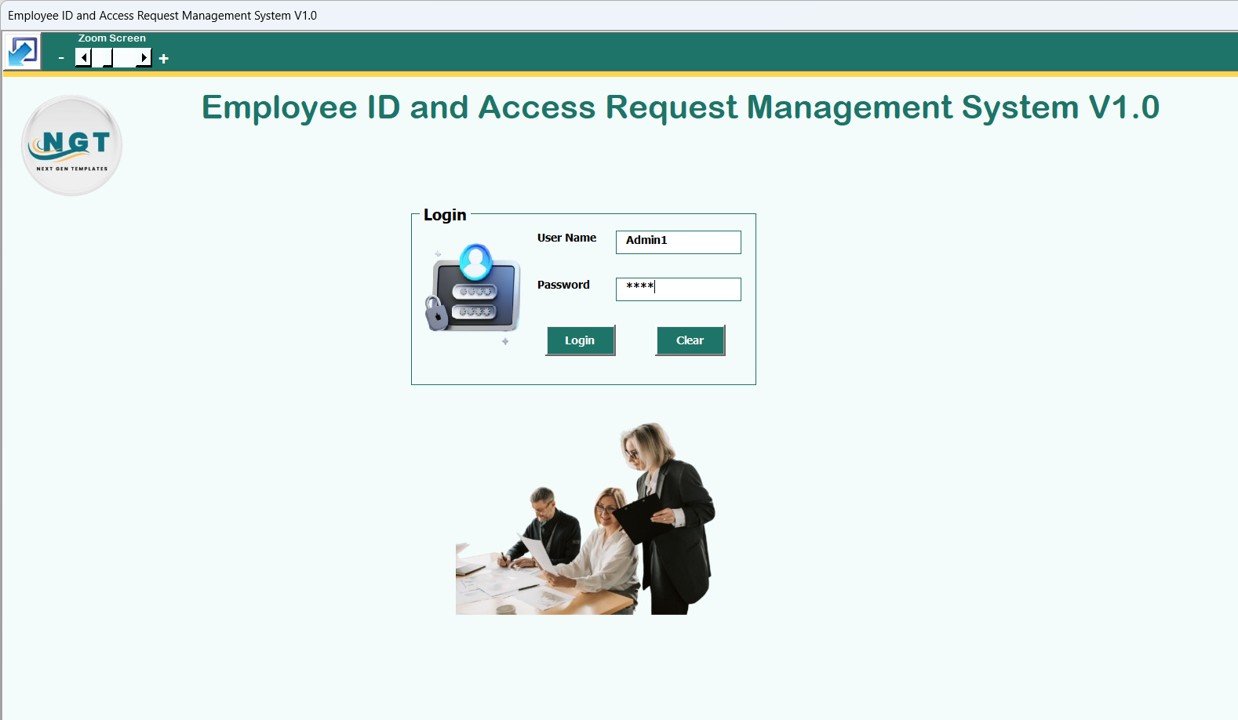
The Login Form is the entry point of the system. It ensures that only authorized users can access the tool.
Default Login Credentials
Admin Role
-
Username:
Admin1 -
Password:
abcd
User Role
-
Username:
User1 -
Password:
abcd
After entering the credentials and clicking the Login button (or pressing Enter), the system redirects the user to the Main Form.
Because of role-based access, users only see what they are allowed to see.
Main Form – Central Control Panel
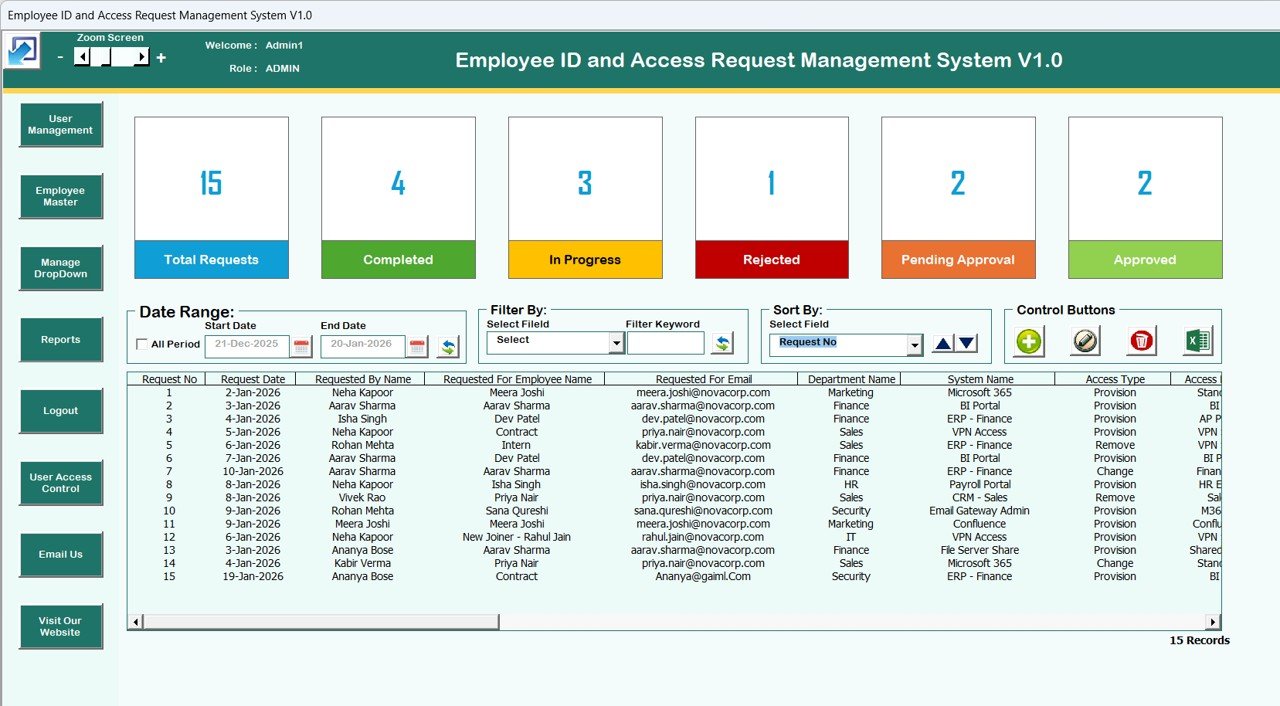
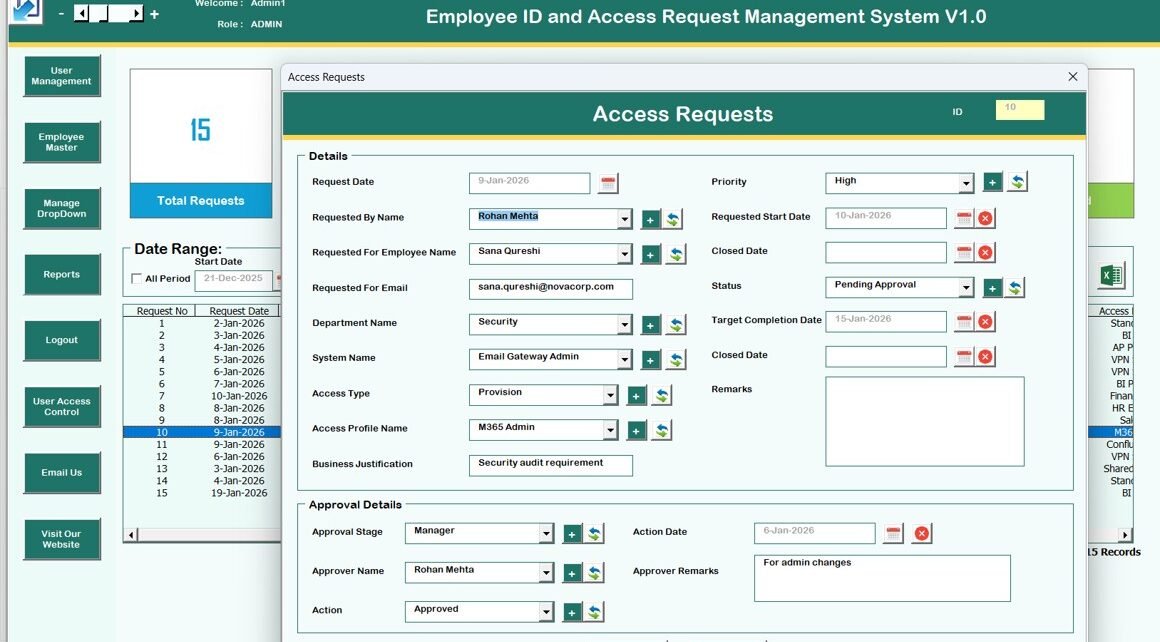
The Main Form acts as the command center of the system. From here, users can manage access requests, records, and reports with ease.
List Box – Real-Time Data View
At the center of the main form, you will find a List Box that displays all relevant records. This list updates dynamically as users add, edit, or delete data.
Filters – Quick Data Search
Above the list box, you can filter records:
-
By date range
-
By selected column
This feature helps users locate records instantly without scrolling through large datasets.
Sort By – Organized Records
Using the Sort By option, users can arrange data in a logical order. As a result, reviewing records becomes faster and clearer.
Control Buttons – Complete Record Management
The system includes powerful control buttons that simplify daily operations.
Add New Record
-
Create a new access request instantly
-
Open the access request form with one click
Update Existing Record
-
Select a record from the list box
-
Click Update Existing Record
-
Alternatively, double-click the record
-
Modify the details and submit
Delete Record
-
Remove unwanted or incorrect records securely
Export to Excel
-
Export filtered or complete data into a new Excel file
-
Useful for audits, sharing, and analysis
Access Requests Form – Simple and Structured Data Entry
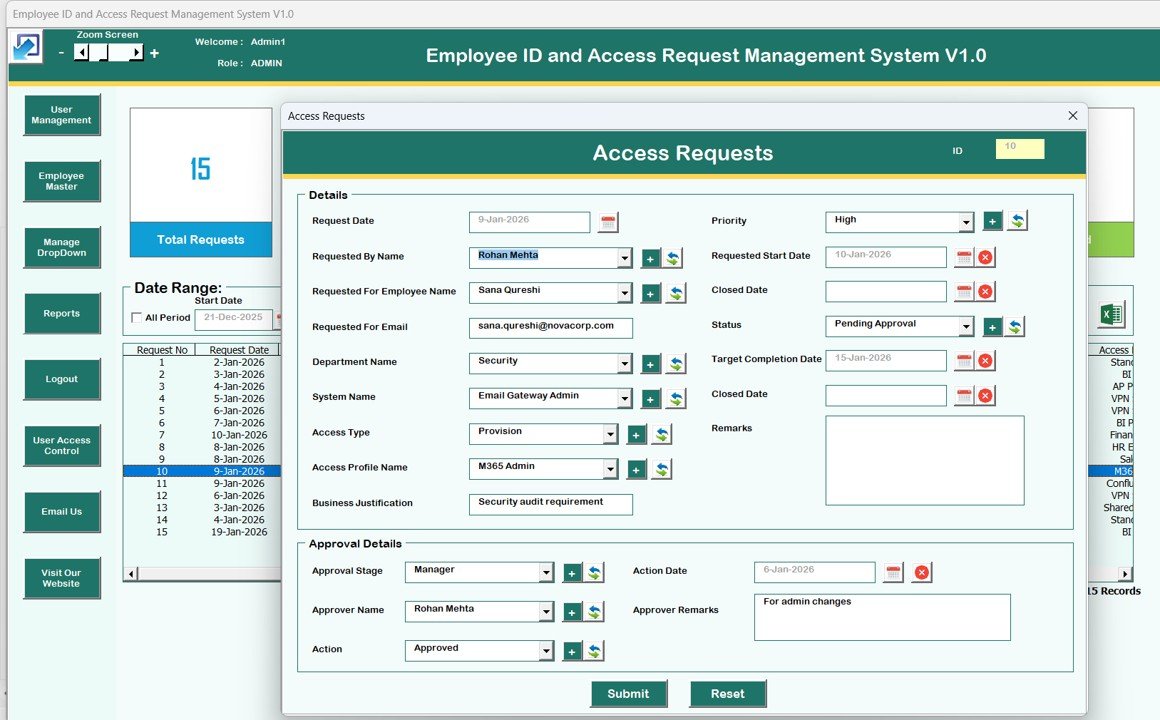
The Access Requests Form opens when users add or update records.
This form ensures:
-
Clean data entry
-
Consistent structure
-
Reduced human errors
Because the form controls validation, users cannot submit incomplete or incorrect information easily.
Navigation Menu – Powerful Features at Your Fingertips
The left-hand navigation menu gives users access to advanced system features.
Firm Information
This option allows you to update:
-
Company name
-
Address
-
Contact details
Once saved, this information reflects across reports and documents.
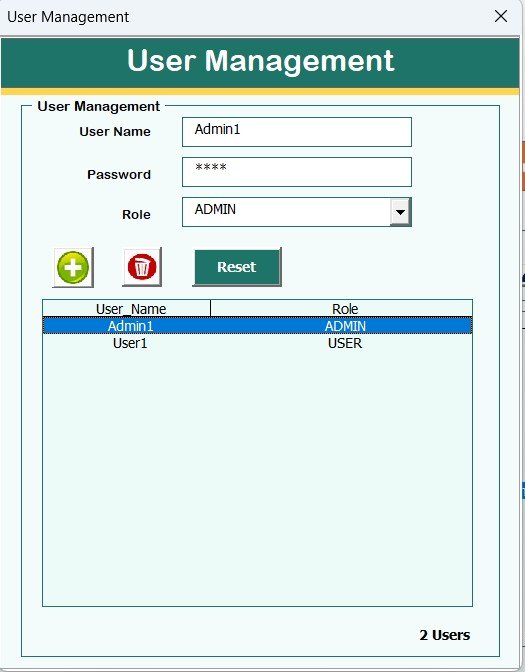
User Management
User Management gives admins full control over system users.
Admins can:
-
Add new users
-
Update existing users
-
Delete users
-
Reset passwords
-
Change login credentials
Because of this feature, managing internal users becomes secure and effortless.
Manage List
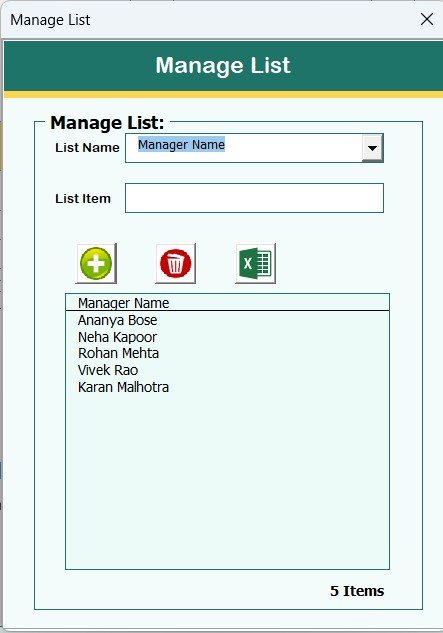
The Manage List option allows admins to:
-
Add dropdown values
-
Delete unused values
This feature keeps the system flexible and customizable.
Employee Master
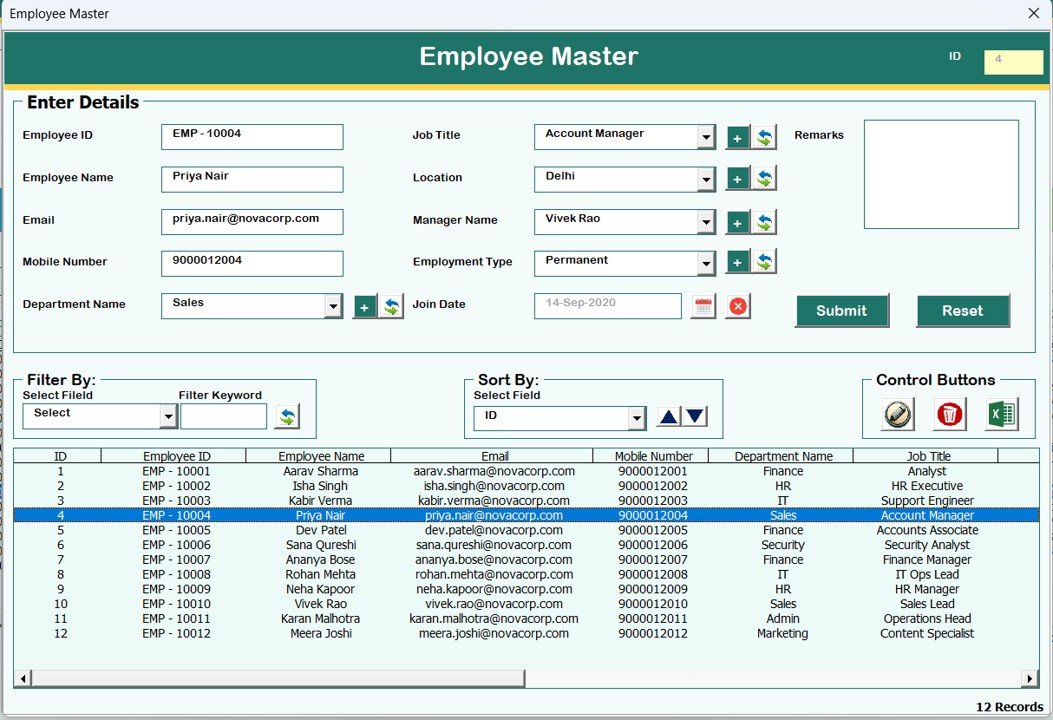
The Employee Master module stores employee-level data in a structured format. As a result, access requests remain consistent and linked to employees.
Click to Purchases Employee ID & Access Request Management System V1.0
Reports – Instant Excel Reports
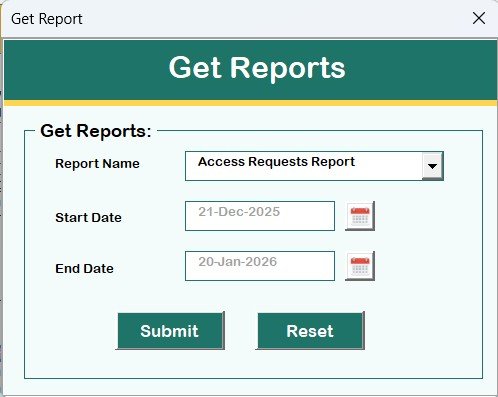
Using the Reports feature, users can:
-
Select a date range
-
Generate reports instantly
-
Export data in Excel format
This functionality supports audits, reviews, and management reporting.
Manage User Access Control
This feature is available only to Admin users.
Admins can:
-
Assign permissions to user roles
-
Control which forms and buttons users can access
As a result, sensitive functions remain protected.
Logout – Safe Exit with Auto-Save
The Logout button:
-
Saves all data automatically
-
Closes forms and the Excel file safely
This ensures zero data loss.
Email Us
This button displays the support email ID. Users can request:
-
Help
-
Customization
-
Enhancements
Visit Our Website
This button opens the official website, where users can explore and purchase:
-
More Excel tools
-
VBA automation systems
-
Ready-to-use templates
System Compatibility – Important Highlights
Before using the tool, it is important to understand system requirements.
Supported Environment
-
✔ Windows 10 and above
-
✔ Microsoft Excel 2010 and above
-
✔ Excel Desktop Application only
Not Supported
-
❌ Mobile devices
-
❌ Tablet devices
-
❌ Mac operating system
Because the tool uses VBA automation, it requires the Windows-based Excel desktop environment.
Advantages of Employee ID & Access Request Management System V1.0
Click to Purchases Employee ID & Access Request Management System V1.0
This system delivers strong operational and business benefits.
Centralized Access Management
-
Manage all access requests from one place
-
Avoid scattered emails and files
Time Saving
-
Reduce manual tracking
-
Speed up approvals and updates
Improved Security
-
Role-based access control
-
Admin-only permissions for sensitive actions
Error Reduction
-
Structured forms prevent wrong data entry
-
Automated validation improves accuracy
Ready-to-Use Solution
-
No development required
-
Deploy instantly
Cost-Effective
-
No monthly subscription
-
No server dependency
Who Should Use This Tool?
This tool works perfectly for:
-
HR teams
-
IT administrators
-
Small and medium businesses
-
Corporate offices
-
Compliance teams
-
Operations managers
If you manage employee access manually today, this tool will transform your workflow.
Best Practices for the Employee ID & Access Request Management System V1.0
To get maximum value, follow these best practices.
Use Role-Based Access Strictly
Always assign permissions carefully. Admin access should stay limited.
Update User Lists Regularly
Remove inactive users to maintain security.
Generate Reports Frequently
Weekly or monthly reports help track trends and issues.
Maintain Employee Master Data
Accurate employee data improves request quality.
Train Users Briefly
A short demo ensures everyone uses the system correctly.
Opportunities for Improvement and Customization
Although the tool is powerful, you can enhance it further.
-
Add approval workflows
-
Integrate email notifications
-
Connect with SQL databases
-
Add dashboard visualizations
-
Customize fields and forms
Because it uses VBA, customization remains flexible.
Conclusion – Why This Tool Is a Smart Investment
The Employee ID & Access Request Management System V1.0 offers a practical, secure, and efficient way to manage employee access without expensive software.
It replaces chaos with control, delays with speed, and risk with structure. Most importantly, it works within Excel, which teams already know and trust.
If you want a ready-to-use, professional, and cost-effective access management solution, this tool fits perfectly.
Frequently Asked Questions (FAQs)
What is Employee ID & Access Request Management System V1.0?
It is an Excel and VBA-based desktop tool that manages employee access requests and user permissions.
Does this tool require internet access?
No. It works completely offline.
Can I customize this tool?
Yes. You can customize forms, fields, and logic using VBA.
Does it work on Mac?
No. It only supports Windows operating systems.
Can multiple users use the file?
Yes, but it works best with controlled access and version management.
Is this tool suitable for large organizations?
Yes. Especially for teams that want structured access control without complex software.
Visit our YouTube channel to learn step-by-step video tutorials